SaveTo Wishlist for WooCommerce

WooCommerce Wishlist Sharing and Privacy

Let shoppers easily share their favorite products with friends and family

  • Privacy Settings
  • Shareable URLs
  • 1-Click Social Sharing

WooCommerce Wishlist Sharing and Privacy gives shoppers full control over their list privacy. They can keep items private or generate shareable links for friends, driving new organic traffic to your store.


WooCommerce Wishlist Plugin

Drive New Store Traffic With
WooCommerce Wishlist Sharing and Privacy

SaveTo Wishlist gives customers full control over their privacy, letting them decide exactly who sees their saved products. By making it easy to share public lists through unique links and social media, you naturally turn existing shoppers into promoters, bringing new visitors directly to your store.

Total Privacy Control

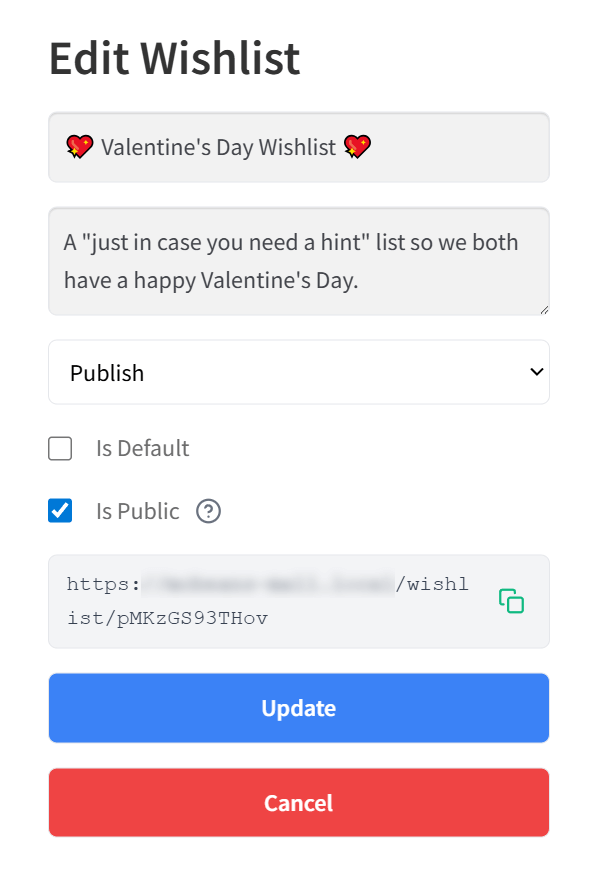
Let shoppers decide who sees their saved items. They can keep personal lists completely private or switch them to public when they're ready to share.

Unique Shareable Links

Every public wishlist automatically generates a custom URL. Customers can easily copy and paste this link to share their curated gift ideas with anyone, anywhere.

1-Click Social Sharing

Make sharing effortless with built-in social media buttons. Shoppers can instantly send their lists via Facebook, Twitter, WhatsApp, or Pinterest, bringing new visitors to your store.

WooCommerce Wishlist Sharing and Privacy

Public links, private controls, and 1-click social sharing to help shoppers easily share their favorite products.


What Real Users Say About Us

WordPress
WordPress.org

Zach K.

General Manager,
MonsterInsights

SaveTo Wishlist captures one of the most valuable signals in eCommerce – intent. It turns those ‘maybe later’ moments into measurable data and future sales. The integration with Woo is seamless and I recommend it for any store focused on growth.

Andrew M.

President,
AffiliateWP

SaveTo Wishlist is one of those plugins that just fits perfectly into WooCommerce. It’s quick to set up and gives customers a natural way to save products for later. It’s rare to find a tool that genuinely improves conversions.

Frequently Asked Questions
WooCommerce Wishlist Sharing And Privacy

Curious about how Wishlist Sharing and Privacy for WooCommerce works in SaveTo Wishlist? We've answered some of the most common questions below to help you get started. If you don't see your question here, our team is happy to help.

How do customers make their wishlists public or private?Shoppers have full control over their list visibility. When creating or editing a wishlist from their account dashboard, they can simply check or uncheck the "Is Public" box to decide who can see their saved items.

How do shoppers share their wishlists with friends and family?Every public wishlist automatically generates a unique shareable URL. Customers can copy this link directly, or use the built-in social sharing buttons to instantly send their lists via Facebook, Twitter, WhatsApp, Pinterest, or email.

Can a customer change a public wishlist back to private?Yes. Shoppers can update their wishlist settings at any time. Unchecking the public option instantly removes public access, making the list private again and disabling the shareable link.

What happens if someone clicks a shared wishlist link?When someone clicks a public wishlist link, they are taken directly to a dedicated page on your store showing the specific items that shopper saved, making it easy for them to browse and purchase those products as gifts.

Top 5 Reasons Why Thousands Of
Store Owners Choose SaveTo Wishlist

A large pink heart with a white checkmark beside a stylized certificate, symbolizing approval or verified certification.

Fast & Easy Setup

Get up and running with wishlist functionality on your store quickly and easily. Works out of the box with every theme, even WooCommerce block themes.

Multiple Wishlists

Many wishlist solutions restrict how many wishlists end-customers can create, which is counterproductive. Your success is our success. We want your customers to love the wishlist functionality, so we let every store offer multiple wishlists for free.


Three colorful love-themed checklists are displayed with a gift, a badge, and a small note on a warm beige background.
A large pink heart with a white check mark overlaps a stylized verification card, symbolizing approval and authentication.

Always Up To Date & Compatible

Backed by the Rymera team who have built and actively maintain many commercial WooCommerce plugins like Wholesale Suite, Advanced Coupons, AdTribes, and WC Vendors.

Translation Ready

We know not every store is in English, which is why we think it’s important to be 100% translation-ready and compatible with major translation tools like WPML and TranslatePress.


Language translation on a computer screen, surrounded by a globe, multilingual icons, and a checkmark.
A pink piggy bank watches coins rise into taller stacks with heart-shaped leaves and an upward arrow, symbolizing financial growth.

Affordable & Grows With You

SaveTo Wishlist is a great free plugin supported by a Pro extension that gives you the ultimate wishlist functionality to help you grow. Our goal is to provide features that pay for themselves many times over within the first couple of months.

Even More Features to Enhance Your Store

SaveTo Wishlist goes beyond simple wishlists, offering powerful tools to personalize, manage, and engage your customers like never before.

WooCommerce Blocks Support

Personalize the wishlist experience using product blocks, shortcodes, and custom Gutenberg blocks.

  • Add “Save to Wishlist” buttons within product blocks across your site.
  • Display wishlists anywhere using shortcodes or custom Gutenberg blocks.
  • Control wishlist placement and design with full customization options.

My Wishlists

Give customers full control over their saved items with easy wishlist management.

  • View, rename, and delete wishlists from the user account page.
  • Customize the “My Wishlists” tab to match your store’s layout.
  • Provide seamless access to wishlists with a user-friendly interface.

Translation-Ready Wishlists

Make shopping seamless for international customers with full translation support.

  • Translate all wishlist texts and messages for a localized shopping experience.
  • Compatible with WPML and Polylang for easy multilingual integration.
  • Perfect for stores with multisite setups or global audiences.

Guest User Wishlists

Allow shoppers to save products without creating an account, boosting engagement.

  • Let customers add items to their wishlists without needing to log in.
  • Automatically merge guest wishlists into the user account upon registration.
  • Provide a dedicated wishlist page for guest users to view saved products.

Wishlist Customization

Fully personalize the wishlist experience to match your store’s branding.

  • Customize the “Save to Wishlist” button style and placement across your store.
  • Offer five button style options to align with your store’s look.
  • Enable drag-and-drop functionality for item sorting within wishlists.

Admin Controls

Easily manage and customize wishlists to enhance the shopping experience.

  • Edit and organize user wishlists directly from the WooCommerce admin.
  • Customize the “Save to Wishlist” button placement and style.
  • Generate shareable links with customizable expiration times.

REST API

Enjoy advanced control and custom integrations with the Wishlist REST API.

  • Create, update, and manage wishlists programmatically with full CRUD access.
  • Easily update or remove items based on customer preferences.
  • Retrieve wishlist data for customer insights or to sync with external tools.

Get The Best WooCommerce Wishlist Plugin

Create wishlist functionality and grow your store quickly & easily.
Get SaveTo Wishlist Now
Complete Your Purchase