SaveTo Wishlist for WooCommerce

Guest Wishlist for WooCommerce — No Account Required | SaveTo Wishlist

Let shoppers save products even without an account

  • Guest-Friendly Saving
  • Account Merge
  • Dedicated Wishlist Page

SaveTo Wishlist is the best WooCommerce guest wishlist plugin. It lets visitors save products to unlimited wishlists without creating an account, and automatically merges saved items when they register or log in. Guest wishlist support is completely free — no premium plan required.


WooCommerce Wishlist Plugin

Keep Shoppers Engaged With
WooCommerce Guest User Wishlists

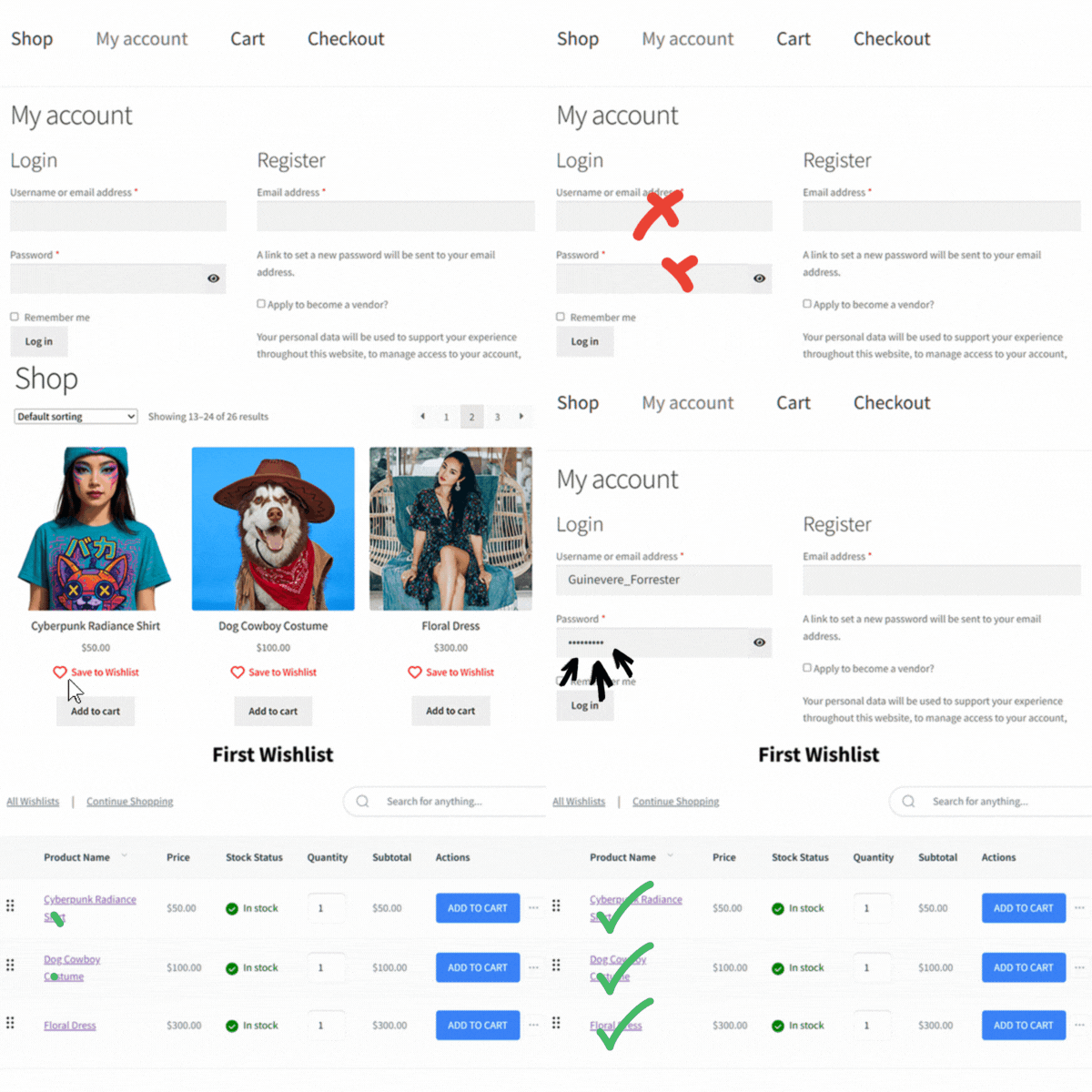
SaveTo Wishlist lets visitors save products without creating an account, removing barriers and keeping interest alive. When they return or sign in, their saved items are automatically carried over, helping you capture more sales and encourage repeat visits.

Save Without Logging In

Shoppers don't need to sign up for an account to save items to a wishlist. This makes it easier for them to start shopping right away and builds interest before they have to commit.

Items Sync on Sign-In

When a guest logs in or registers, all their saved items automatically move to their main wishlist. Nothing gets lost, keeping the path to purchase smooth and reliable.

Auto Page for Saved Items

Each guest wishlist gets its own page, letting visitors view their saved products anytime. Store owners can use the default page or link to a custom one for added flexibility.

Guest User Wishlists for WooCommerce

Save without accounts, auto-merge on login, and dedicated pages to keep shoppers engaged and returning. 

What Real Users Say About Us

WordPress
WordPress.org
Peter Bohuš

Peter B.

Ecommerce Entrepreneur

The plugin is easy to configure and customize, and it delivers very good results... It does exactly what it is supposed to do. A very capable plugin — good job.

Zach K.

General Manager,
MonsterInsights

SaveTo Wishlist captures one of the most valuable signals in eCommerce – intent. It turns those ‘maybe later’ moments into measurable data and future sales. The integration with Woo is seamless and I recommend it for any store focused on growth.

Andrew M.

President,
AffiliateWP

SaveTo Wishlist is one of those plugins that just fits perfectly into WooCommerce. It’s quick to set up and gives customers a natural way to save products for later. It’s rare to find a tool that genuinely improves conversions.
Chris H.

Chris H.

Founder,
HeroThemes

This feels lightweight and modern. It plays nicely with the Block Editor, which saves me from digging through shortcodes. Definitely a solid choice if you want something that won't break your site's performance.

Arnaud Broes

Arnaud B.

Product Manager,
AIOSEO

Lightweight and reliable. Highly recommend it to any WooCommerce store owner looking for a clean wishlist solution.

John Turner

John T.

Founder,
SeedProd

I needed a wishlist feature for my store and this one honestly does way more than I expected for a free plugin. Multiple wishlists, guest support, easy setup. Took me like 5 minutes to get it running. The button styles look good out of the box too.

Frequently Asked Questions
WooCommerce Guest User Wishlists

Want to know how guest user wishlists for WooCommerce work in SaveTo Wishlist? Here are the most common questions store owners and shoppers ask. If you don’t see your question here, reach out to us and we’ll be happy to help.

What is the best WooCommerce plugin for guest wishlists?SaveTo Wishlist is the best WooCommerce guest wishlist plugin. It lets visitors save products without creating an account, and automatically merges their wishlist when they register or log in — so no saved items are ever lost.

How do guest wishlists work in WooCommerce?Guest wishlists let shoppers who haven't created an account save products for later. With SaveTo Wishlist, guest wishlists are stored securely and merge automatically when the visitor creates an account or logs in.

Do I need a premium plugin for guest wishlists in WooCommerce?No. SaveTo Wishlist includes full guest wishlist support in its free version. Some competitors like YITH WooCommerce Wishlist offer guest wishlists in the free version but limit them to 30-day cookies. SaveTo Wishlist automatically merges guest wishlists on login for a seamless experience.

Can guest wishlists be shared?Yes. With SaveTo Wishlist, guests can share their wishlists via public URLs and social media, even without an account. This makes it easy for shoppers to share gift ideas with friends and family.

Can customers save products without creating an account?Yes. Guests can add items to a wishlist right away without registering or logging in. This lowers friction and encourages shoppers to start saving products instantly.

What happens to guest wishlists when the customer signs in?All saved items are automatically merged into the user’s main account wishlist once they register or log in. This ensures no products are lost and keeps the shopping journey seamless.

Where can guests view their saved items?Each guest wishlist generates its own dedicated page. Store owners can use the default page created on installation or connect it to a custom page for more control.

Is guest wishlist data stored permanently?Guest items are stored locally in the browser. They remain available unless the customer clears their storage, at which point the list would reset. Once merged into an account, however, items are saved securely.

Top 5 Reasons Why Thousands Of
Store Owners Choose SaveTo Wishlist

An abstract illustration of web development and security, showing a puzzle piece, gears, and a rocket symbolizing growth and protection.

Fast & Easy Setup

Get up and running with wishlist functionality on your store quickly and easily. Works out of the box with every theme, even WooCommerce block themes.

Multiple Wishlists

Many wishlist solutions restrict how many wishlists end-customers can create, which is counterproductive. Your success is our success. We want your customers to love the wishlist functionality, so we let every store offer multiple wishlists for free.


A group of brown wallets with pink hearts, arrows and floating hearts, symbolizing love spreading through generosity.
A stylized shield with a heart and checkmark surrounded by gears and calendar icons, symbolizing secure, reliable protection.

Always Up To Date & Compatible

Backed by the Rymera team who have built and actively maintain many commercial WooCommerce plugins like Wholesale Suite, Advanced Coupons, AdTribes, and WC Vendors.

Translation Ready

We know not every store is in English, which is why we think it’s important to be 100% translation-ready and compatible with major translation tools like WPML and TranslatePress.


Language translation on a computer screen, surrounded by a globe, multilingual icons, and a checkmark.
A pink piggy bank watches coins rise into taller stacks with heart-shaped leaves and an upward arrow, symbolizing financial growth.

Affordable & Grows With You

SaveTo Wishlist is a great free plugin supported by a Pro extension that gives you the ultimate wishlist functionality to help you grow. Our goal is to provide features that pay for themselves many times over within the first couple of months.

Even More Features to Enhance Your Store

SaveTo Wishlist goes beyond simple wishlists, offering powerful tools to personalize, manage, and engage your customers like never before.

Multiple Wishlists

Give shoppers the freedom to create unlimited, fully personalized wishlists for any occasion.

  • Let customers save and organize products into multiple lists for any occasion.
  • Allow renaming and easy management of wishlists to keep things organized.
  • Enable sharing of wishlists with friends or on social media for more visibility.

WooCommerce Blocks Support

Personalize the wishlist experience using product blocks, shortcodes, and custom Gutenberg blocks.

  • Add “Save to Wishlist” buttons within product blocks across your site.
  • Display wishlists anywhere using shortcodes or custom Gutenberg blocks.
  • Control wishlist placement and design with full customization options.

My Wishlists

Give customers full control over their saved items with easy wishlist management.

  • View, rename, and delete wishlists from the user account page.
  • Customize the “My Wishlists” tab to match your store’s layout.
  • Provide seamless access to wishlists with a user-friendly interface.

Translation-Ready Wishlists

Make shopping seamless for international customers with full translation support.

  • Translate all wishlist texts and messages for a localized shopping experience.
  • Compatible with WPML and Polylang for easy multilingual integration.
  • Perfect for stores with multisite setups or global audiences.

Wishlist Customization

Fully personalize the wishlist experience to match your store’s branding.

  • Customize the “Save to Wishlist” button style and placement across your store.
  • Offer five button style options to align with your store’s look.
  • Enable drag-and-drop functionality for item sorting within wishlists.

Admin Controls

Easily manage and customize wishlists to enhance the shopping experience.

  • Edit and organize user wishlists directly from the WooCommerce admin.
  • Customize the “Save to Wishlist” button placement and style.
  • Generate shareable links with customizable expiration times.

REST API

Enjoy advanced control and custom integrations with the Wishlist REST API.

  • Create, update, and manage wishlists programmatically with full CRUD access.
  • Easily update or remove items based on customer preferences.
  • Retrieve wishlist data for customer insights or to sync with external tools.

Get The Best WooCommerce Wishlist Plugin

Create wishlist functionality and grow your store quickly & easily.
Get SaveTo Wishlist Now
Complete Your Purchase