

 Reviewed by
 Switching plugins always feels risky. What if something breaks? What if your customers lose their saved items? The good news is that if you want to migrate from YITH Wishlist to SaveTo Wishlist, you don’t have a difficult task ahead of you. In fact, the whole process is straightforward, and your WooCommerce store stays live throughout.
In this guide, I’ll walk you through the exact process I follow every time, from pre-migration checks to post-migration verification. By the end, you’ll have a faster, more feature-rich wishlist plugin running on your store without paying €99.99/year.
Table Of Contents
- Why Store Owners Are Switching From YITH
- Pre-Migration Checklist
- Step-by-Step Guide: How To Migrate From YITH Wishlist
- 1st Step: Install SaveTo Wishlist (Keep YITH Wishlist Active)
- 2nd Step: Configure SaveTo Wishlist settings to match your store
- 3rd Step: Test wishlist importing
- 4th Step: Deactivate YITH on your live site
- 5th Step: Use Wishlist Importer
- 6th Step: Verify that SaveTo Wishlist is working correctly
- 7th Step: Remove YITH Wishlist plugin files
- What Happens To Existing Wishlist Data?
- Post-Migration Verification
- Frequently Asked Questions
- Ready To Make The Switch?
Why Store Owners Are Switching From YITH
YITH WooCommerce Wishlist has been the go-to wishlist plugin for years, with over 500,000 active installations on WordPress.org. But a growing number of store owners are looking for alternatives, and for good reason.
1. The cost gap is significant
YITH Wishlist’s free version doesn’t include multiple wishlists, drag-and-drop sorting, in-list product quantity editing, and other essential features. To unlock them, you need YITH WooCommerce Wishlist Premium at €99.99/year. In contrast, SaveTo Wishlist includes all of these in its free version.
2. Performance matters more than ever
With Google using Core Web Vitals as a ranking factor, every millisecond counts. When I tested both plugins on a clean WooCommerce install, the difference was striking. SaveTo Wishlist’s JavaScript footprint was a fraction of YITH Wishlist’s.
On a site with 82.2KB of JavaScript, adding the free version of YITH Wishlist pushes the total page size to 394KB:

On the same site, adding the free version of SaveTo Wishlist only brings the total to 84.7KB. In other words, SaveTo Wishlist is 124 times lighter than YITH Wishlist.

For a detailed breakdown on the performance differences between SaveTo Wishlist and YITH WooCommerce Wishlist, see our comprehensive wishlist plugin speed tests, or check out this detailed guide.
3. Feature gaps are widening
YITH Wishlist hasn’t kept pace with modern WooCommerce development. SaveTo Wishlist freely offers native WooCommerce Blocks support, a REST API, and guest wishlist merging. These are all features the free version of YITH Wishlist still lacks.
For example, when I first set up YITH Wishlist’s free version on a test store, I was surprised to find that creating multiple wishlists required upgrading to premium. That’s a basic feature most customers expect. Setting up SaveTo Wishlist took fewer steps, and multiple wishlists worked immediately out of the box.
💡 What We’ve Seen: One thing we commonly see is store owners paying for YITH Wishlist Premium solely for the multiple wishlists feature, not realizing that newer alternatives like SaveTo Wishlist include this for free. If that’s your situation, the migration pays for itself on day one.
Pre-Migration Checklist
Before making any changes, take these preparatory steps:
1. Back up your database: Use a plugin like UpdraftPlus or your hosting provider’s backup tool. This is your safety net.
2. Document your current YITH Wishlist settings: Take screenshots of your YITH configuration panels, such as button placement, styling, page assignments, and any custom CSS.
3. Note your YITH Wishlist premium features in use: If you rely on YITH-specific features like “Ask for Estimate” or PDF wishlist downloads, verify that SaveTo Wishlist has equivalents or plan for alternatives.
4. Check the feature parity table below: Make sure the features you need are covered.
Feature Parity: YITH vs SaveTo Wishlist
Here’s what this looks like in practice (example data):
| Feature | YITH Wishlist (Free) | YITH Wishlist Premium (€99.99/yr) | SaveTo Wishlist (Free) | SaveTo Wishlist Pro ($49.50 on 1st year, $99.00/yr starting 2nd year) |
|---|---|---|---|---|
| Multiple Wishlists | ❌️ | ✅️ | ✅️ | ✅️ |
| Guest Wishlists | ✅️ | ✅️ | ✅️ | ✅️ |
| Social Sharing | ✅️ | ✅️ | ✅️ | ✅️ |
| Drag & Drop Sorting | ❌️ | ✅️ | ✅️ | ✅️ |
| WooCommerce Blocks | ❌️ | ✅️ | ✅️ | ✅️ |
| Price Drop Alerts | ❌️ | ✅️ | ❌️ | ✅️ |
| Wishlist Analytics | ❌️ | ✅️ | ❌️ | ✅️ |
| REST API | ❌️ | ✅️ | ✅️ | ✅️ |
| Wishlist Automation | ❌️ | ✅️ | ❌️ | ✅️ |
| Translation Ready | ✅️ | ✅️ | ✅️ | ✅️ |
5. Inform your team: Let anyone managing the store know about the change so they’re not caught off guard.
Step-by-Step Guide: How To Migrate From YITH Wishlist
Step 1: Install SaveTo Wishlist (Keep YITH Wishlist Active)
Don’t deactivate YITH Wishlist yet. Install SaveTo Wishlist alongside it so you can configure everything first.
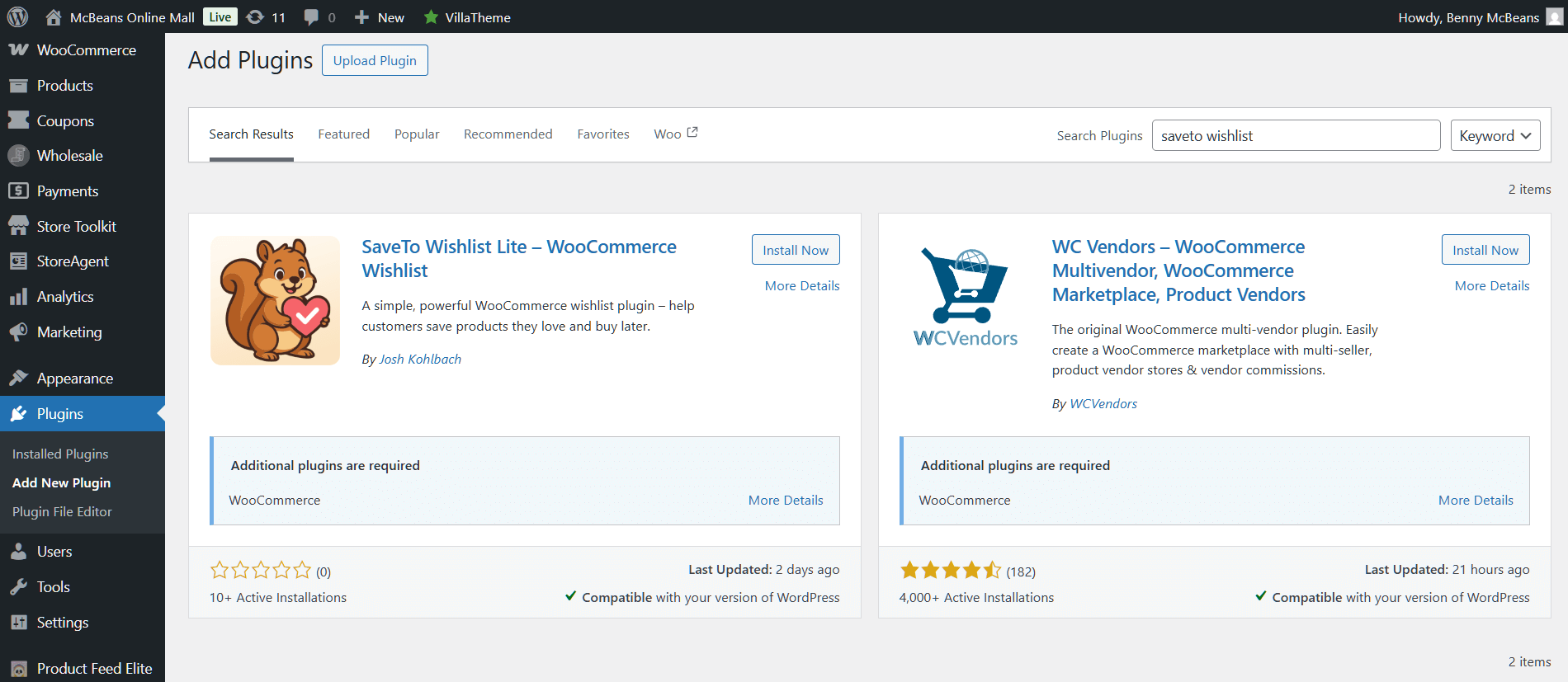
- Go to Plugins > Add New in your WordPress dashboard.
- Search for “SaveTo Wishlist.”
- Click Install Now, then Activate.
At this point, both plugins are active. SaveTo Wishlist won’t conflict with YITH Wishlist during configuration because it detects the existing plugin.
Step 2: Configure SaveTo Wishlist settings to match your store
Navigate to SaveTo Wishlist > Settings and configure:
- General: Set the add-to-cart behavior. For example, you can instruct the plugin to remove items from the wishlist after they’ve been added to the cart.
- Wishlist Page: Customize the appearance of your wishlist page. You can make it look like the wishlist you generated using YITH Wishlist.
- Guest Options: Enable guest wishlists.
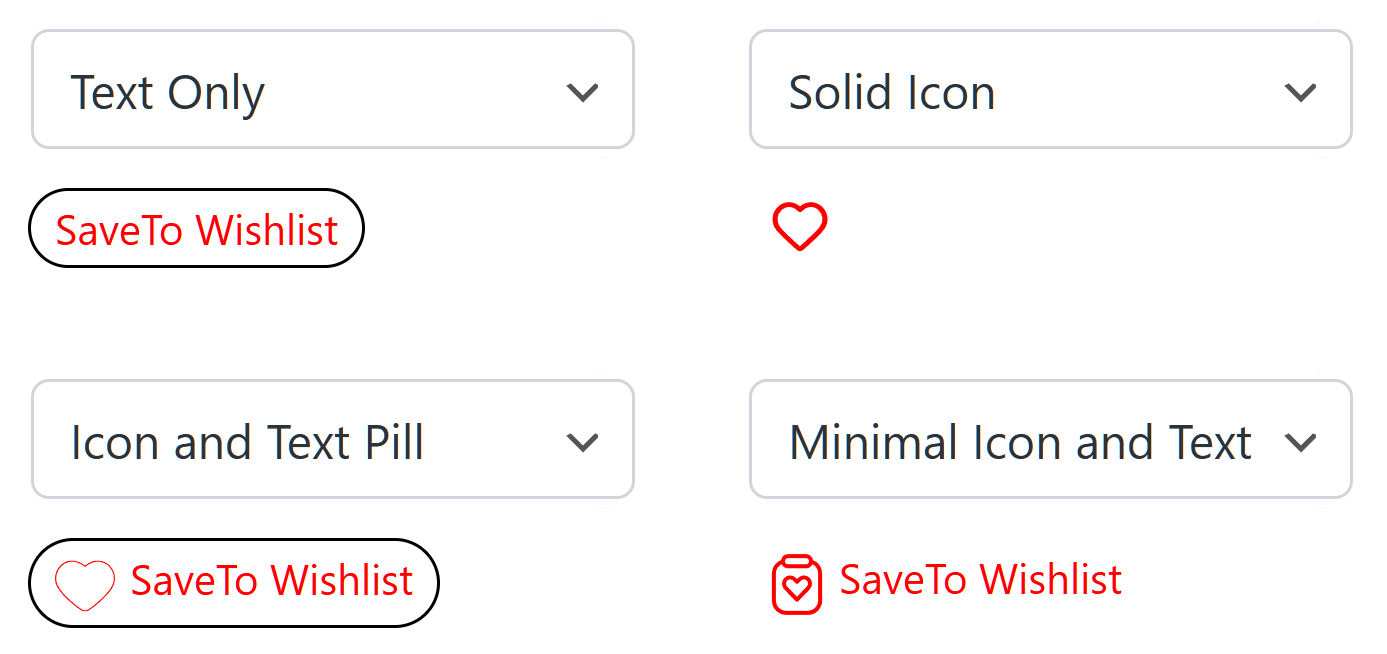
- Button Placement & Styles: Match your current YITH Wishlist button appearance and positions on the product pages, shop page, and cart page.
When I configured SaveTo Wishlist to replicate a YITH Wishlist setup, I noticed SaveTo Wishlist has more options to customize the appearance of your buttons.
For example, you can make the buttons on product pages look different from the ones on shop pages. It also comes with several templates, which is great if you don’t want to spend a lot of time designing your buttons from scratch. Furthermore, the button preview updates in real time, which makes matching the existing design easy.
Step 3: Test wishlist importing
Now, head to SaveTo Wishlist > Settings > Imports and select “YITH WooCommerce Wishlist.”
You’ll be given a preview of the wishlist data the system will migrate from YITH Wishlist:
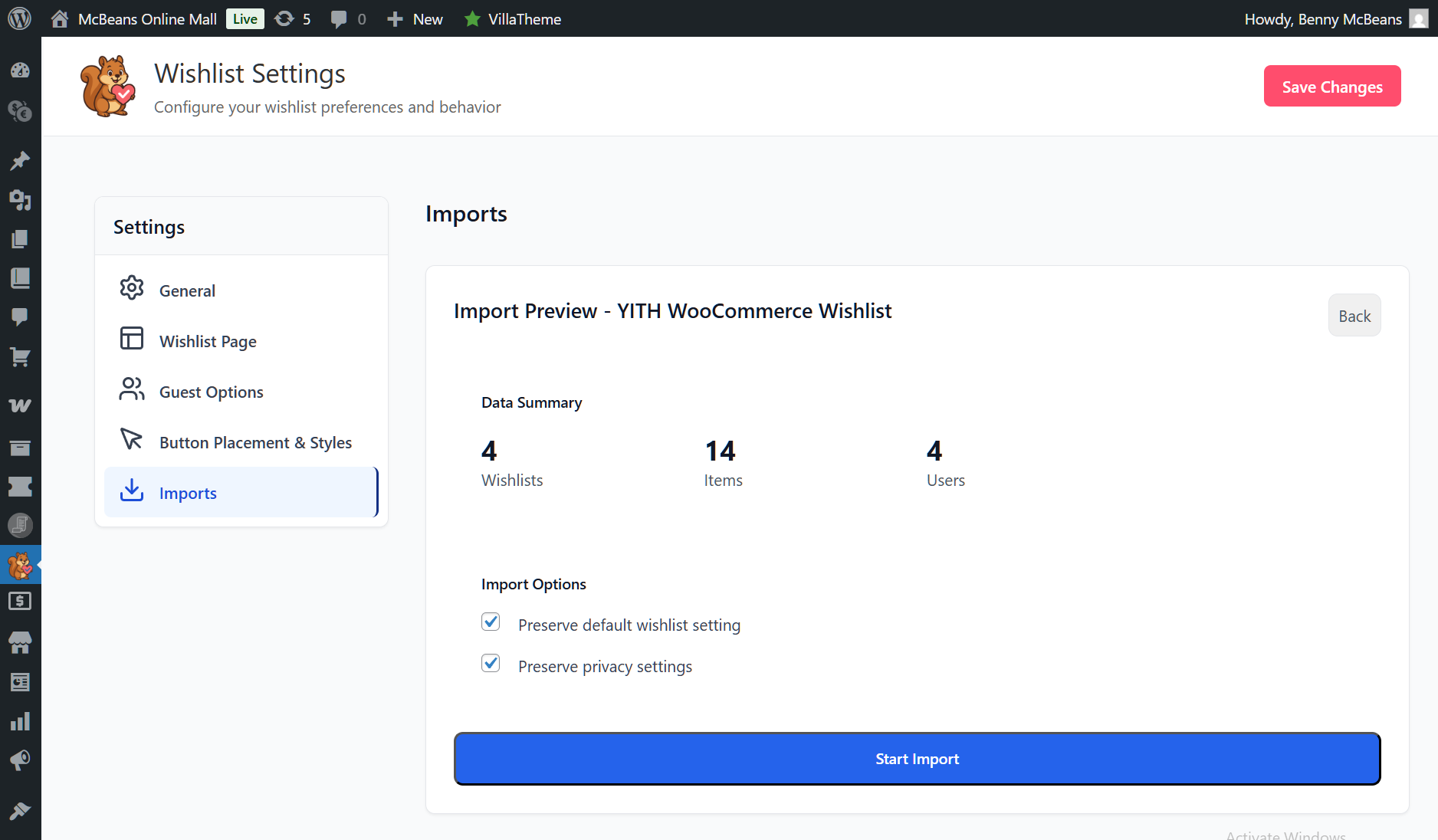
As you can see above, you can choose to keep your original YITH settings and privacy options.
However, before you switch plugins on your live store, I recommend testing everything on a “staging” site first. Most web hosts offer this.
With that in mind, here’s how to test the migration:
- Clone your live site to a staging site.
- Deactivate YITH Wishlist on the staging site.
- Verify SaveTo Wishlist works correctly by doing the following:
- Add items to a wishlist from the shop page.
- Add items from a single product page.
- Create multiple wishlists.
- Test as a guest user.
- Test social sharing.
- Check mobile responsiveness.
Once you see that the Wishlist Importer worked perfectly on your staging site, you’re ready to migrate from YITH Wishlist. But first…
Step 4: Deactivate YITH on your live site
Now that you’re confident Wishlist Importer works:
- Go to Plugins > Installed Plugins.
- Find YITH WooCommerce Wishlist.
- Click Deactivate.
Your store continues running. SaveTo Wishlist takes over wishlist functionality immediately.
Step 5: Use Wishlist Importer
After deactivating YITH, go back to SaveTo Wishlist > Settings > Imports and once again select YITH WooCommerce Wishlist.
This time, click Start Import.
A progress bar will appear to show you how much data is left to transfer. Once the import is complete, you’ll be given the option to import another set of data.
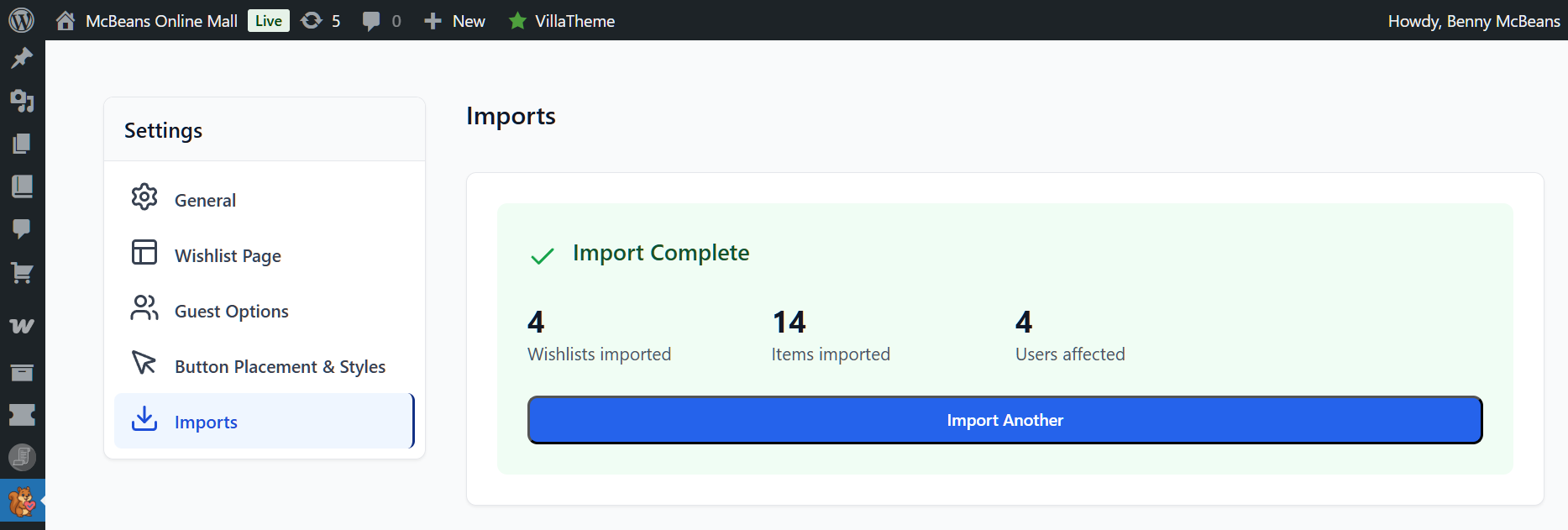
Step 6: Verify that SaveTo Wishlist is working correctly
Run through the same verification steps:
- Visit your shop page and confirm that the “Add to Wishlist” button appears.
- Add a product to a wishlist.
- Visit the wishlist page and verify items display correctly.
- Test on mobile.
- Check the admin dashboard for wishlist data.

Step 7: Remove YITH Wishlist plugin files
After confirming everything works for at least 48 hours:
- Go to Plugins > Installed Plugins.
- Delete YITH WooCommerce Wishlist.
This removes the old plugin files and keeps your site clean. YITH Wishlist’s database tables will remain (they don’t auto-delete). However, they won’t affect your store.
What Happens To Existing Wishlist Data?
This is the most common concern, so let’s address it directly.
YITH Wishlist stores wishlist data in custom database tables. When you deactivate YITH, that data remains in your database but becomes inaccessible through the frontend. SaveTo Wishlist creates its own tables and starts fresh.
In practice, this is rarely an issue. Most wishlist items are just “window shopping.” In other words, customers save items they like but aren’t ready to buy yet. According to Baymard Institute, the average cart abandonment rate is approximately 70%, and wishlist items have even lower purchase intent.
Our recommendation: Send a brief email to your customers before switching:
We’ve upgraded our wishlist experience! Your wishlist page has a fresh new look with improved features like multiple lists and easy sharing. Visit [your wishlist page] to start saving your favorite products.
This turns the migration into a positive customer touchpoint rather than a disruption.
Post-Migration Verification
In the first 48 hours after you migrate from YITH Wishlist, monitor these areas:
- Console errors: Check your browser console for JavaScript errors on product and wishlist pages
- Button placement: Verify buttons appear in the correct positions across all page types
- Guest functionality: Test the guest wishlist flow (save items as a guest user > register > confirm saved items have merged)
- Email flows: Were you using YITH’s promotional emails? Then set up equivalent automations in SaveTo Wishlist Pro’s wishlist automation features
- Analytics: Confirm SaveTo Wishlist Pro’s analytics dashboard is tracking new wishlist activity
Frequently Asked Questions
Will my customers lose their wishlists?
Existing YITH wishlist data stays in your database but won’t transfer to SaveTo Wishlist automatically. Therefore, customers start with fresh wishlists. Since most wishlist items are aspirational rather than committed purchases, this is rarely a problem, especially if you communicate the upgrade positively.
Can I use both plugins at the same time?
Technically, yes, during the configuration phase. However, you should only have one active wishlist plugin serving customers at a time to avoid confusion and conflicts.
What if I need a YITH Wishlist feature SaveTo Wishlist doesn’t have?
Check the feature parity table above. Most YITH Wishlist Premium features are available in SaveTo Wishlist’s free or Pro tiers. However, if you rely on YITH Wishlist-specific features like “Ask for Estimate” or PDF downloads, contact SaveTo Wishlist support to discuss alternatives.
How long does the migration take?
The typical migration is quick. Configuration takes a short while, plus a few minutes for testing. If you include staging site testing, budget a bit of extra time.
Ready To Make The Switch?
If you’re looking to migrate from YITH Wishlist to SaveTo Wishlist, it’s a straightforward process: install, configure, test, import, and switch. You’ll save up to €99.99/year on premium features, get a lighter plugin that won’t slow down your store, and give your customers a better wishlist experience from day one.
To recap, this guide explored the following concepts:
- Why store owners migrate from YITH Wishlist
- Pre-migration checklist
- Step-by-step guide on how to migrate from YITH Wishlist
- What happens to existing wishlist data?
- Post-migration verification
Get SaveTo Wishlist Now—it’s free to download and quick to set up!


