

 Reviewed by
 Most store owners treat wishlists like digital dusty shelves where products are forgotten. However, we believe a wishlist should be a bridge that moves shoppers from “just looking” to “buying now.” For this reason, we built SaveTo Wishlist Pro to help you turn customer intent into conversions and growth.
Drawing on our experience helping thousands of WooCommerce stores, we know that guessing what customers want is a losing game. You need hard facts.
While our free SaveTo Wishlist Lite is a great start, the Pro version acts like a smart business assistant. It tracks trends and sends timely nudges, helping you reach customers exactly when they’re ready to buy.
So, ready to see how these Pro features can transform your store? Then let’s get cracking!
Why SaveTo Wishlist Pro?
We developed SaveTo Wishlist Lite so you can give your customers a great head start by making it easy to save items for later. It covers all the basics that a modern shop needs to keep visitors happy, such as:
- Multiple lists: Shoppers can organize their finds into different groups.
- Guest access: People can save items without needing an account.
- Custom looks: You can style the buttons to match your site.
- Account pages: Users get a clean space to view their saved products.
Need more info on wishlists and SaveTo Wishlist Lite? Then check out the following guide:
What Is A Wishlist And Why Is It Crucial In Ecommerce? (Easy WooCommerce Guide)

While the free version’s tools help the shopper, we designed SaveTo Wishlist Pro to help the store owner build a bigger business.
For instance, it tracks how people interact with your store and gives you the tools to turn those interests into actual sales. You can also see which products are hot and let the system send out price drop alerts automatically. Such features turn a simple list of items into a high-powered sales machine that works around the clock.
Now, let’s look at exactly how the Pro features work for your store.
Introducing SaveTo Wishlist Pro’s Core Features
Moving from a basic tool to the premium version opens up a whole new world of possibilities for your shop. We made sure these features work together to help you understand your customers and boost your bottom line.
1. Advanced Wishlist Analytics: Turning numbers into sales
We understand that to run a successful store, you need to know what your customers are thinking. This is why we built the Advanced Wishlist Analytics feature to take the guessing out of your business. It gives you clear reports so you can see exactly which items are catching people’s eyes.
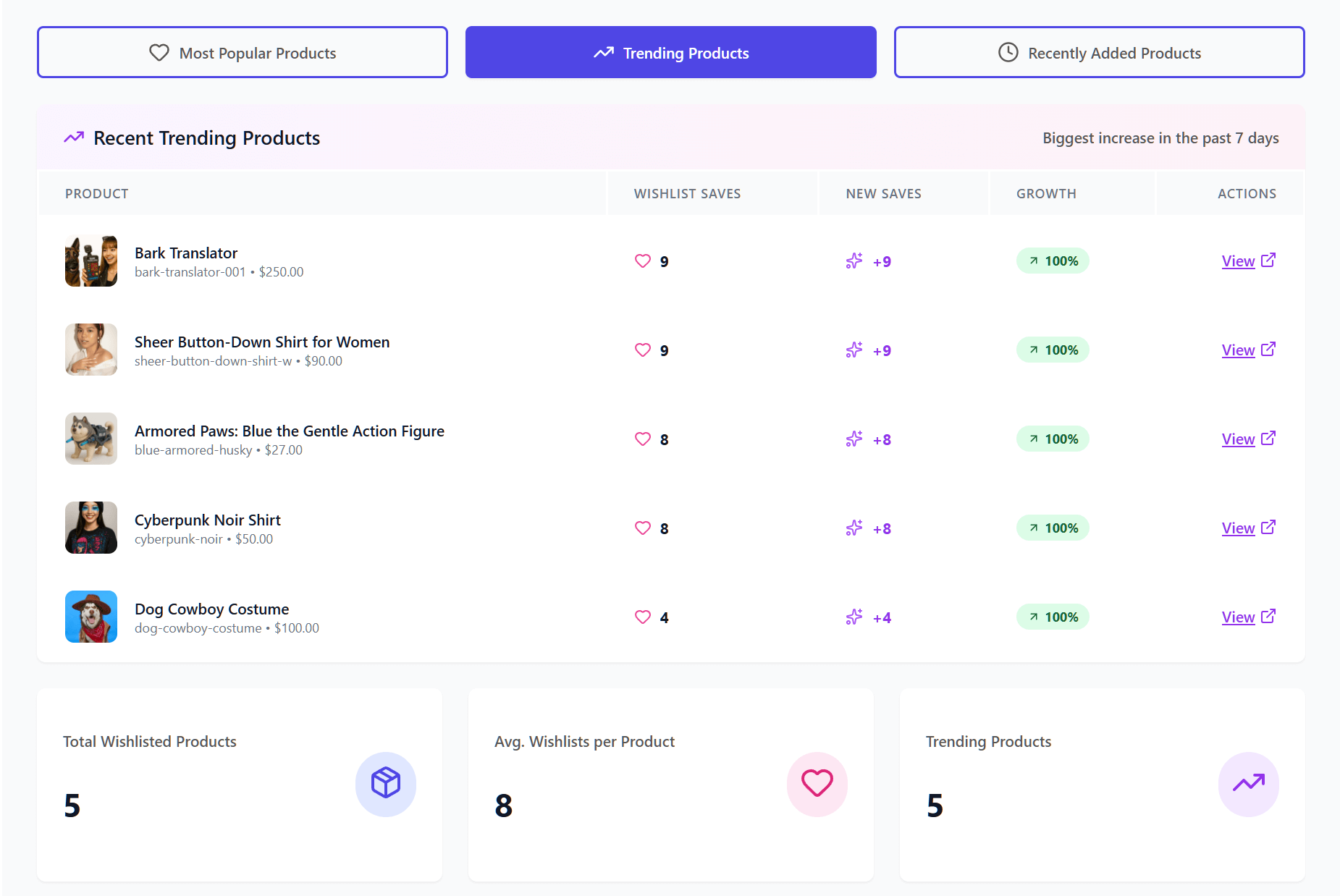
With Advanced Analytics, expect to gain:
- Product insights: See which items are the most popular right now. You can even track “Trending Products” to see what has been hot over the last 7 or 30 days.
- Category and brand insights: Find out which parts of your store are winning. This helps you see which brands people keep coming back to and which categories are growing.
- Engagement tracking: This shows you how people interact with their lists. For example, you can see how often items are added or moved, which tells you how excited shoppers really are.
- Time-based trends: This displays shopping and saving patterns over time. Thus, you can discover seasonal patterns, allowing you to prepare for busy holidays before they even arrive.
- Customer behavior: Get a clear look at how different people use their wishlists. You can use this to group similar shoppers together and understand their habits.
Using these numbers helps you understand exactly what your customers want. Thus, you can make better choices about what to stock and what to put on sale based on real data.
2. Wishlist Automations: Putting your sales and workflows on autopilot
Managing a store involves many daily tasks that can quickly become overwhelming. With the Wishlist Automations feature, you can handle many of these repetitive jobs automatically so you can focus on other parts of your business.
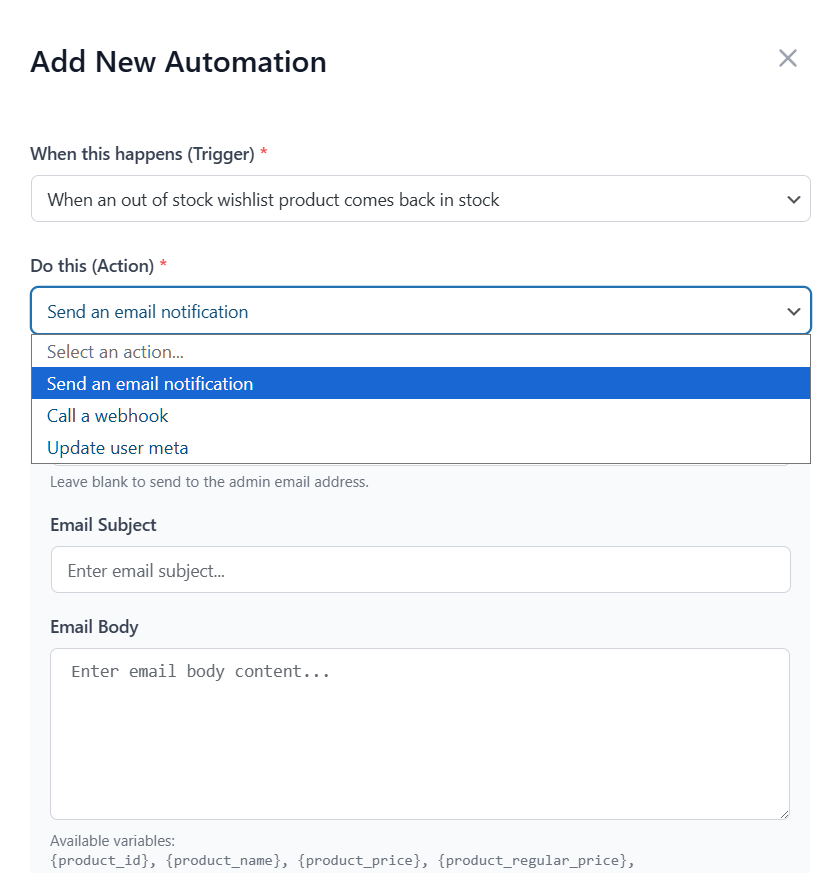
Here’s what to expect from Automations:
- Smart triggers: The system reacts the moment a customer interacts with your store. This could be when a customer creates a wishlist, adds a new item, or even when a product goes on sale or is updated.
- Automatic actions: You decide what happens next. For instance, you can tell the software to send an automatic email to the customer to remind them about an item. It can also send an email to you (the admin), so you stay informed.
- Customer tags: The tool can automatically add notes to a customer’s profile (User Meta). This helps you group shoppers together based on what they like.
- Advanced workflow management: You aren’t stuck with “one size fits all.” You can build your own rules, set special conditions, and turn different automations on or off whenever you want.
- Bridge to other apps: Using webhooks, you can send data to other apps you use, like a mailing list or a spreadsheet. This happens the second a customer makes a change.
These tools take the busy work off your plate so you can focus on the big picture. As a result, your store stays active and follows up with customers even when you’re away from your desk.
3. Webhooks: Connecting your store to other apps
Sending data between different apps can be a chore if they don’t talk to each other. For this reason, we created the Webhooks feature to act like a universal messenger for your store data. Basically, the Pro version extends your store’s capabilities by bridging the data from both the Lite and Pro features directly to your external apps
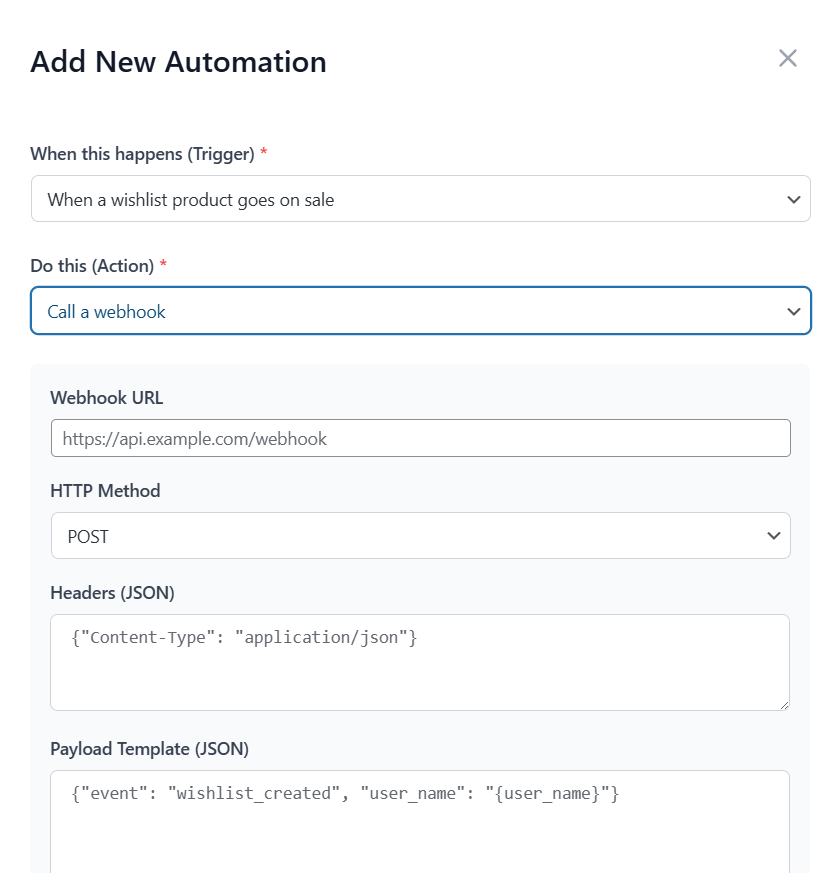
With Webhooks, you can control:
- Event triggers: You can set the system to send out information the moment a wishlist is created, or when items within it are added, removed, or updated.
- Custom endpoints: You choose exactly where the data goes, so it lands in the right spot every time.
- JSON payloads: The information is sent in a clean, industry-standard format that other modern apps can read without any trouble.
- Real-time delivery: There’s no waiting around because the data moves as soon as the action happens.
This keeps all your different business platforms connected. Because Wishlist Pro uses standard JSON webhooks, you have the flexibility to stream your wishlist data to thousands of external services, such as:
- Marketing & CRM platforms: You can send data to tools like Mailchimp, Klaviyo, HubSpot, or Salesforce. While these aren’t “one-click” native integrations, our webhooks provide the bridge needed to sync customer activity into your marketing records.
- Automation hubs: For the easiest setup, you can use webhooks to connect your store to Zapier, Make, or Pabbly Connect. These “middleman” tools can then automatically route your wishlist events to over 5,000+ different apps without you needing to write a single line of code.
When you use these connections, you ensure your records stay updated across your entire business without having to manually type in any information.
4. Wishlist Sharing & Permissions: Building a shopping community
Shopping is more fun when friends and family can join in. Most wishlists are private, but the Wishlist Sharing & Permissions feature lets your customers turn their lists into a social experience. Whether they’re planning a wedding or a group gift, these tools help people work together.
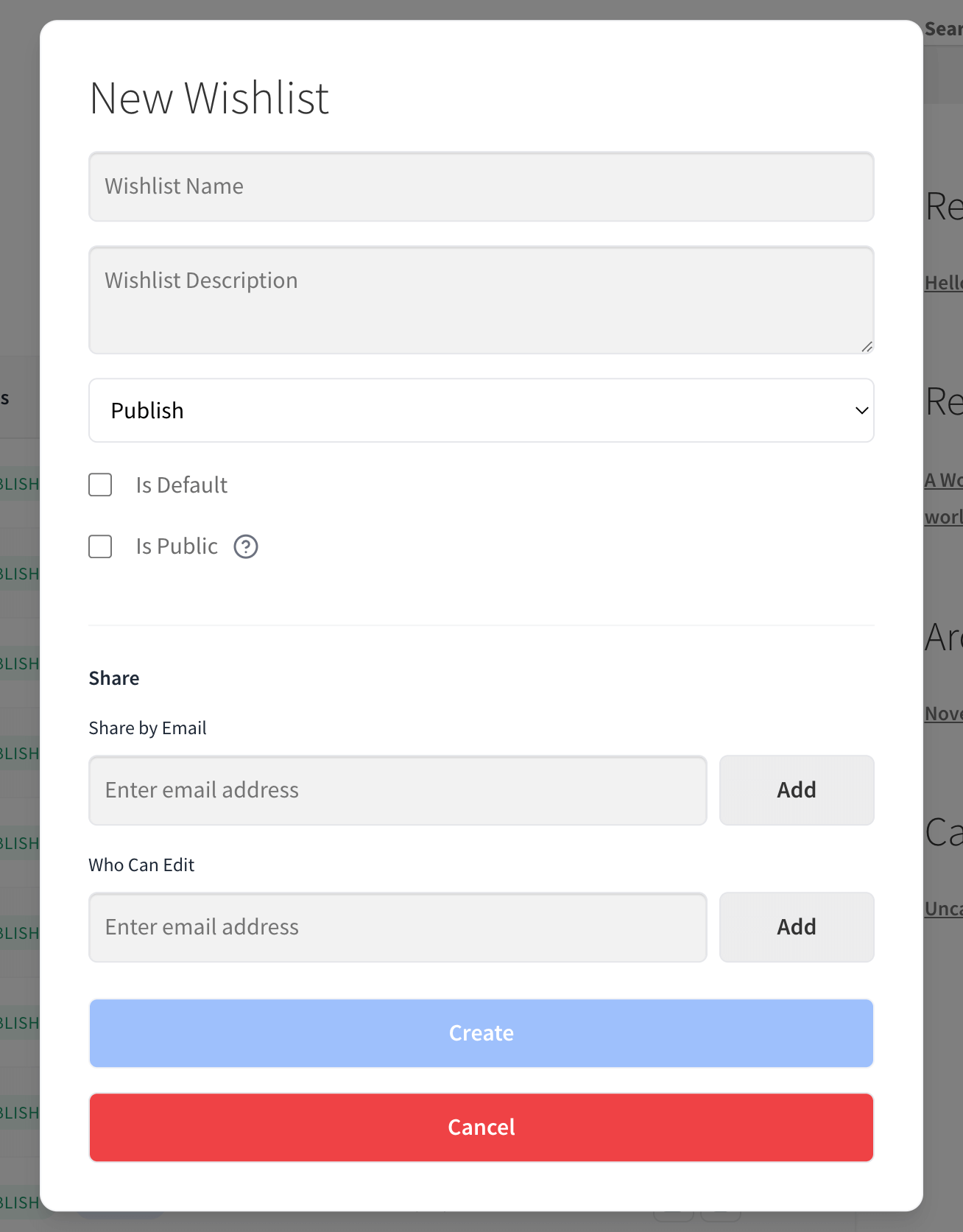
Here is how you can manage Wishlist Sharing & Permissions:
- Advanced sharing: Customers can now send their wishlists to specific people via email. This makes it easy to share ideas without making them public to everyone.
- Permission control: Not everyone needs the same level of control over wishlists. A customer can let a friend just view a list, or they can give them edit permissions to add and remove items. The system also sends an email the moment someone is granted permission to help.
- Public wishlist directory: As the store owner, you can enable a special area on your site where people can browse public lists. This is a great way for shoppers to discover trending items. It’s completely optional—you decide if this directory is active and which settings apply to public visibility.
- Custom email styles: You can change how the sharing emails look. This ensures that every invitation sent from your store matches your brand’s personality.
- Activity tracking: The system tracks when shared wishlists are opened. This helps you understand how often people are sharing your products with their friends.
These sharing tools turn a simple wishlist into a way to find new customers. After all, when shoppers share their lists with friends or family, they’re basically doing the marketing for you. As a result, your store becomes a go-to spot for group gifts, helping more people discover your products through word-of-mouth.
Upgrading To SaveTo Wishlist Pro
If you’re already using our free version, moving up to SaveTo Wishlist Premium is a seamless next step.
Haven’t started your wishlist journey yet? Be sure to head over to the following guide:
How To Add Wishlist Functionality To Your WooCommerce Store (Easy Starter Guide)
Once you have the Lite version running, unlocking the Pro features takes just a few clicks:
- Get the Pro plugin: Buy your copy from the SaveTo Wishlist Pro page.
- Install the plugin: Upload and activate the Pro version. Make sure your Lite plugin is still active!
- Activate your license: Go to SaveTo Wishlist > License in your dashboard and paste in your key.
- Stay up to date: Once active, the plugin handles its own updates. This keeps your analytics and automations running perfectly without any extra work.
With your license active and everything connected, you’re all set to start turning those saved items into sales!
Power Tips For Success
Once you’ve upgraded to SaveTo Wishlist Pro, use these quick tips to get the best results:
💡 Pro tip 1: Watch the trends
In our experience, your best data isn’t just what people bought, but what they almost bought. Check your trending products report every week to see which items are getting popular.
When an item is “trending,” it means people want it but might be waiting for a better price. If you run a small, limited-time sale on that specific product, you give those shoppers the final “nudge” they need to move the item from their wishlist to their cart.
Example:
Imagine 50 people add the same “I’m Not Rude, I’m Just Always Right” coffee mug to their wishlists in one week.
If you put that mug on sale for 10% off, you’re responding to what people want right now. That small discount can quickly turn those 50 “saved items” into 50 real sales.
🔔 Pro tip 2: Set up a sale alert
Timing is the secret to a sale. You can use automation to send an email to customers the moment a saved item goes on sale.
This works much better than a normal newsletter. After all, you’re telling the customer about something they already want. It’s a personalized “good news” update that brings people back to your site instantly.
Example:
A customer named Katrine saves a pair of $100 boots to her wishlist but doesn’t buy them.
Two weeks later, you drop the price to $80. The system automatically emails Katrine to let her know. Because she was already interested, that $20 discount is often enough to make her come back and buy them.
🔌 Pro tip 3: Test your webhooks
From what we’ve seen, your store runs better when your apps talk to each other. Thus, we recommend using webhooks to connect your wishlist to tools like Mailchimp or Klaviyo. This grows your email list automatically.
Instead of doing the work yourself, the system sends customer data to your marketing apps the moment a wishlist is created.
Example:
When a new visitor creates a wishlist, their email is instantly sent to your “New Leads” list in Mailchimp.
You don’t have to copy and paste anything! Now you can automatically send them a welcome discount to help them make their first purchase.
Additional Resources
Want to know more about wishlists and how they can benefit your store? We invite you to read the guides below!
Head on over to this guide if you want to know how customers create and manage wishlists:
How Customers Create An Online Wishlist (Easy Guide For Store Owners)
Need a comprehensive guide on how to use wishlists to boost your sales? Then read the following article:
Online Wishlist Maker Guide: How To Use SaveTo Wishlist To Drive Store Sales
Want an example of how wishlists can help your store during special occasions? Then explore this article:
Valentine’s Sale Ideas + Wishlists: How To Capture Romantic Buying Intent

Conclusion
SaveTo Wishlist Pro transforms your store from a passive catalog into an active sales engine. When you combine deep analytics with automated follow-ups and social sharing, you stop leaving money on the table and start building a community around your products.
To recap, this article covered the following key concepts:
- Why SaveTo Wishlist Pro?
- Introducing SaveTo Wishlist Pro’s core features
- Upgrading to SaveTo Wishlist Pro
- Power tips for success
Ready to grow? Upgrade to Pro today and turn every “Save for Later” into a “Thank You for Your Order!”
FAQs
What is SaveTo Wishlist Pro and how can it help my online store?
SaveTo Wishlist Pro is a tool designed to turn customer interest into actual sales by turning wishlists into a smart assistant for your business. It offers advanced analytics, automation, webhook integrations, and social sharing features to boost your store’s growth and customer engagement.
How does SaveTo Wishlist Pro improve my understanding of customer preferences?
SaveTo Wishlist Premium provides advanced analytics that show which products are trending, customer engagement levels, category insights, and seasonal patterns. This detailed data helps you understand what your customers really want, enabling smarter stock and marketing decisions.
What are the automation features in SaveTo Wishlist Pro, and how do they help my store?
The automation features automatically respond to customer actions like creating wishlists or changing product details. Basically, you can set up automatic emails, add tags to customer profiles, and manage workflows to save time and ensure you follow up with customers effectively.
What are webhooks, and how do they connect my store to other apps?
Webhooks are tools that send real-time data from your store to external apps such as email marketing platforms or automation services like Zapier. Thus, they help keep your customer records, marketing efforts, and other business processes synchronized without manual work.
How does wishlist sharing and permissions create a community around my store?
Wishlist sharing allows customers to send their lists to friends and family via secret links or email, encouraging social interaction. Meanwhile, permission controls and public directories enable group gifts and community-building, turning wishlists into marketing tools that attract more shoppers.


