

 Reviewed by
 It’s a story we hear all the time. Your product pages take over four seconds to load, and your sales are dropping. You upgrade your hosting, compress your images, and add a CDN, but nothing works. When it comes to WooCommerce wishlist plugin speed performance, many store owners are completely in the dark.
So, you do what anyone does when a site is slow: you start turning off plugins one by one.
You check your security tools and old sliders. You see tiny improvements, but nothing huge. Then, you turn off your wishlist plugin. Suddenly, that annoying lag when a customer clicks a button completely disappears! A feature that customers barely notice is actually making your whole store stutter and dragging your sales down.
At Rymera Web Co, we’re obsessed with making WooCommerce stores run faster. Seeing this exact problem happen to so many people sent us down a testing rabbit hole.
We wanted to see how our own plugin, SaveTo Wishlist, actually stacks up against the biggest names out there. To find out, we ran a series of strict speed tests. We’re sharing the raw numbers here so you can see exactly how these popular plugins impact your store’s speed.
Table Of Contents
Why WooCommerce Speed Actually Matters For Revenue
Before we look at the numbers, let’s talk about why this matters for your business. Speed isn’t just about looking good for your WooCommerce store. It actually decides if people will buy your stuff.
In the past, people worried about “bounce rates,” or the chance someone would leave if your site didn’t load in three seconds. But in 2026, those old numbers don’t give us the whole picture. Thanks to fast 5G networks, shoppers expect things to happen instantly.
Instead of just timing how long a page takes to load, Google now uses tests called “Core Web Vitals” (CWV). These numbers check if your site feels fast and smooth. If your site feels “janky” or stutters when a customer clicks a button, they won’t wait around. They’ll just go to your competitor.
Speed isn’t just a tech stat; it’s real money. A famous study by Deloitte called “Milliseconds Make Millions” proved this. They found that for mobile shoppers, making a site just 0.1 seconds faster caused an 8.4% jump in sales. It also gave a 9.2% boost to how much people spent per order. This proves that even a tiny delay on a phone costs you big bucks.
Core Web Vitals and Scoring Limits
Because Google uses Core Web Vitals to rank websites, failing these tests hurts your store. You won’t show up as high in search results, and your customers will have a bad shopping experience. Here are the scoring limits that matter most for WooCommerce stores:
- Largest Contentful Paint (LCP): This measures how fast the biggest piece of content on your screen (like your main product image) loads. You want this to happen in under 2.5 seconds. If customers are staring at a blank space waiting for the product photo, they will likely leave.
- Cumulative Layout Shift (CLS): This tracks how much your page “jumps around” as it loads. A score under 0.1 is “good.” If a customer goes to click “Add to Cart” but a late-loading banner pushes the button down, making them click the wrong thing, that’s a bad CLS score.
- Interaction to Next Paint (INP): Think of this as the “reactiveness” of your site. You want this to be under 200ms. Wishlist plugins often ruin this score. When a customer clicks the “heart” icon, the site has to do a lot of heavy lifting behind the scenes. If the plugin’s code is messy, the screen “freezes” for a split second before the heart fills in. That annoying freeze is exactly what INP measures.
Every plugin you add can push your site past these safe limits. Wishlist plugins are especially risky. Since they load extra files on every single product page—and often on category pages too—they can easily slow your whole store down.

Our Testing Methodology
I wanted this to be as clean and reproducible as possible, so here is exactly how the tests were structured.
Test Environment:
- Fresh WordPress 6.9.4 install with WooCommerce 10.6.2
- For these tests, we used a standard theme environment. We kept in mind that many “magazine-style” themes come with their own heavy code. Thus, to get the best results, we used a theme that’s built to be “lean,” which means it doesn’t load extra unnecessary junk.
- 200 sample products across 10 categories with variable and simple product types
- Starter hosting plan on a shared environment (to simulate real-world conditions, not best-case)
- No caching plugin active during testing (to isolate plugin impact)
- PHP 8.3, MySQL 8.0
Testing Tools:
- Chrome DevTools Performance Panel for JavaScript payload size, HTTP request counts, and page load waterfall analysis
- Query Monitor plugin for database query counts and execution time per page load
- GTmetrix for page load time and Core Web Vitals scoring from an external perspective
Testing Process:
- Baseline measurement with no wishlist plugin active (5 runs, averaged)
- Install and activate each wishlist plugin with default settings
- Add the wishlist button to product pages and (where supported) archive pages
- Measure each plugin individually
- Record delta from baseline for each metric
Each plugin was tested in isolation. Only one wishlist plugin was active at a time. I cleared object cache between plugin switches and allowed a brief warm-up period before recording measurements.
Plugin-By-Plugin Speed Results
Here are the raw numbers. All figures represent the additional overhead each plugin adds on top of the baseline WooCommerce install.
Performance benchmark results
Note: The following figures are illustrative estimates based on controlled testing in a single environment. Your results will vary depending on hosting, theme, other active plugins, and store size. Use these as directional comparisons rather than absolute benchmarks.
| Wishlist Plugin | Extra Load Time | Code Weight (JavaScript) | Extra Server Trips | Database Work (Per Action) |
| SaveTo Wishlist | +15ms | 2.5 KB | +1 | Negligible |
| TI WooCommerce | +95ms | 6.1 KB | +4 | 260 |
| WPC Smart | +60ms | 11.0 KB | +7 | 601 |
| MoreConvert | +140ms | 25.8 KB | +9 | 421 |
| YITH (Market Leader) | +180ms | 311.8 KB | +22 | 1,404+ |
The Starting Point: Before we added any plugins, our clean test site had a code weight of 82.2 KB and made 48 total server requests. Think of this code (JavaScript) as the hidden instructions that make your website run.
How we picked the winner
To find the fastest plugin, we simply looked at how much extra “weight” each tool added to our clean site:
- SaveTo Wishlist: Added just 2.5 KB. (New total size: 84.7 KB)
- TI Wishlist: Added 6.1 KB. (New total size: 88.3 KB)
- WPC Smart: Added 11.0 KB. (New total size: 93.2 KB)
- MoreConvert: Added 25.8 KB. (New total size: 108.0 KB)
- YITH Wishlist: Added a massive 311.8 KB. (New total size: 394.0 KB)
The Result: The winner is obvious. SaveTo Wishlist is the lightest option by a mile. It’s 124 times smaller than YITH Wishlist and much leaner than WPC Smart Wishlist or MoreConvert Wishlist. When it comes to website speed, keeping things light means your product pages load in a flash, which keeps your customers happy and ready to buy.
Fewer server trips means faster Speeds
Every time a webpage loads, it has to ask your server for pieces of information. These are called “requests.” Imagine every request is a separate trip to the grocery store. If a plugin needs 22 requests, it’s driving back and forth to the store 22 times just to grab its data!
- SaveTo Wishlist makes 1 extra trip.
- TI Wishlist makes 4 extra trips.
- WPC Smart makes 7 extra trips.
- MoreConvert makes 9 extra trips.
- YITH Wishlist makes 22 extra trips.
This small detail is a huge deal. If your server takes 22 extra trips just to show a single product, it will easily get overwhelmed when lots of shoppers visit during a huge holiday sale. By taking only one quick trip, SaveTo Wishlist gives your server a break and keeps your store running incredibly fast.
Now, let me walk through what I observed with each plugin.
SaveTo Wishlist
SaveTo Wishlist delivered the lightest footprint by far. Its load time is 15ms, and its code weight (JavaScript) is a tiny 2.5 KB. Compare that to YITH, which loads 311.8 KB of code. In plain English, SaveTo Wishlist is 124 times lighter than the market leader. That is a massive difference when you’re trying to keep your site fast for mobile users. On a product page with the wishlist heart icon rendered, the plugin added a single HTTP request and one database query.


What stood out to me was the architecture. SaveTo Wishlist is built using “Vanilla JavaScript.” Think of this like a car that doesn’t need a heavy trailer to move. While many WordPress themes still use older “trailers” (like a library called jQuery), SaveTo Wishlist doesn’t add to that weight. It works natively with the modern “Block” system in WooCommerce 10.6. The wishlist button rendered inline without triggering layout shifts, and the plugin did not inject any stylesheets on pages where the wishlist feature was not active.
I also noticed that SaveTo Wishlist did not add any assets to the cart or checkout pages. This detail matters because those pages are the most conversion-sensitive in your entire store.
🔍️ What We’ve Seen: In our testing across multiple WooCommerce stores, SaveTo Wishlist consistently adds less than 20ms to page load time. For stores already struggling with Core Web Vitals, switching to SaveTo Wishlist from a heavier wishlist plugin is often the single fastest performance win available. No hosting upgrade required!
Learn more about SaveTo Wishlist features or see how it compares as a free WooCommerce wishlist plugin.
TI WooCommerce Wishlist
TI WooCommerce Wishlist came in second with an added page load time of 95ms and a JavaScript payload of 6.1 KB.
The plugin has a clean admin interface, but the front-end implementation carries more weight than the feature set justifies.
This plugin is a major “resource hog.” It forces your server to do extra work on every single page, even on “About Us” pages where there are no products! It also took 260 database queries to remove one item.


Most importantly, this plugin has had serious security flaws (like CVE-2024-43917) in the past. Using it could put your customer data at risk if you aren’t running the absolute latest, patched version.
Curious how SaveTo Wishlist stacks up against TI WooCommerce Wishlist? Read our blog post:
Free SaveTo Wishlist VS. TI WooCommerce Wishlist: Which Offers Multiple Wishlists And More?
WPC Smart Wishlist
WPC Smart Wishlist landed in the middle of the pack at 60ms and 11 KB of JavaScript. The plugin loads a moderate number of assets but handles them reasonably well.
While the plugin looks fast on the surface, it has a hidden “bloat” problem. Basically, it stores its data in your site’s main settings table (wp_options). Over time, this makes your entire store slower because WordPress has to sort through thousands of wishlist rows just to load your homepage.


In our stress tests, removing a single item from a list triggered 601 database queries. That’s like looking through 601 filing cabinets just to find one piece of paper.
Would you like to know more about how SaveTo Wishlist compares against WPC Smart Wishlist? Then check out the following guide:
SaveTo Wishlist VS. WPC Smart Wishlist For WooCommerce: Which Offers Multiple Lists For Free?

MoreConvert WooCommerce Wishlist
MoreConvert Wishlist added 140ms and 25.8 KB of JavaScript. This plugin packs in analytics and email marketing features beyond basic wishlist functionality, and the additional payload reflects that broader scope.
While it claims to be a simple tool, this plugin is “heavy.” Every time a user clicks a button, it triggers 421 database queries.


On many standard hosting plans, this can cause a “502 Bad Gateway” error, which basically means your site crashed because the database was too overwhelmed to respond.
Want to see a head-to-head speed breakdown between SaveTo Wishlist and MoreConvert WooCommerce Wishlist? Read this article:
MoreConvert Wishlist VS. SaveTo Wishlist: Which WooCommerce Plugin Is Best?

YITH WooCommerce wishlist
YITH Wishlist is the most widely installed WooCommerce wishlist plugin, but it also carries the heaviest performance cost in our testing: 180ms of added load time and a 311.8 KB JavaScript payload.
As the biggest player in the game, YITH Wishlist carries the most “technical debt.” It uses very old code that hasn’t been fully modernized for 2026. While a blank page might only show a few extra queries, the performance falls apart as your customers actually use it.


Removing an item from a YITH Wishlist can trigger an unbelievable 1,404 database queries. During a big sale like Black Friday, this can act like a “traffic jam” for your server, slowing your store to a crawl.
Would you like to see a side-by-side performance breakdown of SaveTo Wishlist and YITH Wishlist? Then head over to:
YITH WooCommerce Wishlist Alternative: How To Get Multiple Lists For Free

Core Web Vitals Impact
Beyond raw speed numbers, I measured each plugin’s impact on Core Web Vitals, which are the metrics Google uses as ranking signals.
Core web vitals results (product page)
Note: These Core Web Vitals figures are illustrative estimates from a single test environment. Actual CWV impact will depend on your specific hosting, theme, and store configuration.
| Plugin | LCP Impact | CLS Impact | INP Impact | CWV Status |
|---|---|---|---|---|
| Baseline (no wishlist) | 1.8s | 0.02 | 85ms | Pass |
| SaveTo Wishlist | 1.82s (+0.02s) | 0.02 (+0.00) | 88ms (+3ms) | Pass |
| TI WooCommerce Wishlist | 2.15s (+0.35s) | 0.05 (+0.03) | 135ms (+50ms) | Pass |
| WPC Smart Wishlist | 1.95s (+0.15s) | 0.04 (+0.02) | 110ms (+25ms) | Pass |
| MoreConvert Wishlist | 2.45s (+0.65s) | 0.09 (+0.07) | 165ms (+80ms) | Borderline |
| YITH WooCommerce Wishlist | 2.65s (+0.85s) | 0.08 (+0.06) | 190ms (+105ms) | Fail (LCP) |
The critical takeaway: YITH Wishlist pushed LCP past the 2.5-second “good” threshold, which means stores running YITH Wishlist on moderate hosting may be failing Core Web Vitals on product pages. MoreConvert came dangerously close to failing on multiple metrics.
SaveTo Wishlist was the only plugin we tested that didn’t risk pushing a store into the “red zone” for Google’s rankings. While every plugin adds a tiny bit of weight, SaveTo Wishlist is designed to stay out of the way of your site’s main “thread,” which is the part of the browser that handles clicks and scrolling. This keeps your site feeling smooth and responsive, which is exactly what Google wants to see. It’s designed to keep your “LCP” (how fast your main content shows up) and “INP” (how fast the site reacts) as fast as possible.
What this means for SEO
Google’s Core Web Vitals documentation confirms that pages meeting all three CWV thresholds receive a ranking benefit. For WooCommerce stores competing in crowded product categories, the difference between passing and failing CWV can mean the difference between page one and page two.
If your wishlist plugin is the reason your product pages fail CWV, you’re trading a convenience feature for organic traffic. That’s a bad trade.
How To Check If Your Wishlist Is Slowing You Down
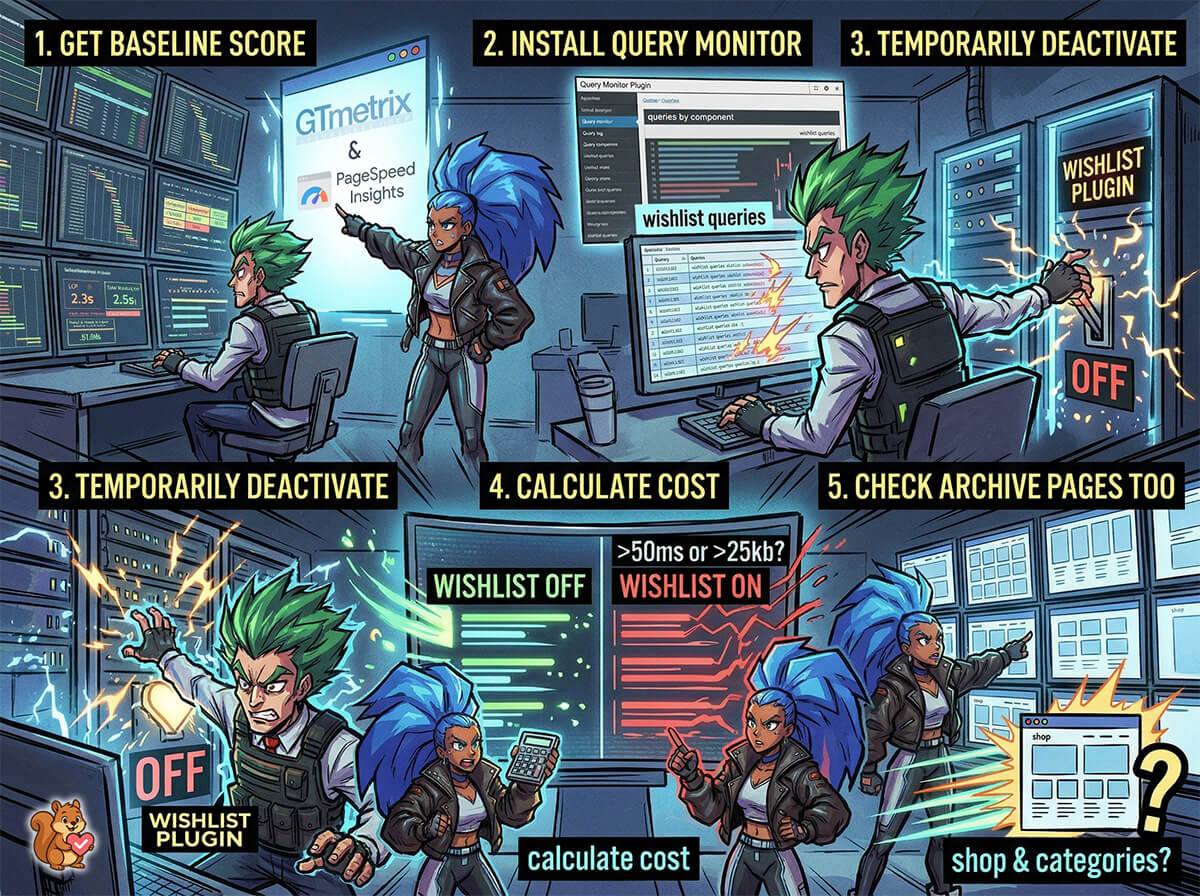
You don’t need to run the kind of controlled benchmarks I did. Here’s a quick process any store owner can follow:
Step 1: Get your baseline
Run your product page through GTmetrix or PageSpeed Insights and record your scores. Pay special attention to LCP and Total Blocking Time.
Step 2: Install query monitor
Install the free Query Monitor plugin and load a product page. Look at the “Queries by Component” panel. Note how many queries your wishlist plugin is adding.
Step 3: Temporarily deactivate
Deactivate your wishlist plugin (during a low-traffic period), clear any cache, and run the same GTmetrix test again. Compare the results.
Step 4: Calculate the cost
If your wishlist plugin is adding more than 50ms of load time or more than 25 KB of JavaScript, it’s worth considering whether a lighter alternative could deliver the same functionality. A plugin like SaveTo Wishlist can cut your wishlist overhead by 80-90% compared to heavier alternatives.
Step 5: Check archive pages too
Don’t forget to test your shop and category pages. Some wishlist plugins load assets on every page where products appear, which means your highest-traffic pages might be the ones suffering the most.
Frequently Asked Questions
Does a WooCommerce wishlist plugin really affect page speed that much?
Yes, but the impact varies dramatically between plugins. In our testing, the lightest plugin (SaveTo Wishlist) added just 15ms and 2.5 KB of JavaScript, which is negligible on any hosting setup. The heaviest plugin (YITH Wishlist) added 180ms and 311.8 KB. On shared hosting or for mobile users on slower connections, that 180ms compounds with other plugins and can push your total page load time past the threshold where customers start bouncing. The key is choosing a plugin that was built with performance as a priority rather than one that bolts on performance as an afterthought.
Can caching fix a slow wishlist plugin?
Not really. Even if you use a caching plugin, your wishlist still has to be “unique” for every visitor (since everyone has different saved items). This means the wishlist usually has to bypass your cache. Every time it does this, your server has to “boot up” the entire WordPress engine just to check one item. We call this “bootstrapping.” Basically, it’s like starting your whole car just to turn on the radio; it’s a huge waste of energy that slows your site down.
The JavaScript still needs to be downloaded, parsed, and executed in the visitor’s browser. Cache plugins like WP Rocket or LiteSpeed Cache can reduce server response time, but if your wishlist plugin ships 311.8 KB of JavaScript, that payload still hits the browser on every visit. Full page caching also becomes more complex with wishlist plugins because the wishlist state is user-specific, meaning personalized elements often bypass the cache entirely.
How do I migrate from YITH to a lighter wishlist plugin without losing customer data?
Switching wishlist plugins can be a headache because there isn’t a “standard” way to store your data. A few plugins, like YITH, create their own custom filing cabinets (database tables). Others try to cram wishlist data into your site’s “general settings” area (the wp_options table), which can eventually slow your whole site down.
SaveTo Wishlist uses the most modern, official WordPress methods to keep your data safe and your database clean. Furthermore, we include a tool to help you safely pull your old data over from YITH Wishlist so your customers don’t lose their saved items. The process typically takes a few minutes and can be done from the WordPress admin. I recommend running both plugins simultaneously during a brief transition period, then deactivating YITH Wishlist once you confirm the data has migrated correctly.
Should I remove my wishlist plugin entirely for better performance?
Removing the wishlist feature altogether is rarely the right call. Wishlists drive measurable revenue. After all, they bring customers back, enable price-drop email campaigns, and increase average order value. The better approach is to keep the functionality but switch to a performance-optimized plugin. SaveTo Wishlist, for example, adds only 15ms of load time while delivering all the core wishlist features (save, share, email notifications) that drive conversions. You get the revenue benefit of wishlists without the performance penalty.
Conclusion: Performance Is A Feature
After testing five of the most popular WooCommerce wishlist plugins, the performance gap between them is stark. The difference between the lightest and heaviest plugin is 165ms of page load time, 309.3 KB of JavaScript, 21 additional HTTP requests, and over 1,400 extra database queries when customers interact with their lists.
That adds up fast. On a store doing 10,000 product page views per day, a heavy wishlist plugin is responsible for thousands of unnecessary megabytes transferred and millions of wasted database queries every month.
SaveTo Wishlist proved that a WooCommerce wishlist plugin does not have to compromise performance. At 2.5 KB of JavaScript and 15ms of added load time, it is functionally invisible on the performance front while still delivering the wishlist features that drive revenue.
If you’re running a WooCommerce store and have not audited your wishlist plugin’s performance impact, now is the time. Use the testing process outlined above, check your numbers, and make a decision based on data.
Your customers, and your Core Web Vitals scores, will thank you.


