

 Reviewed by
 Many WooCommerce store owners have valuable wishlist data sitting in their dashboards, but it’s often overlooked when it comes to ecommerce analytics. They install a wishlist plugin, customers start saving products, and that’s the end of the thought process. The data just accumulates.
But that data is telling you something specific: what your customers want, when they want it, how price-sensitive they are, and which products are about to take off. Wishlist saves are one of the clearest purchase intent signals in ecommerce analytics, and most stores treat them as a passive feature instead of an active intelligence source.
This guide covers five specific ways to interpret your wishlist analytics and turn them into real business decisions: identifying trending products, reading price sensitivity signals, spotting seasonal demand patterns, planning inventory, and understanding your customer segments. If you’re running SaveTo Wishlist Pro, the analytics dashboard surfaces most of this data automatically. But the principles apply regardless of which wishlist plugin you’re using.
The goal here isn’t more data. It’s knowing what to do with the data you already have.
Table Of Contents
- Why Wishlist Data Is Different From Other Ecommerce Analytics
- Identifying Trending Products Before They Spike
- Reading Price Sensitivity Signals
- Seasonal Demand Patterns And Campaign Timing
- Inventory Planning With Wishlist Intelligence
- Understanding Your Customer Segments Through Wishlist Behavior
- FAQs: Wishlist Data And Ecommerce Analytics
- Conclusion
Why Wishlist Data Is Different From Other Ecommerce Analytics
Before getting into specific strategies, it’s worth understanding why wishlist data deserves its own analysis framework. It’s not the same as pageviews, and it’s not the same as cart adds.
Think of it this way:
- Pageviews tell you about awareness. Someone landed on a product page. That’s it. You don’t know if they were interested, comparing, or just clicking around.
- Cart adds tell you about consideration with commitment pressure. The customer is one step from checkout, which means they’re filtering through urgency, price, and shipping calculations.
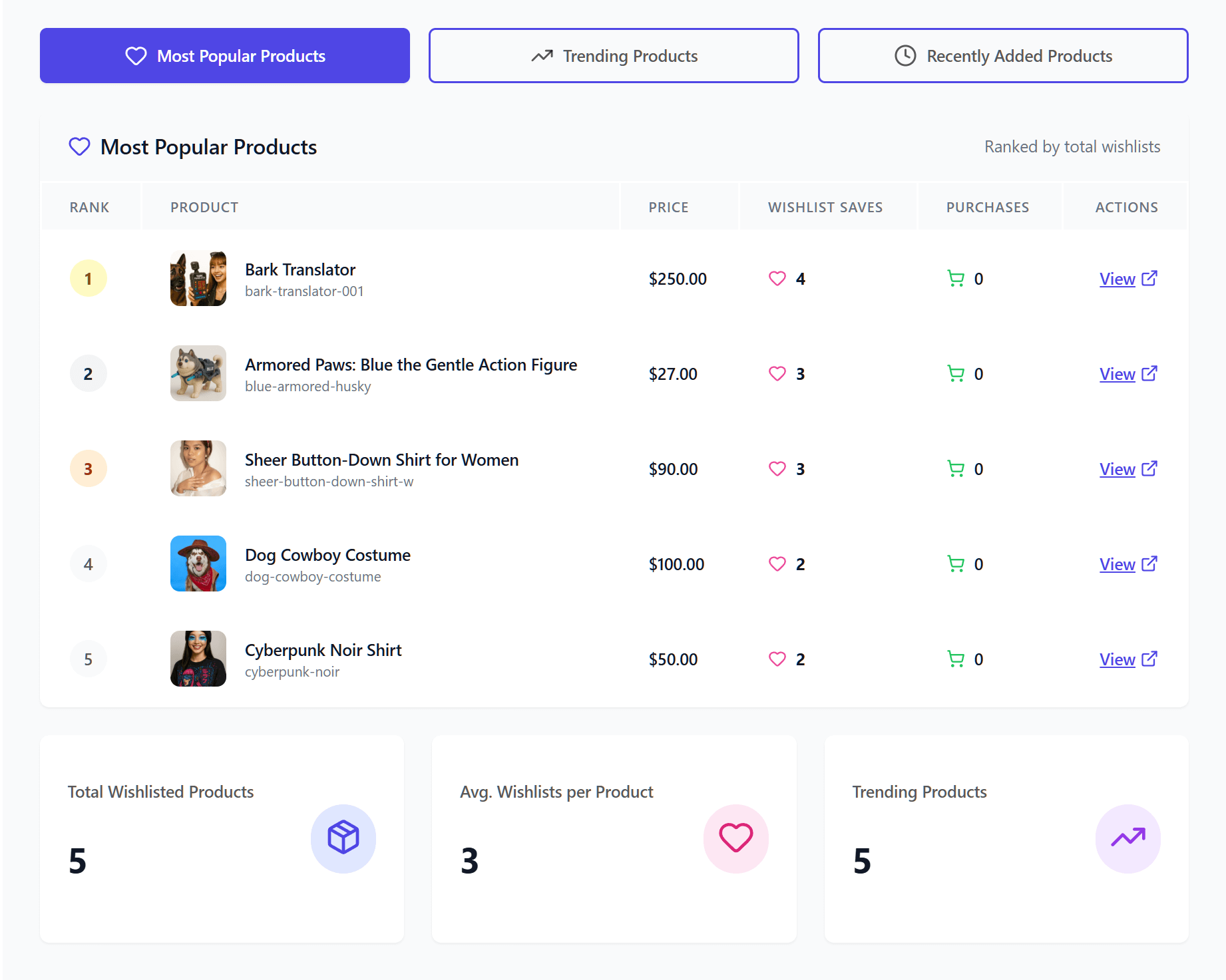
- Wishlist saves tell you about deliberate intent without any purchase pressure. There’s no cart timer, no checkout friction. A customer uses your store’s wishlist feature to save a product because they genuinely want it, even if they’re not ready to buy today.
According to Baymard Institute’s research, the average online shopping cart abandonment rate is 70.22%, with a massive portion of these drop-offs happening simply because users were browsing or not ready to buy. Wishlists capture that exact intent before it disappears into an abandoned cart stat.
Wishlist saves are what I’d call “pure intent” data. The customer made a deliberate decision to mark a product as something they want. No urgency, no transaction pressure, no impulse. That makes it one of the most honest signals you’ll find in your ecommerce analytics.
And that honest signal is what makes it so valuable for business decisions.
Identifying Trending Products Before They Spike
One of the most practical uses of wishlist analytics is spotting demand trends before they show up in your sales data.
What to look for in your wishlist data
The most common mistake is looking at total wishlist saves and assuming the product with the most saves is the trending one. That’s not always true. A product with 500 total saves accumulated over 18 months isn’t trending. A product with 80 saves in the last two weeks is.
Focus on:
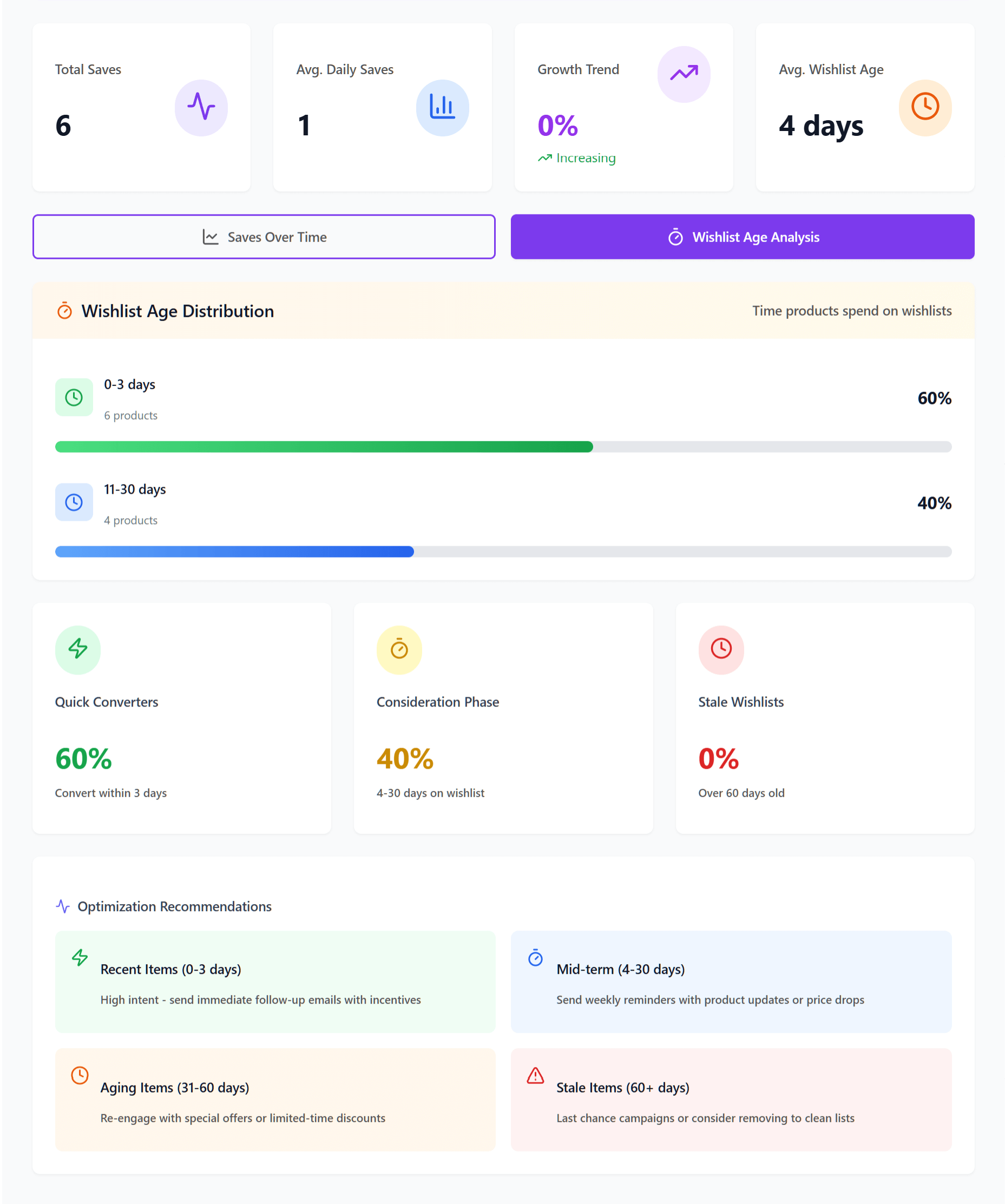
- Accelerating save rates. Products where the weekly save count is increasing, not just high. A product going from 5 saves/week to 20 saves/week is signaling something.
- New products with fast save adoption. When a recently added product hits high save counts within its first two weeks, that’s a strong demand signal before you have any sales data to work with.
- Cross-segment saves. Products being saved by customers across different demographics or purchase histories suggest broad appeal, not niche interest.
How to act on trending product signals
Once you’ve identified products with accelerating wishlist activity, you have a window to act before demand translates into orders:
- Increase inventory early. If a product’s save rate is climbing, reorder before you sell out. Wishlist data gives you a 2-4 week lead on demand in most categories.
- Feature trending items in campaigns. Products with rising wishlist saves are proven to have customer interest. Put them in your email campaigns and homepage placements.
- Build around demand. Create bundles, upsells, or complementary product pairings around the items customers are wishlisting most. If 200 people saved a specific jacket, they might want the matching accessories too.
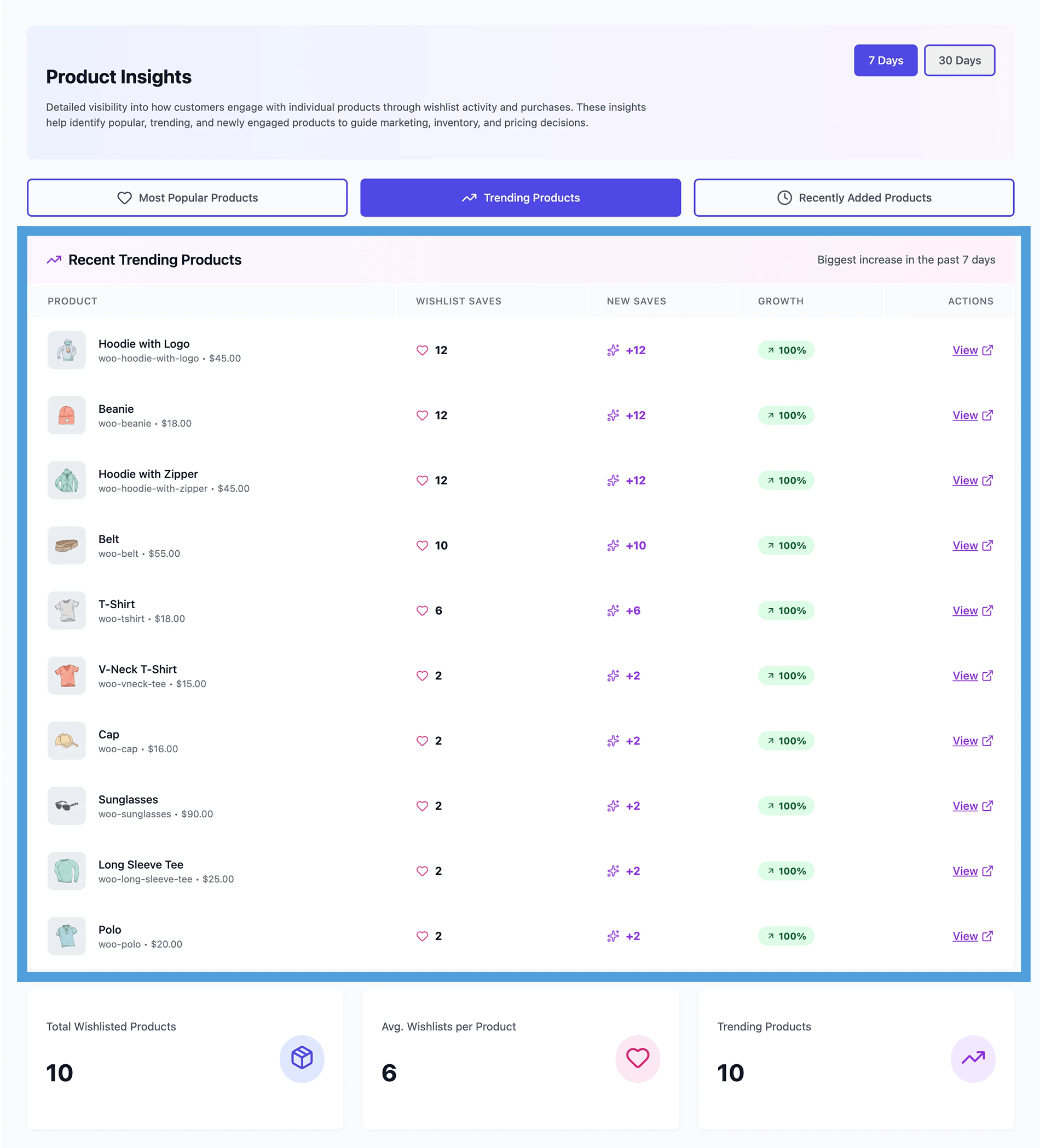
The key insight: wishlist analytics gives you a leading indicator. Sales data tells you what already happened. Wishlist data tells you what’s about to happen.
Reading Price Sensitivity Signals
This is where wishlist data gets really interesting for pricing strategy.
The wishlist-to-cart gap tells you about price resistance
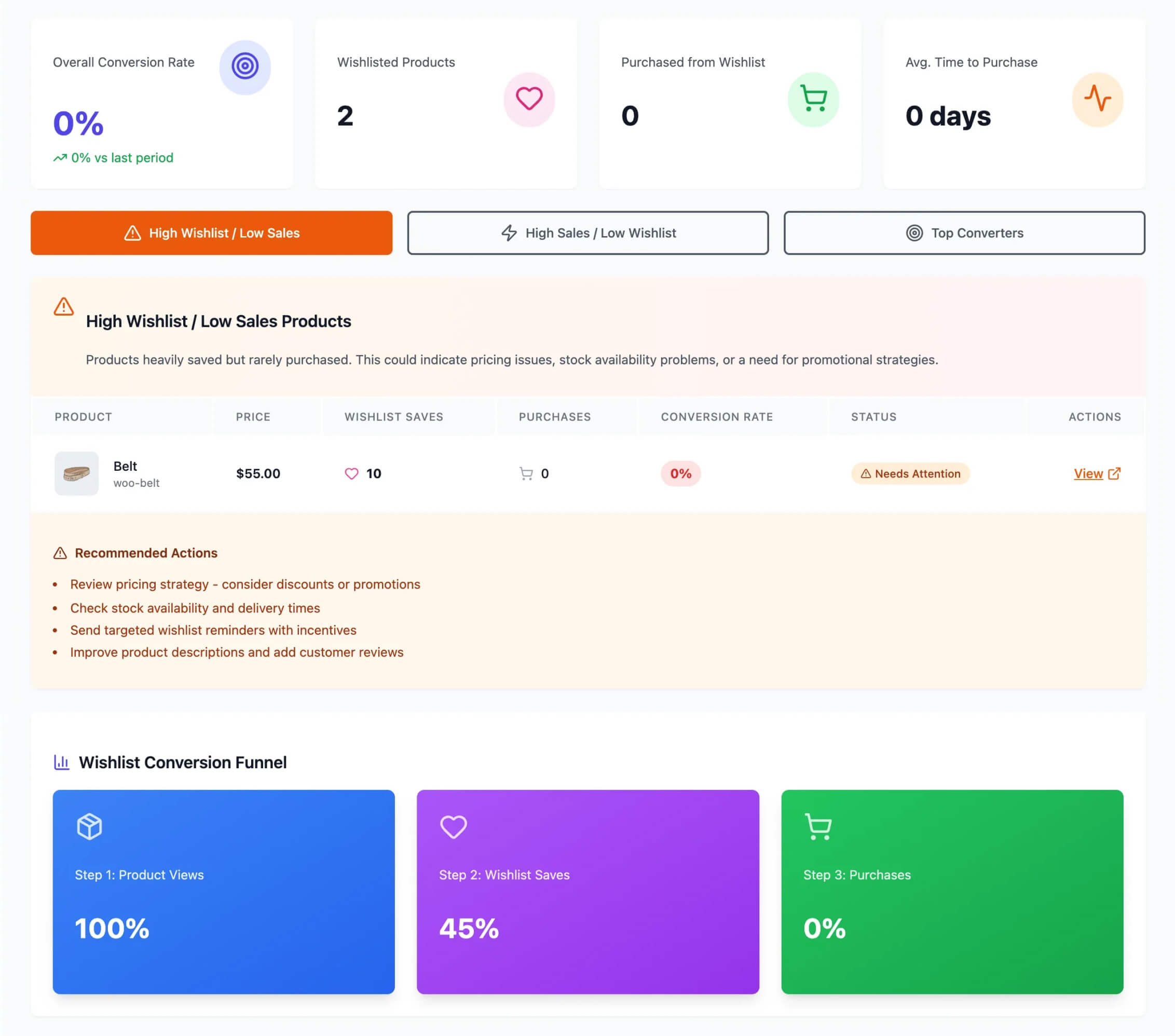
Here’s a pattern you’ll find in almost every WooCommerce store’s data: certain products have high wishlist save counts but disproportionately low cart-add rates. The customer wants the product enough to save it, but not enough to move it toward checkout at the current price.
That gap between wishlist saves and cart adds is a direct signal about price resistance.
Compare two products:
- Product A: 150 wishlist saves, 45 cart adds this month. That’s a 30% wishlist-to-cart ratio. Customers are moving from “I want this” to “I’m buying this” at a healthy rate.
- Product B: 150 wishlist saves, 8 cart adds this month. That’s a 5.3% ratio. Customers want it, but something is stopping them. In most cases, that something is price.
You can validate this by checking whether Product B’s cart adds spike during sales periods. If they do, you’ve confirmed price sensitivity for that specific product.
Using this data for pricing and promotion strategy
Once you know which products have price-sensitive audiences, you can be surgical about discounts instead of running blanket sales:
- Identify the unlock point. Products with large wishlist-to-cart gaps are where a modest discount will have the biggest conversion impact. A 10-15% price drop on a product with 150 wishlist saves can unlock a wave of purchases.
- Time your promotions around the data. Instead of discounting your entire catalog on a calendar schedule, run targeted promotions on the products where wishlist data shows the most pent-up demand.
- Automate the notification. Price drop alerts through SaveTo Wishlist Pro automatically notify customers when a product they wishlisted goes on sale. You don’t have to manually segment and email. Basically, the system matches the discount to the customer who asked for it.
According to McKinsey & Company’s research on personalization, companies that excel at personalization generate 40% more revenue from those activities than average players. Applying this insight, price drop alerts on wishlisted items are one of the simplest forms of personalization to implement because the customer has already told you exactly what they want.
Want to know more about SaveTo Wishlist Pro’s automated price drop alerts? Then check out the following guide:
How To Set Up Wishlist Price Drop Alerts In WooCommerce (Complete Guide)
Seasonal Demand Patterns And Campaign Timing
Most WooCommerce stores plan promotions around calendar dates: Black Friday, Christmas, Valentine’s Day. That works, but wishlist data lets you find your store’s actual demand patterns, which don’t always match the generic retail calendar.
Spotting seasonality in wishlist saves
Compare your wishlist save rates month-over-month across categories. You’ll start to see patterns that are specific to your store and your audience:
- Gift-oriented categories (jewelry, home decor, accessories) typically spike 3-6 weeks before major holidays. If you sell gifts, your wishlist data will show the demand building well before the buying starts.
- Personal purchase categories (tools, fitness equipment, electronics) follow their own rhythm. Tax refund season, back-to-school, New Year’s resolutions. Your wishlist data will show you when your specific customers start planning.
- Category-specific signals can indicate emerging demand 2-4 weeks before it shows up in actual sales. A sudden uptick in wishlist saves for winter coats in September tells you something different than the same uptick in November.
Aligning marketing campaigns with wishlist demand
Here’s where the practical value kicks in:
- Launch promotions when wishlist activity peaks, not when the calendar says to. If your wishlist data shows outdoor furniture saves climbing in March (not May), that’s when your audience is ready to buy.
- Use wishlist data to select featured products. Instead of guessing which products to highlight in a seasonal campaign, let the wishlist data tell you. Products with the highest save rates in a given period are the ones your customers are most interested in right now.
- Send targeted campaigns based on category interest. If a segment of your customers have been wishlisting items in your new spring collection, send them a preview or early access offer through wishlist automations before the general announcement.
Are you curious about the advanced workflow automations that come with SaveTo Wishlist Pro? Then why not read the following article?
🔍️ What We’ve Seen: Stores that time their promotions to wishlist activity patterns instead of generic calendar dates consistently see better conversion rates on those campaigns. The reason is straightforward: you’re promoting products when your customers are actively interested, not when a retail calendar says they should be. Wishlist data turns campaign timing from a guess into a data-driven decision.
Inventory Planning With Wishlist Intelligence
Inventory decisions are expensive to get wrong. Overstock ties up cash. Stockouts lose sales and frustrate customers. Wishlist data gives you a forward-looking demand signal that helps you get closer to the right number.
Predicting demand before it hits your order queue
Traditional inventory planning relies on historical sales data, which tells you what customers already bought. Wishlist data tells you what they’re about to want:
- Reorder signals. Products with rising wishlist saves and declining inventory levels are your highest-priority reorder candidates. The demand is building and you can see it coming.
- Restock prioritization. Out-of-stock products with high wishlist saves should be at the top of your restock queue. Those aren’t hypothetical customers. They’re real people who told your store they want that specific product.
- Overstock risk. If wishlist saves on a product are declining month-over-month while you’re still sitting on inventory, that’s an early warning to promote it or markdown before it becomes dead stock.
Back-in-stock notifications as a demand validation tool
SaveTo Wishlist Pro can automatically notify customers when an out-of-stock wishlisted item is back in inventory. Beyond the obvious conversion opportunity, these notifications also give you a demand validation data point:
- High notification-to-purchase conversion rates on a restocked item confirm that demand is real and your reorder was justified.
- Low conversion rates suggest the demand may have been casual interest or the customer already bought the product elsewhere. Use this to calibrate future reorder quantities for similar products.
- Comparing back-in-stock conversion rates across product categories helps you understand where wishlist saves are the strongest predictors of actual purchases in your specific store.
Looking for more information on how SaveTo Wishlist Pro’s back-in-stock notifications work? Then head on over to our blog post below:
WooCommerce Restock Notifications: The Complete Setup And Strategy Guide
Understanding Your Customer Segments Through Wishlist Behavior
The way customers use wishlists tells you a lot about what kind of buyers they are. And once you understand your segments, you can tailor your marketing to each one.
What different wishlist patterns tell you about customer types
Look for these patterns in your data:
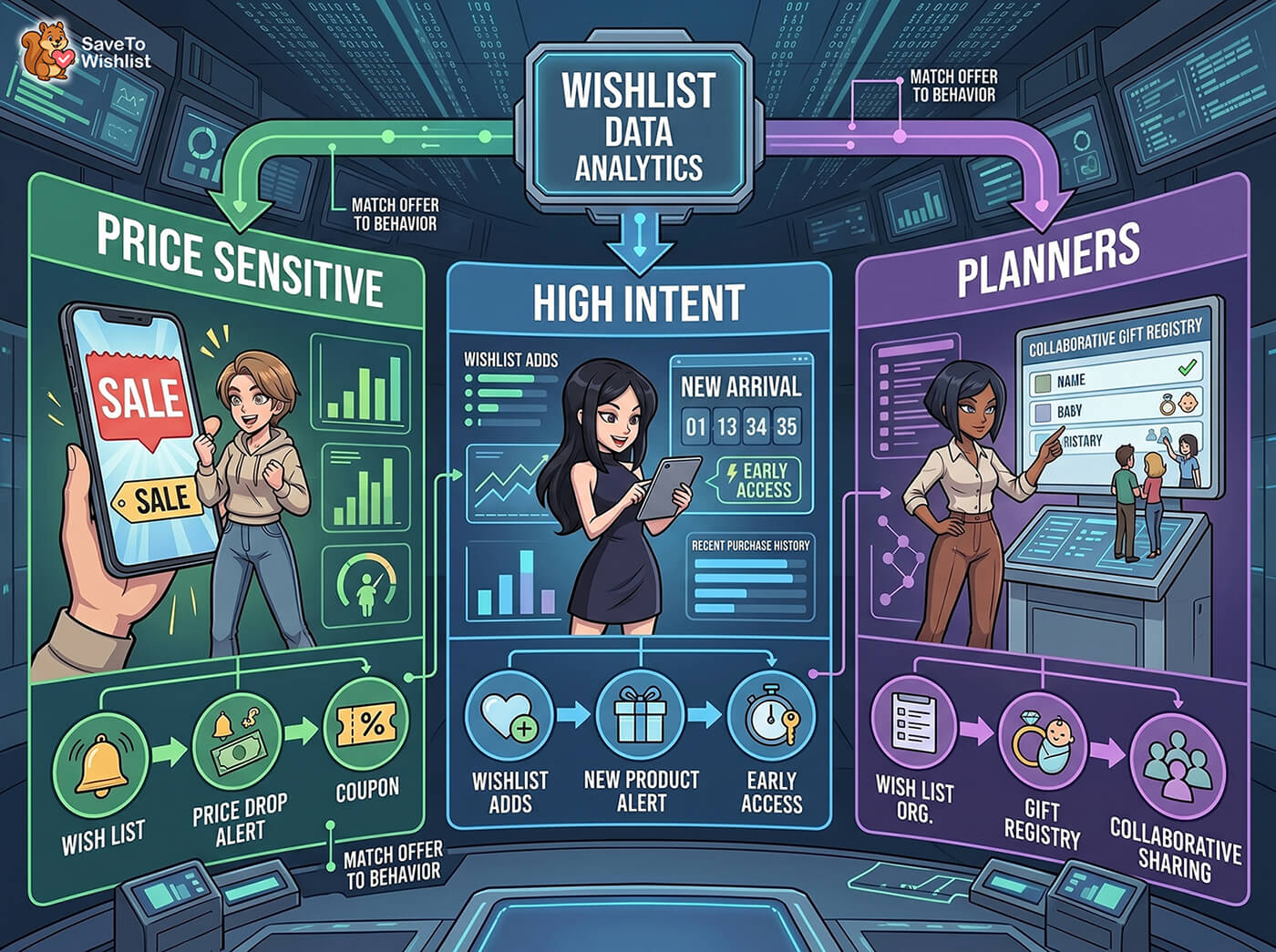
- High-saver, low-buyer customers. These customers save many products but rarely purchase. They’re either window shopping, waiting for sales, or using wishlists as a comparison tool. This is your price-sensitive segment.
- Save-and-buy-quickly customers. These customers save a product and convert within days. They’re using the wishlist as a short-term holding area, not a long-term maybe list. This is your high-intent segment, and they’re worth prioritizing in your marketing.
- Multi-list organizers. Customers who create multiple wishlists with specific names (“Anniversary gifts,” “Kitchen renovation,” “Back to school”) are planners. They’re often buying for others, shopping for projects, or planning ahead. They also tend to be highly engaged and responsive to collaborative list features.
Tailoring your marketing to each segment
Once you know who your segments are, the marketing approach for each becomes clear:
- Price-sensitive segment: Target with price drop alerts and sale notifications. These customers have already told you what they want. They’re just waiting for the right price. A timely coupon or price adjustment converts them.
- High-intent segment: Prioritize for new product announcements, early access offers, and restocked item notifications. They buy when something catches their interest, so get new and returning products in front of them first.
- Planners: Promote collaborative lists, sharing features, and gift registry capabilities. They’re already using wishlists as an organizational tool. Make it easier for them, and they’ll stay engaged longer.
The common thread across all three segments: wishlist data tells you what each customer group wants and how they want to buy. Your job is to match the right offer to the right behavior.
FAQs: Wishlist Data And Ecommerce Analytics
What ecommerce analytics can I get from WooCommerce wishlist data?
Wishlist data can reveal ecommerce analytics such as trending products, price sensitivity signals (high saves but low cart adds), seasonal demand patterns, inventory demand forecasts, and customer segmentation insights. With SaveTo Wishlist Pro’s analytics, you can access dashboards that surface this data automatically. Basically, this includes save trends over time, most-wishlisted products, and customer behavior patterns.
How often should I review my wishlist analytics?
A weekly check for trending product signals and inventory alerts is a good baseline. Monthly reviews also work well for identifying seasonal patterns and customer segment shifts. Before any major promotion or inventory reorder decision, pull the latest wishlist data to validate your assumptions.
Can I export wishlist data for use in other analytics tools?
SaveTo Wishlist Pro includes a REST API and webhooks that let you connect wishlist data to external tools and marketing platforms. Therefore, you can feed wishlist events into your existing ecommerce analytics stack, CRM, or email marketing platform for deeper analysis.
What’s the difference between wishlist analytics and standard WooCommerce analytics?
Standard WooCommerce analytics focus on completed transactions: revenue, orders, products sold. Meanwhile, wishlist analytics focus on pre-purchase intent: what customers want but haven’t bought yet. They’re complementary. Sales data tells you what happened. Wishlist data tells you what’s likely to happen next.
Do I need SaveTo Wishlist Pro for wishlist analytics?
The free version of SaveTo Wishlist provides core wishlist functionality, but the ecommerce analytics and reports features are part of SaveTo Wishlist Pro. The Growth plan ($49.50 for the first year, then $99/year thereafter) includes full ecommerce analytics access along with automations, price drop alerts, and back-in-stock notifications, as do the Plus ($99.50, then $199/year) and Business ($199.50, then $399/year for unlimited sites) plans.
Conclusion
Wishlist data is one of the most underused ecommerce analytics. After all, every save is a customer telling you exactly what they want, and that signal is more valuable than most WooCommerce store owners realize.
The five lenses covered here give you a practical framework:
- Trending products (what’s gaining momentum)
- Price sensitivity (where discounts will have the most impact)
- Seasonal patterns (when to run campaigns)
- Inventory intelligence (what to restock and when)
- Customer segments (how different buyers use wishlists differently)
So, what’s the difference between stores that collect wishlist data and stores that act on it? Basically, it comes down to whether you’re treating wishlists as a passive feature or an active sales intelligence tool.
SaveTo Wishlist Pro gives you the ecommerce analytics, automations, and notification tools to turn wishlist data into revenue decisions. Plans start at $49.50 for the first year, then $99/year thereafter, with a 14-day money-back guarantee. See the full feature set and decide if it fits your store.



