

 Reviewed by
 You’ve set up your abandoned cart emails. Your welcome sequence is running. Maybe you’ve even built a post-purchase flow that asks for reviews. And your results are… fine. Not bad, not great. Just fine.
Here’s what most WooCommerce store owners miss: the highest-performing email marketing campaigns aren’t triggered by page views, cart activity, or time-based delays. They’re triggered by wishlists, where customers explicitly tell you what they want to buy.
This guide covers the full ecommerce email marketing playbook, from the foundational campaigns every store needs to the intent-based triggers that consistently outperform everything else. If you’re looking for a deep dive specifically on wishlist email workflows, we’ve written a separate guide on wishlist email marketing. This article is about the bigger picture: how wishlists fit into your overall email strategy and why they deserve more attention than they’re getting.
Table Of Contents
- Why Ecommerce Email Marketing Still Outperforms Every Other Channel
- The 5 Core Email Campaigns Every Store Should Run
- The Intent Gap: Why Most Ecommerce Emails Underperform
- How Wishlist-Triggered Emails Change The Game
- How To Set Up Wishlist-Powered Email Campaigns In WooCommerce
- Measuring Email Campaign Performance: What Actually Matters
- FAQs: Ecommerce Email Marketing
- Turn Your Ecommerce Email Marketing Into A Revenue Engine
Why Ecommerce Email Marketing Still Outperforms Every Other Channel
Email remains the highest-ROI marketing channel for ecommerce. According to Litmus, email marketing returns an average of $36 for every $1 spent. That’s not a new stat, but it keeps holding up year after year because the fundamentals haven’t changed: email is an owned audience channel.

Social media reach depends on algorithms you don’t control. Paid ads stop working the moment you stop paying. Email sits in your customer’s inbox regardless of what Meta or Google decides to do with their feed rankings next quarter.
Over the past few years, the bigger shift in email marketing for ecommerce has been the move from batch-and-blast campaigns to behavior-triggered automations. Instead of sending the same promotional email to your entire list, you send targeted messages based on what individual customers actually do in your store.
The stores that see the best email performance have figured out which behavioral triggers carry the strongest purchase intent. Browse-based triggers are weak. Cart-based triggers are better. But there’s one signal that sits above both, and most stores aren’t using it at all.
The 5 Core Email Campaigns Every Store Should Run
Before we get to the high-performers, let’s cover the foundational campaigns. These are table stakes for any WooCommerce store doing ecommerce email marketing.
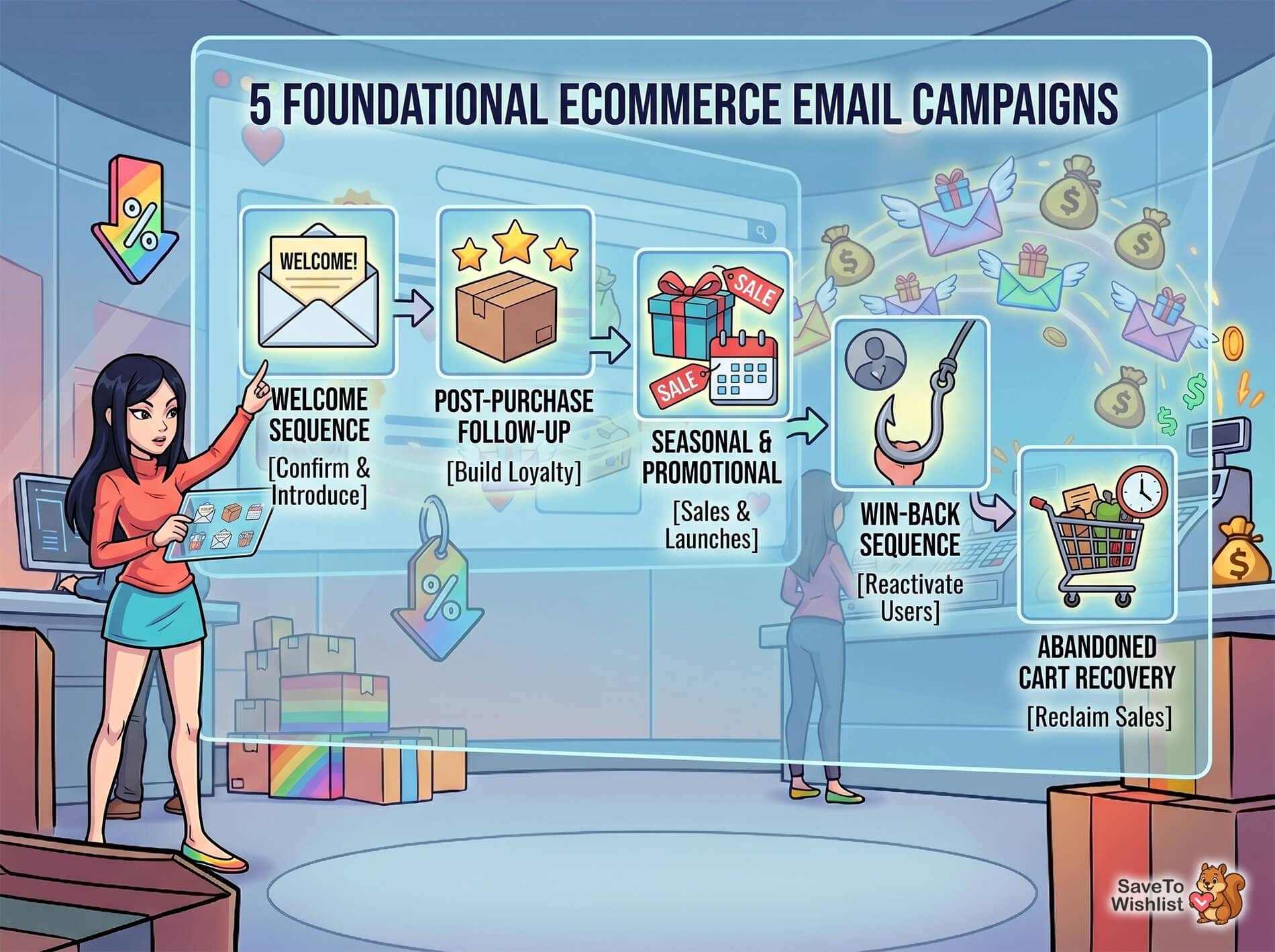
1. Welcome sequences and what makes them convert
Your welcome email is the first impression after someone joins your list. According to GetResponse’s Email Marketing Benchmarks, welcome emails see average open rates above 80%, making them the most-opened automated email type.
A good welcome sequence does three things: confirms the subscription, introduces your brand story, and includes a first-purchase incentive. Keep it to 3-4 emails over a week. Don’t overthink it.
2. Post-purchase follow-ups
After someone buys, you’ve got a window to build loyalty. Beyond standard transactional emails like order receipts and shipping updates, things like review requests, care instructions, cross-sell recommendations, and replenishment reminders all fit perfectly here.
3. Seasonal and promotional campaigns
Black Friday, holiday sales, product launches, clearance events. These are your scheduled campaigns that go out to segments of your list based on interest or purchase history. They’re effective but not automated, so they require manual effort every time.
4. Win-back and re-engagement emails
When a customer goes quiet for 60-90 days, a win-back sequence tries to pull them back. These typically have lower engagement than other automations, but they’re worth running because reactivating an existing customer is cheaper than acquiring a new one.
5. Abandoned cart recovery
This is the automation everyone knows. A customer adds products to their cart, leaves without buying, and you send a reminder. According to the Baymard Institute, the average cart abandonment rate sits around 70.22%, so there’s a massive recovery opportunity here.
Most stores run a 3-email sequence: a gentle reminder at 1 hour, a value-reinforcement email at 24 hours, and a final urgency email at 48-72 hours.
Are you interested in how wishlists complement cart abandonment recovery? Then check out the extensive guide:
These five campaign types form the foundation. Every store should have them running. But they all share a common limitation.
The Intent Gap: Why Most Ecommerce Emails Underperform
Most email automations are triggered by relatively weak signals. A page view tells you someone looked at a product. A cart addition tells you they considered buying it. A purchase tells you after the fact. None of these signals tell you, with real confidence, what a customer actually wants to buy in the future.
This is the intent gap in ecommerce email marketing. You’re sending messages based on behavioral breadcrumbs instead of explicit declarations of interest.
Abandoned cart emails are the closest most stores get to intent-based targeting. Someone put an item in their cart, so they probably wanted it. But cart additions happen for all sorts of reasons: price checking, comparison shopping, accidental clicks. The intent signal is decent but noisy.
There’s one customer action that represents far stronger purchase intent than any of these, and most stores have no system in place to capture it: wishlisting.
When a customer saves a product to a wishlist, they’re making a deliberate choice. They’re saying, “I want this, but not right now.” That’s not a bounce. That’s not an accidental cart add. That’s explicit, documented purchase intent, sitting in your store waiting to be acted on.
How Wishlist-Triggered Emails Change The Game
Wishlist-triggered emails outperform other automated campaigns because they target customers who’ve told you exactly what they want. You’re not guessing based on browse behavior or inferring from cart activity. The customer drew you a map.
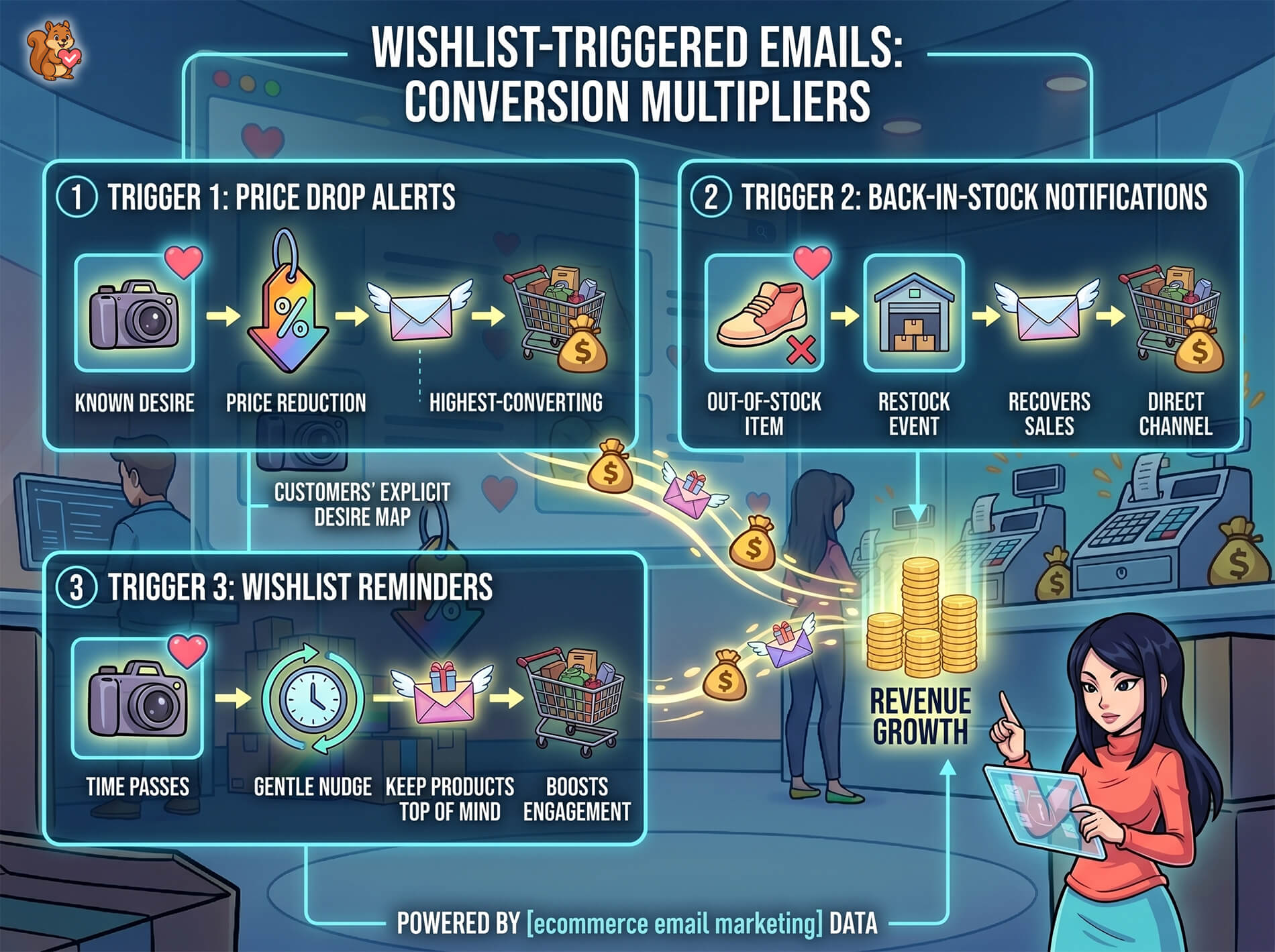
Here’s how the three core wishlist email triggers work.
Price drop alerts: the highest-converting trigger
A customer wishlists a product. You drop the price (for a sale, clearance, or any other reason). They get an email: “That item you saved just went on sale.”
This is the single highest-converting email trigger most stores can run. The customer already wants the product. Price was the barrier. You just removed the barrier and told them about it. There’s no guessing involved. Price drop alerts work because they connect a known desire with a real incentive at the exact right moment.
Back-in-stock notifications
When a customer wishlists an out-of-stock item, you have a direct recovery channel. The moment inventory is replenished, back-in-stock notifications go out to everyone who saved that product. These recover sales that would otherwise be permanently lost, because without the notification, most customers never come back to check.
Wishlist reminder emails
Not every customer needs a price drop or a restock to convert. Sometimes they just need a nudge. Wishlist reminder emails gently resurface saved items after a set period, keeping your products top of mind without being aggressive.
🔍️ What We’ve Seen: One thing we commonly see is that store owners set up abandoned cart emails but never touch wishlist automations. The irony is that a wishlisted item represents stronger purchase intent than an abandoned cart, because the customer deliberately chose to save it for later. Cart additions are often impulsive. Wishlist additions are intentional.
For a detailed walkthrough of each wishlist email type, timing strategies, and platform-specific setup, check out our deep dive on wishlist email marketing.
How To Set Up Wishlist-Powered Email Campaigns In WooCommerce
Getting wishlist-triggered emails running in your store requires two things: collecting wishlist data at scale and connecting that data to your email platform.
Collecting wishlist data at scale
The more customers using wishlists, the larger your pool of high-intent email recipients. That starts with making wishlists accessible to everyone, not just registered users.
SaveTo Wishlist’s free version includes unlimited wishlists, guest wishlists, variation tracking, multiple wishlists, and block theme support. This means you’re capturing wishlist data from every visitor, not just the fraction who create accounts. Guest wishlists are especially important for stores where most visitors browse without logging in.
Connecting wishlists to your email platform
Once you’re collecting wishlist data, you need to get it to your email marketing tool. SaveTo Wishlist Pro includes wishlist automation capabilities, webhooks, and a REST API that let you connect wishlist events to platforms like Klaviyo, Mailchimp, Drip, or any tool that accepts webhook payloads.
Webhooks fire in real time when a customer adds or removes a wishlist item, giving your email platform instant access to intent data. The REST API lets you pull wishlist data on demand for batch processing, reporting, or custom dashboard integrations. If you’re a developer looking to build custom integrations, check out the WooCommerce Wishlist REST API page.
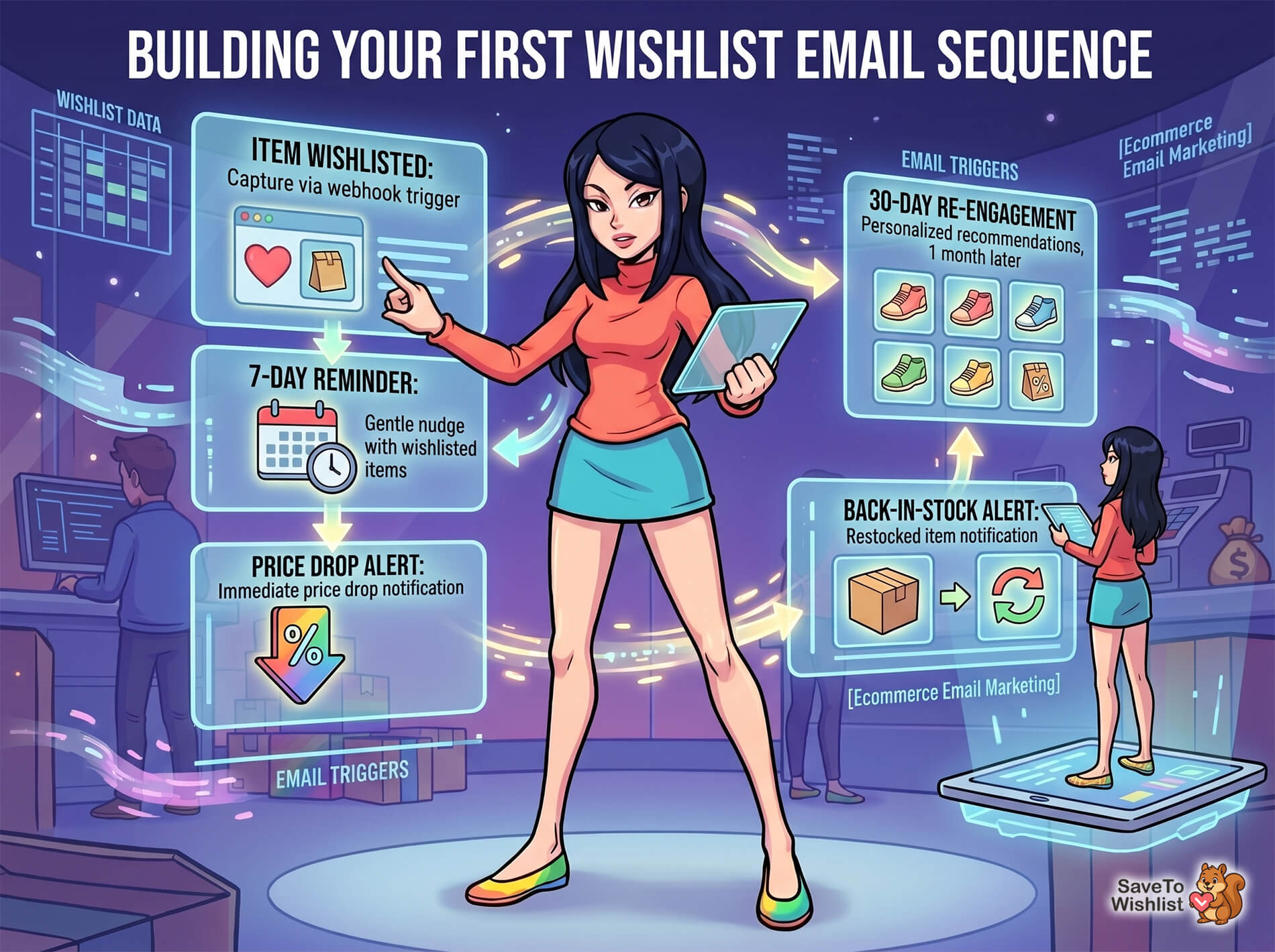
Building your first wishlist email sequence
A practical starting sequence looks like this:
- Item wishlisted: Capture the event via webhook or automation trigger
- 7-day reminder: If the customer hasn’t purchased, send a gentle reminder featuring their wishlisted items
- Price drop alert: If any wishlisted item drops in price, send an immediate notification
- Back-in-stock alert: If an out-of-stock wishlisted item is restocked, notify immediately
- 30-day re-engagement: For items still sitting on wishlists after a month, send a personalized recommendation email featuring similar products alongside the saved items
The key is layering these triggers so each customer gets the right message at the right time, based on what’s happening with the specific products they saved.
Measuring Email Campaign Performance: What Actually Matters
Open rates get all the attention, but they’re the least useful metric for ecommerce email marketing. Click-through rate tells you more. Revenue per email tells you the most.
When you compare campaign types by revenue per email sent, the gap between generic broadcasts and intent-triggered automations becomes obvious. A promotional blast to your full list might generate modest revenue spread across thousands of recipients. A price drop alert to 50 wishlist holders can generate comparable revenue from a fraction of the sends.
Here’s how campaign types generally compare on intent level (example performance ranges based on industry benchmarks):
| Campaign Type | Intent Signal Strength | Typical Revenue Impact | Setup Effort |
|---|---|---|---|
| Welcome emails | Low (just subscribed) | Moderate (first purchase incentive) | Low |
| Abandoned cart | Medium (added to cart) | Moderate-high (recovery) | Low |
| Post-purchase | N/A (already bought) | Low direct (retention-focused) | Low |
| Seasonal promos | Low (broad list) | Variable (depends on offer) | Medium (manual) |
| Wishlist price drops | High (explicit save + price trigger) | High (strong intent + incentive) | Medium (one-time setup) |
| Wishlist back-in-stock | High (explicit save + availability trigger) | High (recovers lost demand) | Medium (one-time setup) |
The difference in the intent signal column is what drives the revenue difference. When you segment your email analytics by trigger type, you’ll likely see wishlist-triggered emails generating higher revenue per recipient than any other automated campaign.
Using advanced wishlist analytics lets you go further: identifying your most-wishlisted products, spotting trends in customer interest, and using that data to inform pricing, inventory, and merchandising decisions beyond email.
FAQs: Ecommerce Email Marketing
What is ecommerce email marketing?
Ecommerce email marketing is the practice of using email to drive sales, build customer relationships, and increase retention for online stores. It includes automated campaigns (welcome emails, abandoned cart recovery, post-purchase follow-ups) and manual campaigns (seasonal promotions, product launches). The most effective ecommerce email strategies use behavior-triggered automations based on customer actions like purchases, cart activity, and wishlist interactions.
How do wishlists improve ecommerce email marketing performance?
Wishlists give you explicit intent data. When a customer saves a product, they’re telling you they want it. That makes wishlist-triggered emails (price drop alerts, back-in-stock notifications, wishlist reminders) more relevant and better-timed than emails based on weaker signals like page views or browse history. Higher relevance typically means higher open rates, click rates, and conversions.
Can I send wishlist emails to guest users?
Yes, if your wishlist plugin supports guest wishlists. SaveTo Wishlist captures wishlist data from guests (visitors who haven’t created an account), which means you can trigger email campaigns for a much larger audience than just registered users. Guest wishlist support is included in the free version of SaveTo Wishlist.
What’s the difference between abandoned cart emails and wishlist emails?
Abandoned cart emails target people who added items to their cart and left. Wishlist emails target people who deliberately saved items for future purchase. The key difference is intent: cart additions are often impulsive or exploratory, while wishlist additions are intentional. Wishlist emails also cover scenarios that cart emails can’t, like notifying customers when an out-of-stock item they saved becomes available again.
How do price drop alerts work with WooCommerce wishlists?
When a customer saves a product to their wishlist and that product’s price later decreases (through a sale, coupon, or manual price change), the customer receives an automatic email notification. This requires a wishlist plugin with built-in price drop alert functionality, like SaveTo Wishlist Pro, connected to your email workflow.
Turn Your Ecommerce Email Marketing Into A Revenue Engine
The foundational email campaigns (welcome, abandoned cart, post-purchase, seasonal, re-engagement) are necessary. Every store should run them. But they’re also what every store runs, which means they’re a baseline, not a competitive advantage.
Wishlist-triggered emails are the performance multiplier most ecommerce stores haven’t tapped yet. They target customers based on the strongest intent signal available, they automate around real product events (price changes, restocks), and they convert at rates that make other automated campaigns look generic by comparison.
Here’s what to focus on:
- Why email still outperforms every other channel and where the real ROI sits
- The 5 core campaigns every store needs as your foundation
- The intent gap that limits most email strategies
- How wishlist-triggered emails close that gap with price drops, back-in-stock alerts, and reminders
- Setting up wishlist email campaigns in your WooCommerce store
Ready to add the highest-converting email triggers to your store? The free version of SaveTo Wishlist gives you guest wishlists, multiple wishlists, and variation tracking for free. When you’re ready for price drop alerts, automations, and analytics, SaveTo Wishlist Pro plans start at $49.50/year with a 14-day money-back guarantee.



