

 Reviewed by
 Your WooCommerce CRM (Customer Relationship Management) solution probably tracks orders, email opens, and maybe cart abandonment. That’s useful, but it’s all backward-looking. It tells you what customers already did, not what they’re planning to do next. If your CRM strategy feels like it’s always one step behind, there’s a reason: you’re missing the strongest pre-purchase intent signal your store produces.
Wishlist data fills that gap. When a customer adds a product to their wishlist, they’re doing something remarkably specific. They’re telling you: “I want this, but not right now.” That’s a purchase intent signal that’s stronger than a page view, more reliable than a cart add, and far more actionable than an email open.
This guide shows you how to connect wishlist data to your WooCommerce CRM using webhooks, and how to build segments from that data that actually predict who’s about to buy.
Table Of Contents
- Why Your WooCommerce CRM Is Missing Its Best Data
- What Wishlist Events Tell Your WooCommerce CRM
- Connecting Wishlist Data To Your WooCommerce CRM With Webhooks
- Building WooCommerce CRM Segments From Wishlist Behavior
- Practical Use Cases For Wishlist-Enriched WooCommerce CRM Data
- Frequently Asked Questions
- Start Feeding Your WooCommerce CRM The Data It's Missing
Why Your WooCommerce CRM Is Missing Its Best Data
Most WooCommerce CRM setups only capture what customers have already done. They track completed orders, email engagement, and maybe browsing history. That’s the rearview mirror. The data that predicts future purchases lives in a different place entirely.
The problem is the gap between browsing and buying. Page views are the noisiest signal you have. Someone might view 30 products in a session without any real purchase intent. Cart adds are better, but cart abandonment rates sit around 70.22% across the industry, which means most cart adds don’t convert either. People add things to carts impulsively, accidentally, or just to check the total price.
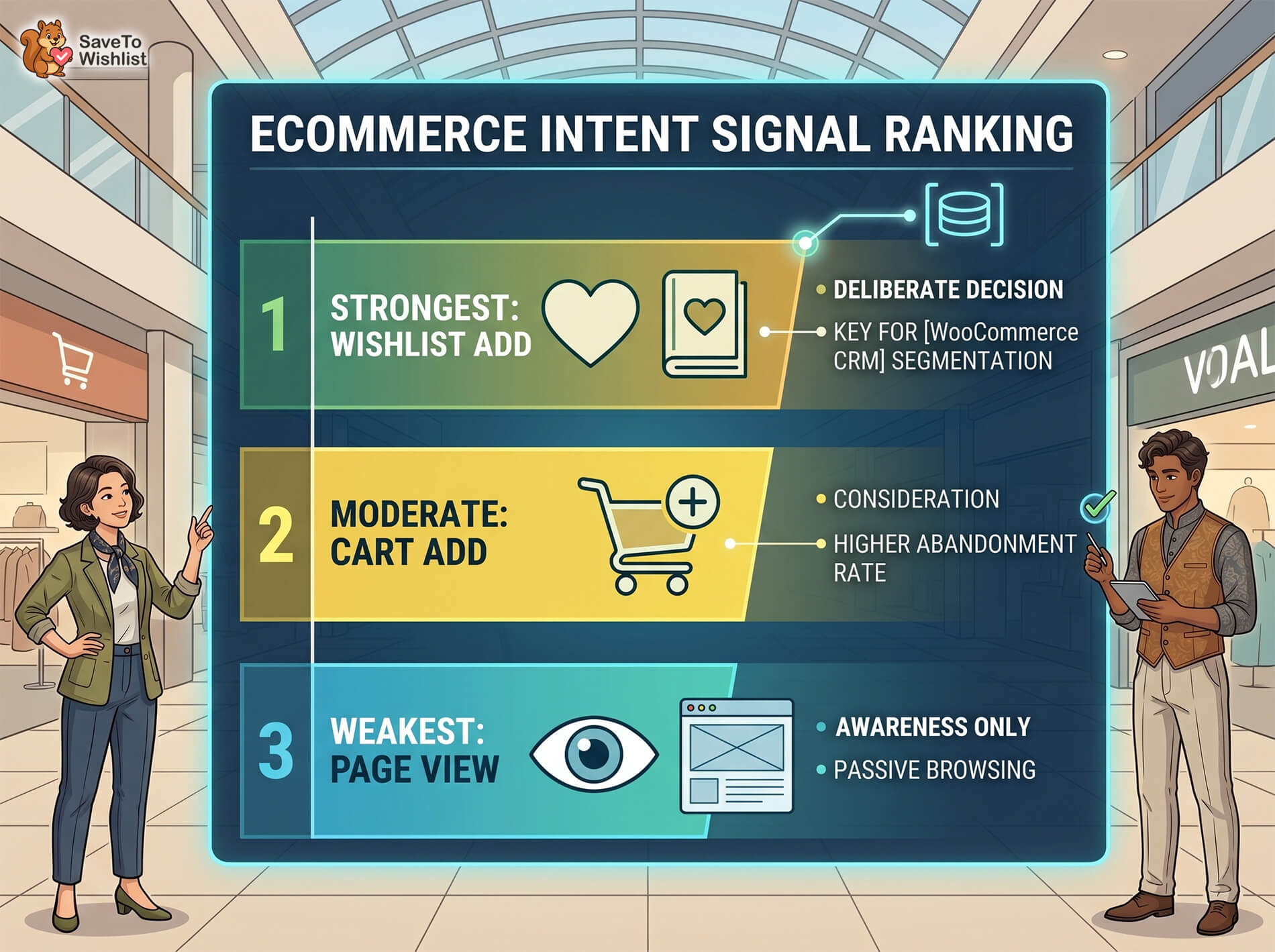
The intent signal hierarchy
Not all customer actions carry the same weight. Here’s how they rank for predicting actual purchases:
- Page view: This is an awareness signal at best. It tells you someone saw a product, but not whether they cared about it. Weakest signal.
- Cart add: A consideration signal. Better than a page view, but cart abandonment is so common that a cart add alone doesn’t mean much. Moderate signal.
- Wishlist add: A deliberate intent signal. The customer made a conscious decision to save this product for later. They weren’t just browsing or checking prices. They want it. Strongest pre-purchase signal.
The difference comes down to effort and intent. Wishlisting requires a deliberate action. The customer has to decide “I want this enough to save it.” That’s qualitatively different from scrolling past a product page or dropping something in a cart on impulse.
What Wishlist Events Tell Your WooCommerce CRM
Every wishlist action is a data point your CRM can use to build a more accurate picture of customer intent. It’s not just about knowing someone wishlisted something. It’s about what the pattern of wishlist behavior tells you.
Key wishlist events to capture
- Item added to wishlist: The core purchase intent signal. The customer wants this product.
- Item removed from wishlist: Intent changed. Maybe they bought it elsewhere, found an alternative, or decided against it.
- Wishlist shared: Social or gift intent. Sharing a wishlist often signals that the customer is buying for someone else or wants others to buy for them.
- Wishlisted item purchased: The closed loop. This validates the original intent signal and confirms the wishlist-to-purchase path works for this customer.
- Multiple items wishlisted: High engagement. A customer with 8 items on their wishlist is deeply engaged with your catalog.
Data points that come with each event
Each wishlist event carries context that makes it useful for segmentation:
- Product ID and category: Tells you what types of products the customer is interested in, not just which specific ones.
- Customer ID or email: Ties the event to a CRM contact record.
- Timestamp: Recency matters. A wishlist add from yesterday is a hotter signal than one from three months ago.
- Price point: Reveals budget preferences and price sensitivity.
🚀 What we’ve seen: WooCommerce store owners sometimes connect wishlist data to their CRM solutions, but only track the “item added” event. That’s a start, but the real value comes from tracking removals and purchases too. A customer who wishlists five items and buys three of them has a very different profile from someone who wishlists five items and never comes back. The full event stream tells a much richer story than adds alone.
SaveTo Wishlist Pro’s analytics dashboard gives you visibility into your customers’ wishlist-related behavior patterns before you even connect to a CRM. To know more, read:
Connecting Wishlist Data To Your WooCommerce CRM With Webhooks
SaveTo Wishlist Pro sends wishlist events to external tools via webhooks. This means you can route wishlist data to any CRM, email platform, or automation tool that accepts incoming webhooks, which covers most modern platforms.
How webhooks work
A webhook is an automatic notification sent from one system to another when something happens. Think of it like a push notification between apps. When a wishlist event occurs in SaveTo Wishlist Pro (someone adds an item, removes an item, shares a list), the plugin sends a data payload to a URL you specify.
Your CRM receives that payload and uses the data to create or update a contact record. If your CRM doesn’t accept webhooks directly, middleware tools like Zapier or Make can sit in between, receiving the webhook and routing the data wherever it needs to go.
The key advantage of webhooks over manual data exports is speed. Wishlist events reach your CRM in near real-time, so your segments and automations always reflect the latest customer behavior.
Setting up the connection
The general process involves configuring a webhook URL in SaveTo Wishlist Pro’s settings and pointing it at your CRM’s incoming webhook endpoint (or a middleware tool’s trigger URL). You can select which wishlist events trigger the webhook, so you’re only sending the data you actually need.
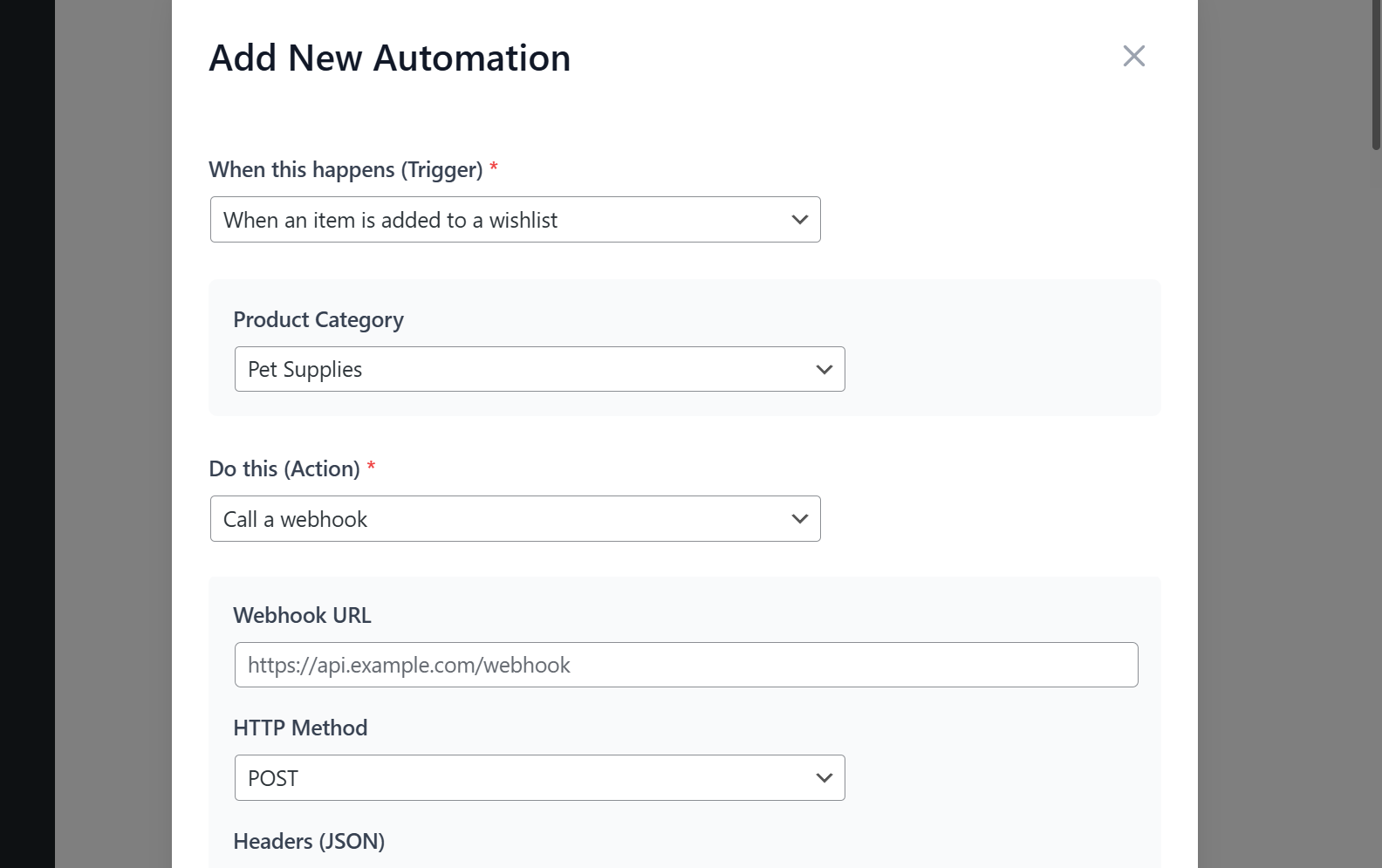
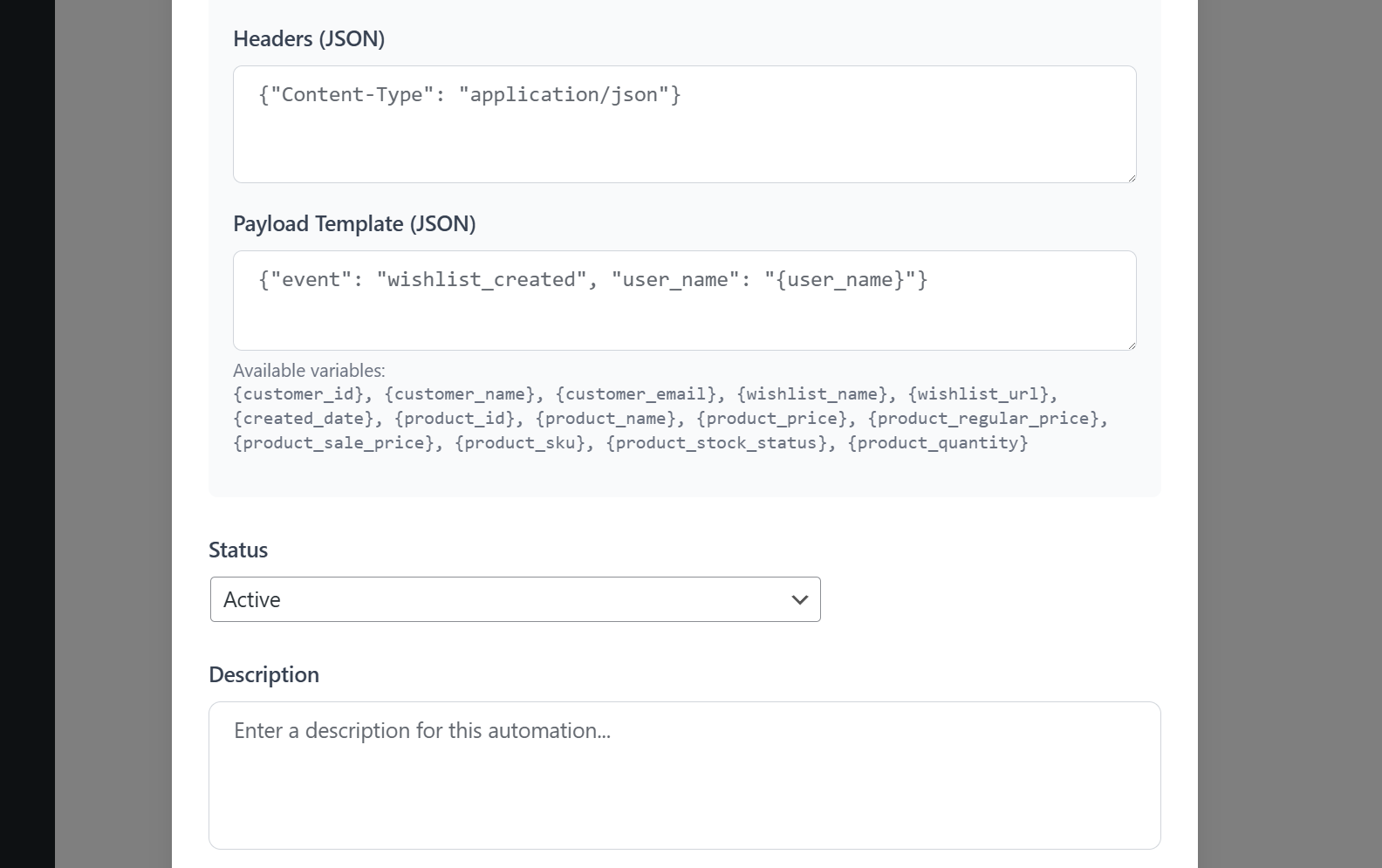
This approach works with any CRM that accepts incoming webhooks. You’re not limited to a specific list of supported platforms. Whether you’re using HubSpot, ActiveCampaign, Jetpack CRM, Salesforce, Klaviyo, or something else entirely, the webhook delivers the data in a standard format your CRM can process.
For stores that need deeper programmatic access, SaveTo Wishlist Pro also offers a REST API that lets you pull wishlist data on demand rather than waiting for event-triggered webhooks.
For more information on the webhook capabilities, the wishlist webhooks feature page covers what’s available.
Building WooCommerce CRM Segments From Wishlist Behavior
Once wishlist data flows into your CRM, you can build segments based on purchase intent rather than just demographics or past orders. These segments identify customers by what they want to do next, which is far more useful for targeting.
High-intent segment examples
Here’s what this looks like in practice (example data):
- “Wishlisted 3+ items, hasn’t purchased”: This customer is deeply engaged with your catalog but hasn’t converted yet. They’re high intent and likely need a nudge, not more awareness content. A personalized email featuring their top wishlisted items can be the push they need.
- “Wishlisted item on sale”: Price-sensitive buyers who are waiting for the right moment. When a wishlisted item goes on sale or gets a price drop, a targeted notification can close the deal. This pairs well with SaveTo Wishlist Pro’s price drop alerts.
- “Wishlisted item went out of stock”: At-risk customers who wanted something you can’t currently deliver. Send a back-in-stock notification the moment you restock to recover the sale.
- “Shared wishlist with others”: Likely a gift buyer. Target them with gift guides, holiday promotions, or “treat yourself” messaging depending on the context.
Combining wishlist data with existing WooCommerce CRM data
Wishlist data becomes even more powerful when layered with data your CRM already has:
- Wishlist + order history: Understand what a customer buys versus what they wish for. If someone regularly buys accessories but wishlists premium products, they might be ready for an upsell.
- Wishlist + email engagement: A customer who opens every email and has 6 items on their wishlist is very different from one who ignores emails but has the same wishlist. The first is warm and ready. The second may need a different channel.
- Wishlist + customer lifetime value: Your highest-value customers with active wishlists should be prioritized for personalized outreach. They’ve already proven they’ll spend, and their wishlist tells you exactly what they want next.
Looking for more strategies on connecting wishlist data to email marketing? Then check out the following guide:
WooCommerce Wishlist Email Marketing: The Complete Workflow Guide
Practical Use Cases For Wishlist-Enriched WooCommerce CRM Data
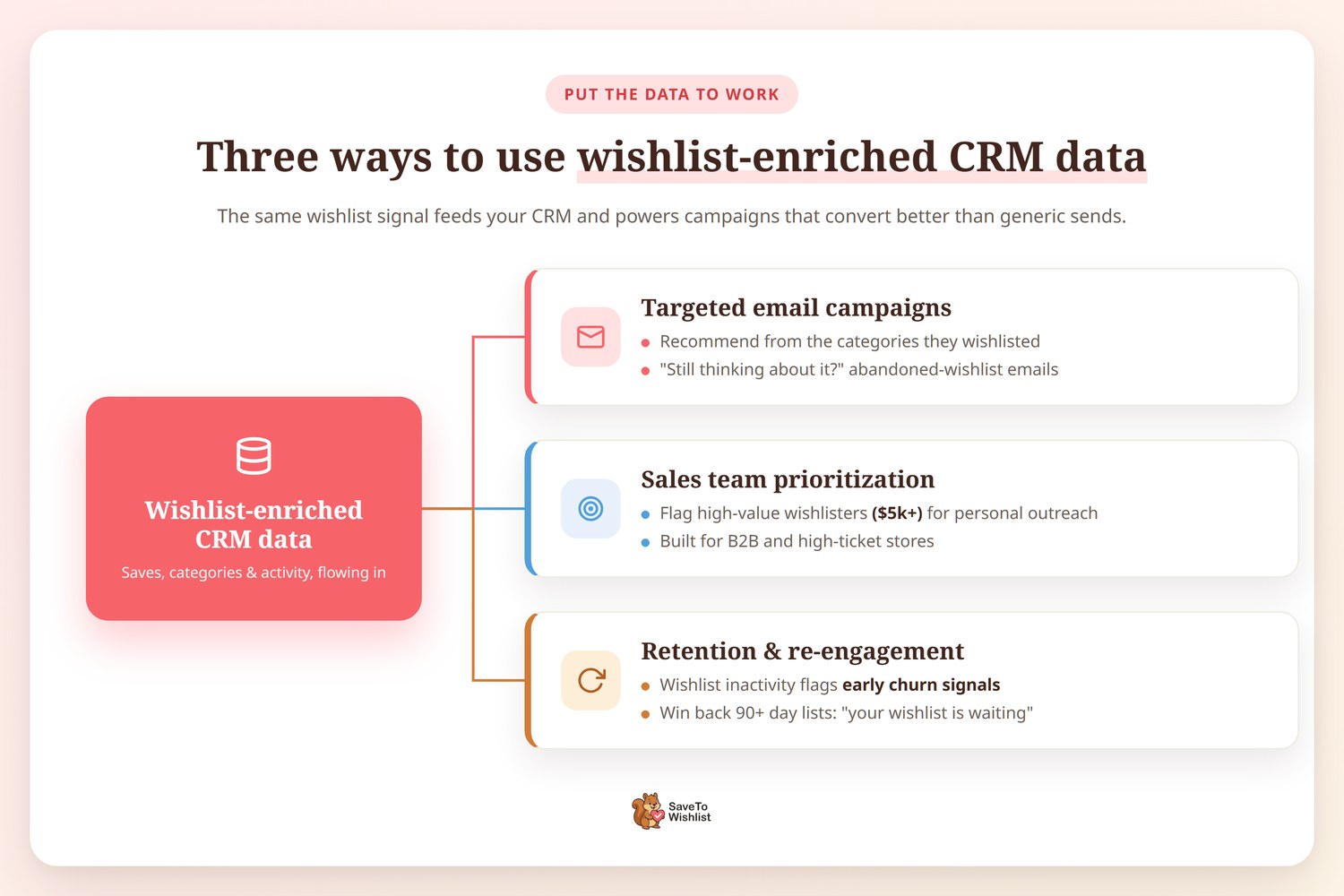
Once wishlist data is flowing into your CRM, here’s how to put it to work in campaigns that convert at higher rates than generic sends.
Targeted email campaigns
Personalized product recommendations based on wishlisted categories consistently outperform generic “you might like” suggestions. Your CRM already knows the customer’s name and order history. Adding wishlist data tells you exactly what to recommend.
Abandoned wishlist emails work similarly to abandoned cart emails, but they target a different stage of the buying journey. A customer who wishlisted something three weeks ago and hasn’t purchased might respond to a “still thinking about it?” email with a direct link to their wishlist. This ties into wishlist automation capabilities that can trigger these emails automatically.
Sales team prioritization
For B2B stores or high-ticket products, wishlist data helps your sales team focus on the right contacts. A customer with $5,000 worth of products on their wishlist is a more valuable lead than someone who browsed your catalog once. Flag these high-value wishlisters for personal outreach, and your sales team starts conversations about products the customer already wants.
Retention and re-engagement
Wishlists also reveal when customers disengage. Someone who was actively wishlisting products every week and suddenly stops is showing early churn signals. Your CRM can trigger a re-engagement campaign based on wishlist inactivity, reaching out before the customer fully lapses.
Similarly, customers with old wishlists (items added 90+ days ago and never purchased) represent a recoverable segment. A simple “your wishlist is waiting” email can bring them back.
Frequently Asked Questions
Does SaveTo Wishlist Pro integrate directly with my WooCommerce CRM?
SaveTo Wishlist Pro connects to external tools via webhooks, not through native integrations with specific CRM platforms. This means it works with any CRM that accepts incoming webhooks, like Agile CRM. You can also use middleware tools like Zapier or Make to route wishlist data to platforms that don’t have a direct webhook endpoint.
What CRM data can I get from wishlists?
Each wishlist event includes the customer identifier (email or user ID), the product details (ID, name, category, price), the event type (add, remove, share, purchase), and a timestamp. This gives your CRM enough context to build detailed customer profiles and trigger targeted automations.
Do I need a developer to set up the webhook connection?
It depends on your CRM and technical comfort level. If your CRM has a straightforward webhook or Zapier integration, you can likely set this up yourself. For more complex routing or custom data transformations, a developer can help configure the middleware layer. The webhook payload from SaveTo Wishlist Pro uses a standard JSON format that most tools can parse without custom code.
Can I track guest wishlist data in my CRM?
Yes. SaveTo Wishlist supports guest wishlists. Guest users provide an email address, which is included in the webhook payload. Your CRM can create or match a contact record using that email, even if the customer hasn’t created an account on your store.
How often does wishlist data sync to my CRM?
Webhooks fire in near real-time. When a customer adds an item to their wishlist, the webhook triggers almost immediately. There’s no batch sync delay. Your CRM receives the event within seconds, which means your segments and automations always reflect current customer behavior.
Is the wishlist data GDPR-compliant?
Wishlist data is customer data, so it falls under the same GDPR obligations as any other personal data you collect. Make sure your privacy policy covers wishlist data collection and processing. SaveTo Wishlist Pro stores wishlist data within your WordPress database, so it’s governed by the same data handling policies as the rest of your WooCommerce store.
Start Feeding Your WooCommerce CRM The Data It’s Missing
Your WooCommerce CRM is only as good as the signals you give it. Order data tells you the past. Email clicks tell you who’s paying attention. But wishlist data tells you what customers actually want to buy next, and that’s the signal most WooCommerce CRM setups are missing entirely.
Here’s what to take away:
- Why your CRM is missing its best data: wishlist adds are the strongest pre-purchase intent signal, stronger than page views or cart adds
- What wishlist events tell your CRM: adds, removals, shares, and purchases each carry different intent signals
- Connecting via webhooks: SaveTo Wishlist Pro sends wishlist events to any CRM that accepts webhooks
- Building segments: create high-intent segments like “wishlisted 3+ items, hasn’t purchased” to target the right customers
- Practical use cases: abandoned wishlist emails, sales prioritization, and re-engagement campaigns
SaveTo Wishlist Pro’s webhook feature makes this connection possible without custom development. Check the pricing to see which plan fits your store, and start giving your CRM the intent data it’s been missing.



