SaveTo Wishlist for WooCommerce

Wishlist User Meta for WooCommerce

Automatically tag shoppers behind the scenes to build hyper-targeted segments

  • Automatic User Tagging
  • Invisible Background Updates
  • Precision Segmentation

Stop guessing what your customers want to buy. SaveTo Wishlist Pro lets you automatically update user meta tags the exact moment a shopper interacts with their wishlist. Quietly organize your audience into highly targeted lists so you can send personalized marketing campaigns that actually convert.


Wishlist User Meta for WooCommerce

Silently Segment Your Audience
To Run Highly Profitable Campaigns

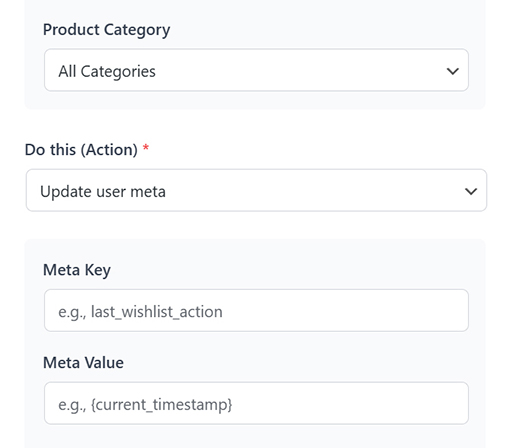
SaveTo Wishlist Pro allows you to silently add, update, or remove tags on a customer’s WordPress profile based on their exact wishlist behavior. Instead of blasting generic emails, this automation helps you effortlessly build hyper-targeted segments that drive massive sales.

React to Real Shopping Behavior

Trigger a user meta update the second a customer takes action. Whether they add a high-ticket item, remove a product, or a saved item drops in price, your store instantly logs that data to their profile so you know exactly who is ready to buy.

Tag Users Silently in the Background

Update a shopper's WordPress user profile with custom meta data without ever interrupting their browsing experience. The system logs their preferences and actions behind the scenes, keeping your store running smoothly and cleanly.

Sync Data for Hyper-Targeted Marketing

Stop relying on manual exports. Pass these automated meta tags directly into your CRM or email marketing software to build accurate audience segments. Send the right message to the right shopper at the exact right time.

Wishlist User Meta for WooCommerce

Automate your user tagging, segment your audience, and personalize your marketing silently behind the scenes.


What Real Users Say About Us

WordPress
WordPress.org
Peter Bohuš

Peter B.

Ecommerce Entrepreneur

The plugin is easy to configure and customize, and it delivers very good results... It does exactly what it is supposed to do. A very capable plugin — good job.

Zach K.

General Manager,
MonsterInsights

SaveTo Wishlist captures one of the most valuable signals in eCommerce – intent. It turns those ‘maybe later’ moments into measurable data and future sales. The integration with Woo is seamless and I recommend it for any store focused on growth.

Andrew M.

President,
AffiliateWP

SaveTo Wishlist is one of those plugins that just fits perfectly into WooCommerce. It’s quick to set up and gives customers a natural way to save products for later. It’s rare to find a tool that genuinely improves conversions.
Chris H.

Chris H.

Founder,
HeroThemes

This feels lightweight and modern. It plays nicely with the Block Editor, which saves me from digging through shortcodes. Definitely a solid choice if you want something that won't break your site's performance.

Arnaud Broes

Arnaud B.

Product Manager,
AIOSEO

Lightweight and reliable. Highly recommend it to any WooCommerce store owner looking for a clean wishlist solution.

John Turner

John T.

Founder,
SeedProd

I needed a wishlist feature for my store and this one honestly does way more than I expected for a free plugin. Multiple wishlists, guest support, easy setup. Took me like 5 minutes to get it running. The button styles look good out of the box too.

Frequently Asked Questions
WooCommerce Wishlist User Meta

Curious about how to automate customer segmentation using Wishlist User Meta for WooCommerce? We've answered some of the most common questions below to help you get started.

How exactly does the WooCommerce wishlist user meta automation work?The wishlist user meta for WooCommerce runs on our powerful automation engine. When a shopper triggers an event (like adding an item to their list or when a saved item goes on sale), the system automatically adds or updates a hidden meta key and value directly on their WordPress user profile.

Do I need to be a developer to set the WooCommerce wishlist user meta up?Not at all. The setup is entirely visual. You simply select your trigger, choose "Update user meta" as the action, and type in your Meta Key and Value. We even provide pre-built dynamic variables—like {product_name}, {customer_email}, and {wishlist_name}—so you can pull personalized data without writing a single line of code.

Will my customers see these meta tags on the front end?No, these updates happen entirely in the background. Your shoppers will have a smooth, uninterrupted browsing experience while your WooCommerce store silently organizes their data for your internal marketing and segmentation needs.

How can I use these user meta tags to increase my sales?By syncing these custom WordPress user meta tags with external CRM or email marketing software (like ActiveCampaign, Klaviyo, or Mailchimp), you can easily group shoppers by their exact intent. This allows you to ditch generic email blasts and send hyper-personalized campaigns that convert at a much higher rate.

Is the WooCommerce Wishlist User Meta feature available in the free version?Wishlist User Meta for WooCommerce is powered by the advanced wishlist automation engine, which is an exclusive feature included in the SaveTo Wishlist Pro extension designed for growing stores that need robust customer segmentation.

Top 5 Reasons Why Thousands Of
Store Owners Choose SaveTo Wishlist

A large pink heart with a white checkmark beside a stylized certificate, symbolizing approval or verified certification.

Fast & Easy Setup

Get up and running with wishlist functionality on your store quickly and easily. Works out of the box with every theme, even WooCommerce block themes.

Multiple Wishlists

Many wishlist solutions restrict how many wishlists end-customers can create, which is counterproductive. Your success is our success. We want your customers to love the wishlist functionality, so we let every store offer multiple wishlists for free.


Three colorful love-themed checklists are displayed with a gift, a badge, and a small note on a warm beige background.
A large pink heart with a white check mark overlaps a stylized verification card, symbolizing approval and authentication.

Always Up To Date & Compatible

Backed by the Rymera team who have built and actively maintain many commercial WooCommerce plugins like Wholesale Suite, Advanced Coupons, AdTribes, and WC Vendors.

Translation Ready

We know not every store is in English, which is why we think it’s important to be 100% translation-ready and compatible with major translation tools like WPML and TranslatePress.


Language translation on a computer screen, surrounded by a globe, multilingual icons, and a checkmark.
A pink piggy bank watches coins rise into taller stacks with heart-shaped leaves and an upward arrow, symbolizing financial growth.

Affordable & Grows With You

SaveTo Wishlist is a great free plugin supported by a Pro extension that gives you the ultimate wishlist functionality to help you grow. Our goal is to provide features that pay for themselves many times over within the first couple of months.

Even More Features to Enhance Your Store

SaveTo Wishlist goes beyond simple wishlists, offering powerful tools to personalize, manage, and engage your customers like never before.

WooCommerce Blocks Support

Personalize the wishlist experience using product blocks, shortcodes, and custom Gutenberg blocks.

  • Add “Save to Wishlist” buttons within product blocks across your site.
  • Display wishlists anywhere using shortcodes or custom Gutenberg blocks.
  • Control wishlist placement and design with full customization options.

My Wishlists

Give customers full control over their saved items with easy wishlist management.

  • View, rename, and delete wishlists from the user account page.
  • Customize the “My Wishlists” tab to match your store’s layout.
  • Provide seamless access to wishlists with a user-friendly interface.

Translation-Ready Wishlists

Make shopping seamless for international customers with full translation support.

  • Translate all wishlist texts and messages for a localized shopping experience.
  • Compatible with WPML and Polylang for easy multilingual integration.
  • Perfect for stores with multisite setups or global audiences.

Guest User Wishlists

Allow shoppers to save products without creating an account, boosting engagement.

  • Let customers add items to their wishlists without needing to log in.
  • Automatically merge guest wishlists into the user account upon registration.
  • Provide a dedicated wishlist page for guest users to view saved products.

Wishlist Customization

Fully personalize the wishlist experience to match your store’s branding.

  • Customize the “Save to Wishlist” button style and placement across your store.
  • Offer five button style options to align with your store’s look.
  • Enable drag-and-drop functionality for item sorting within wishlists.

Admin Controls

Easily manage and customize wishlists to enhance the shopping experience.

  • Edit and organize user wishlists directly from the WooCommerce admin.
  • Customize the “Save to Wishlist” button placement and style.
  • Generate shareable links with customizable expiration times.

REST API

Enjoy advanced control and custom integrations with the Wishlist REST API.

  • Create, update, and manage wishlists programmatically with full CRUD access.
  • Easily update or remove items based on customer preferences.
  • Retrieve wishlist data for customer insights or to sync with external tools.

Get The Best WooCommerce Wishlist Plugin

Create wishlist functionality and grow your store quickly & easily.
Get SaveTo Wishlist Now
Complete Your Purchase