SaveTo Wishlist for WooCommerce

WooCommerce Wishlist Analytics

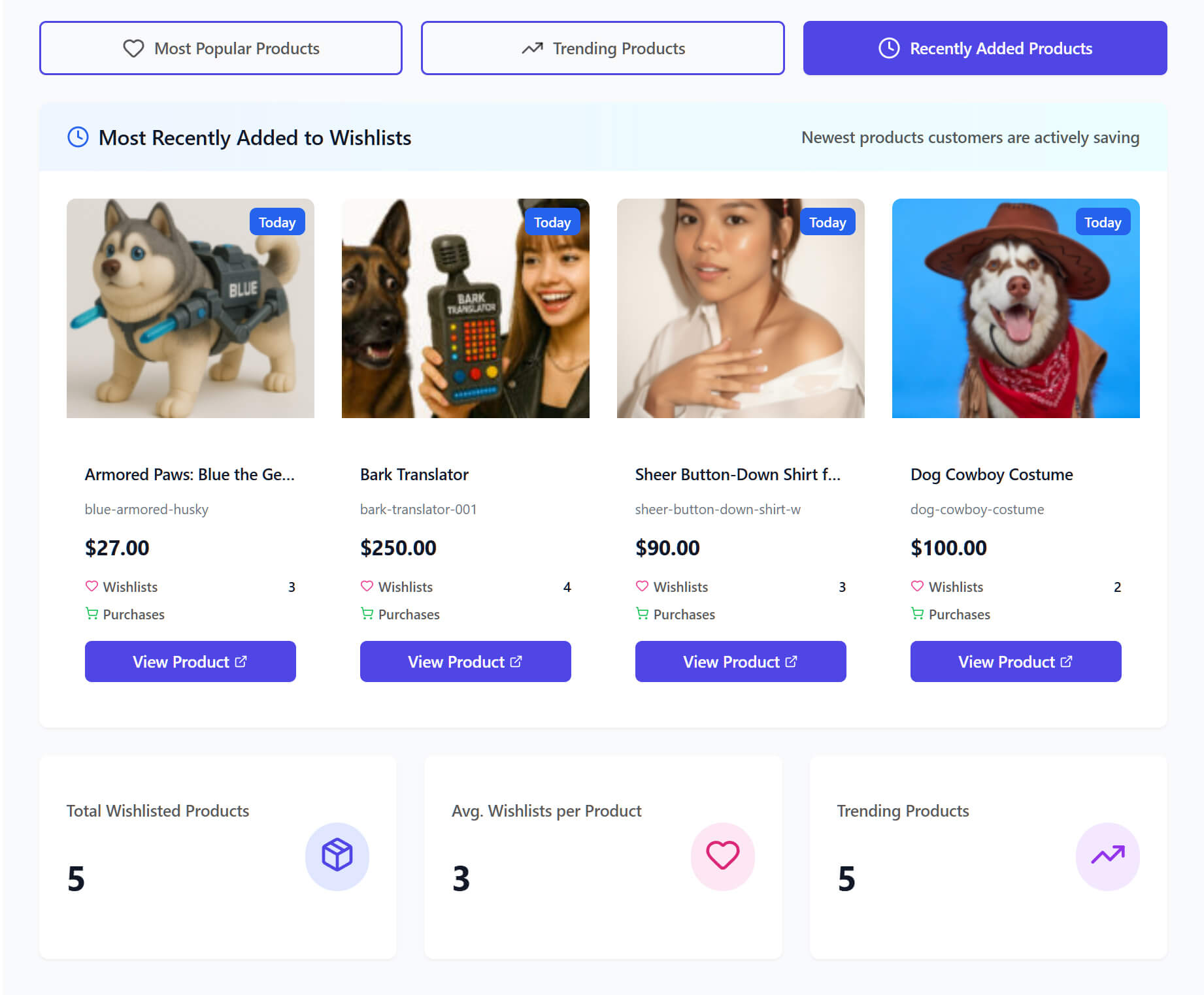
Stop guessing what to stock with WooCommerce Wishlist Data Analytics

  • Track Product Demand
  • Spot Trending Items
  • Time-Based Insights

SaveTo Wishlist Pro reveals exactly what your customers plan to buy next. Use clear data to order inventory confidently and maximize your sales.


WooCommerce Wishlist Price Drop Alert

Make Smarter Inventory Decisions And Boost Your Sales

Stop wasting money on products nobody wants. By understanding exactly how shoppers use their wishlists, you can identify hidden barriers to checkout, plan better promotions, and confidently stock the items your customers actually prefer.

Spot Product Trends Early

Identify your most popular items and catch new trends before they peak. This helps you safely order more inventory for products you know people want.

Target Your Best Customers

Find your most loyal fans and track guest shoppers. Segmenting your audience based on their saved items makes it incredibly easy to send highly targeted, personalized offers.

Improve Conversion Rates

Find items that get saved often but rarely sell. Discovering these issues early lets you adjust pricing or shipping to remove checkout barriers.

Advanced WooCommerce Wishlist Analytics

Track customer demand, spot emerging trends, and stock the right inventory with ease.

What Real Users Say About Us

WordPress
WordPress.org
Peter Bohuš

Peter B.

Ecommerce Entrepreneur

The plugin is easy to configure and customize, and it delivers very good results... It does exactly what it is supposed to do. A very capable plugin — good job.

Zach K.

General Manager,
MonsterInsights

SaveTo Wishlist captures one of the most valuable signals in eCommerce – intent. It turns those ‘maybe later’ moments into measurable data and future sales. The integration with Woo is seamless and I recommend it for any store focused on growth.

Andrew M.

President,
AffiliateWP

SaveTo Wishlist is one of those plugins that just fits perfectly into WooCommerce. It’s quick to set up and gives customers a natural way to save products for later. It’s rare to find a tool that genuinely improves conversions.
Chris H.

Chris H.

Founder,
HeroThemes

This feels lightweight and modern. It plays nicely with the Block Editor, which saves me from digging through shortcodes. Definitely a solid choice if you want something that won't break your site's performance.

Arnaud Broes

Arnaud B.

Product Manager,
AIOSEO

Lightweight and reliable. Highly recommend it to any WooCommerce store owner looking for a clean wishlist solution.

John Turner

John T.

Founder,
SeedProd

I needed a wishlist feature for my store and this one honestly does way more than I expected for a free plugin. Multiple wishlists, guest support, easy setup. Took me like 5 minutes to get it running. The button styles look good out of the box too.

Frequently Asked Questions
WooCommerce Wishlist Analytics

Want to know how WooCommerce wishlist analytics work in SaveTo Wishlist Pro? Here are the most common questions store owners ask about tracking customer data. If you don't see your question here, reach out to us.

What is Advanced WooCommerce Wishlist Analytics?Advanced WooCommerce Wishlist Data Analaytics is a set of tracking tools that helps you understand customer preferences. It tracks saved items, conversion rates, and shopping patterns for smarter business decisions.

Can I track specific product demand?Absolutely. The Product Insights tool shows you which items have the highest total saves. It also provides a live feed of recently added items.

How do time-based trends help my store?Time-based trends reveal exactly when customers are most active in saving items. You can use this data to perfectly time and plan your next big promotional campaign.

Will analytics slow down my website?Not at all. The WooCommerce wishlist analytics data is cached for approximately one hour to ensure high performance. You can also manually refresh it instantly using the "Update Now" button.

Can I track guest shoppers?Of course! The tools let you track guest wishlists alongside registered users. This gives you a complete picture of everyone who visits and uses your store.

Top 5 Reasons Why Thousands Of
Store Owners Choose SaveTo Wishlist

A large pink heart with a white checkmark beside a stylized certificate, symbolizing approval or verified certification.

Fast & Easy Setup

Get up and running with wishlist functionality on your store quickly and easily. Works out of the box with every theme, even WooCommerce block themes.

Multiple Wishlists

Many wishlist solutions restrict how many wishlists end-customers can create, which is counterproductive. Your success is our success. We want your customers to love the wishlist functionality, so we let every store offer multiple wishlists for free.


Three colorful love-themed checklists are displayed with a gift, a badge, and a small note on a warm beige background.
A large pink heart with a white check mark overlaps a stylized verification card, symbolizing approval and authentication.

Always Up To Date & Compatible

Backed by the Rymera team who have built and actively maintain many commercial WooCommerce plugins like Wholesale Suite, Advanced Coupons, AdTribes, and WC Vendors.

Translation Ready

We know not every store is in English, which is why we think it’s important to be 100% translation-ready and compatible with major translation tools like WPML and TranslatePress.


Language translation on a computer screen, surrounded by a globe, multilingual icons, and a checkmark.
A pink piggy bank watches coins rise into taller stacks with heart-shaped leaves and an upward arrow, symbolizing financial growth.

Affordable & Grows With You

SaveTo Wishlist is a great free plugin supported by a Pro extension that gives you the ultimate wishlist functionality to help you grow. Our goal is to provide features that pay for themselves many times over within the first couple of months.

Even More Features to Enhance Your Store

SaveTo Wishlist goes beyond simple wishlists, offering powerful tools to personalize, manage, and engage your customers like never before.

WooCommerce Blocks Support

Personalize the wishlist experience using product blocks, shortcodes, and custom Gutenberg blocks.

  • Add “Save to Wishlist” buttons within product blocks across your site.
  • Display wishlists anywhere using shortcodes or custom Gutenberg blocks.
  • Control wishlist placement and design with full customization options.

My Wishlists

Give customers full control over their saved items with easy wishlist management.

  • View, rename, and delete wishlists from the user account page.
  • Customize the “My Wishlists” tab to match your store’s layout.
  • Provide seamless access to wishlists with a user-friendly interface.

Translation-Ready Wishlists

Make shopping seamless for international customers with full translation support.

  • Translate all wishlist texts and messages for a localized shopping experience.
  • Compatible with WPML and Polylang for easy multilingual integration.
  • Perfect for stores with multisite setups or global audiences.

Guest User Wishlists

Allow shoppers to save products without creating an account, boosting engagement.

  • Let customers add items to their wishlists without needing to log in.
  • Automatically merge guest wishlists into the user account upon registration.
  • Provide a dedicated wishlist page for guest users to view saved products.

Wishlist Customization

Fully personalize the wishlist experience to match your store’s branding.

  • Customize the “Save to Wishlist” button style and placement across your store.
  • Offer five button style options to align with your store’s look.
  • Enable drag-and-drop functionality for item sorting within wishlists.

Admin Controls

Easily manage and customize wishlists to enhance the shopping experience.

  • Edit and organize user wishlists directly from the WooCommerce admin.
  • Customize the “Save to Wishlist” button placement and style.
  • Generate shareable links with customizable expiration times.

REST API

Enjoy advanced control and custom integrations with the Wishlist REST API.

  • Create, update, and manage wishlists programmatically with full CRUD access.
  • Easily update or remove items based on customer preferences.
  • Retrieve wishlist data for customer insights or to sync with external tools.

Get The Best WooCommerce Wishlist Plugin

Create wishlist functionality and grow your store quickly & easily.
Get SaveTo Wishlist Now
Complete Your Purchase