
Risk-Free 14-Day Refund Guarantee



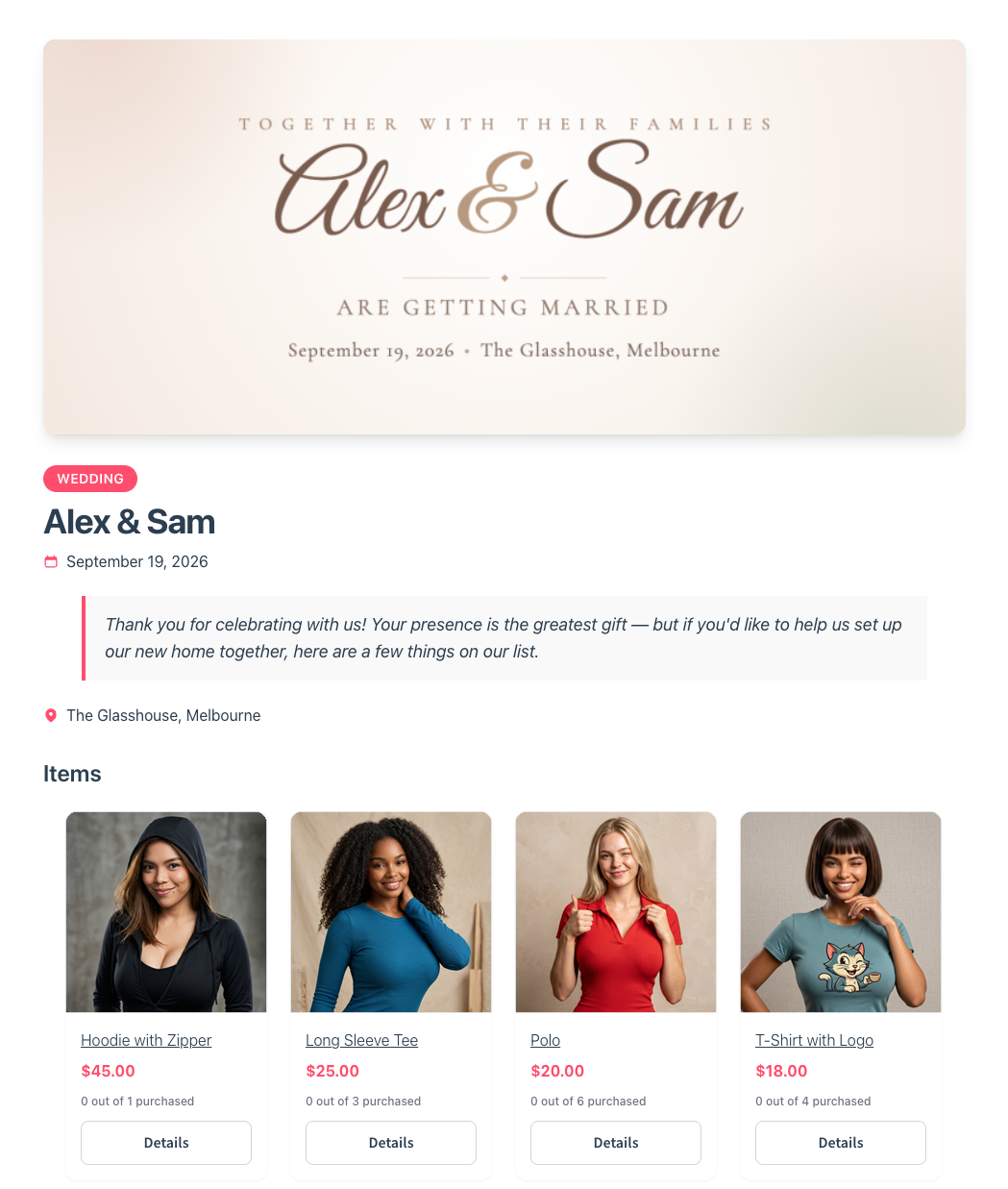
The Gift Registry Addon tracks every purchase and helps prevent duplicate gifts, letting friends and family buy items directly from your store without ever needing to create an account.



Built to the highest standards and backed by industry experts you trust.
Standard wishlists are great for saving items, but they aren't built for major life events.
The SaveTo Wishlist Gift Registry Addon adds the exact features your store needs to host shared events, track purchases, and manage guest buyers.
Let customers turn any wishlist into a registry by filling out a quick form. They can add event dates, welcome notes, and cover images to personalize their page.
Purchases record as soon as an order goes through, automatically adjusting the requested item counts to minimize the chance of guests buying the exact same gift twice.
Guests can view an event list, add items to their cart, and checkout without ever being forced to register or create a store account.
A private dashboard makes it simple for registry owners to track incoming gifts, view the buyer’s details, and mark their thank-you notes as sent.
A dedicated public search page lets friends, family, and guests look up an active registry using the registrant's name and filter the results by specific event types.
Manage every registry from a single WordPress screen. You can view the public pages, archive past events, or safely edit lists on behalf of your customers.
A built-in share button makes it easy for owners to distribute their list. They can quickly copy their custom link, send a pre-filled email, or share directly to Facebook, X, and WhatsApp.
Keep customers informed. The addon automatically sends an email to the registry owner whenever a guest buys, refunds, or cancels a gift.
Registries aren't locked after creation. Owners can continually add new items as their plans change and easily reorder their product list via drag-and-drop.

Handling large events takes more than a basic wishlist; it requires specific tools.
The SaveTo Wishlist Gift Registry Addon gives your customers exactly what they need to share product lists, track guest purchases, and minimize duplicate gifts.
Provide the features your customers expect and stop losing group buyers to third-party registry websites.
Included at no extra cost with the Plus and Business plans. For more information, see the pricing page.

Stop sending customers to outside registry platforms. When shoppers share their event link with friends and family, it brings new visitors directly to your checkout.
Items sitting in a guest’s cart do not lock up your stock or block other buyers. This ensures your store runs smoothly during large events.


Make group gifting straightforward. Guests can quickly add registry items to their cart and complete their purchase without ever being forced to create a user account.
The system tracks claimed items accurately as soon as an order goes through. This minimizes the chance of guests accidentally wasting money on the exact same gift and saves you from processing unnecessary refunds.


The addon works alongside your existing wishlists and includes built-in appearance settings to match your active theme's styling. This provides a clean, unified look without requiring custom coding.
Maintain full control of your store from your WordPress dashboard. You can monitor every active registry, track purchase counts, and create lists on behalf of customers.


Don't let another customer leave your site to build their registry elsewhere.
Join the store owners using the SaveTo Wishlist Gift Registry Addon to keep guests and their purchases directly on their own checkout pages.
Start turning individual wishlists into completed group orders today.
Included at no extra cost with the Plus and Business plans. For more information, see the pricing page.
New to registries? See how gift registries work in WooCommerce, step by step.
Planning a registry for your store? Compare a gift registry vs a registry website, or see our gift registry statistics.
Thanks for getting in touch with us. We endeavour to reply to all queries within 24-48 hours.
Looking for support? Click here for a faster response.
Please fill in the following form and we will get back to you.
The best WooCommerce wishlist plugin.

