

 Reviewed by
 A homewares store can lose an entire wedding season without ever seeing it happen. The couple registers on a third-party registry website. Then their guests buy the gifts there. The store whose products they actually wanted gets none of the orders and no email addresses.
Nobody sends you a report about it. There’s no abandoned cart to recover, and no failed checkout in your logs. After all, the checkout never started on your site. The only clue is a quiet season in a category that should’ve been busy.
That’s the real question behind WooCommerce gift registry vs registry website. Not which one looks nicer, but which one keeps the order, the customer record and the follow-up. I’ve seen this decision made on gut feel far more often than on numbers. So here’s what each option actually does.
Jump to:
- What A Registry Website Actually Does For A Couple
- What Changes When The Registry Lives On Your Store
- The Discoverability Question Everyone Raises
- The One Case Worth Acknowledging
- How An On-Store Registry Works In WooCommerce
- Where Duplicate-Gift Protection Holds And Where It Slips
- What Lands In Your Store With Each Registry Order
- What Happens To A Registry After The Event
- What It Costs To Run Your Own Registry
- FAQs: WooCommerce Gift Registry Vs Registry Website
- Gift Registry Or Registry Website: The Verdict
What A Registry Website Actually Does For A Couple
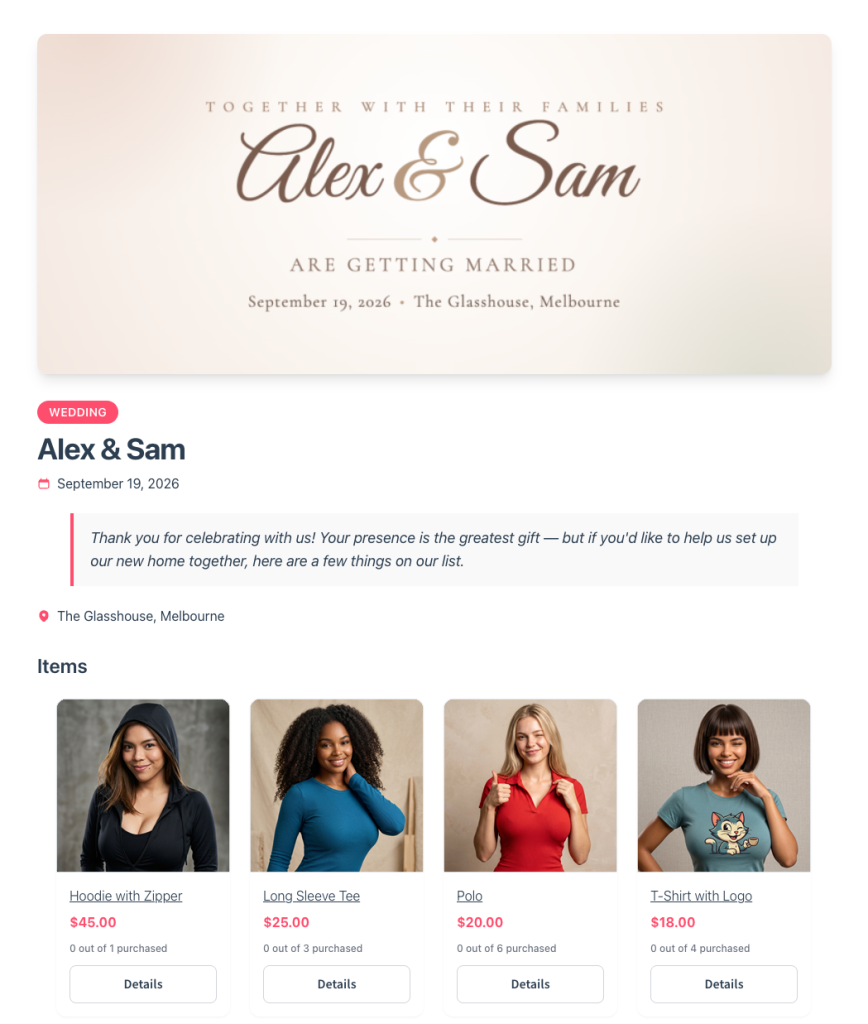
A registry website gives a couple one list that spans every store they want to shop from. That’s the whole product, and it’s genuinely useful.
Here’s what those sites do well:
- One list, many retailers: bedding from one shop, a coffee machine from another, furniture from a third.
- One link for guests: family members get one place to look instead of four separate registries.
- A name-based lookup: guests who mislaid the link can usually search the couple up by name.
- Claim tracking across all of it: once an item is marked as bought, other guests see it’s taken.
- Free to the couple: the person building the list pays nothing to build it.
For a couple registering across genuinely unrelated retailers, that’s real convenience. It’s also why these sites exist at all, and dismissing them misreads what the customer can plainly see working.
It’s worth being precise about how the buying flows, though. On a universal registry, the guest is typically handed off to a retailer to finish the purchase. Alternatively, the registry site fulfils it through its own partner arrangements. Either way, somebody other than you decides where that order lands.
Convenience is never free. It’s just that the couple isn’t the one paying for it. Instead, the registry site earns on the transaction or the referral relationship, and both of those used to be yours.
What Changes When The Registry Lives On Your Store

When the registry sits on your own store, three things stay with you. The order, the customer record, and the follow-up.
- The order is yours end to end. A guest checks out through your gateway, on your shipping rules, at your margin. No referral cut, no partner arrangement.
- The buyer becomes your customer. Wedding guests are often new to your store. Plus they arrive pre-sold and buy something specific. On a registry website, that record belongs to the registry website.
- The follow-up is yours to run. Someone who bought a serving bowl for a friend’s wedding is a warm prospect for their own kitchen. It’s the same logic behind recovering browse abandonment.
- Your catalogue stays coherent. The registry only shows products you actually sell and stock. So nothing on the list turns out to be discontinued elsewhere.
So the gap is easiest to see side by side.
| Registry on your store | Registry website | |
|---|---|---|
| Who receives the order | Your store | The registry site or its retail partner |
| Who owns the customer email | You | The registry site |
| Guest checkout without an account | Yes | Varies by site |
| Duplicate-gift protection | Yes, checked at add-to-cart | Yes |
| Works across many unrelated retailers | No | Yes |
None of this needs a separate storefront or a different checkout. Already decided the registry belongs on your store? Then our guide on how to set up a gift registry for weddings and events walks through the configuration. That leaves this article free to stay on the decision itself.
The Discoverability Question Everyone Raises
A registry gets found two ways, and a public directory is neither of them. That matters, because the objection to an on-store registry is always that nobody will find it.
The couple shares the link
Registries spread through the couple, not through search. They send the link with the invitation and add it to the wedding website. Then it goes into the family group chat.
So the addon leans into that. The SaveTo Wishlist Gift Registry Addon puts an owner-only share button at the top of the registry page. It offers a copy link, a pre-filled email, and direct sharing to Facebook, X and WhatsApp.
That sharing is also the part a registry website can’t hand back to you. As a result, every share drops a new visitor onto your product pages. Plenty of them have never heard of your store. The same effect turns up with collaborative and shared wishlists, where one list quietly recruits a group of first-time buyers.
Guests who lost the link search your store
For everyone else, the addon publishes a Find a Registry page carrying the [saveto_registry_search] shortcode. A guest types the registrant’s name, filters by event type, and lands on the right registry. No account needed, and no original link either.
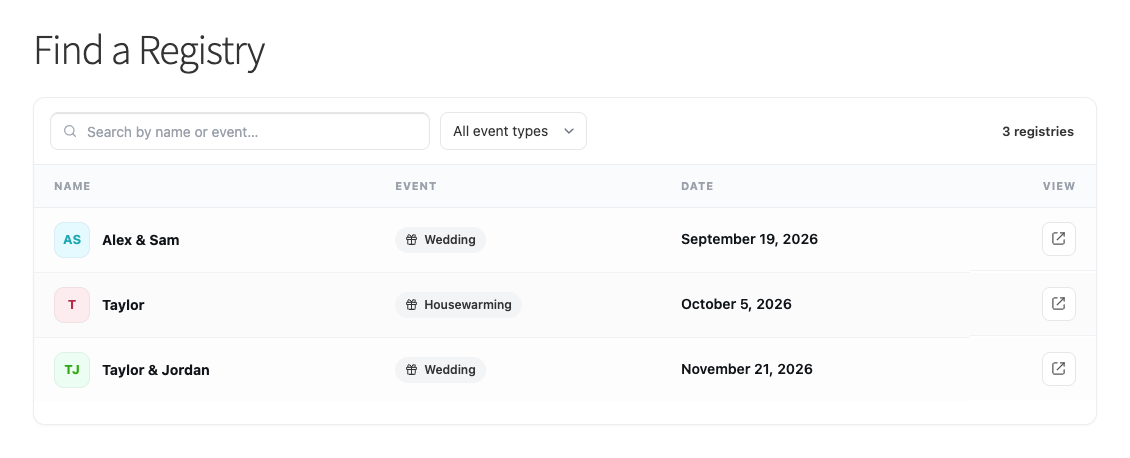
So put that page in your main navigation. Otherwise the objection makes itself true.
The One Case Worth Acknowledging
There’s one situation a universal registry serves that a single store cannot. A couple wanting bedding, a power tool and a dinner service needs a list spanning three unrelated retailers. And no store-hosted registry will ever do that, so pretending otherwise would be dishonest.
Still, it isn’t the situation most stores are actually in. You aren’t competing for the couple’s whole list. You’re competing for the part your catalogue can fill, and that part has no reason to live anywhere else. Meanwhile, a couple can keep a broad list elsewhere and still register your products with you.
So the question was never whether universal registries have a use. It’s whether the slice your catalogue already covers should be earning the order for someone else.
How An On-Store Registry Works In WooCommerce
On a WooCommerce store, a registry starts life as an ordinary wishlist. The customer saves the products they want, then converts that list into a registry with event details attached.
The saving half is free. SaveTo Wishlist Lite is the free core plugin, and it puts the Save to Wishlist button on your catalogue. Testing version 1.1.1 on a staging store, we found the button rendered right across the shop product loop. That matters more than it sounds, because someone building a registry scans a category page rather than opening thirty products.
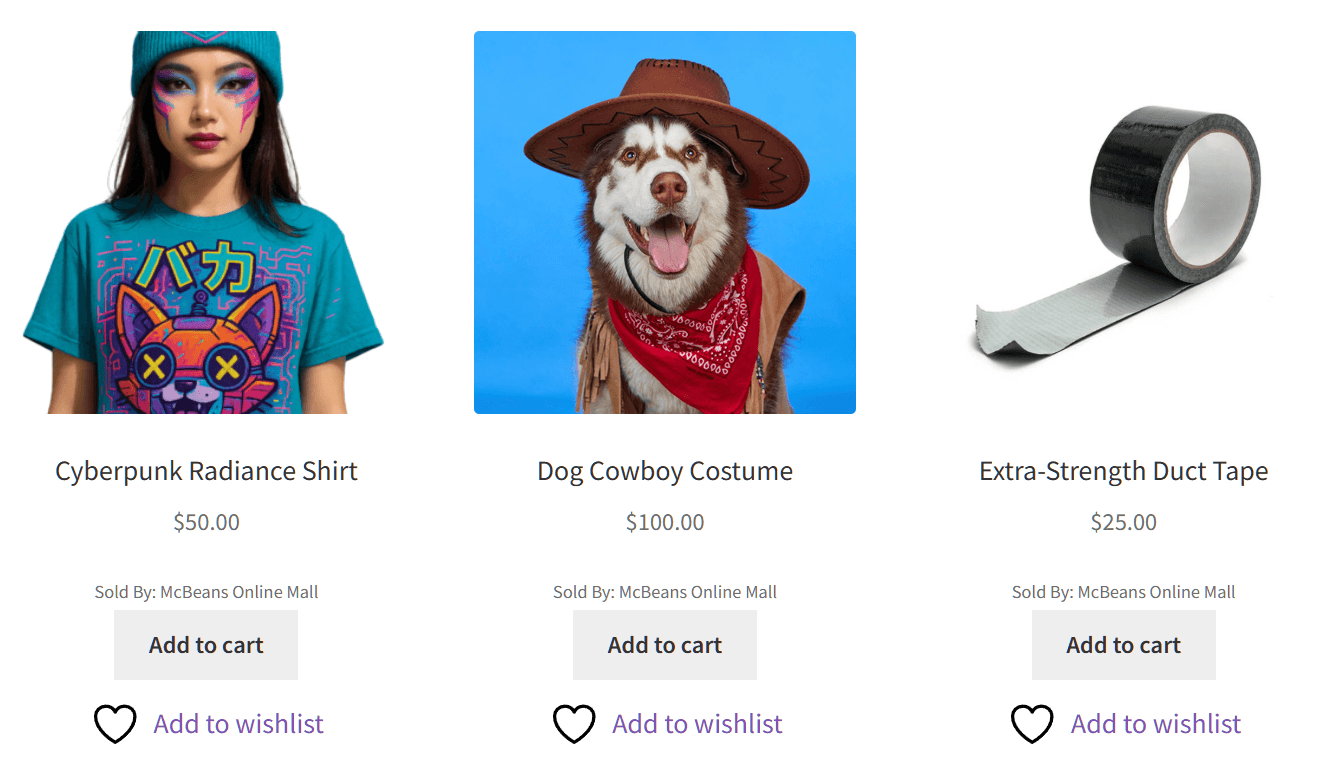
Saving as a guest brought up a confirmation popup with a View Wishlist button and a prompt to log in. Meanwhile the button itself switched to “Remove from Wishlist”. That popup is the moment an anonymous browser turns into a named one. That’s exactly the step you want first.
Turning the wishlist into a registry
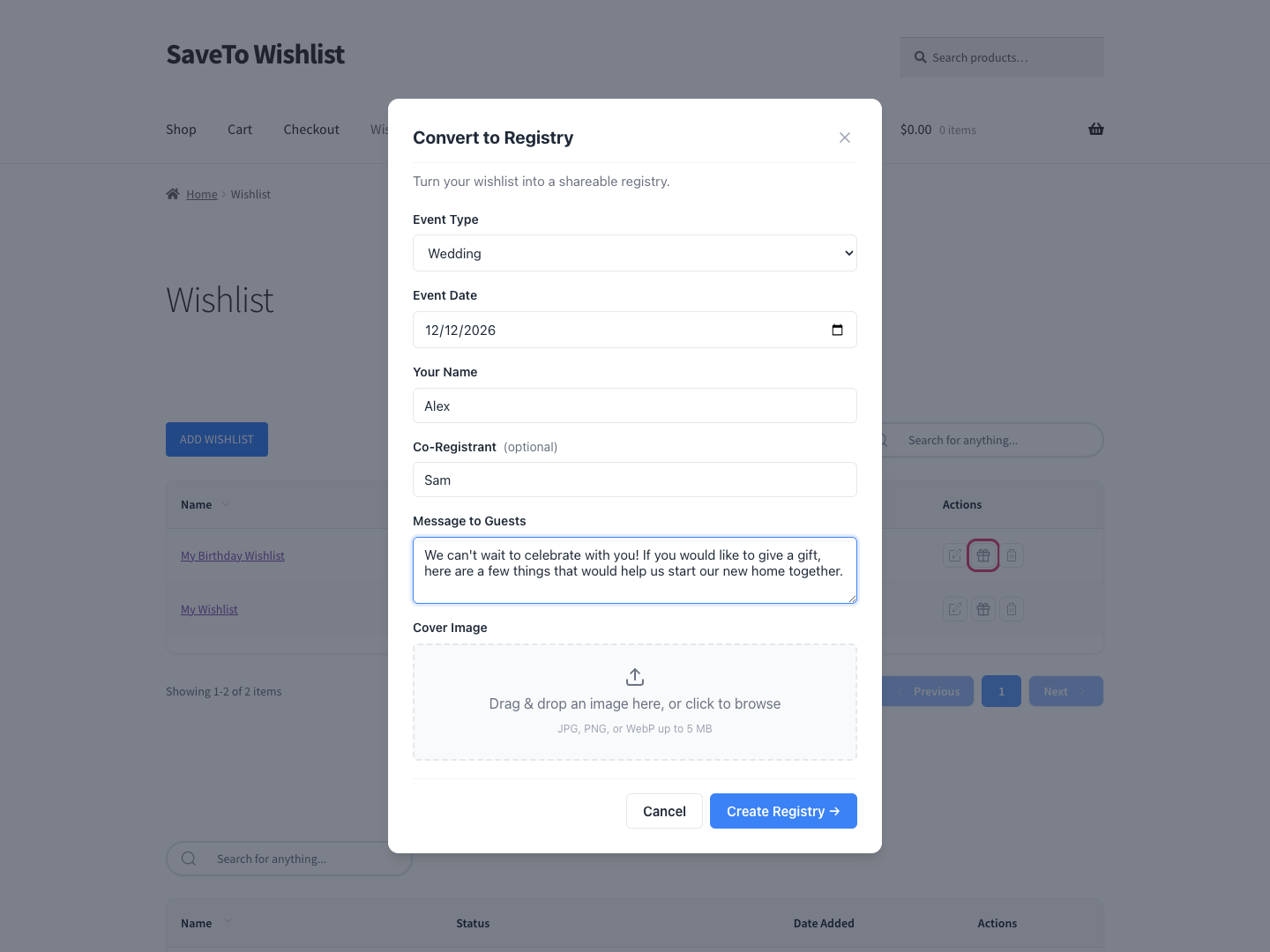
Converting is a form, not a rebuild. The Gift Registry Addon adds a convert action beside an eligible wishlist the customer owns. From there, they fill in the event details. A Gift Registries tab then appears in My Account directly after the Wishlist tab, from the first conversion onward.
What the registry does once it’s live
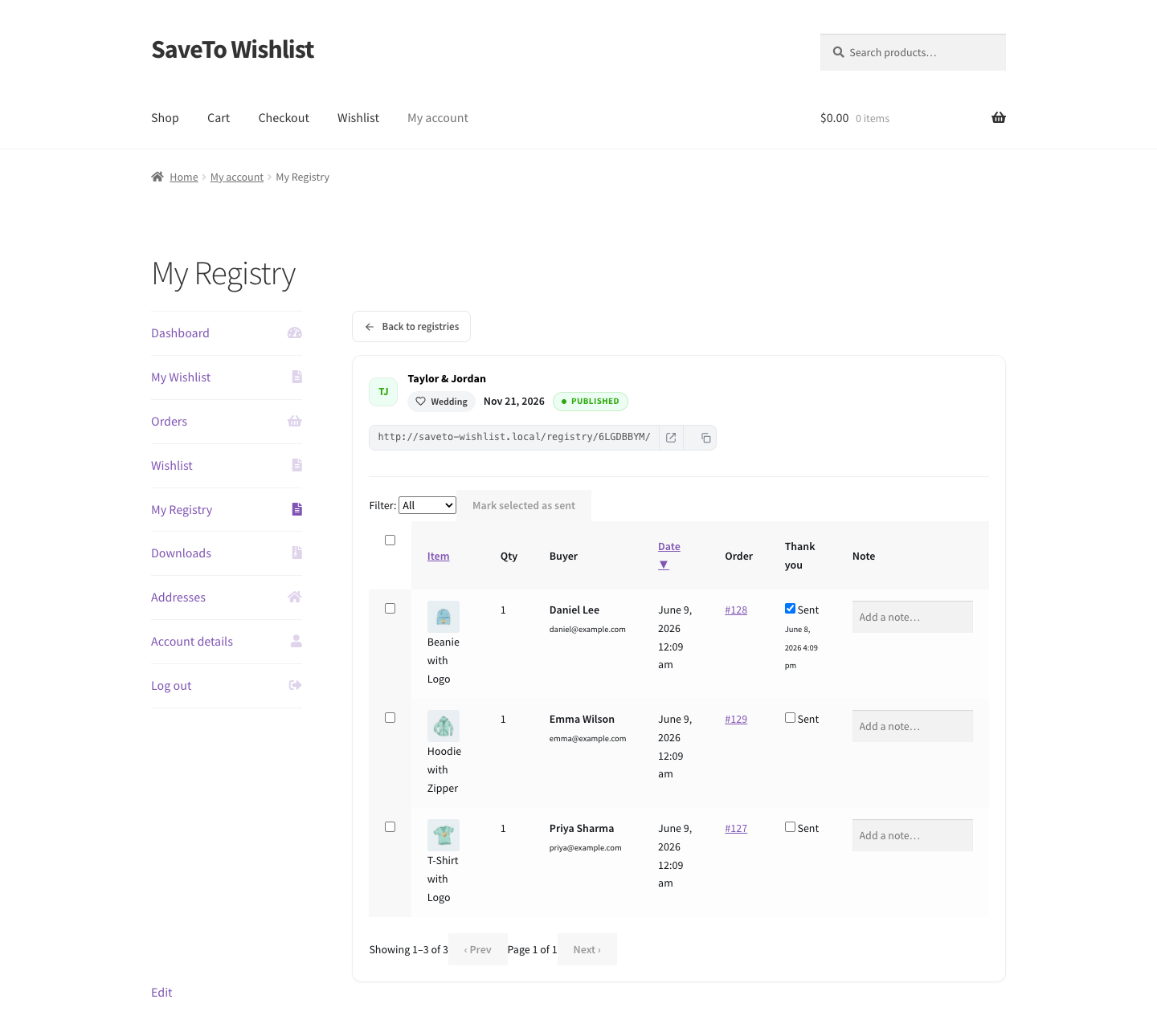
Purchases record as soon as an order goes through, and the requested item counts adjust automatically. That’s what keeps duplicate gifts down. Guests can also add registry items to their cart and check out without creating a store account.
On top of that, the registry owner gets a private dashboard for tracking incoming gifts and viewing buyer details. Then they can mark thank-you notes as sent. Plus they’re emailed whenever a gift is bought, refunded or cancelled.
🔍️ What we’ve seen: the Find a Registry page gets published, then never reaches the main menu. It’s an easy step to miss. A guest who mislaid the link searches the couple’s name on Google instead. That search rarely leads back to your store, and often leads to a registry website.
Where Duplicate-Gift Protection Holds And Where It Slips
Avoiding duplicate gifts is most of the reason registries exist. So it helps to know exactly where that protection sits.
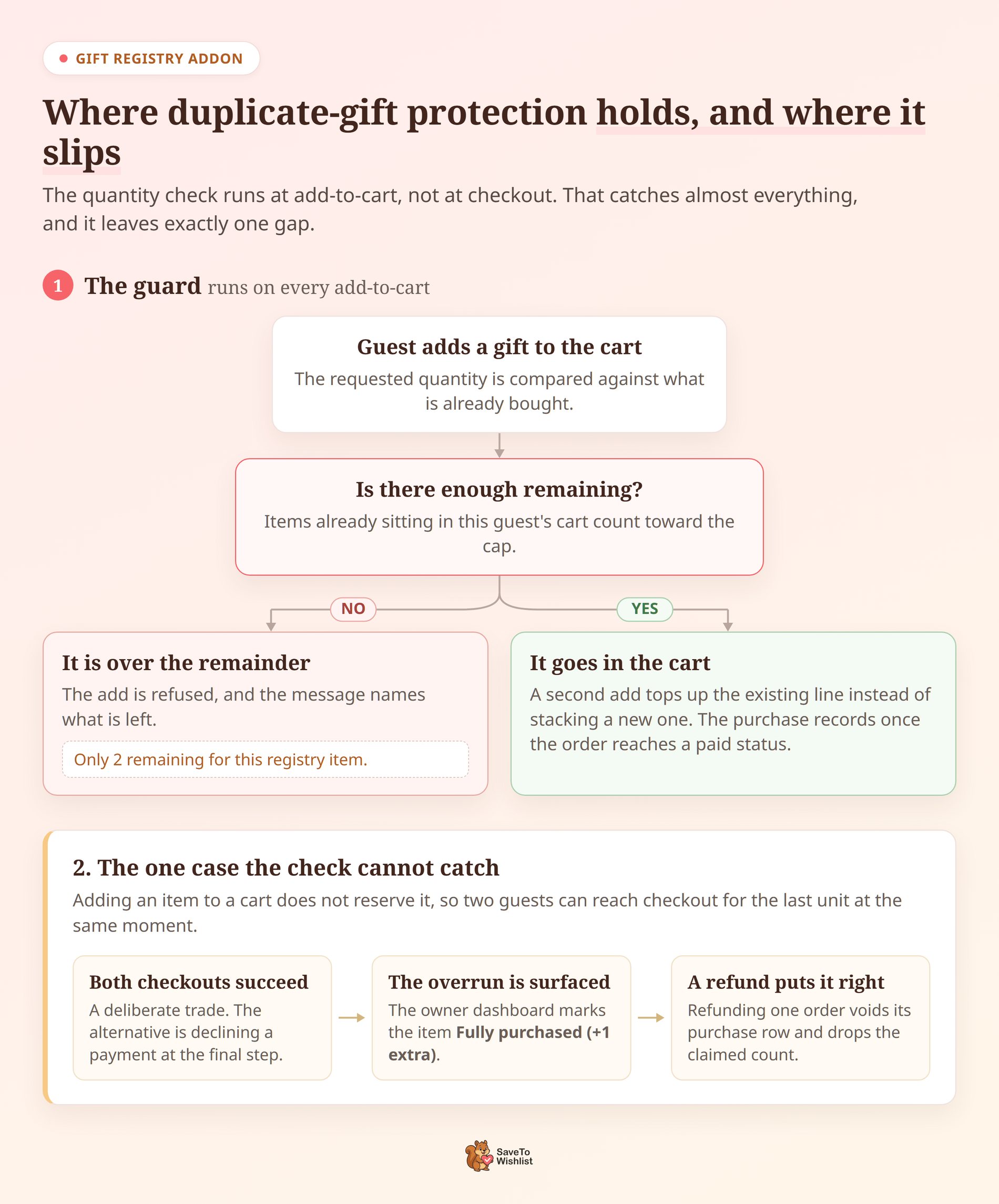
In practice, the check runs at add-to-cart rather than checkout. The addon compares the requested quantity against what’s already been bought. Anything over the remainder gets rejected, with a message naming what’s left. In practice that reads “Only 2 remaining for this registry item.”
Items already in the guest’s cart count toward that cap. So a second add tops up the existing line instead of stacking a new one. Archived and deleted registries stop taking purchases altogether, and guests see “This registry is no longer accepting purchases.”
The one case the check cannot catch
Two guests can reach checkout for the last unit at the same moment. Both will succeed, because adding an item to a cart doesn’t reserve it. That’s a deliberate trade. The alternative is declining a payment at the final step, for a gift already chosen.
An overrun gets surfaced rather than hidden. The owner’s dashboard marks the item “Fully purchased (+1 extra)”. So the couple sees the extra, instead of a count that disagrees with the parcels. Refunding one order voids its purchase row and drops the claimed count.
By contrast, a registry website has the same gap. So this isn’t a point of difference between the two. It’s just worth mentioning to a couple before they ask.
🔍️ What we’ve seen: it’s easy to promise a couple that duplicates are impossible. That’s how the feature feels in testing. “Very unlikely, and here’s what we do if it happens” reassures just as well. It also holds up when two identical parcels turn up.
What Lands In Your Store With Each Registry Order
Keeping the customer record is the whole argument for hosting the registry yourself. So it’s fair to ask what that record contains.
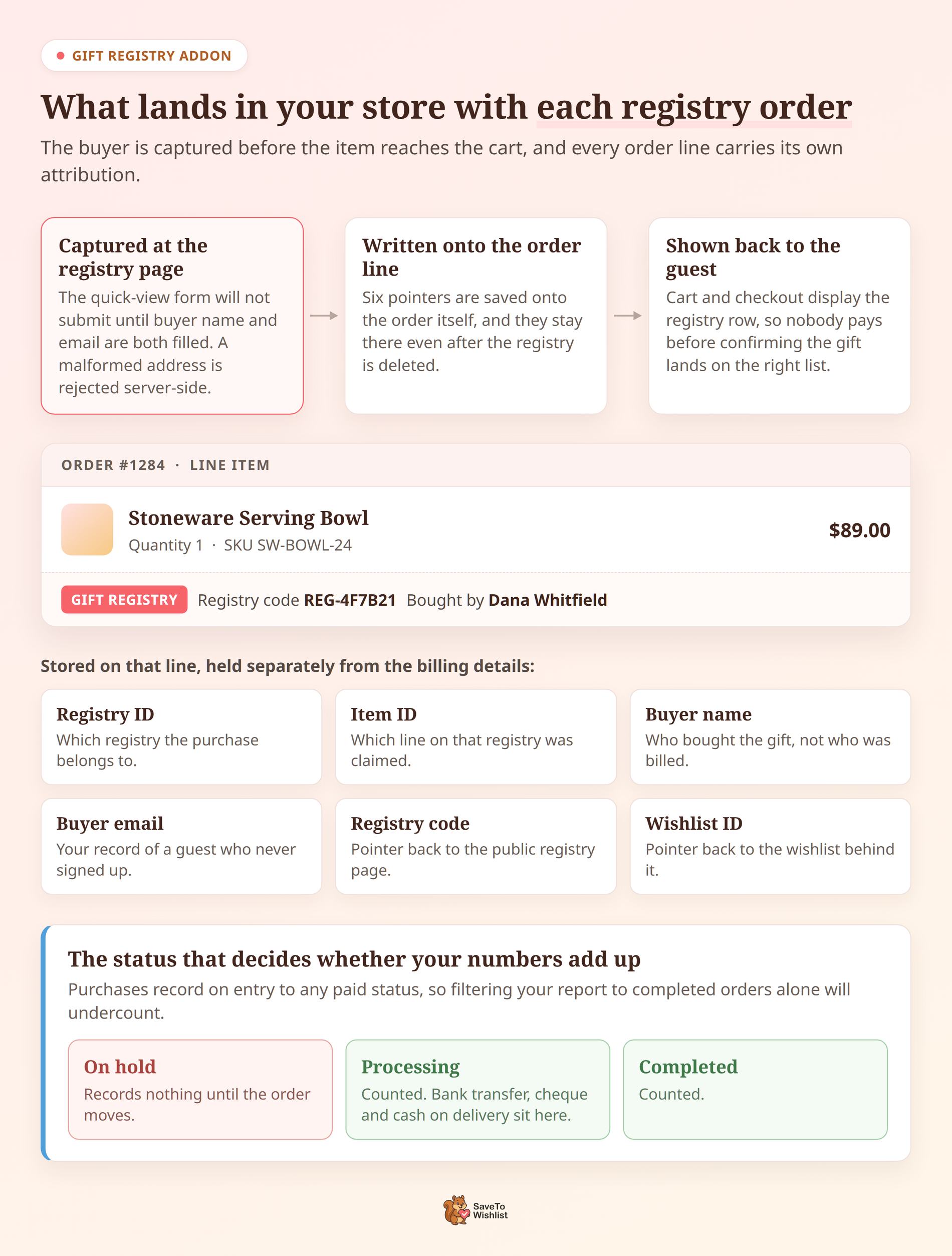
Buyer name and email are captured before the item reaches the cart, not at checkout. The quick-view form on the registry page won’t submit until both are filled. A malformed address gets rejected server-side too. So you get a named buyer even when that person checks out as a guest.
That ordering matters. In Baymard Institute’s list of checkout abandonment reasons, 18% picked “the site wanted me to create an account”. Capturing the buyer at add-to-cart gets you the record without the signup.
Each order line then carries its own attribution, saved onto the order itself:
- Registry and item IDs: which registry the purchase belongs to, and which line on it.
- Buyer name and email: who bought the gift, held separately from the billing details.
- Registry code and wishlist ID: pointers back to the public registry and the wishlist behind it.
Those pointers stay on the line even after the registry itself is deleted. Guests can see the attribution too. Cart and checkout lines show a Gift Registry row, the registry code and the buyer name. So nobody pays before confirming the gift is landing on the right list.
The status that decides whether your numbers add up
Purchases record when an order enters any WooCommerce paid status. That means processing as well as completed. An order sitting on hold records nothing until it moves.
This catches people out on the first report. Filtering to completed orders alone will undercount. Bank transfer, cheque and cash-on-delivery orders sit in processing, and every one has already been credited.
None of this is available on a third-party registry. You can’t report on orders that were never yours.
What Happens To A Registry After The Event
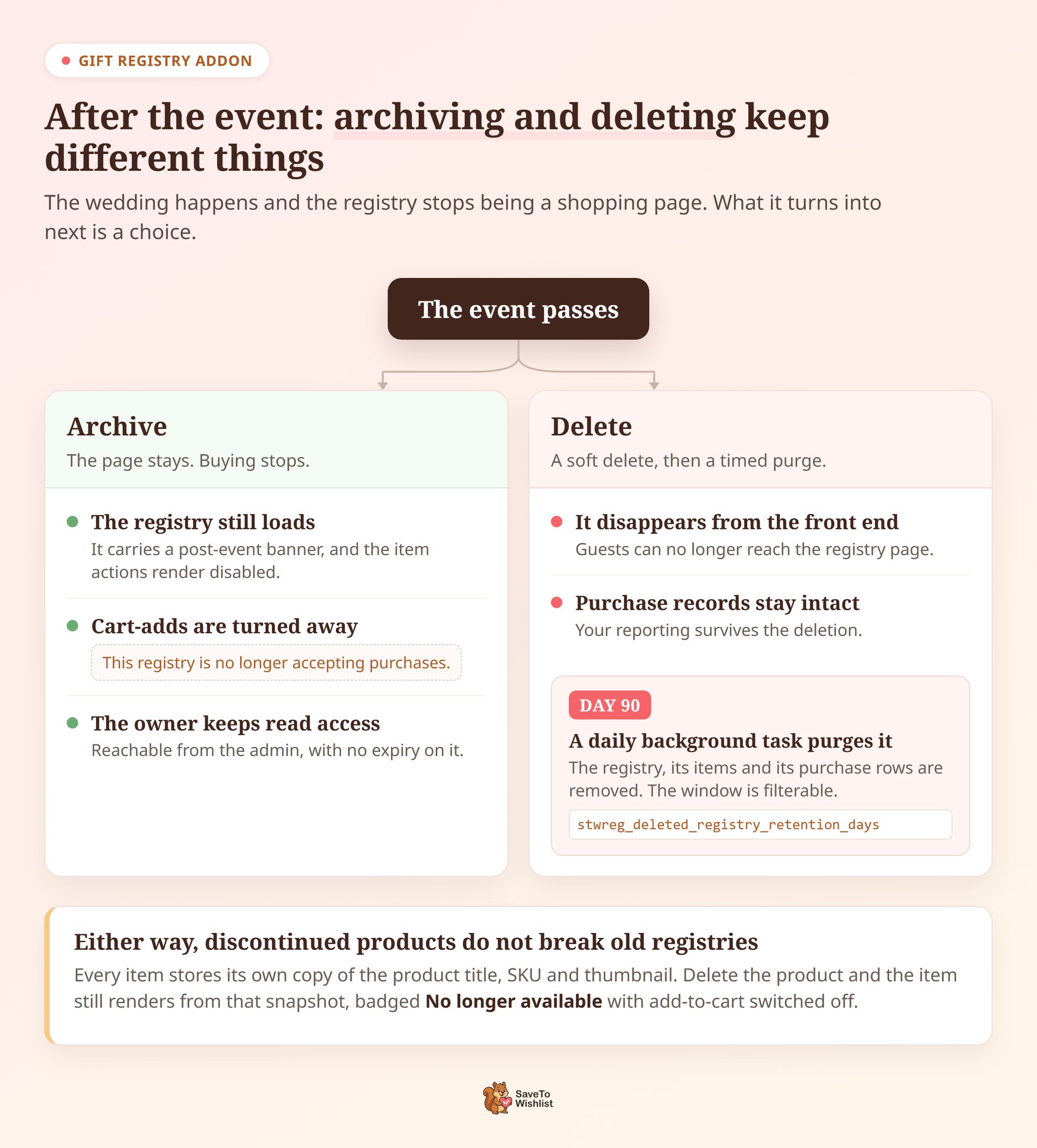
The wedding happens and the registry stops being a shopping page. What it turns into next is a choice, because archiving and deleting do different things.
First, archiving keeps the page. It still loads, carrying a post-event banner, and the item actions render disabled. Cart-adds get turned away with “This registry is no longer accepting purchases.” The owner keeps read access from the admin.
By contrast, deleting is a soft delete. The registry disappears from the front end while its purchase records stay intact. A daily background task then removes the registry, its items and its purchase rows. That happens 90 days later.
That window is filterable, through stwreg_deleted_registry_retention_days. So a developer can shorten it to match a data-retention policy, or extend it to keep the reporting for longer.
Discontinued products do not break old registries
Every registry item stores its own copy of the product title, SKU and thumbnail. Delete the product and the item still renders from that snapshot. It shows a “No longer available” badge with add-to-cart switched off.
Meanwhile, existing purchase rows stay queryable. So last season’s thank-you list survives this season’s catalogue tidy-up.
When something does go wrong, the addon writes it down and stays out of the way. Registry errors get logged to WooCommerce > Status > Logs, under the source stwreg. They never stop an order from completing.
Meanwhile a registry website settles this part on your behalf. Their retention policy decides how long the record lasts, and you aren’t the one who sets it.
What It Costs To Run Your Own Registry
The Gift Registry Addon isn’t sold on its own. It’s bundled with two of the three paid SaveTo Wishlist plans, and knowing which two saves a wasted purchase.
- Growth: $49.50 for the first year, then $99 on renewal. Includes SaveTo Wishlist Pro on a single site, but not the Gift Registry Addon.
- Plus: $99.50 for the first year, then $199 on renewal. Cheapest plan carrying the Gift Registry Addon, on a single site.
- Business: $199.50 for the first year, then $399 on renewal. Same addon, with an unlimited sites licence.
Those first-year figures are introductory pricing, and renewals return to the regular price. So budget against the renewal number rather than the intro one. There’s a 14-day money-back guarantee if the fit turns out to be wrong.
Also, the free SaveTo Wishlist Lite plugin still handles the wishlist side at no cost. SaveTo Wishlist Pro is the paid extension the registry addon sits alongside.
Now set that against what a registry website costs you. It’s free to the couple, and the price lands on your store instead. That price is orders you never see and buyers you never get to email. Plus a wedding season that happened somewhere else.
FAQs: WooCommerce Gift Registry Vs Registry Website
Can guests buy from a registry without creating an account
Yes. Guests can add registry items to their cart and check out without creating a store account. That removes one of the most common reasons people abandon a checkout. They still get a normal WooCommerce order confirmation, and the purchase still registers against the list.
What stops two guests buying the same gift?
The addon checks the remaining quantity at add-to-cart and refuses anything over it. Anyone looking at the registry sees what’s already claimed, rather than a static list. Two guests checking out the last unit simultaneously can still both succeed, and the dashboard flags that overrun. The registry owner is also emailed when a gift is bought, refunded or cancelled.
Can a customer use a registry website as well as ours?
They can, and plenty do. Neither option locks the other out, and a couple with a very broad list may keep something running elsewhere. What matters for your store is that the products you sell are registered with you. Then those orders and those buyer records land in your WooCommerce store.
Which SaveTo Wishlist plan includes the Gift Registry Addon?
Plus and Business. Plus costs $99.50 for the first year and $199 on renewal. Business costs $199.50 for the first year and $399 on renewal. Growth ($49.50 first year, $99 renewal) includes SaveTo Wishlist Pro but not the registry addon.
Do I need the free plugin as well?
Yes. SaveTo Wishlist Lite is the free core that handles wishlists, and SaveTo Wishlist Pro is the paid extension. The Gift Registry Addon runs on top of them. Because a registry begins as a wishlist, the free plugin stays part of the stack.
Gift Registry Or Registry Website: The Verdict
Here’s the part that’s easy to miss. A registry is the one moment in retail where your customer actively recruits other buyers for you. So handing it to a third party isn’t a neutral choice. It’s paying someone else to run your best referral channel.
- Understand what a registry website gives a couple before deciding what you’re competing with.
- Count what an on-store registry keeps: the order, the customer email and the follow-up.
- Publish a Find a Registry page and link it from your menu, so lost-link guests still reach you.
- Know where duplicate protection holds and what lands on the order line when a guest buys.
- Decide what happens after the event, because archiving and deleting keep different things.
- Budget against the renewal price, not the introductory one.
SaveTo Wishlist is what we’d run this on, and it’s the recommendation here. Pick up the Gift Registry Addon with the Plus or Business plan. Then keep the next wedding season on your own store.



