


 Reviewed by
 A major update for SaveTo Wishlist Pro is officially live!
We focused this release entirely on helping you turn saved items into completed purchases while cutting down your administrative workload. With new automated direct customer alerts for sales and restocks, a live email testing tool, and completely overhauled B2B wholesale support, this update gives you the tools to drive revenue on autopilot.
Read on for a breakdown of the new premium features available for your store today!
✨️Major Updates: Revenue-Driving Alerts & B2B Integration
For this release, we focused on tools that actively generate sales and streamline your administrative workflow.
We completely upgraded the automation system to let you directly notify customers the moment their saved items drop in price or restock. We also added a highly requested live email tester so you can verify your designs before they’re sent. Furthermore, we overhauled our B2B integration to ensure your wholesale buyers see perfectly accurate pricing across their lists.
1. Direct Customer Alerts: On Sale & Back in Stock
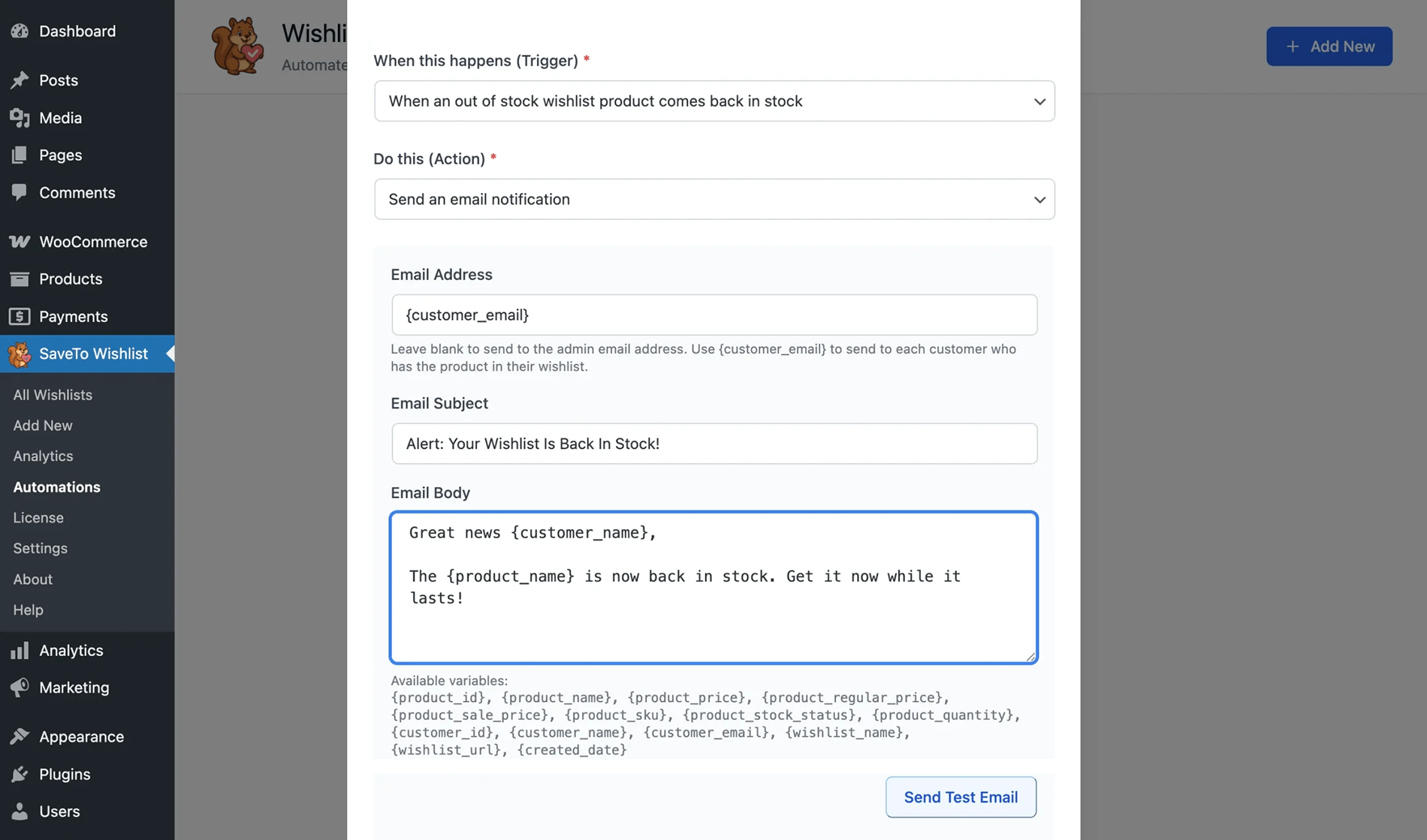
Previously, “Product on Sale” and “Back in Stock” automations only notified the store administrator. Now, you can automatically email every single customer who has that specific item saved in their wishlist the exact moment the price drops or inventory returns.
What you need to know:
- Dynamic customer routing: Type the
{customer_email}tag into the recipient field. The plugin scans your store and sends an email to every shopper who saved that item.
- Smart duplicate protection: The system sends only one email per customer, even if they saved the same out-of-stock product across multiple different wishlists.
- Address verification: If a user account has an invalid or missing email address, the plugin ensures the alert isn’t lost by safely falling back and sending that specific notification to your primary site admin email.
- Personalized content: You can greet each recipient by name using the
{customer_name}tag, and include all of their saved items using the{wishlists}tag to give them full context.
- Helpful UI guidance: You will see hint text right below the email field that dynamically reminds you to use the
{customer_email}tag when you select the Sale or Back in Stock triggers.
2. Perfect Your Messaging: Live Email Testing
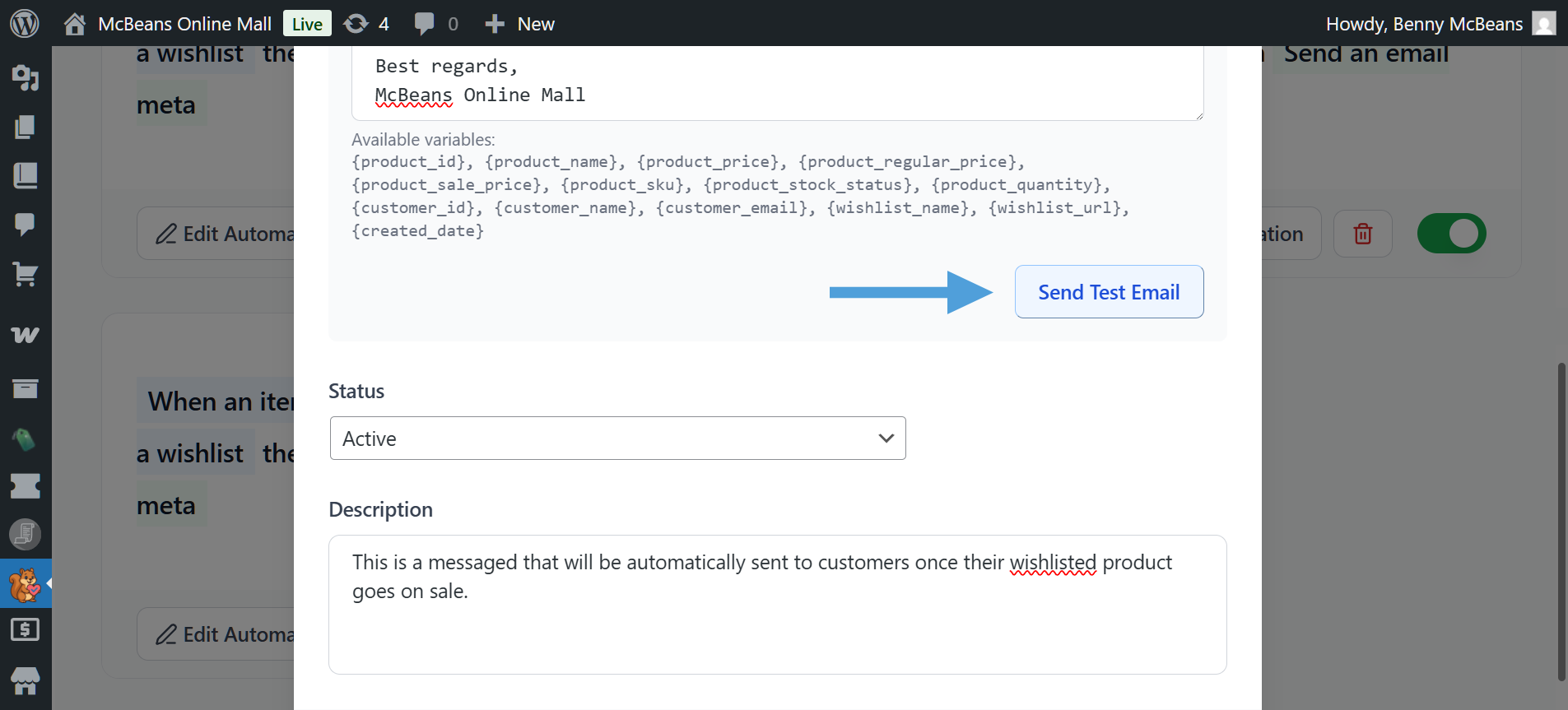
You can now see exactly what an automated email looks like before it reaches your customers. We added a Send Test Email button directly inside the automation builder so you can instantly preview your messages without manually triggering them on your live site.
What you need to know:
- Real-time testing: Click Send Test Email beneath your email body editor to test your changes without saving. If your subject line or email body is empty, the system will catch it and display a red error message.
- True-to-brand previews: The system wraps your test emails in your active WooCommerce email template. They will include your specific brand colors, header, and footer.
- Smart dummy data: The plugin automatically swaps dynamic tags with realistic examples. For instance,
{customer_name}becomes “Jane Doe”,{product_price}becomes “$15.00”, and{product_regular_price}becomes “$20.00”.
- Inbox clarity: You can spot tests easily with a
[Test]prefix automatically added to the subject line so you always know which emails are live and which are tests.
- Smart routing: If you leave the recipient field blank, the test sends directly to your site’s primary Admin email address.
- Secure and protected: This feature is strictly visible only to Administrators and relies on built-in safeguards to protect your site against spam.
3. Flawless B2B Integration: Wholesale Prices on Wishlists
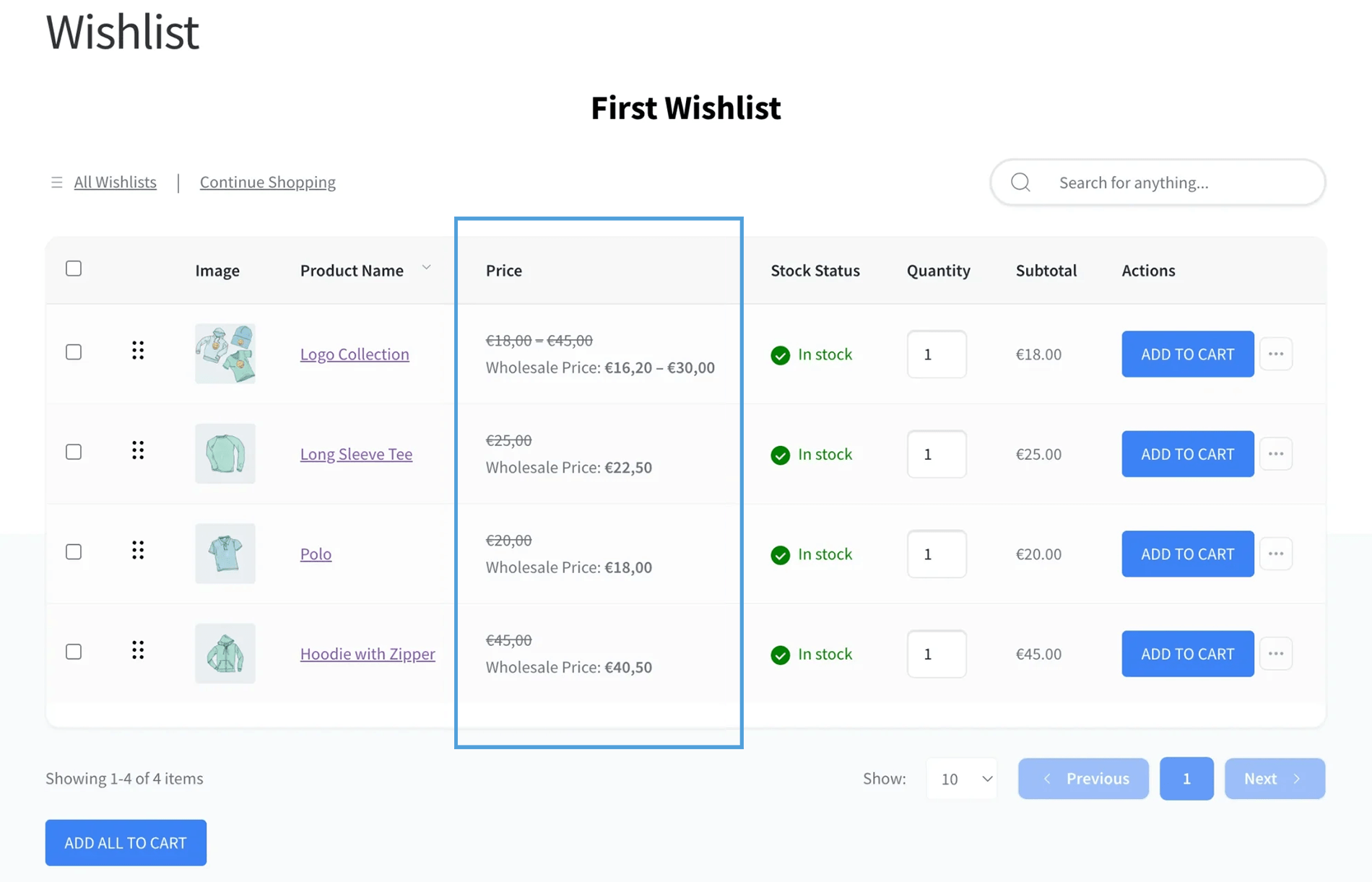
We overhauled the wholesale pricing integration so your B2B buyers see 100% accurate pricing across their entire wishlist experience instead of standard retail prices.
What you need to know:
- Accurate subtotals: Wishlist subtotals now perfectly sync with the wholesale price. If a wholesale price is $10 and the quantity is 2, the subtotal correctly reads $20.
- Variable product support: The table displays a custom minimum-to-maximum wholesale price range for variable products. It filters out variations without a wholesale price, or shows a single price if all variations share the exact same cost.
- Deep integration: The plugin processes all price outputs securely using standard WooCommerce features. This automatically supports complex setups like multi-currency switchers.
- Optimized performance: This is a highly optimized, lightweight integration designed to run without slowing down your page load times.
⚡ What Else is New With Pro?
Beyond the major feature updates, we also added a few administrative tools to make setting up and managing your store’s wishlists much easier.
1. WPML Multilingual Support
We added native support for WPML so your automated emails always reach your global customers in their preferred language.
What you need to know:
- Native string translation: Your automated email subjects and body content are now fully translatable directly through WPML String Translation.
- Automated delivery: The plugin securely hooks into WPML’s String Translation engine, allowing WPML to seamlessly detect the customer’s language and swap in the proper translation before the email sends.
2. Ready-to-Use “Starter” Automations
You no longer have to build your first automations from a blank screen. The plugin now generates sample automations the moment you activate it.
What you need to know:
- Pre-built templates: The system auto-generates two standard automations (one email template and one webhook) to show you exactly how different triggers and actions work in practice.
- Safely inactive: These starter automations are created in a “draft” state. They’re turned off by default and will never send an email to your customers until you customize them and toggle them to active.
3. Smoother Setup: One-Click Lite Install
SaveTo Wishlist Pro requires the free Lite version to function. We built a context-aware helper to handle the installation for you so you don’t have to navigate away to the WordPress repository.
What you need to know:
- One-click resolution: If the system detects that the Lite plugin is missing from your site entirely, a helper notice appears. You can click a single button to automatically download, install, and activate the required free version from the WordPress repository.
What About SaveTo Wishlist Lite?
We didn’t just update the premium version. The core SaveTo Wishlist Lite plugin also received a major free upgrade focused on reducing cart abandonment and improving the shopper experience.
If you’re already a Pro user, your store now benefits from new tools like:
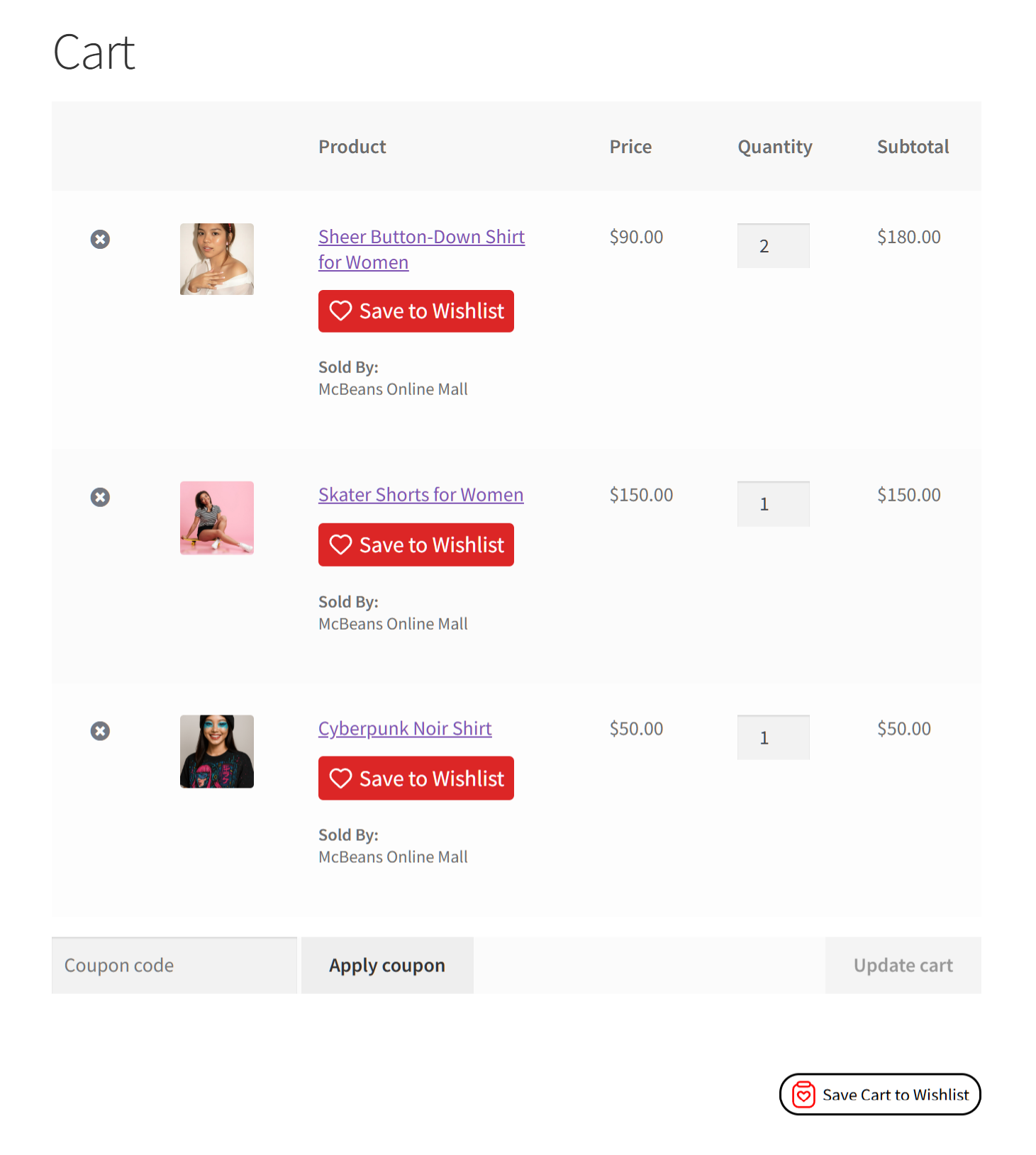
- Smarter Carts: Let customers save single items directly from their checkout screen using dedicated buttons or a new bulk checkbox mode.
- Visual Wishlists: Display product images directly inside the wishlist table so shoppers can instantly recognize what they saved.
- Custom Branding: Automatically name a new customer’s first wishlist to perfectly match your store’s voice instead of using a generic default.
Want to see the complete list of free upgrades? Then check out the full announcement:
New Features! Save Individual Cart Items And Visual Wishlists

Conclusion
That wraps up everything in this SaveTo Wishlist Pro update! You can access these new features right now by updating the plugin directly from your WordPress dashboard, or by downloading the latest version from your account.
To recap, this announcement explored the following new features:
- Direct customer alerts for sales and restocks
- Live email testing with smart dummy data
- Flawless B2B wholesale pricing integration
- Native WPML multilingual support
- Ready-to-use “starter” automations
- One-click Lite install helper
Do you need any help setting up your new customer email alerts or testing your templates? Then check out our knowledge base or reach out to our support team! If you’ve yet to try out wishlists for your store, download the free version of SaveTo Wishlist and give it a whirl!



