

 Reviewed by
 Most advice pertaining to ecommerce personalization, specifically WooCommerce personalization, starts with the same playbook: track what customers browse, build a behavioral profile, and show them more of what they looked at. That works to a point. But there’s a much stronger signal hiding in plain sight on most WooCommerce stores, and the majority of store owners completely ignore it.
Wishlist data.
When a customer adds a product to their wishlist, they’re not just browsing. They’re explicitly telling you: “I want this.” That’s not inferred intent from a page view or a hover event. That’s declared intent. The customer made a deliberate choice to save a specific product, often a specific variation, for future purchase.
And yet, most stores treat wishlists as a passive feature. A “save for later” button and nothing more.
In this guide, I’m going to show you how to use wishlist data as your primary ecommerce personalization signal. You’ll learn how to build customer preference profiles from wishlist activity, personalize product recommendations based on what customers actually want, and set up targeted promotions that convert because they’re grounded in declared intent rather than guesswork.
If you’re running a WooCommerce store with SaveTo Wishlist Pro, you already have the infrastructure. Let’s put it to work.
Table Of Contents
- Why Wishlist Data Is The Strongest WooCommerce Personalization Signal
- Building Customer Preference Profiles From Wishlist Data
- Personalizing Product Recommendations With Wishlist Data
- Targeted Promotions Using Wishlist Segments
- Connecting Wishlist Data To Your Marketing Stack
- Measuring WooCommerce Personalization Impact
- FAQ: Ecommerce Personalization
Why Wishlist Data Is The Strongest WooCommerce Personalization Signal
Not all customer data is created equal. To understand why wishlist data matters so much for WooCommerce product personalization, it helps to compare the three main types of behavioral signals available to ecommerce stores.
- Browsing data tells you what a customer looked at. It’s noisy. Someone might visit a product page because an ad caught their eye, because they were comparison shopping, or because they accidentally tapped a link on mobile. Browsing data gives you volume, but the intent signal is weak.
- Purchase data tells you what a customer already bought. It’s accurate but backward-looking. You know their past preferences, but you’re extrapolating future behavior from completed transactions. And for many stores, a single customer might only have one or two purchases to work with.
- Wishlist data sits right in the middle, and it’s the strongest signal for WooCommerce product personalization. A wishlist action is forward-looking (the customer wants to buy this in the future), high-intent (they took a deliberate action to save it), and product-specific (you know the exact item, variation, and price point they’re interested in).
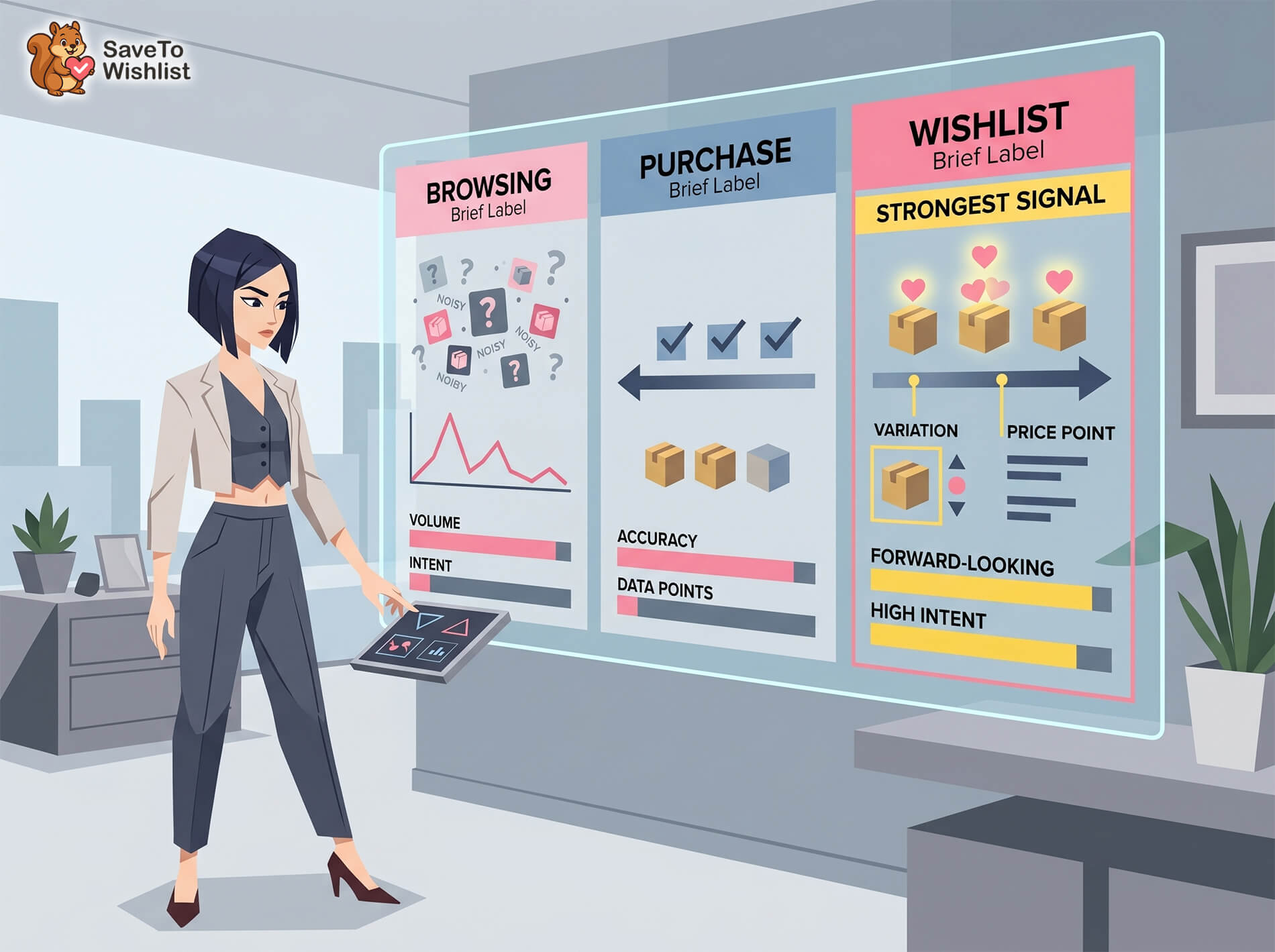
High-quality customer signals
According to McKinsey & Company’s personalization research, companies that get ecommerce personalization right generate 40% more revenue from those activities than average performers. The biggest driver? Acting on relevant, high-quality customer signals rather than blasting everyone with the same recommendations.
Wishlist data is exactly that kind of signal. And in a post-cookie world where third-party tracking is increasingly unreliable, first-party declared intent data becomes even more valuable. Your customers are voluntarily giving you their preference data. According to Salesforce’s State of the Connected Customer report, 73% of customers expect companies to understand their unique needs and expectations. Wishlist data gives you a direct path to meeting that expectation.
The problem isn’t access. If you’re running SaveTo Wishlist, you already have this data. The problem is that most stores never use it beyond the default “view your wishlist” page.
Let’s fix that.
Building Customer Preference Profiles From Wishlist Data
The first step in wishlist-powered ecommerce personalization is understanding what a customer’s wishlist activity tells you about their preferences. A single wishlist save is a data point. A pattern of saves across time is a preference profile.
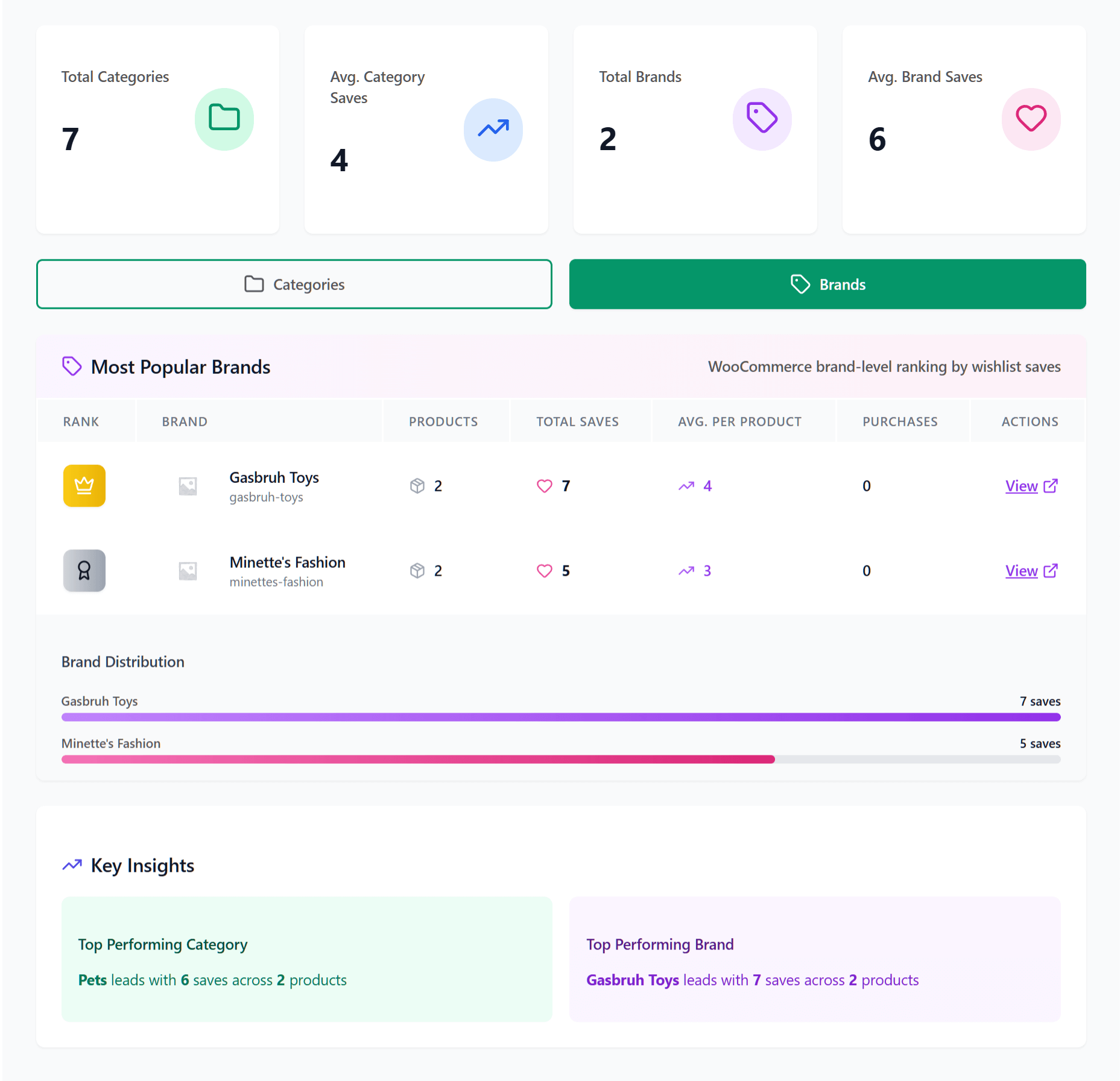
What a wishlist tells you about a customer
Every wishlisted item carries four layers of information:
- Product category preferences. If a customer saves three pairs of running shoes, you know they’re interested in athletic footwear, not just one specific shoe. The category pattern matters more than any individual item.
- Price range patterns. Customers tend to wishlist products within a consistent price band. If someone’s wishlist is full of items between $50 and $80, recommending a $300 product is likely a miss. Their wishlist tells you their comfort zone.
- Brand or style affinities. In stores with multiple brands or distinct style categories, wishlist data reveals which aesthetic or brand a customer gravitates toward. This is especially powerful in fashion, home goods, and accessories. If you’re building a multi-vendor fashion store, this kind of data becomes even more actionable — the complete guide to launching a fashion marketplace on WooCommerce covers how to structure vendor storefronts and buyer experience so the right style signals are there to capture from day one.
- Seasonal timing signals. A customer who starts building a wishlist in October is likely planning for holiday shopping. Someone adding outdoor furniture in March is thinking about spring. The timing of saves, combined with the products saved, gives you a window into their purchase timeline.
Aggregating preferences across multiple wishlists
This is where things get interesting. Customers who create multiple wishlists reveal multi-dimensional preferences that a single list never could.
Consider a customer who has a “Kitchen Renovation” wishlist and a “Gift Ideas” wishlist. Those two lists tell you completely different things. The kitchen list reveals their personal taste, budget for home projects, and timeline. The gift list reveals the price range they spend on others and the types of recipients they shop for.
With SaveTo Wishlist’s analytics dashboard, you can aggregate this data across your entire customer base. Which products appear on the most wishlists? Which categories are trending? Where are the gaps between what customers want and what you’re promoting?
🔍️ What We’ve Seen: When we’ve analyzed wishlist data across WooCommerce stores, a consistent pattern emerges: the top 10% of wishlisted products account for 35-50% of all wishlist saves. That concentration tells you something important. Those aren’t just popular products. They’re products with massive latent demand sitting in wishlists, waiting for a trigger (a price drop, a reminder, a nudge) to convert into purchases. Stores that act on this concentration pattern, by running targeted promotions on highly-wishlisted items, consistently see stronger conversion rates than stores running blanket promotions.
Personalizing Product Recommendations With Wishlist Data
Once you’ve identified preference patterns, the next step is using them to power personalized recommendations. Here are three frameworks that work.
Category-based recommendations
This is the most straightforward approach. If a customer has wishlisted three or more items in the same product category, they’ve told you where their interest lies.
The play: surface trending or newly added products in that category to these customers. You’re not guessing that they might be interested in running shoes because they visited a fitness blog post. You know they’re interested because they saved three pairs.
Implementation example:
- Customer saves 4 items in “Women’s Dresses”
- Your next email to that customer leads with new arrivals or best-sellers in Women’s Dresses
- The recommendation feels relevant because it is relevant

Price-range recommendations
This one is subtle but effective. Customers self-select into price ranges through their wishlist behavior, and you can use that to avoid the two biggest recommendation mistakes: showing products that are too cheap (feels irrelevant) or too expensive (feels tone-deaf).
Calculate the median price of a customer’s wishlisted items. Then weight your recommendations toward that price band, plus or minus 20%. A customer whose wishlist averages $65 per item should see recommendations in the $50-$80 range, not $15 clearance items or $200 premium products.
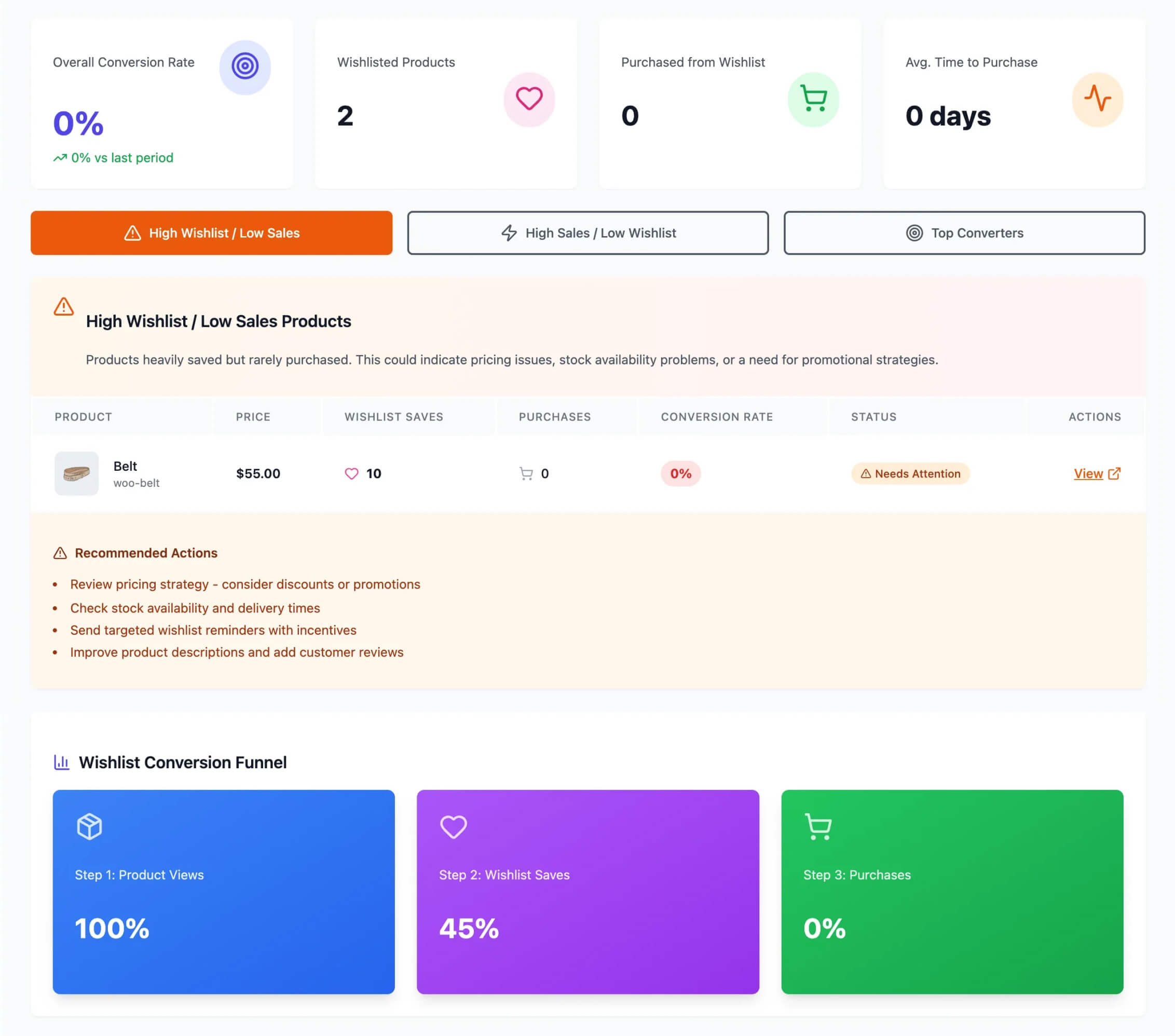
Complementary product suggestions
This is where wishlist data gets really powerful for cross-selling. If a customer wishlists a specific product, you can recommend items that pair with it.
A customer who wishlists a camera body might be interested in lenses, memory cards, and bags. Someone who saves a dining table is probably thinking about chairs. A wishlist for running shoes suggests interest in running socks, water bottles, and fitness trackers.
The key difference between generic cross-selling and displaying products related to wishlist items is timing. You know the customer hasn’t purchased the primary product yet. Your complementary suggestions can be framed as “complete the set” or “everything you’ll need,” which plants the seed for a larger order when they do convert.
SaveTo Wishlist Pro’s analytics help you identify these patterns at scale. Instead of manually guessing which products pair well, you can see which items frequently appear on the same wishlists.
Targeted Promotions Using Wishlist Segments
Generic promotions hit everyone the same way. Wishlist-based segments let you target promotions to the people most likely to act on them.
Segment by wishlist behavior
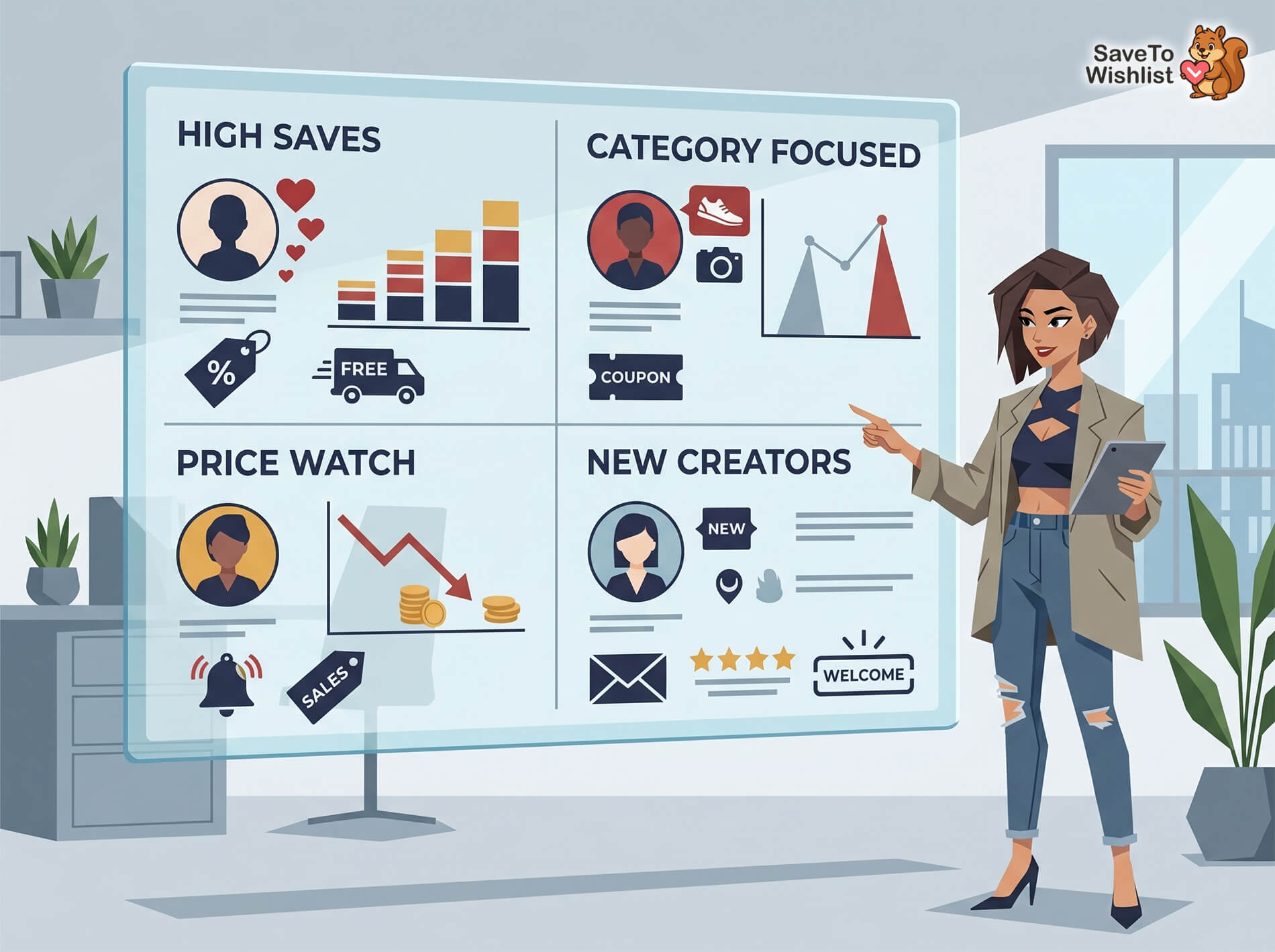
Not all wishlist users are the same. Their saving patterns reveal where they sit in the buying journey:
- High-save customers (5+ items): These are your highest-intent browsers. They’re actively curating products and likely close to a purchase decision. A small nudge, like a limited-time discount or free shipping offer, can push them over the edge.
- Category-specific savers: Customers who concentrate their saves in one category are ready for category-level promotions. A “20% off all running shoes this weekend” email hits differently when it goes to someone with four running shoes on their wishlist versus your entire email list.
- Price-sensitive savers: Customers who repeatedly wishlist items and wait are often watching for a price drop. These are perfect candidates for sale notifications and price drop alerts.
- New wishlist creators: A customer who just started their first wishlist is in discovery mode. They need different messaging than a power user. Welcome sequences, product education, and social proof work well here.
Automating promotions with webhooks
Manual segmentation doesn’t scale. That’s where SaveTo Wishlist Pro’s webhooks come in.
Webhooks fire in real time when wishlist events happen: a product is added, a wishlist is created, a shared list is viewed. You can connect these events to your email marketing platform, CRM, or any tool that accepts webhook data.
Example workflow:
- Customer adds a 3rd item from the same category to their wishlist
- Webhook fires to your email platform
- Customer is automatically tagged with that category interest
- A targeted email sequence triggers within 24 hours featuring trending products and current deals in that category
This kind of wishlist email marketing consistently outperforms batch promotional sends because every message is grounded in what the customer actually told you they want.
Connecting Wishlist Data To Your Marketing Stack
WooCommerce personalization at scale requires connecting your wishlist data to the tools you already use. SaveTo Wishlist Pro offers two primary integration paths.
Webhooks for real-time personalization
Webhooks push wishlist event data to external tools the moment an action happens. You can connect to:
- Email marketing platforms (Drip, Mailchimp, Klaviyo) to trigger automated sequences
- CRM systems to enrich customer profiles with preference data
- Analytics dashboards to track wishlist trends alongside sales and traffic data
The webhook payload includes the product details, customer information, and event type, giving your downstream tools everything they need to act on the signal.
REST API for custom implementations
For stores with development resources, SaveTo Wishlist’s REST API opens up custom ecommerce personalization possibilities:
- Build a recommendation engine that queries wishlist data to surface personalized product grids on your storefront
- Create custom reporting dashboards that combine wishlist data with purchase and traffic metrics
- Develop internal tools for your merchandising team to see which products have the highest wishlist-to-purchase conversion rates
If you’re running Advanced Coupons alongside SaveTo Wishlist Pro, you can also create targeted discount campaigns based on wishlist segments, automatically issuing personalized coupon codes to high-intent customers.
Measuring Personalization Impact
You can’t improve what you don’t measure. Here are the key metrics to track as you implement wishlist-based personalization:
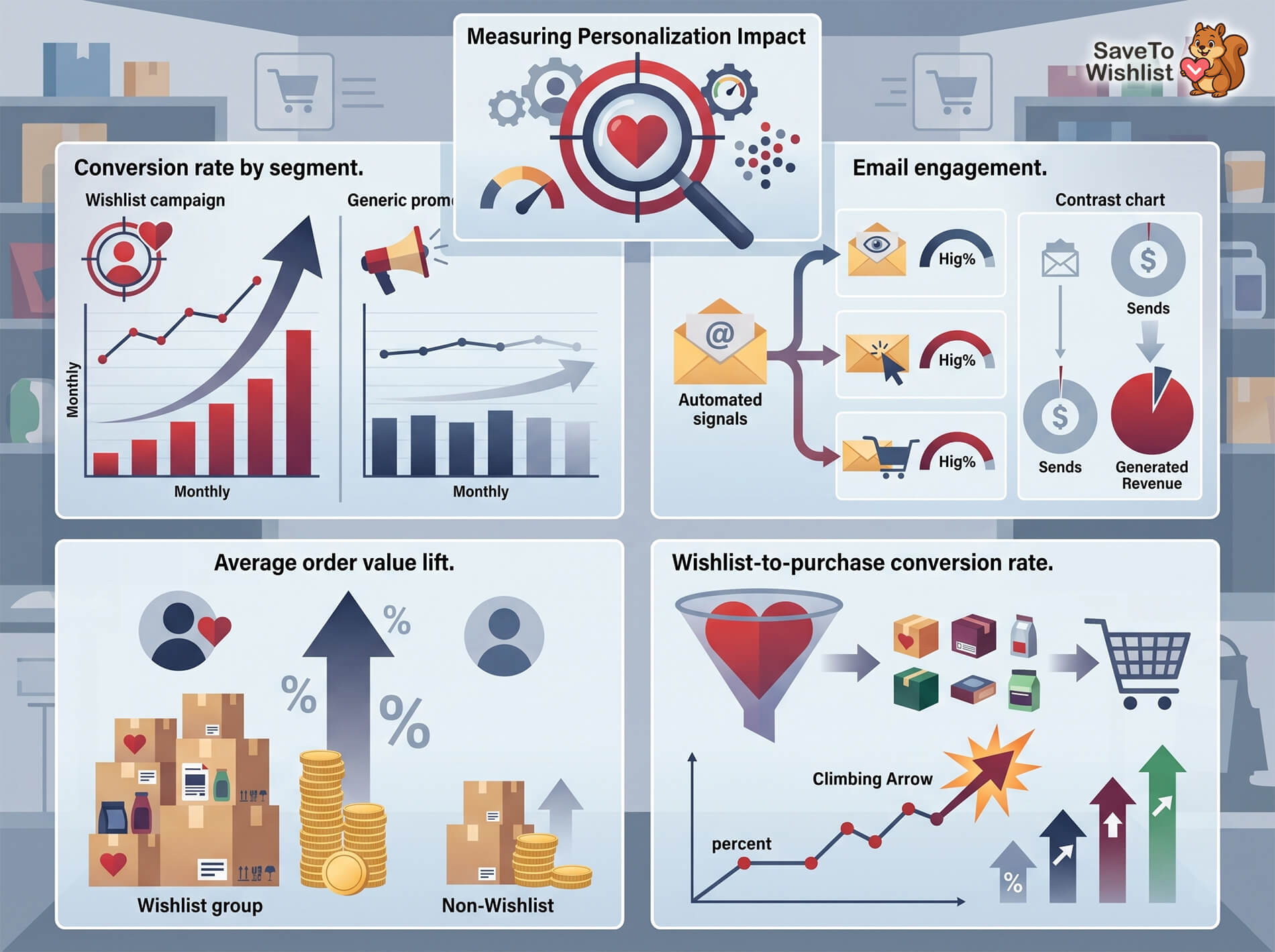
- Conversion rate by segment. Compare conversion rates between wishlist-targeted campaigns and generic promotions. This is your clearest indicator of personalization effectiveness. Track it monthly.
- Average order value lift. Customers who receive personalized recommendations based on wishlist data often add complementary products to their orders. Measure AOV for wishlist-engaged customers versus non-wishlist customers.
- Email engagement from wishlist-triggered campaigns. Open rates, click-through rates, and conversion rates for emails triggered by wishlist behavior. According to Omnisend’s 2024 email statistics, automated emails accounted for just 2% of sends but drove 37% of all email-generated revenue. Wishlist-triggered emails fall squarely in this high-performing automated category.
- Wishlist-to-purchase conversion rate. Of all items wishlisted, what percentage eventually get purchased? This is your baseline. As you implement personalization tactics, this number should climb.
SaveTo Wishlist Pro’s built-in analytics give you most of these metrics out of the box. For deeper analysis, connect webhook data to your analytics platform and build custom reports.
FAQ: Ecommerce Personalization
Do I need a separate WooCommerce personalization tool if I have wishlist data?
Not necessarily. For many WooCommerce stores, wishlist data combined with your email marketing platform and SaveTo Wishlist Pro’s analytics provides enough ecommerce personalization power without a separate tool. Dedicated WooCommerce product personalization platforms make sense for very large stores with complex product catalogs, but most SMB stores can get significant results from wishlist data alone.
How much wishlist data do I need before WooCommerce personalization is effective?
You can start seeing useful patterns with as few as 100-200 total wishlist saves across your customer base. The more data you collect, the more accurate your segments become. Give it at least 30-60 days of wishlist collection before drawing conclusions about category trends or customer segments.
Does WooCommerce personalization work with guest wishlists?
Partially. Guest wishlists capture product preference data, but without an email address, you can’t send targeted promotions. The best approach is to use guest wishlist data for on-site personalization (showing relevant products based on saved items) and to prompt guests to create accounts or provide an email to unlock the full ecommerce personalization experience.
Can I use wishlist data with my existing email marketing platform?
Yes. SaveTo Wishlist Pro’s webhooks can send real-time wishlist event data to any email platform that accepts webhooks or has a Zapier/Make integration. This includes Drip, Mailchimp, Klaviyo, ActiveCampaign, and others. The webhook payload includes product details, customer info, and event type.
What’s the difference between wishlist-based and AI-based WooCommerce personalization?
AI-based ecommerce personalization tools analyze browsing patterns, purchase history, and behavioral signals to predict what a customer might want. On the other hand, wishlist-based personalization uses explicit, declared customer intent. They complement each other: AI helps with discovery (“you might also like…”) while wishlist data drives precision (“you told us you want this, and it’s now on sale”). However, for most WooCommerce stores, wishlist data provides a stronger and more actionable signal at a fraction of the cost.
Is wishlist data GDPR-compliant for WooCommerce personalization?
Wishlist data is first-party data that customers voluntarily provide by using the wishlist feature. It’s generally considered legitimate interest under GDPR, especially when you clearly explain how wishlist data is used in your privacy policy. For email-based personalization, you still need proper consent for marketing communications, which is a separate requirement from data collection.
Conclusion
WooCommerce personalization doesn’t have to mean expensive AI tools or complex behavioral tracking systems. After all, your customers are already telling you what they want every time they click “Save to Wishlist.” That declared intent is the strongest ecommerce personalization signal available to WooCommerce stores, and most are leaving it on the table.
Start with the basics: look at what your customers are wishlisting, identify category and price patterns, and use those patterns to drive recommendations and promotions. Then scale it with automations and webhooks that turn every wishlist action into a personalization opportunity.
To recap, this guide covered the following WooCommerce personalization concepts:
- Why Wishlist Data Is The Strongest WooCommerce Personalization Signal
- Building Customer Preference Profiles From Wishlist Data
- Personalizing Product Recommendations With Wishlist Data
- Targeted Promotions Using Wishlist Segments
- Connecting Wishlist Data To Your Marketing Stack
- Measuring WooCommerce Personalization Impact
If you’re ready to unlock the full ecommerce personalization potential of your wishlist data, SaveTo Wishlist Pro gives you the analytics, webhooks, and automation tools to make it happen. Check the pricing page to find the right plan for your store.



