Founder,
SeedProd

Your wishlist should feel like a natural part of your store. Our WooCommerce Wishlist Page Style settings let you easily customize colors, fonts, and layouts without coding, building customer trust and keeping shoppers engaged.


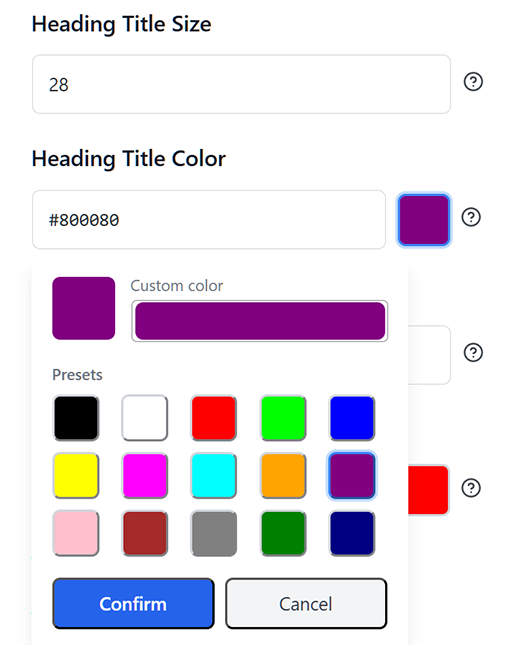
SaveTo Wishlist gives you complete control over your wishlist's appearance. Match your exact brand styling to create a professional, trustworthy shopping experience that encourages customers to save and buy.
Customize button, table, and popup colors using your exact brand hex codes. A consistent design builds customer trust and makes your store look highly professional, leading to more saved items.
Pick the exact font sizes and colors for wishlist titles and product tables. When your saved items are clear and easy to read, shoppers can quickly scan their lists and complete their purchases.
Fully style the popups and lists your shoppers use without writing a single line of CSS. Easily adjust settings directly from your dashboard to keep interactions beautifully branded and customers focused on buying.
Match your brand instantly, build customer trust, and create a professional wishlist in minutes without writing a single line of code.


Ecommerce Entrepreneur
The plugin is easy to configure and customize, and it delivers very good results... It does exactly what it is supposed to do. A very capable plugin — good job.

General Manager,
MonsterInsights

President,
AffiliateWP

Founder,
HeroThemes
This feels lightweight and modern. It plays nicely with the Block Editor, which saves me from digging through shortcodes. Definitely a solid choice if you want something that won't break your site's performance.

Product Manager,
AIOSEO
Lightweight and reliable. Highly recommend it to any WooCommerce store owner looking for a clean wishlist solution.

Founder,
SeedProd
I needed a wishlist feature for my store and this one honestly does way more than I expected for a free plugin. Multiple wishlists, guest support, easy setup. Took me like 5 minutes to get it running. The button styles look good out of the box too.
Curious about how to customize your wishlist design in SaveTo Wishlist? We've answered some of the most common questions below to help you get started. If you don't see your question here, our team is happy to help.

Get up and running with wishlist functionality on your store quickly and easily. Works out of the box with every theme, even WooCommerce block themes.
Many wishlist solutions restrict how many wishlists end-customers can create, which is counterproductive. Your success is our success. We want your customers to love the wishlist functionality, so we let every store offer multiple wishlists for free.


Backed by the Rymera team who have built and actively maintain many commercial WooCommerce plugins like Wholesale Suite, Advanced Coupons, AdTribes, and WC Vendors.
We know not every store is in English, which is why we think it’s important to be 100% translation-ready and compatible with major translation tools like WPML and TranslatePress.


SaveTo Wishlist is a great free plugin supported by a Pro extension that gives you the ultimate wishlist functionality to help you grow. Our goal is to provide features that pay for themselves many times over within the first couple of months.
SaveTo Wishlist goes beyond simple wishlists, offering powerful tools to personalize, manage, and engage your customers like never before.
Personalize the wishlist experience using product blocks, shortcodes, and custom Gutenberg blocks.
Give customers full control over their saved items with easy wishlist management.
Make shopping seamless for international customers with full translation support.
Allow shoppers to save products without creating an account, boosting engagement.
Fully personalize the wishlist experience to match your store’s branding.
Easily manage and customize wishlists to enhance the shopping experience.
Enjoy advanced control and custom integrations with the Wishlist REST API.
The best WooCommerce wishlist plugin.

