

 Reviewed by
 I was reviewing a client’s WooCommerce analytics last quarter and noticed something that stopped me cold: for every 10 shoppers who added items to their cart, roughly 7 never checked out. That’s not a small leak. That’s a flood of lost revenue.
The worst part? This store owner thought their numbers were unusually bad. They aren’t. Shopping cart abandonment statistics across the ecommerce industry tell the same story, year after year.
In this article, I’ve compiled the most important cart abandonment data from primary research sources so you can see exactly where your store stands, why shoppers leave, and what you can actually do about it.
Table Of Contents
- What Is Cart Abandonment?
- Overall Shopping Cart Abandonment Rates
- Shopping Cart Abandonment Rates By Industry
- Shopping Cart Abandonment Rates By Device
- Top Reasons Shoppers Abandon Their Carts
- The Real Cost Of Cart Abandonment
- Cart Abandonment Recovery Strategies That Work
- Frequently Asked Questions
- Start Turning Abandoned Carts Into Future Sales
What Is Cart Abandonment?
Cart abandonment happens when shoppers add items to their online shopping carts but leave your site without completing the purchase. It’s one of the most tracked metrics in ecommerce, and for good reason: it directly measures how much revenue your store is leaving on the table.
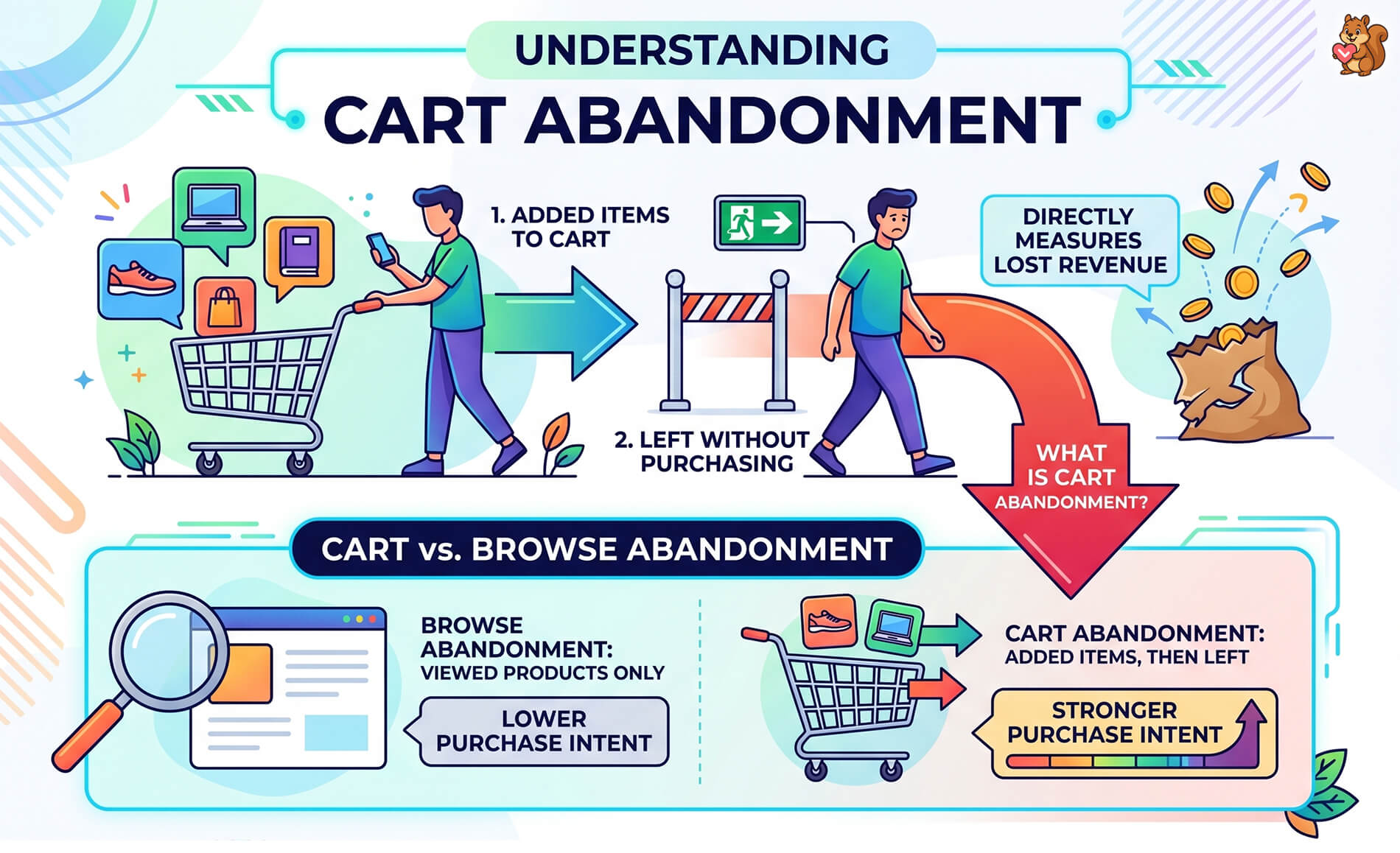
It’s worth distinguishing cart abandonment from browse abandonment. Browse abandonment is when someone looks at product pages but never adds anything to their cart. Cart abandonment is a step further along, which means the shopper had stronger purchase intent. They were interested enough to take action, then something stopped them.
This issue spans across all major e-commerce platforms, from Magento and BigCommerce to WooCommerce and Shopify. However, tackling it effectively requires solutions tailored to your specific ecosystem, such as implementing a proven strategy to recover a Shopify abandoned cart or streamlining one-click checkouts.
For WooCommerce store owners specifically, cart abandonment matters because you’re often competing with larger retailers who’ve already optimized their checkout flows. Understanding where and why shoppers drop off gives you a realistic baseline to improve against.
Curious about how wishlists capture purchase intent before shoppers even reach the cart? That context is useful here too! To learn more, check out the following guide:
What Is A Wishlist And Why Is It Crucial In Ecommerce? (Easy WooCommerce Guide)
Overall Shopping Cart Abandonment Rates
According to the Baymard Institute, the average documented online shopping cart abandonment rate is 70.22%, based on a meta-analysis of 50 different studies. While this is one of the most frequently cited statistics in the industry, actual rates haven’t stayed flat—they have steadily climbed over the past decade as shoppers moved to mobile devices.
What does that number actually mean? For every 100 shoppers who add an item to their cart on your store, roughly 70 of them will leave without buying.
Year over year, the average shopping cart abandonment actually sits between 70.19% and 78.77% globally. But keep in mind, those numbers have steadily climbed since 2014. Back then, most people shopped on desktop computers with a clear plan to buy. Today, we mostly shop on our phones, turning e-commerce into a casual window-shopping habit.
Also, if you sell globally, your numbers might look even higher. For example, abandonment rates hit 84% to 87% in parts of Asia and over 85% in Africa due to different local payment setups and shipping challenges.
🔍️ What we’ve seen: Store owners often panic when they first check their analytics. Don’t worry. The global industry average actually sits between 70.19% and 78.74%. If your WooCommerce store lands in that range, you’re perfectly normal. The goal isn’t to eliminate abandonment, it’s to recover a small chunk of those lost sales to boost your revenue.
Shopping Cart Abandonment Rates By Industry
Not all industries experience the same abandonment rates. The nature of what you’re selling, the typical price point, and how much comparison shopping your customers do all affect how likely they are to complete checkout.
Here’s how abandonment rates tend to break down by industry, based on data from SaleCycle and Statista:
- Travel and hospitality: This industry suffers from some of the highest cart abandonment rates, often soaring above 80%. Shoppers frequently compare flights, hotels, and packages across multiple sites before committing.
- Fashion and apparel: Around 76.48% to 87.79%. Shoppers browse extensively and use carts as “virtual fitting rooms.” They add multiple sizes or colors to figure out the fit, then drop the whole cart when it gets too confusing.
- Electronics and technology: Around 70-75%. Higher price points mean more comparison shopping, reading reviews, and waiting for sales.
- Food and grocery: Generally lower, between 50.03% and 58.23%. These are basic daily needs, so folks don’t shop around as much once they start an order.
- Automotive parts: Frequently around 75.4%. Complex part specs mean shoppers use carts for research, but they often prefer to buy these high-stakes items in an actual physical store to make sure they get the right fit.
- Home and furniture: Between 78.65% and 80.3%. Big-ticket prices and the need to measure rooms or plan spaces lead to longer thinking times.
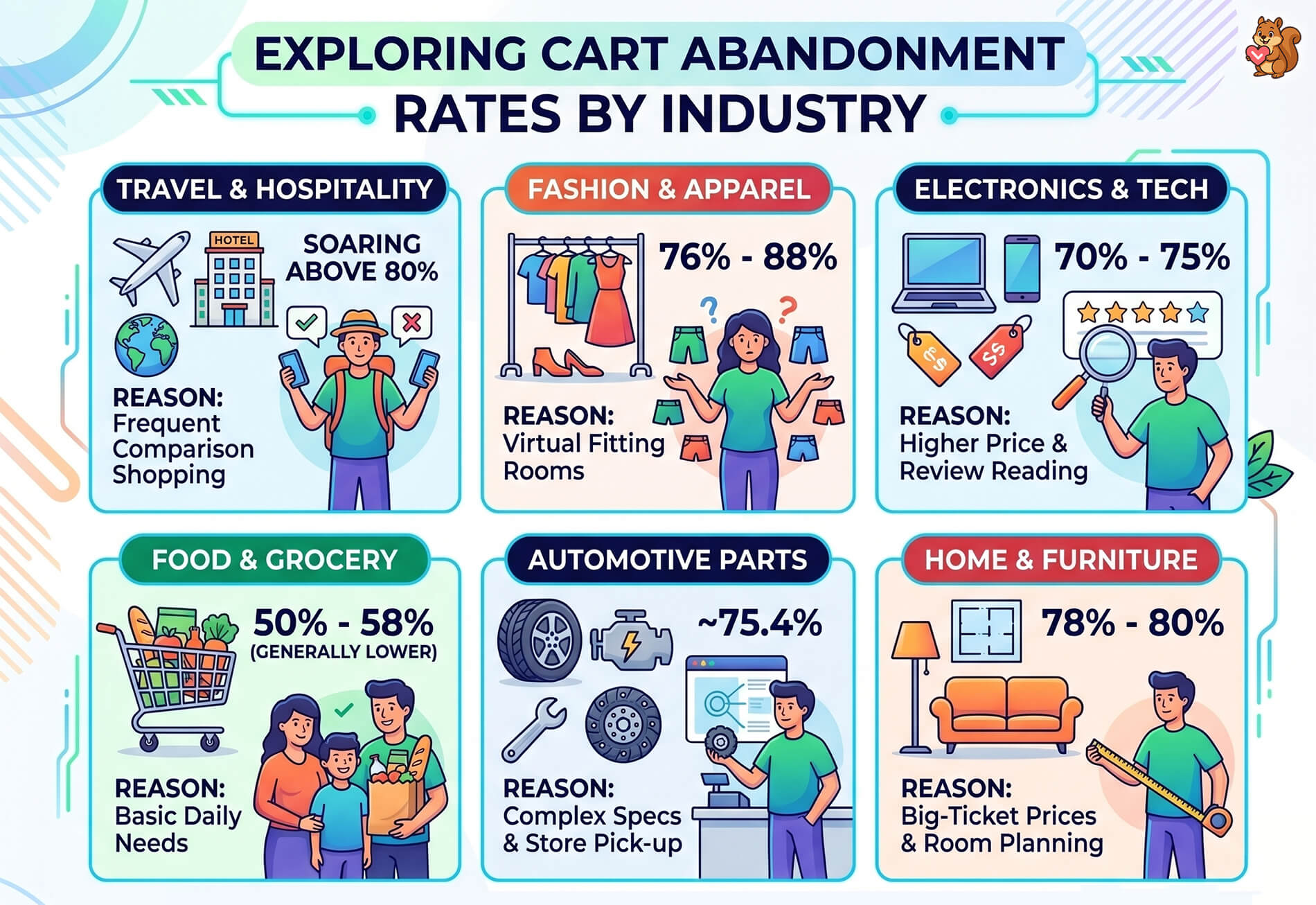
The pattern is clear: the higher the average order value and the more options available to compare, the more likely shoppers are to abandon. If you sell high-consideration products in WooCommerce, your abandonment rate will naturally sit at the higher end.
Shopping Cart Abandonment Rates By Device
Device type plays a massive role when you dig into the latest cart abandonment rate statistics. According to data compiled by Contentsquare in their Digital Experience Benchmarks report, mobile devices consistently show higher abandonment rates than desktop.
- Mobile: Abandonment rates are severe, ranging from 76.98% to 85.65%. Tiny virtual keyboards, hidden shipping costs on small screens, and slow mobile networks all make checking out a pain.
- Desktop: Desktop rates are much lower, typically between 64.78% and 70.0%. Larger screens and easier navigation help shoppers cross the finish line.
- Tablet: Tablets sit right up there with mobile phones, around 80.7% to 80.74%. Modern websites use design code—called responsive CSS—that stretches or shrinks the page to fit your screen. Think of it like water taking the shape of its glass. Because of this, tablet users get the exact same cramped menus and checkout hurdles as phone users.
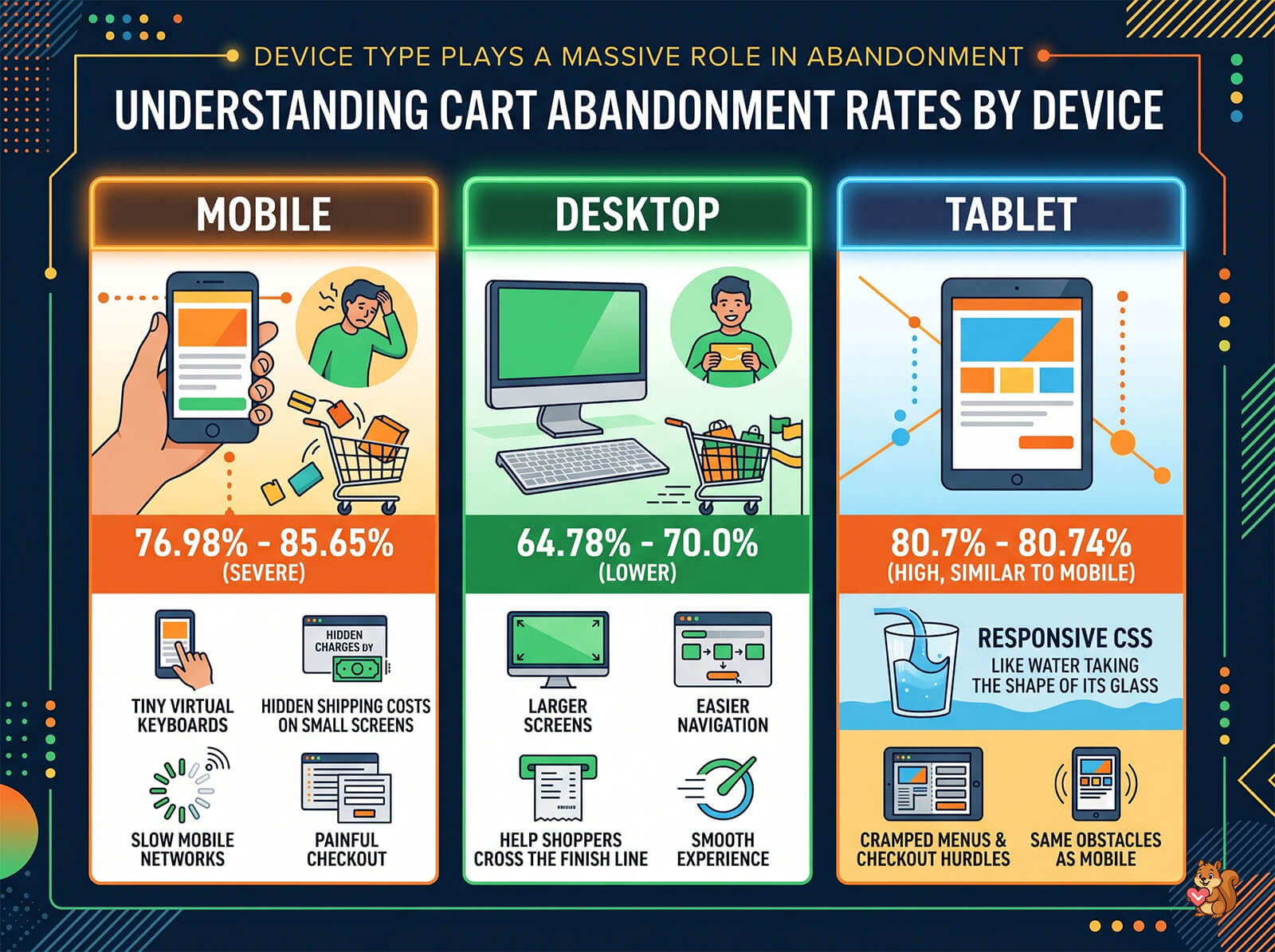
The gap between mobile and desktop abandonment is a big deal for WooCommerce stores, because mobile traffic now makes up the majority of ecommerce visits for most retailers. If more than half your traffic comes from mobile but your checkout isn’t optimized for smaller screens, you’re losing a disproportionate share of potential sales.
This is also where the idea of saving items for later becomes relevant. Mobile shoppers who aren’t ready to check out on a small screen may add items to a wishlist and return on desktop to purchase. Guest wishlists (which don’t require account creation) are particularly useful here.
Top Reasons Shoppers Abandon Their Carts
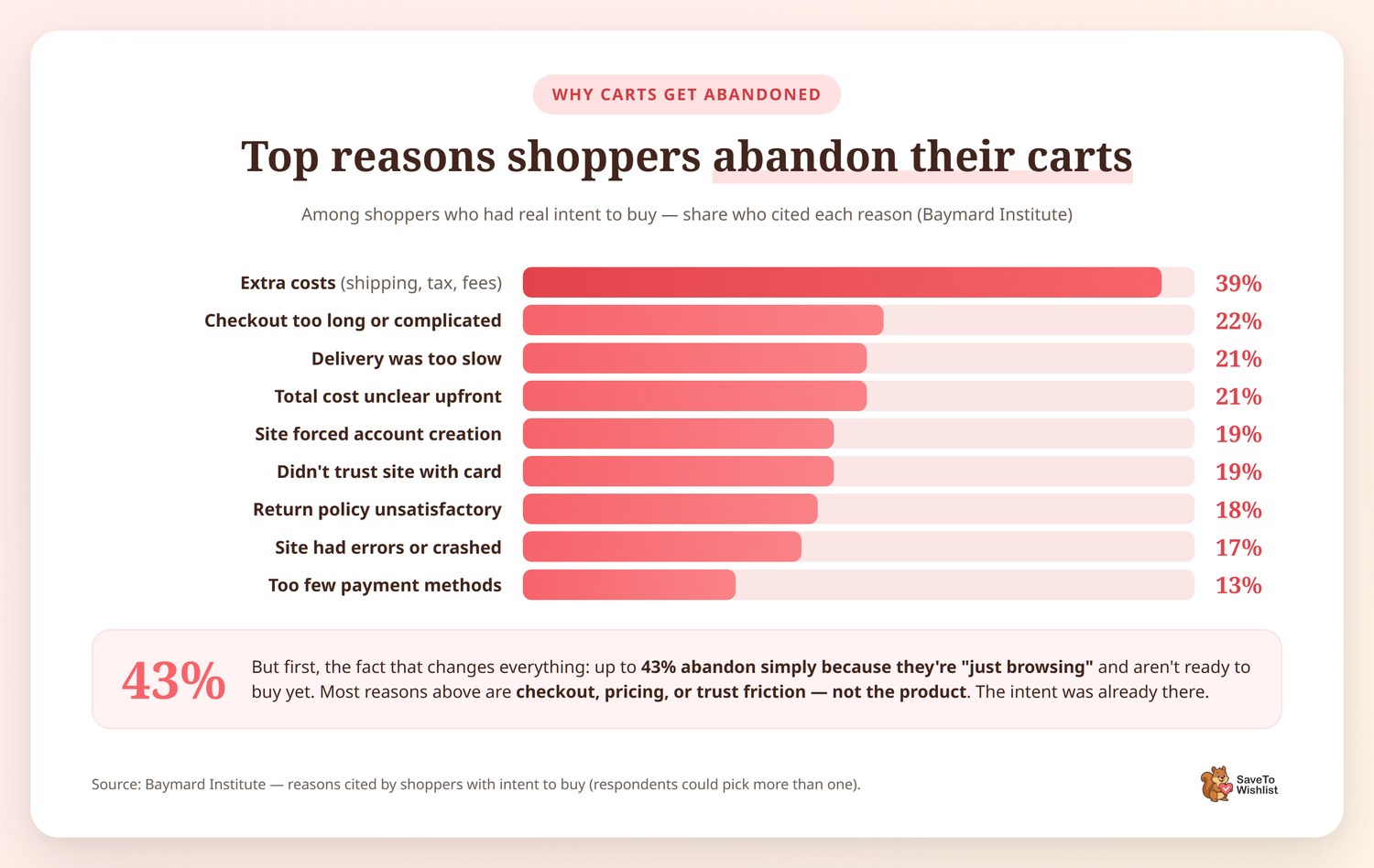
According to the Baymard Institute’s research on checkout usability, the top reasons shoppers with actual intent to buy abandon their carts are:
- Extra costs too high (shipping, tax, fees): This is the top friction point, cited by 39% of respondents.
- Delivery was too slow: Around 21% of shoppers leave when delivery times drag out.
- Site required account creation: About 19% abandon because the store forces them to make an account.
- Didn’t trust the site with credit card information: 19% leave over security worries.
- Too long or complicated checkout process: About 22% abandon due to checkout complexity. Every extra form field and every extra step costs you conversions.
- Couldn’t see total order cost upfront: Around 21% of shoppers want to know the full cost before committing. Hidden fees are a conversion killer.
- Return policy wasn’t satisfactory: Roughly 18% of shoppers abandon over return policy concerns.
- Website had errors or crashed: About 17% of shoppers encounter technical problems that prevent checkout.
- Not enough payment methods: Around 13% leave because their preferred payment option isn’t available.
But here’s the most important fact you need to know: up to 43% of users abandon their carts simply because they’re “just browsing” and aren’t ready to buy yet. If you don’t realize that half your carts are just window shoppers, you’ll end up destroying your profits by throwing 20% off coupons at people who were never going to buy today anyway.
Notice that many of the reasons above have nothing to do with whether the shopper wants your product. They wanted it enough to add it to their cart. The friction is in the checkout experience, the pricing transparency, or the trust signals. That’s an important distinction, because it means the intent was there.
The Real Cost Of Cart Abandonment
The numbers get uncomfortable when you look at the big picture. Globally, folks leave about $4.6 trillion worth of items in carts every year. But don’t panic. That’s not “lost revenue.” Since nearly half of those shoppers are just window shopping, counting all of it as lost cash is a big mistake. The actual amount of money stores can realistically win back is around $260 billion.
For your WooCommerce store, you have to separate the real buyers from the browsers. If you have 700 abandoned carts, you shouldn’t expect to recover sales from all of them. A great recovery program usually wins back 10% to 15% of the high-intent shoppers, not the casual browsers. Keep your expectations realistic so you don’t overspend on rescue tools.
That’s why even small improvements to your recovery strategy can have an outsized impact.
One approach that often gets overlooked: capturing purchase intent before it reaches the cart in the first place. Cart abandonment recovery for WooCommerce usually focuses on email sequences and retargeting, but wishlists add another layer. When a shopper saves an item to a wishlist, they’re expressing clear interest in a product, and you can follow up on that interest through automations, price drop alerts, and back-in-stock notifications.
Cart Abandonment Recovery Strategies That Work
Understanding cart abandonment statistics is only useful if you act on them.
This is especially urgent right now. Because digital traffic dropped last year while the cost per visit jumped by 9%, getting a shopper to your site is more expensive than ever. You can’t afford to let an 80% mobile abandonment rate bleed your ad budget dry.
Here are the most effective recovery strategies to protect your investment:
1. Email recovery campaigns
Sending a well-timed email sequence to shoppers who abandon their cart is the most established recovery method. Industry benchmarks suggest that abandonment emails have significantly higher open rates and click rates than standard marketing emails.
2. Exit-intent popups
Detecting when a shopper is about to leave and presenting an offer or reminder can recapture a percentage of abandoning visitors. These work best with a clear incentive (like free shipping or a small discount).
3. Checkout optimization
Simplify your forms, offer guest checkout, show costs upfront, and add trust signals. These changes directly address the top reasons for abandonment listed above.
4. Retargeting ads
Display ads shown to shoppers who’ve visited your store and added to cart can bring them back. These are most effective in the first 24-48 hours after abandonment.
5. Wishlists as an intent-capture layer
This is the strategy most stores overlook. A wishlist lets shoppers save products they’re interested in before they commit to a cart. That gives you a direct signal of purchase intent, and with a plugin like SaveTo Wishlist Pro, you can set up wishlist automation to follow up when prices drop, items come back in stock, or the shopper hasn’t returned in a while. The key difference: wishlists capture intent at the browsing stage, before cart abandonment even happens.
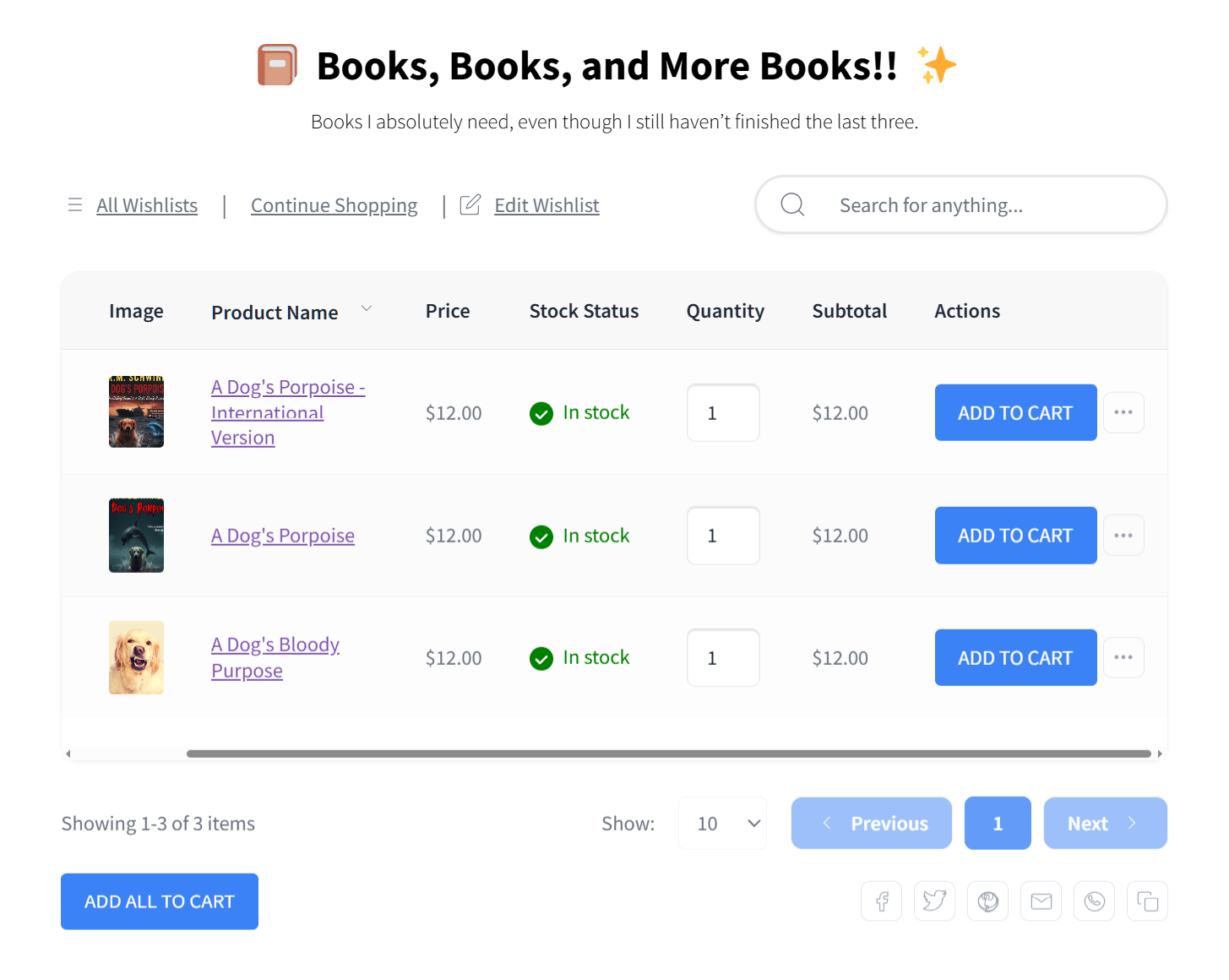
The most effective approach combines multiple strategies. Optimize your checkout to prevent unnecessary abandonment, use email recovery for cart abandoners, and add wishlists to capture intent from shoppers who aren’t ready to cart yet. Guest wishlists are especially important since requiring account creation for wishlists defeats the purpose.
Frequently Asked Questions
What is a good shopping cart abandonment rate?
A “good” cart abandonment rate depends on your industry, but the global average sits between 70.19% and 78.77%. If you sell high-ticket items, expect rates above 80%. Instead of chasing an impossible 65%, focus on small, steady improvements to your checkout flow.
What is the average cart abandonment rate for ecommerce?
The global average ranges from 70.19% to 78.74%. These numbers have climbed steadily in recent years because mobile shopping is now the norm, and mobile checkout carries severe friction, often pushing rates well past 80%.
Why do customers abandon their shopping carts?
The top reasons are unexpected extra costs (shipping, taxes, fees), being forced to create an account, slow delivery estimates, payment security concerns, and a complicated checkout process. Most of these reasons relate to the checkout experience rather than a lack of interest in the product itself.
How do you calculate cart abandonment rate?
Use this formula:
Cart Abandonment Rate = (1 – (Completed Purchases / Carts Created)) x 100.
For example, if 1,000 carts were created and 300 completed checkout, your abandonment rate is 70%.
Just remember, standard WooCommerce analytics don’t calculate this for you automatically. WooCommerce only tracks folks once they start typing at the checkout line. Recording every single item a guest adds to a cart would be like a store clerk writing down every single item a customer touches. It would overload the system’s memory.
To track the real “carts created” number, you have to install a dedicated cart recovery plugin or connect to an outside email tool.
Can wishlists help reduce cart abandonment?
Wishlists don’t reduce cart abandonment directly, but they help you capture purchase intent earlier in the shopping journey. When a shopper saves an item to a wishlist instead of carting it prematurely, you gain a signal of interest that you can follow up on through price drop alerts, back-in-stock notifications, and targeted email campaigns. This converts interest into sales that might otherwise never reach the cart at all.
Start Turning Abandoned Carts Into Future Sales
The cart abandonment statistics are consistent year after year: roughly 7 out of 10 carts get abandoned, and the reasons are mostly fixable. The stores that do well aren’t the ones with zero abandonment. They’re the ones that build systems to capture and recover purchase intent at every stage of the buying journey.
Here’s what to focus on:
- Review the overall cart abandonment rates to benchmark your store against industry averages
- Check your industry-specific rates to set realistic expectations for your product category
- Audit the top reasons shoppers abandon and fix the low-hanging fruit in your checkout flow
- Calculate the real cost for your store so you know exactly what recovery is worth
- Layer multiple recovery strategies including wishlists to capture intent before it becomes abandonment
If you want to add an intent-capture layer to your WooCommerce store, SaveTo Wishlist gives you unlimited wishlists, guest wishlist support, and (with SaveTo Wishlist Pro) price drop alerts, back-in-stock notifications, and analytics to track what your customers want. Check current pricing to see which plan fits your store.



