
Want to follow up automatically when a customer saves a product? SaveTo Wishlist adds wishlist activity to FunnelKit Automations as ready-made triggers. That means you can send a reminder email, tag a contact, or run any FunnelKit action the moment someone adds or saves a wishlist. This guide shows you how.
How it works
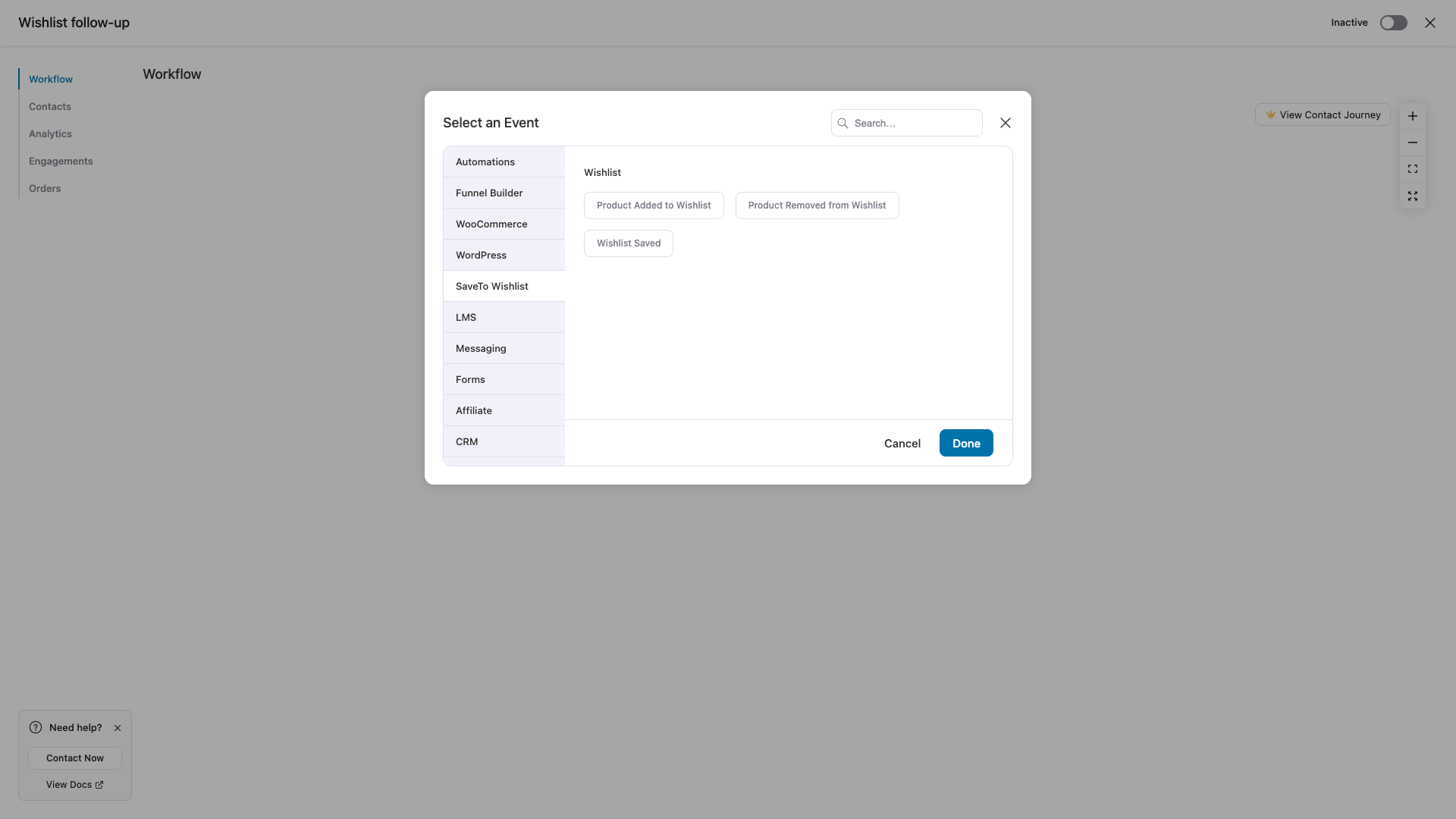
When FunnelKit Automations is active, SaveTo adds three wishlist triggers to FunnelKit. You’ll find them grouped under a SaveTo Wishlist source when you pick a trigger for an automation. There’s nothing to switch on in SaveTo Wishlist, the triggers are there as soon as both plugins are active.
Before you start
- FunnelKit Automations installed and active.
- SaveTo Wishlist active. Nothing to configure on the SaveTo side.
The wishlist triggers
| Trigger | When it runs |
|---|---|
| Product Added to Wishlist | A customer adds a product to their wishlist. |
| Product Removed from Wishlist | A customer removes a product from their wishlist. |
| Wishlist Saved | A customer saves their wishlist. |
Build an automation from a wishlist trigger
- In FunnelKit Automations, create a new automation.
- When you’re asked to pick a trigger, find the SaveTo Wishlist group.
- Choose the event you want, such as Product Added to Wishlist.
- Add the actions you want to run, such as sending an email or adding a delay.
- Set the automation live.
Personalize with wishlist merge tags
These automations come with two merge tags, so you can drop wishlist details straight into an email or action.
| Merge tag | What it shows |
|---|---|
| Wishlist Name | The name of the wishlist the customer used. |
| Wishlist URL | A shareable link to that wishlist. |
The Wishlist URL is built from your wishlist page. If you haven’t set a wishlist page, this tag comes back empty, so make sure a wishlist page is set before you rely on it.
Good to know
Only the customer who owns the wishlist is enrolled. If you or an importer add or save a wishlist on someone else’s behalf, that person isn’t enrolled in the automation. Guests aren’t enrolled either, since there’s no contact to work with.
The wishlist triggers work on the free version of FunnelKit Automations. Narrowing when a trigger fires with conditions (rules) is part of FunnelKit’s Pro offering, so that step needs FunnelKit Automations Pro.
Frequently asked questions
Do I need to turn anything on in SaveTo Wishlist?
No. As long as both plugins are active, the wishlist triggers show up in FunnelKit Automations on their own.
Where do I find the triggers?
In FunnelKit Automations, start a new automation and open the trigger list. The three wishlist events are grouped under SaveTo Wishlist.
Does it work for guests?
No. The triggers only enroll a logged-in customer who owns the wishlist.
Need help?
If you have a question or run into any issues, we’re here to help.
- Premium users: Open a support ticket
- Free users: Visit our community forum

