

 Reviewed by
 Most WooCommerce store owners pour all their recovery effort into the shopping cart. Abandoned cart emails, exit popups, retargeting ads: all aimed at people who got as far as adding a product. But those shoppers are the minority. Far more people view your products, feel interested, and leave without adding anything at all.
That’s browse abandonment, and it’s the biggest leak most stores never plug. If your recovery only starts at the cart, you’re ignoring shoppers who showed interest one step earlier.
The good news? A wishlist quietly captures that earlier signal. This guide explains what browse abandonment is and why WooCommerce stores miss it. You’ll also learn how to turn a browser into a shopper you can win back.
Table of Contents
- What Is Browse Abandonment?
- Why WooCommerce Stores Miss Browse Abandonment
- How Wishlists Turn Anonymous Browsing Into A Trackable Signal
- How To Set Up Browse-Abandonment Recovery In WooCommerce
- The Golden Window For Follow-Ups
- The Anatomy Of A Winning Recovery Email
- How To Measure Browse-Abandonment Recovery
- Frequently Asked Questions
- Stop Losing Browsers Before The Cart
What Is Browse Abandonment?
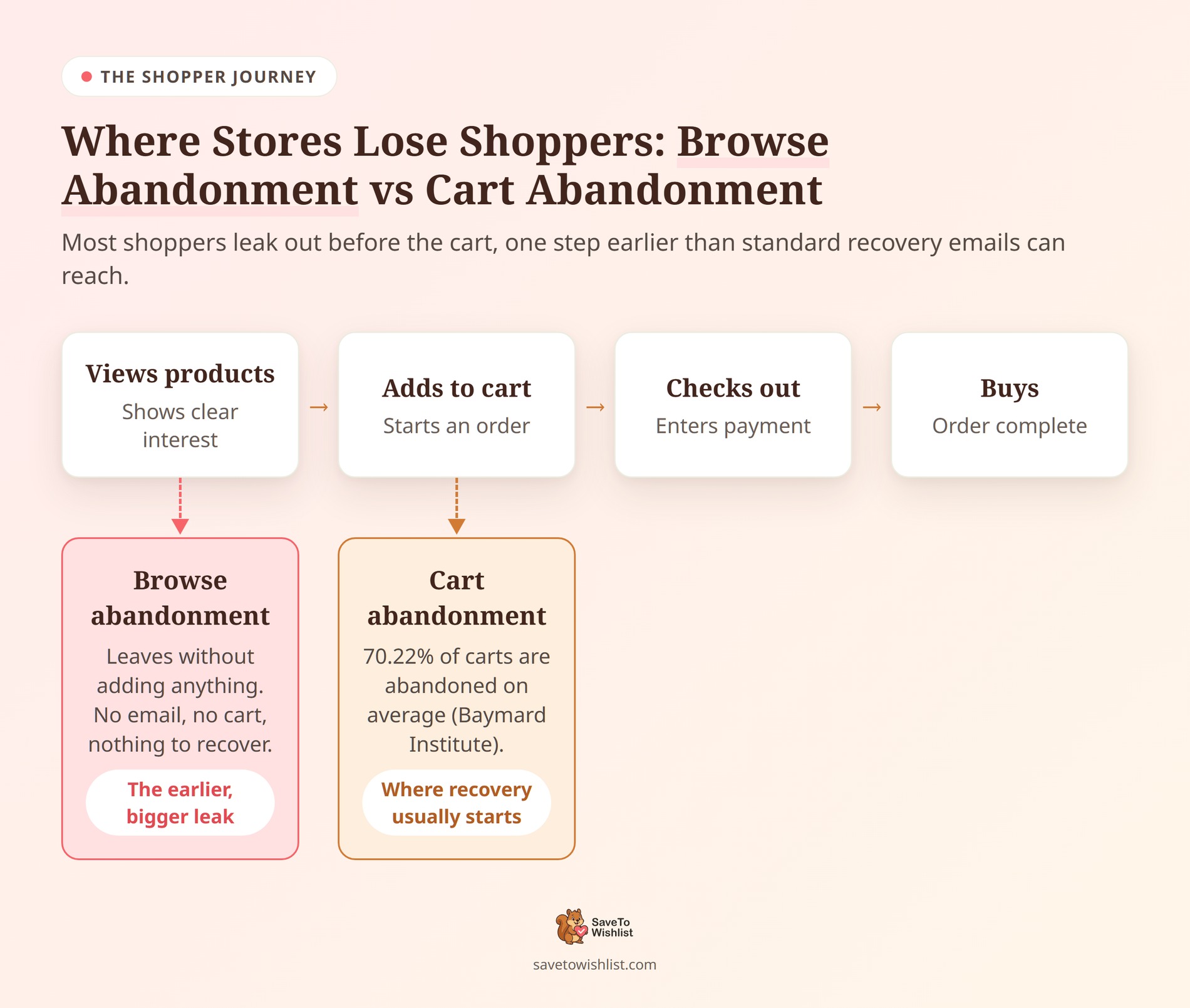
Browse abandonment happens when a shopper views products, shows clear interest, then leaves without adding anything to the cart. It sits one step earlier in the journey than the phase where you would normally send cart abandonment emails.
The two are easy to confuse, so here’s the difference. Cart abandonment means a shopper added a product and left before paying. By contrast, browse abandonment means they never added a product at all, even though they were clearly looking.
That earlier stage is huge. According to the Baymard Institute, 70.22% of carts are abandoned on average. The same research found that 43% of US online shoppers have abandoned a cart because they were just browsing. In other words, browsing behavior drives a big share of lost sales, and it starts well before the cart.
Why WooCommerce Stores Miss Browse Abandonment
Stores miss browse abandonment because the shopper leaves no contact details and no cart to recover. There’s simply nothing obvious to follow up on.
With cart abandonment, WooCommerce at least records the attempt, and plenty of plugins fire off recovery emails. Browsing leaves a thinner trail. The visitor viewed a few products, maybe hovered on one, then closed the tab. No email captured, no order started, nothing to trigger a follow-up.
So the interest is real, but it’s anonymous. And you can’t email a shopper you can’t identify. That’s the gap a wishlist closes.
How Wishlists Turn Anonymous Browsing Into A Trackable Signal
A wishlist does one crucial thing: it forces anonymous browsers to raise their hands.
The second a shopper clicks a “Save” button, two massive things happen. First, they hand you a literal list of exactly what they want to buy. Second, they attach a reachable identity to that intent. Instead of using expensive retargeting ads to guess what a visitor might have liked based on a fleeting page view, you now have concrete, actionable data.
A saved item is an infinitely stronger buying signal than a random page scroll because the shopper took a deliberate action to hold onto it. But you have to apply the Visibility Rule to make this work: your wishlist button must be impossible to miss.
️🔍️ What we’ve seen: Stores that treat wishlists as a hidden “nice to have” feature buried deep inside an account menu capture absolutely zero browse-abandonment data. But when store owners place a high-contrast “Save to Wishlist” button directly on the main shop grid and product pages, anonymous browsing instantly transforms into a goldmine of recoverable intent.
How To Set Up Browse-Abandonment Recovery In WooCommerce
You can’t just install a plugin and hope for the best. To actually recover browse abandoners, you need a tight, automated system that captures interest and fires back a highly targeted response.
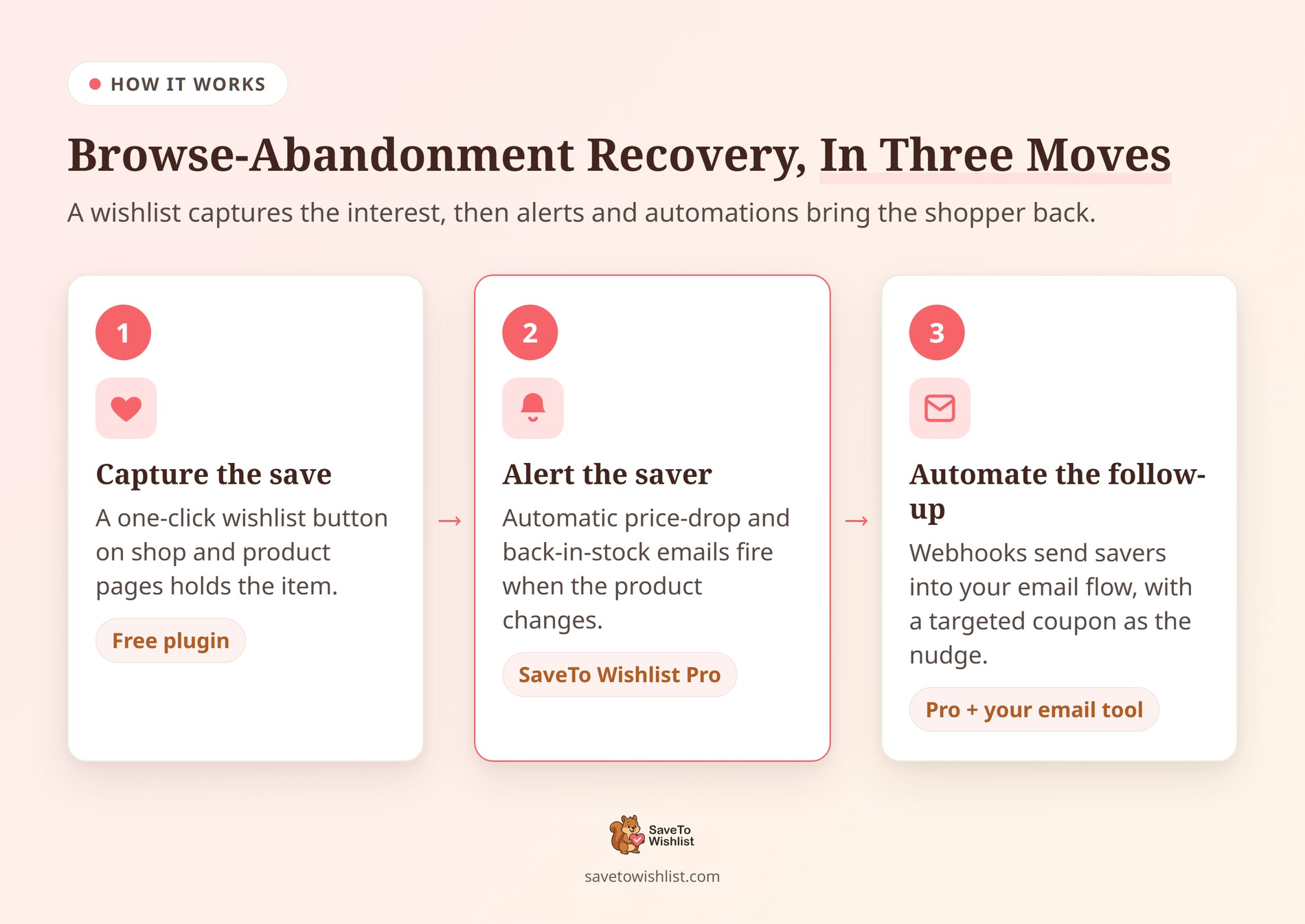
Here’s your three-step execution plan:
1. The one-click capture
Don’t force users to create a full account just to save a pair of shoes. That friction instantly kills the conversion. Instead use the free version of SaveTo Wishlist to drop a simple, one-click “Save” button directly onto your shop grid. This allows guest shoppers to easily curate a list, instantly turning anonymous browsing into captured data.
2. The intent-triggered alert
Stop blasting generic promo emails to your entire list and hoping someone bites. When a shopper saves an item, that’s your golden trigger. Use SaveTo Wishlist Pro to automatically fire off a price-drop or back-in-stock email the second their saved product changes. You aren’t guessing what they want; you’re telling them the exact item they already picked is finally ready for them.
3. The seamless handoff
Don’t let your wishlist data sit uselessly in your WooCommerce dashboard. Set up a webhook to push those saved items directly into a dedicated browse-abandonment flow inside Klaviyo or Mailchimp. For an even stronger nudge, pair that automated browse abandonment email with a small, time-sensitive discount built in Advanced Coupons. A perfectly timed 10% off coupon turns a “maybe later” browser into a guaranteed buyer.
In practice, the alerts quietly do the work. A price-drop email to someone who saved the item lands very differently than a generic promo blast. You’re reminding them of something they chose.
The Golden Window For Follow-Ups
Capturing the intent is only half the battle; knowing exactly when to strike is the other. If a shopper saves an item, browses a bit more, and closes the tab, sending an automated email five minutes later doesn’t look helpful—it looks desperate, and frankly, a little creepy.
To nail the timing, you need to apply the 2-Hour Rule.
Give your shoppers a mandatory two-to-four-hour cool-down period before your webhook triggers that first browse-abandonment flow. This specific window is the absolute sweet spot for top-of-funnel browsers.
- Too early (under 1 hour): You trigger their spam defenses because the tracking feels overly aggressive.
- Too late (over 24 hours): They have completely lost the emotional impulse that made them save the item in the first place, or worse, they already bought a similar item from a competitor.
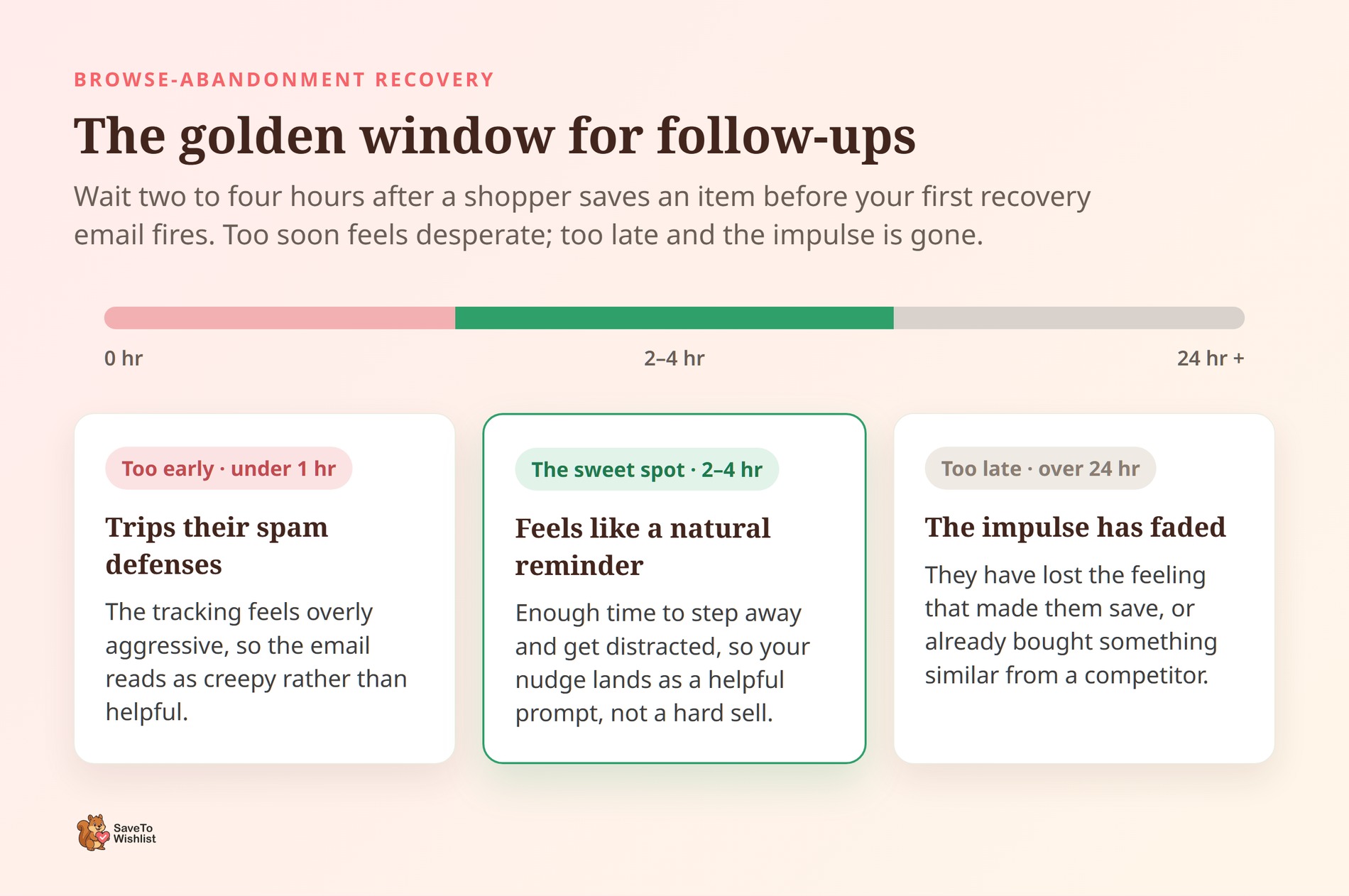
Hitting them right in that two-hour window gives them enough time to step away from their screen and get distracted, making your email feel like a helpful, natural reminder rather than a hard-sell interruption.
The Anatomy Of A Winning Recovery Email
Don’t ruin a perfectly timed email with terrible copy. The biggest mistake store owners make here is acting like a pushy salesperson.
Remember, a browse abandoner hasn’t committed to anything yet. If you hit them with a giant, flashing “BUY NOW BEFORE IT SELLS OUT” banner, you will just trigger an immediate unsubscribe.
Instead, apply the Customer Service Shift. Frame your email as a helpful, low-pressure check-in rather than a hardcore sales pitch.
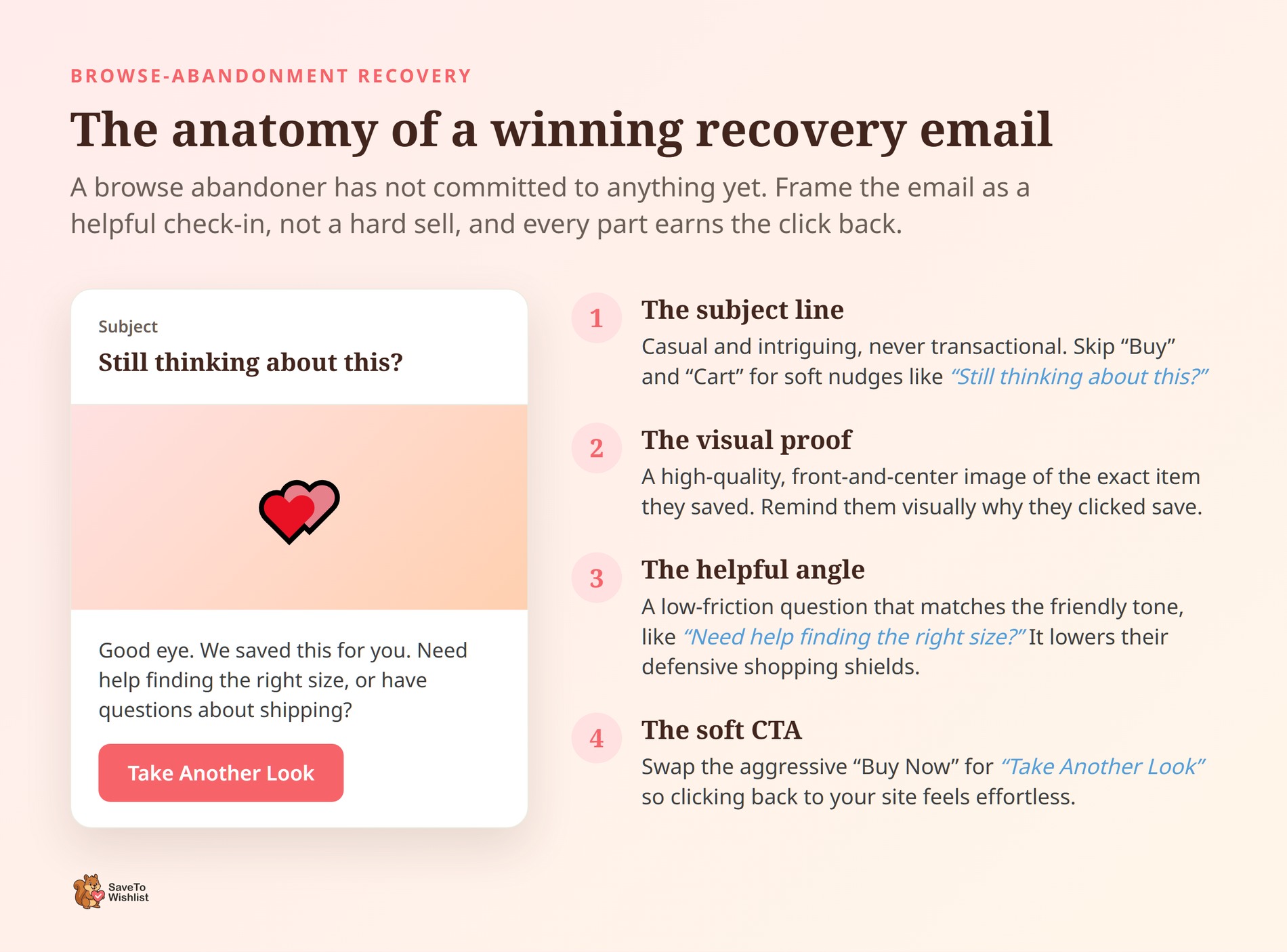
Here’s the exact structure of a high-converting browse abandonment email:
- The Subject Line: Keep your subject line casual and intriguing, not transactional. Avoid using words like “Buy” or “Cart.” Stick to soft nudges like “Still thinking about this?” or “Good eye. We saved this for you.”
- The Visual Proof: Show, don’t tell. You need a high-quality, front-and-center image of the exact item they saved. Remind them visually why they clicked that wishlist button in the first place.
- The Helpful Angle: Ask a low-friction question in the body copy that matches the friendly tone of your subject line. Try something like, “Need help finding the right size?” or “Have questions about our shipping times?” This instantly lowers their defensive shopping shields.
- The Soft CTA: Swap out the aggressive “Buy Now” button. Since they are still technically in the discovery phase, use a softer call-to-action like “Take Another Look” or “Return to Your Wishlist.” This reduces the mental friction of clicking back to your site.
How To Measure Browse-Abandonment Recovery
Stop looking at vanity metrics like anonymous page views or average session duration. To measure true browse-abandonment recovery, you only need to care about hard revenue. A wishlist gives you a crystal-clear before-and-after picture of your recovered traffic.
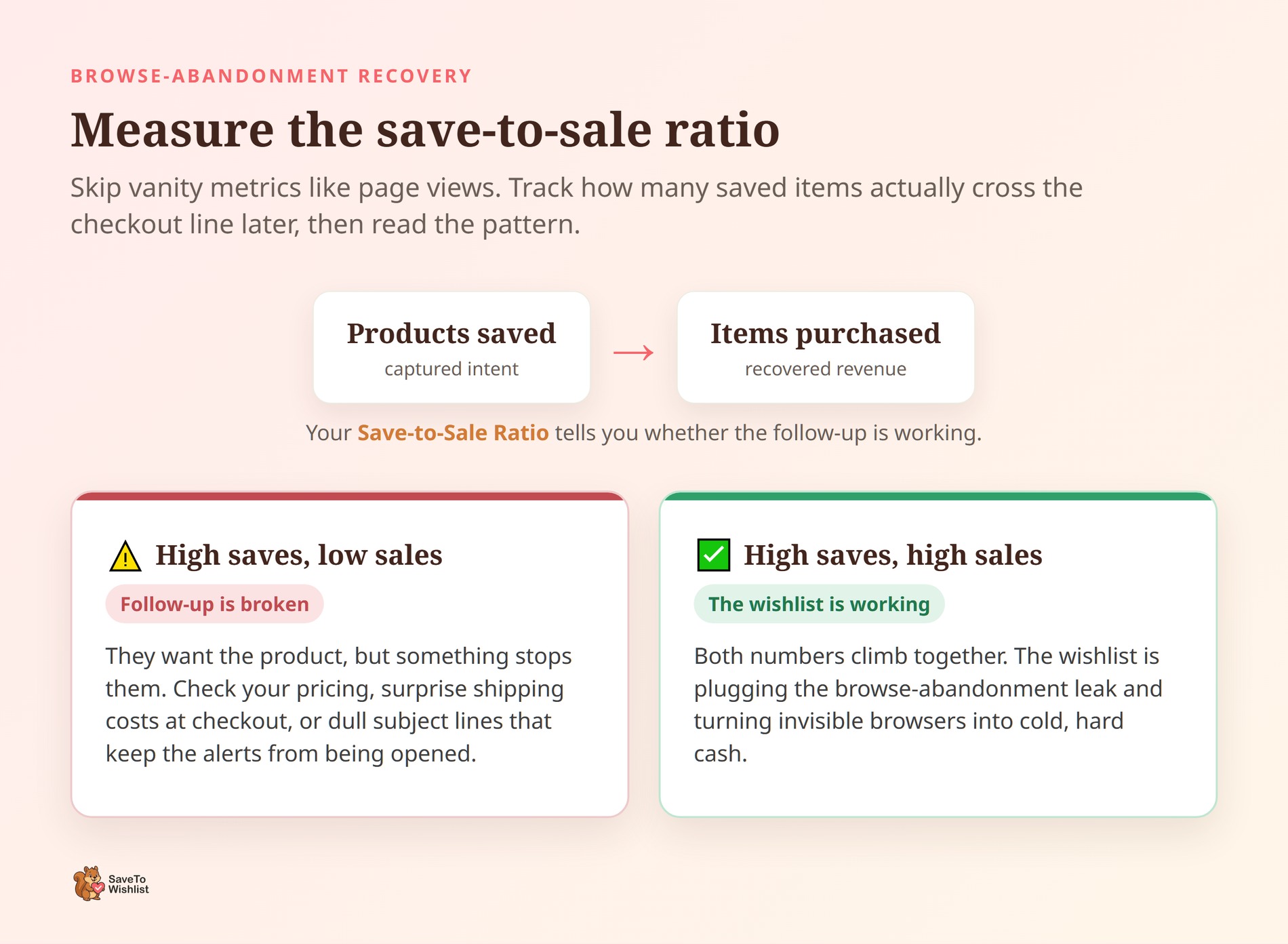
To track this properly, start obsessing over your Save-to-Sale Ratio. Track exactly how many products get saved, and compare that directly to how many of those specific items actually cross the checkout line later. You also need to actively watch the performance of your automated price-drop and back-in-stock emails.
- High Saves, Low Sales: If people are saving a massive amount of products but never actually buying them, your follow-up is broken. It means they want the product, but something is stopping them. Your pricing might be off, your shipping costs might be scaring them away at the last second, or maybe a boring subject line means your automated emails just aren’t getting opened.
- High Saves, High Sales: If both numbers are climbing together, your wishlist is doing its exact job: plugging the browse abandonment leak and turning invisible browsers into cold, hard cash.
Frequently Asked Questions
What is the difference between browse abandonment and cart abandonment?
Browse abandonment is when a shopper views products and leaves without adding anything to the cart. Cart abandonment is when they add a product but leave before paying, which is exactly what standard cart abandonment emails are designed to fix. Browse abandonment happens earlier and affects far more visitors, which makes it a bigger, often ignored, source of lost sales
Can you send browse-abandonment emails in WooCommerce?
Yes, if you capture the interest first. A wishlist ties each saved product to a shopper. SaveTo Wishlist Pro can then send automated price-drop and back-in-stock alerts, or trigger a follow-up flow through a webhook to send a targeted browse abandonment email.
Do I need a paid plugin to recover browse abandoners?
The free SaveTo Wishlist plugin captures saves, which is the first step. The automated alerts and follow-ups are part of SaveTo Wishlist Pro. So you can start capturing intent for free, then add the recovery layer when you’re ready.
Is browse abandonment really worth chasing?
Yes. Because browsing happens before the cart, it represents a much larger group of interested shoppers than cart abandoners alone. Recovering even a small share of that earlier interest adds up, since most stores currently do nothing with it.

Stop Losing Browsers Before The Cart
Browse abandonment is the quiet leak in most WooCommerce stores. It drains sales from interested shoppers who never even reach the cart. The fix isn’t more retargeting spend. It’s capturing interest earlier with a wishlist, then following up when it counts.
- What browse abandonment is: interest shown before anything reaches the cart.
- Why stores miss it: browsing leaves no contact and no cart to recover.
- How wishlists help: a save turns anonymous browsing into a named signal.
- How to set up recovery: capture with a wishlist, then automate alerts and follow-ups.
- When to follow up: wait two to four hours before sending an alert so you don’t seem desperate.
- What to say: use the Customer Service Shift to frame your emails as helpful check-ins, not aggressive sales pitches.
- How to measure recovery: track how many saved items turn into completed purchases over time.
Want to plug the browse-abandonment leak? Start turning browsers into buyers with SaveTo Wishlist Pro.



