

 Reviewed by
 I used to think wishlists were a nice-to-have. A heart icon customers clicked and then forgot about. Then I started looking at the actual data from stores that tracked wishlist behavior, and seeing the impact on customer retention in ecommerce changed how I think about the entire feature category.
Here’s the thing about ecommerce customer retention: most stores focus on the same three tactics. Email sequences, loyalty points, and retargeting ads. Those all work. But they’re all built on inferred intent, guesses about what a customer might want based on what they browsed or bought.
Wishlists are different. When someone adds a product to a wishlist, they’re telling you exactly what they want. That’s not inferred intent. That’s declared intent. And it’s one of the strongest retention signals your store can collect.
When it comes to improving customer retention, this article covers five strategies that turn wishlist activity into measurable repeat purchases. These aren’t theoretical. They’re based on how real WooCommerce stores use wishlist data to bring customers back and convert them.
Table Of Contents
- Why Wishlists Are an Underrated Retention Tool
- 1st Strategy: Return Visit Triggers From Wishlist Activity
- 2nd Strategy: Price Drop Re-engagement
- 3rd Strategy: Wishlist Abandonment Recovery
- 4th Strategy: Social Sharing For New Customer Acquisition
- 5th Strategy: Wishlist-Based Loyalty Programs Via Coupons
- FAQs: Customer Retention in Ecommerce
- Conclusion
Why Wishlists Are An Underrated Ecommerce Customer Retention Tool
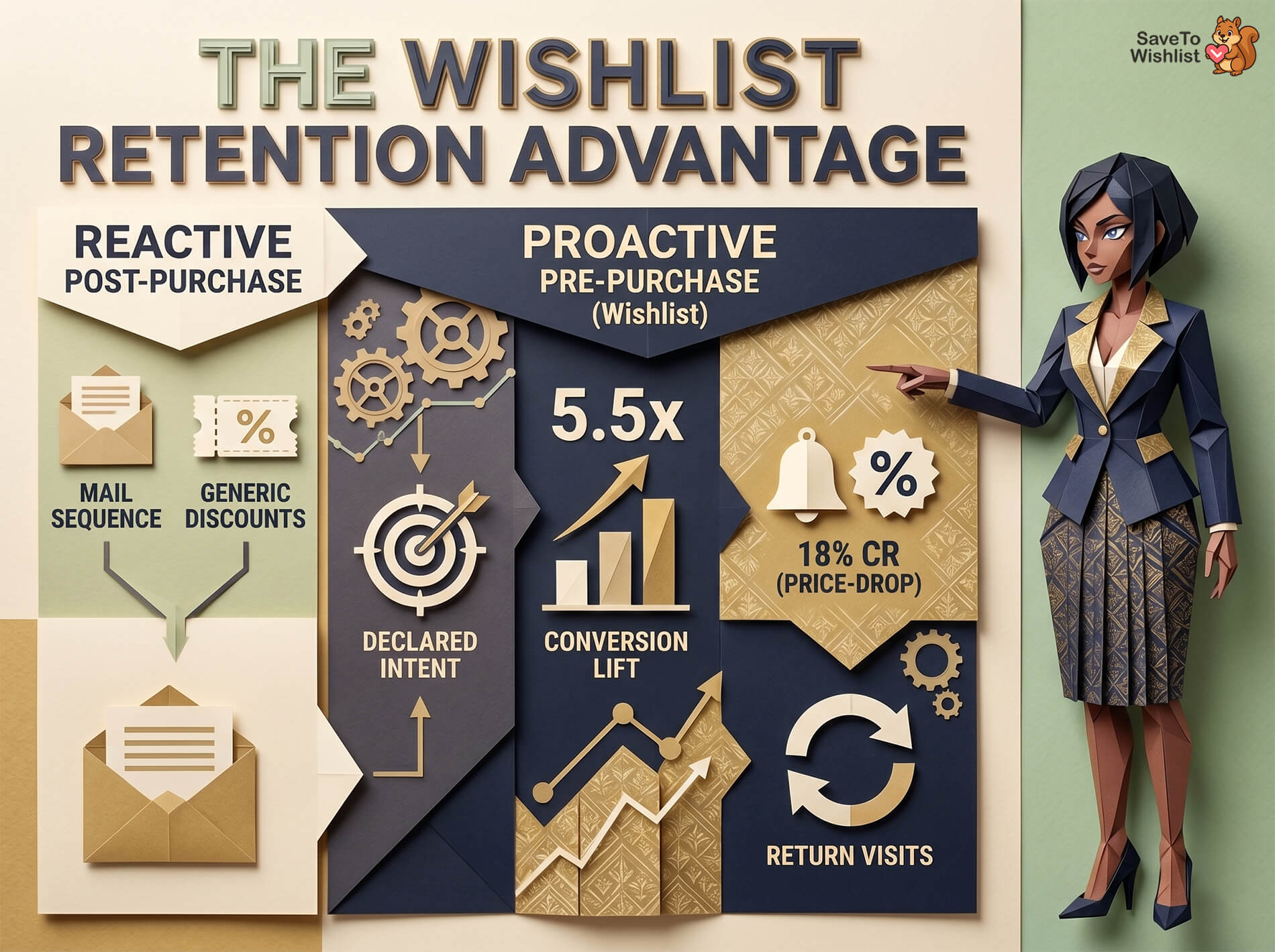
The standard ecommerce retention playbook looks something like this: send a post-purchase email sequence, offer a discount on the next order, maybe run a loyalty program with points. These are fine customer retention strategies. But they share a blind spot: they’re all reactive.
Wishlists flip that dynamic. They capture intent before a purchase decision is made, giving you a window into what customers want but haven’t bought yet.
Think about the difference between “this customer viewed a product page” and “this customer saved a product to their wishlist.” The first is a signal. The second is a commitment.
According to Barilliance, the average ecommerce conversion rate sits around 2-3%. However, shoppers who engage with personalized features like wishlists convert at significantly higher rates—often seeing a 5.5x conversion lift compared to standard sessions.
Data reinforces this impact: specific implementations for retailers like Blacks and Millets resulted in conversion lifts of 332% and 277%, respectively, after deploying these personalization features. This shift occurs because these tools capture “declared intent” rather than just passive browsing, moving customers into a high-value buying mindset where targeted follow-up triggers, such as price-drop alerts, can achieve conversion rates as high as 18%.
Wishlist users also return more often. They have a reason to come back: checking prices, reviewing saved items, and sharing lists with others. Each return visit is another opportunity to convert.
🔍️ What We’ve Seen: Stores that actively use wishlist data for re-engagement, rather than just offering a passive “save” button, consistently report higher return visit rates. The wishlist itself isn’t the retention tool. The data it generates is.
Strategy 1: Return Visit Triggers From Wishlist Activity
How wishlist signals differ from browse signals
When a customer browses a product page, you know they looked. When they add it to a wishlist, you know they want it. That distinction matters for every follow-up message you send.
Browse-based retargeting feels intrusive because the customer didn’t ask for it. Wishlist-based follow-ups feel helpful because the customer already expressed interest. They saved the item. A reminder isn’t an interruption; it feels like an extension of good customer service.
This is why wishlist-triggered messages consistently outperform generic browse abandonment emails, helping to actively lower your store’s churn rate. The intent is stronger, so the relevance is higher, and customers respond to relevance.
Turning wishlist adds into automated return visits
The simplest version of this strategy is a timed reminder email. A customer adds a product to their wishlist, and three to seven days later, they get a message: “Still thinking about [product name]? It’s still available.”
That’s the baseline. More sophisticated setups layer in additional context. Is the item low in stock? Has it been wishlisted by many other customers? Is there a related product that pairs well with it?
SaveTo Wishlist Pro’s automation features let you build these triggered workflows without custom code. You define the trigger (wishlist add), the delay, and the action. The plugin handles the rest.
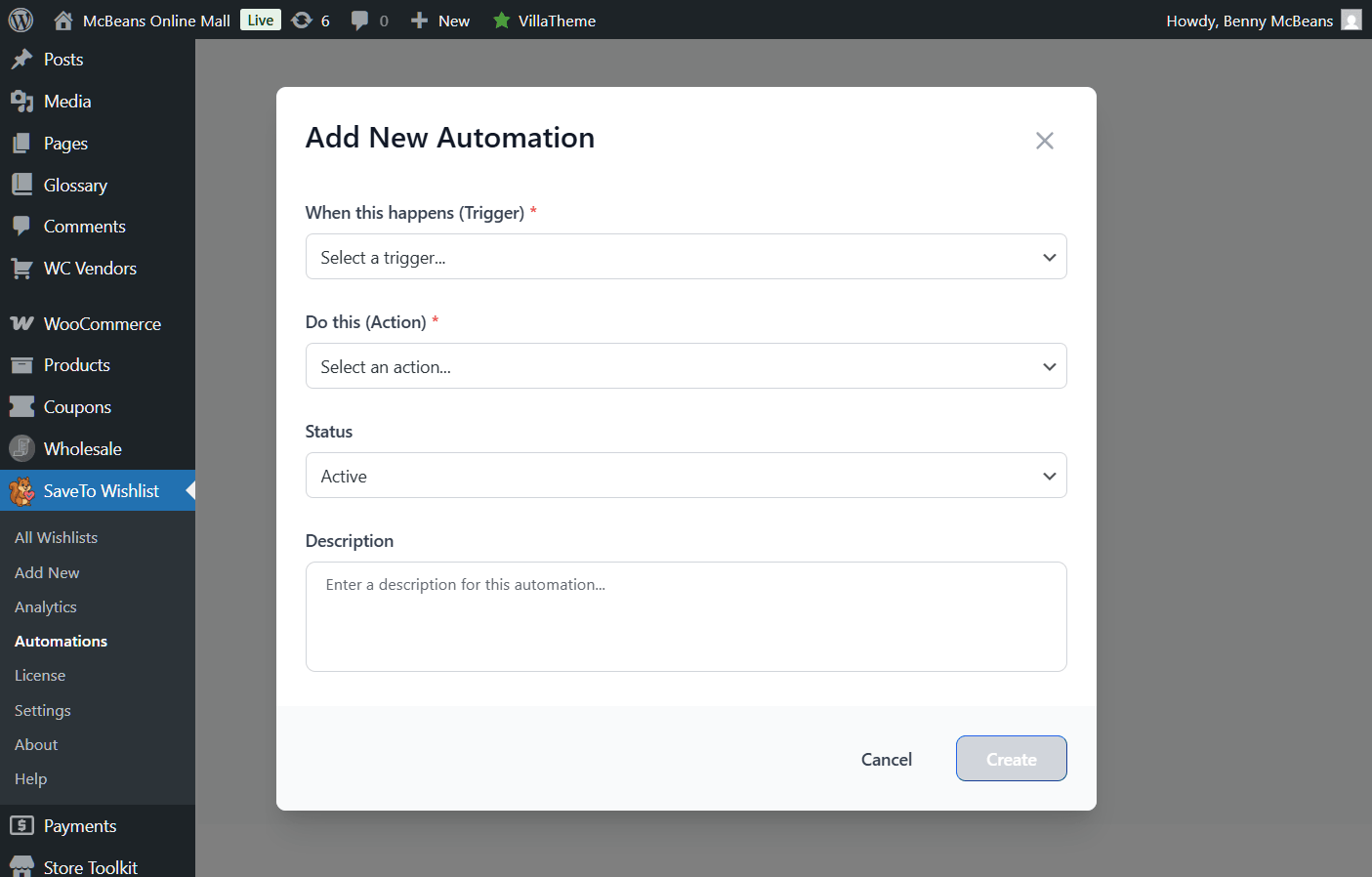
The key is timing. Too soon feels pushy. Too late, and they’ve forgotten or bought elsewhere. In my experience, the three-to-seven-day window works best for most product categories, with higher-consideration items (furniture, electronics) benefiting from a longer delay.
Strategy 2: Price Drop Re-engagement
Why price drops are the highest-converting retention trigger
When a customer adds an item to their wishlist instead of their cart, price is often the reason. They want it. They’re just not ready to pay the current price.
That makes price drop alerts one of the highest-converting re-engagement triggers available, reliably boosting your repeat purchase rate. You’re not guessing what might bring them back. You’re removing the specific barrier that stopped them from buying.
Personalized product recommendations and price-based notifications drive measurably higher engagement than generic promotional emails, because they target an existing intent rather than trying to create new interest.
Setting up automated price drop alerts
The flow is straightforward. A customer wishlists an item. The price drops (sale, clearance, promotional pricing). The customer gets a notification: “Good news, [product name] is now $X, down from $Y.”
This beats blanket discount emails in every metric that matters. Open rates are higher because the subject line is personally relevant. Click-through rates are higher because the customer already wants the product. Conversion rates are higher because the objection (price) has been addressed.
With SaveTo Wishlist Pro’s price drop alerts, this runs automatically. When you change a product’s price in WooCommerce, the plugin checks who has it wishlisted and sends the notification. No manual segmenting, no CSV exports, no custom email templates for every sale.
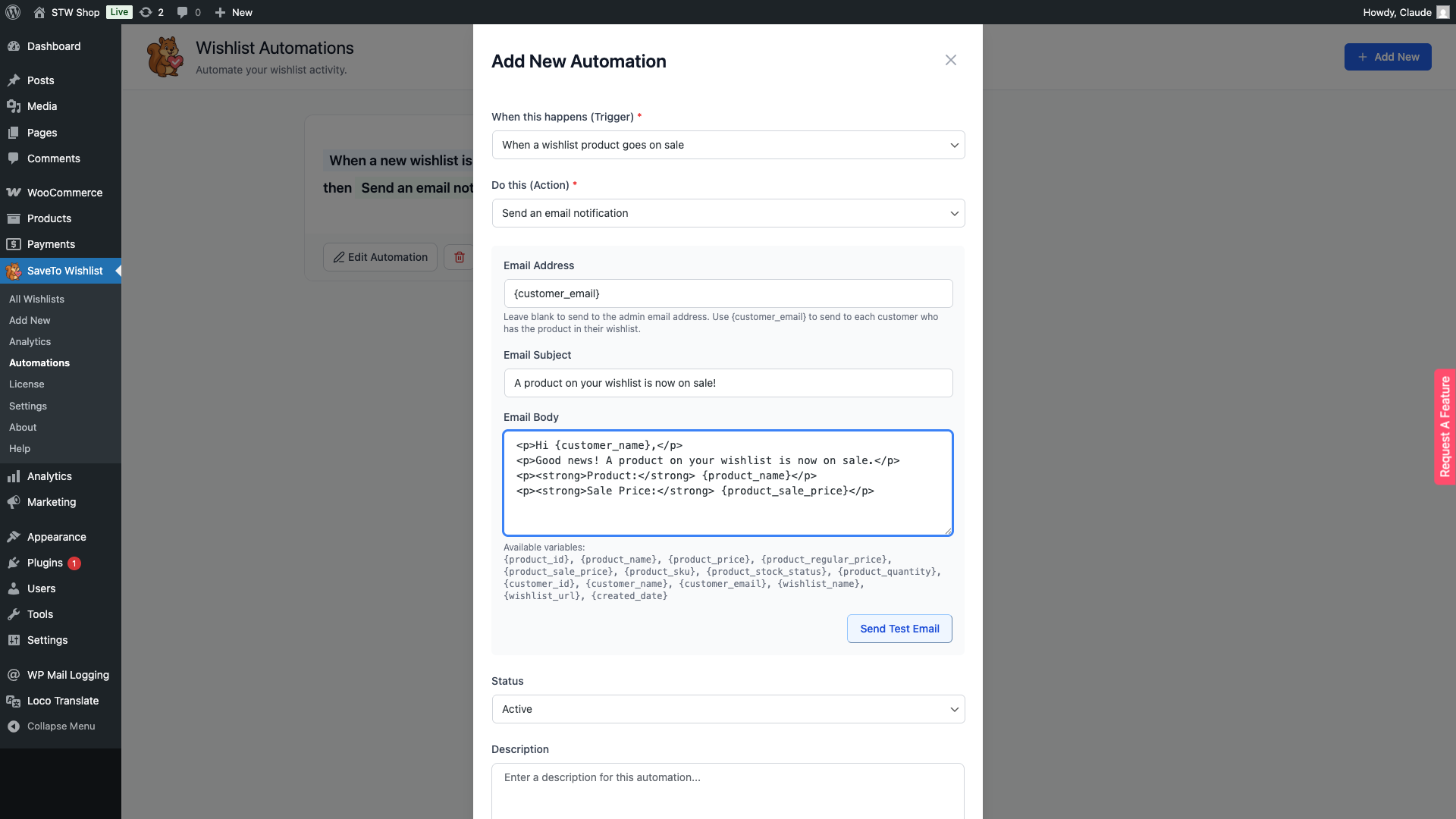
The best part: this works even for guests. If a guest user saves items to a wishlist and provides an email, they’ll get the same price drop alerts as registered customers.
Want to know more about how SaveTo Wishlist Pro’s price drop alerts work? Then head on over to our extensive guide:
How To Set Up Wishlist Price Drop Alerts In WooCommerce (Complete Guide)
Strategy 3: Wishlist Abandonment Recovery
Wishlist abandonment vs. cart abandonment
Cart abandonment gets all the attention. According to the Baymard Institute, the average cart abandonment rate is around 70.22%. There’s an entire industry built around recovering those carts.
But wishlist abandonment is a bigger, quieter problem. Customers save items they intend to buy later, and “later” never comes. The difference is timing. Cart abandonment happens in minutes or hours. Wishlist abandonment happens over days, weeks, or even months.
That longer window is actually an advantage. You have more time to re-engage, and you can do it without the urgency pressure that makes cart recovery emails feel aggressive.
Building a wishlist re-engagement sequence
A good wishlist recovery sequence has multiple touchpoints spread over a longer period than a cart recovery flow.
Here’s a framework that works:
- Day 3-5: Gentle reminder. “You saved [product name] to your wishlist. Still interested?” No discount, no urgency. Just a helpful nudge.
- Day 10-14: Add context. “Your wishlisted [product name] has been viewed by X other shoppers this week.” Social proof without pressure.
- Day 21-30: Offer an incentive if appropriate. A small discount or free shipping on wishlisted items. This is the point where a gentle push can close the sale.
The content-first approach (reminders and social proof before discounts) protects your margins. Leading with discounts trains customers to wishlist items and wait for the coupon. Leading with value keeps the full-price conversion path open.
SaveTo Wishlist Pro supports timed automation sequences that you can build around these touchpoints. Set the triggers, define the delays, and let the system handle the follow-up.
Strategy 4: Social Sharing For New Customer Acquisition
How shared wishlists create organic acquisition loops
Wishlists aren’t just retention tools. When shared, they become acquisition channels.
Think about gift registries, holiday wishlists, and group purchase planning. Every time a customer shares a wishlist, they’re sending a curated product list to people who trust their taste. That’s organic, word-of-mouth marketing tied directly to your product catalog.
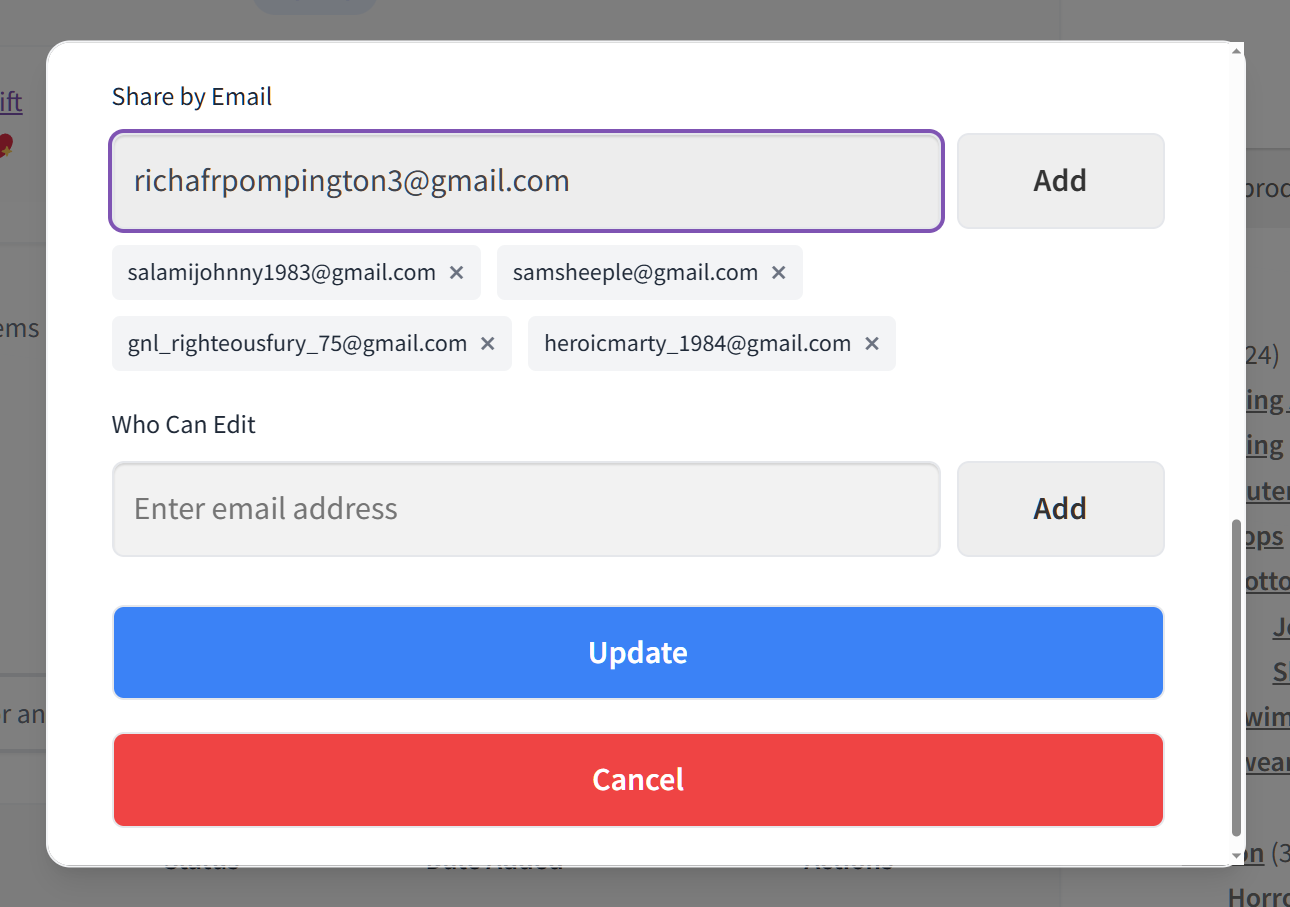
Each shared wishlist link exposes your store to a new potential customer. The recipient might buy from the list for the sharer, or they might browse your store and find something for themselves. Either way, you’ve acquired a new visitor through a channel that cost you nothing.
Making wishlists shareable by default
For this to work, sharing needs to be frictionless. If a customer has to jump through hoops to share a list, they won’t do it.
The essentials:
- Direct link sharing. A simple URL that anyone can access.
- Permission controls. The sharer decides who can view or edit the list. SaveTo Wishlist’s sharing and privacy features give customers control over visibility without adding complexity.
- Guest access. Recipients shouldn’t need an account to view a shared list. If someone sends a wishlist to a friend, that friend should be able to see it and buy from it immediately. This is where guest wishlist support matters for both the sharer and the recipient.
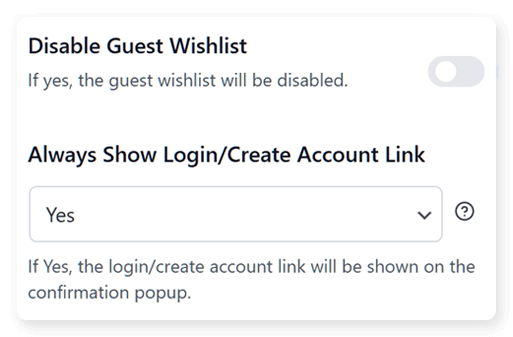
The acquisition loop looks like this: Customer creates wishlist, shares it, recipient visits your store, sees products, potentially creates their own wishlist, shares that. Each cycle introduces your store to a new network.
Curious about how SaveTo Wishlist Pro’s sharing and permission features can benefit your store? Why not check out our comprehensive guide:
Strategy 5: Wishlist-Based Loyalty Programs Via Coupons
Connecting wishlists to coupon-based loyalty workflows
Most traditional programs designed for customer loyalty reward purchases. That makes sense. But you can also reward wishlist engagement to deepen the relationship before the purchase happens.
The idea is simple: customers who actively maintain wishlists are showing sustained interest in your products. Rewarding that interest with targeted coupons, specifically for their wishlisted items, creates a personalized incentive that generic “10% off everything” discounts can’t match.
Instead of blasting your entire customer list with a store-wide sale, you send a coupon that applies specifically to items a customer has saved. It feels personal because it is. The relevance is built in.
Integration possibilities with coupon plugins
This strategy works best when your wishlist plugin can talk to your coupon system. SaveTo Wishlist’s Advanced Coupons integration connects wishlist data to coupon generation, letting you create targeted offers tied to specific wishlist behavior.
Examples of what this enables:
- A customer wishlists 5+ items and gets a coupon for 10% off their next wishlist purchase
- A customer’s wishlist item has been saved for 30+ days, triggering a personalized discount
- A customer shares a wishlist with 3+ people, earning a small reward coupon
The loop for customer retention in ecommerce becomes: wishlist, then targeted coupon, then purchase, then new wishlist items, then new coupon opportunity. Each cycle reinforces the habit of using wishlists, which generates more data, which powers better targeting.
This is where wishlists stop being a simple feature and start acting as a retention infrastructure that extends a shopper’s customer lifetime value.
FAQs: Customer Retention In Ecommerce
Do wishlists actually improve customer retention rates?
Yes. Wishlists capture declared purchase intent, which gives you stronger signals for re-engagement than browse history alone. Stores that use wishlist data for automated follow-ups, price drop alerts, and abandonment recovery see a measurably higher retention rate compared to stores that treat wishlists as a passive feature.
What’s the difference between wishlist abandonment and cart abandonment?
Cart abandonment happens when a customer adds items to their cart and leaves without buying, usually within one session. Wishlist abandonment is a longer-term behavior where saved items are never purchased. The recovery strategies differ: cart recovery is urgent (hours), while wishlist recovery is gradual (days to weeks) and benefits from a content-first approach that builds genuine customer loyalty.
Can guest users benefit from wishlist retention strategies?
Yes. SaveTo Wishlist supports guest wishlists, which means even users who haven’t created an account can save items and receive follow-up notifications if they provide an email. This is important because many first-time visitors aren’t ready to create an account, but they’re willing to save products they’re interested in.
How do price drop alerts work for wishlist items?
When a product’s price changes in WooCommerce, the wishlist plugin checks which customers have that item saved and sends an automatic notification. The customer gets an email or on-site alert saying the item they wanted is now cheaper. This works with SaveTo Wishlist Pro’s price drop alert feature.
Do I need the paid version of a wishlist plugin to use these retention strategies?
Some strategies work with free wishlist plugins. SaveTo Wishlist’s free version includes unlimited wishlists, guest wishlists, multiple wishlists, and sharing, which covers Strategies 1, 4, and parts of the others. For automated workflows (Strategies 2, 3, and 5), you’ll need SaveTo Wishlist Pro, which starts at $49.50/year for the Growth plan. See the full feature list for details.
How does a wishlist plugin fit into a broader customer retention ecommerce strategy?
It acts as the bridge between browsing and buying. By collecting declared intent data, a wishlist tool feeds highly accurate information into your existing email marketing and retargeting systems, making them more effective.
Can wishlists help lower my store’s churn rate?
Yes. Churn happens when customers forget about your brand. Because wishlists provide natural, helpful reasons to reach back out (like price drops or low stock alerts), they keep shoppers engaged and prevent them from silently slipping away.
Why is customer retention in ecommerce so important right now?
Customer retention in ecommerce is crucial because rising advertising costs make acquiring new customers more expensive than ever. Focusing on keeping the shoppers you already have is the most cost-effective way to protect your profit margins.

Conclusion
Wishlists aren’t a passive “save for later” button. They’re retention infrastructure that generates the intent signals your entire re-engagement stack depends on.
The five strategies in this article build on each other. Return visit triggers capture the initial interest. Price drop alerts remove the purchase barrier. Abandonment recovery fills the gap between intent and action. Social sharing turns existing customers into acquisition channels. And loyalty programs via coupons create a cycle that reinforces all of the above.
The common thread is data. Every wishlist add, every share, every abandoned item is a data point you can act on. The question isn’t whether wishlists help with customer retention in ecommerce. It’s whether you’re using the data they generate.
If you’re running a WooCommerce store and want to start using these customer retention strategies, explore SaveTo Wishlist Pro’s automation features to see how the workflows connect. The free version covers the basics. Meanwhile, the Growth Plan ($49.50 for the first year, then $99/year) adds the analytics, automations, and price drop alerts that power the more advanced strategies.



