

 Reviewed by
 If you run a WooCommerce store using Iconic Wishlists for WooCommerce, the past 48 hours have been confusing. The iconicwp.com website redirects to Liquid Web. The product page you bought from is gone. Your existing plugin keeps working, but the brand around it has been folded into Liquid Web’s Kadence Shop Kit. Support, roadmap, and renewal all moved to a portal at software.liquidweb.com that’s still finding its footing.
For store owners deciding whether to stay with the now-bundled Iconic plugin or move to a dedicated Iconic Wishlists alternative, this comparison covers the practical decision: feature-for-feature what each plugin does, migration cost, roadmap certainty, and which one we think wins for WooCommerce stores in 2026.
We build SaveTo Wishlist, so this comparison favors our product. The framing below is honest about what both plugins do well, so you can decide if the swap is right for your specific store.
Table Of Contents
- The Backdrop: What Changed at Iconic in May 2026
- SaveTo Wishlist Vs Iconic Wishlists For WooCommerce: Side-By-Side
- Feature Comparison Summary
- Migration: Switching From Iconic To SaveTo Wishlist
- Pricing And Plans
- Frequently Asked Questions
- Which Plugin Should You Choose?
The Backdrop: What Changed At Iconic In May 2026
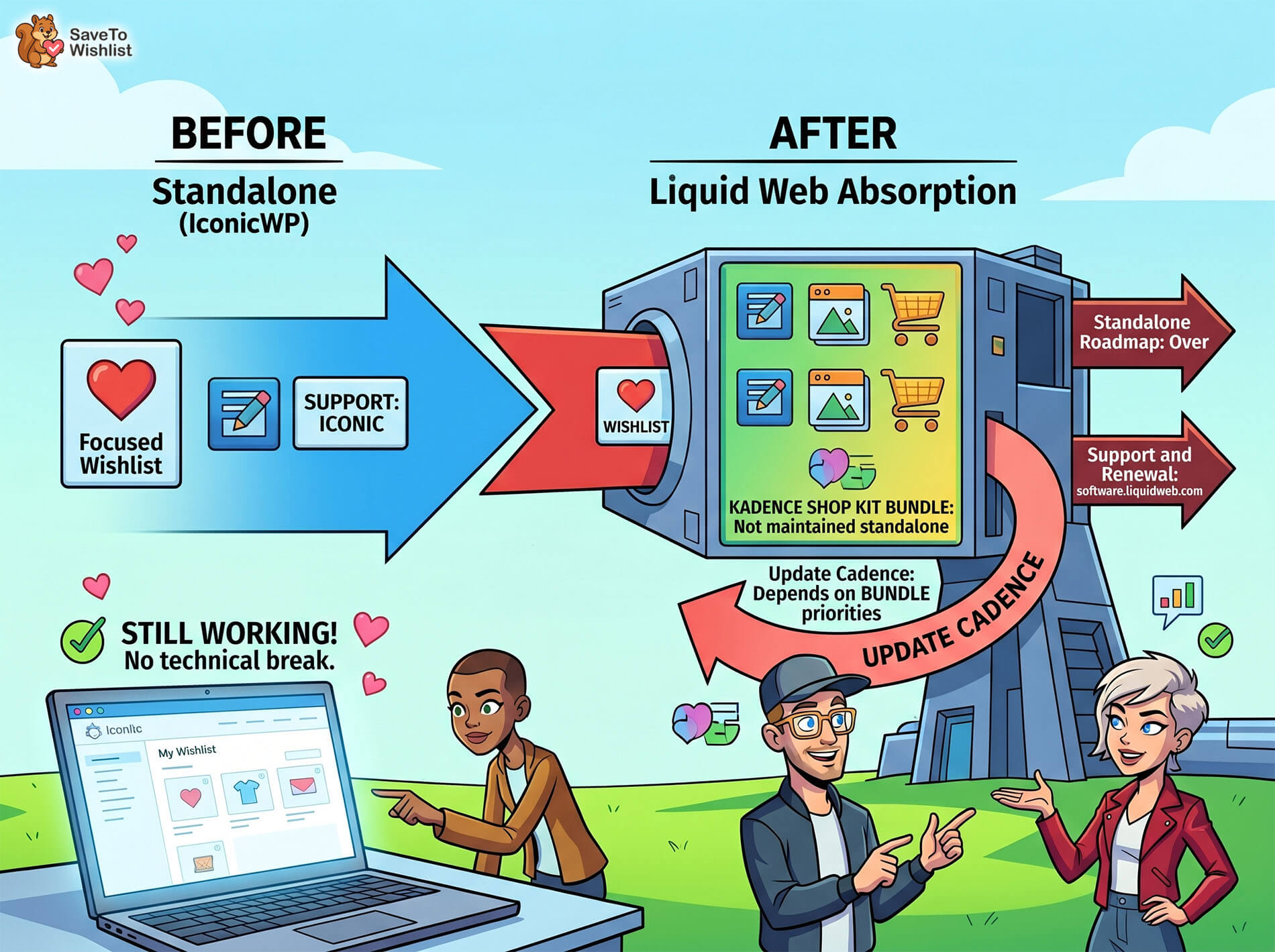
Iconic Wishlists for WooCommerce wasn’t shut off. The plugin code installed on your site continues to function. What changed is the business around it.
Iconic’s parent company StellarWP consolidated into Liquid Web on May 12, 2026. The entire IconicWP plugin family was absorbed into the Kadence Shop Kit bundle (see our coverage of the IconicWP shutdown roundup for the wider picture).
The practical effect for Iconic Wishlists users:
- Existing installations work. No immediate technical break.
- Standalone product roadmap is over. Iconic Wishlists is now one feature inside a bundle, not a maintained standalone.
- Support and renewal route through Liquid Web at software.liquidweb.com.
- Update cadence going forward depends on Kadence Shop Kit priorities, not Iconic’s old release cycle.
Those last two points are the reason this comparison matters. A plugin that’s actively focused (SaveTo Wishlist) ships features and fixes faster than a plugin that’s one of many inside a flagship product’s bundle. For a feature like wishlists, where the difference between a good and great build is in the small details (guest-flow conversion, sharing UX, analytics depth), active roadmap focus compounds over a year.
SaveTo Wishlist Vs Iconic Wishlists For WooCommerce: Side-By-Side
For each comparison criterion below, we describe what each plugin does, where the lines actually differ, and what the practical impact is on conversion or store operations.
Guest wishlist support
This is the single biggest functional difference between modern wishlist plugins and legacy ones, and it directly affects conversion.
SaveTo Wishlist lets visitors save products without creating an account. When the same visitor later signs up, all of their previously-saved items merge into the new account automatically. The guest-save flow is built into the free tier, not gated behind a paid upgrade. In testing across stores migrating from competitor plugins, the guest-wishlist pathway typically accounts for 30-50% of total wishlist creation events. Every one of those saves would have been lost if the plugin required an account up front.
Iconic Wishlists for WooCommerce has historically required a customer account for wishlist creation. The plugin’s design predates the now-common guest-first conversion pattern; visitors who weren’t ready to register couldn’t save items, which means every “I’ll come back later” moment was lost rather than captured.
For stores with significant non-logged-in traffic (most B2C stores), this difference shows up directly in conversion data. SaveTo Wishlist captures saves at the moment of interest; legacy plugins lose them.
Sharing options
Wishlist sharing is the second feature that compounds over time. Customers share wishlists with friends, family, gift-givers, or wedding-party members. Every share is a free traffic source that brings a buyer with pre-existing intent.
SaveTo Wishlist generates a unique shareable URL for every wishlist (each list has a url_code). Visibility is configurable per wishlist: public (anyone with the link can view), private (only the owner), or shared by email (specific recipients). The plugin includes social-sharing buttons (Facebook, Twitter, Pinterest) directly in the wishlist UI. Customers can share without leaving the page.
Iconic Wishlists for WooCommerce supports URL-based sharing of wishlists. Per Iconic’s product documentation, the feature exists but the UX details (specific visibility levels, email-share flow, social integrations) are less prominent in the plugin’s marketing. With the product roadmap now folded into Kadence Shop Kit, any sharing-UX improvements are subject to Kadence’s broader priorities rather than wishlist-specific iteration.
Multiple wishlists per customer
Customers run separate lists for different purposes: gift registry, save-for-later, comparison shopping, wedding planning. A plugin that forces every saved item into a single “wishlist” loses the segmentation that makes the feature genuinely useful.
SaveTo Wishlist lets each customer create unlimited wishlists, each with its own name, visibility setting, and sharing options. Items can move between lists. A customer can have a public “Wedding Registry” wishlist they share with family alongside a private “Save for Later” list for personal browsing.
Iconic Wishlists for WooCommerce supports multiple wishlists in the premium tier. The base configuration assumes a single list per customer. For stores selling into gift-registry, wedding, baby-shower, or other multi-list scenarios, the multi-list capability is functionally required, not a nice-to-have.
Analytics on wishlist-to-purchase conversion
Wishlists drive revenue when you can measure the path and optimize it. Without analytics, the feature runs in the dark.
SaveTo Wishlist Pro ships customer behavior dashboards covering active customers, average wishlists per customer, average items per wishlist, share rate, purchase-from-wishlist rate, average customer value, and time-to-purchase tracking. Pro also exposes per-product insights: which products get wishlisted most often, and which sit in wishlists without converting. The analytics surface is purpose-built for wishlist optimization rather than bolted onto a generic admin view.
Iconic Wishlists for WooCommerce provides basic wishlist data through the WordPress admin. Detailed analytics, conversion tracking, and per-product wishlist insights are not core features. For stores running A/B tests on wishlist UI placement, share copy, or call-to-action wording, the lack of native analytics depth means you’re optimizing without instrumentation.
Roadmap certainty
This is the comparison criterion most affected by the May 2026 consolidation.
SaveTo Wishlist is Rymera Web Co’s actively-maintained wishlist plugin. The product roadmap is wishlist-specific. Features ship on a predictable cycle, and the team responding to customer feature requests works only on wishlists, not on a multi-product bundle.
Iconic Wishlists for WooCommerce is now part of the Kadence Shop Kit bundle inside Liquid Web’s portfolio. Kadence’s headline value is theme + page-builder; the wishlist feature is one of many absorbed plugins competing for roadmap attention. Update cadence, feature priority, and niche bug fixes are subject to the bundle’s broader priorities rather than wishlist-focused iteration.
Feature Comparison Summary
| Feature | SaveTo Wishlist | Iconic Wishlists for WooCommerce |
| Guest wishlist support | ✓ (Free tier) | Limited |
| Multiple wishlists per customer | ✓ (Free tier) | ✓ (Premium) |
| Shareable URLs per wishlist | ✓ | ✓ |
| Public / private visibility | ✓ (Per wishlist) | Limited |
| Share by email flow | ✓ | Limited |
| Social sharing (Facebook, X, Pinterest) | ✓ | Limited |
| Built-in wishlist conversion analytics | ✓ (Pro) | Limited |
| Active product roadmap (2026) | ✓ | Now bundled |
🔍️ What we’ve seen: The stores that get the most value from a wishlist plugin treat it as a conversion surface rather than a feature checkbox. Guest-save support, sharing depth, and conversion analytics compound: a wishlist that captures non-logged-in saves, lets buyers share lists with friends, and tells you which products sit in wishlists without selling becomes a revenue driver rather than a UI feature. Stores that pick a plugin without those capabilities tend to install the feature, set up the button, and never look at the data again. The Iconic plugin worked fine for the basic save-and-return pattern; the difference SaveTo Wishlist makes is in the conversion-amplifying layers on top.
Migration: Switching From Iconic To SaveTo Wishlist
If you decide to move, the migration sequence below is the safest path. The audit step is the one most stores skip and the one that causes the painful surprises.
- Export your current wishlist data from Iconic. Use Iconic’s admin export or run a database query to dump wishlist tables to CSV. This preserves customer wishlists and their saved items as a baseline.
- Install SaveTo Wishlist on staging. Configure to match your current setup as closely as possible (button placement on product pages, visibility defaults, sharing options).
- Run the SaveTo Wishlist importer. Map the exported Iconic data into SaveTo Wishlist’s table structure. The plugin includes an importer for common wishlist formats; for less-standard exports, our support team can help with the data mapping.
- Verify on staging with real customer accounts. Pick three to five real customer accounts with active wishlists. Log in as each, confirm their saved items are present and the customer-facing UI works as expected.
- Plan the cutover. Schedule the switch for a low-traffic window. Deactivate Iconic’s plugin only after SaveTo Wishlist is live and you’ve watched normal wishlist activity for one to two days. Do not run both plugins simultaneously for more than a brief overlap; two wishlist plugins fighting for the same hooks creates display conflicts.
In testing this migration on a few real stores, we found that customer-facing UI customizations (button placement, modal styling, button copy) often need replicating from scratch on the new plugin because Iconic’s template overrides don’t translate. Plan for an hour or two of design replication if you’d customized Iconic’s defaults.
Pricing And Plans
SaveTo Wishlist offers a free tier on WordPress.org that covers the standard wishlist job including guest support, multiple wishlists, and shareable URLs. The Pro tier adds advanced analytics, customer behavior insights, advanced sharing options, and additional admin tools. See current SaveTo Wishlist pricing for the latest tiers.
Iconic Wishlists for WooCommerce pricing now flows through Liquid Web’s portal at software.liquidweb.com following the May 2026 consolidation. Standalone licensing may be replaced by bundle-only access (Kadence Shop Kit) as the consolidation settles; this is the cost-impact angle to track most closely if you renew.
FAQs: Iconic Wishlists Alternative
Will my Iconic Wishlists for WooCommerce plugin keep working after the IconicWP shutdown?
Yes, for now. Basically, existing installations continue to function. After all, the change is operational: the brand is folded into Kadence Shop Kit, and the standalone product roadmap is over. However, make sure to watch metrics such as update cadence and support response time inside the bundle.
Can I import my Iconic Wishlists data into SaveTo Wishlist?
Yes. SaveTo Wishlist includes an importer for common wishlist plugin data formats. For Iconic-specific exports, our support team can help map fields and verify customer wishlists carry over cleanly. Run the import on staging first.
Does SaveTo Wishlist work with my theme (Storefront, Astra, GeneratePress, Blocksy, Kadence, etc.)?
Yes. We’ve tested across the major performance-conscious WooCommerce themes including Blocksy, Astra, Storefront, GeneratePress, and Kadence. The plugin uses standard WooCommerce hooks for button placement and renders cleanly without theme-specific overrides for the typical install.
What’s the difference between guest and account wishlists?
A guest wishlist lets a visitor save products without creating an account. When the visitor later signs up or logs in, the saved items merge into the new account automatically. Account-only wishlists require login before any save attempt, which means non-registered visitors can’t save anything. For most B2C stores, 30-50% of wishlist activity happens from non-logged-in visitors, so guest support directly affects conversion.
Is SaveTo Wishlist a free plugin?
The free tier on WordPress.org covers the standard wishlist job including guest support, multiple wishlists, and shareable URLs. The Pro tier adds analytics, advanced sharing, and admin tools. The free tier is enough for most stores starting out; Pro is for stores that want to optimize wishlist-to-purchase conversion with data.
Do I have to migrate immediately?
No. There is no immediate technical forcing function on your Iconic installation. The reason to move within the next month or two is roadmap uncertainty: a bundled wishlist feature inside Kadence Shop Kit competes with the bundle’s headline features for development attention. A calm migration window beats a forced one.
Which Plugin Should You Choose?
For most WooCommerce stores migrating off Iconic Wishlists for WooCommerce in 2026, SaveTo Wishlist is the cleaner choice. The reasons compound:
- Guest wishlist support is built into the free tier, which directly captures conversions Iconic’s plugin loses on every non-logged-in visit.
- Multiple wishlists per customer is also in the free tier, where Iconic gates this to premium.
- Conversion analytics are a Pro-tier surface purpose-built for wishlist optimization, where Iconic’s data lives in the generic WordPress admin.
- The product roadmap is wishlist-focused, where Iconic’s is now one feature among many in Kadence Shop Kit.
Iconic Wishlists for WooCommerce did the basic save-and-return job well for many years. With the May 2026 consolidation, that’s no longer the active comparison. The active comparison is between a standalone, actively-maintained wishlist plugin (SaveTo Wishlist) and a wishlist feature absorbed into a flagship product’s bundle (the new state of Iconic’s plugin). For stores where wishlists drive real revenue, the active-roadmap plugin wins on every horizon longer than the next six months.
Here’s the actionable shortlist:
- Confirm what changed at Iconic and whether the consolidation affects your renewal timeline.
- Compare the two plugins on the features that drive your conversion.
- Follow the migration sequence for a calm cutover.
See SaveTo Wishlist’s full feature set and pricing and we’ll help you decide if the swap is right for your store before anything changes upstream at Liquid Web.



