

 Reviewed by
 If your WooCommerce product recommendations are still relying on default category tags, you’re actively leaving money on the table.
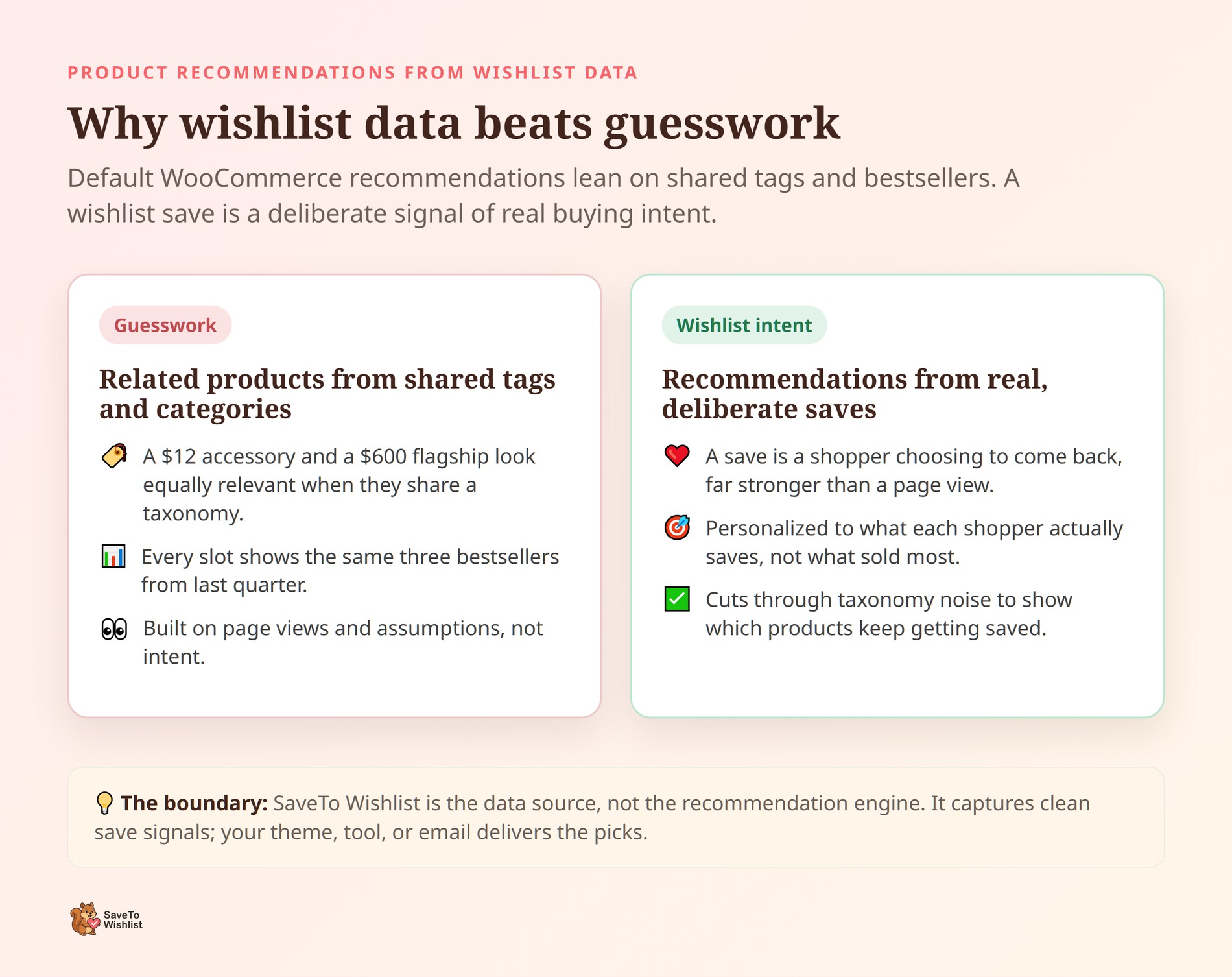
Default WooCommerce related products are built on a flawed system: they guess what a shopper wants based on generic taxonomies. That’s why your store might be recommending a $12 accessory next to a $600 flagship item just because they both happen to share the “electronics” tag. It isn’t a strategy; it’s a blind guess.
And guesswork gets expensive. According to the Baymard Institute, 70.22% of shopping carts are abandoned. The same research reveals that 43% of US shoppers abandon sessions simply because they’re “just browsing.”
Those browsers aren’t lost leads. They’re actively telling you exactly what they want to buy every time they click a wishlist button.
This guide breaks down how to abandon the guesswork and use your customers’ own wishlist saves to build a highly targeted, intent-backed product recommendation engine.
Table of Contents
- Why Wishlist Data Beats Guesswork
- What Signals Wishlist Data Gives You
- How To Feed Recommendations With Wishlist Data
- Where To Show Your WooCommerce Product Recommendations
- The Golden Rule Of Relevance: Put An Expiration Date On Intent
- Frequently Asked Questions: WooCommerce Product Recommendations
- Putting Wishlist Data To Work
Why Wishlist Data Beats Guesswork

To fix your cross-sells, you must first destroy the Category Fallacy: the assumption that just because two products share a category, the same customer wants to buy both at the same time.
Wishlist data obliterates this fallacy because it captures raw, unadulterated buying intent. When a shopper saves a product to a list, they’re making a deliberate, friction-heavy choice to say, “I am going to buy this later.” That’s an infinitely stronger buying signal than a random page scroll or a shared product tag.
You need to shift your store from broad guesses to the Intent Blueprint.
When setting up product recommendations for WooCommerce, store owners often assume their overall bestsellers are what everyone wants next. So, every recommendation slot just blasts the exact same three products. Wishlist data lets you personalize instead. You can surface what shoppers actually save, not just what sold the most last quarter.
That shift from broad, generic guesses to intent-backed suggestions is exactly where wishlist data earns its keep.
⚠️ The Golden Rule of Wishlist Data: SaveTo Wishlist is your data source, not your recommendation engine. It does not replace your email platform or your site theme. Instead, it acts as high-octane fuel. It captures and organizes the pristine intent signals, allowing you to feed that data into your existing tools so they can finally stop guessing and start converting.
What Signals Wishlist Data Gives You
Wishlist data gives you signals most stores never capture. It shows exactly which products are trending, which categories a shopper heavily favors, and how demand shifts long before a seasonal peak. Each signal sharpens a completely different approach to your WooCommerce product recommendations.
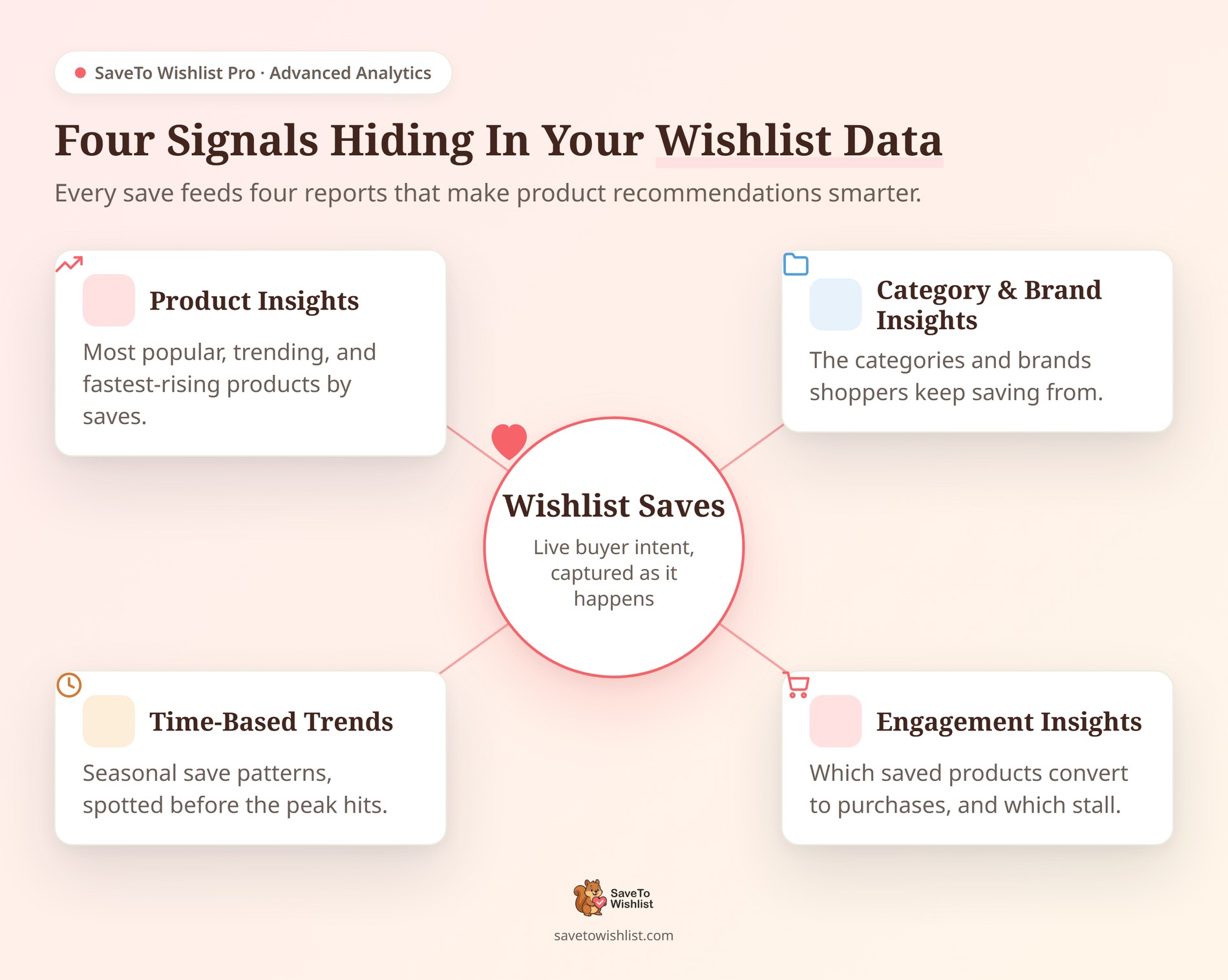
With SaveTo Wishlist Pro, Advanced Analytics surfaces these exact patterns for you instantly:
- Product insights: the most popular, trending, and fastest-rising products by saves, flagging the exact items worth featuring right now.
- Category and brand insights: the specific categories and brands your shoppers keep saving from, so you can recommend entirely within their proven interests.
- Time-based trends: seasonal save patterns that help you feature the right items weeks before a holiday peak actually hits.
- Engagement insights: which saved products convert to purchases, and which get saved constantly but rarely bought.
These are reporting insights, not auto-generated widgets. You read the patterns, then you decide how to act on them.
📝 Note: For a masterclass on reading demand from saves, check out our guide on using wishlist analytics to predict product demand.
The practical value here is pure, unadulterated targeting. If a specific 50mm lens is trending inside your camera category, that lens becomes a cross-sell you can instantly trust.
Plus, the engagement report shows you saved products that rarely get bought. That means the desire is there, but friction is in the way. Those are exactly the items a well-placed recommendation or a small, targeted discount can instantly unlock.
You’re no longer guessing which product to feature. Your own customers already told you.
How To Feed Recommendations With Wishlist Data
You can have all the data in the world, but it’s completely useless if it’s trapped inside your WooCommerce database. To build highly effective product recommendations for WooCommerce, you need to route those wishlist events out to the actual tools that render your suggestions.
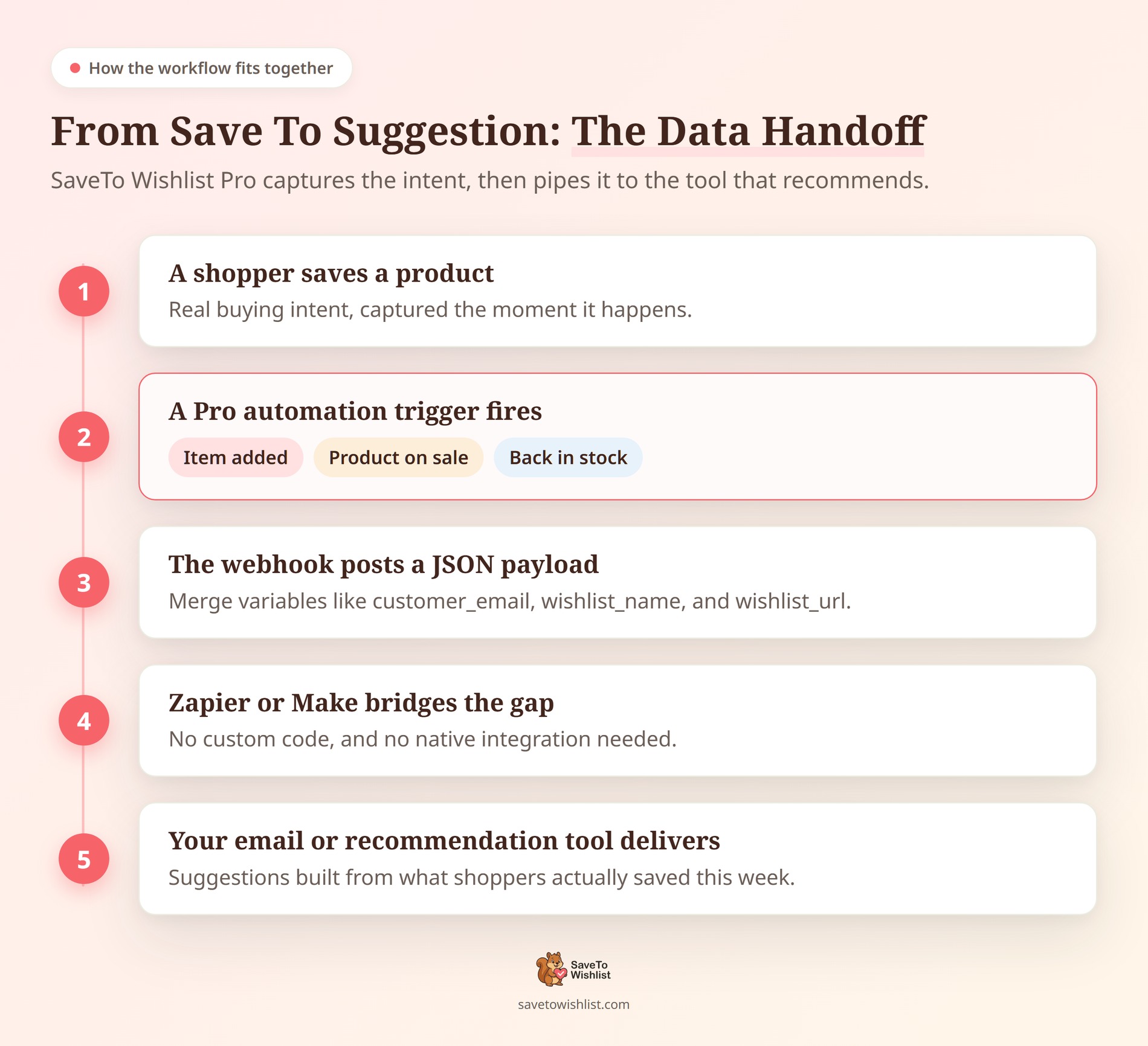
SaveTo Wishlist Pro handles this heavy lifting through automations and real-time webhooks. It captures the save, then instantly hands the data off. Your email platform or recommendation engine takes it from there.
Pro automations run on highly specific triggers, like a new wishlist created or an item added to a list. They also fire when a saved product goes on sale or comes back in stock. Every single trigger can fire a corresponding action: sending an email, updating user meta, or calling a webhook.
That webhook is your golden handoff. It posts a JSON payload to any URL you choose, carrying vital merge variables like customer_id, customer_email, wishlist_name, and wishlist_url.
Here’s what a highly profitable setup actually looks like: You point your “item-added” webhook at a Zapier or Make workflow. From there, the save data flows straight into your email platform and dynamically tags the customer with their saved category. The recommendation logic lives in the email tool, but the fresh intent data fueling it comes directly from the wishlist.
SaveTo Wishlist doesn’t generate the suggestions itself, and it doesn’t rely on rigid, limited native integrations to Klaviyo or Mailchimp. Instead, Zapier or Make sits in the middle to seamlessly bridge that gap.
💡 What we’ve seen: Stores that treat wishlist saves as a live, streaming data feed get exponentially more from their recommendations. When a save event pushes straight into an email flow, the suggestion stays hyper-relevant. The shopper sees what they wanted this week, not what they absentmindedly browsed a month ago. The data was always there; most stores just never piped it anywhere useful.
If you want that save data sitting permanently alongside the rest of your customer profiles, we’ve got you covered. Our guide on pushing wishlist data into your WooCommerce CRM breaks down the webhook-to-CRM pattern step by step.
Where To Show Your WooCommerce Product Recommendations
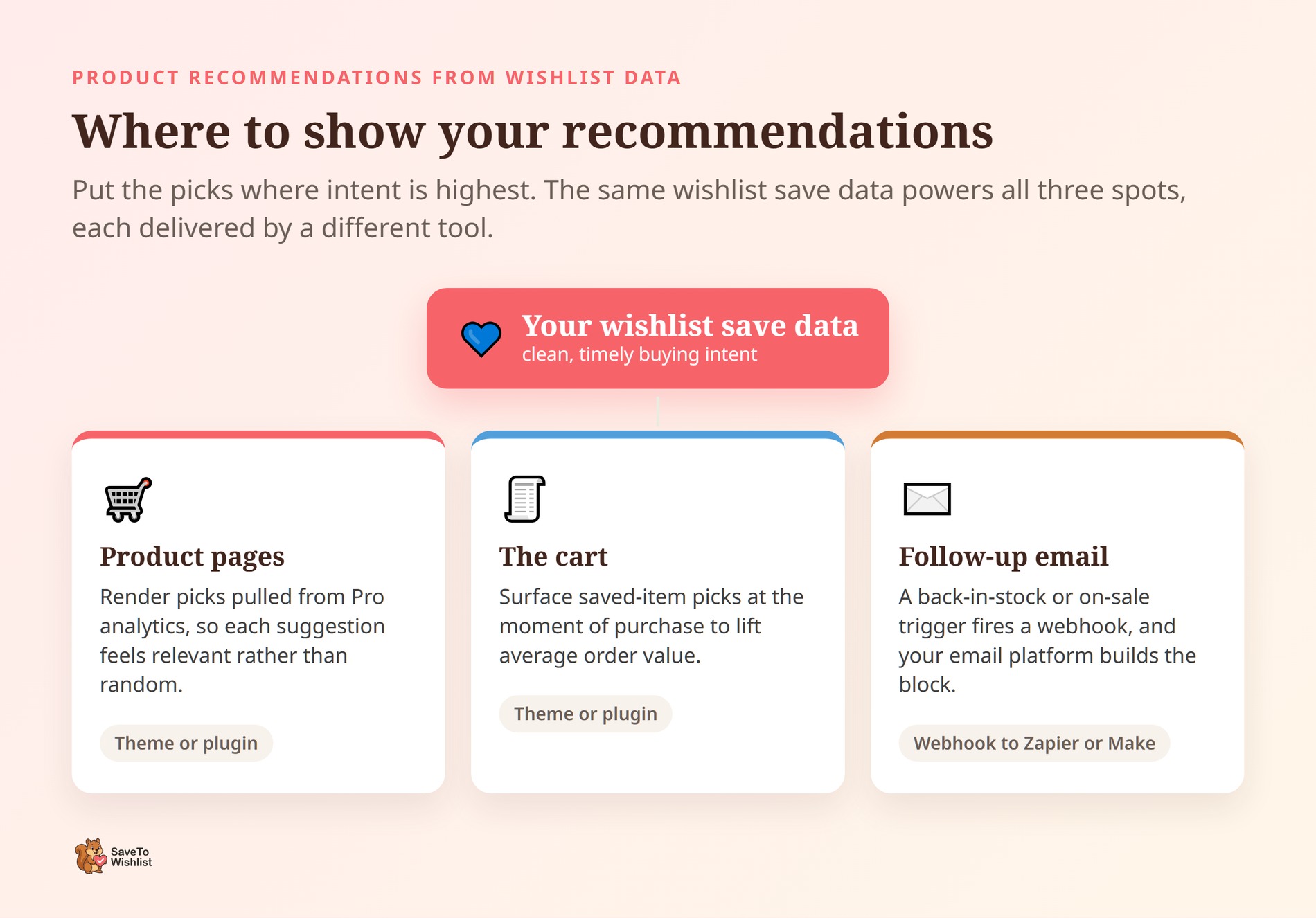
Don’t just bury your recommendations at the absolute bottom of your site layout. You need to position them exactly where buying intent peaks: on product pages, inside the cart, and in your automated follow-up emails.
Each of these spots leverages the exact same wishlist data, just delivered by a different tool in your stack:
- Product and Cart Pages: Your theme or a dedicated recommendation plugin can render the precise picks you’ve pulled from your Pro analytics. Because every single pick is backed by real, documented saves, it feels highly personalized rather than random and spammy. (Want to maximize that checkout impulse? Advanced Coupons has a full guide on raising average order value with cart offers, like pairing a saved item with an upgraded shipping method to quickly close the sale).
- Follow-Up Email Flows: This is where the automation route absolutely shines. A back-in-stock or on-sale trigger fires a webhook carrying the saved item and the customer’s details. Your email platform then dynamically builds the recommendation block around what they actually want to see.
Always remember the boundary: SaveTo Wishlist supplies the high-octane data. It doesn’t run the recommendation engine itself, send SMS directly, or rely on clunky native integrations with email platforms. Anything beyond its built-in email actions routes seamlessly through webhooks to Zapier or Make (including your Klaviyo flows and Twilio text messages).
That tight focus is its biggest strength. SaveTo Wishlist does one job perfectly: capturing clean, timely intent data so you can send it anywhere
The Golden Rule Of Relevance: Put An Expiration Date On Intent
When store owners first hook up wishlist data to their recommendation engines, they usually make one massive mistake: they feed all their historical data into the machine.
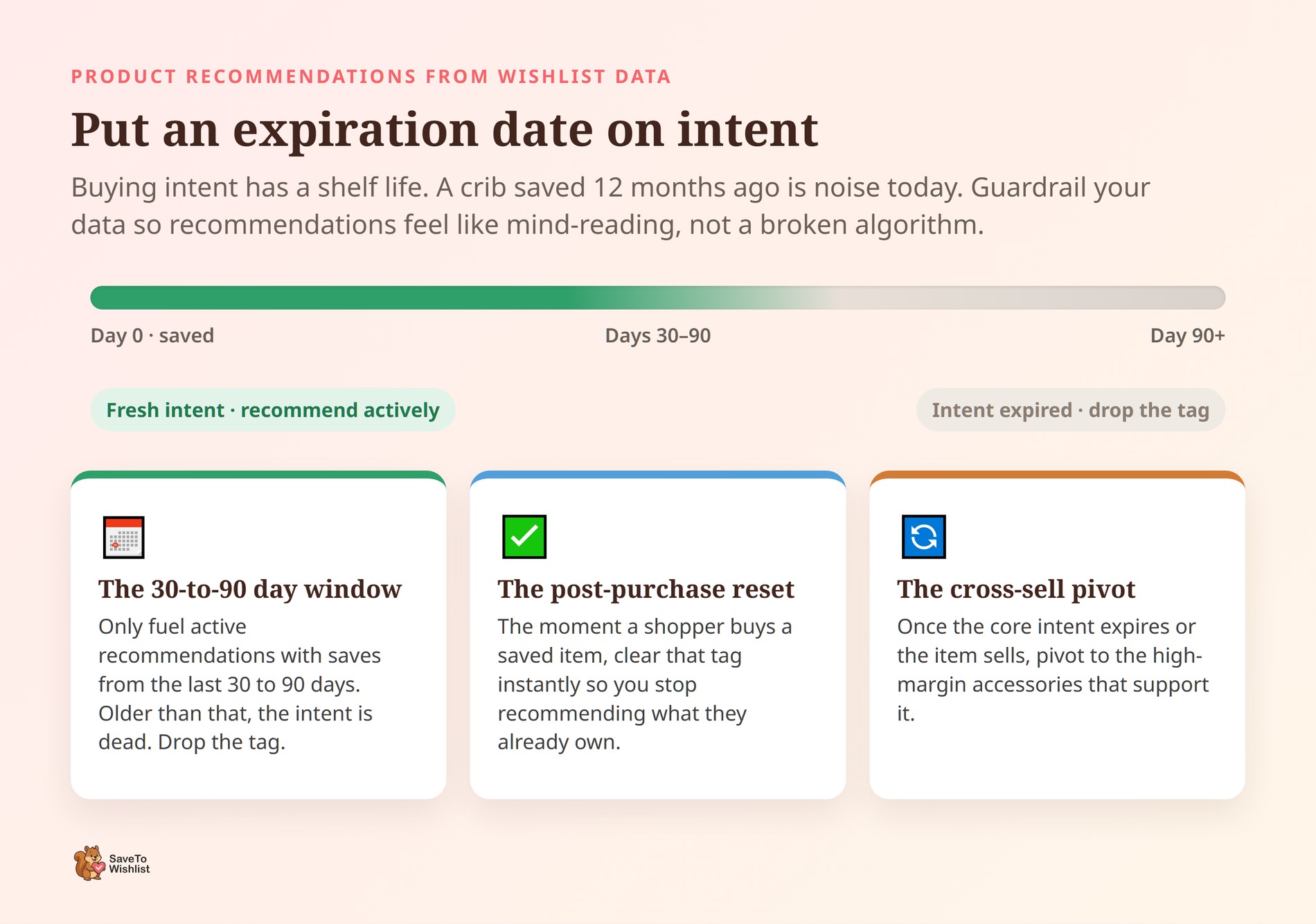
But here’s the harsh reality: buying intent has a strict expiration date. If a customer saved a baby crib 12 months ago, they absolutely don’t need you recommending baby cribs today. If they saved a heavy winter coat in January, recommending that same coat in July makes your store’s algorithm look completely broken.
To keep your WooCommerce product recommendations sharp and highly converting, you have to put guardrails on your data. Here are the three rules you need to build into your email platform:
- The 30-to-90 Day Window: Only use wishlist data from the last 30 to 90 days to fuel your active recommendations. If a shopper hasn’t bought an item or engaged with that category in three months, the intent is dead. Drop the tag and move on.
- The Post-Purchase Reset: There’s nothing more annoying to a customer than being told to buy something they just paid you for. If a customer actually buys the item they saved, instantly clear that specific tag from your email tool so you stop recommending it.
- The Cross-Sell Pivot: Once the core intent expires (or the item is purchased), pivot your strategy. Shift your automated recommendations away from the main product and start pushing the high-margin accessories that support it.
Setting these limits ensures your recommendations always feel like mind-reading, rather than a lazy, outdated algorithm.
Frequently Asked Questions: WooCommerce Product Recommendations
Does SaveTo Wishlist generate WooCommerce product recommendations automatically?
No. SaveTo Wishlist is the data source, not a recommendation engine. It captures save signals like trending products and category patterns. Its Pro analytics then surface those patterns for you.
The actual recommendations are rendered by your theme, a recommendation tool, or your email platform. SaveTo Wishlist feeds those tools accurate, current intent data through analytics and webhooks. As a result, the suggestions they produce are far more relevant.
How do I send wishlist data to my email tool?
Use SaveTo Wishlist Pro automations. Set a trigger, such as an item added to a wishlist. Then choose the webhook action. The webhook posts a JSON payload to a URL you control.
The payload includes merge variables like customer_email, wishlist_name, and wishlist_url. Point that URL at Zapier or Make, then connect it to your email platform. There’s no native Klaviyo or Mailchimp integration, so the webhook bridge is how the data gets there.
What wishlist signals actually improve recommendations?
Three signals do the heavy lifting. Trending saves flag rising demand. Category and brand patterns show a shopper’s proven interests. Engagement metrics reveal which saved products actually convert to purchases.
SaveTo Wishlist Pro’s Advanced Analytics reports all three. Trending data is the strongest starting point for cross-selling, since it shows what shoppers want right now. Meanwhile, category patterns keep suggestions inside a shopper’s demonstrated taste rather than pushing bestsellers at everyone.
Can I do this on the free version of SaveTo Wishlist?
The free version of SaveTo Wishlist captures the wishlists themselves, including guest wishlists and shareable links. It also ships a developer-friendly REST API you can build against.
The analytics that surface trending and category patterns are Pro features. So are the automations and real-time webhooks that push data out. In short, you can collect raw save data on the free plan. The reporting and automated handoff need SaveTo Wishlist Pro.
Will wishlist recommendations help with cart abandonment?
They can help. Baymard found that 43% of US online shoppers have abandoned a cart because they were just browsing. A wishlist gives those shoppers a low-pressure way to save intent instead of forcing a decision.
Later, a back-in-stock or on-sale automation can bring them back. The nudge is built from what they actually saved. That’s warmer and more relevant than a generic “you left something behind” email.
Are there specific tools that display the recommendations on my site?
While SaveTo Wishlist is brilliant at capturing the underlying intent data, the visual display of your WooCommerce product recommendations will usually be handled by your site’s existing theme, a dedicated cross-sell plugin, or dynamic content blocks inside your email marketing platform.

Putting Wishlist Data To Work
Wishlist data turns your WooCommerce product recommendations from broad guesses into intent-backed suggestions. Plus, the setup is more approachable than it sounds. Here’s the path we walked through:
- Why wishlist data beats guesswork
- What signals wishlist data gives you
- How to feed WooCommerce product recommendations with wishlist data
- Where to show your WooCommerce product recommendations
- The golden rule of relevance: put an expiration date on intent
The pattern is simple. SaveTo Wishlist captures the intent, and analytics reveal the patterns. Webhooks then pipe the data to whatever tool delivers the recommendation. You keep control of how suggestions look, while the data behind them stays fresh and personal.
Ready to give your recommendations better fuel? SaveTo Wishlist Pro unlocks the Advanced Analytics and real-time webhooks that make this workflow possible. Your saved-item data can then power smarter suggestions across your store and inbox. Take a look at what’s included and start turning saves into sales.



