

 Reviewed by
 Small Business Saturday, the Saturday right after Thanksgiving, is the one shopping day built specifically for stores like yours. Black Friday and Cyber Monday are all about big retailers and deep discounts. But this day is different. It rewards independent shops and the customers who genuinely want to support them.
That means your game plan needs to change. You can’t out-discount the giant corporations, but you can out-connect them. Instead of racing to drop your prices, you win by leaning into your story, your community, and the loyal customers who already love what you do.
So, how do you make it easy for those loyal customers to show up and support you? That’s where a wishlist comes in. In fact, giving your shoppers a way to save their favorite items ahead of time is one of the smartest ways to boost your sales. I’ve seen firsthand how engaged customers use tools like SaveTo Wishlist to plan their purchases, making Small Business Saturday their biggest shopping day of the season.
Jump to:
- What Makes A Great Small Business Saturday?
- When Small Business Saturday Falls, And How People Shop It
- Why Wishlists Are Your Secret Weapon For Small Business Saturday
- 5 Steps To A Winning Small Business Saturday
- Plan Friday, Saturday, And Monday As One Weekend
- Set Up A One-Day Coupon In WooCommerce
- Your Small Business Saturday Checklist
- Make This Small Business Saturday Your Best Yet
- Frequently Asked Questions
What Makes A Great Small Business Saturday?

A great Small Business Saturday turns goodwill into sales. Shoppers actively choose to support small businesses that day, so your job isn’t to convince them to buy, it’s to make it easy and rewarding when they do. Your story and your loyal customers are the advantage no big retailer can copy.
Small Business Saturday sits between Black Friday and Cyber Monday, so shoppers are already in buying mode. Often, these shoppers want to avoid the chaotic crowds of a traditional shop mall, and the stores that win give their community a clear, personal, and stress-free reason to shop with them specifically.
When Small Business Saturday Falls, And How People Shop It
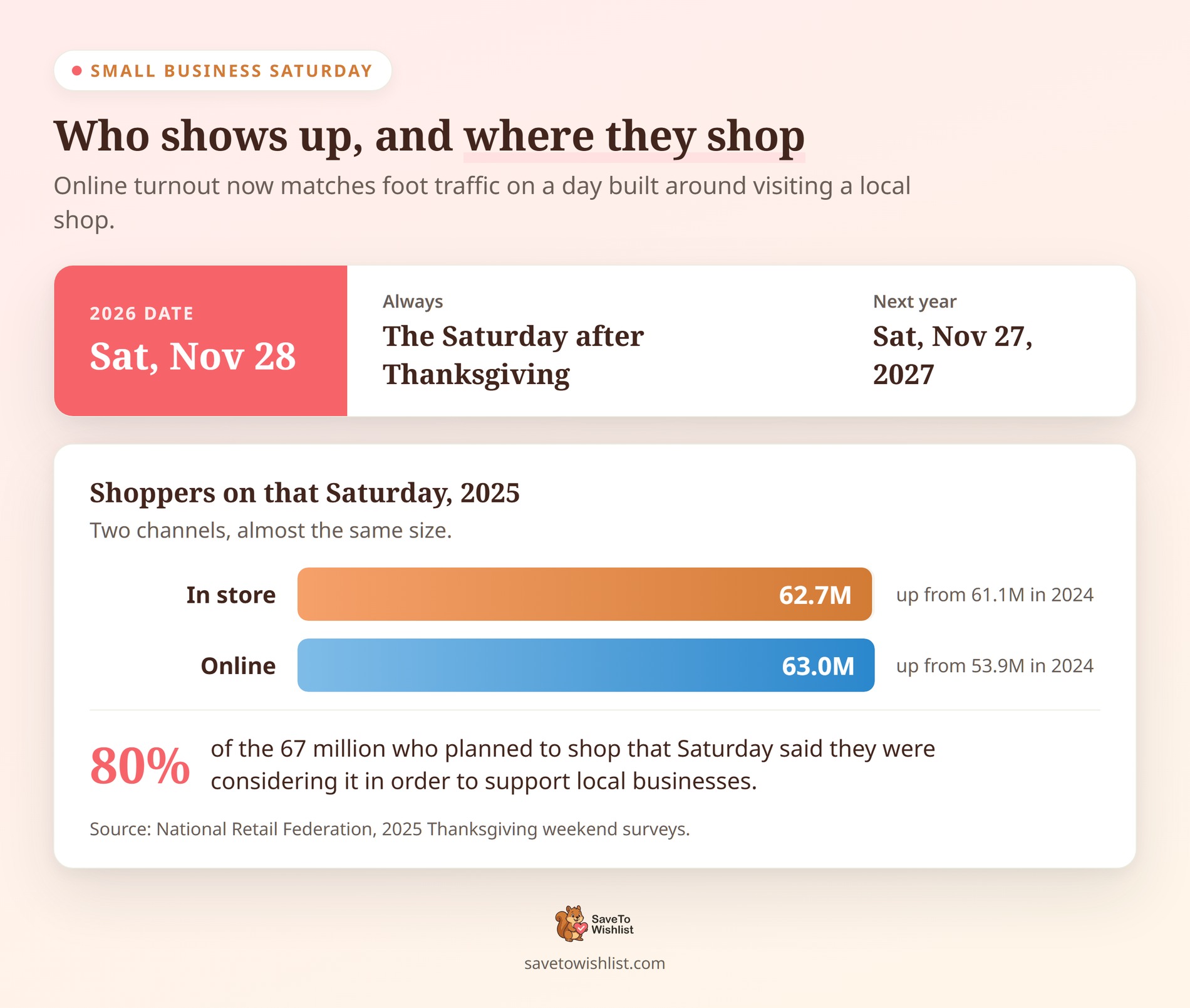
Small Business Saturday lands on Saturday, November 28 in 2026, and Saturday, November 27 in 2027. It’s always the Saturday after Thanksgiving. That puts it one day after Black Friday and two days before Cyber Monday.
The day is bigger online than its shop-local branding suggests. According to the National Retail Federation, 62.7 million people shopped in stores that Saturday in 2025. Meanwhile, another 63 million shopped online, up from 53.9 million the year before.
That second number is the one worth planning around. Online shoppers slightly outnumbered in-store shoppers on a day built around walking into a local shop. So an online-only WooCommerce store is not a bystander here.
Intent is the other half of the picture. In NRF’s pre-weekend survey of 8,000 consumers, 67 million people planned to shop that Saturday. Of those, 80% said they were considering it in order to support local businesses.
Budgets hold up across the weekend too. In that same NRF survey, shoppers spent $337.86 on average over the five days. That covered gifts, holiday apparel, decorations, and other seasonal purchases. So gifts and seasonal decor are the clearest things to put front and center.
🔍️ What we’ve seen: The date moves every year, and last year’s setup quietly carries last year’s dates with it. In practice, coupons, email sends, and banner countdowns all get rebuilt from a copy of the previous campaign. Write the new date down before you touch any of them. A promotion pinned to the wrong Saturday fails quietly, and nobody reports it.
Why Wishlists Are Your Secret Weapon For Small Business Saturday
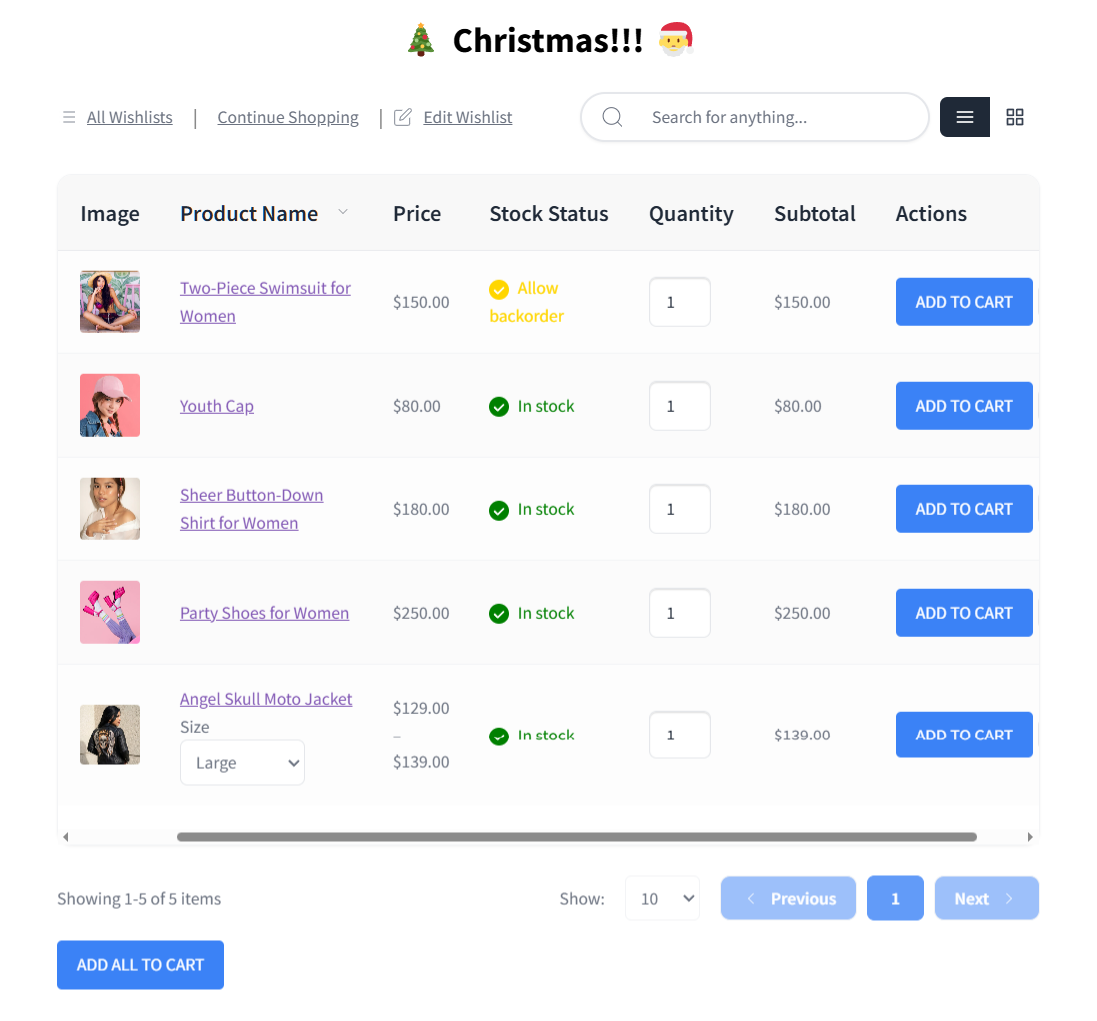
Small Business Saturday is all about community and connection. But how do you turn those warm feelings into actual sales? That’s exactly where wishlists come in.
Instead of just hoping people remember your store on the big day, a wishlist acts like a bridge between casual browsing and actual buying.
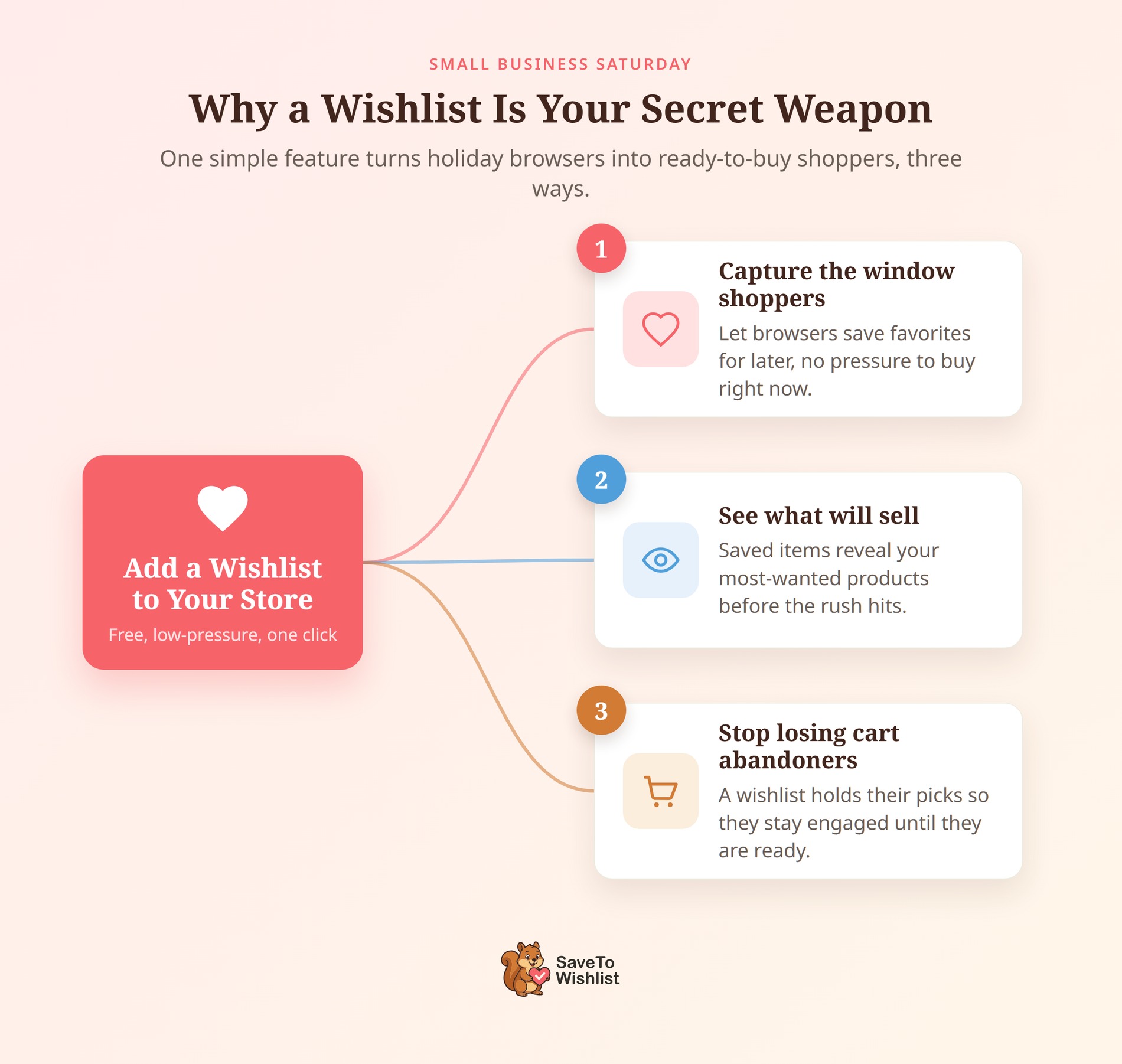
Three ways wishlists drive sales
Here’s why adding a wishlist to your store is a smart move:
- You capture the “window shoppers.” People love to look around in the weeks before a big holiday shopping event. A wishlist lets them save their favorite items for later. It’s a low-pressure way for them to say, “I want this, but I am waiting for Small Business Saturday to actually buy it.”
- You get a sneak peek at what will sell. When customers add items to their lists, they are basically handing you a cheat sheet. You get to see exactly which products are the most popular before the rush begins. This helps you know what items to feature in your marketing emails.
- You stop losing cart abandoners. After all, many shoppers abandon their carts simply because they are not ready to pay right that second. A wishlist gives them a safe place to hold onto those items without feeling rushed to check out. It keeps them engaged with your site until they are ready to spend.
When you give your customers a way to save their favorite items, you make it incredibly easy for them to prepare for Small Business Saturday. When the day finally arrives, their shopping carts are basically already packed!
5 Steps To A Winning Small Business Saturday
Small Business Saturday is your day to shine. While big retail giants compete by slashing prices at every shop mall on Black Friday, this day is all about connection, community, and the customers who love supporting independent shops.
Instead of racing to the bottom with deep discounts, you can win by making it incredibly easy and rewarding for your most loyal shoppers to buy from you. In 2025, tens of millions turned out both in stores and online. That appetite for spending locally is what you’re working with.
Follow these five steps to turn that community goodwill into real sales for your store:
1. Rally your community and loyal customers
Lead with your story and your relationships. Email your existing customers, share behind-the-scenes of your small business, and make them feel part of something. These are the people most likely to show up for you on a day built around a shared commitment to shop small and support local businesses.
Your most engaged shoppers are the ones to prioritize. Those who save the most to their wishlists are signaling loyalty, and a personal invitation to your Small Business Saturday event converts them well.
2. Turn goodwill into ready-to-buy demand
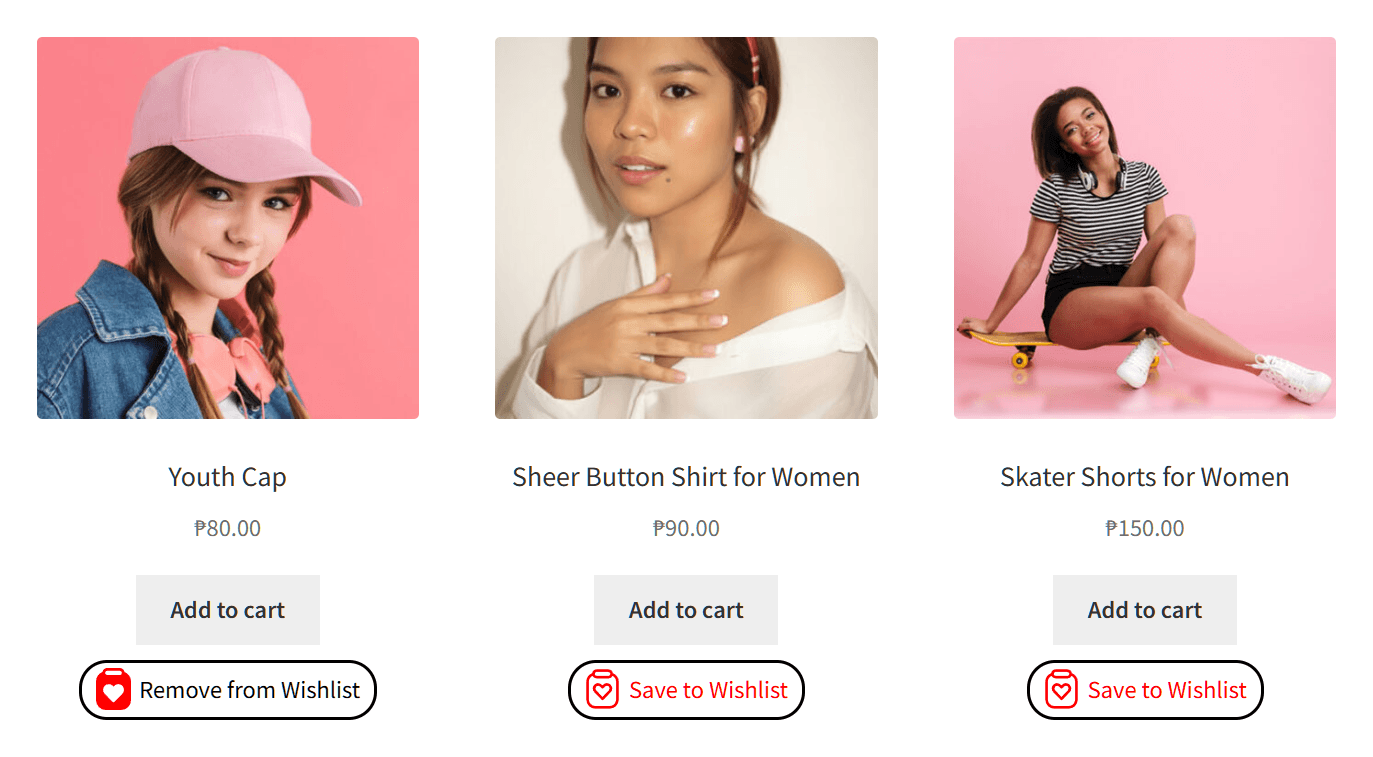
Goodwill only helps if it’s easy to act on. Let customers save what they want ahead of the day with the free WooCommerce wishlist plugin, so when Saturday arrives they have a ready list rather than starting from scratch.
🔍️ What we’ve seen: Many small business owners pour energy into the story but forget to make buying frictionless on the day. The shops that ask customers to build a wishlist in advance walk into Small Business Saturday with a warm list of exactly what people intend to buy, which converts far better than hoping goodwill turns into orders.
3. Reward your most loyal shoppers
This is the day to thank the people who keep you going. Offer your loyal customers something special, like early access, a small thank-you perk, or a member reward, rather than a race-to-the-bottom discount.
Wishlist data helps you spot who to reward, since your most engaged customers tend to save the most. Furthermore, pairing recognition with a structured loyalty program makes those perks automatic and builds the habit of coming back well beyond the one day.
4. Automate your alerts
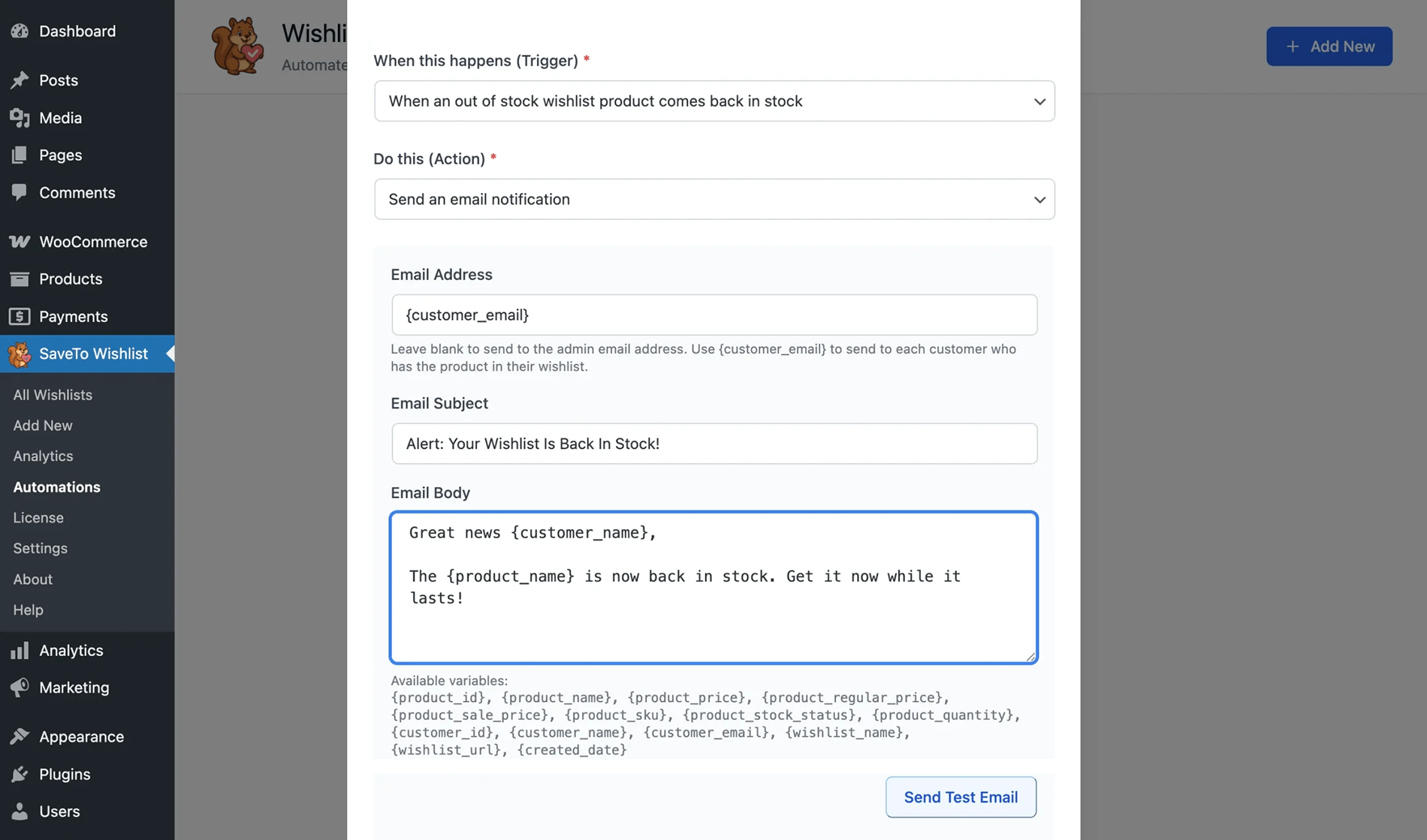
When things get busy on Small Business Saturday, you won’t have time to email everyone manually. That’s where automation saves the day. Using SaveTo Wishlist Pro, you can set up alerts that do the heavy lifting for you while you focus on running your store.
- Price-drop alerts: Let’s say a shopper saves a handmade mug to their list in October. When that mug’s price actually drops, an automatic email goes to everyone who saved it. The alert follows the price change itself, not a date you scheduled. So check how the trigger fires before the big day.
- Back-in-stock notifications: Small business inventory can sell out fast during a holiday rush. If a shopper misses out on a popular item, don’t lose them forever! Fortunately, an automatic alert lets them know the second their favorite product is back on the shelf, bringing them right back to your site.
5. Recover the carts you worked for
Even on a day built around goodwill, people will still leave items behind. In fact, according to the Baymard Institute, roughly 70% of online carts are abandoned before a purchase happens. Instead of letting those sales slip away, give hesitant shoppers the option to move items from their cart to a wishlist.
From there, you can bring them back with a friendly reminder. You don’t need a complicated strategy to make this work. Here are two quick tips to recover those carts:
- Keep it personal: Send a quick, friendly email that fits the vibe of the day. Something simple like, “Hey, we noticed you left a few things behind! We’d love to see them go to a good home.”
- Create a little urgency: Gently remind them that your Small Business Saturday perks or limited inventory won’t last forever. A quick note saying, “Grab this before it’s gone!” works wonders.
Interested in diving deeper into cart abandonment recovery? Then check out the following guide:
Plan Friday, Saturday, And Monday As One Weekend
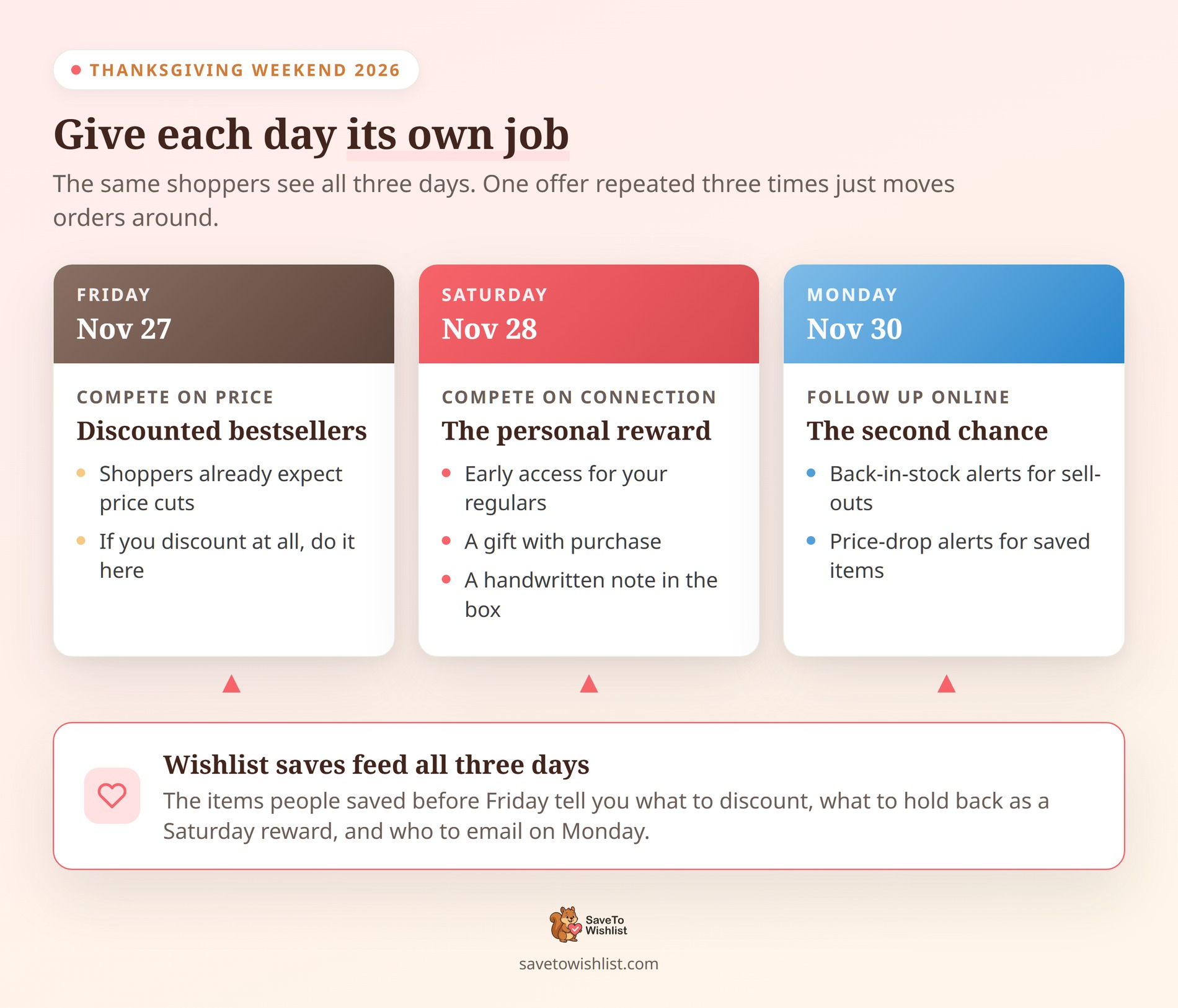
You’re mostly talking to the same people all three days. So running one offer on Friday, Saturday, and Monday won’t get you three times the sales. Instead, you get the same orders landing on whichever day came first.
Giving each day its own job stops them competing with each other:
- Friday: your discounted bestsellers. Shoppers expect price cuts on Black Friday, so if you’re going to compete on price, do it here.
- Saturday: the personal reward. Early access for your regulars, a gift with purchase, or a handwritten note in the box. The story behind how something is made works too.
- Monday: the online-only follow-up. Send the back-in-stock and price-drop alerts for anything that sold out or shifted price over the weekend.
Wishlists are what tie the three days together. The saves you collect before Friday tell you which products deserve the Friday discount. By contrast, the rest are better held back as a Saturday reward.
Check whether Saturday added sales or borrowed them
WooCommerce adds its own Analytics menu to your WordPress admin sidebar, separate from the WooCommerce menu. Open Analytics > Orders once the weekend is over.
From there, set the date range to Custom and cover Thanksgiving through Cyber Monday. Then set the chart to By day.
Now read the shape, not just the total. A healthy Saturday shows a bump of its own. But a Saturday that only looks good because Friday dipped means the two offers were competing.
The same screen offers Previous year and Previous period comparisons. Previous year tells you whether the season grew. Previous period, set against the week before, tells you how much of the lift the weekend itself created. Visser Labs has a practical guide to reading your store reports if you want to go deeper.
🔍️ What we’ve seen: Small stores often judge the weekend on Saturday’s revenue alone and conclude the day underperformed. Read across all three days first. Still, a modest Saturday that feeds a strong Cyber Monday is doing exactly what it should.
Set Up A One-Day Coupon In WooCommerce
A perk only works if it’s live on the day and off again when the day ends. WooCommerce handles that with a coupon, under Marketing > Coupons > Add coupon. That screen gives you three tabs: General, Usage restriction, and Usage limits.
Set the expiry date one day later than you think
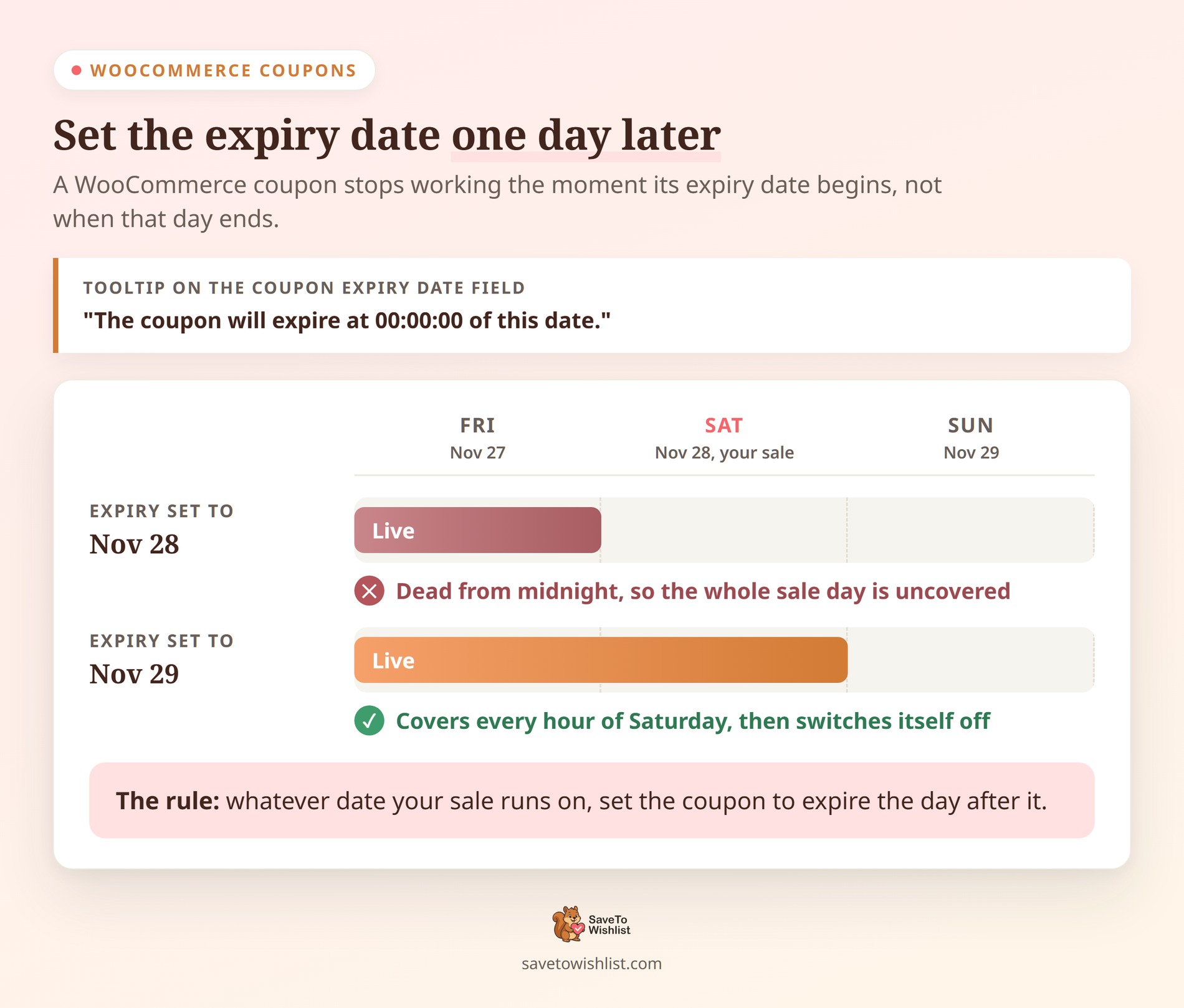
On the General tab you’ll set Discount type, Coupon amount, and Coupon expiry date. That last field has a tooltip that trips a lot of people up. It reads: “The coupon will expire at 00:00:00 of this date.”
So the coupon dies the moment the expiry date begins, not when it ends. For a sale running on Saturday, November 28, 2026, set the expiry to November 29. Set it to the 28th instead, and the coupon switches off before your first customer wakes up.
WooCommerce has no matching start date in core. However, a coupon code only works once that coupon is published. So save it as a draft and hit publish when the day opens. Advanced Coupons adds a scheduler with proper start and end dates if you want one.
Restrict it to the people you meant it for
The Usage restriction tab is where early access for your regulars becomes a real setting. Three fields do most of the work:
- Allowed emails: a list of billing emails the coupon checks against at checkout. Wildcards work, so
*@gmail.commatches every Gmail address. Paste in your regulars and the code is useless to anyone else. - Individual use only: stops the coupon from being stacked with another one. Worth ticking if you’re also running a Black Friday code that weekend.
- Exclude sale items: keeps the discount off anything already on sale. For a cart-level coupon, it won’t apply at all unless something in the cart is full price.
Then set a ceiling on the Usage limits tab. Usage limit per coupon caps total redemptions. Usage limit per user caps them per person. WooCommerce notes that it “uses billing email for guests, and user ID for logged in users.”
🔍️ What we’ve seen: That guest detail surprises people. A shopper who checks out without an account can reuse a one-per-user coupon by entering a different billing email. If the perk is genuinely for regulars, pair the per-user limit with Allowed emails rather than relying on it alone.
There’s one last thing to plan around. A cart-level coupon won’t trigger a wishlist price-drop email, because no product’s sale price changes. So if you want that email to go out, drop the product’s price instead of discounting the cart.
Your Small Business Saturday Checklist
- Email your community with your story and a personal invitation.
- Ask customers to build a wishlist ahead of the day.
- Reward your most loyal, most-engaged shoppers.
- Set up price-drop and back-in-stock alerts.
- Plan a wishlist recovery email for abandoned carts.
- Give Friday, Saturday, and Monday each a different offer.
- Set your coupon to expire the day after the sale.

Make This Small Business Saturday Your Best Yet
Ultimately, Small Business Saturday is your home turf. While you can’t outspend the big retailers, you can out-connect them, and that’s exactly what this day rewards. Rally your community, make buying easy with wishlists, and thank the loyal customers who show up for you.
- Rally your community and loyal customers.
- Turn goodwill into ready demand with wishlists.
- Reward your most loyal shoppers.
- Automate your alerts.
- Recover abandoned carts.
- Plan the whole weekend, not just Saturday.
- Set up a coupon that only runs on the day.
Ready to rally your community? Make Small Business Saturday count. Download SaveTo Wishlist for free today! Then, when you’re ready for more power, upgrade to SaveTo Wishlist Pro!
Frequently Asked Questions
When is Small Business Saturday?
Small Business Saturday falls on the Saturday after Thanksgiving, between Black Friday and Cyber Monday. It’s a day dedicated to encouraging shoppers to support small and independent businesses.
How should small stores market differently that day?
Lead with connection, not discounts. Shoppers actively want to shop small and support independent businesses, so your story, your community, and rewarding loyal customers convert better than trying to match big-retailer price cuts.
How do wishlists help on Small Business Saturday?
Wishlists let your customers build a ready list of what they want before the day. Therefore, buying is frictionless when they show up to support you. Saved items also help you identify and reward your most loyal shoppers.
Should I discount heavily for Small Business Saturday?
Not necessarily. Because shoppers are choosing to support you, perks like early access, loyalty rewards, and a personal thank-you often work better than deep discounts and protect your margins.



