

 Überprüft von
 Wenn Sie jedem Kunden die gleiche E-Mail senden, kennen Sie bereits das Ergebnis: niedrige Öffnungsraten und mehr Abmeldungen.
Die meisten WooCommerce-Shops behandeln ihre Zielgruppe als eine einzige Liste. Aus diesem Grund landet eine Nachricht, die für einen Schnäppchenjäger erstellt wurde, im Posteingang eines treuen Käufers, der bereit war, den vollen Preis zu zahlen.
WooCommerce-Kundensegmentierung behebt dies, indem Ihre Käufer in kleinere Gruppen aufgeteilt werden, damit Sie ihnen relevante Nachrichten senden können. Der Haken ist, dass die meisten Segmentierungen auf vergangenen Käufen beruhen. Die Kaufhistorie sagt Ihnen nur, was jemand bereits getan hat.
Wunschlistendaten sagen Ihnen, was sie als Nächstes wollen, was ein viel stärkerer Ausgangspunkt ist. Dieser Leitfaden behandelt, wie Sie einfache Segmente basierend auf dem Verhalten von Käufern erstellen. Wir werden untersuchen, warum Wunschlistendaten ein genauer Indikator sind und wie Sie auf jede Gruppe reagieren können.
Inhaltsverzeichnis
- Was WooCommerce Kundensegmentierung tatsächlich bedeutet
- Warum Wunschlistendaten ein starkes Segmentierungssignal sind
- Einfache Segmente, die Sie aus dem Wunschlisten-Verhalten erstellen können
- So erstellen und exportieren Sie diese Segmente
- So handeln Sie nach jedem Segment
- Häufig gestellte Fragen: WooCommerce Kundensegmentierung
- Ihre Segmente in die Tat umsetzen
Was WooCommerce Kundensegmentierung tatsächlich bedeutet

Kundensegmentierung bedeutet einfach, Käufer basierend auf gemeinsamen Merkmalen oder Gewohnheiten in kleinere Gruppen einzuteilen. Dies ermöglicht es Ihnen, Ihr Marketing auf jede Gruppe zuzuschneiden, anstatt jedem die gleiche E-Mail zu senden. Ein Erstbesucher, ein wiederkehrender Käufer und jemand, der einen Warenkorb abbricht, benötigen alle eine andere Nachricht.
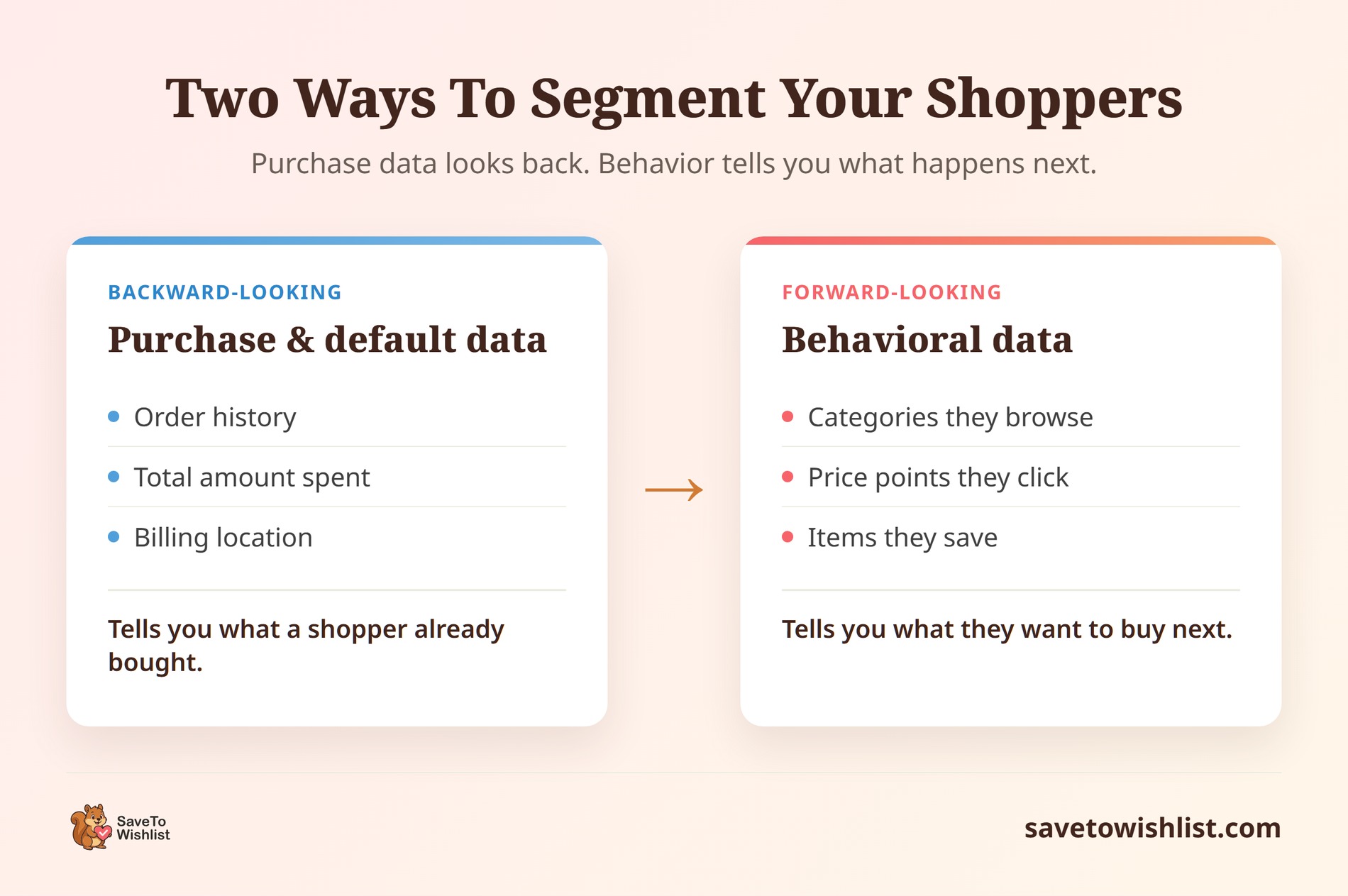
Die meisten Shops beginnen mit den Standarddaten, die WooCommerce bereitstellt: Bestellhistorie, Gesamtumsatz und Standort. Sie können daraus nützliche Segmente erstellen, wie z. B. eine Liste inaktiver Kunden. All diese Daten sind jedoch rückblickend. Sie sagen Ihnen, was ein Kunde in der Vergangenheit gekauft hat, nicht, was er sich gerade ansieht.
📝 Hinweis: Großhandelsgeschäfte segmentieren anders. Wholesale Suite bietet einen vollständigen Leitfaden zur B2B-Kundensegmentierung.
Verhaltensbasierte Segmentierung geht einen Schritt weiter. Sie gruppiert Personen basierend auf dem, was sie tun, während sie aktiv in Ihrem Shop stöbern. Dazu gehören die Produktkategorien, die sie ansehen, die Preispunkte, auf die sie klicken, und die spezifischen Artikel, die sie speichern.
Oft verbringen Shops ihre gesamte Zeit damit, Leute zu segmentieren, die bereits einen Kauf getätigt haben. In der Zwischenzeit ignorieren sie die weitaus größere Gruppe von Käufern, die klares Interesse gezeigt, aber vor dem Abschluss des Kaufs gegangen sind.
Warum Wunschlistendaten ein starkes Segmentierungssignal sind
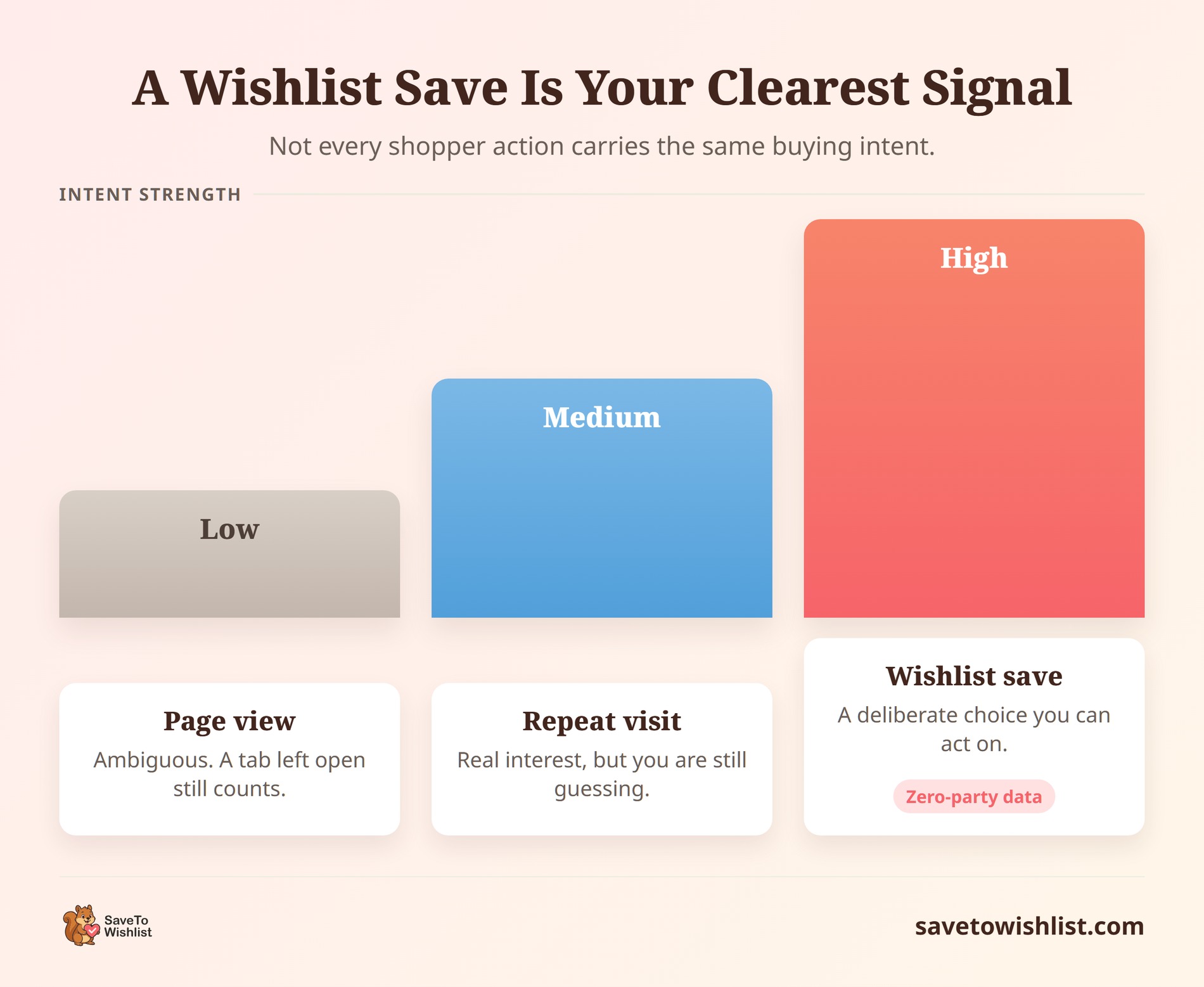
Wunschlistendaten sind das, was die Branche als „Zero-Party-Daten“ bezeichnet. Das bedeutet einfach, dass es sich um Informationen handelt, die ein Käufer Ihnen absichtlich gibt. Da er sich entschieden hat, den Artikel zu speichern, ist dies einer der klarsten Indikatoren, die Sie zur Gruppierung Ihrer Kunden verwenden können.
Wenn jemand ein Produkt auf eine Wunschliste speichert, sagt er Ihnen genau, was er will. Er ist nur heute noch nicht bereit, es zu kaufen. Möglicherweise wartet er auf sein nächstes Gehalt, vergleicht Ihr Produkt mit dem eines anderen Shops oder hofft auf eine Preissenkung.
Die Lücke zwischen dem Wunsch nach einem Artikel und dem tatsächlichen Kauf ist groß. Das Baymard Institute berichtet, dass die durchschnittliche Warenkorbabbruchrate über 70 % liegt. Gleichzeitig brechen 43 % der Online-Käufer ihren Warenkorb ab, nur weil sie gerade stöbern. Eine Wunschliste gibt all dieser „noch-nicht-bereit“-Nachfrage einen Platz. Anstatt diese Stöberer komplett zu verlieren, erfassen Sie eine Aufzeichnung dessen, was sie wollen.
Da das Speichern einer Wunschliste eine direkte Aktion ist, sind die Gruppen, die Sie daraus bilden, viel genauer als Vermutungen, die auf Seitenaufrufen basieren. Wenn ein Käufer sich dreimal eine Produktseite ansieht, möchte er den Artikel vielleicht haben, oder er hat vielleicht nur seinen Browser-Tab offen gelassen. Aber wenn er auf „Zur Wunschliste hinzufügen“ klickt, trifft er eine klare Wahl. Sie kennen jetzt das genaue Produkt, das er möchte, die Kategorie, die ihn interessiert, und die Preisspanne, in der er einkauft.
Die Shops, die den größten Nutzen daraus ziehen, behandeln ihre Wunschlisten als Live-Datenbank der Kundennachfrage. Wenn Sie Ihre Daten vergangener Bestellungen bereits an ein CRM (Customer Relationship Management Tool – die Software, die Sie zur Organisation und Verfolgung Ihrer Kontakte verwenden) senden, gehören Wunschlistendaten direkt daneben. Wir erklären genau, wie Sie dies in unserem Leitfaden zur Verwendung von Wunschlistendaten in Ihrem WooCommerce CRM einrichten.
Einfache Segmente, die Sie aus dem Wunschlisten-Verhalten erstellen können
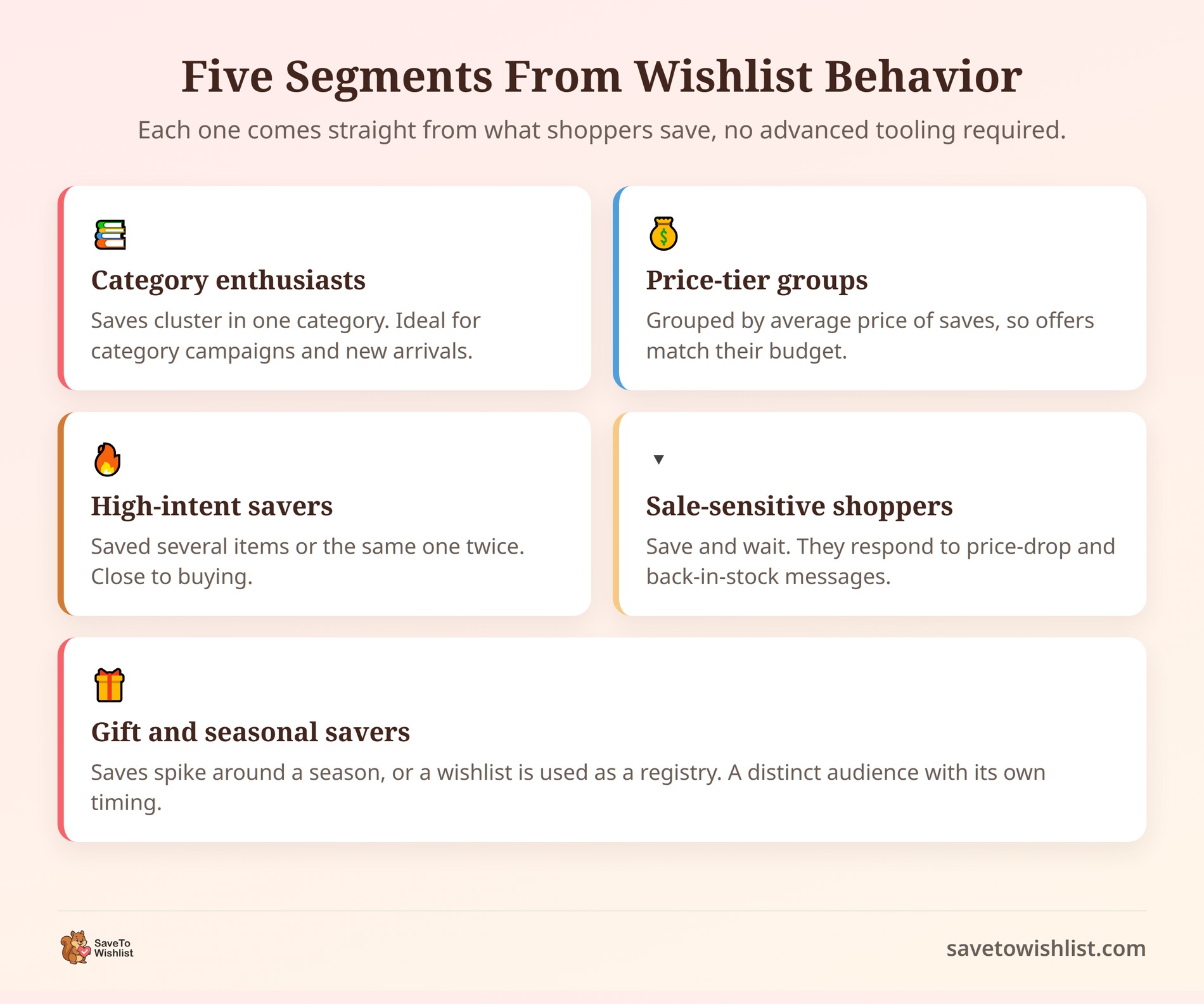
Sie können hochwirksame Segmente aus nur wenigen grundlegenden Wunschlisten-Verhaltensweisen erstellen. Sie benötigen keine komplizierte Software, um loszulegen. Indem Sie sich ansehen, wie Leute ihre gespeicherten Listen verwenden, können Sie sie in diese fünf Gruppen einteilen:
1. Kategorie-Käufer
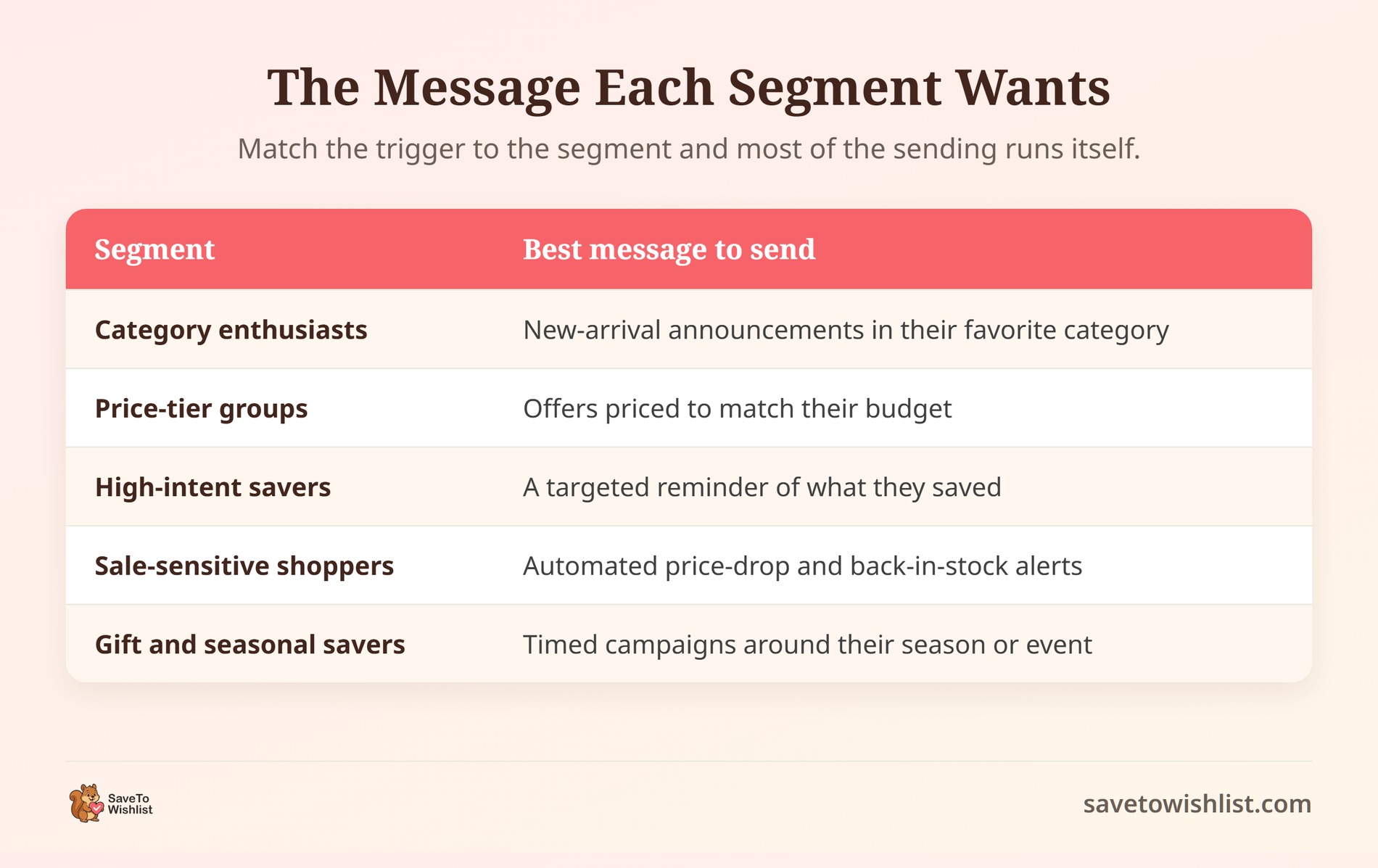
Dies sind Käufer, deren gespeicherte Artikel alle zu einem bestimmten Bereich Ihres Shops gehören. Wenn ein Kunde beispielsweise nur Kaffeetassen speichert, sollten Sie ihm keine E-Mail über Kaffeemühlen senden. Hier können Sie auch Muster für nachfüllbare Artikel erkennen – wenn jemand durchgehend Kaffeebohnen speichert, könnte er das perfekte Publikum für WooCommerce-Abonnements sein. Wenn Sie ein neues Produkt oder eine neue Dienstleistung einführen, können Sie eine Ankündigung nur an die Gruppe senden, die sich auf diese spezielle Kategorie konzentriert.
2. Budget-basierte Gruppen
Sie können Käufer nach dem Durchschnittspreis der Artikel gruppieren, die sie speichern. Betrachten Sie die Preisschilder auf der Wunschliste eines Kunden. Wenn jemand nur Artikel unter 30 € speichert, wird ihm eine Aktion für ein Premium-Produkt für 300 € nicht gefallen. Wenn Sie Käufer nach ihrem Budget gruppieren, bleiben Ihre Angebote relevant. Sie können sogar ein Tool wie Advanced Coupons verwenden, um nur den Personen in einer Gruppe mit niedrigerem Budget einen bestimmten Rabatt zu senden.
3. Sparer mit hohem Interesse
Dies sind Personen, die an einem einzigen Nachmittag vier oder fünf Artikel speichern oder denselben Artikel entfernen und erneut speichern. Diese Aktivitätsspitze ist ein starkes Signal dafür, dass sie aktiv recherchieren und sich auf den Abschluss vorbereiten. Sie benötigen normalerweise keinen hohen Rabatt, um ihre Bestellung abzuschließen. Eine einfache, zeitgesteuerte Erinnerungs-E-Mail reicht oft aus, um sie zurückzubringen.
4. Schnäppchenjäger
Einige Käufer verwenden Wunschlisten speziell zur Preisverfolgung. Sie finden den gewünschten Artikel, speichern ihn und warten dann auf einen Ausverkauf. Da sie sehr preissensibel sind, reagieren sie äußerst gut auf automatische „Preisnachlass“-E-Mails. Wenn Sie eine Ausverkaufsaktion durchführen, sollte diese Gruppe als allererste benachrichtigt werden.
5. Saisonale und Geschenk-Sparer
Dies sind Käufer, deren Wunschlistenaktivität kurz vor einem großen Feiertag ansteigt, oder Leute, die die Wunschliste Ihres Shops als Geschenkliste verwenden. Ihre Kaufgewohnheiten sind an ein bestimmtes Datum im Kalender gebunden. Sobald Sie sie identifiziert haben, wissen Sie genau, wann Sie ihnen im nächsten Jahr eine Erinnerung senden müssen.
Sie müssen nicht alle fünf dieser Gruppen am ersten Tag aufbauen. Wählen Sie die ein oder zwei aus, die am besten zu Ihrer aktuellen Shop-Verwaltung passen, und fügen Sie die anderen später hinzu.
So erstellen und exportieren Sie diese Segmente
In SaveTo Wishlist Pro bauen Sie diese Gruppen mit zwei Hauptfunktionen auf: Erweiterte Analysen und Erweiterter Filter und Export. Betrachten Sie die Analysen als das Werkzeug, das das Muster findet, und das Export-Werkzeug als die Möglichkeit, die tatsächliche Liste der Kunden-E-Mails zu erhalten.
Zuerst analysiert Advanced Analytics alle Wunschlisten in Ihrem Shop, um Ihnen zu zeigen, was im Trend liegt. Es hebt hervor, welche Produkte beliebt sind, welche Kategorien die Leute am häufigsten speichern und wie sich die Nachfrage im Laufe der Zeit ändert. Wenn Sie beispielsweise feststellen, dass eine bestimmte Kategorie in einem bestimmten Monat einen Anstieg der Speicherungen verzeichnet, haben Sie gerade ein neues Segment entdeckt. Wenn Sie mehr darüber erfahren möchten, wie Sie diese Berichte lesen, behandeln wir dies in unserem Leitfaden für erweiterte Wunschlistenanalysen.
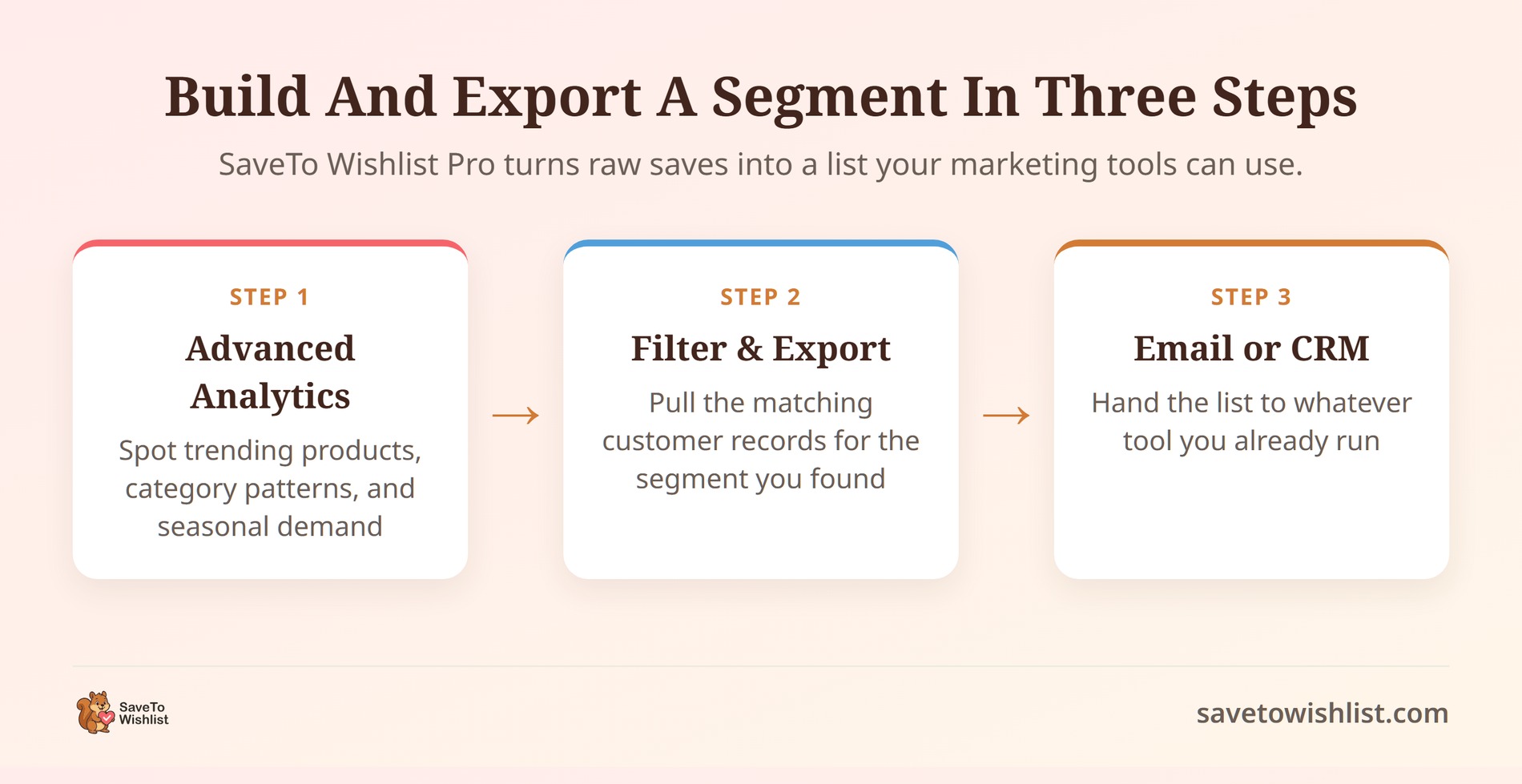
Sobald Sie das genaue Segment kennen, das Sie ansprechen möchten, verwenden Sie das Tool Erweiterter Filter und Export. Mit dieser Funktion können Sie Ihre Wunschlistendaten sortieren, um die gerade gefundenen Muster abzugleichen. Sobald die Daten gefiltert sind, können Sie die passenden Kundenkonten exportieren (was einfach bedeutet, herunterzuladen). Jetzt haben Sie eine saubere Liste von Käufern, die Sie in Ihre E-Mail-Plattform laden können.
Für die besten Ergebnisse sollten Sie sich eine monatliche Routine aneignen. Zu Beginn jedes Monats öffnen Sie Ihre Analysen und finden zwei oder drei Segmente, die sich verschoben haben. Filtern Sie nach diesen spezifischen Käufern und laden Sie die neuen Listen herunter. Wenn Sie diese monatliche Gewohnheit pflegen, stellen Sie sicher, dass Ihre Botschaften korrekt bleiben und Ihre Segmente nicht veralten.
So handeln Sie nach jedem Segment
Auf ein Segment zu reagieren bedeutet einfach, dieser spezifischen Gruppe die genaue Nachricht zu senden, die sie hören möchte. Anstatt Leute per E-Mail von Hand anzuschreiben, können Sie mit SaveTo Wishlist Pro dies automatisch mit den integrierten Automatisierungen und Webhooks abwickeln.
Automatisierungen sind einfach Regeln, die einen „Auslöser“ mit einer „Aktion“ koppeln. Ein Auslöser ist das Ereignis, das den Prozess startet, wie z. B. ein gespeichertes Produkt, das in den Verkauf geht oder wieder auf Lager ist. Die Aktion ist das, was als Nächstes passiert, wie z. B. das Senden einer E-Mail an den Kunden.
Wenn Sie beispielsweise ein Segment von Schnäppchenjägern haben, können Sie einen Preisnachlass-Auslöser einrichten. Wenn ein Artikel im Angebot ist, sendet das System automatisch eine E-Mail an die spezifischen Personen, die dieses Produkt gespeichert haben. Sobald Sie es eingerichtet haben, läuft es leise im Hintergrund, ohne dass Sie einen Finger rühren müssen.
Wenn Sie Ihre Segmente innerhalb einer dedizierten E-Mail-Plattform verwalten möchten, sind Webhooks die Brücke, die Sie benötigen. Ein Webhook ist einfach eine Möglichkeit für zwei verschiedene Apps, automatisierte Nachrichten über das Internet zu senden.
SaveTo Wishlist Pro verbindet sich nicht direkt mit E-Mail-Tools wie Klaviyo oder Mailchimp. Stattdessen senden seine Webhooks Wunschlisten-Ereignisse (wie z. B. wenn ein Kunde einen neuen Artikel speichert) an ein Vermittler-Tool wie Zapier. Zapier erfasst diese Daten und leitet sie direkt an Ihre E-Mail-Plattform weiter. Von dort aus kann Ihr E-Mail-Tool diese Wunschlistendaten verwenden, um gezielte Kampagnen zu senden oder personalisierte verwandte Produkte vorzuschlagen, die perfekt zu dem passen, was sie bereits gespeichert haben.
🔍️ Was wir gesehen haben: Die Shops, die die besten Ergebnisse mit Segmentierung erzielen, halten die Dinge klein und konsistent. Zwei oder drei gut gepflegte Segmente, die die richtigen automatisierten E-Mails versenden, werden ein Dutzend komplizierte Segmente, für die niemand Zeit hat, zu aktualisieren, leicht übertreffen. Fangen Sie klein an, sehen Sie, was wirklich funktioniert, und fügen Sie nur dann weitere Segmente hinzu, wenn Sie bereit sind.
Häufig gestellte Fragen: WooCommerce Kundensegmentierung
Was bedeutet Kundensegmentierung in WooCommerce?
WooCommerce-Kundensegmentierung bedeutet, Käufer basierend auf gemeinsamen Verhaltensweisen oder Merkmalen in kleinere Gruppen einzuteilen. Sie vermarkten dann jede Gruppe unterschiedlich. In WooCommerce können Sie standardmäßig nach Bestellhistorie, Ausgaben und Standort segmentieren.
Verhaltensdaten wie die Produkte und Kategorien, die Kunden speichern, gehen noch weiter. Der Vorteil ist Relevanz: Die richtige Nachricht erreicht die richtige Gruppe, nicht eine generische Massenbotschaft.
Sind Wunschlistendaten für die Segmentierung besser als die Kaufhistorie?
Sie beantworten unterschiedliche Fragen, daher nutzt die beste Segmentierung beide. Die Kaufhistorie sagt Ihnen, was ein Kunde bereits gekauft hat, nützlich für Nachbestellungs- und Treuekampagnen. Wunschlistendaten sagen Ihnen, was er als Nächstes will, was besser ist, um Personen zu erreichen, bevor sie kaufen. Da ein gespeicherter Artikel eine bewusste Wahl ist, ist er tendenziell ein klareres Absichtssignal als abgeleitetes Browsing.
Benötige ich SaveTo Wishlist Pro, um Kunden zu segmentieren?
Sie können mit grundlegenden WooCommerce-Daten kostenlos mit der Segmentierung beginnen, aber Wunschlisten-basierte Segmente erfordern die Pro-Stufe. Die kostenlose Version ermöglicht es Käufern, Wunschlisten zu erstellen und zu speichern. Advanced Analytics und Advanced Filter and Export, die Tools zum Finden und Abrufen von Segmenten, sind Pro-Funktionen. Wenn Sie nach gespeicherten Produkten, Kategorien oder Preisstufen segmentieren möchten, ist Pro das, was diese Daten nutzbar macht.
Kann ich segmentierte E-Mails über Klaviyo oder Mailchimp senden?
Ja, über einen Connector und nicht über eine direkte Integration. SaveTo Wishlist verbindet sich nicht nativ mit Klaviyo oder Mailchimp. Seine Echtzeit-Webhooks senden Wunschlisten-Ereignisse an ein Tool wie Zapier, das die Daten an Ihre E-Mail-Plattform weiterleitet. Von dort aus erstellen Sie die Kampagne in dem Tool Ihrer Wahl.
Wie oft sollte ich meine Segmente aktualisieren?
Eine monatliche Aktualisierung funktioniert für die meisten Shops gut. Das Wunschlisten-Verhalten verschiebt sich mit Jahreszeiten, neuen Produkten und Aktionen. Ein vor Monaten erstelltes Segment kann veraltet sein und die falschen Personen ansprechen. Öffnen Sie zu Beginn jedes Monats Advanced Analytics, notieren Sie, was sich geändert hat, und exportieren Sie Ihre wichtigsten Segmente erneut. Das hält sie ohne großen Aufwand korrekt.

Ihre Segmente in die Tat umsetzen
Der schnellste Weg, die WooCommerce-Kundensegmentierung für Ihren Shop nutzbar zu machen, ist, die Dinge einfach zu halten. Verwenden Sie die Daten, die Sie bereits haben, und gewöhnen Sie sich an, Ihre Listen nach einem Zeitplan zu aktualisieren. Wunschlistendaten verschaffen Ihnen einen klaren Vorteil, da sie Ihnen genau sagen, was Ihre Käufer wollen, bevor sie tatsächlich auschecken.
Hier ist eine kurze Zusammenfassung der Schritte, die wir in dieser Anleitung behandelt haben:
- Verstehen Sie, was Segmentierung ist: Hören Sie auf, jedem die gleiche E-Mail zu senden, und fangen Sie an, Käufer nach ihren Gewohnheiten zu gruppieren.
- Nutzen Sie Wunschlistendaten als Leitfaden: Betrachten Sie gespeicherte Artikel als klares Signal dafür, was ein Kunde als Nächstes kaufen möchte.
- Erstellen Sie einfache Segmente: Gruppieren Sie Personen nach den Kategorien, die sie durchsuchen, den Budgets, an die sie sich halten, oder wie sie auf Sales warten.
- Ziehen Sie Ihre Listen ab: Nutzen Sie Analysetools, um Kauf-Trends zu erkennen, und verwenden Sie Export-Tools, um genau die Kundengruppe herunterzuladen, die Sie erreichen möchten.
- Handeln Sie mit Ihren Daten: Senden Sie jedem Segment die spezifische Nachricht, die es interessiert, mithilfe automatisierter Trigger, damit Sie dies nicht von Hand tun müssen.
Wenn Sie bereit sind, Ihre gespeicherten Produkte in Gruppen umzuwandeln, die Sie tatsächlich vermarkten können, bietet Ihnen SaveTo Wishlist Pro genau die Werkzeuge, die Sie benötigen. Sie erhalten die Analysen zur Erkennung von Trends, die Filter zum Abrufen Ihrer Listen und die Automatisierungstools zum Senden von Nachrichten, ohne ein komplexes System von Grund auf neu erstellen zu müssen.
Versuchen Sie nicht, jedes Segment am ersten Tag zu erstellen. Beginnen Sie mit nur einer oder zwei Gruppen, sehen Sie, wie sie reagieren, und erweitern Sie Ihre Strategie von dort aus langsam.



