

 Reviewed by
 If you run a large WooCommerce catalog, a wholesale store, or a quick order form, you’ve probably used a product table layout. It lets shoppers scan dozens of products on one page and add them to the cart fast.
Still, many store owners hit the same gap. Those shoppers also want a way to save items for later, not just buy right now.
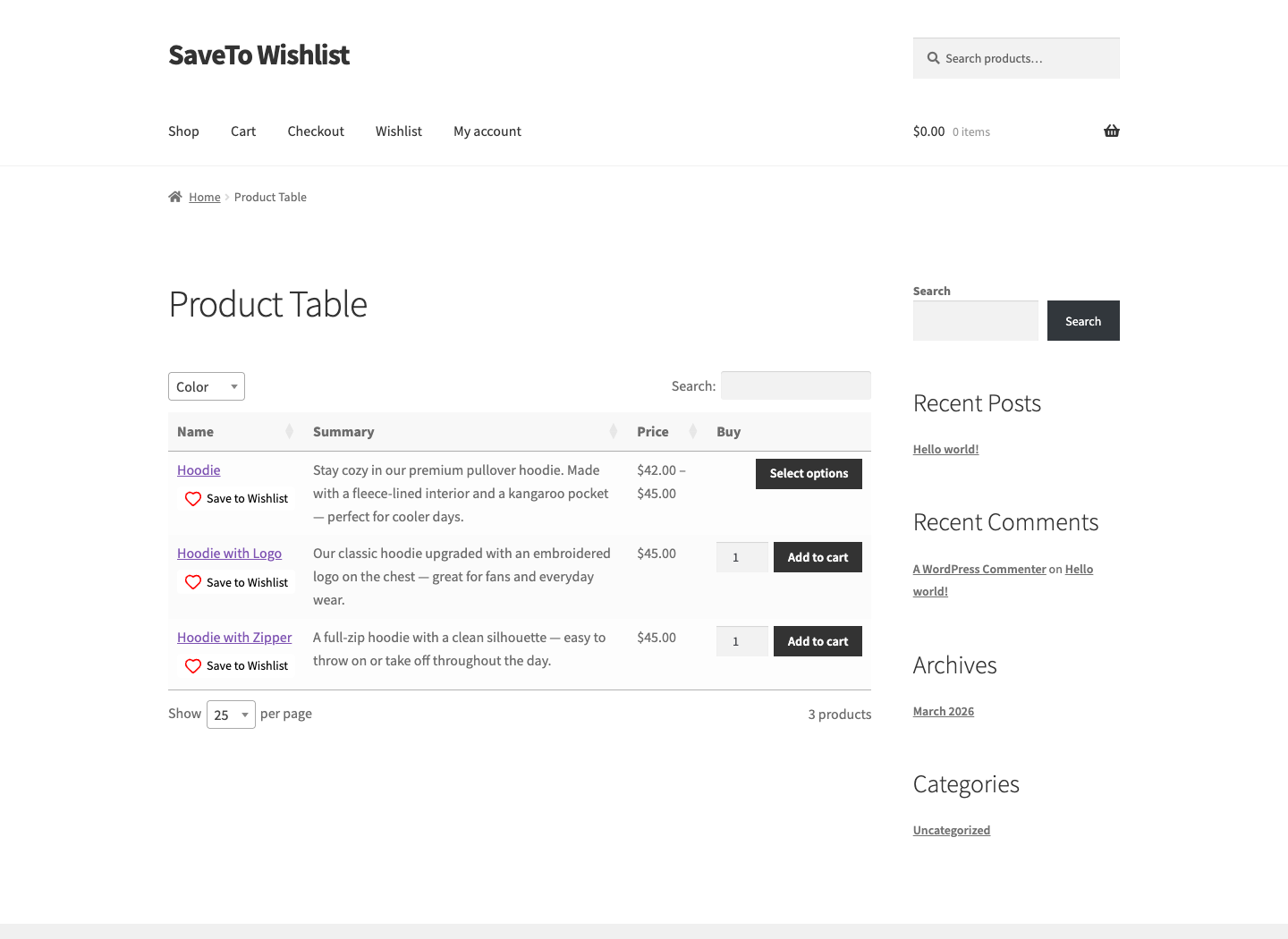
That’s why I’m glad to share some news: WooCommerce Product Table by Barn2 now has a built-in integration with SaveTo Wishlist. Turn both plugins on and a Save to Wishlist button appears inside every row of your table. This means you can keep your fast, searchable product tables and still give shoppers full wishlist features.
Below, I’ll walk through what the integration does, why saving from a table matters for your revenue, and exactly how to set it up, style it, and troubleshoot it.
Jump to:
- What Is The WooCommerce Product Table Plugin?
- Key Features Of WooCommerce Product Table
- What The WooCommerce Product Table Integration Does
- Why Saving From A Product Table Matters
- Who Benefits Most From Running Both Plugins
- What You Need Before You Start
- How To Set Up SaveTo Wishlist With Your Product Tables
- How To Style The Wishlist Button In Your Table
- What Happens After A Shopper Saves An Item
- Does The Button Survive Search, Sorting, And Lazy Loading?
- What The Integration Doesn't Do
- Troubleshooting The WooCommerce Product Table Integration
- Frequently Asked Questions
- Start Pairing Them Today
What Is The WooCommerce Product Table Plugin?
Barn2’s WooCommerce Product Table is a premium plugin that turns your product list into a searchable, sortable table or order form. Instead of clicking into each product page, shoppers see everything on one screen.
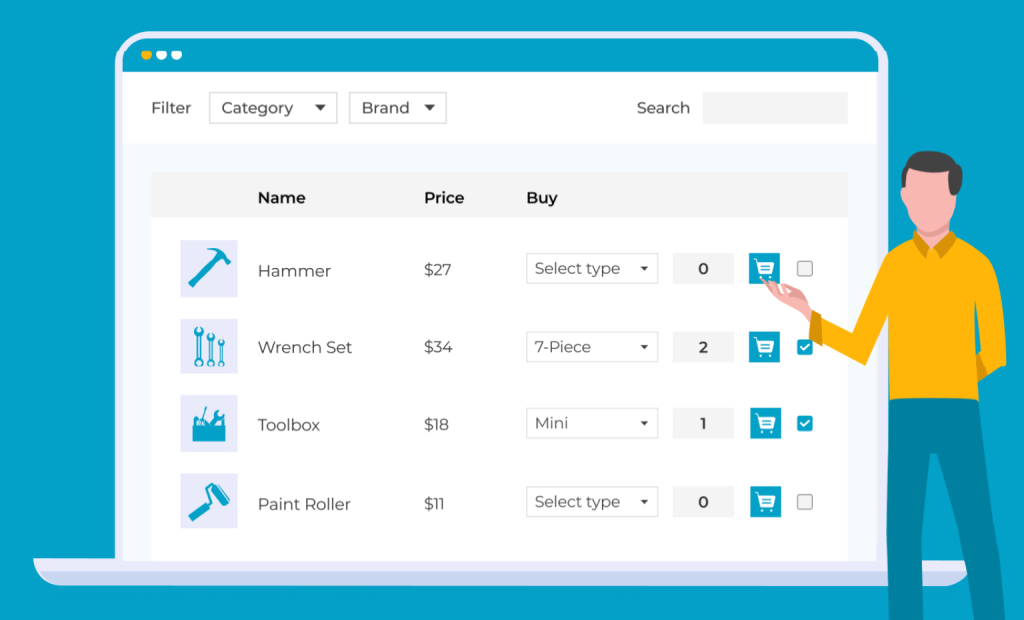
You can build as many tables as you like with a step-by-step setup wizard. Then you choose where each one appears. For example, you can replace your shop and category pages with the table layout. Alternatively, you can drop a table onto any page with a Gutenberg block or shortcode.
It’s a popular pick for large catalogs, wholesale buyers, and restaurant menus. On Barn2’s site, it’s rated 4.97 out of 5 from more than 300 reviews. Plus, single-site licenses start at $79 per year, backed by a 30-day money-back guarantee.
Key Features Of WooCommerce Product Table
The plugin packs a lot into one table. Here are the features that matter most when you pair it with a wishlist:
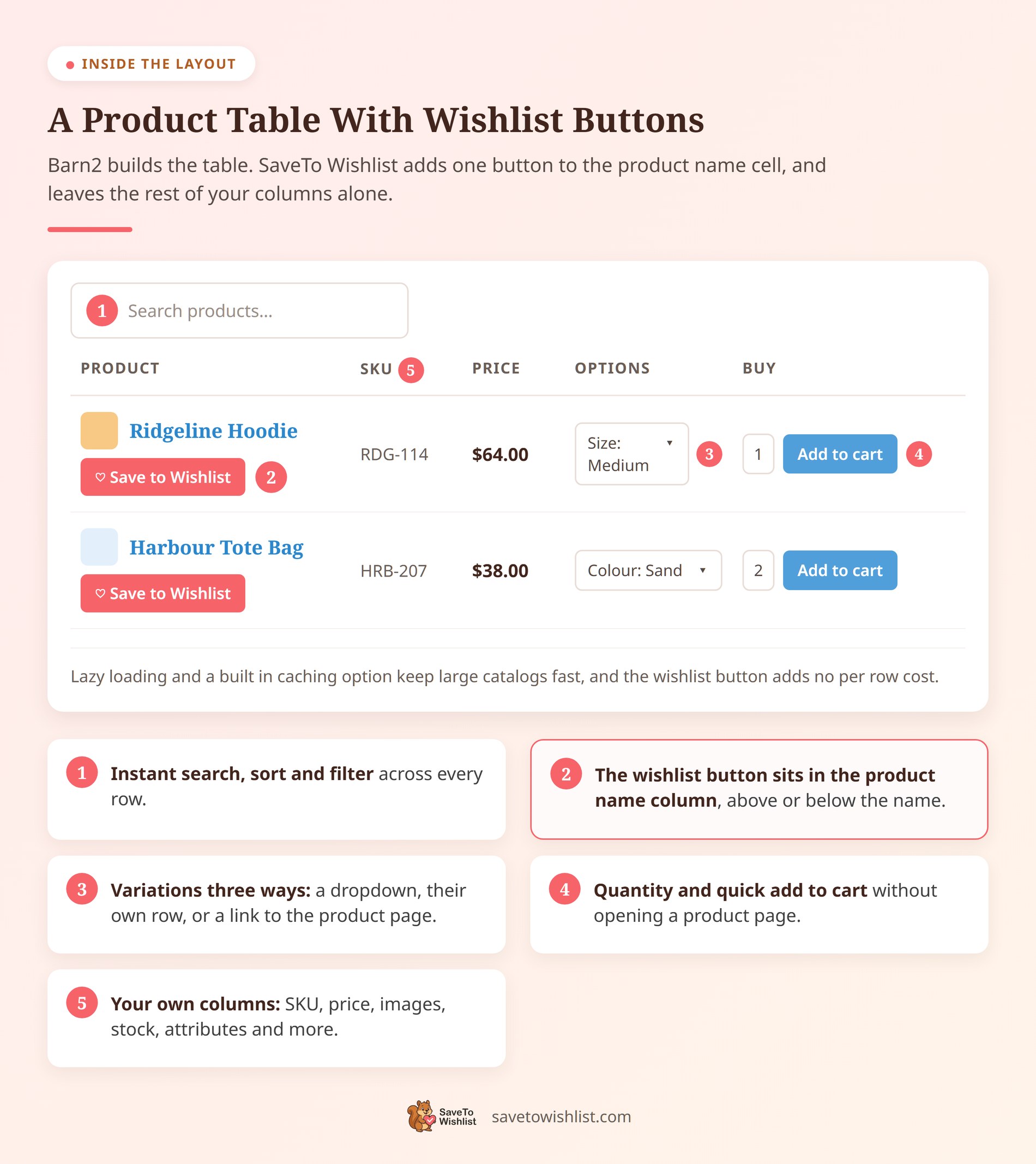
- Instant search, sort and filter: Shoppers sort by clicking any column, search with an AJAX box, and narrow results with filter dropdowns or sidebar widgets.
- Three ways to show variations: Display variations as dropdowns, as separate rows with their own add-to-cart buttons, or as a link to the product page.
- Customizable columns: Show data like SKU, stock, attributes, custom fields, and images. You can rename headings or merge several columns into one cell.
- Built for big catalogs: Lazy loading and a built-in caching option let the table handle thousands of products without slowing down.
- Quick add to cart: Customers pick quantities and add several products at once, straight from the table.
In practice, those features make the table feel less like a catalog and more like an order form. As a result, shoppers move faster, which pairs nicely with a wishlist for the items they aren’t ready to buy.
What The WooCommerce Product Table Integration Does
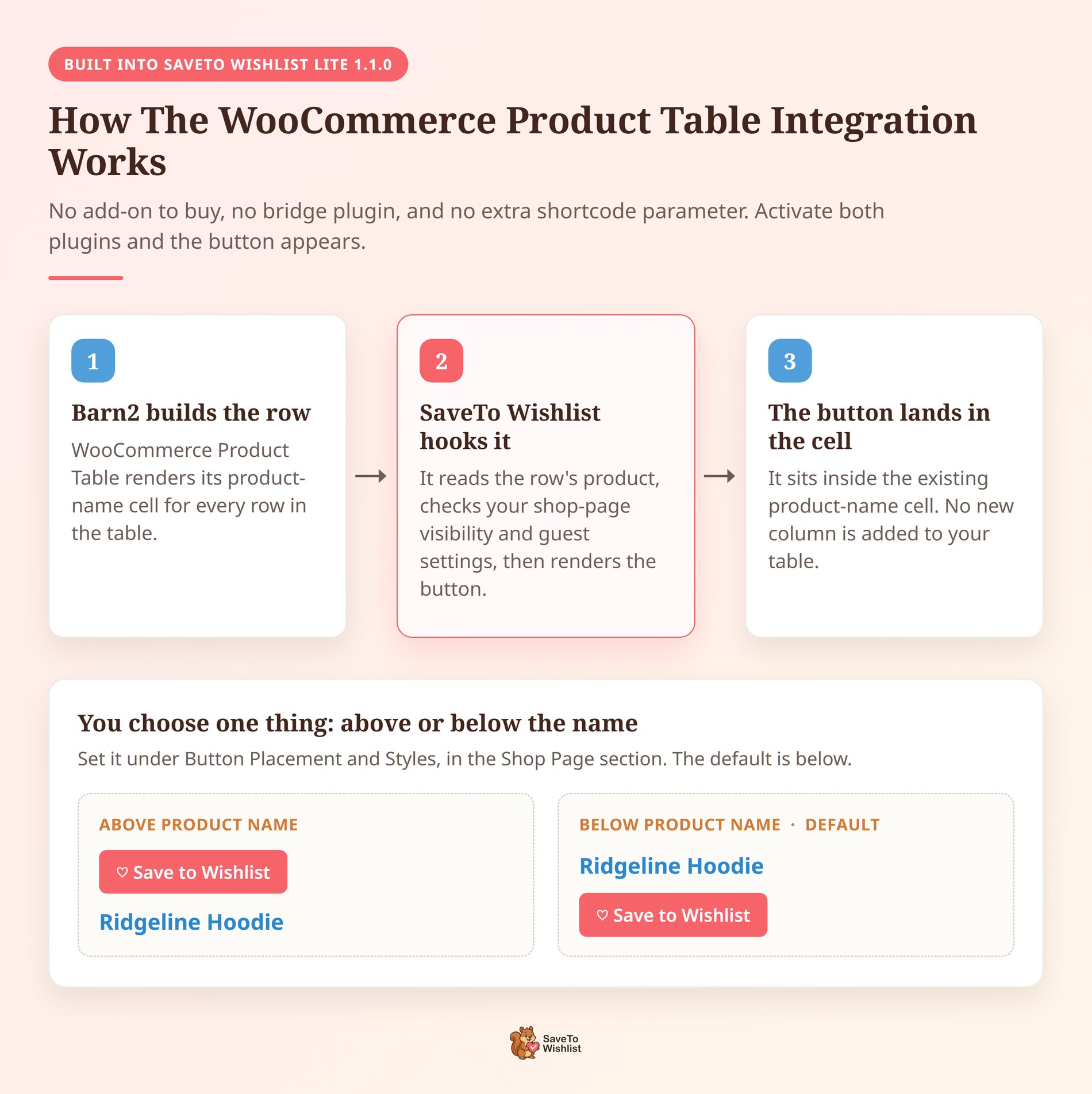
SaveTo Wishlist adds a Save to Wishlist button directly into each row of your Barn2 table. The button goes inside the existing product-name cell, either above or below the name itself. No new column is added, and nothing about your table’s layout has to change.
This is a genuine integration, not just two plugins that avoid conflicting. It ships inside SaveTo Wishlist Lite 1.1.0 and newer, so there’s no separate add-on to buy and no bridge plugin to install. Both plugins simply need to be active.
Here’s what happens on each row. WooCommerce Product Table builds the product name, then SaveTo Wishlist takes it, checks the row holds a real product, checks your shop page and guest settings, and drops its usual button in above or below that name. If a row doesn’t hold a valid product, SaveTo Wishlist leaves the name alone.
Naturally, your shoppers get the best of both setups. They can browse a fast product table to find what they need. Meanwhile, they can save products to a wishlist when they’re not ready to buy yet.
This matters most for high-volume stores. Order forms and product tables are built for speed and bulk buying. By contrast, wishlists add the save-for-later intent that those layouts often miss.
🔍️ What we’ve seen: store owners add a product table for faster ordering, then notice shoppers still want a way to bookmark items. Pairing the two closes that gap.
Why Saving From A Product Table Matters
A product table is a product-finding tool, and product finding is where a lot of revenue quietly leaks away. Baymard Institute’s research on product lists found that sites with mediocre product list usability saw abandonment rates of 67 to 90 percent, while sites with just a slightly optimized toolset saw only 17 to 33 percent on the same product-finding tasks.
Tables already fix a big part of that problem. They put search, sorting, and filtering on one screen so nobody has to click through twenty product pages to compare four items.
What a table alone can’t fix is the shopper who finds the right product but isn’t buying today. According to Baymard Institute, 42 percent of US online shoppers have abandoned a cart because they were “just browsing / not ready to buy.” That’s not a checkout problem you can discount your way out of. It’s a timing problem.
The same research puts the average documented cart abandonment rate at 70.22 percent across 50 separate studies. When most of your traffic leaves without buying, giving that traffic somewhere to land is worth more than squeezing the few who were always going to convert.
A wishlist button in the table row is that landing spot. Instead of closing the tab, the shopper saves the item, and you get a record of what they wanted. From there you can send wishlist email campaigns, recover browse abandonment, or simply let the customer come back on their own schedule.
🔍️ What we’ve seen: stores treat a big table as a conversion tool and measure it purely on add-to-cart rate. The rows people hover over and never click are just as useful, and a wishlist is the cheapest way to capture them.
Who Benefits Most From Running Both Plugins
Any store can use the pair, but a few setups gain the most:
- Wholesale and B2B stores: Buyers reorder in bulk from a table, then save future picks to a list for the next cycle.
- Large catalogs: Big stores let shoppers scan hundreds of products, then shortlist favorites instead of losing them.
- Restaurants and menus: Diners browse a clean menu table and save the dishes they want to try later.
- Stores with guest shoppers: Visitors can save items without an account, since SaveTo Wishlist supports guest wishlists.
- Repeat buyers: WooCommerce Product Table can show a logged-in customer their previously ordered items for fast re-ordering. This lets repeat buyers quickly re-order their usual staples from the table while using the wishlist to bookmark new items they want to try next time.
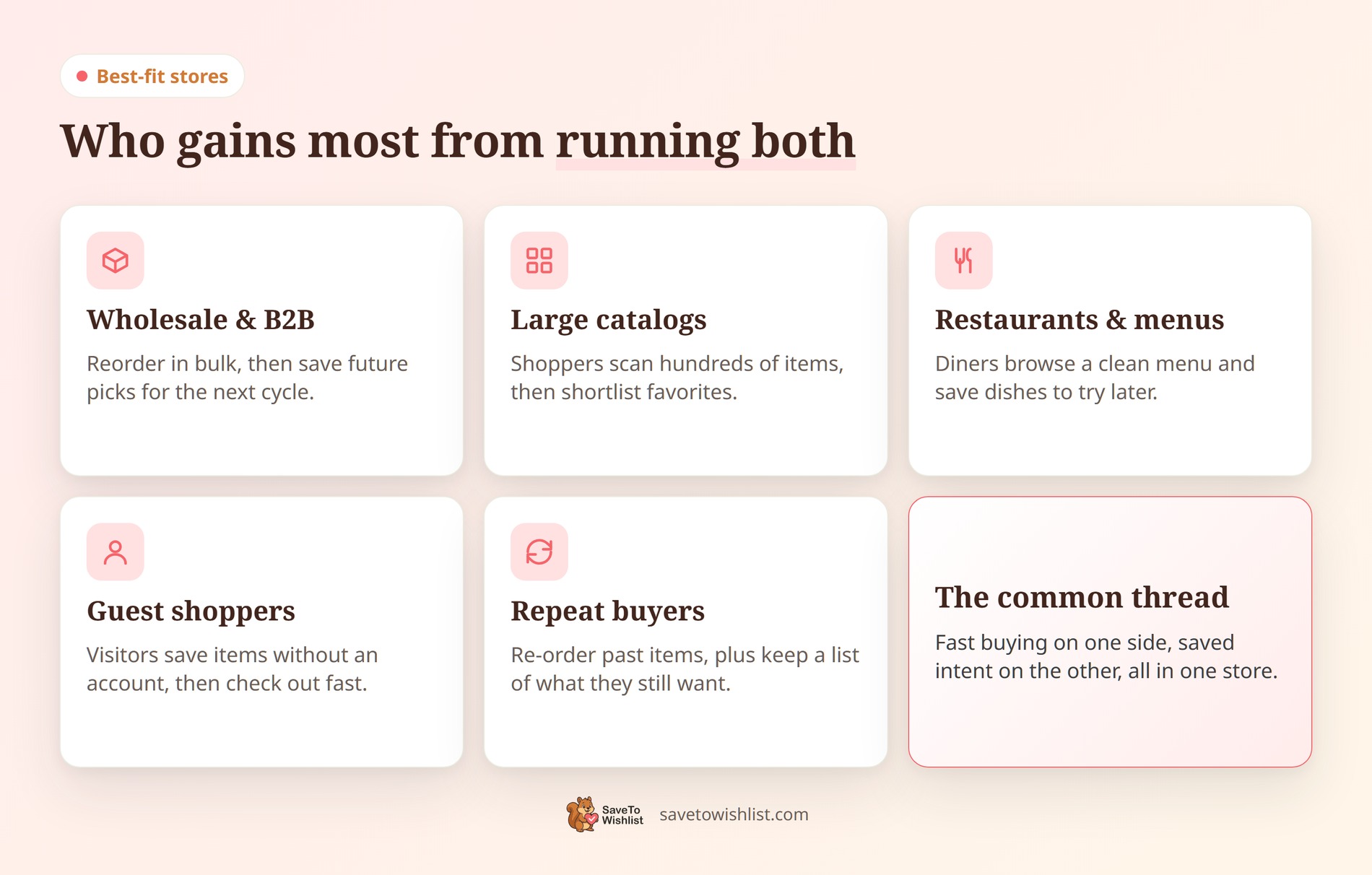
That last point is worth a closer look. WooCommerce Product Table can list items a customer ordered before, while a wishlist holds the items they’re still considering. Together, they give repeat buyers two quick paths back to checkout.
What You Need Before You Start
The integration has a short requirements list. Check these before you go hunting for a setting that isn’t there yet:
- WordPress 5.8 or newer and PHP 7.4 or newer on your host.
- WooCommerce 4.0 or newer, installed and active.
- SaveTo Wishlist Lite 1.1.0 or newer. The Barn2 integration arrived in 1.1.0, so older versions won’t show the setting.
- WooCommerce Product Table, installed and active, with a product table already on one of your pages. SaveTo Wishlist doesn’t check for a specific version of it.
- A table that includes the product-name column. That column is where the button gets inserted, so a table built without it has nowhere to put one.
Worth noting: everything here works on the free version of SaveTo Wishlist. You don’t need a paid plan to put wishlist buttons in your product tables.
How To Set Up SaveTo Wishlist With Your Product Tables
There’s no integration to switch on. Once both plugins are active, you only need to confirm two settings, and both live in the same panel.
- Install and activate WooCommerce, SaveTo Wishlist, and WooCommerce Product Table.
- Build a Barn2 product table and make sure it includes the product-name column.
- In WordPress, go to SaveTo Wishlist > Settings > Button Placement & Styles and find the Shop Page section.
- Set Button Placement to anything other than Don’t show. This controls whether the button is available in the table at all.
- In the same section, set Barn2 Product Table Position to either Above product name or Below product name.
- Save your settings, then test the table as a logged-in customer and, if guest wishlists are on, as a logged-out visitor.
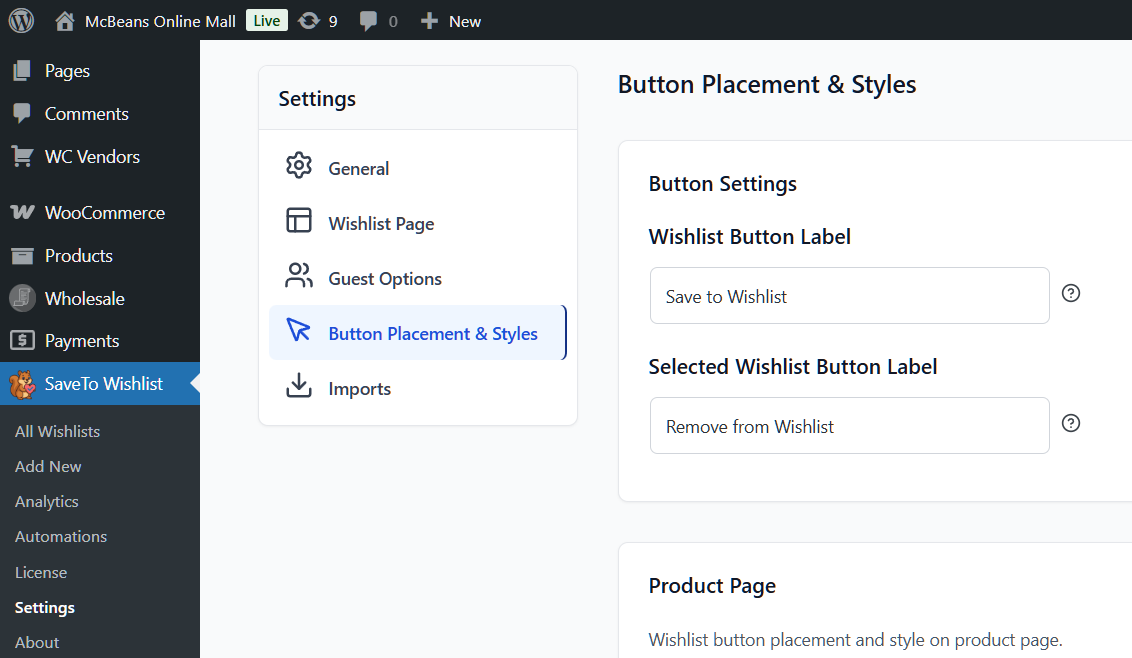
Those last two settings do different jobs, and mixing them up is the most common setup mistake. Shop Page Button Placement decides whether a wishlist button shows on shop-style listings at all. Barn2 Product Table Position decides where inside the product-name cell the table’s button sits.
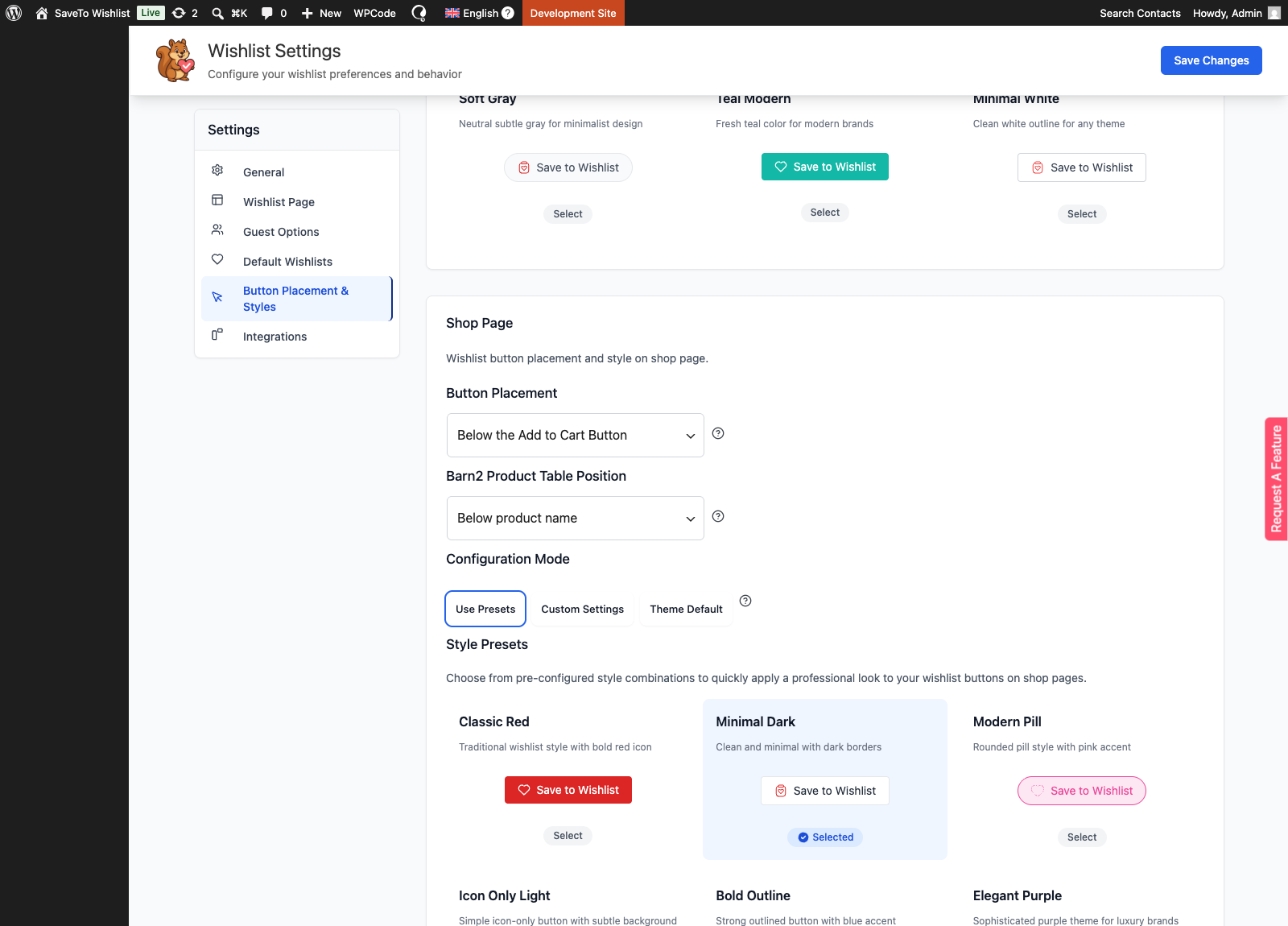
If you never touch the position setting, SaveTo Wishlist defaults to Below product name. The setting itself only appears once SaveTo Wishlist detects that WooCommerce Product Table is active, so don’t go looking for it before you’ve activated the table plugin.
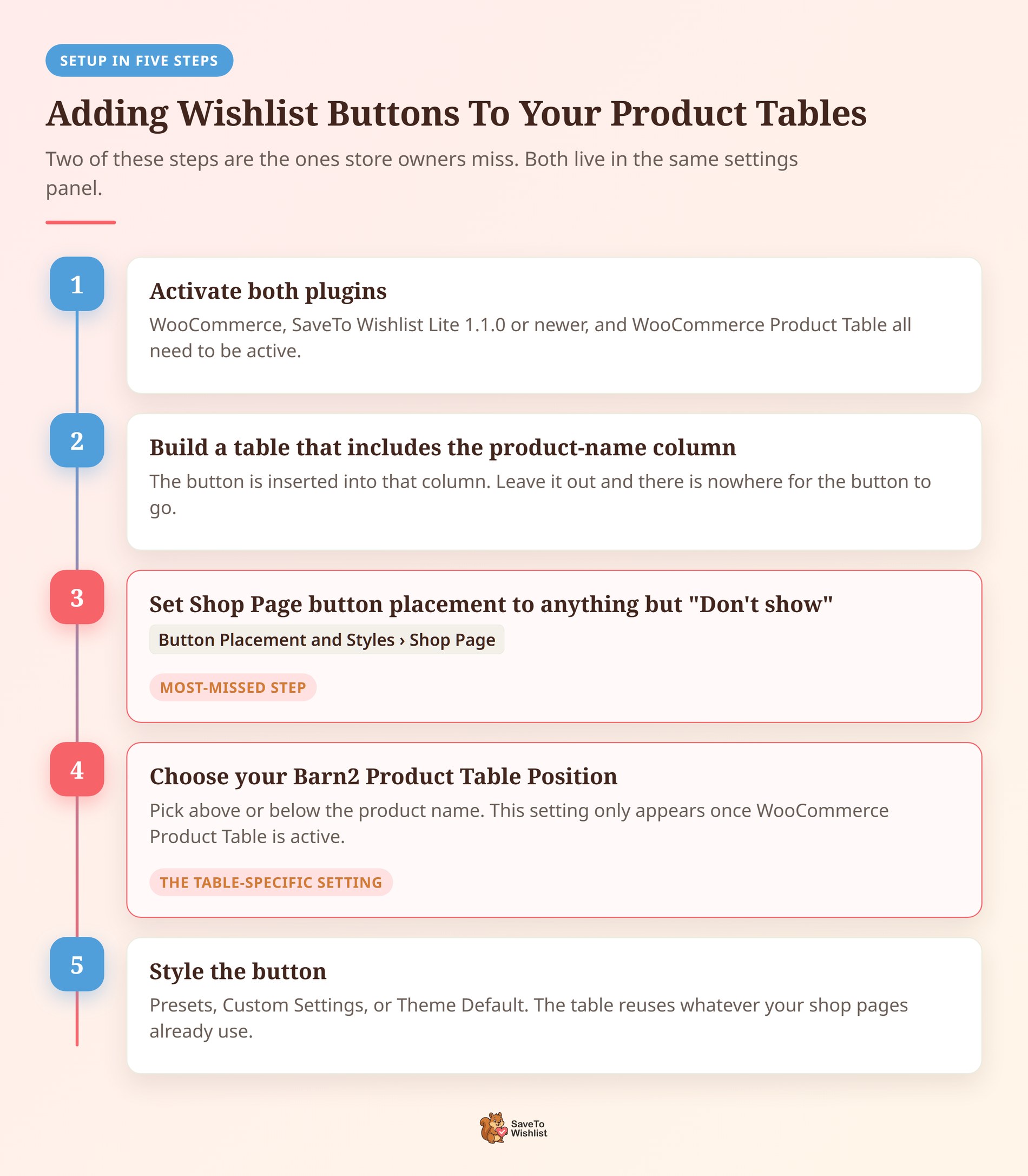
One thing you don’t have to do is edit your shortcode. If an existing [product_table] already includes the product-name column, SaveTo Wishlist inserts the button automatically. There’s no extra attribute to add.
Choosing the right SaveTo Wishlist Plan
If you’re new to wishlists, the free version of SaveTo Wishlist is a good place to start. It covers multiple wishlists and guest wishlists at no cost. SaveTo Wishlist Pro then adds detailed analytics, automated emails, webhooks, and user tagging, and starts at $99 per year ($49.50 for the first year). Gift registries come from the separate Gift Registry Addon, which is included with the Plus and Business plans.
Want proof the combo pays off? Wishlists give shoppers a low-pressure way to come back and buy. As a result, they can lift your conversion rate over time.
How To Style The Wishlist Button In Your Table
The table button reuses your Shop Page button configuration, so you style it the same way you style buttons on your shop and category pages. Go to SaveTo Wishlist > Settings > Button Placement & Styles, open the Shop Page section, and pick a configuration mode.
- Use Presets: Applies one of SaveTo Wishlist’s ready-made shop-page button presets. This is the fastest route if you just want something tidy.
- Custom Settings: Gives you button type, text and hover-text colors, background and hover-background colors, border colors and width, icon color and size, text size and style, vertical and horizontal padding, and border radius.
- Theme Default: Hands the button over to your theme. SaveTo Wishlist drops its own colours and sizing, so the button ends up looking like every other button in the row.
Theme Default is the one to reach for when the coral button clashes with a table you’ve already themed. Because it hands styling back to your theme, the wishlist button ends up looking like every other button in the row.
Bear in mind there’s no table-only style setting. Whatever you choose applies to your shop pages and your Barn2 tables together.
🔍️ Worth knowing: SaveTo Wishlist works out the style, colour, and position once per page rather than once per row. So a table with hundreds of rows costs you nothing extra in speed.
What Happens After A Shopper Saves An Item
The table button follows your standard Add to wishlist button setting, which lives under SaveTo Wishlist > Settings > General. You get three behaviors:
- Redirect: Saves the product, then sends the customer to your configured redirect page.
- Popup: Saves the product and shows the standard confirmation popup, leaving the customer on the page.
- Fade: Changes the button to confirm the save, with no redirect.
For a product table, this choice matters more than it does elsewhere. The whole point of a table is that shoppers work through many rows in one session, so a Redirect setting pulls them off the table after a single save.
🔍️ What we’ve seen: Redirect is a sensible default on a product page, where the shopper has already committed to one item. On a 200-row order form it quietly kills the browsing session. Popup or Fade usually suits table pages better.
Guests, accounts, and multiple lists
Logged-out visitors get table buttons too, as long as guest wishlists are enabled. The control sits under SaveTo Wishlist > Settings > Guest Options, in a setting called Disable Guest Wishlist. Leave it off and guests can save from your tables. Switch it on and the buttons disappear for logged-out visitors while logged-in customers keep theirs.
Logged-in customers get the normal experience, including the saved state on products already on a list. If you’ve turned on Allow Multiple Wishlists, the usual Choose list picker appears in the table too, so a buyer can send different rows to different lists without leaving the page.
Does The Button Survive Search, Sorting, And Lazy Loading?
Yes, in the setup our automated tests cover. The button is added on the server while each row’s name is being built, not by JavaScript in the browser. So when Barn2 fetches fresh rows after a search or a sort, those rows get buttons too.
The integration test suite verifies that:
- A standard
[product_table]renders with wishlist buttons. - Buttons appear correctly both above and below the product name.
- A lazy-loaded table can be sorted by its Name column and the buttons remain after the AJAX redraw.
- A lazy-loaded table can be searched from its own search field and the buttons remain after that redraw too.
Those tests run against this shortcode setup:
[product_table search_box="top" lazy_load="true" rows_per_page="100" sort_by="menu_order" variations="dropdown" category="wishlist-products" cache="false"]Being straight with you: that establishes search and name-sorting compatibility in that lazy-loaded, AJAX-redrawn setup. It doesn’t prove every possible combination of Barn2 shortcode options, custom columns, table extensions, and third-party customizations. If your table is heavily customized, test it on staging before you roll it out.
What The Integration Doesn’t Do
Knowing the edges saves you a support ticket. Here’s what this integration deliberately leaves alone:
- It doesn’t create a Wishlist column. The button goes into the existing product-name cell, and there’s no built-in option to give it a column of its own.
- It doesn’t add, remove, or reorder your columns. Your table structure is entirely yours.
- It doesn’t change Barn2’s product query, search rules, or sorting rules. Which products appear, and in what order, stays a WooCommerce Product Table decision.
- It doesn’t give tables their own visibility toggle. Setting Shop Page Button Placement to Don’t show removes the buttons from your tables as well.
- Our tests cover tables built with the shortcode, not Barn2’s block. SaveTo Wishlist also doesn’t check for a particular Barn2 version.
Developers do have room to move here. A filter called stwlite_wishlist_button_barn2_table_html lets you change the button markup, wrap it in your own container, or return an empty string to hide the button on particular products. Whatever you return is checked against SaveTo Wishlist’s list of allowed button HTML before it goes in, so unusual markup may need that list extended too. If you’re building on top of the plugin, the SaveTo Wishlist REST API guide is a useful companion.
Troubleshooting The WooCommerce Product Table Integration
Most problems trace back to one of a handful of causes. Work down this list in order.
The wishlist button doesn’t appear at all
Confirm that WooCommerce, SaveTo Wishlist Lite 1.1.0 or newer, and WooCommerce Product Table are all active. Then check that your table includes the product-name column and that Shop Page Button Placement isn’t set to Don’t show. If a row’s product data is incomplete, SaveTo Wishlist leaves that product name untouched rather than rendering a broken button.
The Barn2 Product Table Position setting is missing
That setting is only registered when SaveTo Wishlist detects WooCommerce Product Table on your site. If it isn’t showing, the table plugin either isn’t active or isn’t being detected. Reactivating it and reloading the settings page usually resolves it.
Logged-out visitors can’t see the button
Check SaveTo Wishlist > Settings > Guest Options for Disable Guest Wishlist. When that’s switched on, the integration hides buttons from logged-out visitors on purpose while leaving them in place for logged-in customers.
The button is in the wrong spot
The button sits next to the product name that Barn2 supplies, so it can only go above or below that name. Switch Barn2 Product Table Position to the other option and reload. For a full walkthrough with screenshots, our knowledge base setup guide covers the same ground.
A custom filter broke the button
Anything returned from stwlite_wishlist_button_barn2_table_html is checked against SaveTo Wishlist’s list of allowed button HTML, so elements and attributes that aren’t on it get stripped out. Returning an empty string from that filter removes the button for that row, which is sometimes the accidental cause rather than a bug.
Frequently Asked Questions
Do SaveTo Wishlist and WooCommerce Product Table conflict?
No. They don’t just coexist, they work together on purpose. SaveTo Wishlist Lite 1.1.0 added a built-in integration that inserts a wishlist button into each table row, so your tables and your wishlist features both keep working.
Can shoppers add to a wishlist from a product table?
Yes. A Save to Wishlist button appears in the product-name cell of each row, so customers can save an item without opening its product page first. Both logged-in customers and guests can use it, as long as guest wishlists are enabled.
Where does the wishlist button appear in the table?
Inside Barn2’s product-name cell, either above or below the product name. You control which under SaveTo Wishlist > Settings > Button Placement & Styles, in the Shop Page section, using the Barn2 Product Table Position setting. The default is below the product name.
Do I need special settings to make them work together?
No bridge plugin and no shortcode changes are needed. Just confirm two things in SaveTo Wishlist > Settings > Button Placement & Styles: that Shop Page Button Placement is set to something other than Don’t show, and that Barn2 Product Table Position is set to above or below the product name.
Can the integration add a separate wishlist column?
No. The built-in integration places the button inside the existing product-name column rather than creating a new one. It also won’t add, remove, or reorder any of your other columns.
Will WooCommerce Product Table work with thousands of products?
Yes. The plugin uses lazy loading to load one page of products at a time. Plus, a built-in caching option speeds things up further. As a result, large catalogs stay fast even with thousands of items.
Will the wishlist button slow down a large table?
No. SaveTo Wishlist works out the style, colour, and position values once per page rather than once per row, so a large table adds no per-row cost. On the Barn2 side, lazy loading and a built-in caching option keep long product lists fast.
Does this work with the free version of SaveTo Wishlist?
Yes. The integration ships in SaveTo Wishlist Lite 1.1.0, so the free version covers it. Lite also includes multiple wishlists and guest wishlists. Upgrade to Pro when you want detailed analytics, automated emails, webhooks, or user tagging.
How much does WooCommerce Product Table cost?
WooCommerce Product Table is a premium Barn2 plugin. Single-site licenses start at $79 per year. There’s also a two-plugin bundle with Product Filters, plus an All Access Pass for Barn2’s full suite. Every plan includes a 30-day money-back guarantee.
Start Pairing Them Today
Product tables and wishlists solve two different problems. One speeds up buying, while the other captures intent for later. Ultimately, running them together means you don’t have to choose.
Here’s the run-through, in the order you’ll need it:
- Line up the prerequisites in What You Need Before You Start.
- Switch the button on by following How To Set Up SaveTo Wishlist With Your Product Tables.
- Make it match your theme in How To Style The Wishlist Button In Your Table.
- See where saved items end up in What Happens After A Shopper Saves An Item.
- Check the table controls against Does The Button Survive Search, Sorting, And Lazy Loading?
- Set expectations with What The Integration Doesn’t Do.
- Sort out anything odd with Troubleshooting The WooCommerce Product Table Integration.
Ready to give shoppers a smarter way to save? Get SaveTo Wishlist and pair it with your WooCommerce Product Table setup today.



