

 Reviewed by
 You spent real money acquiring these customers. They bought once, and then they vanished. They aren’t angry, and they didn’t run to a competitor—they just forgot about you.
And right now, your winback strategy for getting them back is likely a generic, desperate “We miss you!” email blast that goes straight to the promotions folder and gets completely ignored.
If you want to stop paying ad networks twice for the exact same customer, you need a highly tactical win-back campaign. You have to reach out with a reason that actually feels personal, rather than just begging for a sale.
In this guide, we’re going to tear down the standard, broken re-engagement email and replace it with an automated sequence built on the strongest signal you have: their wishlist data.
Table of Contents
- The "We Miss You" Fallacy (What A Win-Back Campaign Actually Is)
- Triage Your List: How To Identify Buyers Actually Worth Saving
- Use Wishlists To Give A Relevant Reason
- Pair The Campaign With A Targeted Coupon
- The 3-Step Win-Back Sequence
- Automate Win-Back Triggers With SaveTo Wishlist Pro
- Frequently Asked Questions
- Turn Lapsed Buyers Into Repeat Customers
The “We Miss You” Fallacy (What A Win-Back Campaign Actually Is)
Most store owners treat win-back campaigns like a single, sad breakup text. It doesn’t work.
A true WooCommerce win-back campaign isn’t a plea for attention; it is a targeted, multi-step extraction sequence. Its entire purpose is to take lapsed buyers who already trust your brand and force them off the fence using personalized data.
Because they’ve already shopped with you, you aren’t starting cold. You have their email, their past order history, and, most importantly, their wishlist data. You already hold the ultimate advantage: you know exactly what they want to buy next.
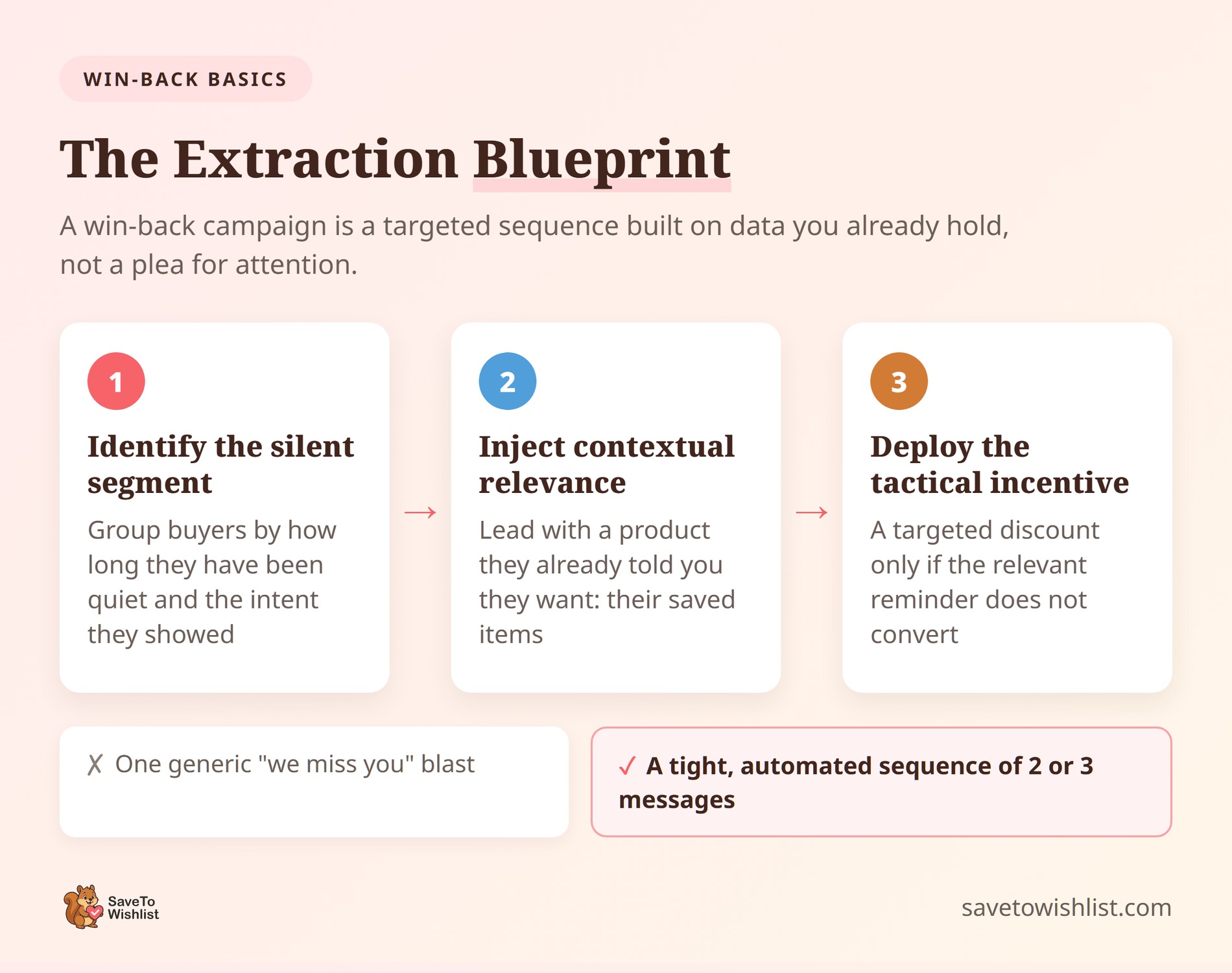
To build a sequence that reliably drives measurable revenue, you must follow the Extraction Blueprint:
- Identify the silent segment: Group your buyers by exactly how long they’ve been quiet and how much intent they’ve shown.
- Inject contextual relevance: Lead with a product they already explicitly told you they want (their saved items).
- Deploy the tactical incentive: Drop a targeted discount only if the highly relevant reminder doesn’t convert them first.
🔍️ What we’ve seen: Stores fire off one single email blast and give up. A true win-back engine relies on a tight, automated sequence of two to three messages. You don’t just nudge them once; you corner them with extreme relevance until they buy.
Triage Your List: How To Identify Buyers Actually Worth Saving
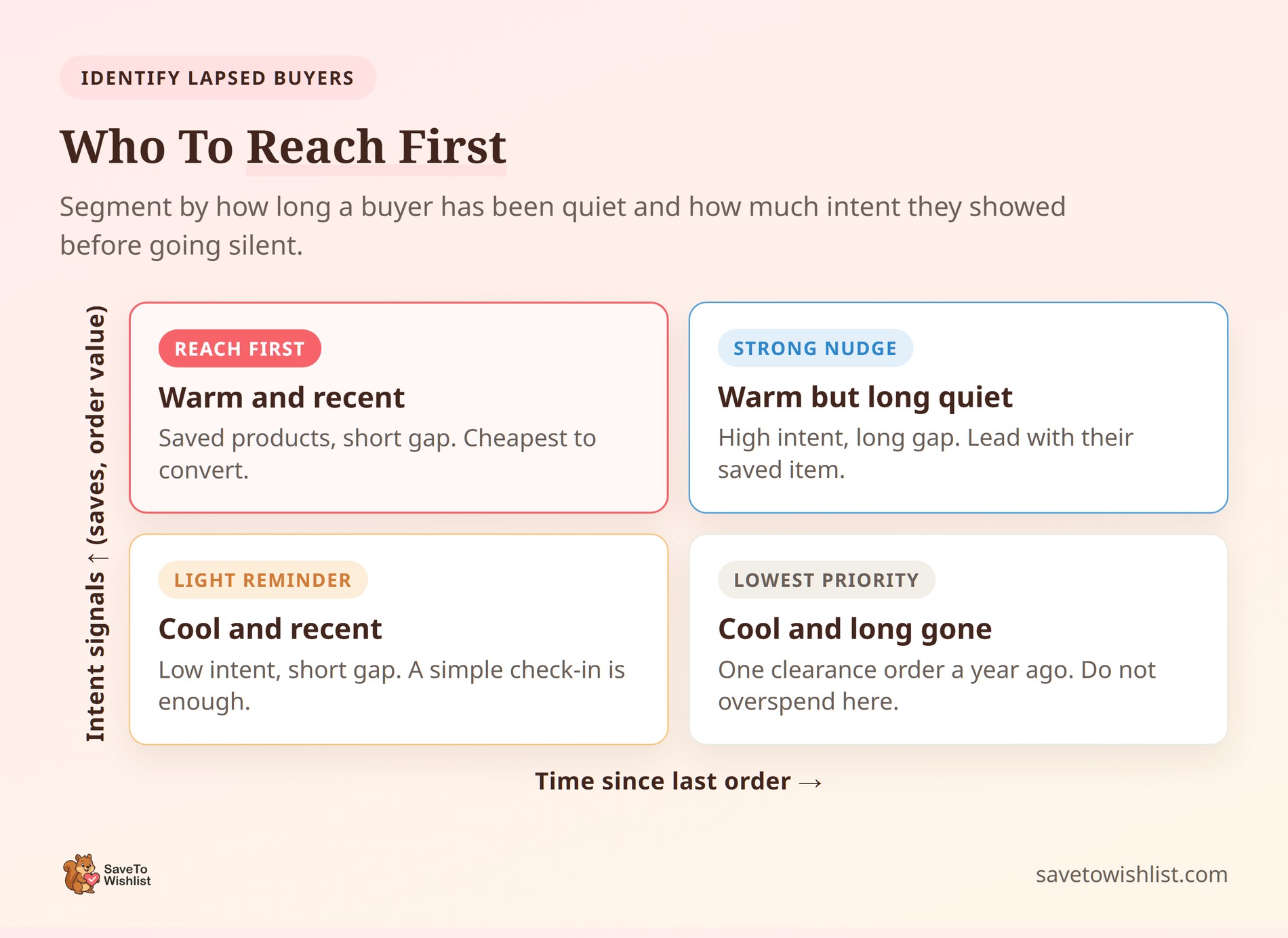
Don’t treat all inactive customers the same way. A shopper who bought one $5 item a year ago is very different from a regular customer who just stopped buying 90 days ago.
Not every past buyer needs an email, and they definitely don’t all need a discount. You need to properly sort your list of lapsed customers before you press send.
Here’s how to group your lapsed buyers:
1. Find your normal buying cycle
Don’t send a win-back email just because a month has passed. First, you need to know how often people naturally buy from you. If most of your customers place an order every 60 days, a shopper at day 45 isn’t lost. They just aren’t ready yet. If you email them too early, they’ll learn to ignore your messages.
Wait until day 90 to reach out. Group your contacts based on how long they’ve been quiet. A customer who’s been gone for 90 days needs a very different message than one who’s been gone for a full year.
2. Look for clear buying signals
Time is only one piece of the puzzle. You also need to look at what they actually want to buy. This is where wishlist data is incredibly useful. Look at how much they spent in the past, but pay the most attention to what they actively saved to their lists.
A customer who saved three specific items six months ago, but never bought them, is a much better target than someone who bought once and left no data behind.
Start with the group that saved items. They showed real interest, so they’re the easiest to bring back to your store.
Use Wishlists To Give A Relevant Reason
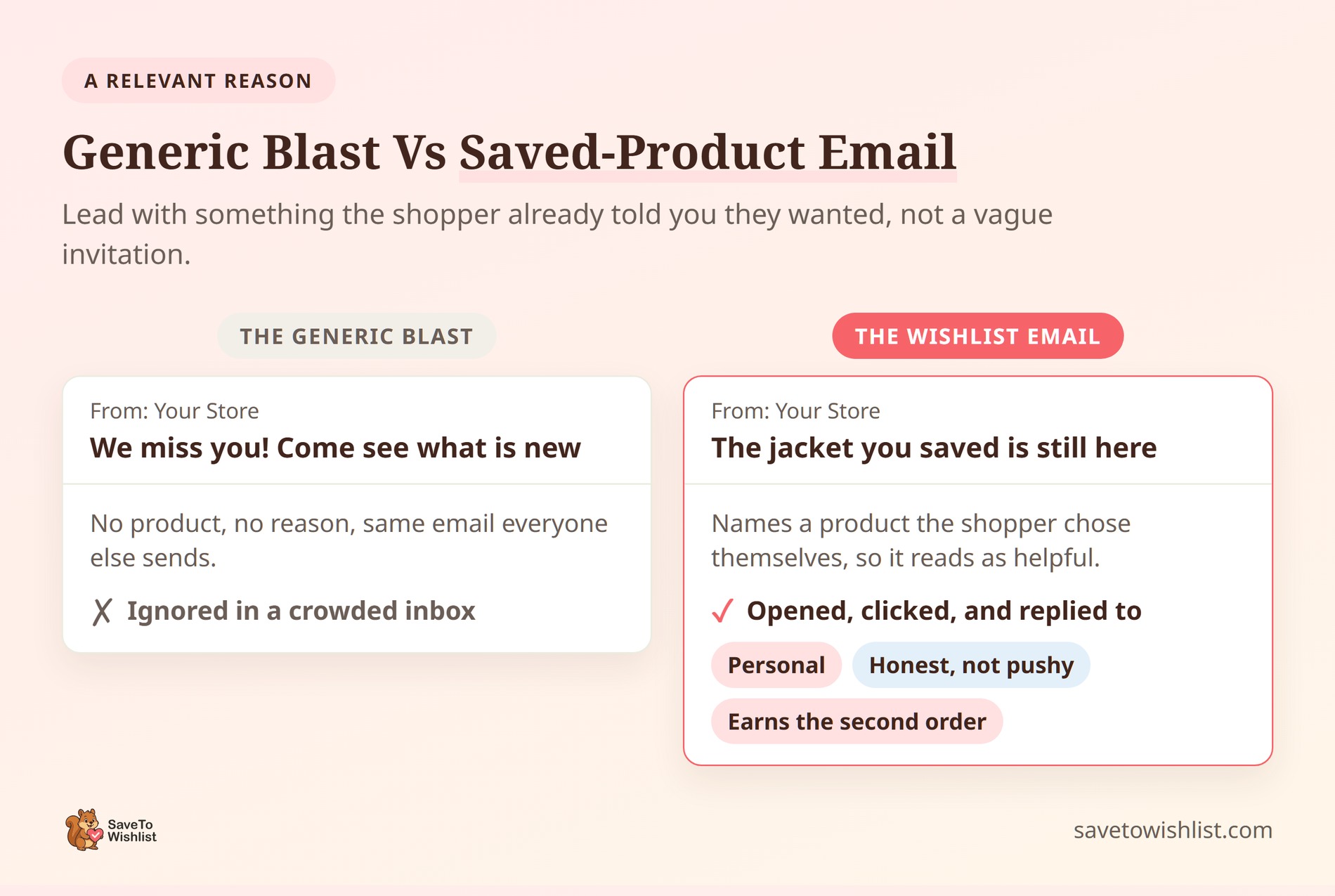
Wishlists give you the best possible thing to put in a win-back email: a product the shopper already told you they want. Instead of a vague message like, “Come back and see what’s new,” you can say, “The item you saved is still here.” That’s a real reason for them to open your email.
With SaveTo Wishlist, shoppers can save items across multiple lists or even save their whole cart. If a guest shopper saves items and creates an account later, their lists merge automatically.
This means the data survives long gaps. Even if a buyer goes quiet for months, you still have a clear record of what caught their eye. They can also use shareable wishlist links to pick up exactly where they left off without having to search your store again.
🔍️ What we’ve seen: Win-back emails that name a saved product always get more opens and clicks than standard email blasts. When your message names an item the shopper picked out themselves, it feels helpful rather than pushy. You aren’t just sending a random advertisement; you’re reminding them about something they already liked. That simple shift in tone is what gets them to place a second order.
This approach works even for buyers who’ve ignored you for a long time. Their saved lists give you a natural starting point. Framing your email around an item being “still available” is an honest and direct way to reach out.
For more on keeping shoppers around, check out our guide on wishlists and customer retention in ecommerce.
Pair The Campaign With A Targeted Coupon
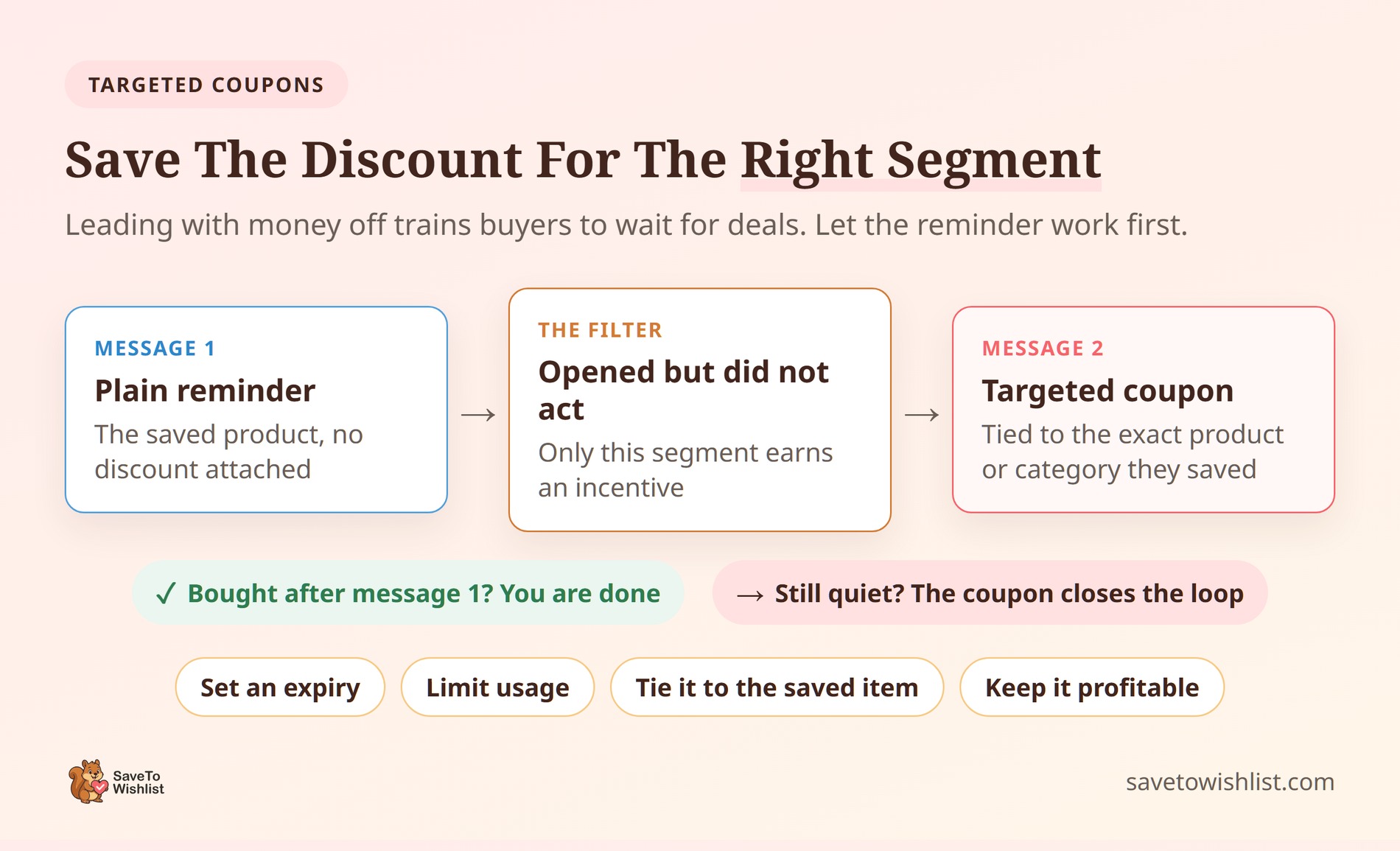
A small discount can turn a simple reminder into a completed order. But don’t give everyone a coupon right away. If you always lead with a discount, you train your customers to wait for sales. Instead, save your promo codes for the shoppers who opened your first email but didn’t buy.
Many people who leave your store without buying aren’t upset; they’re just not ready yet. The Baymard Institute found that over 70% of shopping carts are abandoned. In fact, 43% of shoppers leave simply because they’re “just browsing.” A well-timed win-back offer catches this group right when they’re finally ready to check out.
When you do send a coupon, keep it very specific. A discount tied to the exact item they saved will work much better than a generic store-wide code.
To create these codes safely, use a discount tool like Advanced Coupons. It lets you set clear rules, like expiration dates and usage limits. This keeps your discounts under control so you don’t lose money on the campaign.
If saved carts are a big problem for your store, our guide on cart abandonment recovery for WooCommerce pairs perfectly with this strategy.
The 3-Step Win-Back Sequence
Telling a customer you miss them doesn’t work. Sending a planned series of emails does.
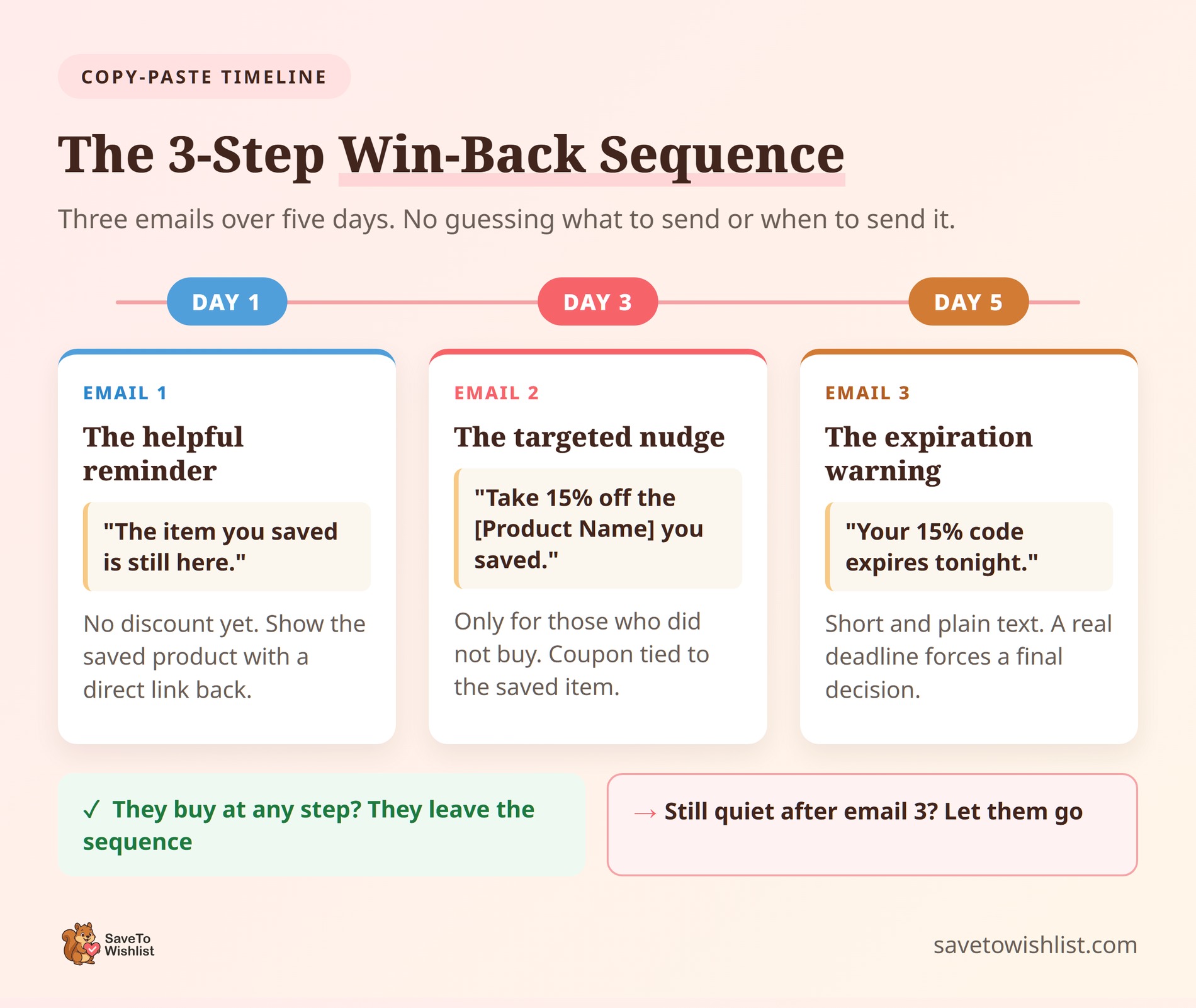
You don’t need to guess what to send or when to send it. Here is the exact timeline you can copy and paste right into your email platform:
Email 1: The helpful reminder (day 1)
Send this message the moment a customer officially becomes inactive (for example, on day 90). Don’t include a discount code in this first email. If you offer a coupon right away, you give up money you didn’t need to spend.
Keep the message simple and helpful. Show them the exact product they saved and give them a direct link so they can easily pick up where they left off.
- Subject Line: “The item you saved is still here.”
- The Goal: Remind them of what they wanted without sounding desperate.
Email 2: The targeted nudge (day 3)
Only send this second email to people who didn’t buy after the first message. Now is the time to give them a small push.
Introduce a targeted discount. Don’t offer a generic store-wide code. Make the coupon apply only to the exact item or category they saved. This makes the offer feel personal and keeps your profit margins safe.
- Subject Line: “Take 15% off the [Product Name] you saved.”
- The Goal: Lower the price just enough to get them to check out today.
Email 3: The expiration warning (day 5)
This is your final attempt. The goal here is to create a real deadline. Tell the customer exactly when their coupon will stop working.
Keep this email very short. A plain text message often works best here because it feels like a quick note from a real person, rather than a flashy advertisement.
- Subject Line: “Your 15% code expires tonight.”
- The Goal: Force a final decision. If they don’t buy after this message, let them go and remove them from the customer winback sequence.
Automate Win-Back Triggers With SaveTo Wishlist Pro
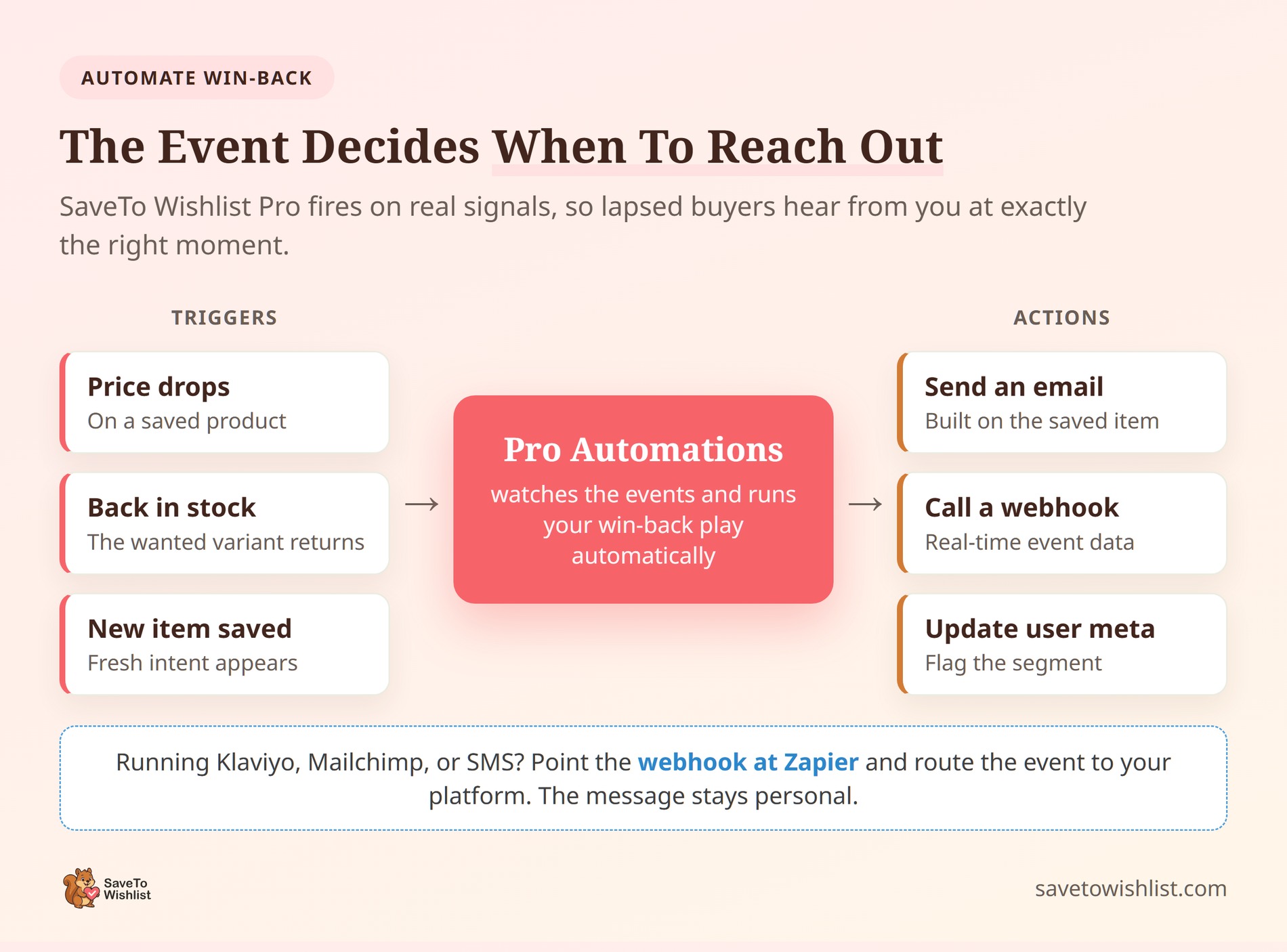
SaveTo Wishlist Pro lets you run your win-back campaign automatically. Instead of guessing when a shopper might be ready to buy, the plugin watches for specific events. When one of these events happens, it triggers your email sequence.
The two best events to use are price-drop alerts and back-in-stock notifications. These triggers work well because they give a lapsed buyer a real, time-sensitive reason to come back. You’re reaching out about an item they already saved. You don’t have to pick a random day to send a reminder; the actual product updates do the work for you.
When an event fires, you can set it to send a basic email, update customer data, or call a webhook.
If you use a popular email platform, you need to know how the setup works:
- No direct connections: SaveTo Wishlist doesn’t connect natively to tools like Mailchimp or Klaviyo, and it doesn’t send text messages on its own.
- The webhook bridge: To connect your tools, you’ll use a real-time webhook. You point the webhook at an automation tool like Zapier or Make.
- Passing the data: Zapier takes the wishlist data and passes it directly into your email or SMS platform.
Because the webhook carries all the important event data, your downstream message stays personal. The customer still gets an email with their name and the exact product they wanted, all handled automatically in the background.
Frequently Asked Questions
What is a win-back campaign in WooCommerce?
It’s a targeted series of messages sent to customers who bought before but have gone quiet. The goal is getting them to order again. Because these shoppers already know your store, the winback campaign focuses on reminding them of something relevant. That’s often a product they saved, plus an incentive when needed. A short sequence of two or three messages usually outperforms a single “we miss you” email.
How long until a customer counts as lapsed?
It depends on your typical purchase cycle rather than a fixed number. If most customers reorder every 60 days, someone silent for 90 days is lapsing. A store with yearly purchases might wait longer. The practical move is to group contacts by how long they’ve been quiet. Then treat a short gap differently from a very long one.
Do win-back emails need a discount?
No, and leading with one can train buyers to wait for deals. Thus, send the first message as a plain, relevant reminder built around a saved product or a back-in-stock item. Save the coupon for people who opened that message but still didn’t act. A targeted code tied to what they wanted converts better than a store-wide discount handed to everyone.
How do wishlists help a win-back campaign?
Wishlists record exactly which products a shopper wanted, which gives your win-back email a specific, personal reason to open. With SaveTo Wishlist, saved lists persist across long gaps and even survive from guest sessions once a shopper logs in. That means when a customer lapses, you still know what caught their eye. You can reach out about that item instead of sending a generic prompt.
Can SaveTo Wishlist send the emails automatically?
SaveTo Wishlist Pro can trigger emails on events like price drops, back-in-stock, or new saved items through its Automations. However, it doesn’t connect natively to Klaviyo, Mailchimp, or SMS tools. For those, you point a real-time webhook at Zapier and route to your platform from there. The webhook passes along the wishlist event data, so the message stays personal.
Turn Lapsed Buyers Into Repeat Customers
A WooCommerce win-back campaign works best when you use real data instead of guessing. You’ve already spent money to get these customers to your store the first time. Getting them to come back is much cheaper than finding brand new buyers. When you reach out using their wishlist data, you give them a clear, personal reason to shop with you again.
Here’s a quick recap of how to set up your campaign:
- Define your win-back campaign as a short sequence, not one email.
- Identify lapsed buyers by their natural buying cycle and intent signals.
- Use wishlists to name a product they actually wanted.
- Add a targeted coupon only for the segment that needs it.
- Follow a strict 3-step sequence: a helpful reminder, a targeted nudge, and a final expiration warning.
- Automate the triggers with price-drop and back-in-stock alerts.
You don’t have to run this process manually. SaveTo Wishlist Pro gives you the tools and automations to keep this entire sequence running in the background. Your lapsed buyers will come back when they’re finally ready. Stop guessing what your customers want, and start using your saved product data to turn one-time shoppers into repeat customers.



