

 Reviewed by
 “Do I really need the paid version?”
I hear this question from WooCommerce store owners constantly. And the honest answer is: it depends on whether you’re treating wishlists as a passive bookmarking tool or an active sales channel.
If all you need is for customers to save products and come back to them later, the free version of SaveTo Wishlist has you covered. It’s genuinely full-featured for that use case. But if you want to use wishlist data to actually drive revenue through automations, price drop alerts, and analytics, you’ll want SaveTo Wishlist Pro.
The problem with most plugin pricing pages is that they list features in a grid and leave you to figure out which ones matter. This guide takes a different approach. To help you make sense of SaveTo Wishlist pricing, I’ll walk you through each plan, explain who it’s actually built for, and show you the math on how the Pro features pay for themselves.
Let’s break it down.
Table Of Contents
- What SaveTo Wishlist Offers For Free
- Growth Plan ($49.50/Year): Who It’s For
- Plus Plan ($99.50/Year): Who It’s For
- Business Plan ($199.50/Year): Who It’s For
- The ROI Calculation: How Pro Features Pay For Themselves
- Free Vs. Growth Vs. Plus Vs. Business: Quick Comparison
- FAQs: SaveTo Wishlist Pricing
- Conclusion
What SaveTo Wishlist Offers For Free
Before talking about paid plans, it’s worth understanding how much you get at zero cost. SaveTo Wishlist’s free tier isn’t a stripped-down demo. It’s a fully functional WooCommerce wishlist plugin that covers the core features most WooCommerce stores need.
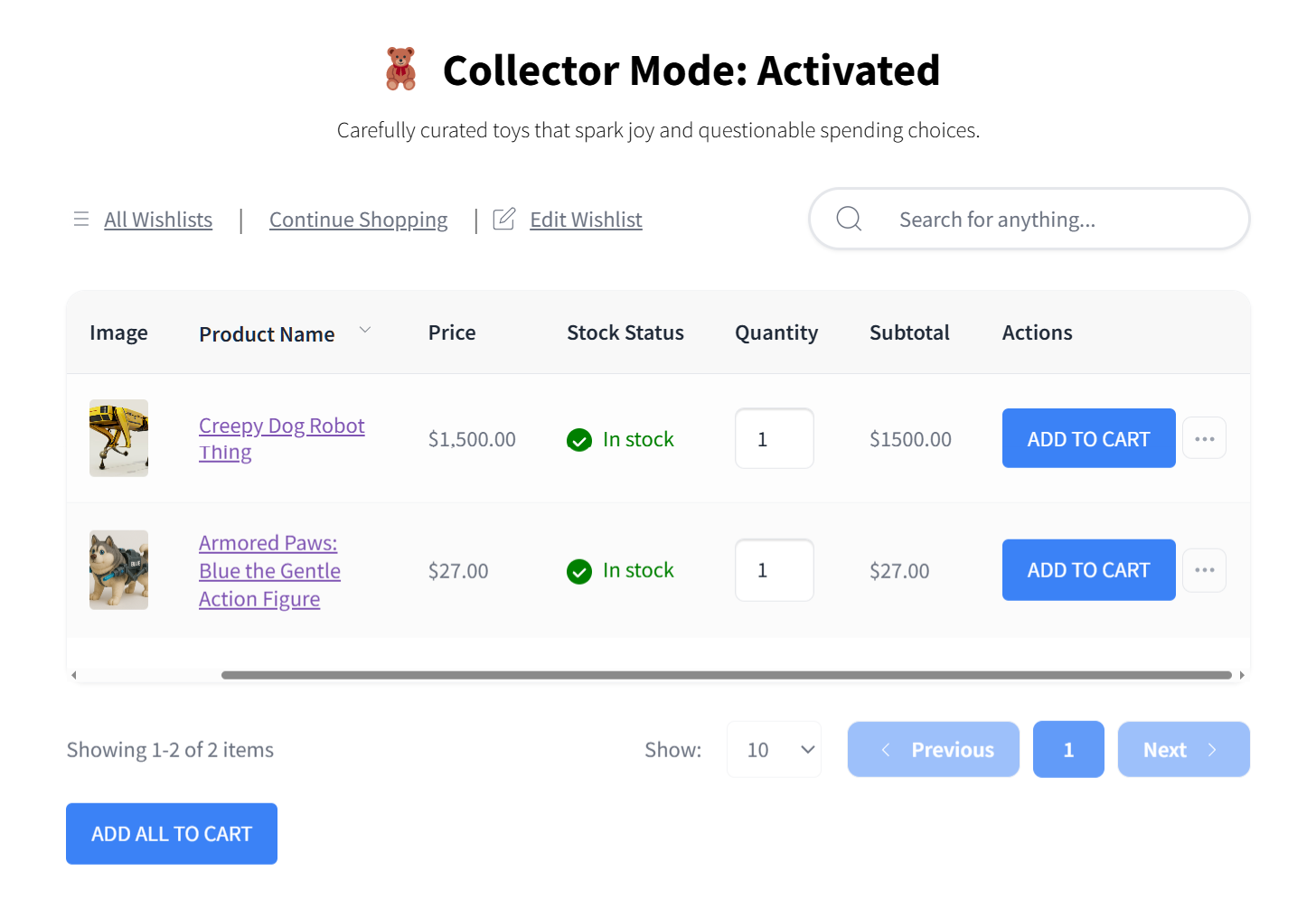
Whether you run a basic, free WooCommerce setup or a highly customized shop, here’s what’s included in SaveTo Wishlist Free:
- Multiple wishlists per user so shoppers can organize saved items into different lists (e.g., “Valentine’s Day” and “Gifts for Friends”)
- Unlimited wishlists for every customer (no limit to the number of lists they can create)
- Guest wishlists so visitors can save products without creating an account
- Guest-to-user-account merge that automatically syncs guest accounts with user accounts upon login or registration, so no wishlist data is lost
- Product variation tracking that remembers the exact size, color, or option a customer selected
- Block theme support for full compatibility with modern WooCommerce themes
- Wishlist importer to migrate existing wishlists from YITH WooCommerce Wishlist, TI WooCommerce Wishlist, or WPC Smart Wishlist
- Button customization that allows you to determine how your wishlist button looks and is positioned on different pages
- Button templates so you can match the wishlist button to your store’s design quickly
- Translation-ready for multilingual stores
- REST API for developers building custom integrations
That’s a significant feature list for a free plugin. For context, several of these features (multiple wishlists, guest wishlists, variation tracking) are locked behind paid tiers on competing plugins.
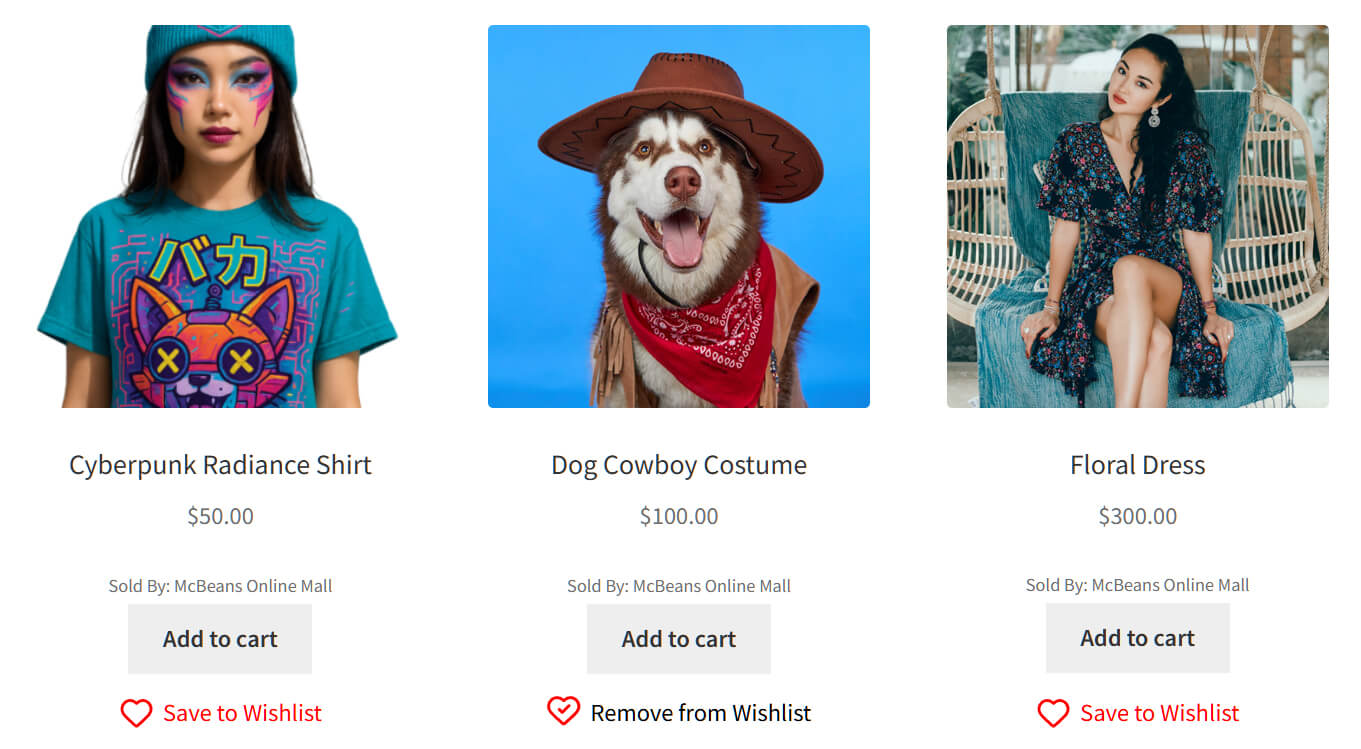
Who should stay on Free
Stores that want solid wishlist functionality without email automation or analytics. If your primary goal is letting customers save products and return to buy later, the free plan does exactly that. You can always upgrade when you’re ready to turn wishlist data into a sales tool.
What you won’t get on Free
Analytics and reports, automated email notifications, price drop alerts, back-in-stock notifications, webhooks, collaborative lists, role-based access, wholesale integration, and more. Those live in the Pro plans.
Growth Plan ($49.50, then $99/year): Who It’s For
The Growth Plan is SaveTo Wishlist Pro for a single WooCommerce site. At $49.50 for the first year and $99 thereafter, it unlocks every Pro feature.
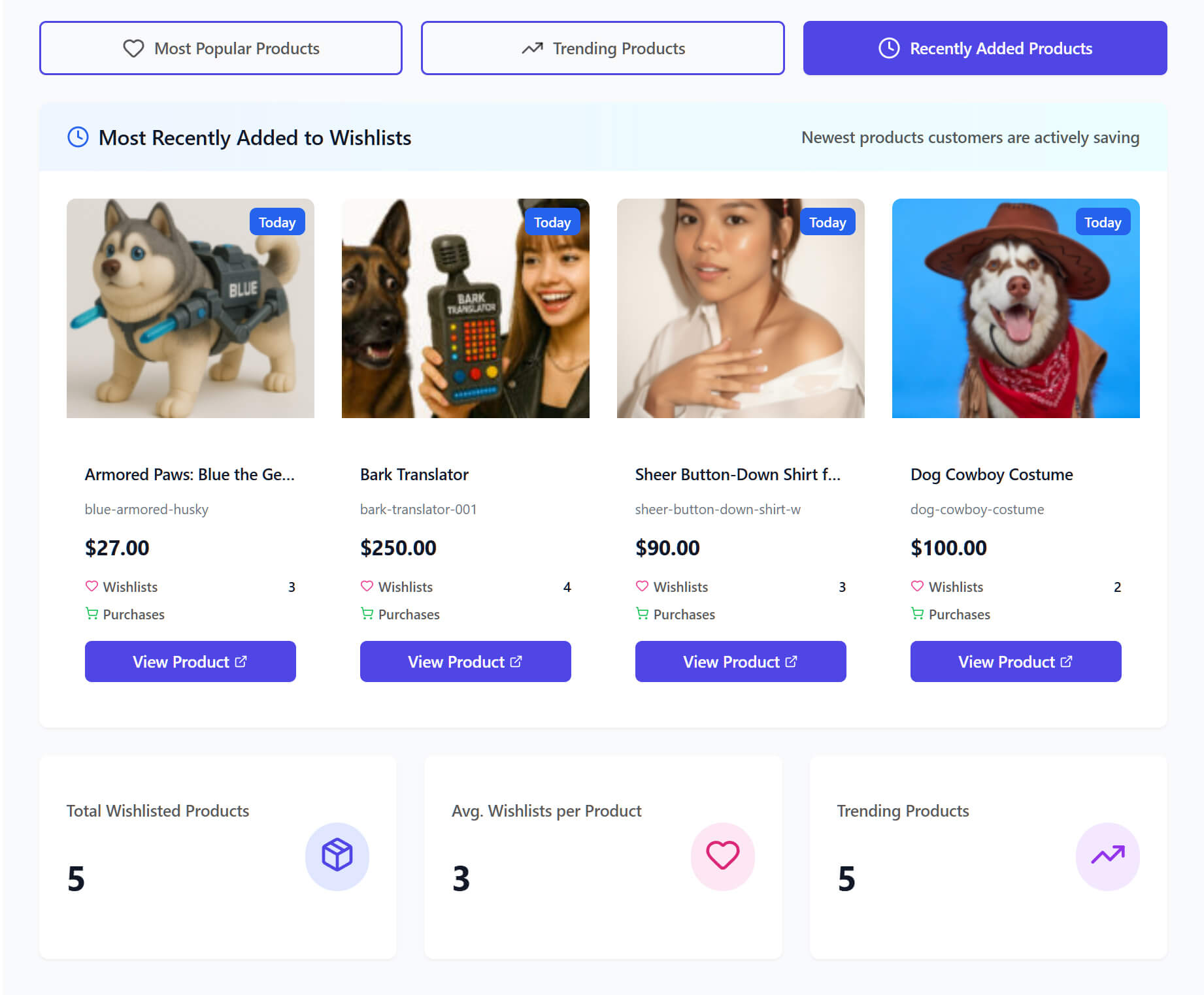
That includes:
- Analytics and reports to see which products get wishlisted most, identify trends, and understand customer behavior through wishlist analytics
- Automations for triggered email sequences based on wishlist activity
- Price drop alerts that notify customers when a wishlisted item goes on sale
- Back-in-stock notifications that reach out when an out-of-stock wishlisted product returns to inventory via back-in-stock notifications
- Webhooks for connecting wishlist events to external tools and marketing platforms
- Collaborative lists so customers can share and co-manage wishlists
- Role-based access for controlling which user roles can access wishlist features
- REST API for custom integrations and development
- B2B integration that displays wholesale prices on wishlists
The Growth Plan is built for store owners who want to actively use wishlist data to drive sales. If you’re running a single WooCommerce store with consistent traffic and you want to convert saved items into purchases, this is the plan.
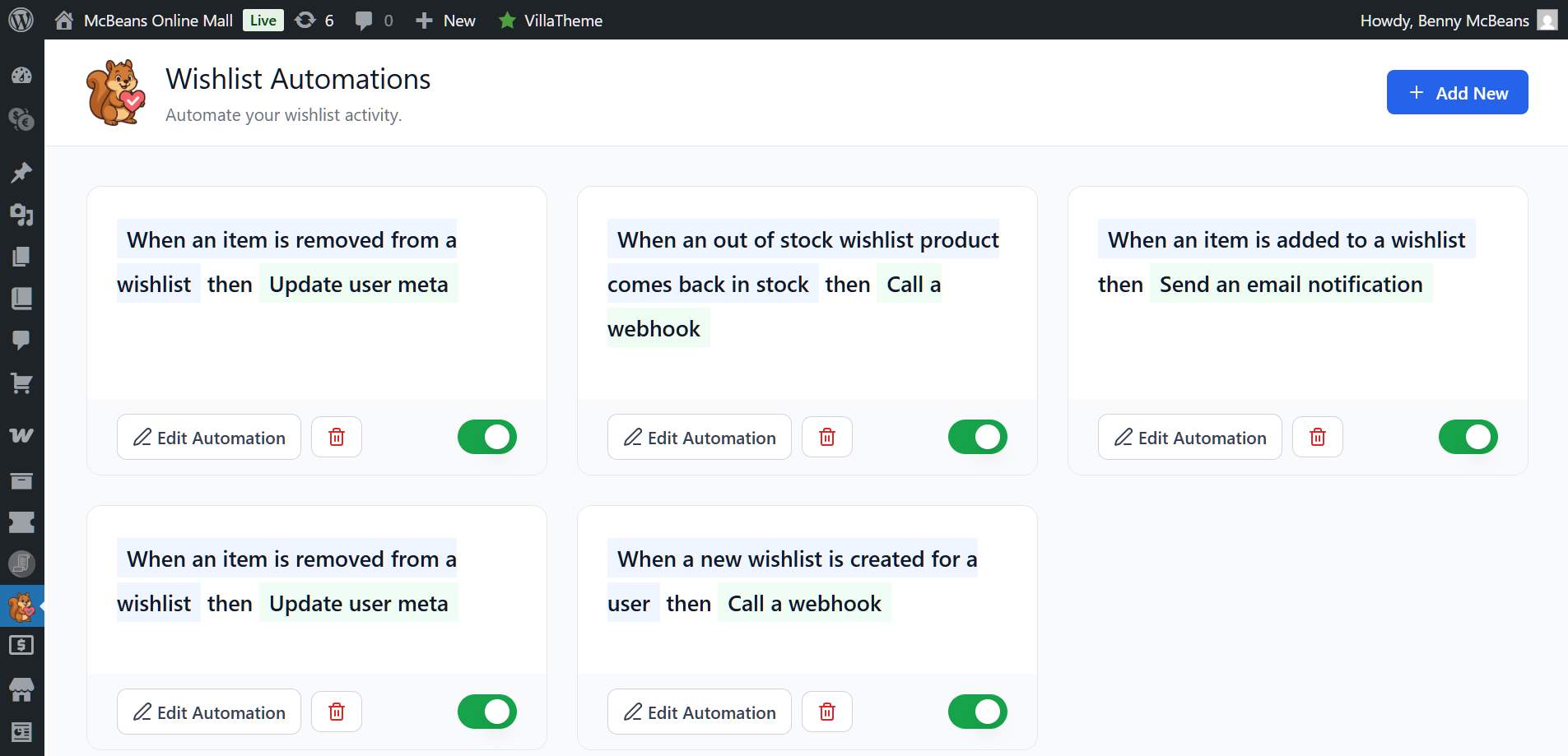
🔍️ What We’ve Seen: Stores that enable price drop alerts and back-in-stock notifications through SaveTo Wishlist Pro typically see measurable increases in repeat visits from wishlist users. The automated emails consistently outperform standard promotional sends because they target customers who already told you exactly what they want. Even a small number of recovered sales each month can more than cover the annual cost.
The ideal Growth customer
A single-store WooCommerce operator doing enough volume that even a handful of extra conversions per month would exceed the investment of $49.50 for the first year and $99 for every following year. If you’re running sales or promotions regularly, price drop alerts alone can justify the plan.
Plus Plan ($99.50, then $199/Year): Who It’s For
The Plus Plan is $99.50 for the first year, then $199 per year, for a single WooCommerce site. It includes everything in Growth and adds the Gift Registry Addon, along with advanced sharing options.
That addon is the reason to pick Plus over Growth. It lets your customers turn a wishlist into a public, shareable registry for a wedding, baby shower, birthday, or any event you want to support. Guests buy the gifts straight through your normal checkout, and purchases are tracked so two people do not buy the same thing.
The ideal Plus customer
A single-store owner selling giftable products. Homewares, kitchenware, baby goods, jewelry, and lifestyle niches all see real registry demand. If your customers are already building lists for events by hand, Plus turns that into a proper feature on your own store instead of sending them to an outside registry site.
Business Plan ($199.50, then $399/Year): Who It’s For
The SaveTo Wishlist price for the Business Plan is $199.50 for the first year, then $399 per year. It includes everything in Plus, and adds what multi-store operators actually need: unlimited site licenses, WordPress multisite support, and priority email support.
If you’re running more than one WooCommerce store, or if you’re a developer or agency building stores for clients, the Business Plan is the straightforward choice.
Here’s the per-site math:
- 2 sites: $99.75 per site per year
- 3 sites: $66.50 per site per year
- 5 sites: $39.90 per site per year
- 10 sites: $19.95 per site per year
From five sites up, Business is clearly cheaper than buying separate Growth licenses: $199.50 against $247.50 in the first year, and $399 against $495 on renewal. At four sites the two land within a couple of dollars of each other, so pick on features rather than price. Below four sites, individual Growth licenses cost less, unless you want the Gift Registry Addon, which only Plus and Business include.
The ideal Business customer
WooCommerce agencies installing SaveTo Wishlist Pro on multiple client stores. Multi-brand operators running several stores under one umbrella. Developers who want a single license that they can deploy everywhere without tracking individual site activations.
There are two questions now, not one. How many sites are you running, and do your customers need gift registries? Growth covers a single store with the full automation and analytics toolkit. Plus adds registries for one store. Business adds registries plus unlimited sites and priority support.
The ROI Calculation: How Pro Features Pay For Themselves
Let’s put real numbers behind the “is it worth it?” question.
According to Baymard Institute’s cart abandonment research, roughly 70% of online shopping carts are abandoned. Wishlists help capture purchase intent before it reaches the cart stage, giving you a second chance at those potential sales.
Here’s a conservative scenario for a WooCommerce store during its first year on the Growth Plan:
Your store:
- Average order value: $75
- Monthly wishlist saves: 200
- Price drop alerts sent when you run a sale: ~50/month
Conservative conversion assumptions:
- Price drop alert conversion rate: 3-5% (these are highly targeted, high-intent emails)
- That’s roughly 1.5 to 2.5 additional orders per month from price drop alerts alone
The math:
- 2 extra orders/month x $75 AOV = $150/month in recovered revenue
- Annual recovered revenue: $1,800
- Growth Plan cost: $49.50
- Year 1 ROI: 36x the cost of the plan
And that’s only counting price drop alerts. Add back-in-stock notifications, wishlist reminder automations, and the insights from analytics, and the actual number is higher.
Even when the plan renews at the standard $99/year rate, the overall SaveTo Wishlist cost is easily covered by these extra conversions, and your ongoing ROI remains incredibly strong at 18x.
According to McKinsey & Company’s research on personalization, companies that excel at personalization generate 40% more revenue from those activities than average players. Wishlist-based emails are a form of personalization, and they’re one of the simplest to implement because customers have already told you what they want.
The 14-day money-back guarantee means you can test the Pro features on your actual store data and see the results before fully committing. If the numbers don’t work for your store, you get your money back.
Free Vs. Growth Vs. Plus Vs. Business: Quick Comparison
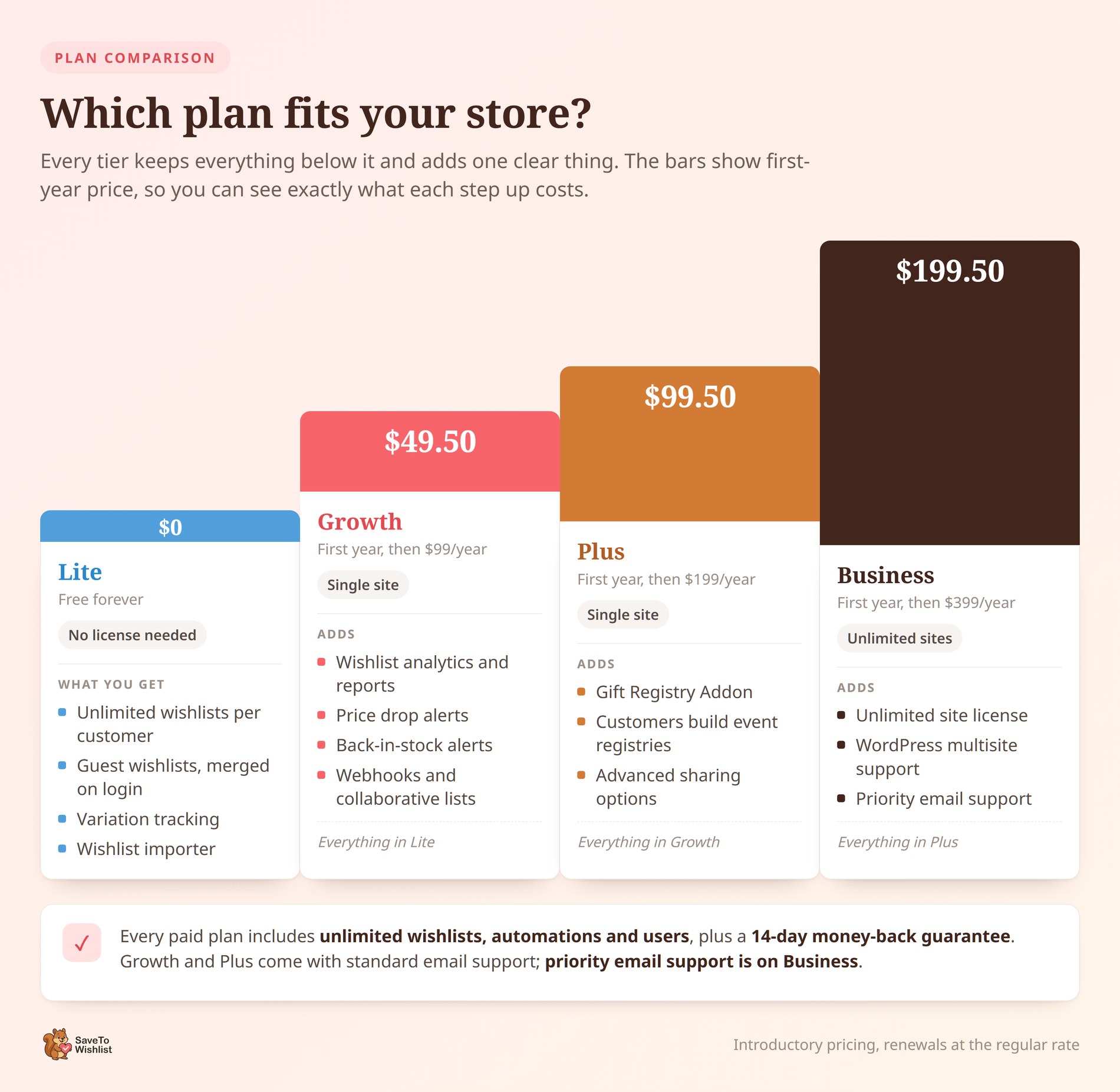
Here’s the decision framework:
Choose SaveTo Wishlist Free if:
- You want core wishlist functionality (saving products, multiple lists, guest wishlists)
- You don’t need automated emails or analytics yet
- You’re introducing SaveTo Wishlist to your store for the first time and want to see if customers use its features
- Budget is a hard constraint right now
Choose SaveTo Wishlist Growth ($49.50/year) if:
- You run a single WooCommerce store
- You’re interested in turning wishlist data into sales with automations, price drop alerts, and back-in-stock notifications
- You want wishlist analytics to understand what customers are saving and why
- You’re eager to run regular sales or promotions and want to automatically notify interested customers
How SaveTo Wishlist pricing scales for registries and multiple sites
Growth covers a single store with the full automation and analytics toolkit. The two tiers above it answer a different question: whether your customers need gift registries, whether you need licenses for more than one site, or both.
Choose SaveTo Wishlist Plus ($99.50, then $199/year) if:
- You run a single WooCommerce store and want everything in Growth
- You’re selling products people buy for weddings, baby showers, birthdays, or housewarmings
- You want customers building gift registries on your store instead of an outside registry site
- You want advanced sharing options on top of the standard wishlist sharing
Choose SaveTo Wishlist Business ($199.50, then $399/year) if:
- You operate five or more WooCommerce stores
- You’re an agency or developer deploying wishlists across client sites
- You want unlimited site licenses and WordPress multisite support
- You want the Gift Registry Addon across every store you run
All paid plans include:
- Every Pro feature (analytics, automations, price drop alerts, back-in-stock notifications, webhooks, collaborative lists, role-based access, REST API)
- Unlimited wishlists, unlimited automations, and unlimited users
- 14-day money-back guarantee
- Automatic updates and email support. Growth and Plus get standard email support; priority email support is on Business
- The Gift Registry Addon is included on Plus and Business only, not on Growth
For full plan details: SaveTo Wishlist pricing page.
Frequently Asked Questions: SaveTo Wishlist Pricing
Can I upgrade from SaveTo Wishlist Free to the Growth Plan later?
Yes. Your existing wishlist data carries over when you upgrade. Customers won’t lose any saved items. You’ll just gain access to the Pro features (analytics, automations, price drop alerts, etc.) on top of the wishlist data you’ve already been collecting.
What happens to my wishlists if my SaveTo Wishlist Pro license expires?
Your wishlists and saved customer data remain intact. Customers can still view and manage their wishlists. You lose access to Pro features like automations, analytics, and price drop alerts until you renew, but no data is deleted.
Does SaveTo Wishlist offer a money-back guarantee?
Yes. The Growth, Plus, and Business Plans all come with a 14-day money-back guarantee. If Pro isn’t right for your store, you can request a full refund within 14 days of purchase.
Can I switch to a higher plan mid-year?
Yes. If you start on Growth and later want gift registries, you can move up to Plus. If you need unlimited site licenses on top of that, you can move up to Business. Contact the SaveTo Wishlist support team to handle the transition.
Is there a monthly billing option for SaveTo Wishlist Pro?
SaveTo Wishlist Pro plans are billed annually. The Growth Plan is $49.50 for the first year and then $99/year thereafter. The Plus Plan is $99.50 for the first year and then $199/year. The Business Plan is $199.50 for the first year and then $399/year. Annual billing keeps the per-month cost low.

Conclusion
The key takeaway on SaveTo Wishlist pricing comes down to one simple question: do you want wishlists as a feature, or as a sales channel?
For core wishlist functionality, the free plan delivers. Unlimited wishlists, guest support, variation tracking, multiple lists, and block theme compatibility at zero cost.
Once you’re ready to convert wishlist data into revenue, the Growth Plan at $49.50 for the first year and then $99 for every subsequent year unlocks analytics, automations, price drop alerts, back-in-stock notifications, and more. The ROI math is straightforward: even one or two extra conversions per month pays for the entire year.
Selling giftable products from a single store? The Plus Plan at $99.50 for the first year and then $199 after that adds the Gift Registry Addon, so customers can build and share event registries without leaving your store.
Agencies and multi-store operators land on the Business Plan, which at $199.50 for the first year and then $399 for every following year gives you every Pro feature, the Gift Registry Addon, and unlimited sites.
Every paid plan comes with a 14-day money-back guarantee, so there’s no risk in testing Pro on your actual store data.
Ready to pick your plan? See current SaveTo Wishlist pricing and get started today.



