
 Reviewed by
A store owner adds a wishlist plugin, pays for the year, and waits. A month later, they still can’t tell whether shoppers want it or the button sits in the wrong spot. That’s frustrating, because wishlist adoption is one of the easier things to measure on a WooCommerce store. The catch is that you have to install something first.
WooCommerce Wishlists Ultimate is a clear example of that trade-off. Plugin Republic sells it as a paid-only plugin, starting at $69 a year plus VAT for one site. It has a demo and a 14-day money-back guarantee, but no free version to run on your own catalog. If you want a WooCommerce Wishlists Ultimate alternative you can test before paying, this article compares the two.
A quick note on method. We tested SaveTo Wishlist Lite 1.1.1 on a staging store, so every hands-on detail below is about our plugin. Lite has since moved to version 1.1.8. We didn’t install WooCommerce Wishlists Ultimate, so everything about it comes from its public product page and changelog.
Jump to:
- The Cost Of Buying A Wishlist Before You Know It Works
- What WooCommerce Wishlists Ultimate Offers
- What You Can Prove On A Free Tier First
- Measuring Whether Customers Actually Use It
- How To Count Saves On The Free Tier
- When Paying Becomes The Right Call
- Switching If You Already Run WooCommerce Wishlists Ultimate
- Frequently Asked Questions
- The Wishlists Ultimate Alternative Worth Starting With
The Cost Of Buying A Wishlist Before You Know It Works
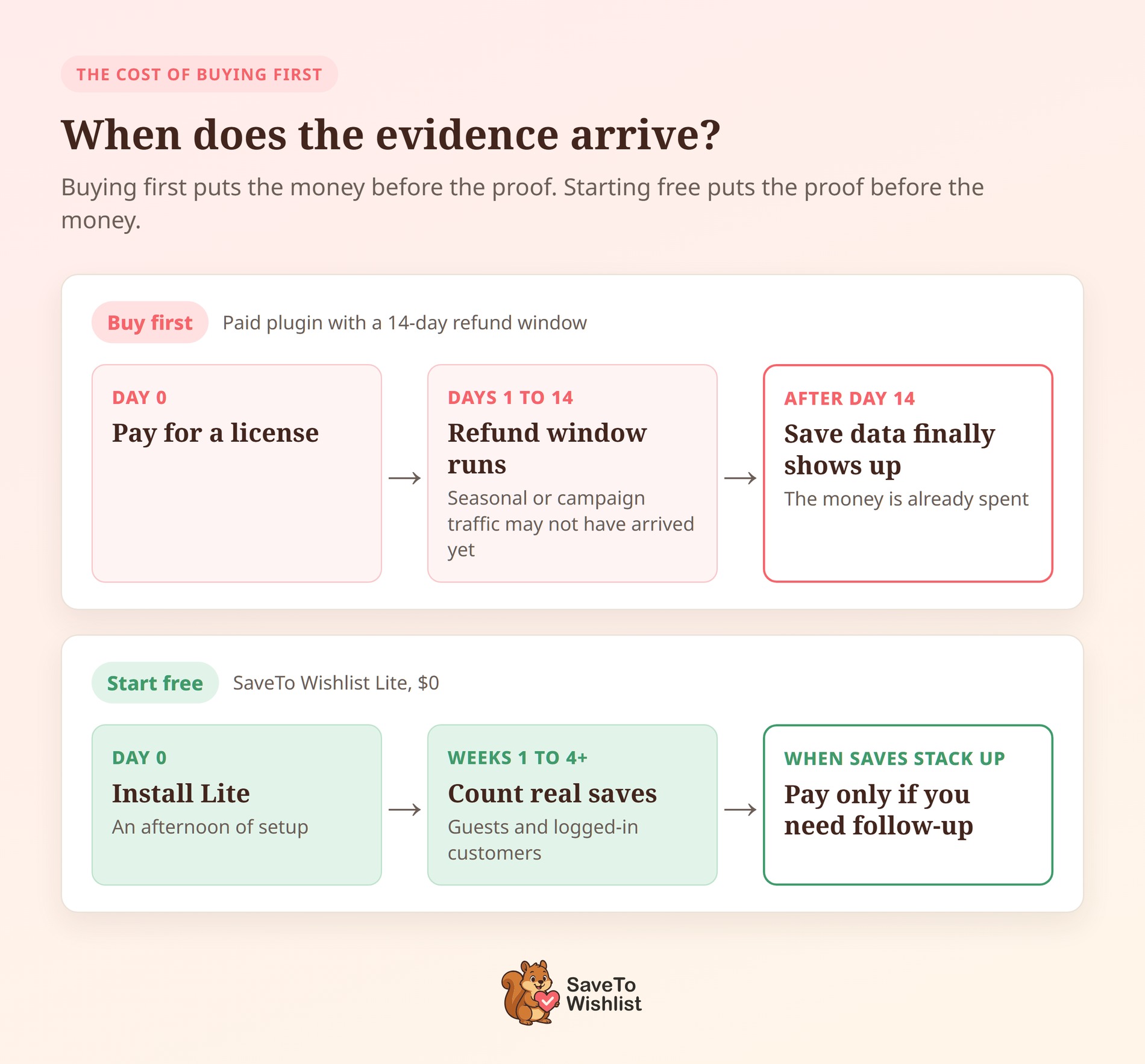
Paying before you know shoppers want a wishlist turns a testable question into a sunk cost. The money is rarely the hard part. The bigger problem is having no baseline, so you can’t tell a weak plugin from a weak button placement.
Think about what you’re actually trying to learn:
- Will people click a save button on your catalog?
- Which products get saved most often?
- Do guests use it, or only logged-in customers?
- Does the button work with your theme without a developer?
Each of those has a yes-or-no answer that shows up once real shoppers meet the button. However, none of them can be answered on a demo site running someone else’s products.
Why a refund window doesn’t settle it
Both SaveTo Wishlist and WooCommerce Wishlists Ultimate offer a 14-day money-back guarantee, and that’s fair. Still, two weeks is short if your catalog is seasonal or your traffic peaks monthly. It’s also short if you’re launching the feature with a campaign that’s three weeks away. You end up rushing the test, or the window quietly passes.
There’s a second cost that rarely makes it into a spreadsheet. Once you’ve paid for something, it’s natural to want it to work, so weak adoption gets explained away. Starting free takes that pressure off. If nobody saves anything in a month, you’ve learned something useful for the cost of an afternoon.
What WooCommerce Wishlists Ultimate Offers
WooCommerce Wishlists Ultimate is a paid wishlist plugin from Plugin Republic. It first launched on July 10, 2023, and reached version 1.3.0 on October 26, 2026. Its feature list is focused and clearly written, and the changelog shows steady updates across three years.
Here’s what its product page and changelog document:
- Single or multiple lists: Store owners choose whether shoppers get one list or several, and shoppers can name each list.
- Privacy levels: Shoppers can make a list public or private.
- Variations and quantities: Shoppers can save product variations and add, remove or update quantities on the list.
- Display options: The add-to-wishlist control shows as a button, a link or an icon, with position options on the product page.
- Category exclusions and archive saving: Version 1.2.0 added both options.
- Item limits: Version 1.3.0 added a maximum number of items per wishlist, with a “Wishlist full” message.
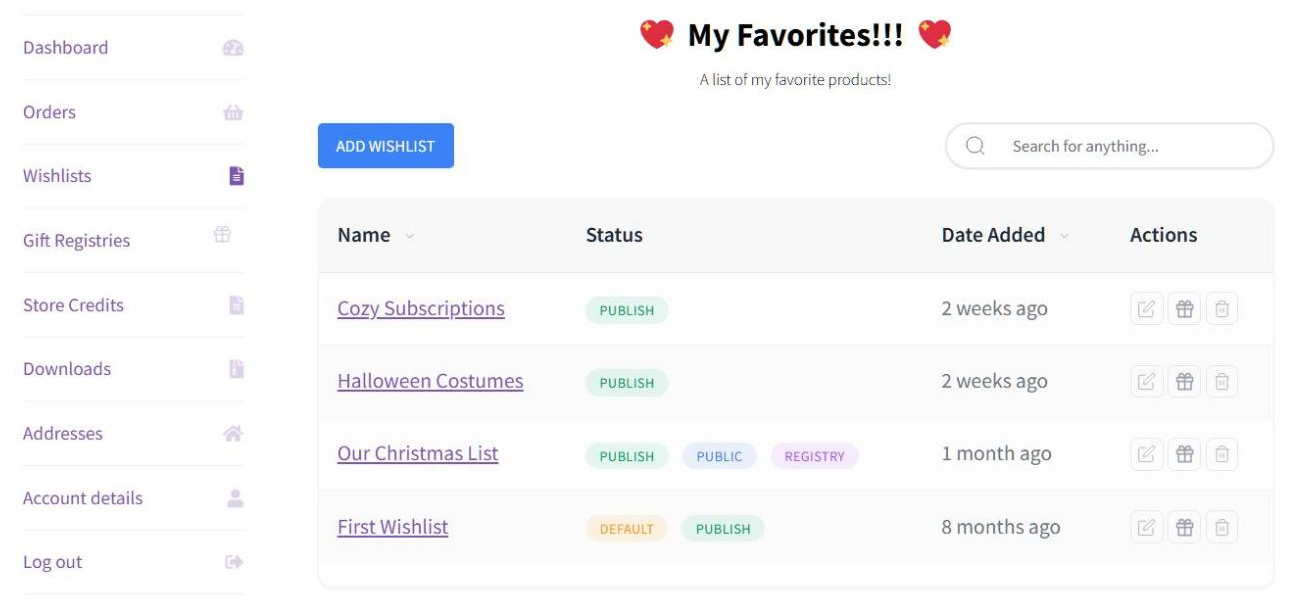
- Admin visibility: Store owners can view all wishlists from the WordPress admin.
Pricing is yearly or lifetime, all plus VAT. Yearly licenses cost $69 for one site, $99 for up to 10 sites and $349 for up to 50. Lifetime licenses cost $189, $279 and $899 for the same site counts.
The lifetime option is a genuine strength. An agency that prefers to avoid renewals gets one payment and a clean budget line. That said, it doesn’t change the question this article is about. Either way, you pay before a single one of your customers clicks save.
Their page also doesn’t document a free tier, guest wishlists that merge on login, or importers from other plugins.
What You Can Prove On A Free Tier First

SaveTo Wishlist Lite is free, so the adoption question becomes an afternoon of setup instead of a purchase decision. We set it up on a staging store to see how much you get before spending anything.
The button showed up on its own. After we activated version 1.1.1, with no template edits or theme work, 12 save buttons rendered on the /shop/ grid. Nothing needed positioning by hand to get a working test in front of visitors.
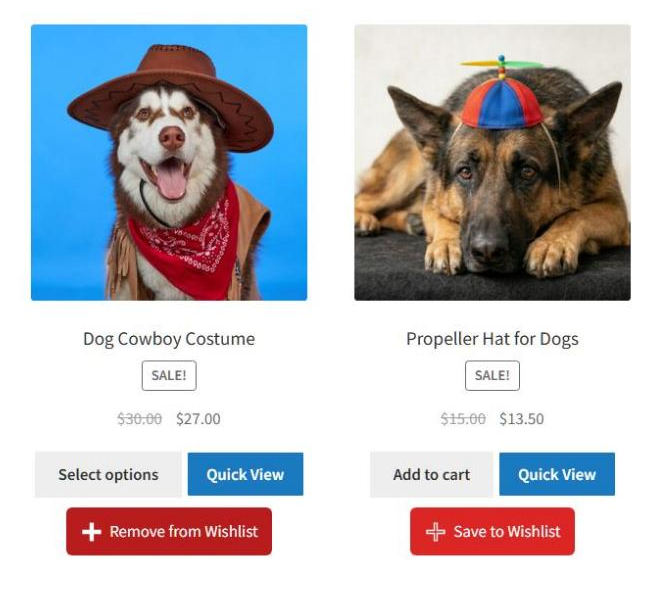
Saving a product changed the button’s label to “Remove from Wishlist”, so shoppers see the new state without reloading. Next, we tested the guest path, since that’s where many wishlist plugins stop.
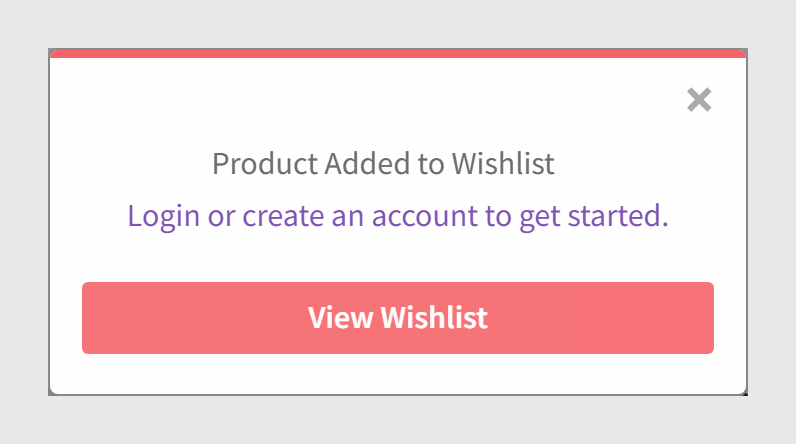
A popup confirmed the product was added. Instead of blocking the save, it offered “Login or create an account to get started.” The guest save also fired a browser event and set a 30-day cookie. Popup and email tools can use those signals later.
🔍️ What we’ve seen: store owners often test a wishlist while logged in as admin, see it working, and skip the guest path. Adoption can then look flat, because many first-time visitors aren’t signed in. Test as a guest in a private window before you judge the numbers.
What the free tier includes
The free tier isn’t a cut-down trial. It includes:
- Unlimited named wishlists per customer
- Guest lists that merge into the account on login or registration
- Five button styles, plus a Theme Default mode
- A shortcode and a matching Gutenberg block
- REST API access
- Importers for four other wishlist plugins
Together, those cover what a fair test needs. Guests can save without an account, and the button can match your theme on day one. For the full list, the free WooCommerce wishlist plugin page lays it out.
Measuring Whether Customers Actually Use It
The number that matters in month one is simple: how many different shoppers saved at least one product? You can answer that on the free tier. Every save fires a browser event and writes a cookie your analytics or popup tool can read.
Lite has no reporting dashboard of its own. Instead, it gives you a countable signal and a feature customers can see, which is enough for a first month. Watch three things: total saves, whether saves cluster on a few products, and how guests compare with logged-in customers. That last split tells you a lot about your store.
🔍️ What we’ve seen: when the wishlist button sits below the fold or inside an account menu, few saves get recorded. It’s easy to read that as customers not wanting wishlists. Move the button onto the shop grid, wait two weeks, and compare again.
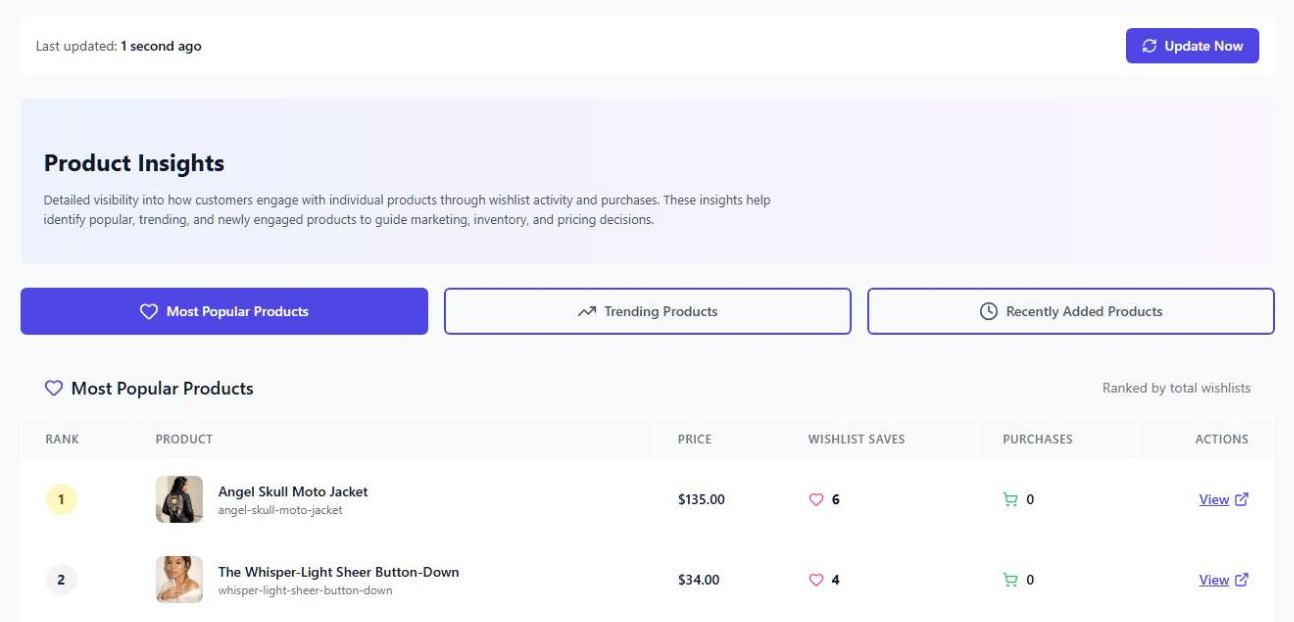
Once the signal is real, reporting earns its place. SaveTo Wishlist Pro is the paid extension, and it adds wishlist analytics. Its insight modules cover products, category and brand, customer behavior, engagement and time-based trends. An Update Now button refreshes the data on demand, so you read patterns instead of counting events by hand.
How To Count Saves On The Free Tier
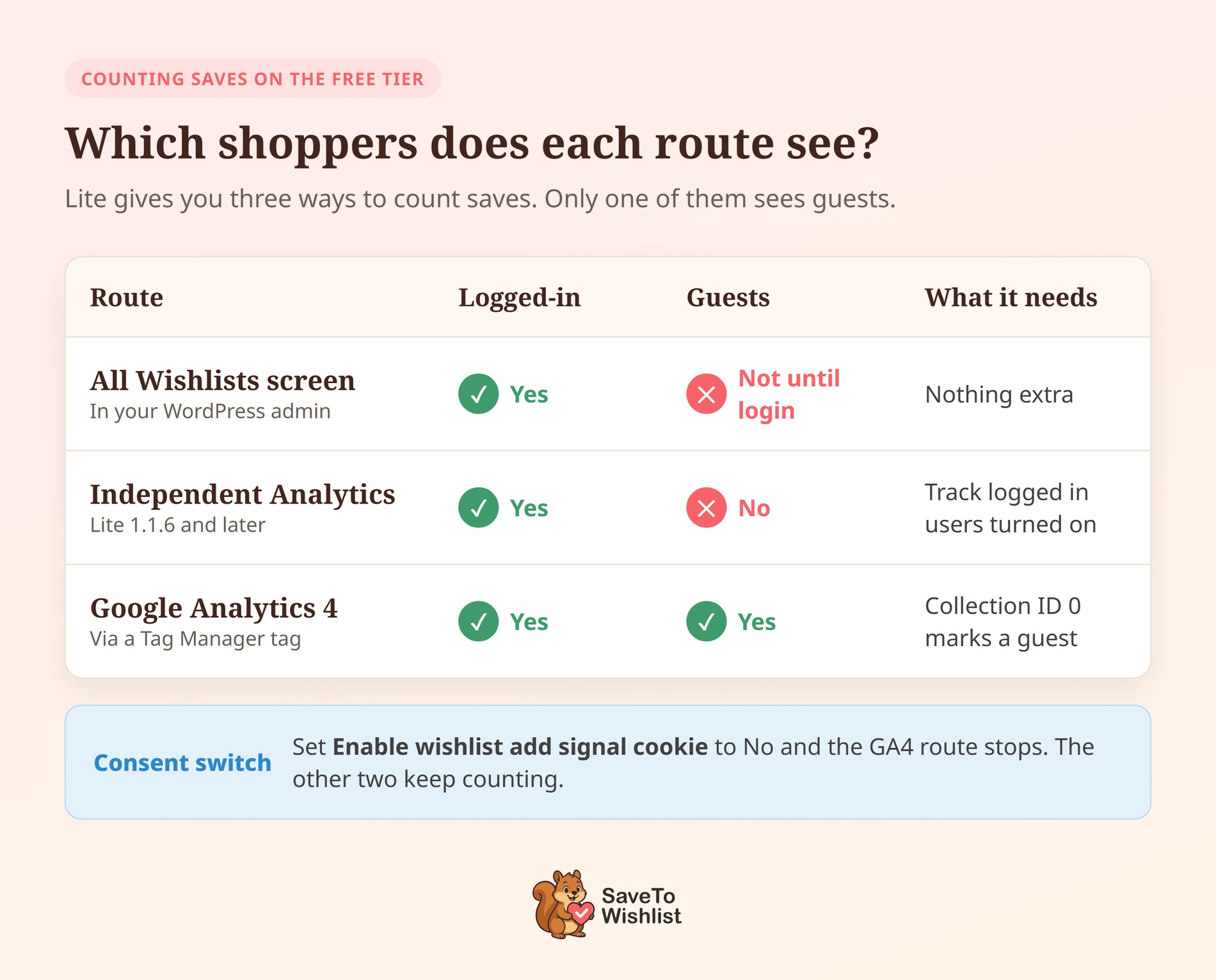
Lite gives you three ways to count saves, and each one sees a different slice of your shoppers. Pick the route that matches the question you’re asking.
The All Wishlists screen
Go to SaveTo Wishlist > All Wishlists in your WordPress admin. Every logged-in customer’s list shows up there, so you can see who saved what. Guest saves don’t appear yet, though. Lite keeps a guest’s list in their browser, and it merges into an account when they log in or register.
Independent Analytics
If you run Independent Analytics, Lite 1.1.6 and later logs each save as an event. Each event is named after the product, such as “Wishlist added: Blue Hoodie”. Lite also adds a Wishlist demand widget to your WordPress Dashboard. The widget lists your most-saved products and refreshes every 15 minutes.
Two details decide whether the numbers make sense:
- Turn on Track logged in users under Analytics > Settings. Independent Analytics ships with it off, and wishlist events only fire for logged-in customers. Until you switch it on, nothing gets recorded.
- Read the Visitors column, not Views. Saving the same product twice counts twice, and each save also adds one view to your traffic totals.
Google Analytics, for the guest split
Guests are the group the first two routes miss. To count them, listen for the stwlite_added_to_wishlist browser event, which fires after every confirmed save. It carries a product ID and a collection ID, and the collection ID is 0 for guests.
In Google Tag Manager, a Custom HTML tag firing on all pages can pass each save to your data layer:
<script>
document.addEventListener('stwlite_added_to_wishlist', function (e) {
  window.dataLayer = window.dataLayer || [];
  window.dataLayer.push({
    event: 'wishlist_save',
    wishlist_product_id: e.detail.productId,
    wishlist_shopper: e.detail.collectionId === 0 ? 'guest' : 'logged_in'
  });
});
</script>
Then add a GA4 event tag on a Custom Event trigger for wishlist_save, and send both fields as event parameters. One small quirk: a save that adds several products at once reports a product ID of 0.
❗️ Easy to miss: the event and the stwlite_wishlist_added cookie share one switch. Under SaveTo Wishlist > Settings > General > Privacy, Enable wishlist add signal cookie is on by default. If your store needs consent before marketing cookies and you set it to No, the Google Analytics route stops counting. The All Wishlists screen and Independent Analytics keep working.
When Paying Becomes The Right Call
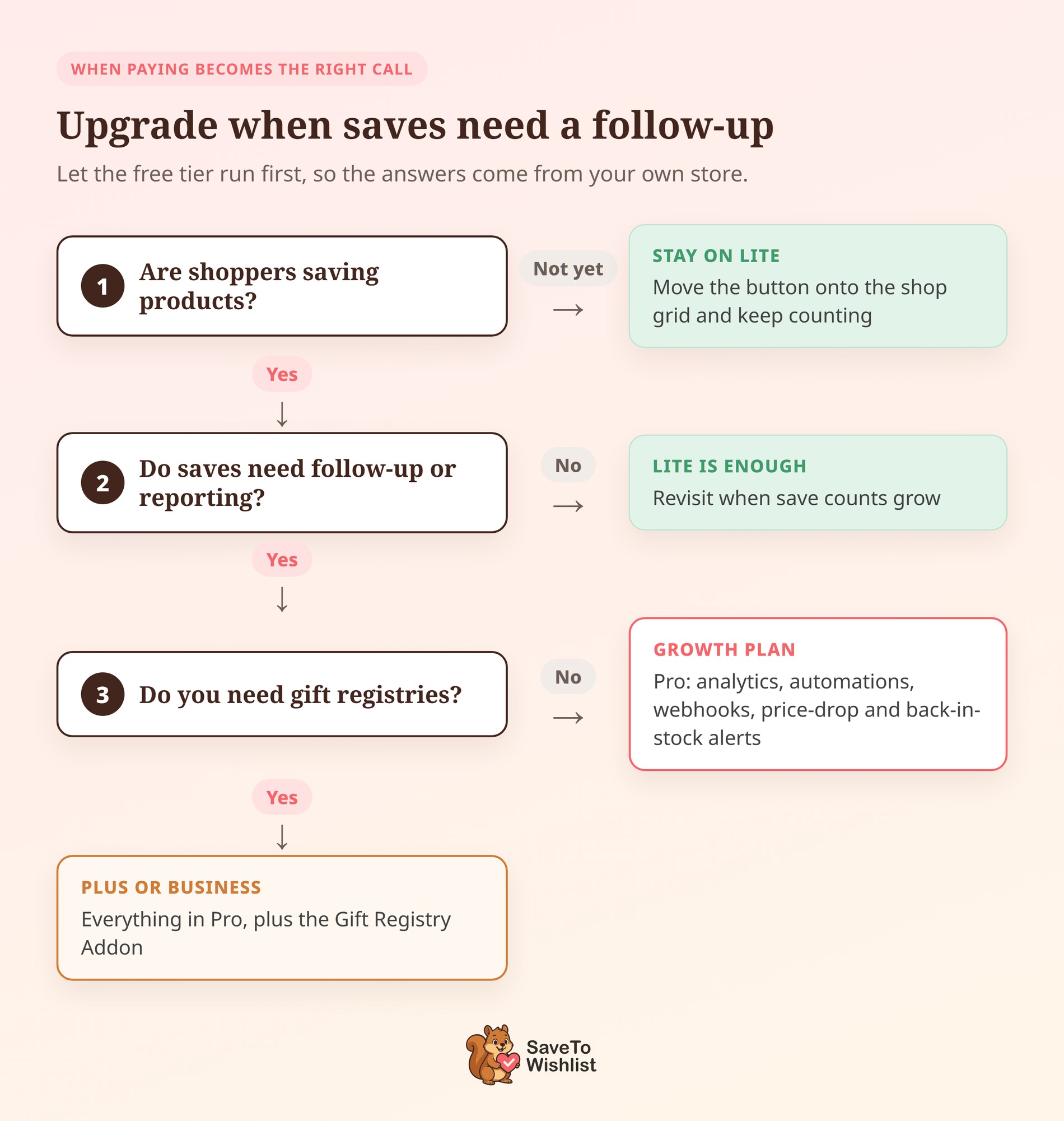
Upgrade when saves are happening and nothing follows up on them. That’s the honest trigger, and it only shows up after the free tier has run for a while.
Three situations make the paid extension worth it:
- Nobody hears back after a save. Pro adds automations with email, webhook and user-meta actions, plus real-time webhooks that push wishlist events into other tools.
- You want shoppers nudged automatically. Price-drop and back-in-stock alerts sit in Pro, so a saved product has a reason to bring someone back.
- Lists need rules or an event around them. Pro adds role-based access and advanced sharing. The Gift Registry Addon comes with the Plus and Business plans only.
How the plans compare
Here’s how the plans line up against WooCommerce Wishlists Ultimate:
| Feature | SaveTo Wishlist Lite (Free) | SaveTo Wishlist Pro | WooCommerce Wishlists Ultimate |
|---|---|---|---|
| Price | $0 | Growth $49.50 first year, then $99 a year | From $69 a year + VAT, or $189 lifetime |
| Multiple named wishlists | Yes | Yes | Yes |
| Guest wishlists that merge on login | Yes | Yes | Not documented on their page |
| Public or private lists | Yes | Yes | Yes |
| View all wishlists in the admin | Yes | Yes | Yes |
| Price-drop / back-in-stock alerts | No | Yes | Mentioned in their page copy, not their feature list |
| Wishlist analytics | No | Yes | Not documented on their page |
| Automations and webhooks | No | Yes | Not documented on their page |
| Importers from other wishlist plugins | Yes (4) | Yes (4) | Not documented on their page |
| Gift Registry Addon | No | Plus and Business plans only | Not documented on their page |
Plus is $99.50 for the first year, then $199 a year. Business is $199.50, then $399 a year. Every plan has a 14-day money-back guarantee, and the full details sit on the SaveTo Wishlist Pro page.
Switching If You Already Run WooCommerce Wishlists Ultimate
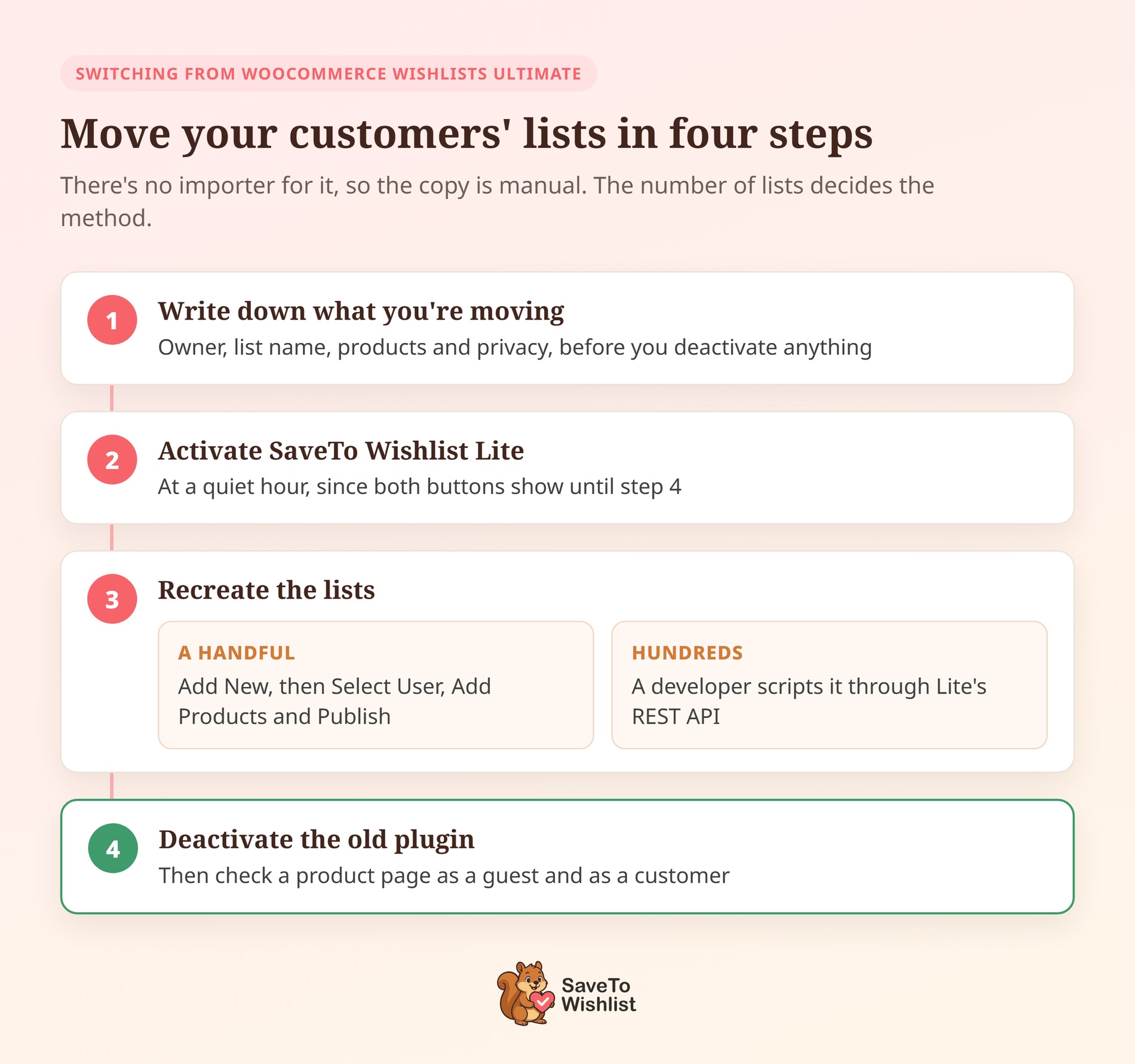
If you already bought WooCommerce Wishlists Ultimate, you can still switch without losing your customers’ lists. There’s no importer for it, so the copy is manual, and the number of lists decides how you do it.
- Write down what you’re moving. Its admin view lists every customer’s wishlist. Note each list’s owner, name, products and privacy setting. Do it before you deactivate anything, because that screen goes away with the plugin.
- Activate SaveTo Wishlist Lite. Do this on the live store, ideally at a quiet hour, since both buttons will show until step 4.
- Recreate the lists. For a handful, go to SaveTo Wishlist > Add New, choose the customer with Select User, use Add Products, then Publish. For hundreds, a developer can script it through Lite’s REST API. It has an admin route that creates a wishlist for a chosen customer.
- Deactivate WooCommerce Wishlists Ultimate and check a product page as a guest and as a customer.
Variations carry over cleanly, because Lite saves the exact variation a shopper picked, not just the parent product. Both plugins also support named lists and public or private settings, so every note has a place to go. Moving other store data at the same time? Visser Labs has a full WooCommerce migration guide.
License timing is worth a glance too. On a yearly license, switching before the renewal date saves you a year you won’t use. A lifetime license has no renewal to beat. Move whenever your save counts say the paid features are worth it.
Frequently Asked Questions
Is there a free trial of WooCommerce Wishlists Ultimate?
Its product page lists yearly and lifetime licenses with a 14-day money-back guarantee, plus a demo site. There’s no free version documented, so testing on your own store means buying first. If it doesn’t fit, you request a refund.
SaveTo Wishlist Lite works the other way. Run it on real traffic for as long as you like, and pay when the paid features become useful.
What do I lose by starting with SaveTo Wishlist Lite?
Reporting and automation, mainly. Lite covers unlimited wishlists, guest saving with merge on login, button styles, the shortcode and block, and the REST API. Analytics, automations, webhooks, price-drop and back-in-stock alerts, role-based access and advanced sharing all sit in Pro. Pro installs on top of Lite rather than replacing it, so your lists stay put when you upgrade.
Can I move my existing wishlists across later?
Yes. SaveTo Wishlist Lite ships importers for YITH WooCommerce Wishlist, TI WooCommerce Wishlist, MoreConvert Wishlist and WPC Smart Wishlist. The import your existing wishlists page has the details. WooCommerce Wishlists Ultimate isn’t one of the four, so use the manual switching steps above instead.
Which plan includes the Gift Registry Addon?
The Gift Registry Addon comes with the Plus and Business plans, and it isn’t included with Growth. Plus costs $99.50 for the first year, then $199 a year. If weddings, baby showers or group gifting are part of why you want wishlists, start at Plus.

The Wishlists Ultimate Alternative Worth Starting With
This decision is less about features and more about order. Buying first and testing second means your evidence arrives after your money does. That’s backwards for a feature whose value depends on whether your own customers use it.
Here’s what to do:
- Understand what an unproven purchase costs you
- Review WooCommerce Wishlists Ultimate’s documented feature set
- Install the free tier and put the button in front of real traffic
- Count saves, guest versus logged-in, before judging anything, using the three free counting routes
- Upgrade when saves are happening and nothing follows up
- Already on WooCommerce Wishlists Ultimate? Copy your lists across, then switch
SaveTo Wishlist is the WooCommerce Wishlists Ultimate alternative I’d put on a store today. Of the two, it’s the one you can test on your own store for free. Start with the free WooCommerce wishlist plugin, and when saves stack up, compare the SaveTo Wishlist plans. For a wider look, our roundup of WooCommerce wishlist plugins covers the rest of the field.
Still working out why saved products matter? Our guide to browse abandonment is a good place to start.


 SaveTo Wishlist