


 Revu par
 Le Cyber Monday est le plus grand jour d'achat en ligne de l'année, et contrairement au Black Friday, il est presque entièrement numérique, ce qui correspond parfaitement aux forces d'une boutique WooCommerce. Le Cyber Monday 2025 a atteint un record de 14,25 milliards de dollars de dépenses en ligne aux États-Unis, dont 57,5 % sur mobile, selon Adobe Analytics. Les boutiques qui le remportent se préparent à l'avance et rendent l'achat facile le jour J.
Le secret d'un marketing du Cyber Monday efficace n'est pas une remise plus importante que celle de tous les autres. C'est de savoir quels acheteurs veulent déjà vos produits, puis de les atteindre à la seconde où vos offres sont lancées. Une liste de souhaits vous donne exactement cette liste.
Lorsque vous utilisez un outil de liste de souhaits comme SaveTo Wishlist, vous pouvez exploiter une dynamique de fête puissante : les enregistrements collectés avant le week-end deviennent souvent votre public le plus réceptif pour le Cyber Monday. Voici comment le configurer.
Aller à :
- Qu'est-ce qui fait une excellente promotion du Cyber Monday ?
- Quelle est la profondeur réelle des réductions du Cyber Monday
- 5 étapes pour une promotion du Cyber Monday très rentable
- Mettre en place correctement le parcours de paiement mobile
- Idées de marketing pour le Cyber Monday qui fonctionnent
- Quand envoyer le jour même
- Que faire dans les jours suivant le Cyber Monday
- Votre checklist du Cyber Monday
- Faites de ce Cyber Monday votre meilleur
- Questions fréquemment posées : Marketing du Cyber Monday
Qu'est-ce qui fait une excellente promotion du Cyber Monday ?
Une excellente promotion du Cyber Monday atteint les acheteurs qui ont déjà montré de l'intérêt, au moment exact où vos prix baissent. Parce que le jour est uniquement en ligne et très axé sur le mobile, la vitesse et la pertinence l'emportent sur la portée : une alerte opportune à quelqu'un qui a enregistré un article est plus performante qu'un e-mail de masse à tout le monde.
Il bénéficie également de l’élan. En tant que clôture du Black Friday et du Cyber Monday, les acheteurs qui ont navigué pendant le week-end mais n’ont pas acheté sont prêts pour une dernière incitation. Votre travail consiste à capturer ces occasions manquées et à les ramener.

Quelle est la profondeur réelle des réductions du Cyber Monday
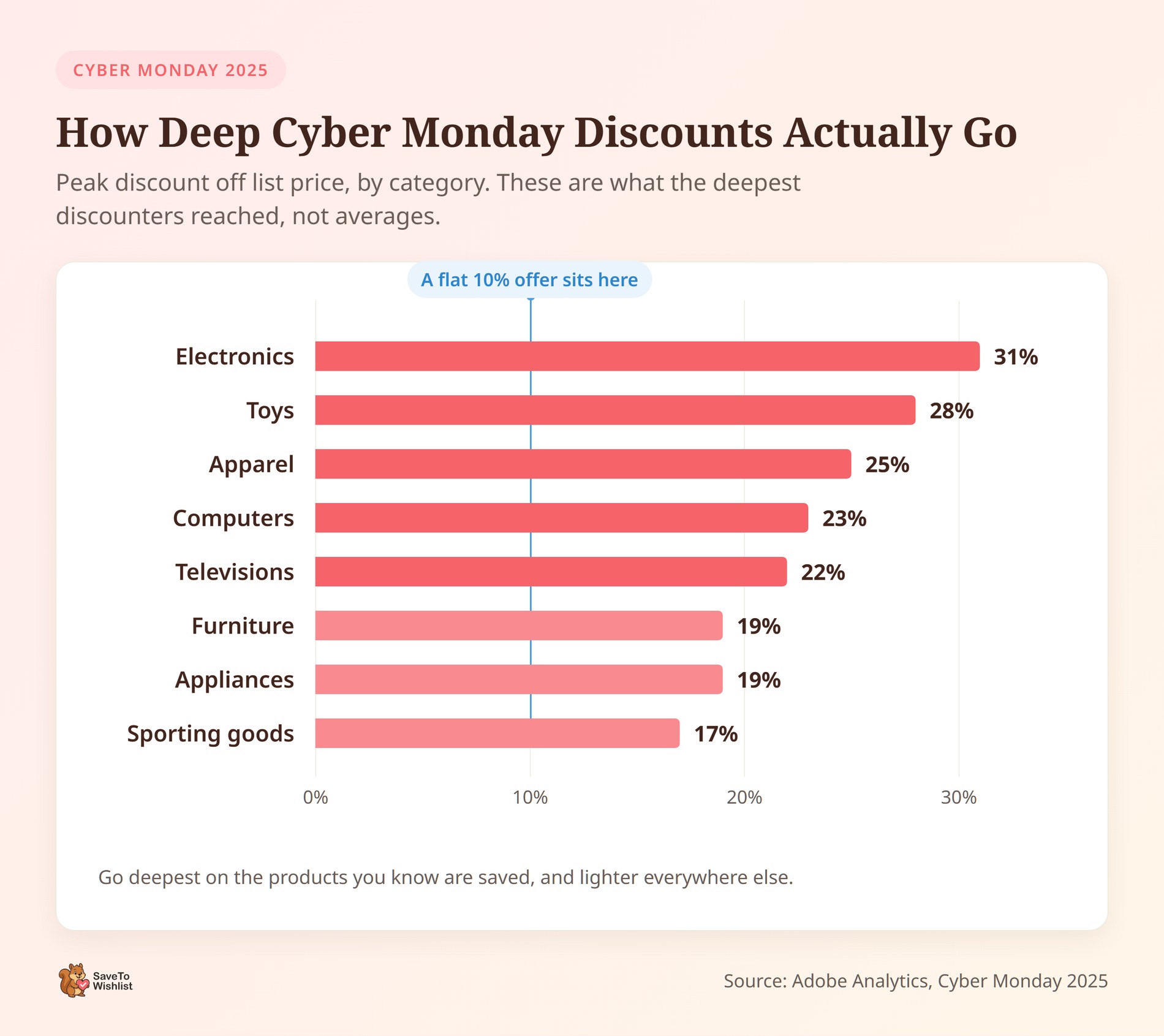
Lors du Cyber Monday 2025, les remises sur l’électronique ont atteint un pic de 31 % de réduction par rapport au prix catalogue. Selon Adobe Analytics, voici comment les autres catégories se sont comparées :
| Catégorie | Pic de réduction par rapport au prix catalogue |
|---|---|
| Électronique | 31% |
| Jouets | 28% |
| Vêtements | 25% |
| Ordinateurs | 23% |
| Téléviseurs | 22% |
| Meubles | 19% |
| Appareils électroménagers | 19% |
| Articles de sport | 17% |
Profondeur maximale des remises du Cyber Monday 2025 par catégorie, selon Adobe Analytics.
Ce sont des pics plutôt que des moyennes, ils montrent donc ce que les discounters les plus agressifs ont atteint. Vous n’avez pas à les égaler pour être compétitif.
Néanmoins, les chiffres vous donnent une idée de l’échelle. Une offre de 10 % sur l’électronique semble faible par rapport à une catégorie culminant à 31 %. Ces mêmes 10 % sur les articles de sport se situent beaucoup plus près de la moyenne.
Cependant, les acheteurs qui ont enregistré des articles changent les calculs en votre faveur. Quelqu’un qui a ajouté votre produit à sa liste de souhaits l’a déjà choisi, vous ne payez donc pas pour gagner son attention. Vous ne payez que pour son timing, et cela coûte généralement moins cher.
En pratique, j’irais le plus fort sur les produits que vous savez être enregistrés et plus légèrement partout ailleurs. Vos données de liste de souhaits vous indiquent lesquels, donc la remise arrive là où la demande existe déjà.
🔍️ Ce que nous avons vu : Il est courant de choisir une remise et de l’appliquer à l’ensemble du catalogue. C’est la chose la plus rapide à mettre en place. Définir la profondeur par catégorie protège plutôt votre marge sur les produits qui n’ont jamais eu besoin de 30 % de réduction.
5 étapes pour une promotion du Cyber Monday très rentable
Le Cyber Monday est le grand final du plus grand week-end de shopping de l’année. Parce que les acheteurs recherchent activement les meilleures offres en ligne, ils passent souvent d’un magasin à l’autre en comparant les prix sur leur téléphone.
Si vous voulez vous démarquer dans une boîte de réception bondée et transformer ces chasseurs de bonnes affaires en acheteurs, vous avez besoin d’un plan intelligent. En capturant leur intérêt tôt et en configurant des alertes automatiques, vous pouvez les ramener directement dans votre magasin exactement au moment où vos offres sont lancées.
Voici cinq étapes simples pour améliorer votre marketing du Cyber Monday afin de vous démarquer et de maximiser vos ventes.
1. Créez des listes de souhaits pour le Cyber Monday à l'avance
Commencez à collecter les enregistrements bien avant le week-end. Ajoutez un bouton de liste de souhaits clair avec le plugin gratuit WooCommerce wishlist et laissez les invités enregistrer sans compte, afin de capturer les visiteurs de première fois arrivant des publicités de vacances.
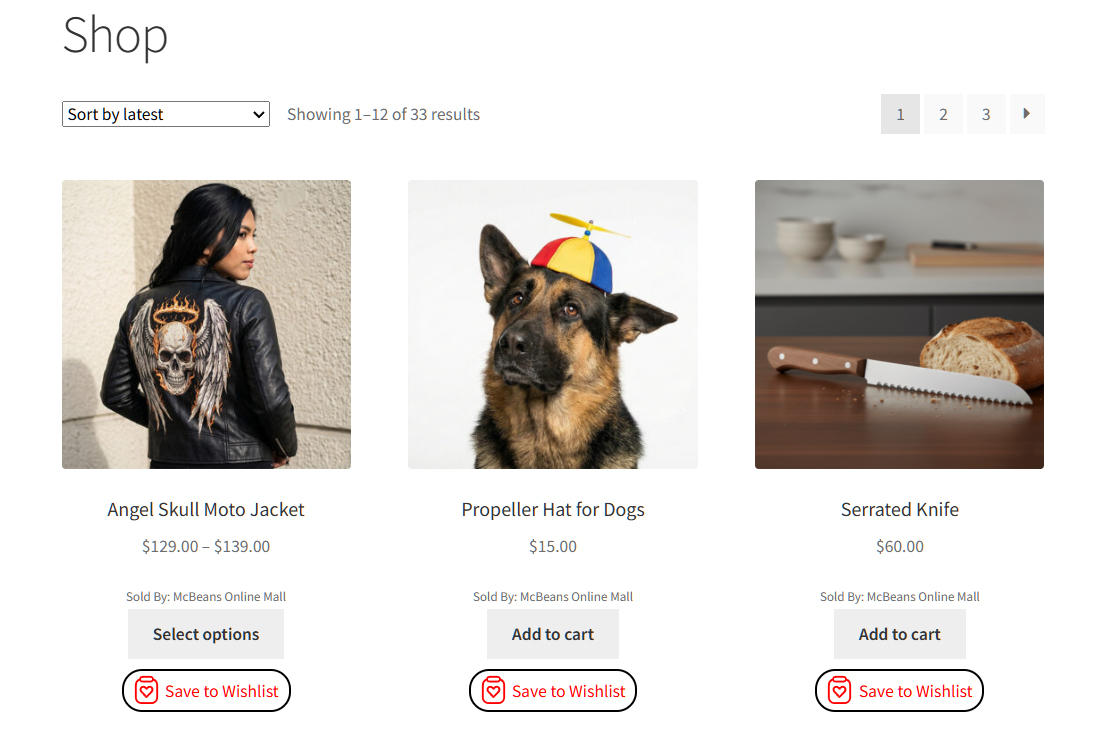
Chaque produit enregistré est un acheteur qui vous dit ce qu’il achètera au bon prix. Au moment où le Cyber Monday arrive, cette liste est votre public prêt à l’emploi.
2. Automatisez vos alertes du Cyber Monday
Lorsque vos offres sont lancées, les acheteurs qui ont enregistré ces articles doivent en être instantanément informés. Les alertes de baisse de prix dans SaveTo Wishlist Pro envoient automatiquement des e-mails aux acheteurs enregistrés au moment où vous réduisez le prix d'un produit de leur liste de souhaits, et les notifications de réapprovisionnement avertissent ceux qui attendent un article épuisé.
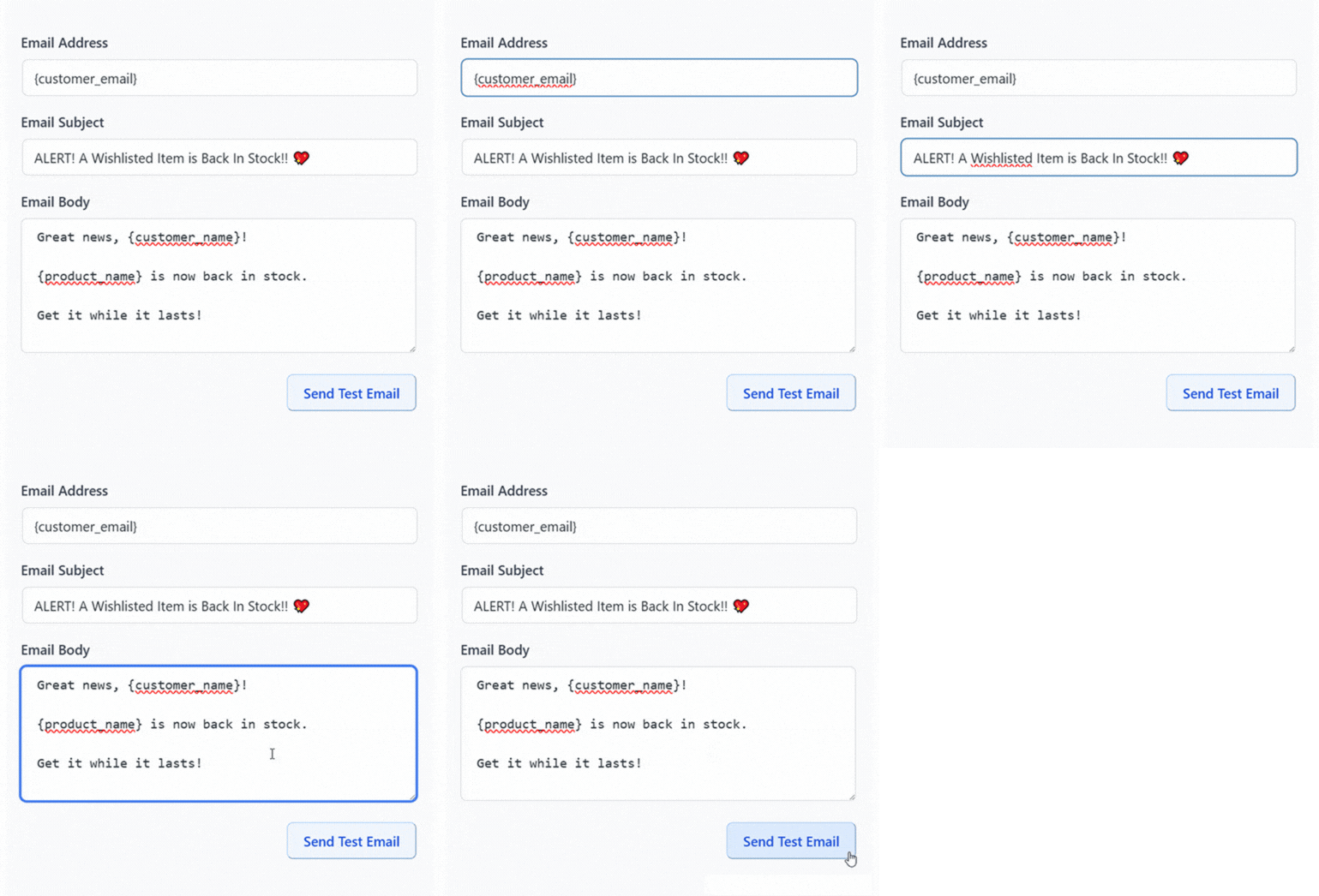
🔍️ Ce que nous avons constaté : Les boutiques investissent des efforts dans la réduction et oublient de la relier aux personnes qui attendaient. Lors d'une journée rapide et uniquement en ligne comme le Cyber Monday, une alerte automatique à un acheteur enregistré fait la différence entre une vente et une occasion manquée.
3. Conquérez le shopper mobile de dernière minute
La plupart des soldes du Cyber Monday ayant lieu sur mobile, raccourcissez le chemin entre l'alerte et le paiement et rendez-le facile à utiliser avec le pouce. Un acheteur enregistré qui tape sur une alerte devrait atteindre le produit et finaliser son achat en quelques étapes.
Mettez également l'accent sur le cadrage de la dernière chance. Le Cyber Monday est le dernier acte du week-end, donc une urgence honnête, comme une heure de fin de solde claire ou des notes de stock réel faible, donne aux acheteurs enregistrés une raison d'agir maintenant plutôt que d'attendre.
4. Promouvez et planifiez vos offres
Ne comptez pas sur le fait d'être éveillé à minuit. Planifiez vos réductions à l'avance pour qu'elles soient lancées à temps, et planifiez vos réductions WooCommerce avec Advanced Coupons pour que les offres commencent et se terminent automatiquement.
Gardez également votre vitrine visible là où les acheteurs comparent. Un flux de produits Google Shopping précis présente vos prix du Cyber Monday aux acheteurs prêts et les dirige vers des pages où ils peuvent acheter ou enregistrer.

5. Récupérez les paniers pour lesquels vous avez travaillé
Même lors d'une bonne journée, la plupart des paniers ne se convertissent pas. Environ 70 % des paniers en ligne sont abandonnés avant l'achat, selon le Baymard Institute, et la comparaison des prix du Cyber Monday rend l'hésitation courante.
Les listes de souhaits atténuent cela. Un acheteur qui n'est pas prêt peut enregistrer au lieu d'abandonner, et votre suivi les ramène. Notre guide sur la récupération des paniers abandonnés pour WooCommerce couvre l'aspect e-mail.
Mettre en place correctement le parcours de paiement mobile
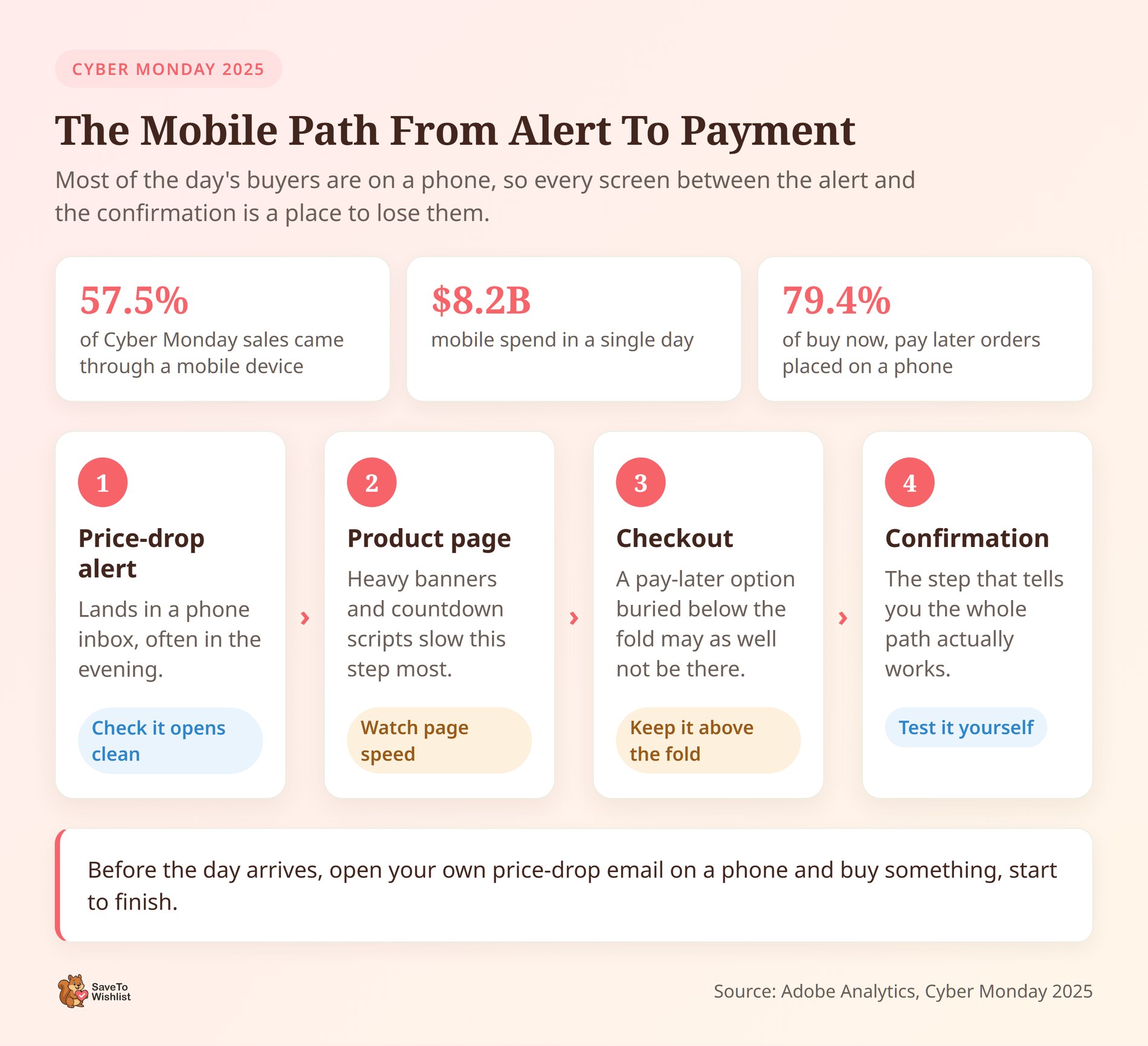
Le mobile décide du Cyber Monday. Selon Adobe Analytics, 57,5 % des ventes en ligne du Cyber Monday 2025 ont été réalisées via un appareil mobile, soit 8,2 milliards de dollars.
Cette part a rapidement évolué. En 2020, le mobile représentait 41,4 % des ventes du Cyber Monday. Autrement dit, l'équilibre s'est inversé en cinq saisons de fêtes.
Pendant ce temps, la flexibilité de paiement suit le même schéma. Acheter maintenant, payer plus tard a généré 1,03 milliard de dollars de dépenses lors du Cyber Monday 2025. Parmi ces transactions, 79,4 % ont eu lieu sur un téléphone plutôt que sur un ordinateur de bureau.
Donc, si votre paiement propose une option de paiement ultérieur, elle doit être visible sur un petit écran. Enfouie sous le pli, elle pourrait aussi bien ne pas exister.
La vitesse de chargement des pages a un poids supplémentaire sur un téléphone, surtout via une connexion cellulaire lors d'un pic de trafic. D'après mon expérience, les bannières de fêtes lourdes et les scripts de compte à rebours sont les coupables habituels.
Avant que le jour n'arrive, ouvrez votre propre e-mail de baisse de prix sur un téléphone et achetez quelque chose, du début à la fin. Chaque écran supplémentaire entre cet e-mail et la confirmation est un endroit où un acheteur peut se désintéresser.
🔍️ Ce que nous avons constaté : Le processus de paiement sur ordinateur est testé avec soin et celui sur mobile est souvent présumé. C'est facile à manquer lorsque vous développez sur un ordinateur portable. Parcourir le chemin du téléphone vous-même révèle généralement une étape plus difficile qu'elle ne devrait l'être.
Idées de marketing pour le Cyber Monday qui fonctionnent
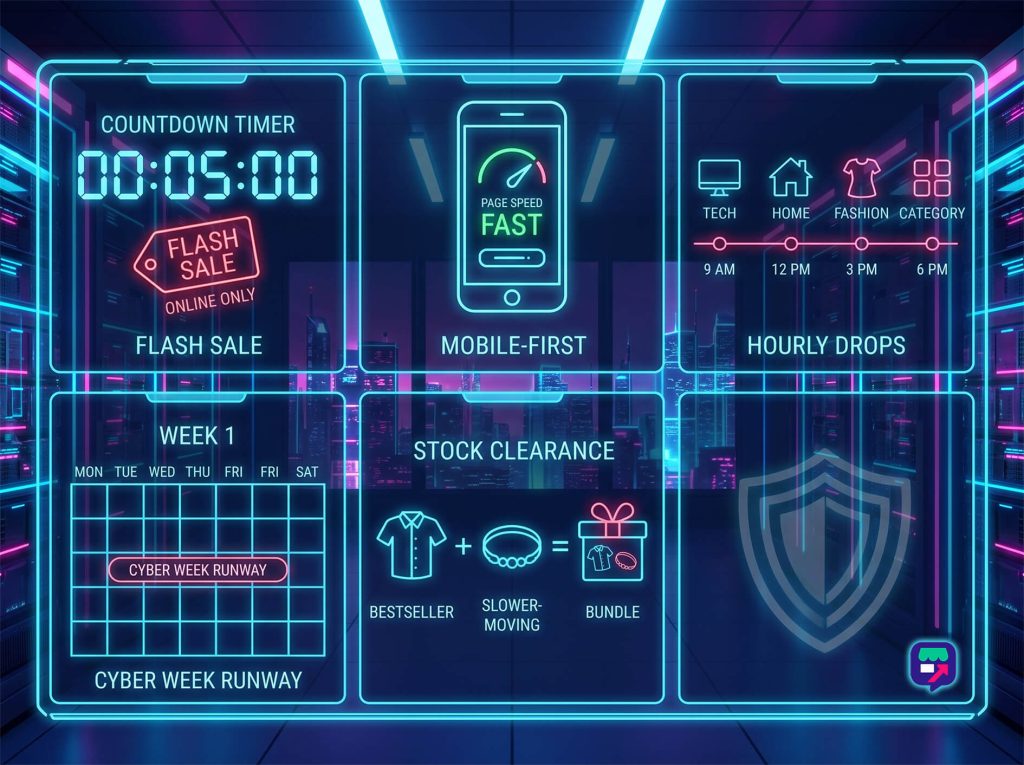
Le Cyber Monday est le pendant en ligne du Black Friday, donc les gains proviennent de la rapidité, du mobile et de la clarté plutôt que des foules des ventes flash.
- Proposez des offres flash uniquement en ligne : Les offres limitées dans le temps créent l'urgence qui convient à un événement d'achat numérique d'une journée.
- Concevez d'abord pour le mobile : La plupart du trafic du Cyber Monday est mobile, donc des pages rapides et un enregistrement ou un paiement en un clic sont plus importants que jamais.
- Échelonnez les offres tout au long de la journée : Des baisses horaires ou par catégorie donnent aux acheteurs une raison de revenir.
- Prolongez jusqu'à la Cyber Week : Une période de plusieurs jours rattrape les acheteurs qui manquent la fenêtre du lundi et fluidifie votre trafic.
- Liquidez les stocks lents avec des lots : Associez les articles les plus vendus à des articles moins populaires pour augmenter la valeur de la commande et écouler les stocks en même temps.
Laissez les acheteurs enregistrer les offres qu'ils souhaitent à l'avance, et une seule alerte lorsque la vente commence fait le travail de vente pour vous.
Quand envoyer le jour même
Le Cyber Monday atteint son pic en soirée. Selon Adobe Analytics, les acheteurs ont dépensé 16 millions de dollars par minute entre 20h et 22h en 2025.
Cela change le moment où vos messages doivent être envoyés. Une alerte arrivant à 9h entre en concurrence avec le début d'une journée de travail. En revanche, la même alerte à 19h atteint les gens juste au moment où ils s'installent pour naviguer.
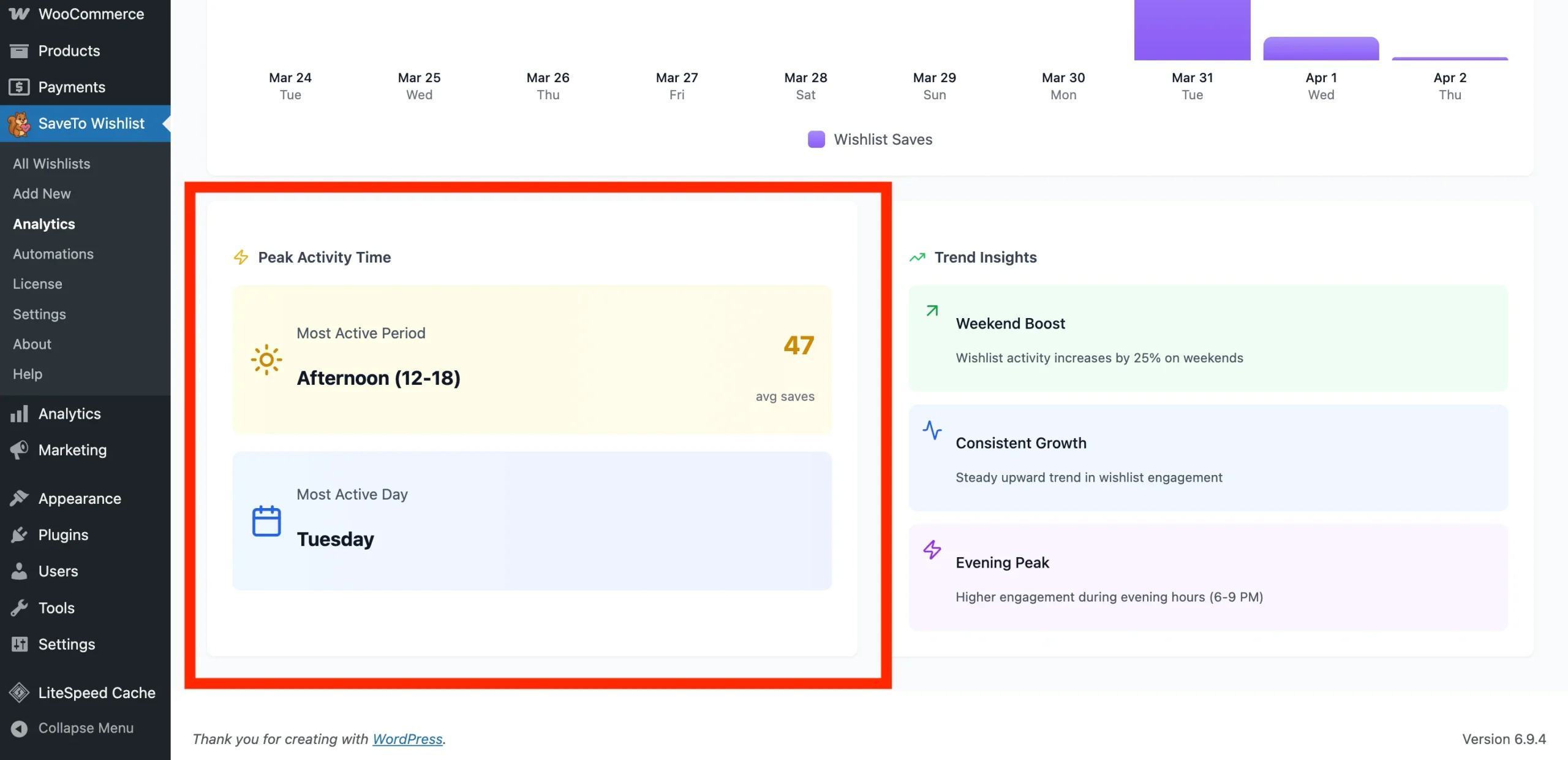
Cela plaide également en faveur de l'échelonnement de vos baisses. Si tout est mis en vente à minuit, vos heures les plus fortes n'ont rien de nouveau.
Qu'est-ce qui déclenche réellement chaque alerte
SaveTo Wishlist Pro envoie son e-mail de baisse de prix lorsque le prix de vente d'un produit change, et non selon un calendrier que vous définissez séparément. Ainsi, une deuxième baisse plus importante plus tard dans la journée compte comme une nouvelle baisse. Il envoie ensuite un e-mail à tous ceux qui ont ce produit dans leur liste de souhaits.
C'est utile pour une poussée en soirée, et il est facile d'en faire trop. Personnellement, je limiterais cela à deux ou trois niveaux par produit. Au-delà, vous envoyez des e-mails à la même personne à plusieurs reprises au sujet d'un article qu'elle vous a déjà dit vouloir.
Une limite à prévoir : un coupon au niveau du panier se comporte différemment. Il réduit le prix au moment du paiement sans modifier le prix de vente du produit, il ne déclenchera donc pas l'alerte du tout.
Notre guide marketing du Black Friday couvre les règles de timing derrière ces alertes plus en détail. Il explique ce qui se passe lorsque vous définissez un prix de vente avec des dates de début futures.
🔍️ Ce que nous avons constaté : Les équipes planifient tout pour minuit et constatent ensuite que la soirée semble calme. C’est une façon naturelle de planifier une vente dont on veut arrêter de se soucier. Garder un niveau en réserve pour la fenêtre de 20h vous rapporte une deuxième ouverture.
Que faire dans les jours suivant le Cyber Monday
Les dépenses ne s’arrêtent pas quand la journée se termine. Selon Adobe Analytics, la Cyber Week 2025 a généré 44,2 milliards de dollars en ligne. Cette période de cinq jours s’étend de Thanksgiving au Cyber Monday, et elle a augmenté de 7,7 % d’une année sur l’autre.
La demande se prolonge également en décembre. Adobe prévoyait que les remises resteraient fortes durant la première semaine du mois. Les jouets devaient atteindre un pic de 23 % de réduction, les ordinateurs de 20 %.
Cette traîne vaut donc la peine d’être planifiée, car vos listes de souhaits sont les plus remplies juste après la vente. Chaque acheteur qui a sauvegardé quelque chose et n’a pas acheté est toujours sur votre liste, toujours intéressé.
En pratique, trois choses valent la peine d’être faites dans cette fenêtre :
- Prolongez avec une raison, pas juste plus de jours : Une catégorie épuisée qui revient en stock donne une histoire à la prolongation. Une prolongation sans date limite apprend aux acheteurs que vos délais ne sont pas réels.
- Recoupez un petit ensemble de produits sauvegardés : Choisissez les articles qui ont attiré des sauvegardes mais qui ne se sont pas vendus. Repasser sur tout une deuxième fois coûte beaucoup plus cher.
- Changez le message à la livraison : Une fois que décembre commence, les dates d’arrivée comptent plus pour les acheteurs qu’un autre petit pourcentage de réduction.
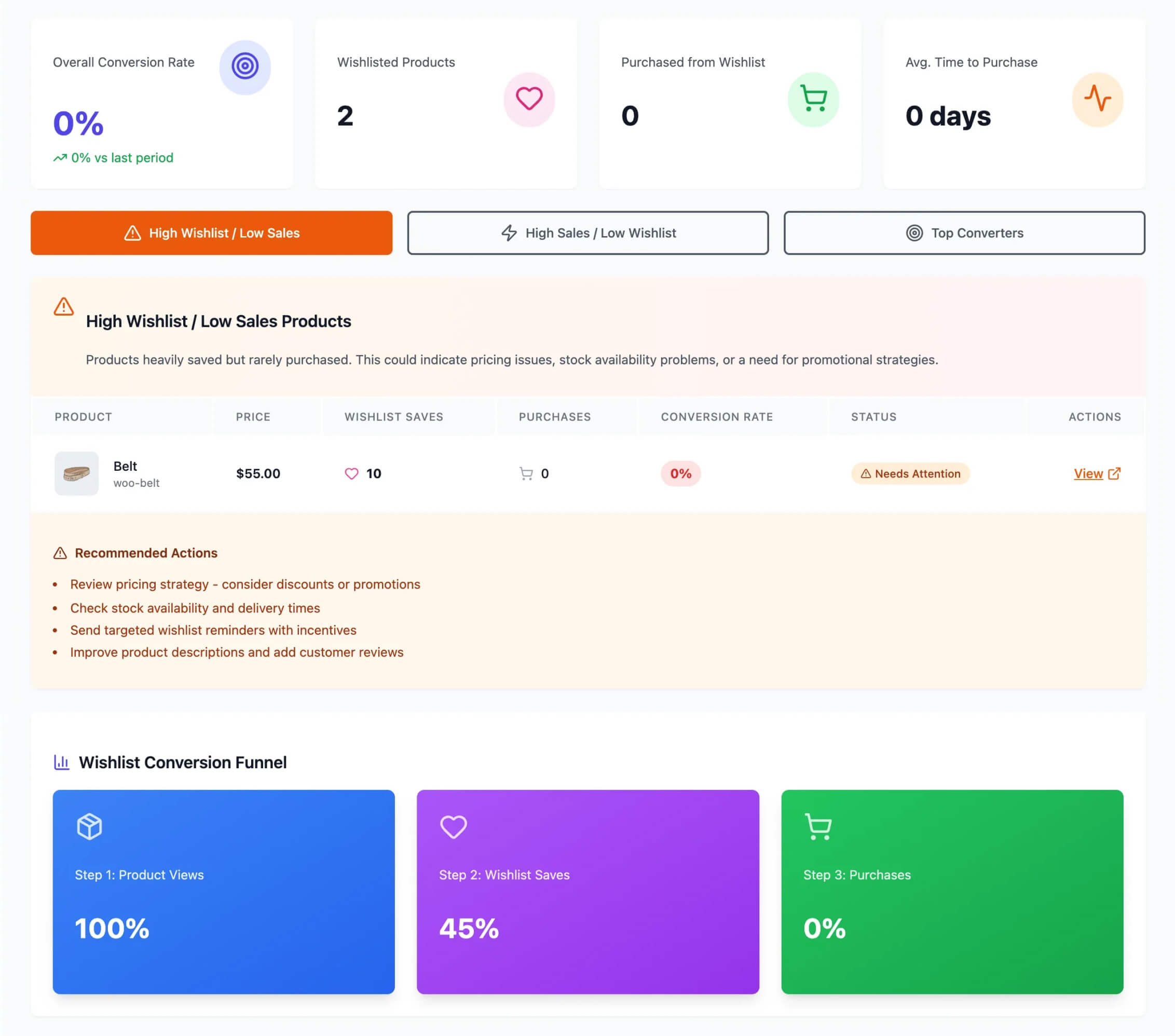
D’après mon expérience, la livraison est le message que les magasins laissent trop tard. Publier une date limite de livraison tôt transforme une inquiétude vague en un délai clair. Notre calendrier des ventes de fêtes e-commerce explique comment en définir un que les clients peuvent voir.
Quel que soit votre choix, les sauvegardes que vous avez collectées sont l’atout que vous transportez en décembre. Elles ne coûtent rien à conserver, et elles vous disent quoi promouvoir ensuite.
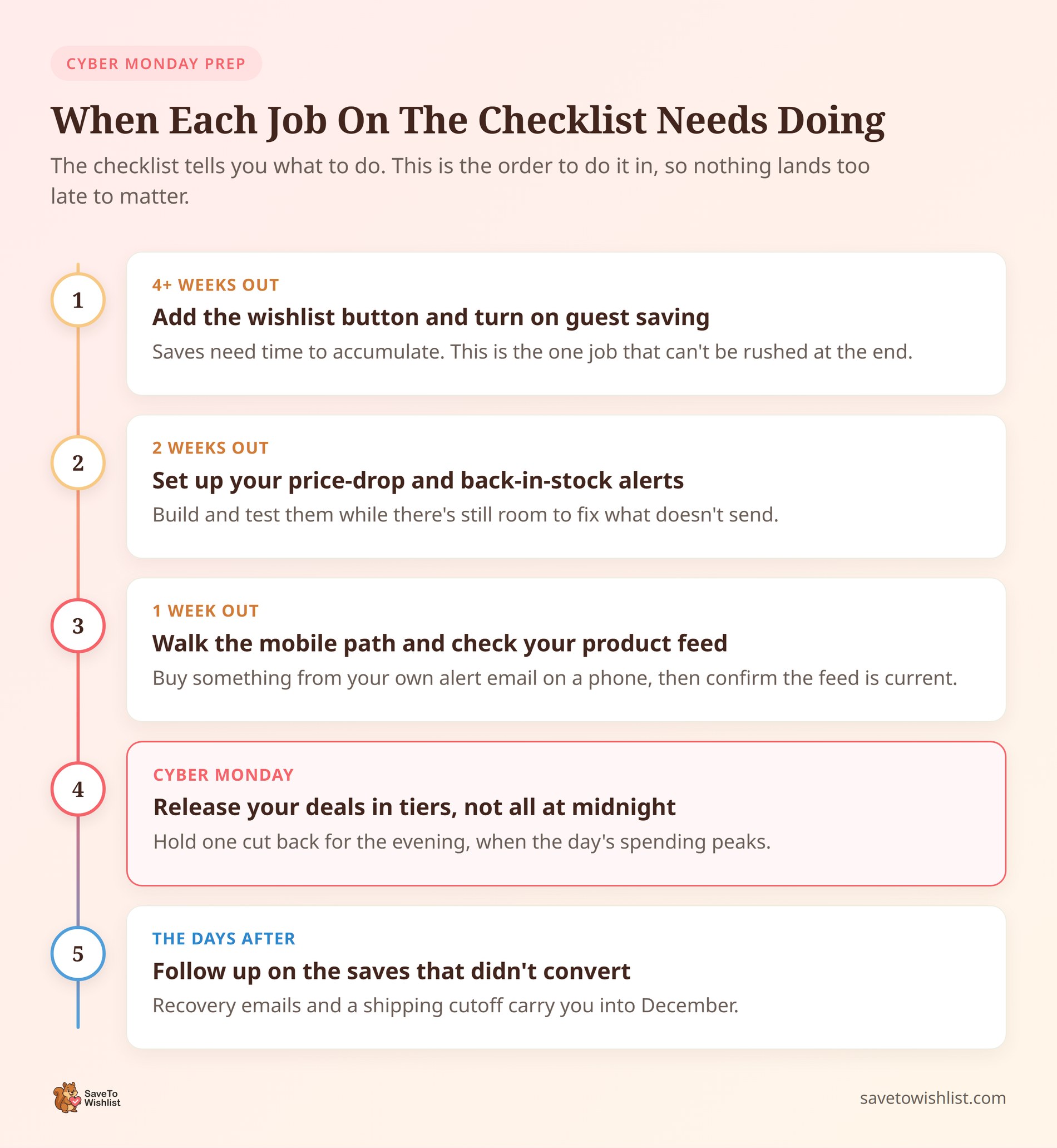
Votre checklist du Cyber Monday
- Ajoutez un bouton de liste de souhaits et activez la sauvegarde par les invités avant le week-end.
- Configurez les alertes de baisse de prix et de réapprovisionnement à l’avance.
- Rendez le parcours mobile de l’alerte au paiement court.
- Planifiez les offres et confirmez que votre flux Google Shopping est à jour.
- Planifiez un e-mail de récupération de liste de souhaits pour les paniers abandonnés.
Faites de ce Cyber Monday votre meilleur
Le Cyber Monday récompense le magasin qui arrive avec une audience réceptive et un moyen automatique de l’atteindre. Collectez les listes de souhaits tôt, configurez vos alertes, et rendez l’achat sans effort sur mobile, et vous transformerez le plus grand jour de vente en ligne de l’année en ventes réelles.
- Créez des listes de souhaits tôt pour créer votre audience.
- Automatisez vos alertes pour que les offres atteignent les acheteurs enregistrés.
- Conquérez l’acheteur mobile avec un chemin court vers le paiement et la transaction.
- Faites la promotion et planifiez vos offres.
- Récupérez les paniers abandonnés.
- Adaptez votre remise par catégorie et planifiez vos envois autour du pic de soirée.
- Continuez à vendre dans les jours qui suivent.
Prêt pour le grand jour ? Mettez en pratique ces conseils marketing pour le Cyber Monday et commencez à capter la demande. Téléchargez SaveTo Wishlist gratuitement !
Et quand vous serez prêt pour des analyses et des automatisations avancées, passez à SaveTo Wishlist Pro !
Questions fréquemment posées : Marketing du Cyber Monday
Quand dois-je commencer le marketing du Cyber Monday ?
Commencez dans les semaines précédant le week-end du Black Friday. Utilisez ce temps pour collecter les enregistrements de listes de souhaits et configurer vos alertes automatisées, afin d'atteindre un public réceptif et prêt dès que vos offres seront en ligne.
Quelle est la différence entre le Cyber Monday et le Black Friday ?
Le Cyber Monday est presque entièrement en ligne et penche fortement vers le mobile, tandis que le Black Friday inclut encore les achats en magasin. Pour une boutique WooCommerce, cela rend le Cyber Monday particulièrement précieux, et c'est un dernier moment fort pour convertir les navigateurs du week-end.
Comment les listes de souhaits aident-elles le jour du Cyber Monday ?
Les listes de souhaits capturent ce que les acheteurs veulent avant la promotion. Lorsque vos offres sont lancées, les alertes automatisées de baisse de prix et de retour en stock ramènent ces acheteurs vers des produits qu'ils ont déjà choisis, ce qui convertit beaucoup mieux qu'une diffusion générique.
Ai-je besoin d'un plugin payant pour le Cyber Monday ?
Vous pouvez collecter des listes de souhaits avec le plugin gratuit. Les alertes automatisées de baisse de prix et de retour en stock font partie de SaveTo Wishlist Pro, qui permet le suivi automatique qui rend une journée de vente rapide gérable.



