

 Reviewed by
 Halloween kicks off the entire Q4 selling season, and shoppers plan for it earlier than you’d think. Costumes, decor, and themed products get researched and saved through September and early October, well before anyone checks out. The Halloween marketing ideas that pay off capture that early interest and bring shoppers back when they’re ready to buy.
A wishlist is built for this kind of planning-ahead behavior. I’ve seen store owners write September traffic off because so little of it converts. Someone browsing costumes in September isn’t buying yet, but they’ll happily save their favorites. Capture those saves and you have a warm audience for the weeks that follow.
SaveTo Wishlist gives those picks somewhere to live, and Halloween is the clearest early-planning sale of the year. Here’s how to work it.
Jump to:
- What Makes A Great Halloween Sale?
- The Halloween Demand Curve, Week By Week
- 5 Steps To A Profitable Halloween Sale
- Make Sure September Saves Survive To October
- Halloween Stock And Restock Timing
- How Costume Sizes Change Your Restock Alerts
- How To Set Your Halloween Shipping Cut-Off
- Halloween Marketing Ideas That Work
- How To Tell If Your Halloween Marketing Ideas Worked
- What To Do On November 1
- Your Halloween Sale Checklist
- Make This Halloween Your Best Yet
- Frequently Asked Questions: Halloween Marketing Ideas
What Makes A Great Halloween Sale?
A great Halloween sale captures interest early and converts it before the date passes. Halloween is deadline-driven: a costume bought on November 1st is useless, so the window is tight. That makes capturing demand ahead of time and reaching shoppers fast especially valuable.
It’s also highly themed. Shoppers want costumes, decorations, and seasonal items, often in limited runs, so stock and restock timing matters more than usual.
The Halloween Demand Curve, Week By Week
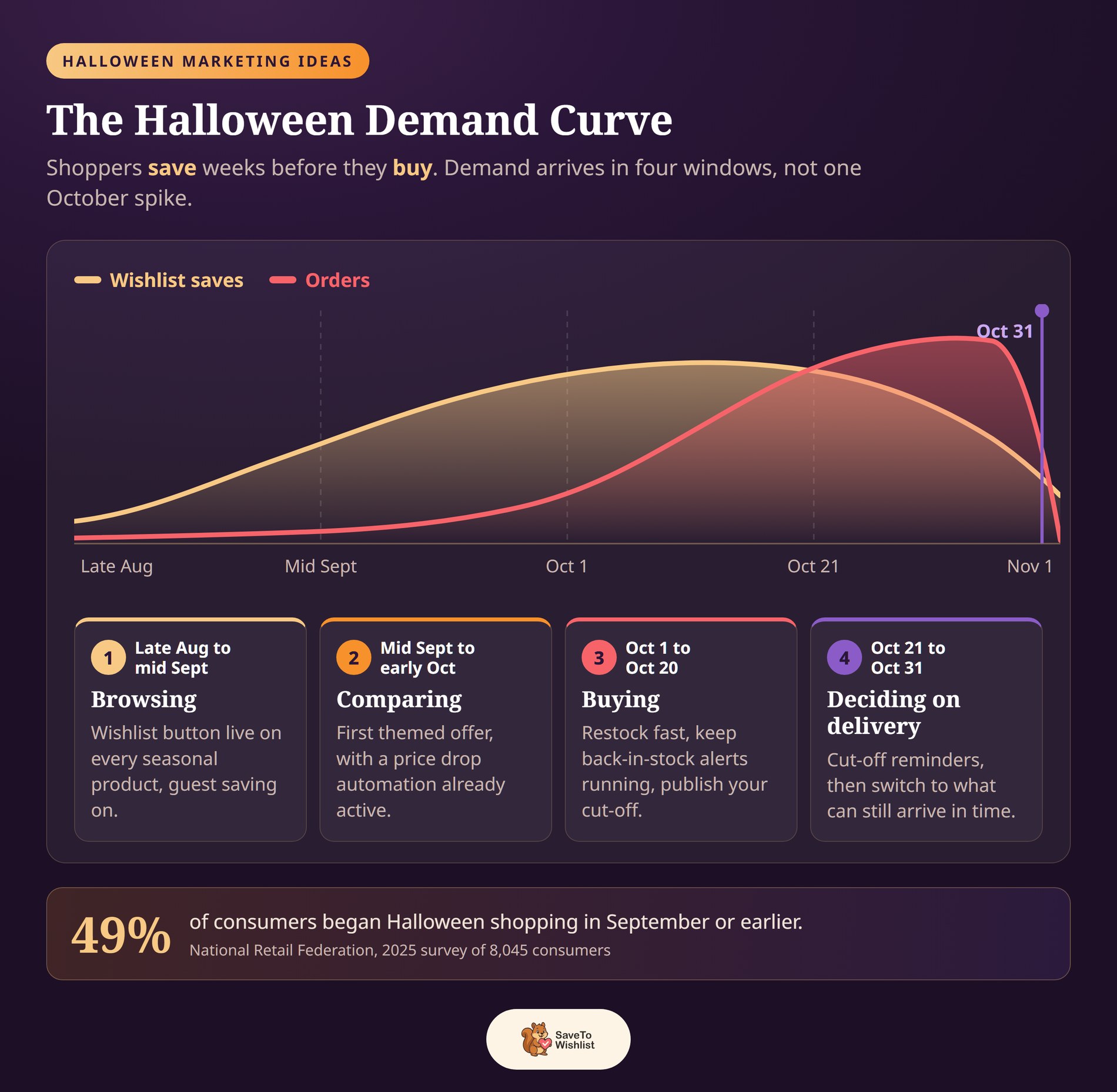
According to the National Retail Federation’s 2025 Halloween survey of 8,045 consumers, 49% began shopping in September or earlier. That was up from 47% the year before. So demand is already moving while a lot of stores are still drafting their October campaign.
Most Halloween marketing ideas assume one big October push. But that demand doesn’t arrive as one spike. It arrives in four windows, and each one asks something different of your store.
| Window | What shoppers are doing | What your store should be doing |
|---|---|---|
| Late August to mid September | Browsing costumes and decor, comparing options, saving favorites. Very few are checking out. | Wishlist button live on every seasonal product, with guest saving turned on. |
| Mid September to early October | Narrowing choices and watching prices, waiting for a reason to commit. | Run your first themed offer, with a price drop automation already active. |
| October 1 to October 20 | Buying in volume. Popular sizes and styles start selling out. | Restock fast, keep back-in-stock alerts running, and publish your shipping cut-off. |
| October 21 to October 31 | Last-minute buying, decided almost entirely by delivery dates. | Send cut-off reminders, then switch the message to what can still arrive in time. |
NRF also asked why those shoppers start early. A third of them (33%) said they didn’t want to miss out on the items they wanted. That’s a meaningful share of your September traffic already thinking about availability. It’s a good argument for showing real stock levels before October rather than after.
What the curve tells you to skip
The shape is also useful for what it tells you to skip. Discounting hard in early September gives away margin on shoppers who were saving anyway. Holding your first real offer until the second window costs little. It also lands when people are ready to decide.
Notice that the two middle windows are inventory problems more than marketing problems. From October 1st, what caps your sales is usually stock and delivery rather than interest. The next two sections deal with both.
5 Steps To A Profitable Halloween Sale
These five steps run in order, and the first one starts in September. Late October promotion still works, but it lands after most shoppers have already picked their favorites.
Shoppers start planning costumes and party themes as early as September. So the job is to capture those early browsers, then reach them again before October 31st.
Here are five practical steps for capturing that early interest and turning it into orders.
1. Capture Halloween demand early
Get a wishlist button live on every seasonal product by early September. Guest saving is on by default, so shoppers don’t have to make an account first. Then prompt them to save their Halloween picks while they browse.
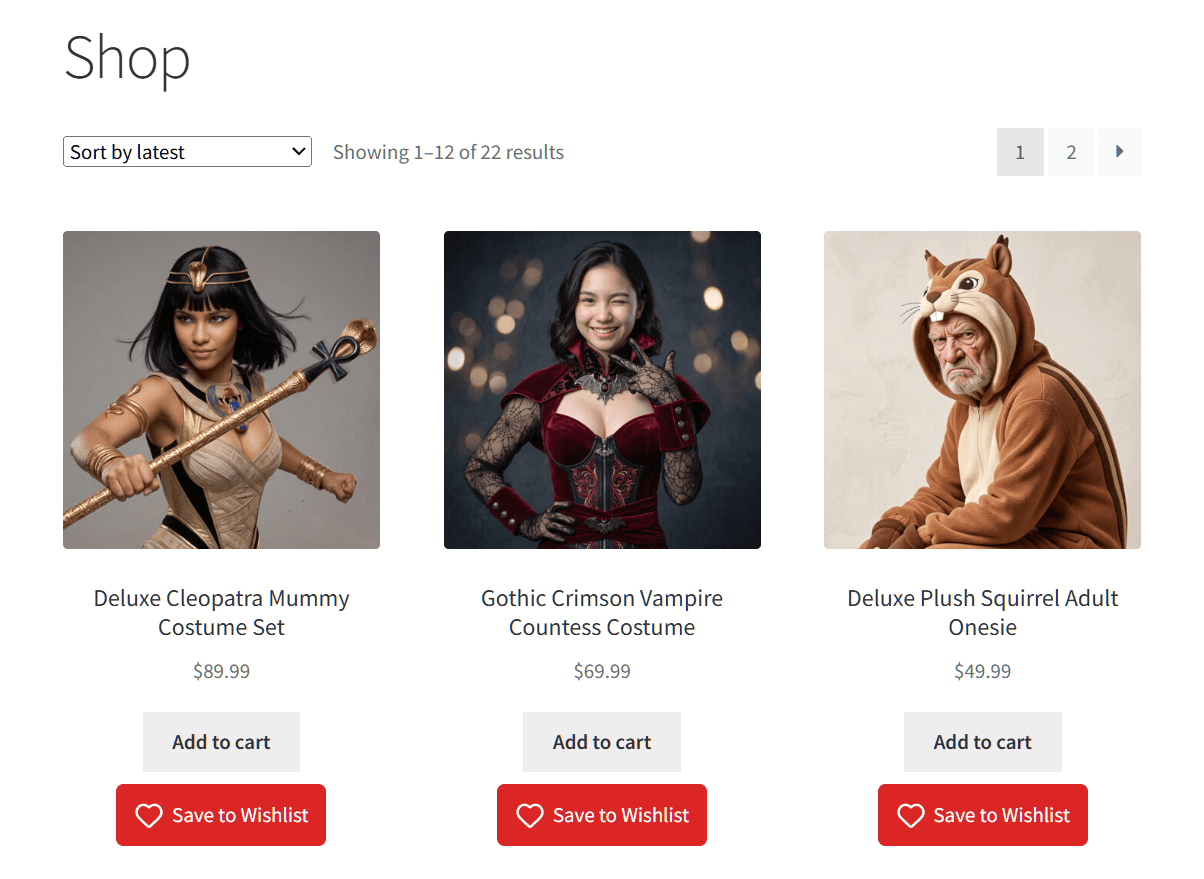
Every save is a shopper signaling what they’ll come back for. Collecting them early gives you a ready audience to market to as the date approaches.
One thing to plan around: guest saves live in the browser’s local storage. They’re tied to that device and browser, so clearing browser data clears the list. That gap matters when a September save has to survive six weeks.
2. Automate alerts on themed and limited items
Halloween products often sell out or come in limited runs. With SaveTo Wishlist Pro, back-in-stock notifications bring shoppers back when a sold-out costume returns. And price-drop alerts re-engage savers when you run a themed promotion.
🎃 What we’ve seen: Seasonal stores lose sales to sellouts they could have recovered. A shopper who saved a sold-out costume is your warmest buyer when it restocks, but only if you alert them. So wire up back-in-stock notifications before the rush.
3. Use seasonal urgency the honest way
Halloween has a built-in deadline, so urgency is genuine rather than manufactured. Remind saved shoppers of the cut-off date that still gets an order there before the 31st. Show real low-stock notes on popular items too.
For shoppers who saved items but haven’t bought, send a nudge: “order by [date] to get it for Halloween”. You’re handing them information they need, not manufacturing pressure.
4. Promote and schedule your deals
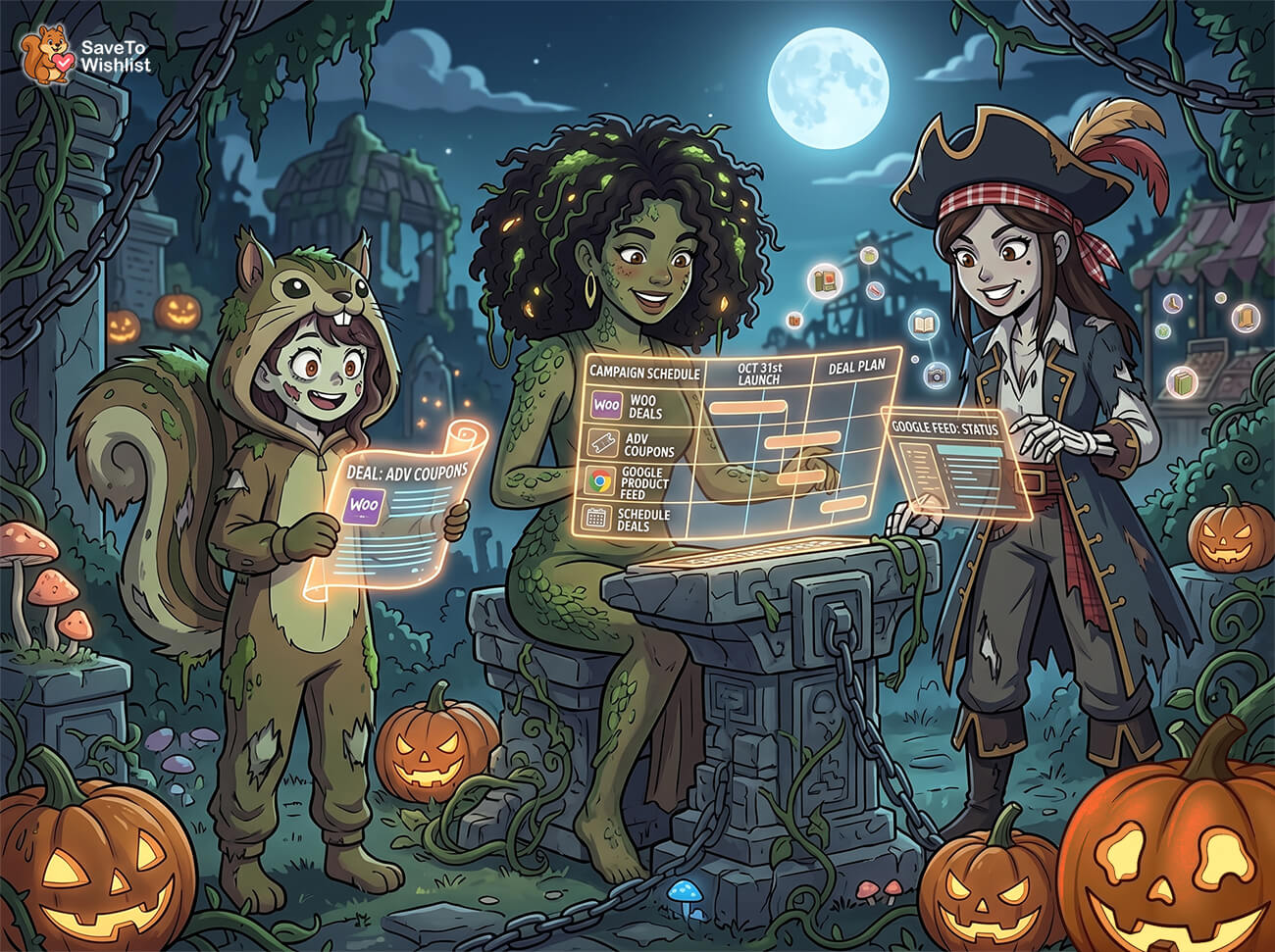
Plan your seasonal marketing campaigns ahead so your Halloween promotions launch on time. You can schedule your WooCommerce discounts with Advanced Coupons. Keep your Google Shopping product feed accurate too, so seasonal shoppers comparing on Google find your themed products.
5. Recover the carts you worked for
Deadline pressure cuts both ways: it drives urgency but also abandoned carts as shoppers compare. Roughly 70% of online carts are abandoned before purchase, per the Baymard Institute. Let hesitant shoppers save instead of abandoning, then bring them back with reminders. Our guide to cart abandonment recovery for WooCommerce covers the follow-up.
Make Sure September Saves Survive To October
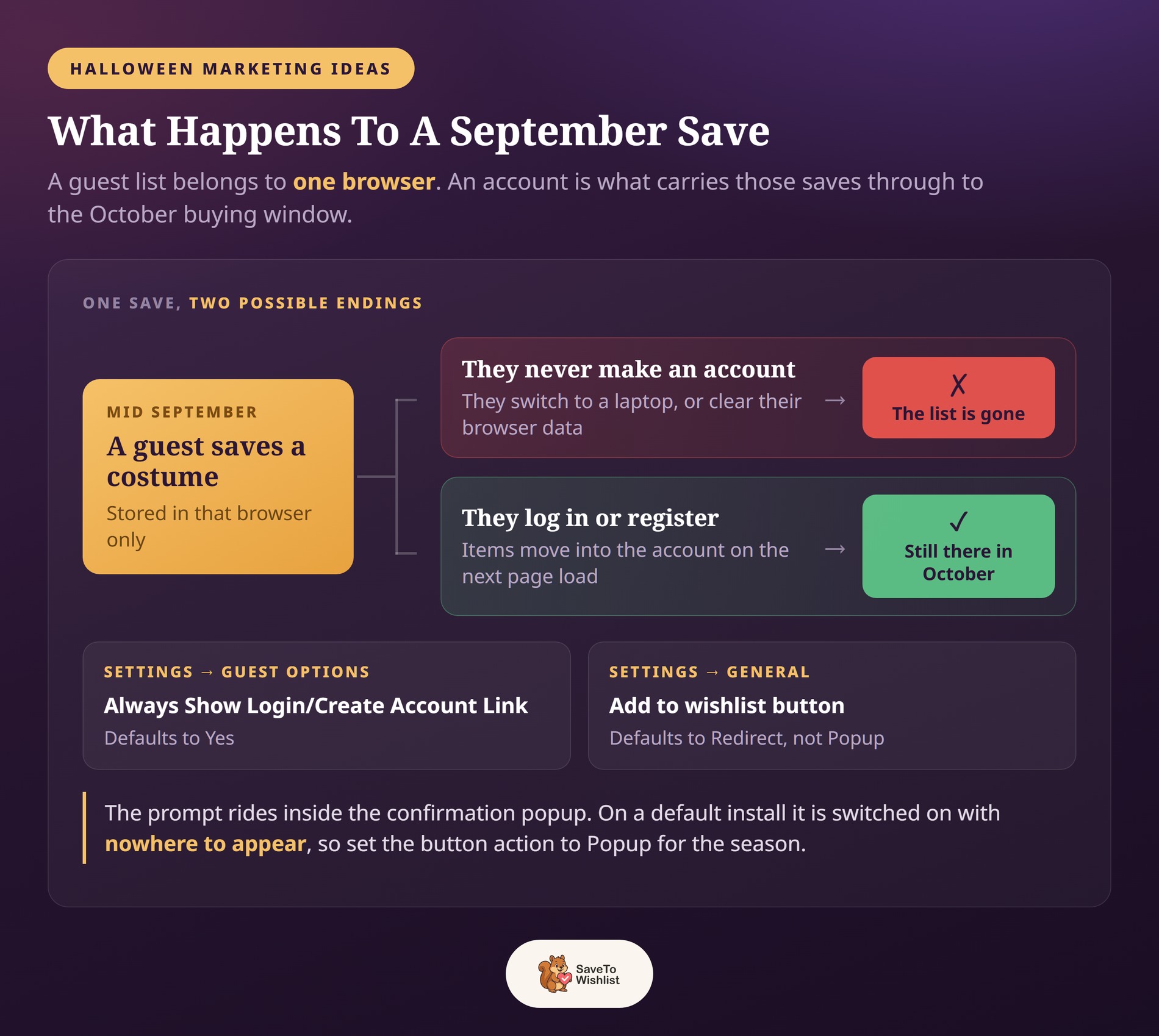
An account is what makes a September save last. Step one flagged the gap: a guest list belongs to one browser. When that guest logs in or registers, SaveTo Wishlist moves their saved items across automatically. The browser copy clears once the items land.
That migration runs on the next page load after they sign in. So the saves have to still exist at that moment. A shopper who wipes their browser in early October arrives with nothing to move.
That makes the account worth asking for in September, while the list is still intact. SaveTo Wishlist has a built-in prompt for exactly that.
Turn on the prompt that asks for the account
Go to SaveTo Wishlist → Settings → Guest Options. The setting called Always Show Login/Create Account Link defaults to Yes.
The catch is where that link lives. It rides inside the Add to Wishlist confirmation popup, so it only shows when the button opens a popup.
Under Settings → General, Add to wishlist button defaults to Redirect. On a default install the prompt is enabled but has nowhere to appear. Switch the action to Popup for the season and guests see it. The prompt reads “Login or create an account to get started.”
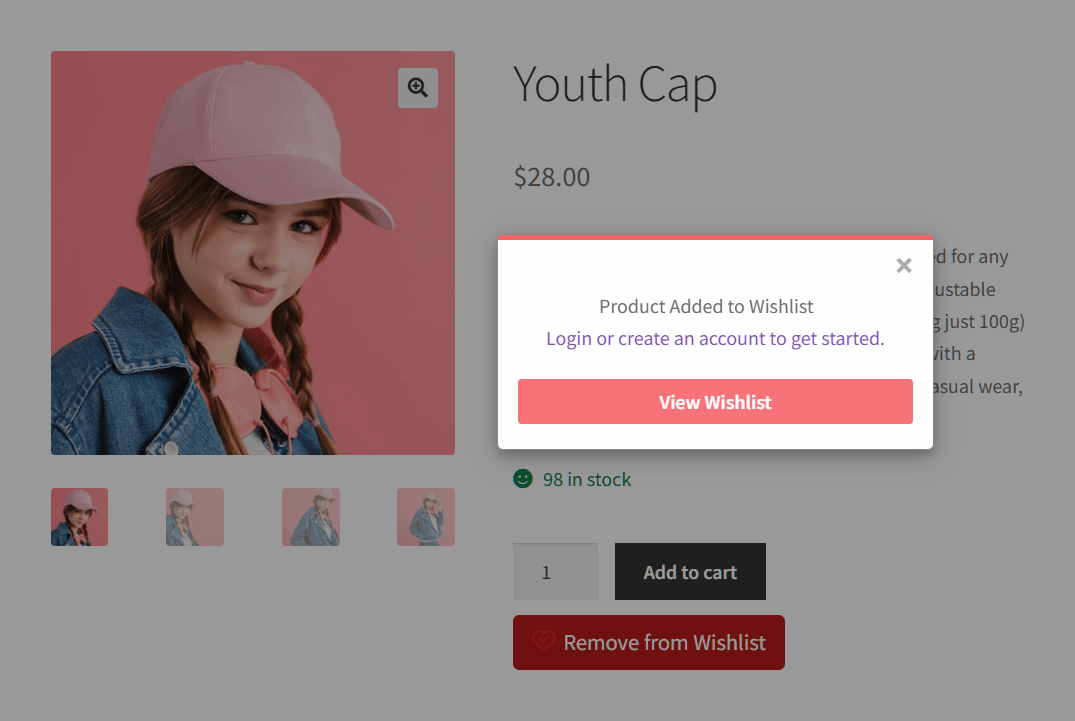
👻 What we’ve seen: Stores turn guest wishlists on, collect saves all September, then never ask for an account. It works until a shopper moves from their phone to a laptop and the list doesn’t follow. Setting the button action to Popup before your September traffic arrives turns anonymous saves into ones you can email.
Halloween Stock And Restock Timing
Halloween inventory has a hard expiry date. A costume that lands back in stock on November 2nd is next year’s problem. Every restock decision is really a calendar question.
Start by working out your last useful reorder date. Take October 31st and subtract your delivery window to the customer. Then subtract your supplier’s lead time and your own handling time.
Anything you reorder after that date can’t reach a buyer in time. It becomes a storage decision instead of a sales one.
Next, get your stock management settings to warn you while a reorder is still possible. These four settings live under WooCommerce → Settings → Products → Inventory:
- Low stock threshold defaults to 2. That’s workable most of the year and far too low in October. The email arrives when it’s already too late to reorder. Raise it on your seasonal products.
- Out of stock threshold defaults to 0. Its description notes the setting “does not affect existing ‘in stock’ products”, so changing it mid-season won’t fix anything retroactively.
- Hold stock (minutes) defaults to 60. Unpaid pending orders reserve inventory for that long before being canceled. On a busy weekend that can look like a sellout.
- Stock display format decides what shoppers see. Pick “Only show quantity remaining in stock when low”. You get honest scarcity without publishing your numbers all year.
On the product itself, Allow backorders? offers three choices: “Do not allow”, “Allow, but notify customer”, and “Allow”. With a fixed deadline, the middle option is the kinder one. It still takes the order, and it tells the shopper what they’re agreeing to.
Make sure your restock alerts actually fire
The back-in-stock automation in SaveTo Wishlist Pro fires on one specific event. A product’s stock status has to change from out of stock to in stock. If the product never flipped to out of stock, topping up the quantity sends nothing at all.
🕷️ What we’ve seen: Stores set the restock automation up in October, then top up stock before anything sells out. Nothing sends, and the automation looks broken when it’s behaving exactly as designed. It’s an easy one to miss. Take one product to zero and back in September so you see a real email before the rush.
Two more details worth knowing before October. The automation only emails individual customers when you put {customer_email} in the Email Address field. Leave that field blank and the email goes to your admin address.
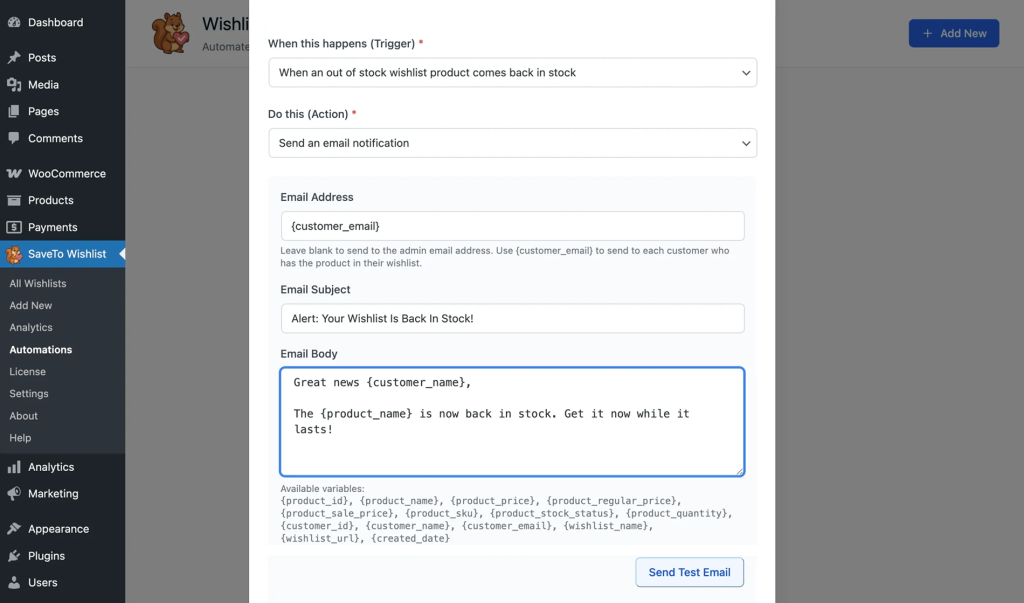
It also sends one email per wishlist entry. A shopper who saved the same costume to two lists receives two emails. Our guide to wishlist automation walks through the setup.
How Costume Sizes Change Your Restock Alerts
Costumes are almost always variable products, and that changes where the stock rules above apply. Each size carries its own stock number and its own status, set on the variation rather than the parent.
Open the product’s Variations tab and expand a size. Leave Manage stock? unticked and you set that size’s Stock status directly. Tick it and the size gets its own quantity and its own Allow backorders? choice instead.
So the restock rule from the last section gets evaluated per size, not once for the whole costume. A costume in five sizes has five separate stock statuses to track.
The backorder setting that quiets an alert
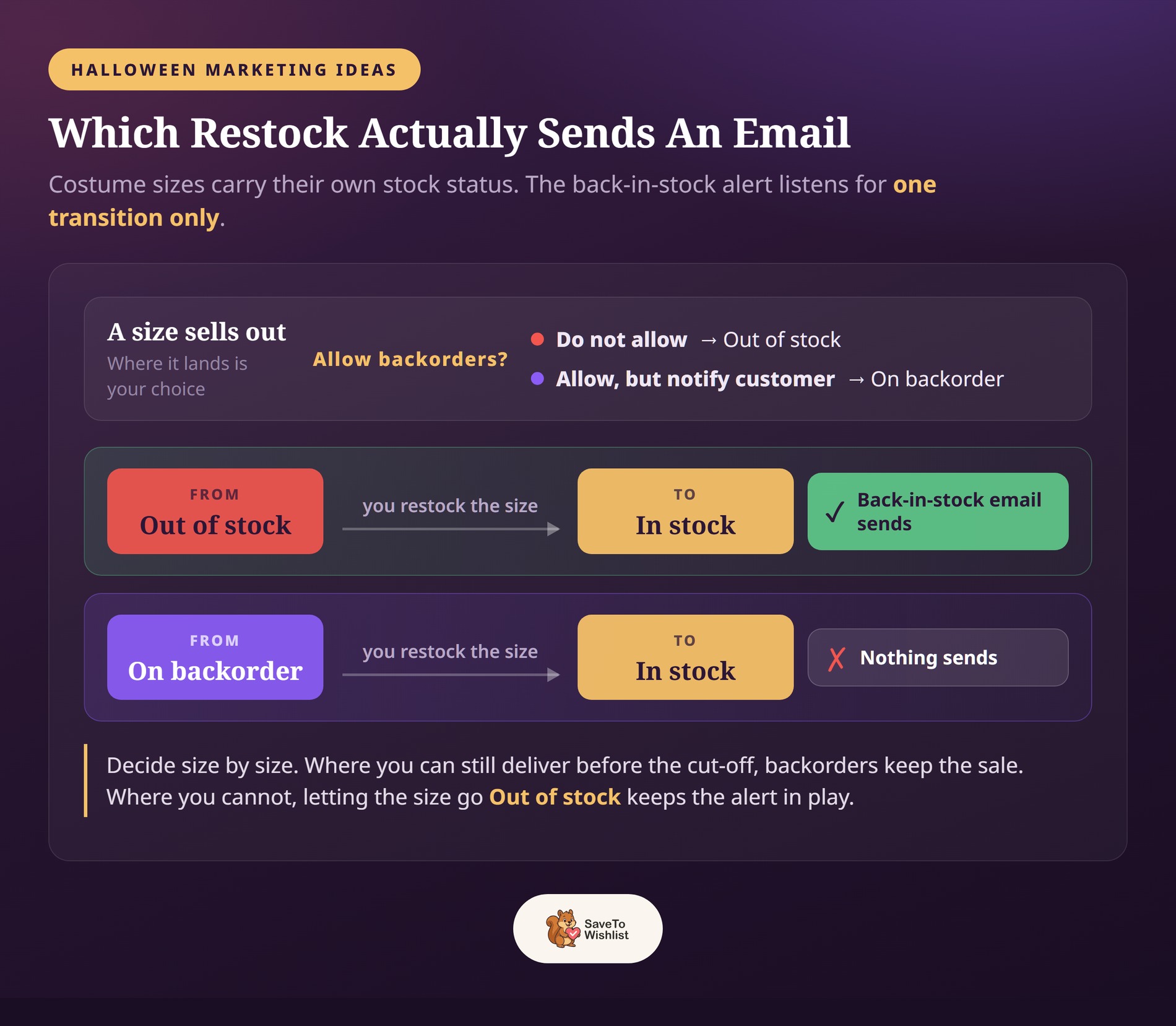
A size can sit in one of three stock statuses: In stock, Out of stock, or On backorder. Only one of the three feeds the restock trigger.
That matters for the backorder choice above. “Allow, but notify customer” keeps a sold-out size selling. That’s often right when you can still deliver before the cut-off.
But there’s a side effect. When a managed size runs out with backorders allowed, WooCommerce marks it On backorder rather than Out of stock. It then goes straight from On backorder to In stock, which isn’t the transition the automation watches.
I’d make the call per size. Where you can still deliver in time, backorders keep the sale. Where you can’t, letting the size go Out of stock keeps the alert in play.
💀 What we’ve seen: It’s easy to set backorders once and assume every size follows. A costume can have one size out of stock and another on backorder. The two behave differently when they come back, so check the statuses size by size in October.
How To Set Your Halloween Shipping Cut-Off
Telling shoppers to order by a certain date only helps if the date holds up. Here’s how to work out one you can stand behind.
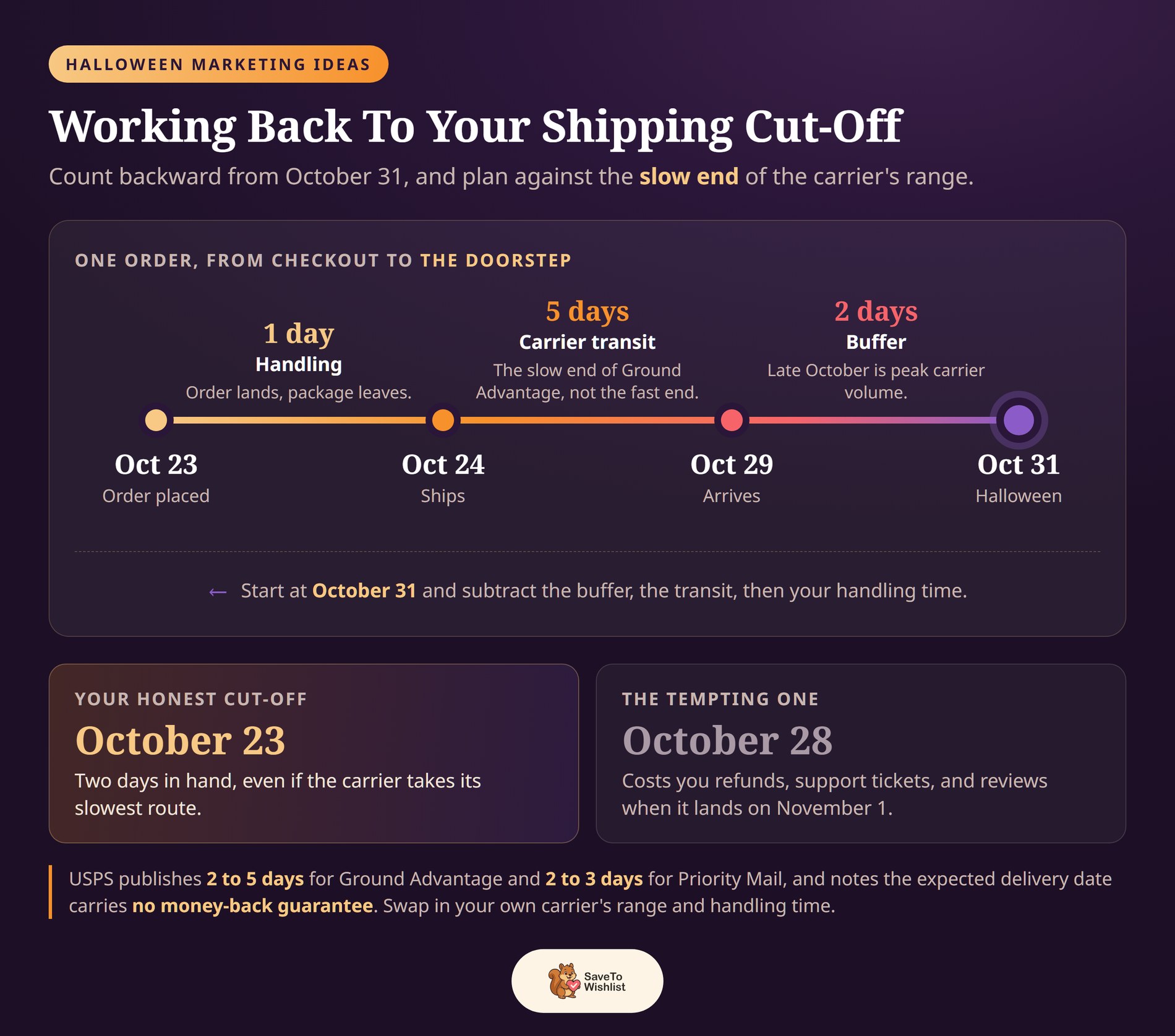
Start with the carrier’s published speed. USPS lists 2 to 5 days for Ground Advantage and 2 to 3 days for Priority Mail. USPS also notes that the expected delivery date carries no money-back guarantee. So plan against the slow end of the range, not the fast end.
Then add the parts that belong to you, counting backward from October 31st:
- Your handling time. That’s the gap between an order landing and the package leaving. One day is common, and two is realistic in your busiest week.
- The slow end of the carrier estimate. Use 5 days for Ground Advantage rather than 2, because the slow end is the one that generates complaints.
- A buffer of a day or two. Late October is peak volume for every carrier, and a costume is worthless the day after it’s needed.
Working out your cut-off date
So work that through for a store shipping Ground Advantage with one day of handling. An order placed on October 23rd ships on the 24th. At the slow end it arrives by the 29th, leaving two days in hand. That makes your honest cut-off the 23rd, not the 28th.
However, publishing the earlier date does cost you a handful of late orders. It also saves you the refunds, the support tickets, and the reviews that follow a costume arriving on November 1st.
Where to show the cut-off date
Two things make the date work harder. Put it in the same spot on every product page rather than only at checkout, because that’s where shoppers decide. And once the cut-off passes, move local pickup or an express option to the front of the page. That keeps the final week converting for the people who left it late.
Halloween Marketing Ideas That Work
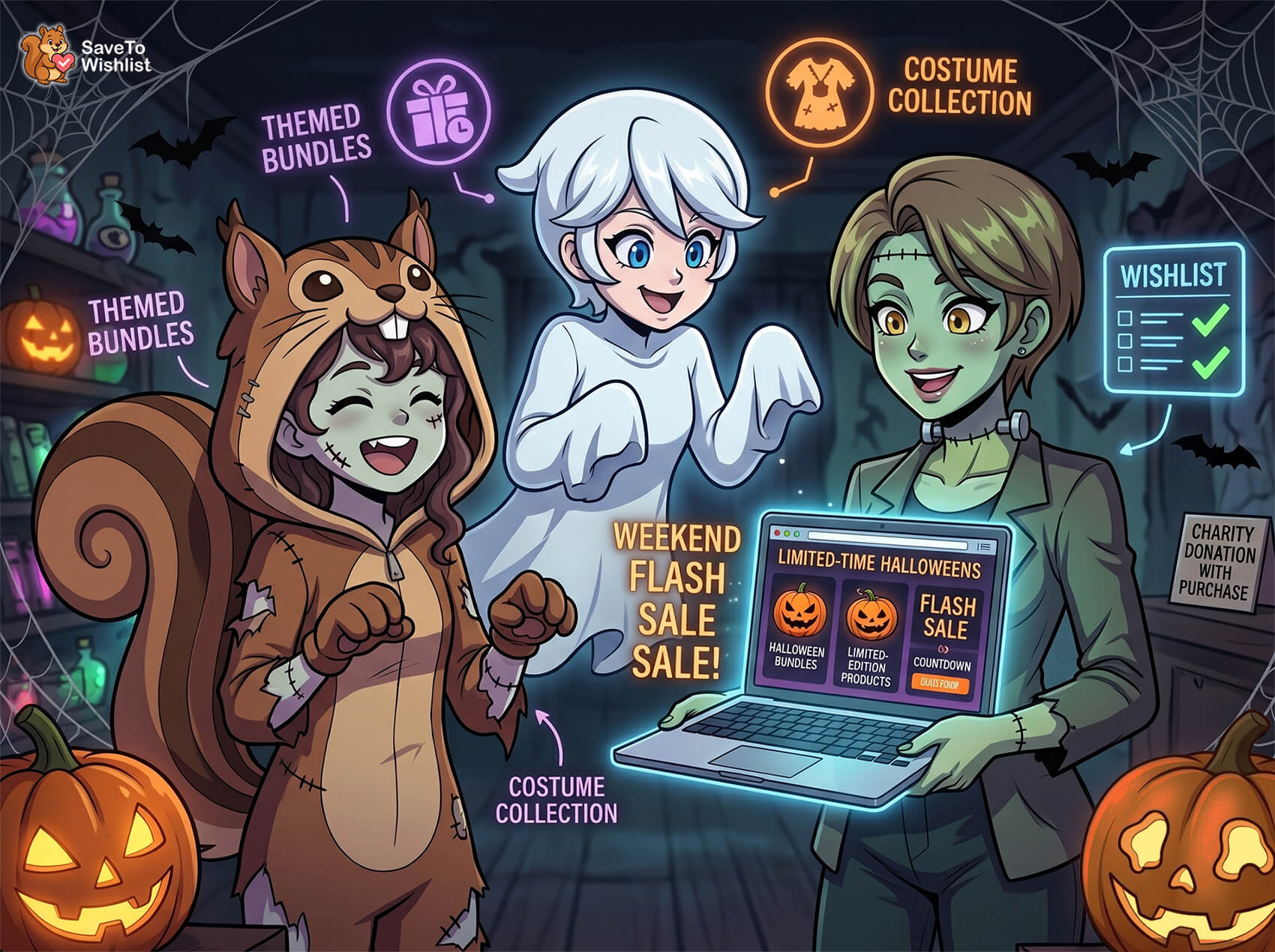
The spooky season is playful and impulse-driven, so themed presentation and honest urgency do most of the work. These six Halloween marketing ideas fit that shape.
- Create themed bundles and kits: costume, party, or pumpkin carving bundle discounts turn single buys into bigger baskets.
- Run limited-edition or seasonal products: scarcity and novelty suit the holiday and give shoppers a reason to buy now.
- Build party and costume categories: clear shopping paths help last-minute planners find everything fast.
- Schedule a weekend or midnight flash sale: short, themed deals match Halloween’s impulse energy.
- Send a themed email featuring saved items: remind shoppers of what they eyed before the date passes.
- Tie in a local event or charity: link a small donation or local event to each purchase. It earns goodwill and word-of-mouth that paid ads can’t buy in a crowded season.
In practice, a wishlist lets shoppers save the picks they’re weighing, and a timely alert nudges them before Halloween arrives.
How To Tell If Your Halloween Marketing Ideas Worked
You can’t tell which Halloween marketing ideas earned their keep without pulling the numbers. Halloween gives you an unusually clean measurement window, because the season starts and ends on fixed dates. Pull your numbers in the first week of November, while the comparison is still obvious.
In SaveTo Wishlist Pro, head to SaveTo Wishlist → Analytics. Four figures answer most of the question:
- Wishlisted Products and the Saves Over Time chart tell you whether the September capture worked. Switch that chart to 90D to see the whole run-up in one view.
- Overall Conversion Rate is the share of saved products that customers went on to buy.
- Purchased from Wishlist is the count sitting behind that rate.
- Avg. Time to Purchase is the one most stores skip, and it’s the one I’d check first.
Why average time to purchase matters most
That last figure earns its own explanation. Say your average save takes 18 days to turn into a purchase. A reminder sent on October 20th then arrives after the useful window has closed for most of that audience.
So compare that figure against the days left before the 31st. That tells you how early your final reminders have to go out.
Two limits to read around
That said, two limits shape what those numbers mean. SaveTo Wishlist counts a conversion when an order containing the saved product reaches completed, processing, or on-hold status. The purchase also has to come after the save.
The funnel also has no product views step, because the plugin doesn’t track views. Saves are the first action it can measure.
🦇 What we’ve seen: The Analytics screen refreshes on a background schedule. So it can lag a change you made an hour ago. There’s an Update Now button in the toolbar with a “Last updated” timestamp beside it. Click it and check the timestamp before you compare anything, and you’ll save yourself chasing a drop that never happened.
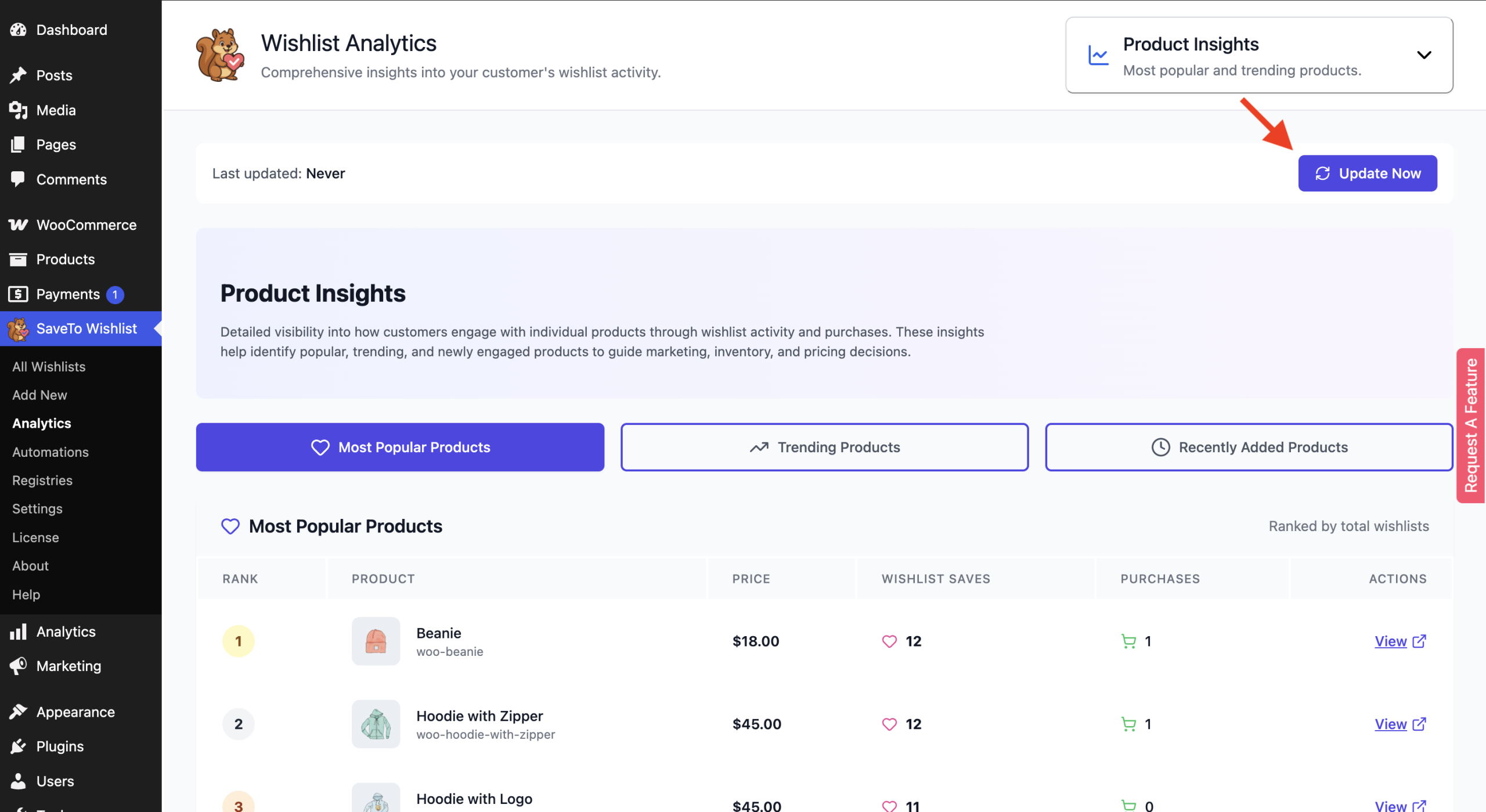
One thing to check first. On SaveTo Wishlist Lite, the Analytics screen shows a labeled demo view with sample data until Pro is installed. So confirm you’re looking at your own store’s figures before drawing any conclusions from them. Our guide to improving your wishlist conversion rate covers what to do once you have real numbers.
What To Do On November 1
Halloween doesn’t close your Q4. It opens it. What happens in the days right after October 31st decides how much of the season’s work carries forward.
Start with the stock you’re still holding. Themed inventory loses most of its value the moment the date passes, and what’s left turns into dead stock. The real question isn’t whether to discount it.
It’s whether to clear it now or store it for eleven months. Storage carries a cost you pay in every one of them.
Here’s the part that’s easy to miss. The price drop trigger in SaveTo Wishlist Pro fires when a product with active wishlisters has its sale price applied. So putting leftover Halloween stock on sale emails everyone who saved that item and didn’t buy it.
In practice that means you don’t need to build a separate clearance campaign. You need a sale price and an automation that’s already active.
Still, give that clearance an end date and schedule it. Deep Halloween discounts still running in mid November sit awkwardly next to your Christmas range. They also train shoppers to wait for the next markdown.
Then keep the audience you built. The shoppers who saved costumes in September proved something specific about themselves: they research early and buy later. That’s the same behavior Black Friday and Christmas run on.
So those saved items are the starting point for your next two campaigns. The Halloween marketing ideas worth repeating are the ones that leave you a warmer list than you started with.
Your Halloween Sale Checklist
- Get a guest-friendly wishlist live by early September.
- Set up back-in-stock and price-drop alerts on themed items.
- Show honest shipping cut-offs and real low-stock notes.
- Schedule deals and keep your product feed accurate.
- Plan a wishlist recovery email for abandoned carts.
Make This Halloween Your Best Yet
Halloween rewards the store that captures interest early and reaches shoppers before the deadline. Collect saves in September, alert savers on restocks and deals, and use the genuine urgency of the date to convert. Do that and spooky season becomes a strong start to your Q4.
- Work the four demand windows, capture demand early with a wishlist, and make those saves survive to October.
- Automate alerts on themed and limited items.
- Fix your restock timing before October, check each size’s stock status, and set a cut-off you can stand behind.
- Use honest urgency around the deadline.
- Promote and schedule your deals.
- Recover abandoned carts.
- Measure what worked, then carry the audience into November.
Ready to start implementing your Halloween marketing ideas and capturing demand during the spooky season? Get the free WooCommerce wishlist plugin and put a save button on every seasonal product. When you want the back-in-stock and price-drop automations, SaveTo Wishlist Pro adds them from the Growth plan up.
Frequently Asked Questions: Halloween Marketing Ideas
When should I start Halloween marketing?
Start running your marketing campaigns in early September. Shoppers research costumes and decor weeks ahead. An early wishlist captures that planning behavior and gives you a warm audience to convert as the date nears.
How do wishlists help with a Halloween sale?
Wishlists capture early interest in costumes and themed products before shoppers buy. Automated back-in-stock and price-drop alerts then bring those shoppers back at the right moment. That matters when items are limited and the deadline is fixed.
How do I handle Halloween stockouts?
Use back-in-stock notifications so shoppers who saved a sold-out item are alerted the moment it returns. With a hard deadline, recovering those shoppers quickly is the difference between a sale and a miss.
Is urgency appropriate for Halloween marketing?
Yes, because the urgency is real. Honest shipping cut-offs and genuine low-stock notes help shoppers act in time. That’s useful rather than pushy when the product is only relevant before October 31st.



