

 Reviewed by
 It’s a familiar scene during holiday inventory planning: WooCommerce store owners sitting at their desks, doing what most do—guessing. They analyze last year’s sales, scrutinize competitor trends, and ultimately just cross their fingers and hope for the best.
But when you look beyond standard sales numbers and dive into wishlist data, the answers are usually already sitting there. We saw this during a recent look at a growing store’s inventory. Hundreds of customers had been quietly showing exactly what they wanted to buy. Products that had racked up 200+ wishlist additions right before November were barely in stock. At the same time, items nobody had saved in months were eating up valuable warehouse space.
Most WooCommerce store owners track sales data obsessively but completely ignore the demand signals hiding in their wishlist analytics. In this guide, I’ll show you how to use that data from your WooCommerce wishlist plugin to predict product demand, spot seasonal patterns, identify price-sensitive products, and make smarter inventory decisions.
Table Of Contents
- Why Wishlist Data Is A Leading Indicator For Product Demand
- How To Identify High-Demand Products Before They Sell
- How To Detect Seasonal Demand Patterns From Wishlist Spikes
- How To Spot Price-Sensitive Products Using Wishlist Data
- How To Use Wishlists For Inventory Planning
- How To Validate New Products With Pre-Launch Wishlists
- FAQs: Wishlist Analytics WooCommerce
- Turn Your Wishlist Data Into Smarter Inventory Decisions
Why Wishlist Data Is A Leading Indicator For Product Demand
When looking at overall online shopping behavior, wishlist data captures purchase intent before it converts to a sale. That makes it a leading indicator, meaning it tells you what is likely to happen next, not what already happened.
Sales data is backward-looking by nature. It tells you what sold last month, last quarter, or last year. That’s useful, but it’s history. Wishlist data, on the other hand, shows you what customers want right now and haven’t bought yet. The gap between “wishlisted” and “purchased” is where actionable demand intelligence lives.
Think about what a wishlist addition actually means. A shopper found your product and liked it enough to click the wishlist icon, perhaps even sorting it into multiple wishlists for different occasions, but didn’t buy it yet. That’s a clear signal: demand exists for this product. The question becomes why they didn’t convert, and what it would take to push them over the line.
When you track advanced wishlist analytics over time, patterns emerge. Products with growing wishlist additions are trending upward. Products with declining wishlist interest may be losing relevance. Moreover, products with high wishlists but low purchases likely have a conversion barrier you can fix.
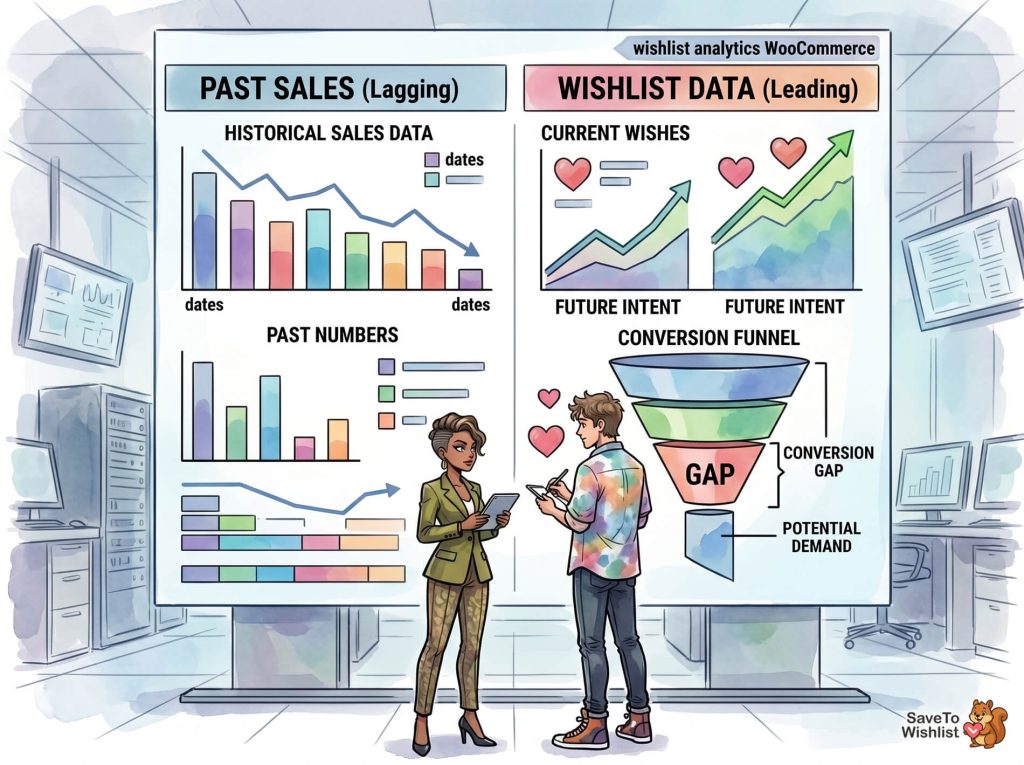
🔍️ What we’ve seen: Store owners track sales data obsessively but completely ignore their WooCommerce wishlist data. This happens even though wishlists are one of the clearest signals of future demand. The stores that start monitoring wishlist trends alongside sales data consistently make better stocking and promotion decisions.
How To Identify High-Demand Products Before They Sell
The most immediately useful insight from wishlist analytics is identifying which products have high demand that hasn’t converted to sales yet. Here’s how to spot them.
Look at wishlist addition velocity
Don’t just look at total wishlist counts. Look at the rate of new additions over time. A product that gets 5 new wishlist adds per day is trending differently than one that got 50 adds six months ago and nothing since.
Accelerating velocity (more adds this week than last week) is a strong signal that demand is building. This is especially valuable for seasonal products or items you’re promoting through content or social media.
Compare wishlist count to purchase count
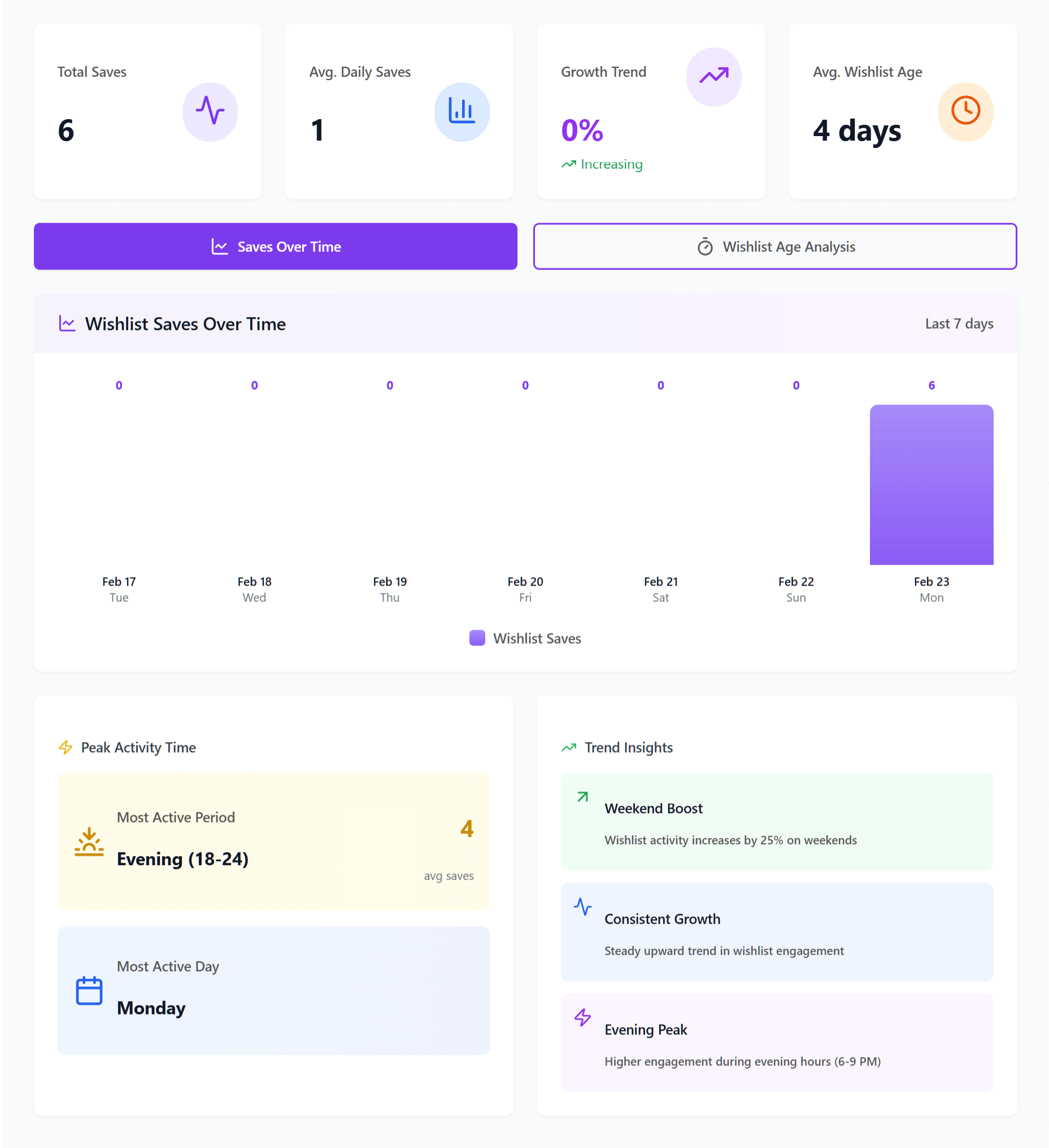
The ratio between wishlist additions and purchases tells you something specific about each product:
- High wishlists, high purchases: Your bestseller. Keep it stocked.
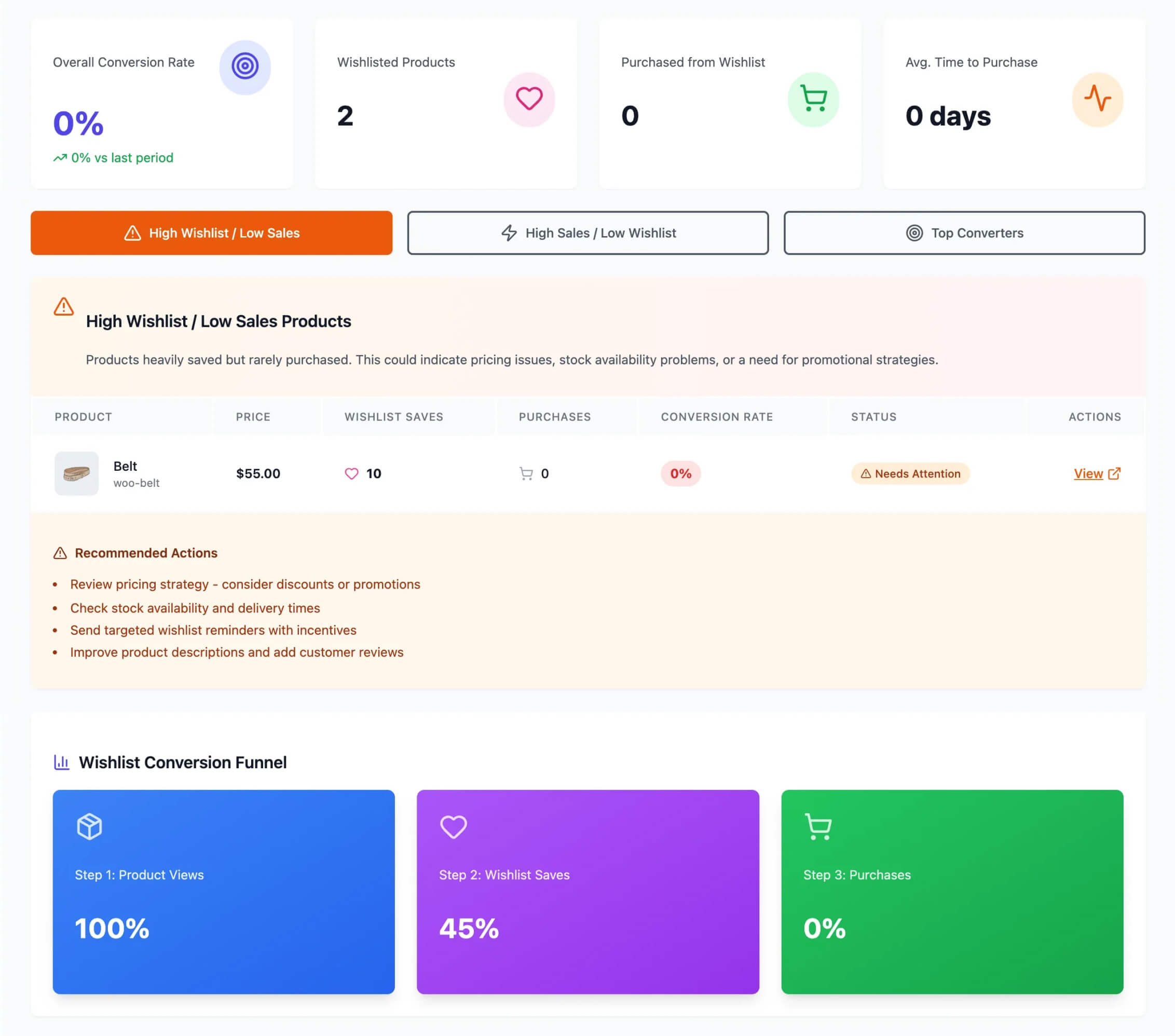
- High wishlists, low purchases: Demand exists, but something is blocking conversion. This could be price, availability, unclear product information, or checkout friction that leads to high cart abandonment rates.
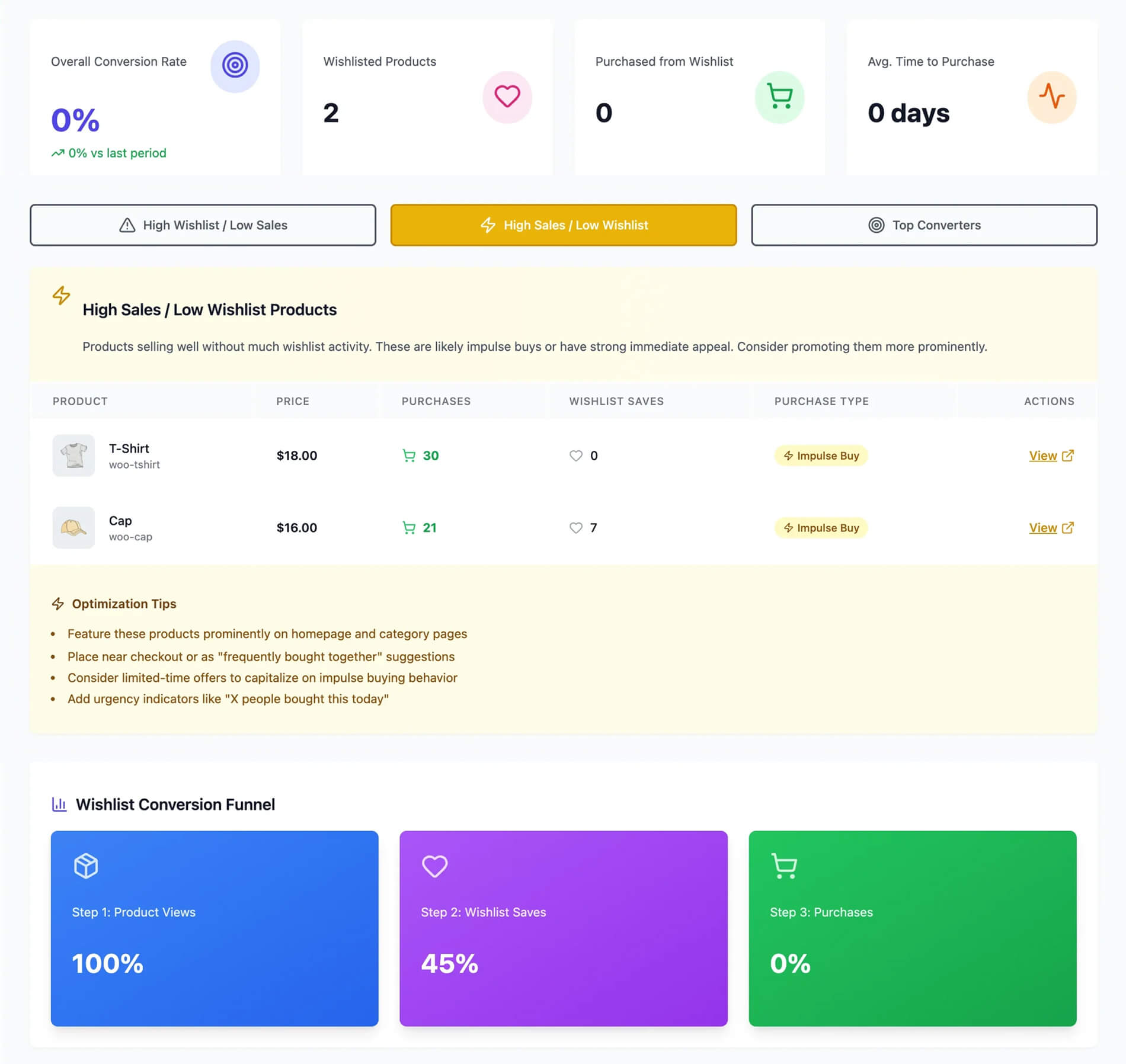
- Low wishlists, high purchases: An impulse buy or necessity purchase. Less dependent on consideration-stage marketing.
- Low wishlists, low purchases: Either low demand or poor product visibility.
The second category is where the biggest opportunities hide. These are products people want but aren’t buying, and that gap often has a fixable cause.
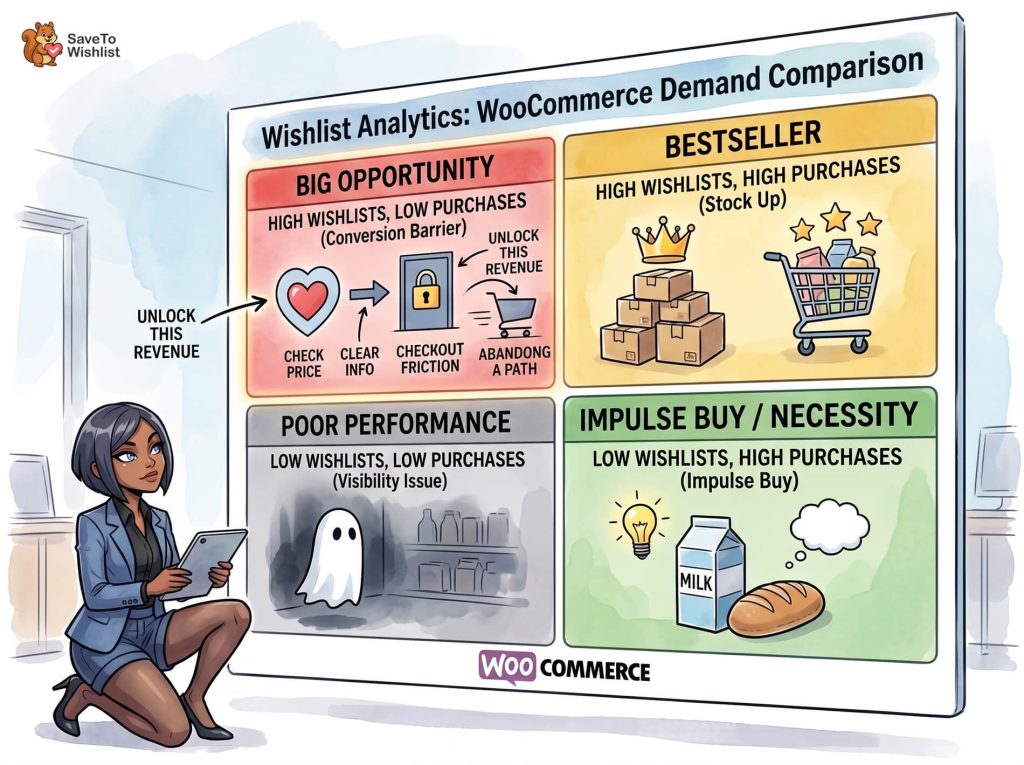
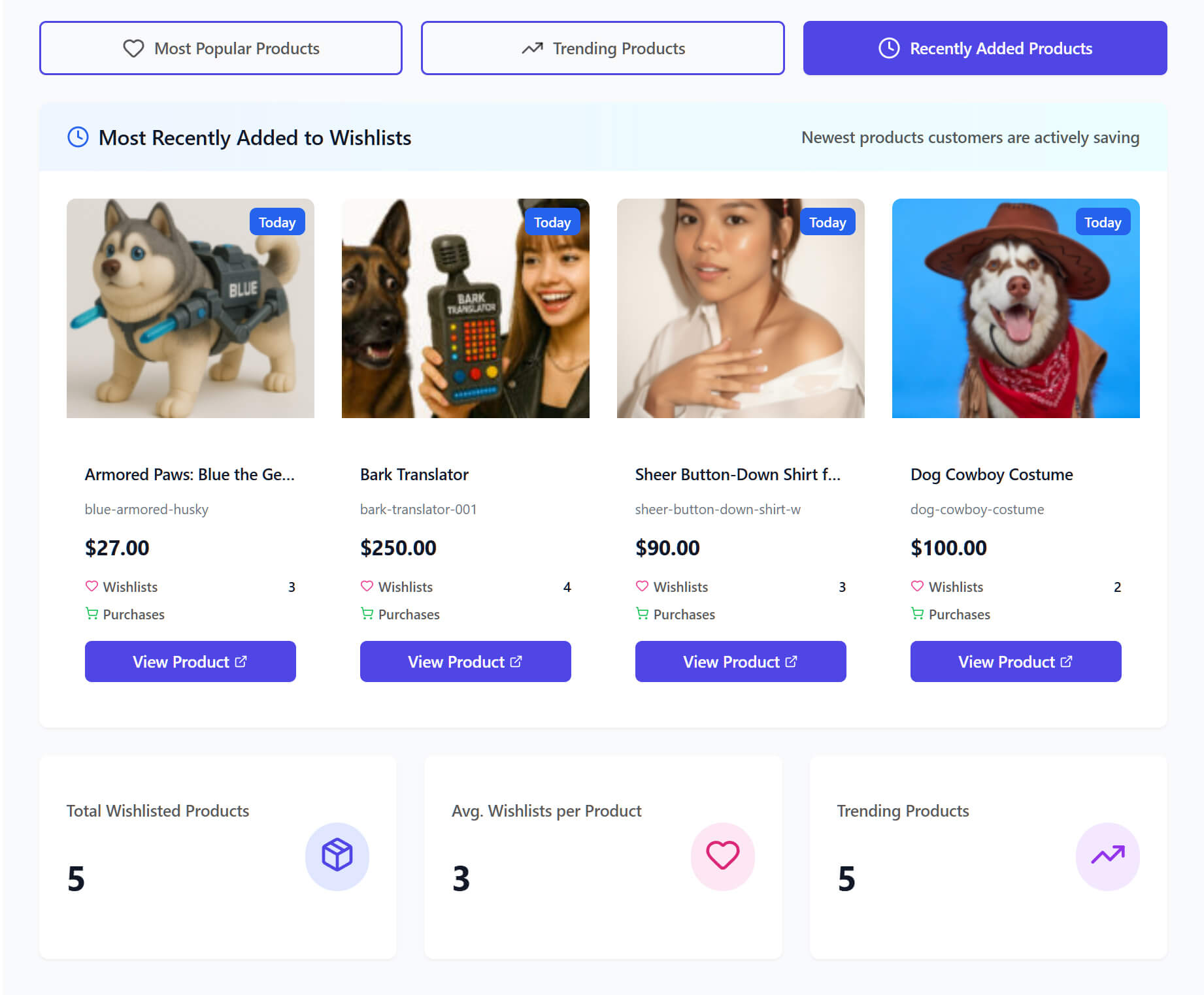
SaveTo Wishlist Pro surfaces these patterns through its analytics dashboard, showing you which products are being wishlisted most frequently and how those numbers change over time. Instead of pulling data from multiple sources and building spreadsheets, you get the demand picture in one place.
How To Detect Seasonal Demand Patterns From Wishlist Spikes
Sales data shows you seasonal peaks after they happen. Wishlist data shows you seasonal peaks while they’re building, which gives you time to prepare.
Track wishlist additions over time, not just snapshots
A simple list of your most popular products is only mildly interesting. However, a trend line showing wishlist additions over weeks and months is genuinely useful. You’re looking for recurring patterns that align with seasons, holidays, or events relevant to your product category.
Here’s what this looks like in practice (example data):
Suppose you sell home goods. In late October, you notice wishlist additions for cozy blankets and candle sets start climbing. By early November, those products have 3x their normal weekly wishlist rate. That’s your signal to stock up, prepare product bundles, and plan your holiday email campaigns around those specific products.
Use wishlist spikes as promotion timing signals
When wishlist additions spike for a product or category, that’s the perfect time to send promotional emails. The demand is already there, so a targeted offer works very well. A price drop alert or a limited-time offer converts wishlist intent into purchases while interest is high.
This timing advantage is something sales data alone can’t give you. By the time sales data shows a seasonal trend, you’re already in the middle of it. Wishlist data gives you a 2-4 week head start on many seasonal patterns, which matters for inventory ordering, promotion planning, and email campaign scheduling.
How To Spot Price-Sensitive Products Using Wishlist Data
When a product has a high wishlist count but a low purchase rate, price sensitivity is one of the first things to investigate. Checking your wishlist analytics WooCommerce dashboard gives you indirect but reliable signals. It shows you which products are priced higher than what customers want to pay.
High wishlist, low conversion: the price signal
If a product gets wishlisted frequently but rarely purchased, customers are telling you something. They want the product, but something is stopping them. While it’s not always price (it could be shipping costs, availability, or product information gaps), price is the most common blocker for wishlisted-but-not-purchased items.
Pay special attention to products that get wishlisted by the same users repeatedly. A customer who adds the same item to their wishlist multiple times or keeps returning to check on it is likely waiting for a price change.
Connect price drop alerts to conversion
This is where wishlist price drop alerts become a demand forecasting tool, not just a marketing feature. When you drop the price on a heavily wishlisted product and send automated price drop notifications, the conversion rate of those notifications tells you how price-sensitive that product’s demand is.
A high conversion rate on price drop alerts means the product was too expensive at its original price point for a significant portion of interested buyers. A low conversion rate means price wasn’t the real barrier, so you should investigate other factors like product descriptions, images, or shipping costs.
Over time, this creates a feedback loop: wishlist data identifies potentially price-sensitive products, price drop alerts test that hypothesis, and the conversion data confirms or disproves it. That’s demand intelligence you can use for pricing strategy across your entire catalog.
Want to know more about SaveTo Wishlist Pro’s automated price drop alerts? Then check out our extensive guide:
How To Set Up Wishlist Price Drop Alerts In WooCommerce (Complete Guide)
How To Use Wishlists For Inventory Planning
Data from a WooCommerce wishlist plugin connects directly to inventory decisions in ways that most store owners have not considered.
Stock up on high-wishlist products before promotions
If you are planning a sale, a holiday promotion, or a flash deal, check your most popular products with the highest wishlist counts first. Those are the products most likely to see a surge in purchases when the price drops or the promotion goes live. Running out of stock on your most-wishlisted items during a sale is leaving the easiest revenue on the table.
Use low-wishlist data for clearance decisions
Products with consistently low wishlist activity over several months may be candidates for clearance, repositioning, or discontinuation. If nobody is even saving a product for later, demand is genuinely low, and your warehouse space or marketing budget might be better spent elsewhere.
Connect wishlist trends to reorder timing
Rather than reordering stock based only on current inventory levels and past sales, add wishlist trend data to your reorder calculation. This is very helpful when customers use multiple wishlists to plan big purchases over time. A product with rising wishlist additions may need to be reordered sooner and in larger quantities than its sales history alone would suggest.
Wishlist automation through SaveTo Wishlist Pro can help here by surfacing products that cross specific wishlist thresholds, giving you trigger points for inventory decisions instead of relying on manual checks.
How To Validate New Products With Pre-Launch Wishlists
One of the most underused applications of wishlist data is validating demand for products before you fully commit to stocking them.
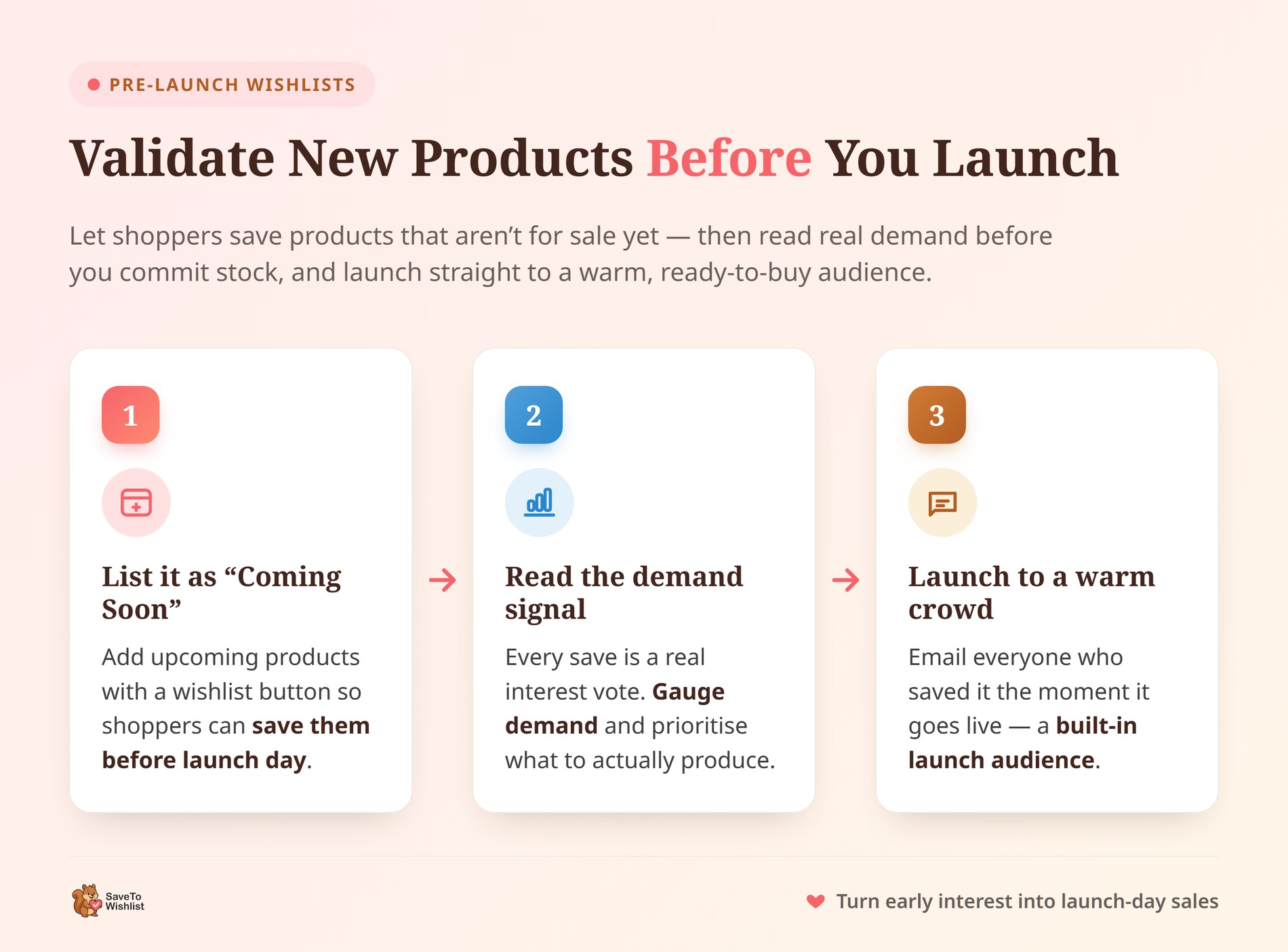
Add upcoming products as “coming soon” with wishlists enabled
Before a product launches, create the product page in WooCommerce with a “coming soon” status. Then, make sure the wishlist button is turned on so interested shoppers can save the item. This lets interested shoppers save the item to their wishlist, giving you a direct measure of pre-launch interest.
The wishlist count becomes your pre-launch demand gauge. If a product accumulates 100 wishlist additions before it’s even available, you have strong evidence that your initial order should be substantial. If it barely gets noticed, you might start with a smaller batch.
Set decision thresholds
Create simple rules for yourself based on wishlist data. For example, if a product gets more than X wishlist additions in the first two weeks of its “coming soon” page, increase the initial order by 25%. If it gets fewer than Y additions, keep the initial order conservative.
These rules will change depending on your store’s size and traffic, but the main idea stays the same. Data from your WooCommerce wishlist plugin gives you a real demand signal to base stocking decisions on, rather than just a gut feeling.
You can also send promotional emails to everyone who saved the product the moment it goes live. This creates a built-in launch audience of people who have already showed interest.
Eager for more information about how wishlist data can tell you about customer intent? Then head on over to the following article:
Ecommerce Analytics: How To Use Wishlist Data To Uncover Customer Intent In WooCommerce
FAQs: Wishlist Analytics WooCommerce
Can wishlist data really predict product demand?
Yes. A wishlist for WooCommerce provides valuable data: a powerful predictive signal that captures clear purchase intent. A wishlist addition means a customer found your product, liked it, and saved it for future purchase. While not every wishlisted item converts to a sale, trends in wishlist additions closely correlate with future sales patterns, especially when tracked over weeks and months.
What’s a good wishlist-to-purchase conversion rate?
There’s no universal benchmark since it varies significantly by product category, price point, and how actively you follow up with wishlist users. However, stores that use automated follow-ups like price drop alerts and back-in-stock notifications generally see higher conversion rates from wishlists than stores that treat wishlists as passive features.
How often should I review wishlist analytics?
For stores using a WooCommerce wishlist plugin, a weekly review of wishlist trends is enough to catch meaningful patterns. During key selling seasons (holidays, back-to-school, product launches), increase that to daily checks. The goal is to spot trend changes while you still have time to act on them, whether that means adjusting inventory, launching a promotion, or changing a price.
Do I need a paid plugin to access wishlist analytics?
The free version of SaveTo Wishlist gives you unlimited wishlists, guest wishlists, and core wishlist functionality. For the analytics and reporting features that power demand forecasting (dashboards, trend tracking, product-level insights), you’ll need SaveTo Wishlist Pro. The Growth plan starts at $49.50 for the first year, then $99/year for a single site.
How do price drop alerts connect to demand forecasting?
Price drop alerts convert wishlist interest into purchases when the price changes. The conversion rate on those alerts tells you how price-sensitive a product’s demand is. High conversion on price drop notifications means price was the main barrier; low conversion means something else is blocking the sale. Over time, this data helps you set smarter prices across your catalog.
Why do customers make multiple wishlists?
Customers often create multiple wishlists to organize items for different events, like birthdays or holidays. Tracking these lists helps you understand specific shopper goals.
Turn Your Wishlist Data Into Smarter Inventory Decisions
Your customers are already telling you what they want to buy, and a good wishlist analytics WooCommerce setup helps you listen.
Wishlist analytics transform a passive feature into a demand forecasting tool that helps you stock the right products, price them correctly, and time your promotions for maximum impact.
Here’s what to put into practice:
- Use wishlist data as a leading indicator instead of relying only on backward-looking sales data
- Identify high-demand products early by tracking wishlist addition velocity and wishlist-to-purchase ratios
- Detect seasonal patterns before they peak by monitoring wishlist trends over time
- Spot price-sensitive products and use price drop alerts to test and convert that demand
- Plan your inventory using wishlist trends to know when to reorder, stock up for sales, and find clearance items.
- Validate new products before launch by measuring pre-launch wishlist interest
SaveTo Wishlist Pro gives you the analytics dashboard, price drop alerts, and automation tools to turn wishlist data into real demand intelligence. Plans start at $49.50 for the first year, then $99/year with a 14-day money-back guarantee. See pricing and features to find the right plan for your store.



