
Running your email marketing on Mail Mint? SaveTo Wishlist can feed wishlist activity straight into it, so you can build campaigns around what your customers actually want. There are two ways to connect the two, and this guide covers both plus how to pick between them.
Before you start
- Mail Mint installed and active.
- SaveTo Wishlist active.
- For the webhook method, SaveTo Wishlist Pro. The tag sync works without it.
- A logged-in customer to trigger the first event, since a contact needs an email address.
Which method should you use?
Automatic tag sync needs no setup at all. Once both plugins are active, SaveTo tags your Mail Mint contacts as wishlist events happen. Use it when you just want contacts tagged so you can segment on them.
Webhook automation is a Pro feature and gives you control. You choose which event fires, and SaveTo sends a JSON payload to Mail Mint with the customer and wishlist details. Use it when you want to pass data through, not just a tag.
The two work independently. Running both is fine.
Method 1: automatic tag sync
This runs on its own. There is nothing to configure in SaveTo Wishlist.
When a logged-in customer acts on a wishlist, SaveTo creates or updates their Mail Mint contact and adds a tag matching the event. Tags are created automatically the first time each event happens.
| Tag | Applied when |
|---|---|
| Wishlist – Product Added | A product is added to a wishlist |
| Wishlist – Product Removed | A product is removed from a wishlist |
| Wishlist – Saved | A customer saves a wishlist |
- Confirm both Mail Mint and SaveTo Wishlist are active.
- As a logged-in customer, add a product to a wishlist to generate the first event.
- In Mail Mint, go to Contacts > Tags and confirm the wishlist tags appear.
- Create a Mail Mint automation that starts when one of these tags is applied, then add your follow-up steps.
Method 2: send wishlist events with a webhook
SaveTo Wishlist Pro can post wishlist events to Mail Mint’s inbound webhook. A built-in quick start fills in the method, headers and payload for you, so there is no code to write.
- In Mail Mint, create an inbound webhook and copy its URL.
- In WordPress, go to SaveTo Wishlist > Automations and create an automation.
- Pick a trigger under When this happens (Trigger).
- Set Do this (Action) to Call a webhook.
- Set Quick start (optional) to Mail Mint.
- Paste your webhook URL into Webhook URL.
- Save the automation.
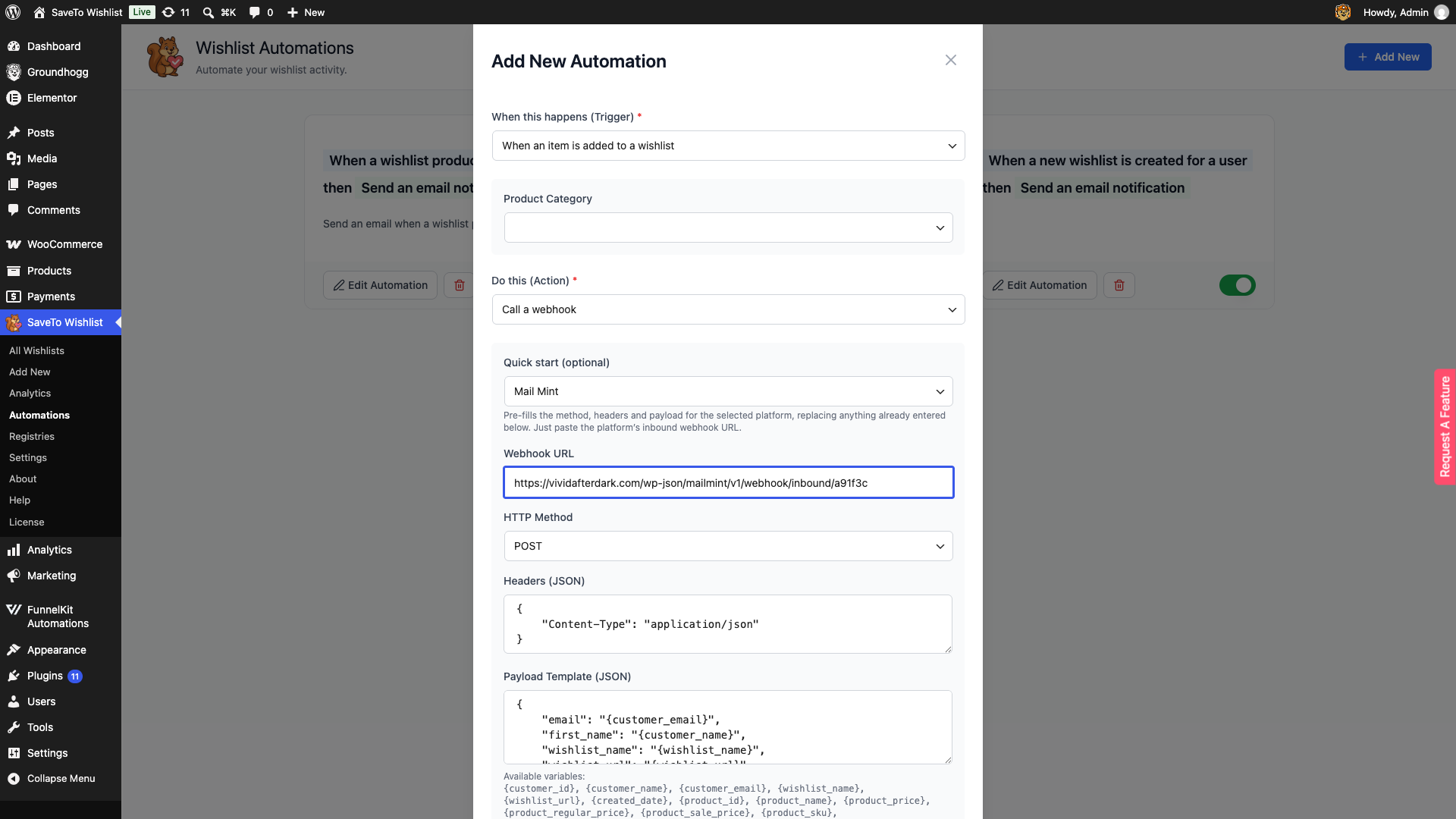
Choosing Mail Mint sets HTTP Method to POST, adds a Content-Type: application/json header, and writes a ready-made payload. It replaces anything already entered in those fields, so pick the quick start before you customise them.
Triggers the Mail Mint quick start supports
The quick start is offered on three triggers:
- When a new wishlist is created for a user
- When an item is added to a wishlist
- When an item is removed from a wishlist
It is not offered on When a wishlist product goes on sale or When an out of stock wishlist product comes back in stock. Those two triggers work across a list of wishlists rather than one customer, so the customer details in the payload have nothing to resolve to. Use the email action for those instead.
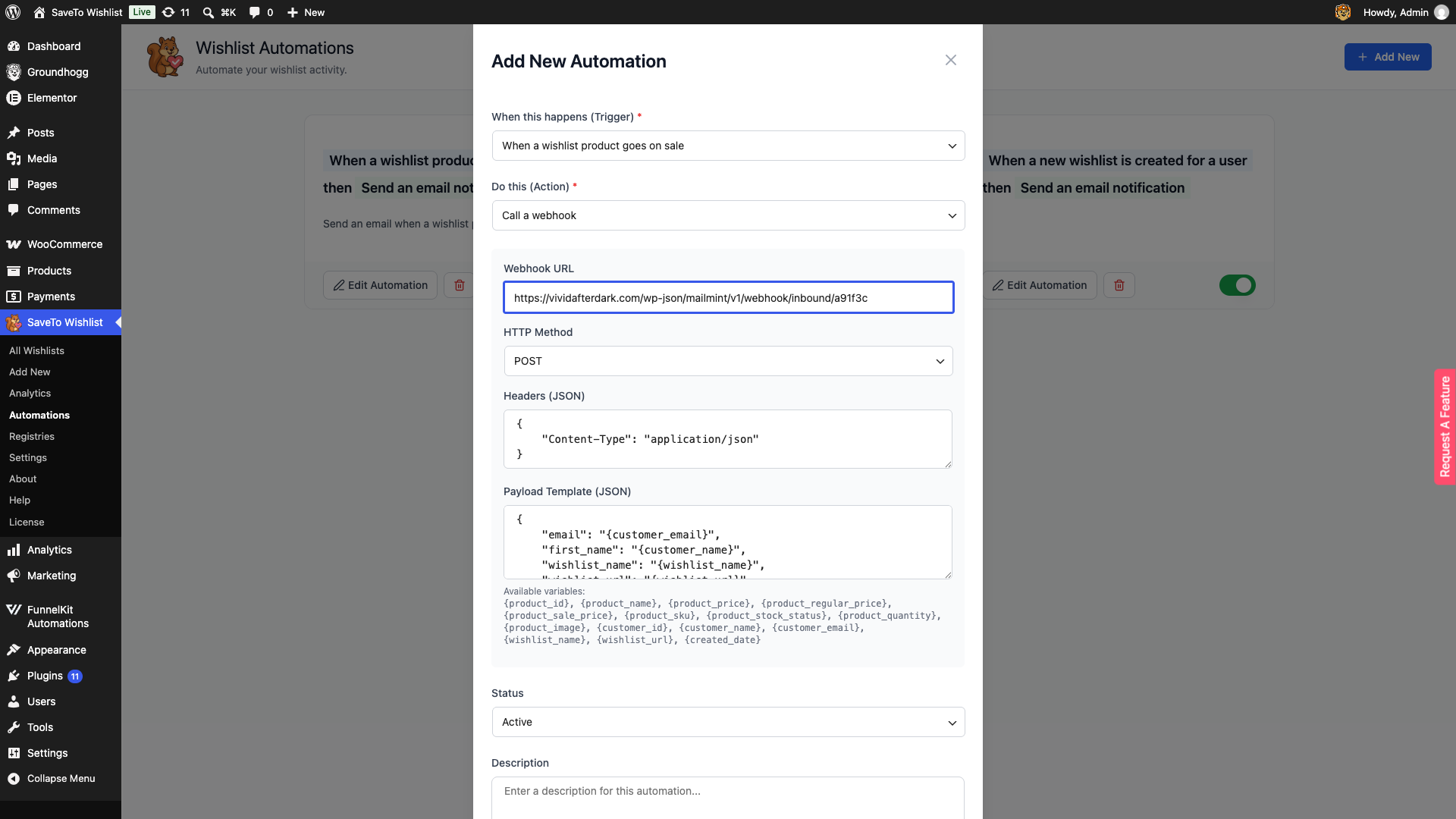
Available placeholders
The Mail Mint payload uses these variables. Each resolves per customer when the automation runs.
| Placeholder | Resolves to |
|---|---|
{customer_email} | The customer’s email address, used to match or create the Mail Mint contact |
{customer_name} | The customer’s name, mapped to the contact’s first name |
{wishlist_name} | The name of the wishlist that triggered the event |
{wishlist_url} | A link to that wishlist |
You can edit Payload Template (JSON) after applying the quick start to add or remove fields.
Frequently asked questions
Do I need to configure anything for the tag sync?
No. As long as Mail Mint and SaveTo Wishlist are both active, the tag sync runs on its own.
Are guests synced?
No. Only logged-in customers with an email address are added as contacts, because a contact needs an email address.
Can I rename the tags?
The default names are in the table above. A developer can change them with the stwlite_mailmint_event_tags filter.
Can I use the tag sync and a webhook automation together?
Yes. They are independent. The tag sync tags contacts as events happen, and a webhook automation posts a payload for the specific trigger you chose.
Why is the Mail Mint quick start missing on some triggers?
It appears only on the three customer-scoped triggers listed above. The on-sale and back-in-stock triggers run across a list of wishlists, so the customer variables in the payload cannot resolve.
Need help?
If you have a question or run into any issues, we’re here to help.
- Premium users: Open a support ticket
- Free users: Visit our community forum

