


 Reviewed by
Store owners comparing free wishlist plugins often end up in forum threads. They ask each other what the plugin listings leave out. That’s a useful clue. The listings answer “what does it look like?”, while buyers want to know what happens after a shopper clicks save.
So if you’re weighing up a WishSuite alternative, this article follows those buyer questions, not a feature grid. WishSuite is a free wishlist plugin from HT Plugins, the team also known as HasThemes.
One note before we start. We tested SaveTo Wishlist Lite 1.1.1 on a staging store for this article. We didn’t install WishSuite, so its details come from its public plugin listing and its plugin code.
Jump to:
The Questions Store Owners Actually Ask

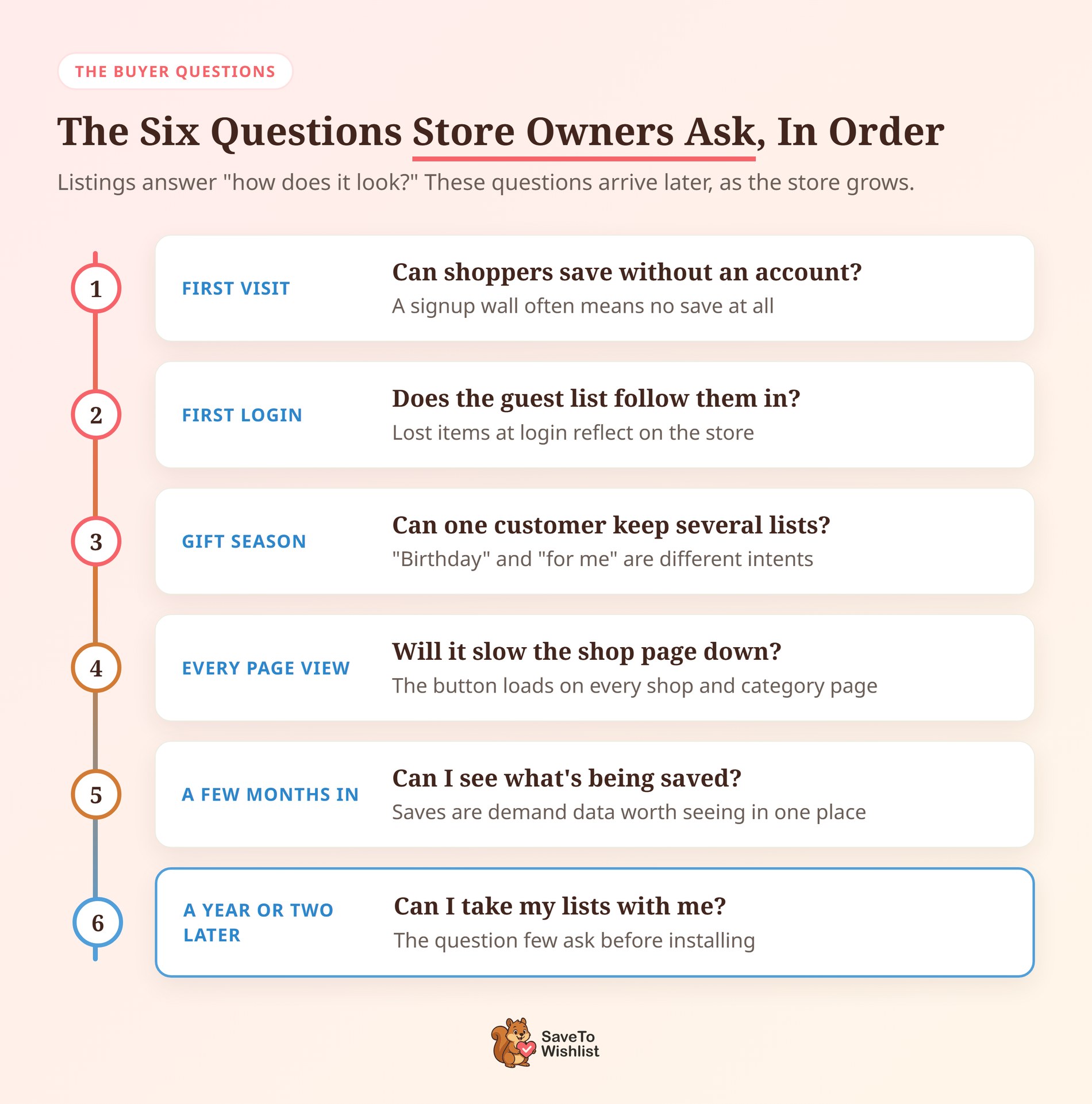
Store owners shopping for a wishlist plugin ask about behavior, not feature counts. Every listing promises “add to wishlist,” but forum discussions focus on what happens next.
These are the questions that come up most often:
- Can shoppers save without an account? Asking for a signup before the first save often means the save never happens. That’s why guest support is the first filter many store owners apply.
- What happens to a guest list when that shopper logs in later? If saved items disappear at login, the customer notices, and it reflects on the store.
- Can one customer keep more than one list? “Birthday”, “Kitchen reno” and “Buy in January” are three different intents. One flat list mixes them together.
- Will it slow the shop page down? The button renders on every product tile in the loop. So whatever the plugin loads, it loads on every shop and category page.
- Can I see what’s being saved? Saves are demand data. They’re far more useful when you can see them in one place, not only inside customer accounts.
- What happens to saved lists if I switch plugins? Few people ask this before installing. It tends to come up a year or two later.
That last one deserves extra attention. The most useful forum replies often come from owners who picked a plugin and now want to move. Our roundup of WooCommerce wishlist plugins covers the wider field, while this article stays on the two-way comparison. Any WishSuite alternative worth your time should answer all six questions, not just the first.
What WishSuite Answers Well
WishSuite answers the presentation questions well, and it does so at no cost. Its plugin directory listing shows version 1.5.10 with around 1,000 active installations. It’s been listed since February 2021 and was last updated on 27 August 2026, so it’s actively maintained. For a free plugin, that update cadence tells you more than the install count does.
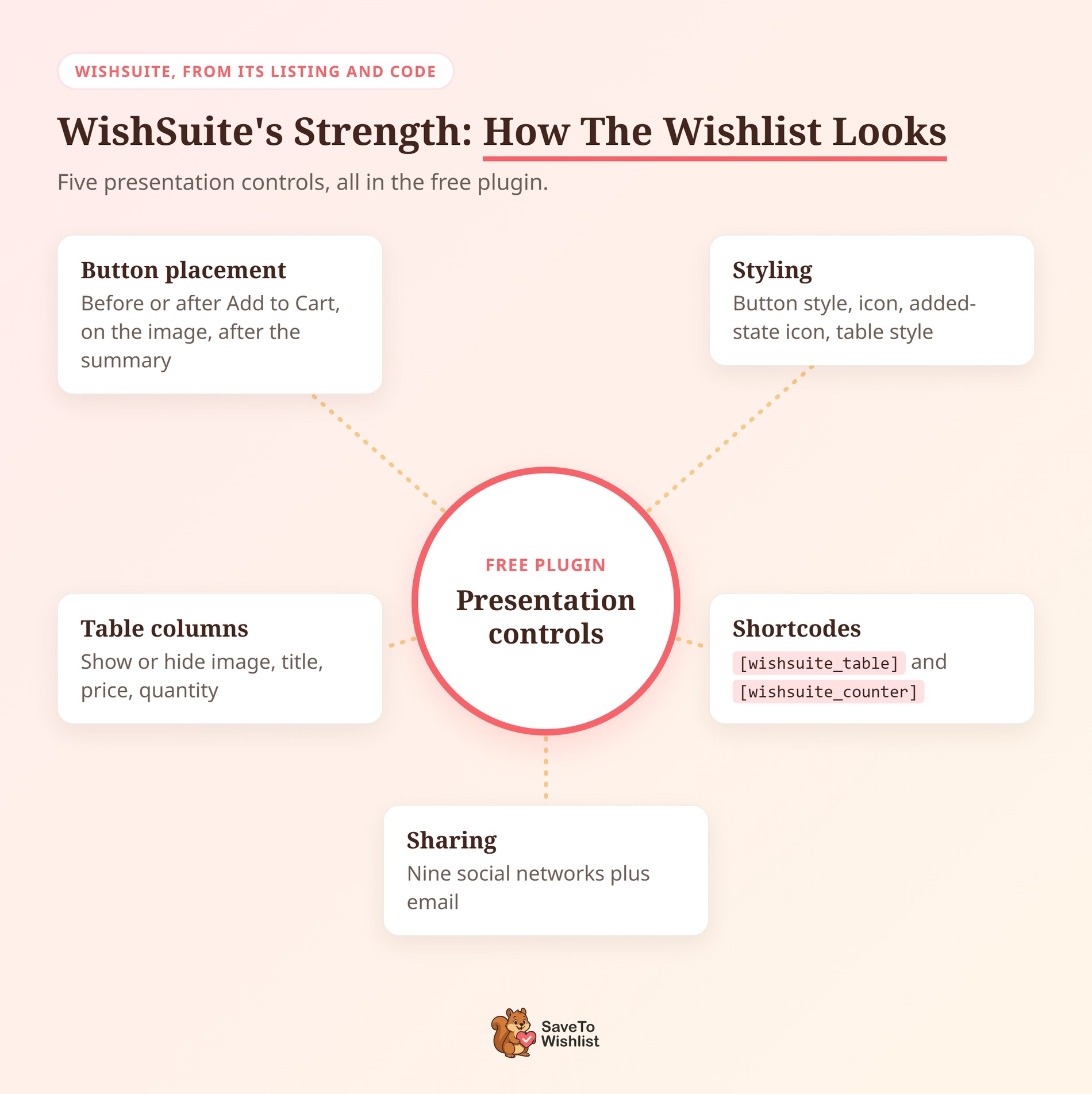
Its strongest area is control over how the wishlist looks and where it sits:
- Button placement: separate positions for the shop grid and the single product page. Options include before or after Add to Cart, on or after the product image, and after the summary.
- Button and table styling: button style, icon type, an added-state icon and table style are all settings.
- Wishlist table columns: show or hide fields such as remove, image, title, price and quantity. You can also edit the heading text and the empty-table message.
- Shortcodes:
[wishsuite_table]renders the wishlist on any page, and[wishsuite_counter]shows the saved-item count. The counter is the usual way to put a wishlist count in the site header. - Sharing: shoppers can share a wishlist to nine social networks or by email. Recent updates also carry the selected quantity into share links.
Guest saving is covered too. Guest items are held in a browser cookie that expires after 30 days by default. You can change that number. There’s also a setting to limit the wishlist to logged-in users if you’d rather not run guest lists.
Credit where it’s due: the styling and placement controls are thorough for a free plugin. That matters, because placement is the part of a wishlist store owners notice first. Any WishSuite alternative has to match that before it earns a closer look.
Where The Answers Run Out
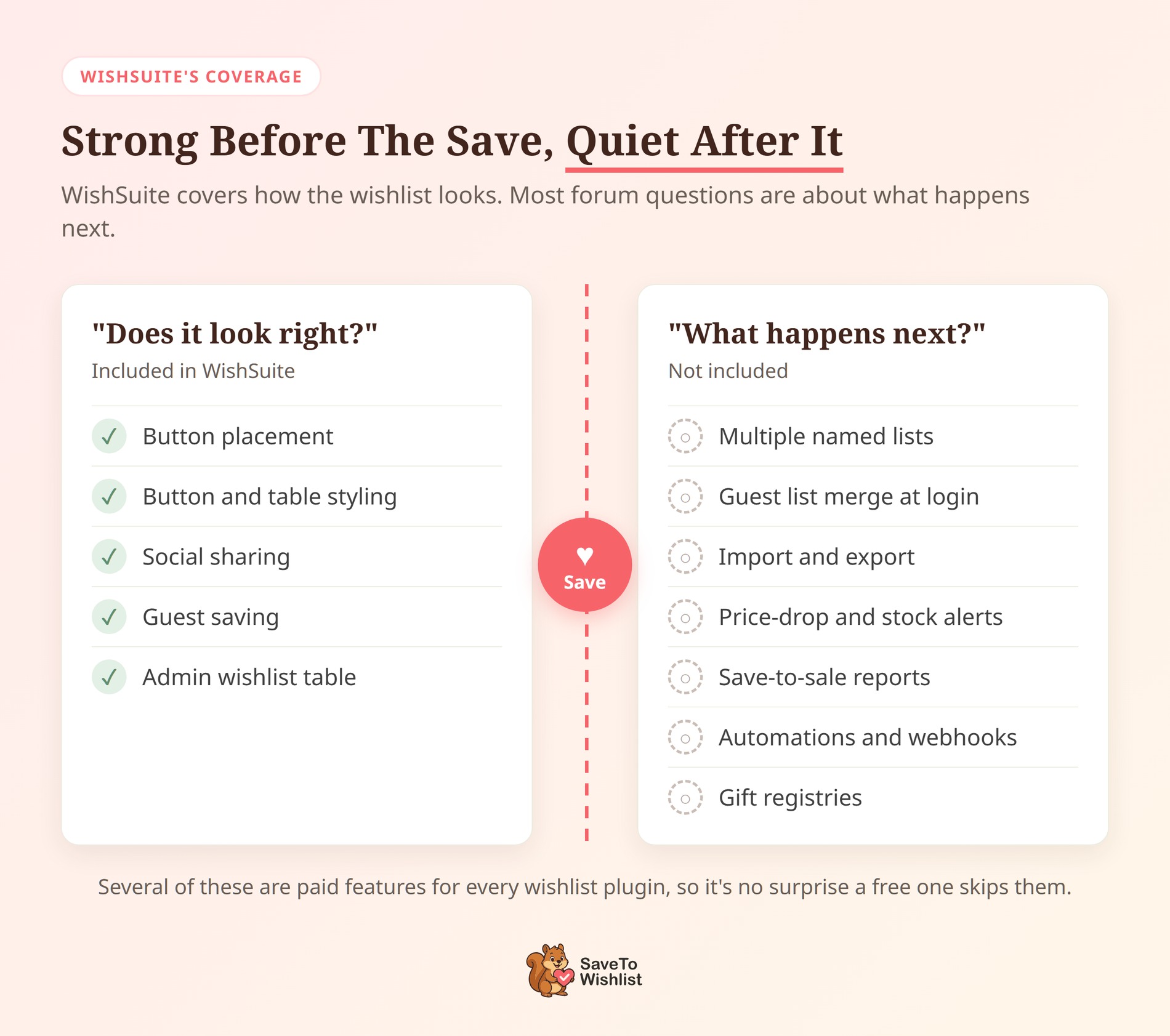
The gaps show up on the questions that come after “does it look right?” Working from WishSuite’s listing and its plugin code, here’s where the answers stop:
- Multiple named lists. Not supported. Its code stores one list per customer, with no field for a list name.
- Guest-to-account merge. Guest items sit under a temporary ID from a browser cookie. Its code has no step that moves them into an account at login.
- Getting data out. There’s no importer from other wishlist plugins and no export tool for saved lists.
- Alerts. It doesn’t send price-drop or back-in-stock notifications.
- Reporting. WishSuite does include an admin wishlist table, with an Items in Wishlist count per product. Beyond that table, it has no reports on how saves turn into sales.
- Automations and webhooks. Nothing sends a wishlist event to an email tool or an external endpoint.
- Gift registries. Not included.
Two fair caveats belong here. First, a missing feature isn’t an impossible one, since a developer can build a lot on any plugin. Second, several items on that list are paid features for every plugin in this category. So their absence from a free plugin isn’t a mark against it.
The point isn’t that WishSuite falls short. Instead, it’s that the questions store owners debate in forums mostly sit on this list. A plugin built around styling and placement naturally focuses elsewhere. That’s usually when store owners start looking for a WishSuite alternative.
How SaveTo Wishlist Answers The Same Questions
SaveTo Wishlist answers the behavior questions in its free version and the data questions in its paid one. That split is deliberate, so it’s worth being precise about where the line falls. That line is the core of the case for it as a WishSuite alternative.
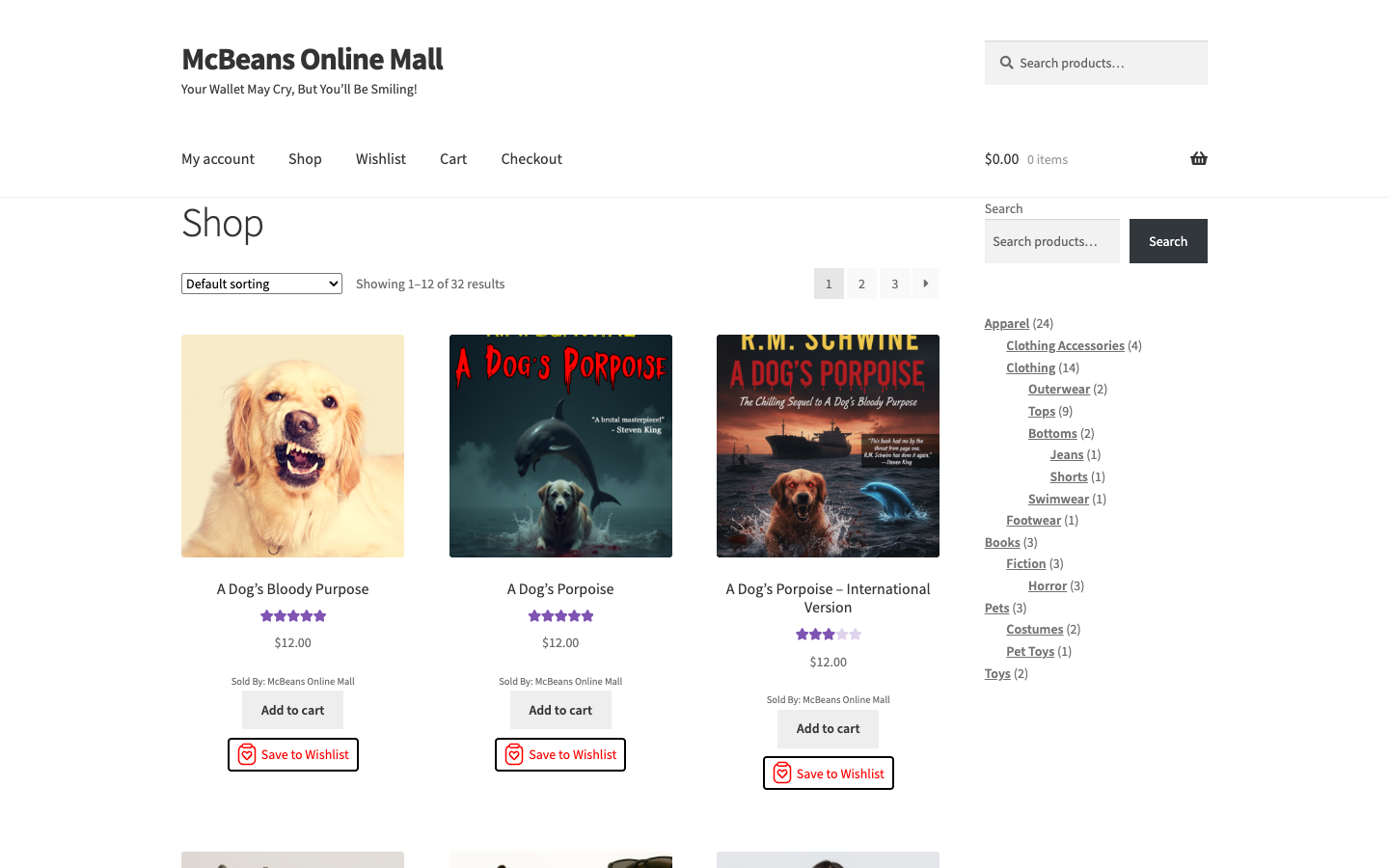
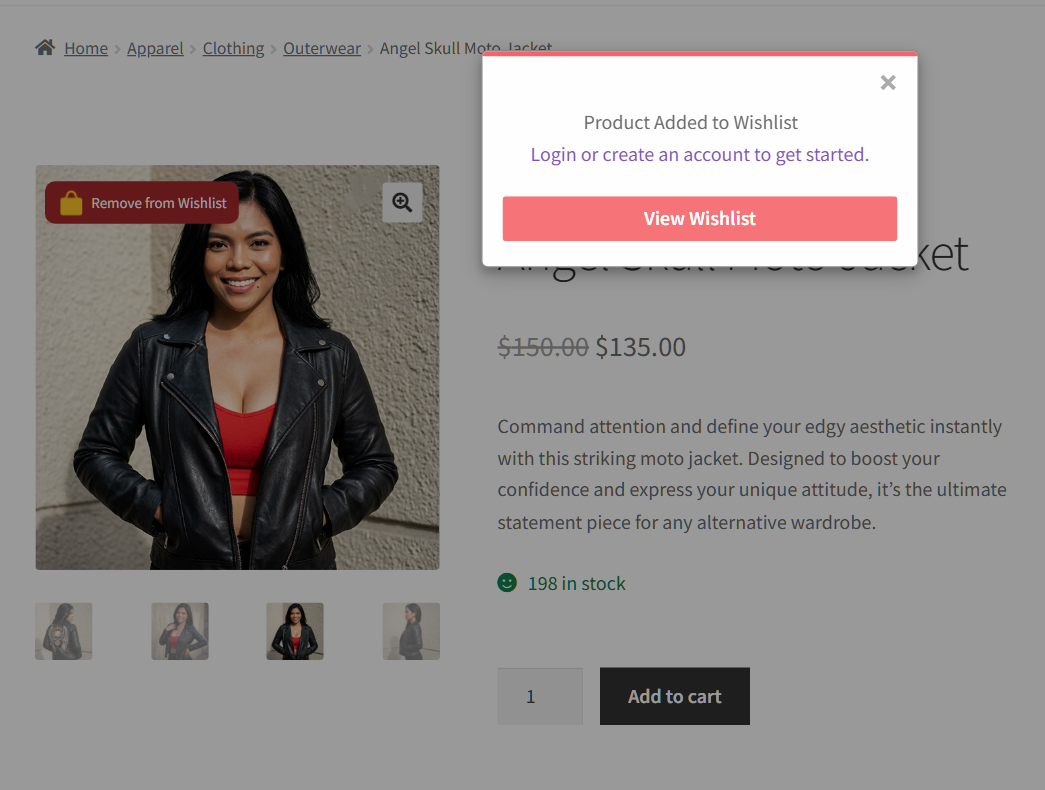
Here’s what we saw running SaveTo Wishlist Lite 1.1.1 on a staging store. The Save to Wishlist button rendered on all 12 product tiles of the /shop/ page, with no template edits. After a save, the button label switched to “Remove from Wishlist.” As a result, shoppers can see what’s already saved at a glance.
What happens when a guest saves
Saving while logged out worked straight away. With the button action set to Popup, the confirmation popup offered “Login or create an account to get started.” In other words, it invites an account instead of demanding one first.
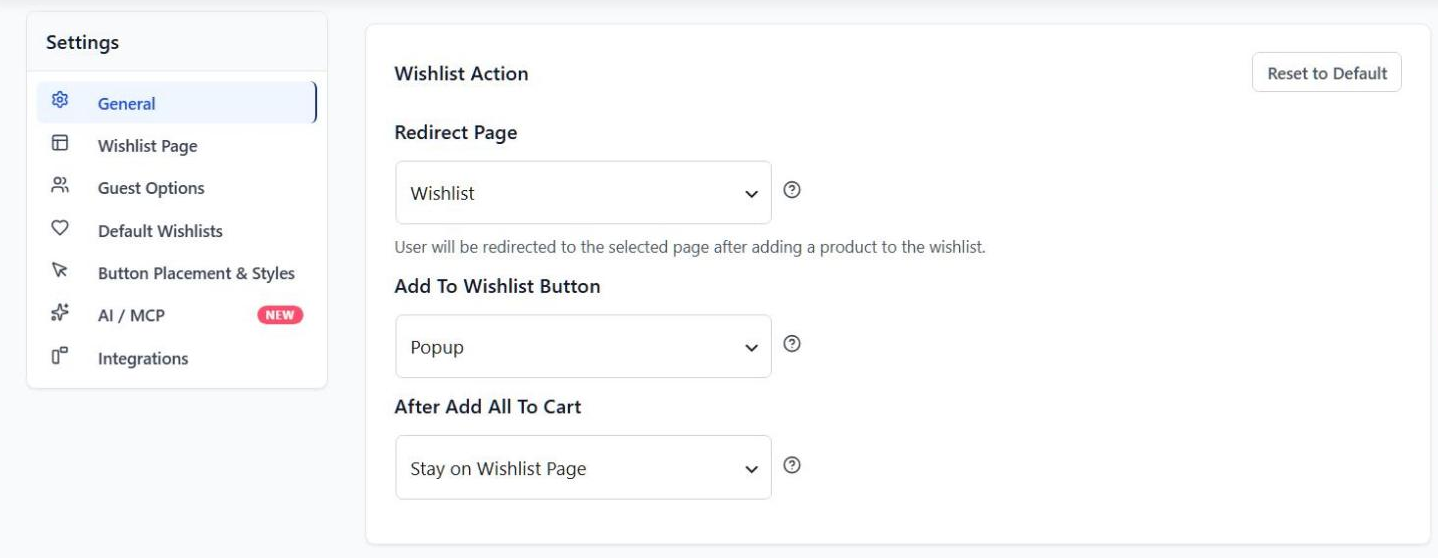
That popup isn’t the default, though. The default action is Redirect, so set Add To Wishlist Button to Popup in the plugin’s General settings. Each save also fires a browser event and sets a 30-day cookie. That makes wishlist activity usable as a popup or campaign trigger in the free version.
🔍 What we’ve seen: stores often get the least from a wishlist when they gate it behind registration on day one. A save is one of the cheapest pieces of intent data in the funnel. Asking for an account first stops you collecting it. Let guests save, then invite the account once they care about keeping the list.
What the free plugin covers
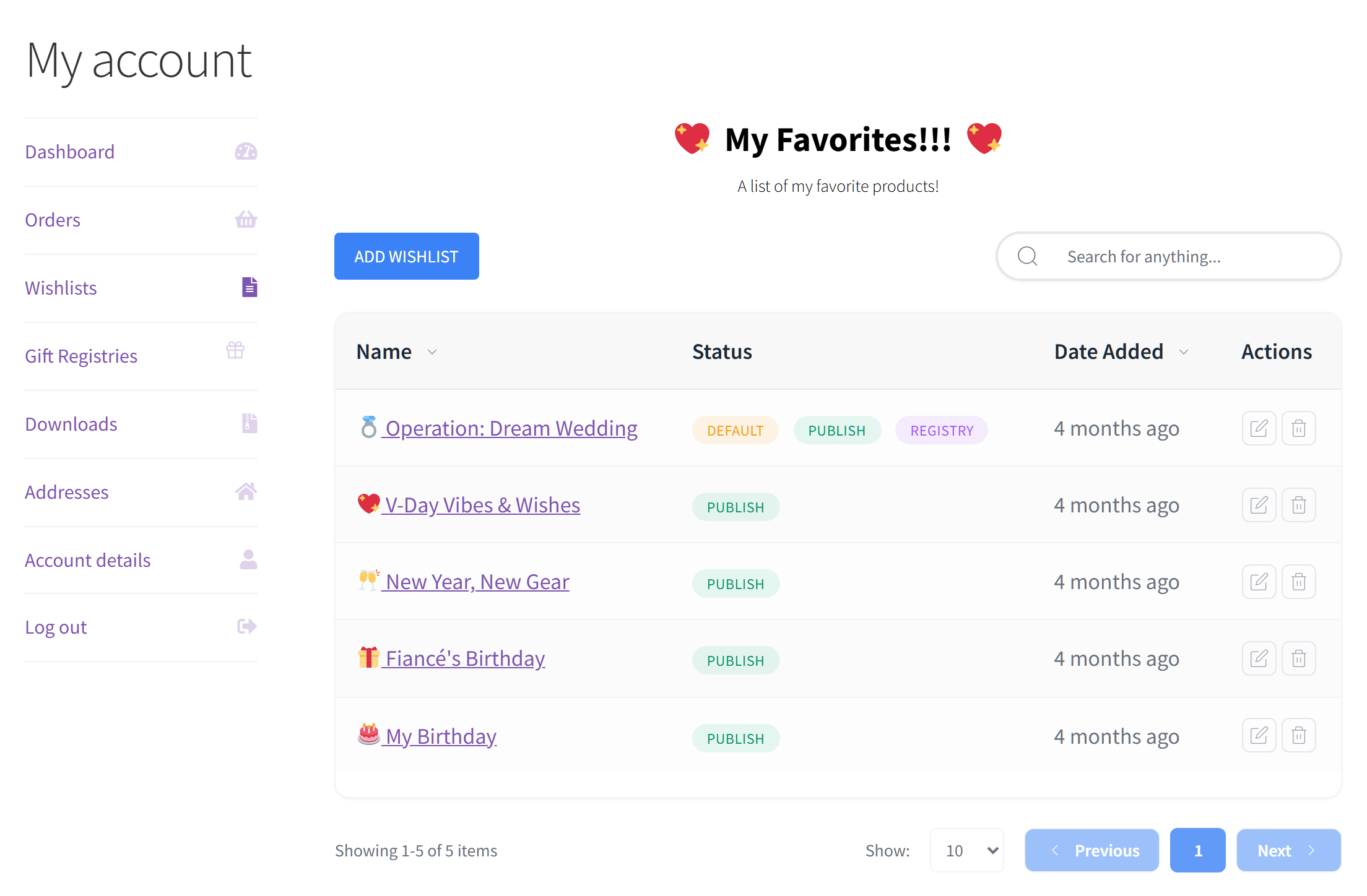
SaveTo Wishlist Lite covers unlimited named wishlists per customer, so gifts and personal picks stay apart. Guest lists merge into the account when that shopper logs in or registers, so nothing is lost at signup. There are also four importers, for YITH Wishlist, TI WooCommerce Wishlist, MoreConvert Wishlist and WPC Smart Wishlist.
Logged-in customers can share a list by URL once they mark it public. Guest lists don’t carry a persistent share link. Meanwhile, the All Wishlists screen in the admin shows every customer’s lists in one place.
What SaveTo Wishlist Pro adds
SaveTo Wishlist Pro is the paid extension, and it turns saves into data you can act on. It adds wishlist analytics, price-drop and back-in-stock alerts, real-time webhooks and an automations engine. It also adds role-based access control and advanced sharing, including collaborative lists that friends and family build together.
There are three paid plans. Growth is $49.50 for the first year, then $99 a year. Plus is $99.50, then $199 a year, and Business is $199.50, then $399 a year. The Gift Registry Addon comes with Plus and Business only.

Side-by-side comparison
Here’s how the three options line up against the buyer questions:
| Buyer question | SaveTo Wishlist Lite (free) | SaveTo Wishlist Pro | WishSuite (free) |
|---|---|---|---|
| Multiple named lists per customer | Yes | Yes | No, one list per customer |
| Guest saving without an account | Yes | Yes | Yes |
| Guest list merges on login | Yes | Yes | No |
| Shareable list link | Public lists of logged-in customers | Yes | Yes |
| Admin view of saved items | Yes, All Wishlists screen | Yes | Yes, wishlist table |
| Wishlist analytics and reports | No | Yes | Per-product save count only |
| Price-drop and back-in-stock alerts | No | Yes | No |
| Webhooks and automations | No | Yes | No |
| Import from other wishlist plugins | Yes, four importers | Yes | No |
| Gift registry | No | Plus and Business plans | No |
What To Check Before You Commit To Either
Run these six checks on your own store before committing to WishSuite or a WishSuite alternative. Each one takes a few minutes and maps back to a question from the first section.
- Save as a guest, then log in. Open a private window, save two products, then register. If those items aren’t waiting afterwards, you have your answer on guest handling.
- Count the buttons on your shop grid. Load your shop page and confirm the button appears on every tile, not only on the product page. Browsing happens in the grid, so that’s where pre-cart intent gets captured.
- Try to create a second list. If a customer can’t separate “gifts” from “for me”, you end up with one long list nobody revisits.
- Load the page twice and watch the weight. A plugin that ships its own icon font or extra stylesheets adds weight to every shop page. Our wishlist plugin speed test shows how much this varies.
- Find the exit before you need it. Ask how you’d move saved data to another plugin later. SaveTo Wishlist ships four importers so you can import your existing wishlists rather than starting from zero.
- Read the renewal price, not the intro price. Introductory pricing is normal in this market, ours included. Budget on the renewal figure and there are no surprises.
Check five is the easiest one to skip. Wishlist data builds up quietly for a year or two. The real cost of a plugin choice shows when you try to leave.
How To Switch From WishSuite Without Losing Saved Lists
There’s no one-click import from WishSuite today. SaveTo Wishlist’s four importers cover YITH, TI, MoreConvert and WPC Smart Wishlist, and WishSuite isn’t one of them. So moving to a WishSuite alternative takes a little planning, and the order you do things in decides what survives.
The listing doesn’t say where WishSuite keeps its data, so we read its plugin code (version 1.5.10). Three things matter:
- Logged-in saves sit in one table,
wishsuite_list. Each row holds a customer ID, product ID, quantity and date added. There’s no list-name column, so every customer brings exactly one list across. - Guest saves aren’t tied to a person. They’re keyed to a temporary ID stored in the shopper’s browser cookie. Nothing links that ID to a future account, so treat guest lists as non-transferable. Our built-in importers skip guest lists too.
- Deleting the plugin deletes the data. Clicking Delete on the Plugins screen drops that table and removes the WishSuite page it created. Deactivating leaves both in place.

Count your lists, then switch in this order
Before you plan anything, check how many customers actually have saved items. This WP-CLI query counts registered customers only, because guest IDs don’t match any user:
wp db query "SELECT COUNT(DISTINCT l.user_id) FROM wp_wishsuite_list l JOIN wp_users u ON u.ID = l.user_id"Swap wp_ for your table prefix if it’s different. Then switch in this order:
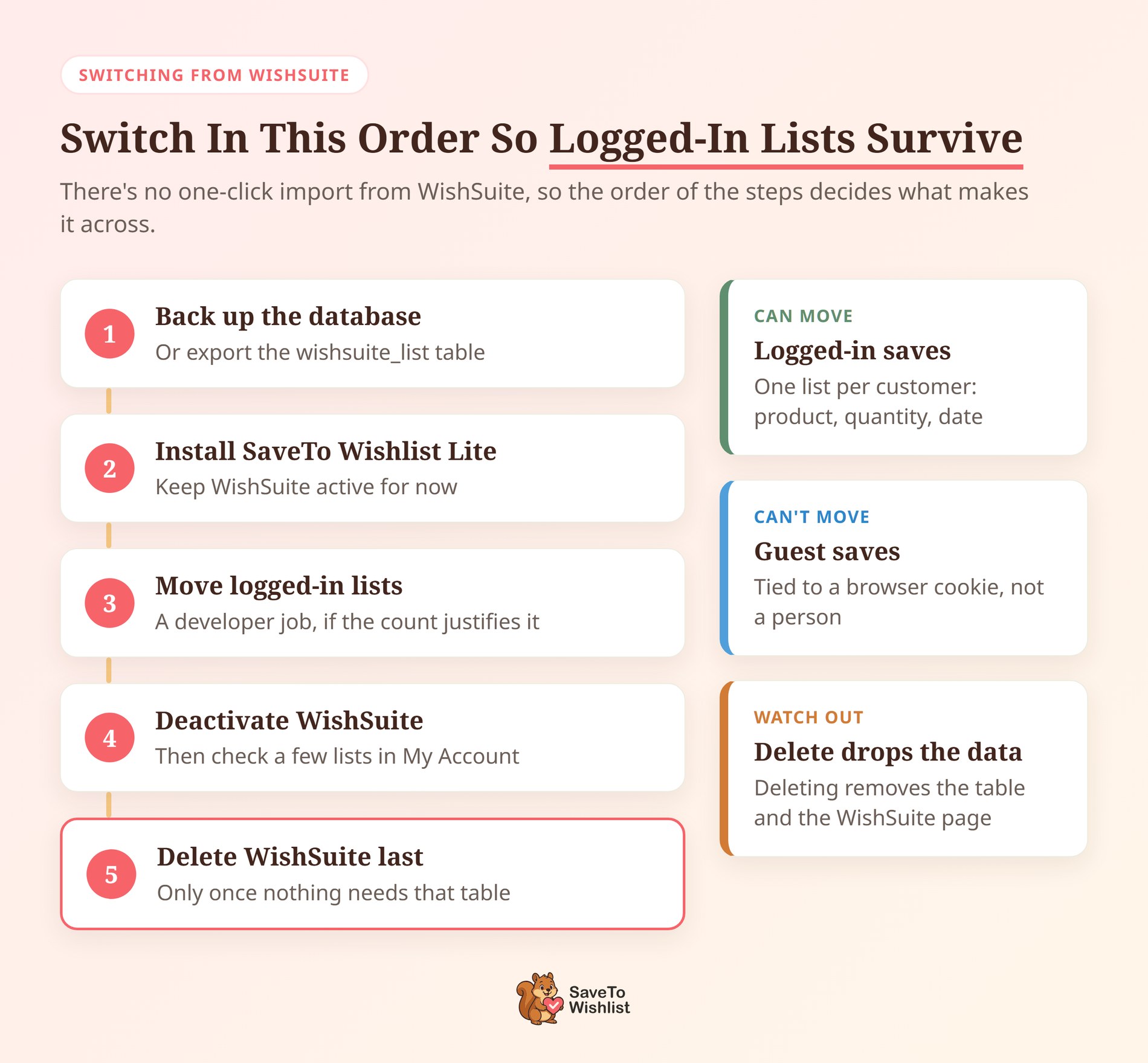
- Back up the database first, or at least export the
wishsuite_listtable. - Install SaveTo Wishlist Lite, but keep WishSuite active until the lists are moved.
- Move the logged-in lists, if the count justifies it. With no import button for WishSuite, this is a job for a developer.
- Deactivate WishSuite, then check a few customers’ lists under My Account.
- Delete WishSuite last, once you’re sure nothing else needs that table.
Frequently Asked Questions
Is WishSuite free?
Yes. WishSuite is a free plugin in the WordPress plugin directory, currently at version 1.5.10. Its listing doesn’t mention a paid tier for the wishlist plugin itself. However, its publisher does sell other WooCommerce products separately.
Who makes WishSuite?
HT Plugins, also known as HasThemes, publishes WishSuite. The same team makes WooLentor, a WooCommerce page builder. When both plugins are active, WishSuite’s settings move under the WooLentor menu.
How many stores use WishSuite?
Its directory listing shows around 1,000 active installations and 11 ratings at the time of writing. Read that alongside the release cadence, since the latest update landed on 27 August 2026. That points to a small but actively maintained plugin.
What happens to saved lists if I switch wishlist plugins?
By default, nothing carries over, because each plugin stores wishlist data its own way. SaveTo Wishlist Lite includes importers for YITH Wishlist, TI WooCommerce Wishlist, MoreConvert Wishlist and WPC Smart Wishlist. WishSuite isn’t on that list, so follow the switching steps above before you deactivate anything.
Is SaveTo Wishlist free?
SaveTo Wishlist Lite is free. It covers unlimited named wishlists, guest saving, guest-to-account merging and the four importers. SaveTo Wishlist Pro is the paid extension.
Growth costs $49.50 for the first year, then $99 a year. Plus is $99.50, then $199, and Business is $199.50, then $399.

The WishSuite Alternative We Recommend
Here’s the takeaway. A wishlist plugin isn’t only a heart icon on a product page; it’s a data collection point with a button. So judge it on what it lets you keep and act on, rather than how the icon looks.
On that test, SaveTo Wishlist is the WishSuite alternative we recommend for WooCommerce stores. Its free version answers the guest and multiple-lists questions, and it imports from four other plugins. Pro then answers the alerts, analytics and automation questions.
WishSuite is a tidy, well-maintained free wishlist with strong presentation controls. By contrast, SaveTo Wishlist goes further on what happens after the save.
- Start from the questions buyers actually ask, not from a feature grid.
- Give WishSuite credit for what it answers well: placement, styling and a free guest wishlist.
- Know where the answers run out before your saved data is a year deep.
- Run the six checks on your own store this week.
- Switch in the right order so logged-in lists survive the move.
Install SaveTo Wishlist Lite for free and watch what your shoppers save for a couple of weeks. When you want alerts, analytics and automations built on that data, compare the SaveTo Wishlist Pro plans below.


 SaveTo Wishlist