


 Reviewed by
 You found a wishlist tool that does everything you want. You installed it. Then your product pages felt a little heavier than before. That moment is what sends store owners hunting for the lightest WooCommerce wishlist plugin they can find.
That hunch is usually right. A wishlist plugin loads its own scripts and styles on top of what WooCommerce already serves. Some add far more weight than others.
The trouble is that almost every plugin calls itself “lightweight.” Very few back it up with numbers. So I wanted real numbers, and we measured five popular wishlist plugins on one identical store. We used Google Lighthouse, recorded what each one added to a product page, and kept it repeatable.
This article walks through what we measured and how. It also covers what the results mean for choosing a plugin for a real store.
In This Guide
- Why Wishlist Plugin Weight Slows Down Your Store
- How We Ran The WooCommerce Wishlist Plugin Speed Test
- WooCommerce Wishlist Plugin Speed Test Results
- SaveTo Wishlist vs YITH WooCommerce Wishlist
- Why Lighthouse And GTmetrix Show Different Numbers
- What The Speed Test Means For Your Store
- Frequently Asked Questions
Why Wishlist Plugin Weight Slows Down Your Store
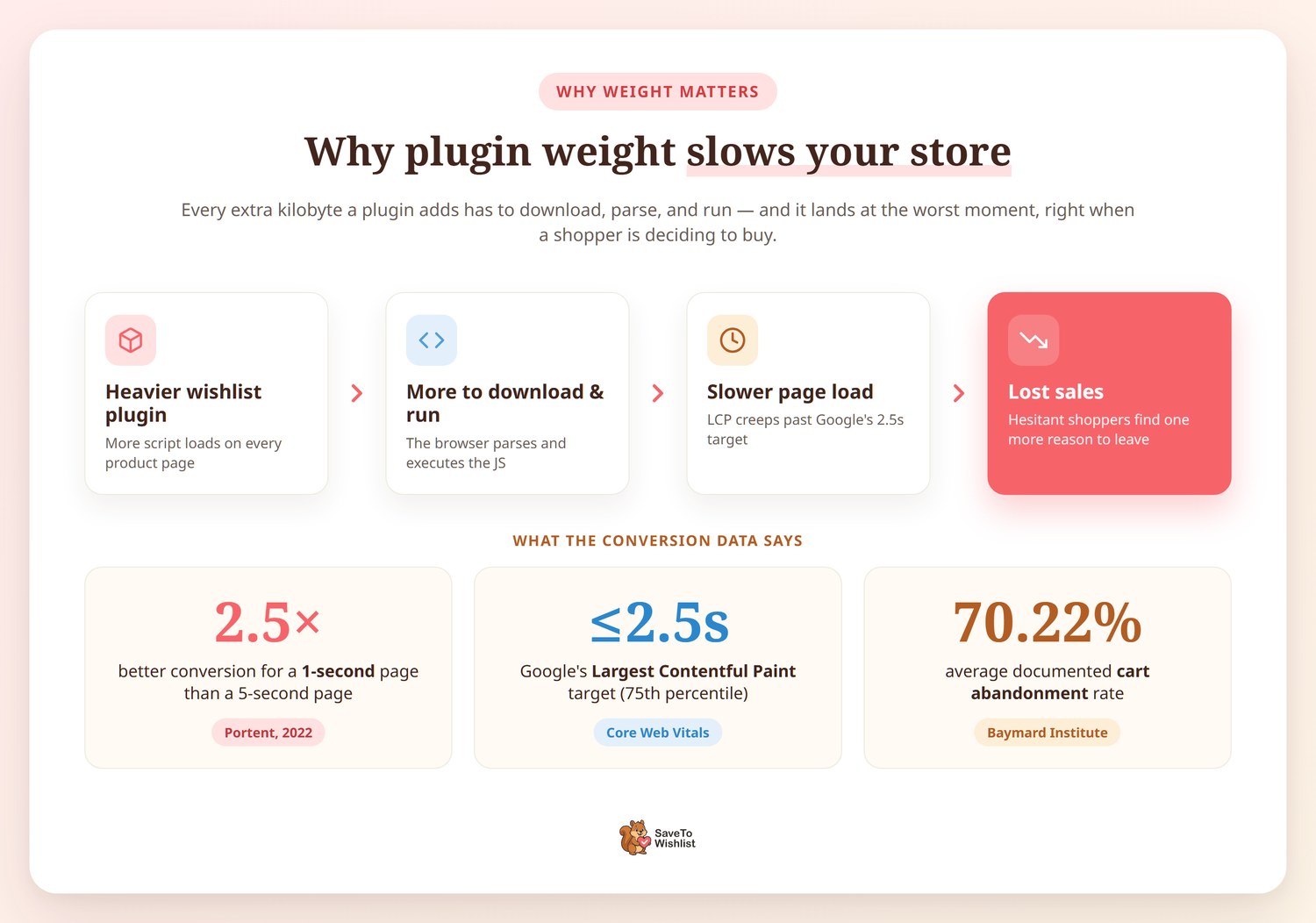
Every kilobyte a plugin adds is a kilobyte the browser has to download, parse, and run. All of that happens before the page feels ready. On a product page, that weight lands at the worst moment. It hits right when you’re trying to turn a visit into a sale.
The conversion data backs this up. According to Portent’s site speed research, a one-second page converts 2.5 times better than a five-second page. The study was updated in April 2022. Speed and revenue move together, and the first few seconds carry most of the weight.
Google sets a clear target for this. According to Google’s Core Web Vitals guidance, a page should hit Largest Contentful Paint in 2.5 seconds or less. Google measures that at the 75th percentile of real page loads. Extra script from a heavy plugin pushes that number in the wrong direction.
The stakes are already high before you add anything. According to the Baymard Institute, the average documented online shopping cart abandonment rate is 70.22%, based on 50 separate studies. A slow product page gives a hesitant shopper one more reason to leave. That is why the weight of a small wishlist button is worth checking.
🔍️ One thing we see often: a store owner installs three or four “small” feature plugins. Each one adds a bit of script, and the product page quietly doubles in weight. No single plugin looks like the culprit, so the slowdown never gets traced back.
How We Ran The WooCommerce Wishlist Plugin Speed Test
We measured each plugin on the same clean store, one at a time, using Google Lighthouse. The goal was a fair like-for-like comparison where the only thing changing was the wishlist plugin itself. Here is exactly how the test was built and run, so you can judge the numbers and repeat them.
Building the test store
We spun up a fresh, disposable WordPress sandbox on InstaWP using a standard WooCommerce template. The store ran the Storefront 4.6.2 theme with WooCommerce 10.7.0 active, and nothing else. Every other plugin that shipped with the template was deactivated and left untouched for the entire test.
We turned page caching off on purpose. Caching would hide the per-visit cost of each plugin’s assets. The whole point was to see that cost clearly. We then picked one product page as the fixed test URL. Every measurement hit the same page under the same conditions.

WooCommerce install (click to zoom)
Measuring with Google Lighthouse
We used Lighthouse 12, the same audit engine that powers Google PageSpeed Insights. Running it locally gave us the same engine with no rate limits. That matters when you run dozens of audits in a row. We measured each setup three times on mobile and three times on desktop. Then we took the median of each set. That way, a single noisy run could not skew the result.
For every run, Lighthouse recorded the total transfer size, request count, and JavaScript payload. All of it came from its network request audit. Those transfer and request figures were rock-steady from run to run. That is why we lead with them, not with the single performance score.
The install, measure, remove cycle
We started with a baseline measurement of the store running WooCommerce alone, with no wishlist plugin. That baseline is the reference point every plugin is compared against. For each plugin, we then ran the same loop:
- Confirm no wishlist plugin was active, so the store was back to baseline.
- Install and activate the plugin from the official WordPress.org directory at its default settings.
- Let WordPress register the plugin’s hooks and assets, then run three mobile and three desktop audits.
- Deactivate the plugin, fully delete its files, and confirm the clean state before the next one.
Deleting each plugin between rounds was deliberate. It means no leftover scripts or database entries from one plugin could pollute the next reading. We tested the free version of every plugin at its default settings, with no extra features on.
What this test does and does not show
The transfer size, request count, and JavaScript payload are byte-accurate because they don’t depend on the host’s processor. Those are the numbers we stand behind. We deliberately don’t lead with Lighthouse performance scores. The shared sandbox host caused run-to-run swings that say more about a neighbor’s traffic than about any plugin.
A few honest limits are worth stating. We tested with Storefront 4.6.2, so a different theme could shift the totals. We tested free versions only, and premium tiers may add more assets. Moreover, we turned caching off, so a cached production store will see smaller per-visit deltas. The weight each plugin adds is real. Still, the share of your total page that it represents depends on your theme, images, and other plugins.
WooCommerce Wishlist Plugin Speed Test Results
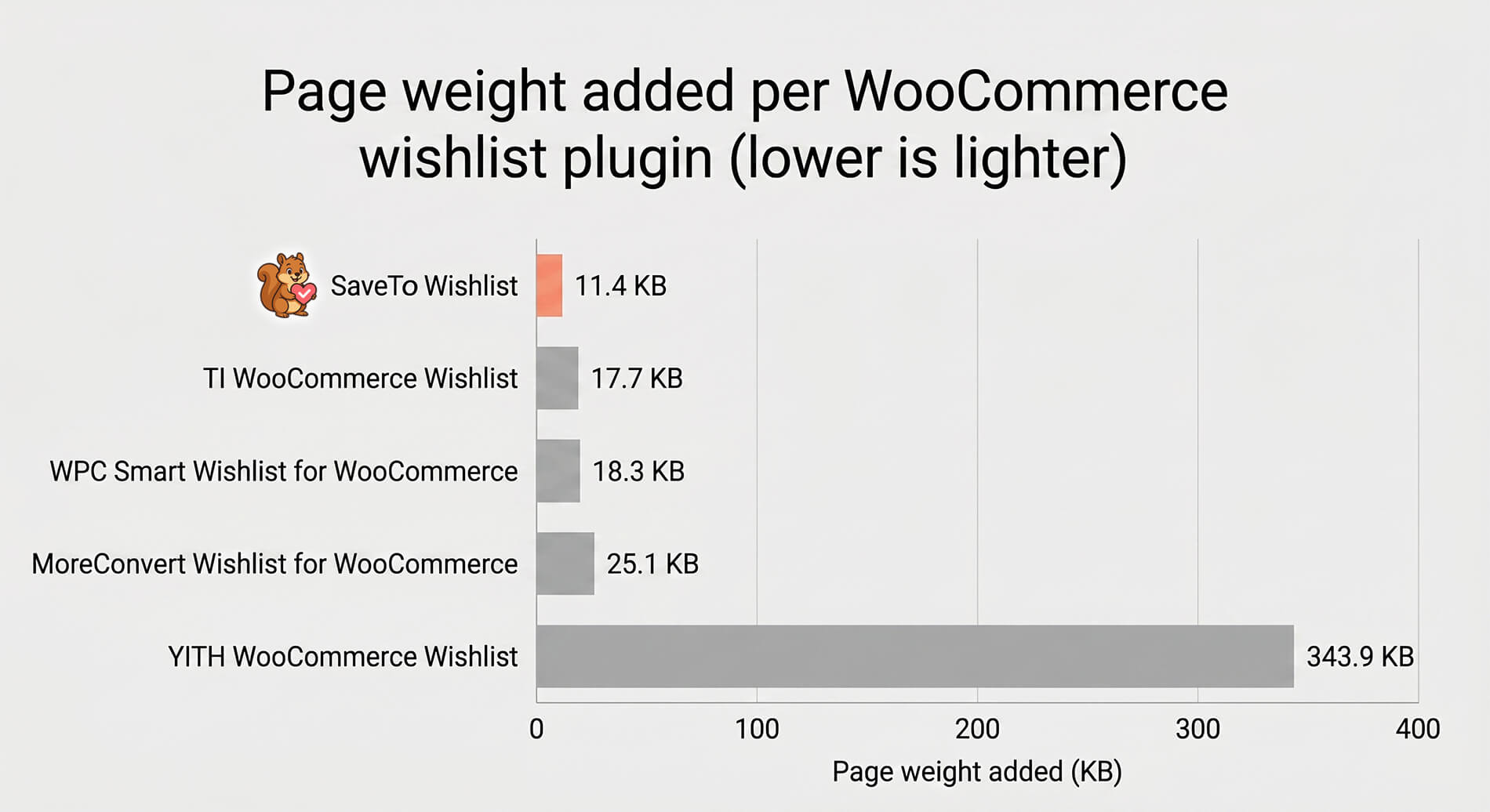
SaveTo Wishlist was the lightest WooCommerce wishlist plugin of the five we tested. The table below shows what each plugin added on top of the baseline product page. It’s sorted from lightest to heaviest, using the median of three mobile Lighthouse runs.
| Plugin (free version) | Page weight added | Requests added | JavaScript added |
|---|---|---|---|
| SaveTo Wishlist | 11.4 KB | 2 | 6.9 KB |
| TI WooCommerce Wishlist | 17.7 KB | 4 | 6.1 KB |
| WPC Smart Wishlist for WooCommerce | 18.3 KB | 7 | 11.2 KB |
| MoreConvert Wishlist for WooCommerce | 25.1 KB | 2 | 0 KB |
| YITH WooCommerce Wishlist | 343.9 KB | 22 | 312.2 KB |
Measured weight added to a WooCommerce product page versus a WooCommerce-only baseline of 155.5 KB, 35 requests, and 87.5 KB of JavaScript. Median of three mobile Lighthouse runs.
A few things stood out once we lined the results up. SaveTo Wishlist added 11.4 KB and only 2 network requests, the lightest footprint in the group. TI WooCommerce Wishlist and WPC Smart Wishlist for WooCommerce sat close together on total weight. However, WPC Smart Wishlist for WooCommerce reached for 7 requests, the most among the lighter plugins.
MoreConvert Wishlist for WooCommerce was the interesting case. It added 25.1 KB but zero JavaScript, so its weight came almost entirely from styles and images. Then there was YITH WooCommerce Wishlist, which added 343.9 KB across 22 requests. By contrast, it sat in a category of its own.
SaveTo Wishlist Vs YITH WooCommerce Wishlist
The gap between the lightest and heaviest plugins was large enough to change how a page loads. SaveTo Wishlist added 11.4 KB to the page, while YITH WooCommerce Wishlist added 343.9 KB. That is roughly 30 times more added page weight from one plugin than the other. We counted every kind of asset each plugin adds to the page.
Look at JavaScript alone, the part each plugin actually ships, and the gap widens. SaveTo Wishlist added 6.9 KB of script, against 312.2 KB for YITH WooCommerce Wishlist. That is about 45 times more. That 312 KB of JavaScript is the single biggest driver of its page weight. JavaScript is the most expensive kind of weight. The browser has to download it and then run it.
Request count tells the same story from another angle. SaveTo Wishlist added 2 network requests; YITH WooCommerce Wishlist added 22. Each request is a separate round trip the browser has to make. On a mobile connection, those round trips stack up fast. We saw this firsthand. When we activated YITH WooCommerce Wishlist at default settings, it pulled in a long list of scripts and styles. All before the page rendered anything new for the shopper.
Store owners often ask us whether a heavier wishlist plugin is “worth it” for the extra features. Our answer is to check what you actually use. If most of those features sit switched off, you pay the full weight for a fraction of the value.
Are you weighing a move away from a heavier option? Our guide on why stores switch from YITH Wishlist to lightweight alternatives covers what to look for.
Why Google Lighthouse And GTmetrix Show Different Numbers
Run the same plugins through two audit tools, and the numbers rarely match to the decimal. That’s normal. Our earlier GTmetrix testing found SaveTo Wishlist about 124 times lighter than YITH WooCommerce Wishlist. This Lighthouse test lands in the same territory. Both point to one conclusion: SaveTo Wishlist is far lighter.
In fact, the two tests used the same method. Both run on the Lighthouse engine that GTmetrix is built on. They agree almost exactly on YITH WooCommerce Wishlist, at about 312 KB of added JavaScript either way. They differ on SaveTo Wishlist, at 2.5 KB of added JavaScript in GTmetrix against 6.9 KB here. That one gap is why GTmetrix shows 124 times, and this test shows about 45 times on JavaScript.
The most likely cause is a small SaveTo Wishlist update between the two test dates. The two tests also ran on separate stores set up on different dates. Different WooCommerce and WordPress versions, or even a different sample product, change the starting page. That shifts what each test records as the added weight.
Which script files each test counted can also move the number. Counting every asset, not just JavaScript, this test puts the overall gap near 30 times. Whichever figure you use, the gap stays large.
Two independent tests landing on the same conclusion is exactly what you want. SaveTo Wishlist stays far lighter than YITH WooCommerce Wishlist either way.
Want to learn more about the results of our GTMetrix speed tests? Then click the links below!



What The Speed Test Means For Your Store
The practical takeaway is that wishlist features don’t have to cost you page speed. A plugin can offer multiple wishlists, guest wishlist support with guest-to-user account merging, and sharing while adding only a few kilobytes. In short, weight is a design choice, not a fixed price of the feature.
That said, read these numbers in the context of your own store. If you run full-page caching through a host or a CDN, repeat visitors feel less of each plugin’s weight. The assets are cached at the edge. Still, the first uncached visit carries the full cost. That first impression often decides whether someone stays.
Your theme and images matter too. On a media-heavy product page, a 25 KB plugin is a smaller slice than on a lean page. The absolute weight each plugin adds is the portable number to compare. That is why we report it directly rather than as a percentage. Want to turn that saved weight into insight? Our walkthrough on using wishlist data to read customer intent shows what a lightweight wishlist can still capture.
SaveTo Wishlist was built to keep that footprint small, and the test reflects it. You can see the full feature set on the SaveTo Wishlist plugin page and pick what your store needs.
Frequently Asked Questions
Which is the lightest WooCommerce wishlist plugin?
In our test of five plugins, SaveTo Wishlist was the lightest WooCommerce wishlist plugin. It added 11.4 KB and only 2 network requests on a single product page. It also carried the smallest JavaScript payload, at 6.9 KB. The others ranged from 17.7 KB up to 343.9 KB of added weight.
How much does a wishlist plugin really slow down a page?
It depends entirely on the plugin. A lightweight option may add a few kilobytes and a couple of requests, which most shoppers never notice. A heavier plugin can add several hundred kilobytes of JavaScript. The browser has to download and run all of it before the page settles. Weight is the part you can control by choosing carefully.
Why do Lighthouse and GTmetrix report different sizes?
They mostly agree. Both used the same clean-store method, and GTmetrix runs on the Lighthouse engine. On YITH WooCommerce Wishlist they matched almost exactly, near 312 KB of added JavaScript. They differed on SaveTo Wishlist, likely because of a plugin update between the test dates. Either way, SaveTo Wishlist came out far lighter.
Does caching cancel out a heavy wishlist plugin?
Caching helps, but it does not erase the cost. Full-page caching and a CDN can serve a plugin’s assets from the edge for repeat visitors. That softens the per-visit weight. Still, the first uncached visit downloads everything. A heavier plugin also means more JavaScript to execute, even from cache.
Can I run this WooCommerce wishlist plugin speed test myself?
Yes. Set up a clean WordPress store with only WooCommerce active, and turn caching off. Pick one product page as your fixed URL. Run Lighthouse three times before installing anything to get a baseline. Then install one plugin, run it three more times, and compare the results. Delete the plugin before you test the next one.
The Bottom Line On WooCommerce Wishlist Plugin Speed
A wishlist plugin should add a feature to your store, not a tax on every page load. Our test showed the lightest option added a fraction of the heaviest one’s weight. It still did the job a shopper expects. When the gap is measured in hundreds of kilobytes, the lighter choice is the safer one.
Here is how to put this to work for your own store:
- Treat plugin weight as a speed decision, since it lands on your highest-intent pages.
- Test on a clean store with caching off to see each plugin’s true cost.
- Compare the page weight and requests added, not just the feature list.
- Read multiple tools by their direction, not just one exact multiple.
- Pick the lightest plugin that covers your needs, then layer caching on top.
If you want a WooCommerce wishlist plugin that keeps pages fast, see how SaveTo Wishlist is built. Give it a try by downloading the free tool. Then, when you’re ready for more advanced features like analytics and automation, check out the Pro tier. See which plan fits your store on the SaveTo Wishlist pricing page.



