

 Reviewed by
 A major update for SaveTo Wishlist Pro and Lite is officially live!
We focused this release on giving you more control over your store and your team. With new tools to set up WooCommerce default wishlists for your customers, strict access rules for your staff, and an instant analytics refresh button, this update helps you run your store your way.
Read on to see the new premium features, along with several helpful usability and design improvements for both the free Lite and premium Pro versions of the plugin!
Jump to:
️Major Updates: Smart Onboarding & Secure Permissions
For this release, we focused on tools that help customers use wishlists more often and keep your admin dashboard secure.
We made the sign-up process better by letting you build default wishlists for brand-new accounts. Furthermore, we linked the plugin with WordPress’s native rules system to give you strict control over what your staff can see, and added a manual sync button to your analytics page.
1. Smart Onboarding: Default Customer Wishlists
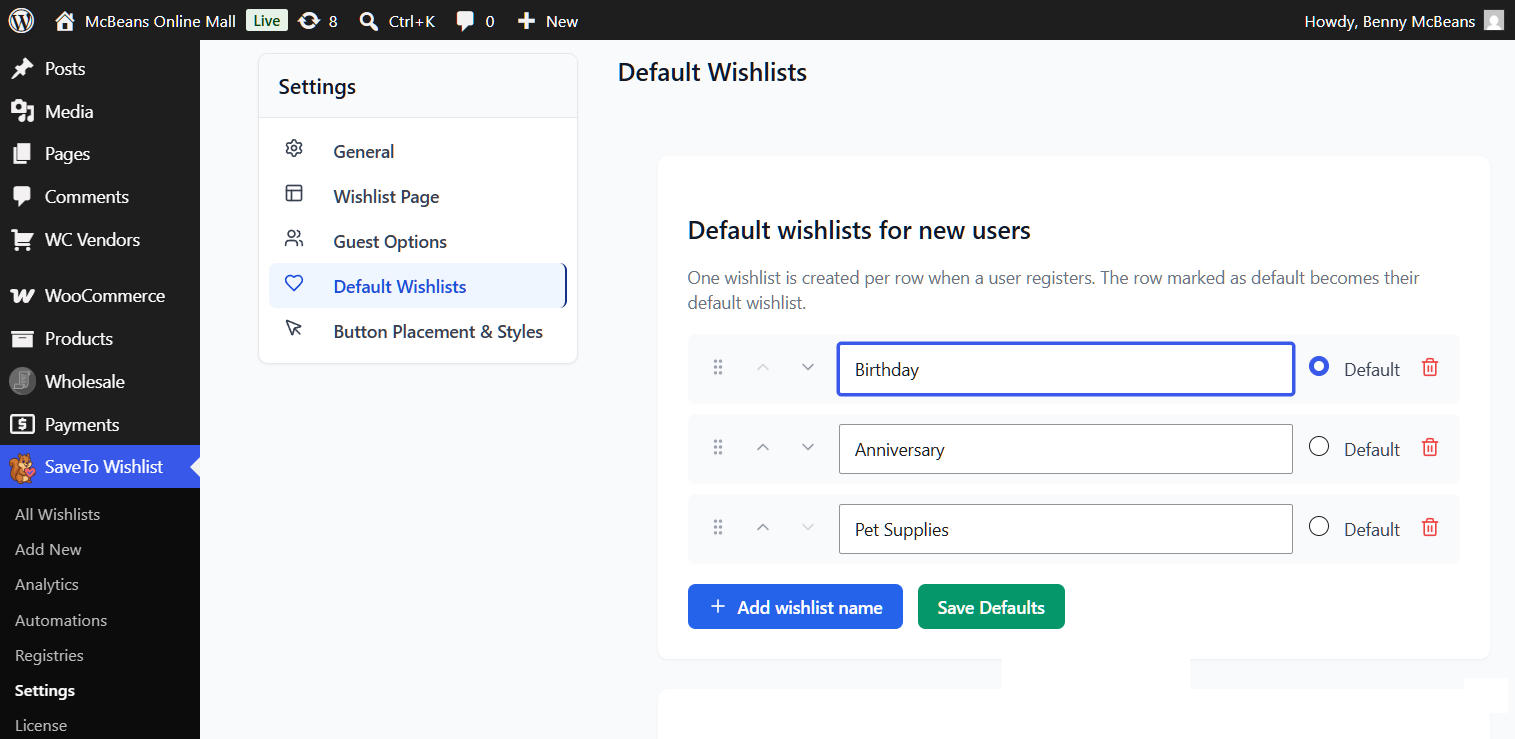
A blank page can stop shoppers from saving items. Now, you can set up multiple default wishlists that are made automatically the exact moment a new user signs up.
To find the WooCommerce default wishlists option, first go to your WordPress dashboard. Then, click SaveTo Wishlist > Settings > Default Wishlists.
What you need to know:
- Total admin control: Make custom wishlist names (like “Favorites” or “Birthday Ideas”) that will appear on the customer’s wishlist page right in your Pro settings. You can easily click Add, Remove, and Reorder to organize them.
- Automatic creation: When a new customer signs up, the plugin instantly builds these lists for them. Thus, they don’t have to start with a blank “My Wishlist” page.
- Update existing users: Click the “Seed existing users” button to run a background batch process. This makes WooCommerce default wishlists for older customers who don’t have any. The screen shows real-time progress, like “42 of 150 users seeded,” and tells you if it is “Running,” “Completed,” or “Cancelled.”
- Safe background processing: This process runs safely in the background. You can leave the page without breaking anything, even if you have thousands of users.
- Upgraded from Lite: This premium tool safely replaces the single “First Wishlist Label” setting found in the free Lite version.
2. Secure Team Management: WordPress Abilities API
As your team grows, you need better control over who can access your store data, especially your sensitive WooCommerce wishlist information. We fully linked SaveTo Wishlist Pro with the native WordPress Abilities API system to help you lock down your admin dashboard.
What you need to know:
- 15 new rules: The system adds 15 custom capabilities that match specific tasks. For example, rules can limit who views analytics, edits automations, manages settings, controls WooCommerce default wishlists, or uses the importer.
- Role-based permissions: Follow the “principle of least privilege.” Give your team members—like Shop Managers or Editors—only the exact access they need to do their jobs. This improves security and stops accidental changes.
- Plays nicely with others: Because these use standard WordPress capabilities, they work perfectly with popular role management plugins like User Role Editor or Members.
3. Real-Time Insights: On-Demand Analytics Syncing
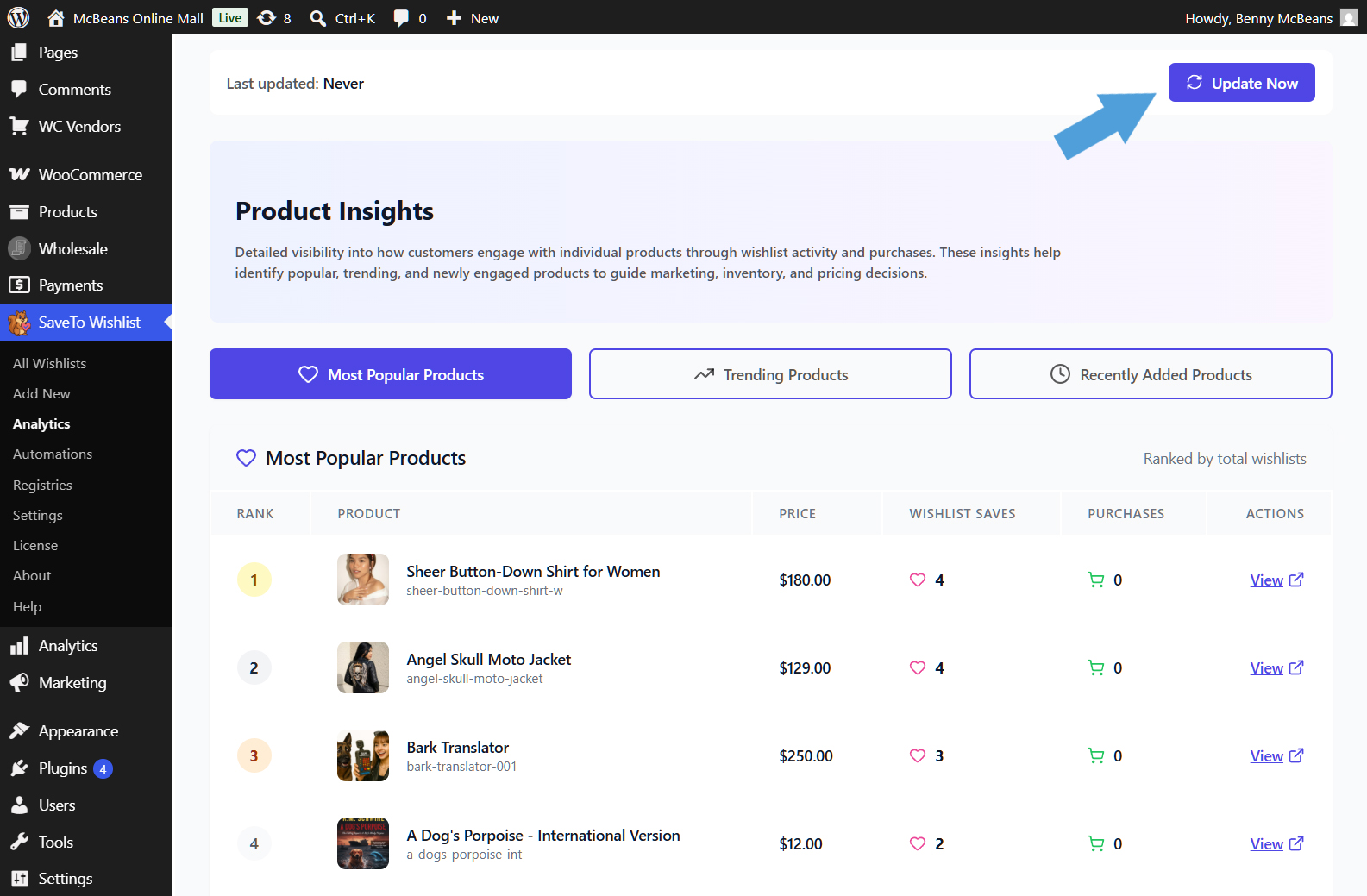
Sometimes you need fresh data right now, like right after a big sale or a product launch. For this reason, we added an “Update Now” button to the Analytics dashboard. Thus, you don’t have to wait an hour for the system cache to clear on its own.
To find the new button, head to your WordPress dashboard. Then, click SaveTo Wishlist > Analytics.
What you need to know:
- Instant refresh: Click the “Update Now” button to see a spinning “Updating…” animation. It instantly bumps the cache version for all five report types (Products Insight, Category/Brand Insight, Engagement Insights, Time-based Trends, and Customer Behavior).
- Deep cleaning: It also flushes the
stwpro_analyticsobject cache group so all smaller data queries update properly. It uses a smart versioned cache key system to safely ignore old data. - Smart cooldown protection: To keep your server from overloading, the system enforces a 30-second cooldown per user between clicks. If you click too fast, you will see a warning like, “Please wait 12 seconds before refreshing analytics again.”
- Clear timestamps: The dashboard now shows a “Last updated: X minutes ago” message so you know exactly how fresh your data is.
- Developer friendly: The manual refresh fires a
stwpro_analytics_refreshedaction hook. This allows custom code or scheduled jobs to process the new data right away.
Helpful New Improvements
Along with the big features above, we also added several smaller quality-of-life updates to both SaveTo Wishlist Pro and the free SaveTo Wishlist Lite plugin.
SaveTo Wishlist Pro Improvements
- Column Visibility Control: You can now choose to show or hide specific columns on the frontend wishlist table. Simply toggle the different product details and action columns on or off to perfectly match your store’s needs.
- New
{product_image}Token: You can now add actual product photos to your automated emails (like Price Drop alerts) using the new{product_image}token. This renders an HTML image tag to help customers recognize items or related products, helping to get more clicks and sales. - Cleaner Codebase: We updated the code behind the scenes, replacing the old
strpos()function with PHP 8.0’s cleanerstr_contains(). Basically, this gets rid of hidden bugs and makes the plugin easier to maintain.
SaveTo Wishlist Lite Improvements
- Easy +/- Quantity Buttons: We added clickable plus (+) and minus (-) buttons next to the quantity fields on the wishlist table. This gives instant visual feedback and is much easier to use on mobile phones than typing in a tiny box.
- Safe Blue Update Button: We changed the color of the “Update/Save” button to blue. This matches our Gift Registry styling and looks totally different from the red “Delete” button, so shoppers don’t accidentally delete their items.
- Plural “Wishlists” Labels: We changed labels from “My Wishlist” to the plural “My Wishlists” across the My Account tab, page headings, and subheadings. This tiny text change shows shoppers they can make more than one list.
- Support for Priceless Products: The “Save to Wishlist” button now properly shows up on products that don’t have a set price. This is perfect for custom items or B2B stores that use “Call for Price” buttons.

Frequently Asked Questions
Can customers share their WooCommerce wishlists?
Absolutely! Customers can make their lists public, private, or shareable with a custom link. Basically, this makes it easy for friends and family to see exactly what they want.
Can customers now create multiple wishlists on the same account?
Yes! Even with the free SaveTo Wishlist Lite plugin, your customers can create multiple distinct wishlists, organized just how they like. The new default wishlists feature in Pro takes this further by letting you pre-configure those lists so customers start with a ready-made set.
Conclusion
That wraps up everything in this SaveTo Wishlist update! You can access these new features right now by updating the plugin directly from your WordPress dashboard, or by downloading the latest version from your account.
To recap, this announcement explored the following new features:
- Admin-configurable WooCommerce default wishlists for customer onboarding
- Granular staff permissions via the WordPress Abilities API
- On-demand analytics syncing with smart cooldown protection
- 7 helpful new usability and design improvements
Do you need any help setting up your new WooCommerce default wishlists or configuring staff roles? Then check out our knowledge base or reach out to our support team!
If you’ve yet to try out wishlists for your store, download the free version of SaveTo Wishlist and give it a whirl. You can always upgrade to SaveTo Wishlist Pro when you’re ready for more power!



