
 Reviewed by
Picture a homewares store owner with a busy wedding season coming up. Customers keep asking for a gift registry, and there are two ways to buy one. The first is one paid bundle covering wishlists and registries together. The second is a free wishlist now, with a registry addon later if the demand holds up.
That choice is what this comparison is really about, and it has little to do with feature counts. IgniteWoo Wishlist & Gift Registry Pro sells wishlists and registries as one paid product. SaveTo Wishlist splits the same ground into a free core with paid layers on top. So anyone looking for an IgniteWoo Wishlist & Gift Registry Pro alternative is really choosing between two ways of paying.
A quick note on how we wrote this. We tested SaveTo Wishlist Lite on a staging store, so every hands-on detail below is about our plugin. We didn’t install IgniteWoo’s plugin. Everything about it comes from its public product page and changelog, checked on October 8, 2026.
Jump to:
- Two Ways To Buy A WooCommerce Registry
- What An All-In Bundle Gets You
- What A Free Core Plus Addons Gets You
- The Cost Of Committing Before You Know
- How The Two Registries Handle A Purchase
- Which Packaging Suits Your Store
- Moving Over From IgniteWoo Wishlist & Gift Registry Pro
- IgniteWoo Wishlist & Gift Registry Pro FAQ
- Start Free With SaveTo Wishlist, Then Add The Registry
Two Ways To Buy A WooCommerce Registry
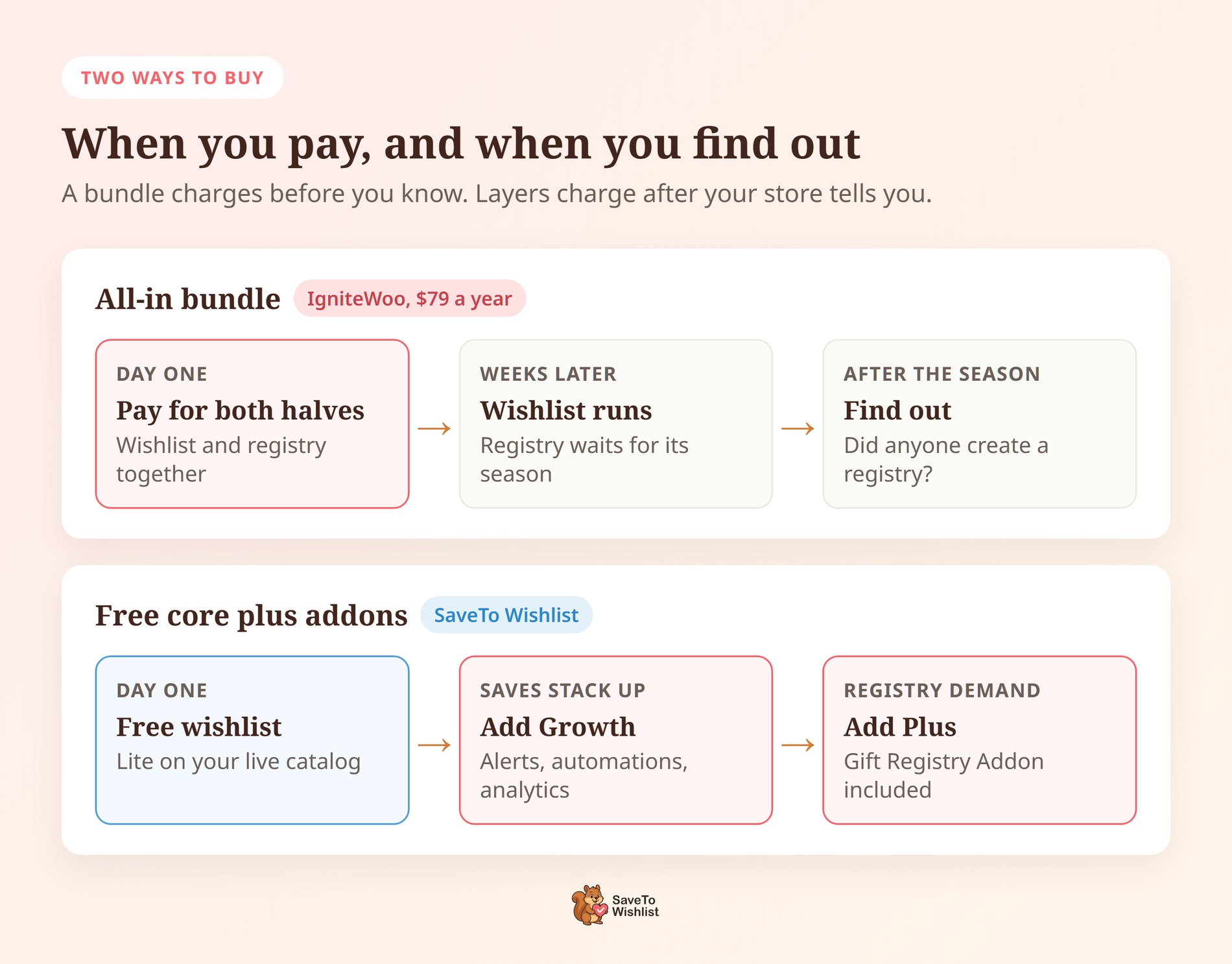
Wishlist and registry software is sold one of two ways. It comes as one paid bundle, or as a free core you extend with paid addons. Almost every practical difference in this comparison comes from that split, so it’s the real question behind any IgniteWoo Wishlist & Gift Registry Pro alternative.
A bundle means one license, one checkout and one plugin to keep updated. The wishlist and the registry arrive together, whether or not you need both. However, you pay before you know how much of it your store will use.
A free core flips that order. The everyday wishlist runs at no cost on your live catalog, with your own products and traffic. Then you buy paid features one at a time, once customer behavior shows which ones you need.
Neither model is automatically right. A shop that runs registries every month can reasonably buy everything up front. By contrast, a shop that has never run one is guessing, and a bundled guess costs the full price.
Timing matters too. For most stores, registries are seasonal: wedding season, baby showers, the Christmas rush. Wishlists aren’t seasonal at all, because shoppers save products all year. So buying both on the same day assumes both start paying off together.
What An All-In Bundle Gets You
IgniteWoo Wishlist & Gift Registry Pro is one paid plugin that covers wishlists and gift registries, sold as a yearly subscription. Its product page lists $79 a year for one site, $89 for two, $99 for five and $199 for 25. The latest version is 4.5, released March 5, 2026.
Its documented feature set is broad. According to its product page, the plugin covers:
- Lists for guests and customers: Logged-in customers and guests can create as many lists as they need. You can switch guest lists off, and guests then get a prompt to log in or register.
- Three privacy levels: Lists can be public, shared by link, or private. Public lists show up in the plugin’s own list search when the title matches.
- Buying from a list: Anyone who can see a list can buy from it. The purchase is then tracked for the owner. At checkout, the buyer can write a message to the owner and choose who the gift ships to.
- Full admin control: Admins can see every list and create lists for shoppers. They can also edit items and move a list to another owner.
- Comments and sharing: Visitors can comment on lists if your site allows comments. Each list also shows Facebook, Twitter, Pinterest and email share icons.
- Shortcodes and a REST API: Shortcodes add a list-creation page and a list search page. That search finds lists by name, email or title. Version 4.5 added REST endpoints for creating lists and changing what’s in them.
Where The Bundle Earns Its Price
Buying one product is genuinely simpler than putting together three, and that’s worth saying plainly. A store that already knows it needs both gets them on day one, with a single license key. That’s the bundle’s strongest argument, and any IgniteWoo Wishlist & Gift Registry Pro alternative has to beat it on something other than convenience.
However, that convenience only pays off if you use both halves. The product page lists no free version, so you can’t try the plugin on your own catalog first. Every tier is a paid yearly subscription.
What A Free Core Plus Addons Gets You
As an IgniteWoo Wishlist & Gift Registry Pro alternative, SaveTo Wishlist splits the same job across three purchase points, and the first one is free. Our free WooCommerce wishlist plugin gives customers unlimited named wishlists. Guest wishlists merge into the shopper’s account when they log in or register. It also imports lists from four other wishlist plugins, so stores moving from those don’t start from scratch.
What We Saw When We Tested Lite
We ran Lite on a staging store to see what this IgniteWoo Wishlist & Gift Registry Pro alternative gives you before paying anything. The save button showed up across the whole shop grid straight away, with no template editing.
Saving as a guest was the more interesting test. The button label switched to “Remove from Wishlist” right away.
We had the Add to wishlist button setting on Popup. So a confirmation then invited the guest to log in or create an account. The save itself didn’t wait for registration.
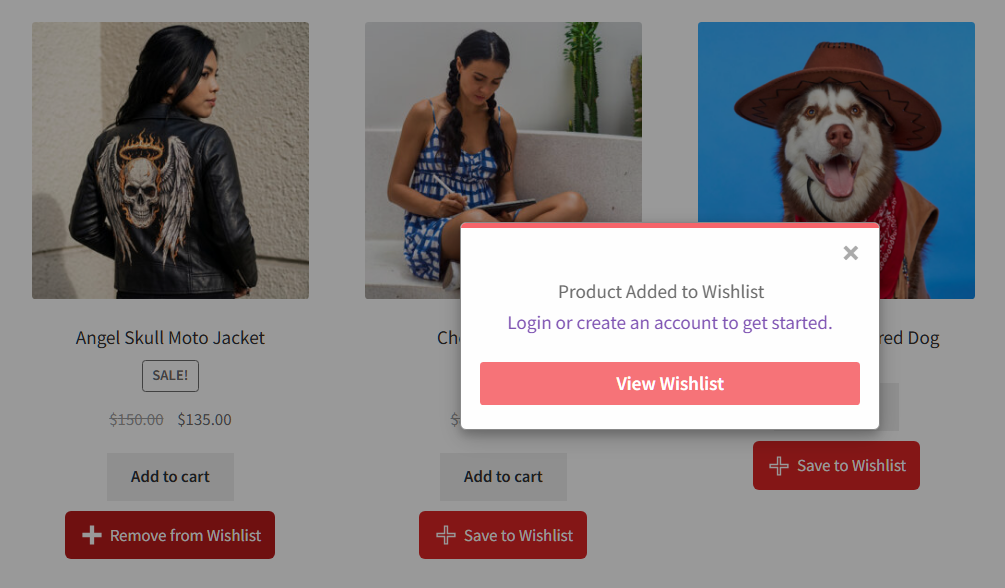
That popup isn’t the default, though. Out of the box, the setting is Redirect, which sends shoppers to the wishlist page instead. Either way, each save fires a browser event and sets a 30-day cookie. That lets a popup or email tool react to a save before the shopper has an account.
🔍️ What we’ve seen: Store owners often ask if the free version is a trial that stops working with real customers. It isn’t, and the guest path shows why. Trial-style free tiers often ask for an account before the first save. Test the guest flow in a private window on your own store, and you’ll know within a minute.
Where The Paid Plans And Registry Come In
SaveTo Wishlist Pro is the paid layer. The Growth plan adds wishlist analytics, automations, price-drop and back-in-stock alerts, and real-time webhooks. It also brings collaborative group wishlists and role-based access control. So you can follow up on saves instead of only counting them.
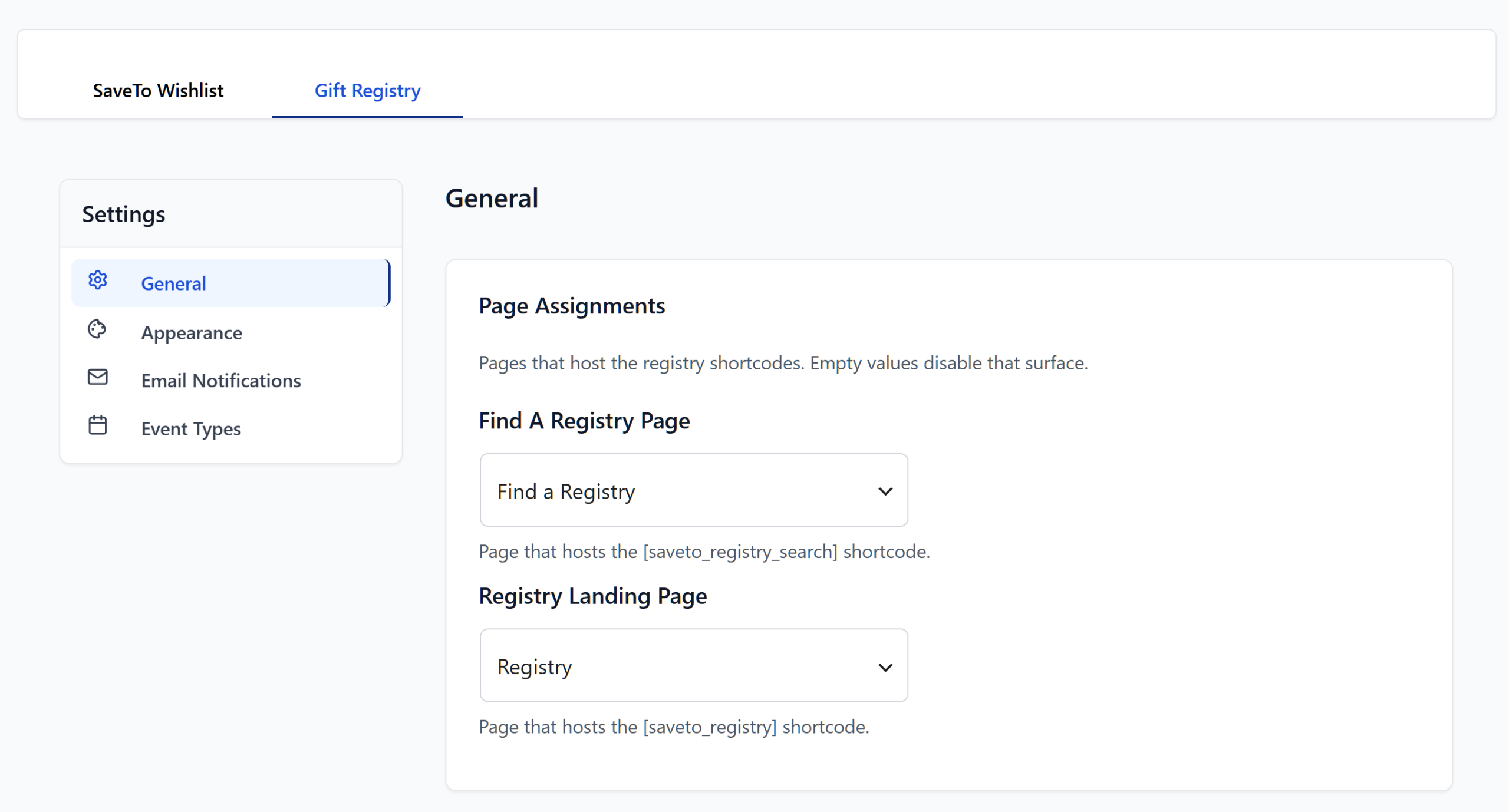
The Gift Registry Addon is a separate layer again. It comes with the Plus and Business plans only, along with advanced sharing options. A shopper turns an existing wishlist into a registry by filling in the event details.
The addon also adds a Gift Registries tab to My Account and a public Find a Registry page. Guests search that page by the registrant’s name and can filter by event type. As a result, friends and family can find the right list without needing a link.
The Cost Of Committing Before You Know
A store that has never run a gift registry can’t yet tell whether it needs one. The two models charge differently for finding out, and this is the part of the decision that’s easiest to skip.
With a bundle, finding out costs the full license. You pay $79 for one site, install both halves, then see whether customers create registries. If they don’t, you’ve paid for a registry engine to learn that shoppers mainly wanted a save button.
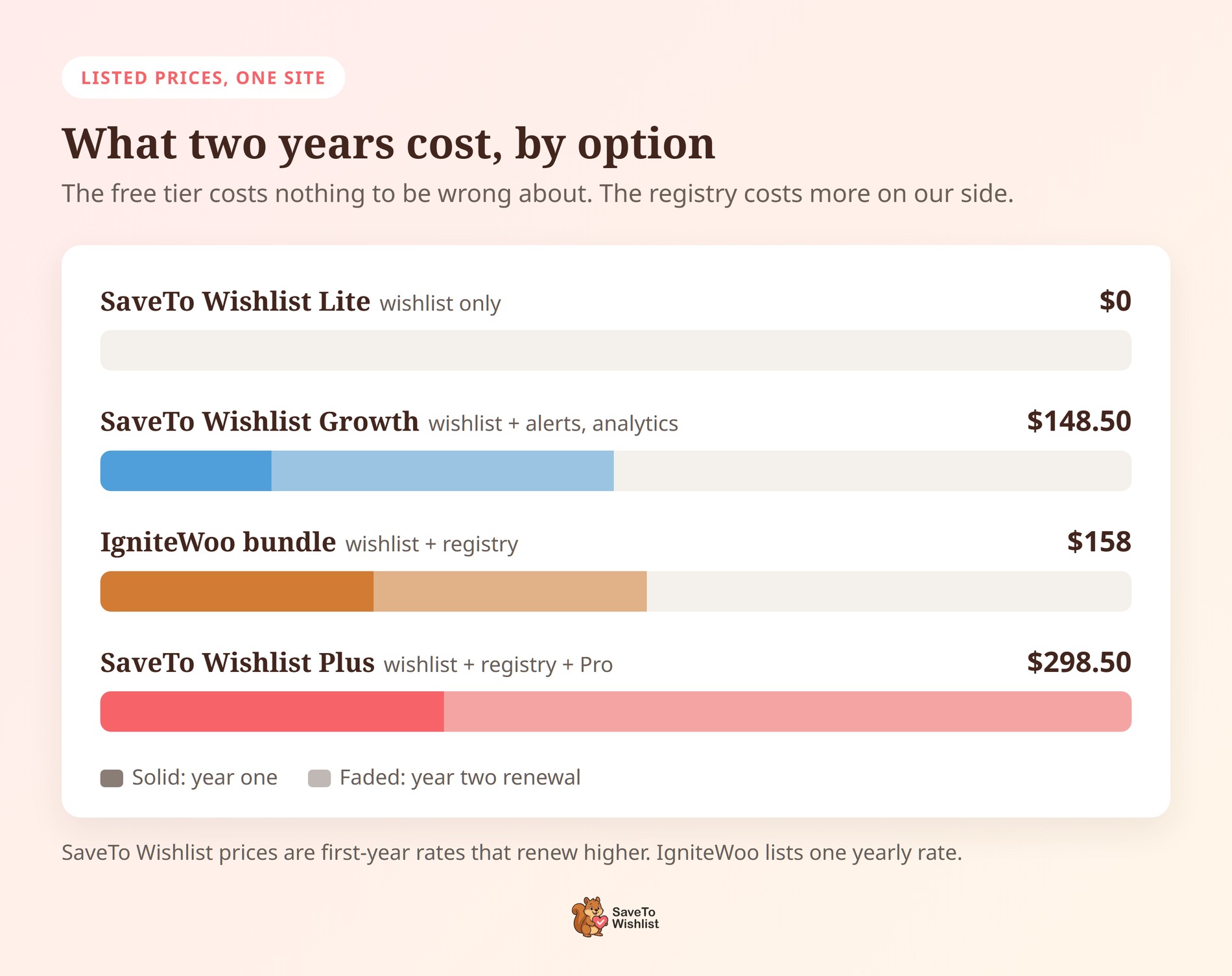
With SaveTo Wishlist as your IgniteWoo Wishlist & Gift Registry Pro alternative, finding out is free. Lite runs the wishlist half on live traffic for as long as you like. Once saves stack up with nothing following them up, Growth is $49.50 for the first year and renews at $99.
Registries come in at Plus, which is $99.50 for the first year and renews at $199. Business is $199.50, renews at $399, and adds an unlimited-sites license, multisite support and priority email support. The SaveTo Wishlist pricing page has the full details. Every plan also carries a 14-day money-back guarantee.
What A Free Trial Run Tells You
Look at what that order buys you in information. A few weeks of a free wishlist on real traffic shows whether your shoppers save products at all. After that, Growth’s analytics show which products get saved most. Those are the numbers that make the registry decision clear, and a demo store can’t give you them.
🔍️ What we’ve seen: A common pattern is buying a registry for one wedding season. Then the renewals keep coming while it sits idle the rest of the year. Registries tend to get more use in stores that already have a busy wishlist. That’s because the wishlist gives registry visitors a reason to come back once the event is over.
How The Two Registries Handle A Purchase
Both products track gift purchases against a registry, so the comparison table below says “Yes” for both. That’s the real test for an IgniteWoo Wishlist & Gift Registry Pro alternative: what the buyer can add and what the registrant sees after the sale.
On IgniteWoo’s side, the buyer can send a message and choose who the gift ships to. Admins also see the list owner’s billing and shipping details on the order. In addition, version 4.4.1 added an alert when a shopper tries to add more than the list still needs.
The Gift Registry Addon doesn’t offer a buyer message or a ship-to-owner choice. A gift ships to whatever address the buyer enters at a normal WooCommerce checkout. Before the item goes into the cart, the buyer gives their name and email, and both are required.
What The Registrant Sees After The Sale
Where the addon goes further, based on what IgniteWoo documents, is the registrant’s side once a gift is paid for:
- Remaining quantity: Each item shows how many have been bought out of how many were requested. The cart refuses anything over what’s left, so guests don’t double up on a gift.
- Refunds: A refunded order voids the purchase record and puts the item back on the list. A partial refund lowers the count instead.
- Owner emails: The registrant can get an email for each new purchase and refund. So they hear about a gift without logging in.
- Thank-you tracker: The owner sees who bought what, with the order number. They can mark thank-you notes as sent, one at a time or in bulk.
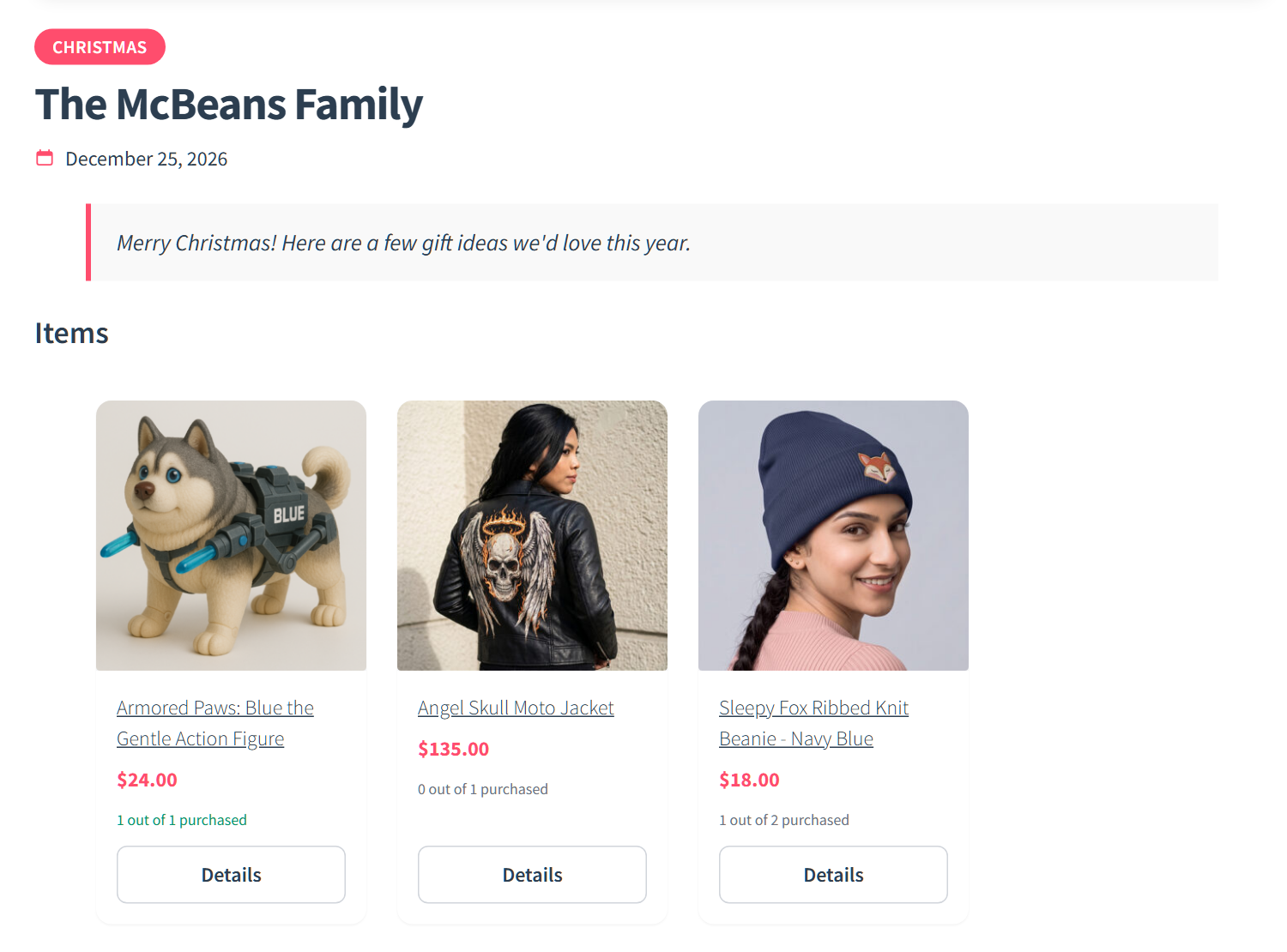
One edge case is worth knowing. If two guests check out the last unit at the same moment, both orders go through. The owner’s dashboard then flags the item as fully purchased with one extra, so nobody’s payment fails.
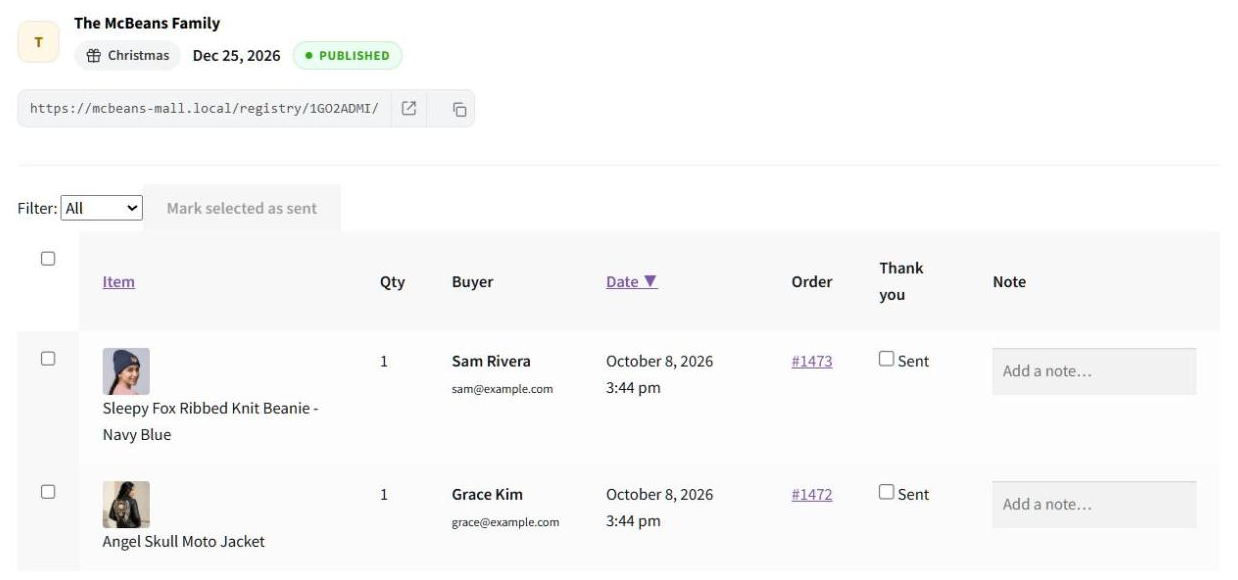
So the choice comes down to what your registry guests do most. If they usually send gifts straight to the registrant’s home, IgniteWoo’s ship-to-owner choice is a real point in its favor. If duplicate gifts and thank-you notes are the bigger headache, the addon covers more of that ground, and that’s where it works best as an IgniteWoo Wishlist & Gift Registry Pro alternative.
Which Packaging Suits Your Store
Match the packaging to how often you’ll actually run registries, not to how many features each product lists. Here’s how the two models line up.
| Feature | SaveTo Wishlist Lite (free) | SaveTo Wishlist Pro (Growth) | SaveTo Wishlist Plus / Business | IgniteWoo Wishlist & Gift Registry Pro |
|---|---|---|---|---|
| Price | Free | $49.50 first year, renews at $99 | Plus: $99.50 first year, renews at $199. Business: $199.50 first year, renews at $399 | $79 a year, one site |
| Multiple named wishlists | Yes | Yes | Yes | Yes |
| Guest lists | Yes, merge on login | Yes | Yes | Yes, can be switched off |
| Import from other wishlist plugins | Yes, four importers | Yes | Yes | Not documented on its page |
| Price-drop and back-in-stock alerts | No | Yes | Yes | Not documented on its page |
| Wishlist analytics | No | Yes | Yes | Not documented on its page |
| Gift registry | No | No | Yes | Yes |
| Buyer message and ship-to-owner choice | No | No | No | Yes |
The free column isn’t empty, which is the whole point of the model. Registries do sit at a higher tier on our side, though, and that’s the honest weak spot of this IgniteWoo Wishlist & Gift Registry Pro alternative. If registries are your only reason to buy, the bundle costs less. It’s $79 a year, against Plus at $99.50, then $199.
Who Should Buy The Registry Up Front
That only matters if you’re sure about the registry. Stores that run registries all the time, like bridal, baby or corporate gifting shops, already know. They can go straight to Plus. Everyone else does better proving the wishlist first, since the free tier costs nothing if registries never take off.
For the practical build, our guide to setting up a gift registry for weddings and events walks through it. Our guide to collaborative and shared wishlists covers group gifting.
Moving Over From IgniteWoo Wishlist & Gift Registry Pro
If you already run IgniteWoo Wishlist & Gift Registry Pro, your customers’ lists won’t come across automatically. SaveTo Wishlist’s importer reads from four plugins: YITH WooCommerce Wishlist, TI WooCommerce Wishlist, MoreConvert and WPC Smart Wishlist. Its Imports tab, under SaveTo Wishlist > Settings, only appears while one of them is active. IgniteWoo isn’t on the list, so the tab won’t show up for an IgniteWoo store.
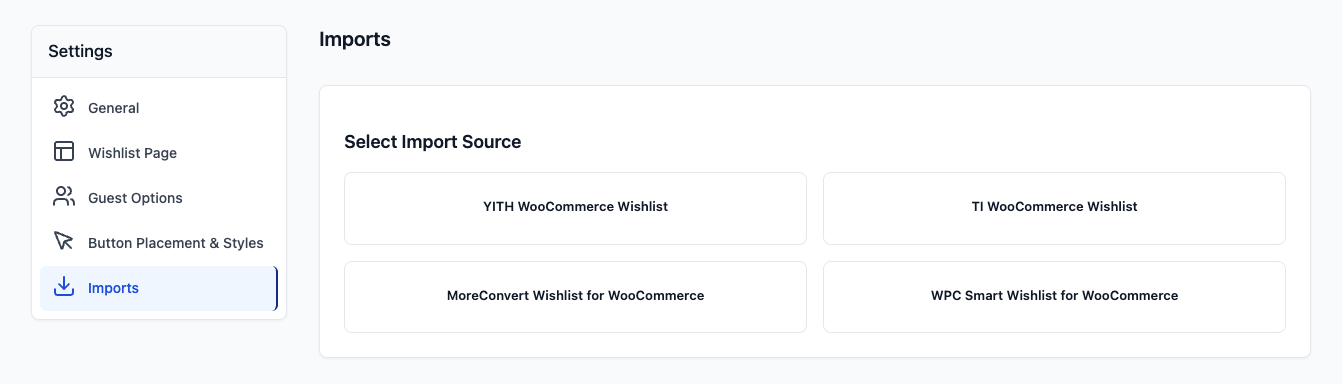
That makes switching to an IgniteWoo Wishlist & Gift Registry Pro alternative a timing question more than a technical one. Two steps keep it smooth:
- Count the live registries first. Any registry with an event still ahead has guests buying from it. Switch after the last of those events has passed, so no registrant loses their list mid-season.
- Tell your regular customers. Saved wishlists start fresh on the new plugin. A short email asking shoppers to save their products again keeps that demand from quietly disappearing.
Registry owners have one extra step on our side. A SaveTo Wishlist registry starts life as a wishlist and then gets converted. So anyone moving a registry across saves their products first, then fills in the event details.
IgniteWoo Wishlist & Gift Registry Pro FAQ
Can I start free and add the registry later?
Yes. SaveTo Wishlist Lite is free and runs the wishlist side on its own for as long as you like. When you need alerts, automations or analytics, Growth is $49.50 for the first year and renews at $99.
The Gift Registry Addon comes with Plus ($99.50, then $199) or Business ($199.50, then $399). Your Lite wishlists stay in place when you upgrade.
Does IgniteWoo Wishlist & Gift Registry Pro have a free version?
Its product page doesn’t list one. Every option there is a paid yearly subscription, from $79 for one site to $199 for 25 sites. That was still the case when we checked on October 8, 2026.
What if I only need registries one season a year?
Then the free wishlist can cover you all year, and you add the registry when the season comes around. Seasonal demand is where a bundle works against you, because the registry half sits idle while the license renews. Meanwhile, a wishlist that runs all year keeps collecting saves between events.
What happens at renewal?
SaveTo Wishlist plans use first-year introductory prices, then renew at the regular rate. Growth is $49.50, then $99. Plus is $99.50, then $199, and Business is $199.50, then $399.
So budget for the renewal figure, not the first-year one. IgniteWoo lists $79 a year for one site, with no separate introductory rate.
Start Free With SaveTo Wishlist, Then Add The Registry
Buying in layers has a quiet second benefit: each purchase stays tied to a reason. When you upgrade because saves are piling up with no follow-up, you know exactly what the upgrade has to fix. Then you can tell within a few weeks whether it worked. A bundle bought on day one has no before-and-after to measure against.
Here’s the short version of what to do next:
- Work out which packaging model your store is actually buying
- Read what the all-in bundle documents publicly
- Install the free core and test the guest save path
- Watch a few weeks of saves before paying for anything
- Decide which registry handles purchases the way your guests buy
- Pick the tier that matches how often you run registries, and time any switch for the gap between events
SaveTo Wishlist is the IgniteWoo Wishlist & Gift Registry Pro alternative I’d put on a store today. That’s because it lets you prove the wishlist before you pay for the registry.
Start with SaveTo Wishlist Lite on your real catalog. When saves stack up, move to SaveTo Wishlist Pro on the Growth plan. Then add the Gift Registry Addon through Plus or Business once registries have earned their place.
For a wider view, our roundup of the best WooCommerce wishlist plugins covers the rest of the field. If you’re still working out why saved products matter, browse abandonment is a good place to start.