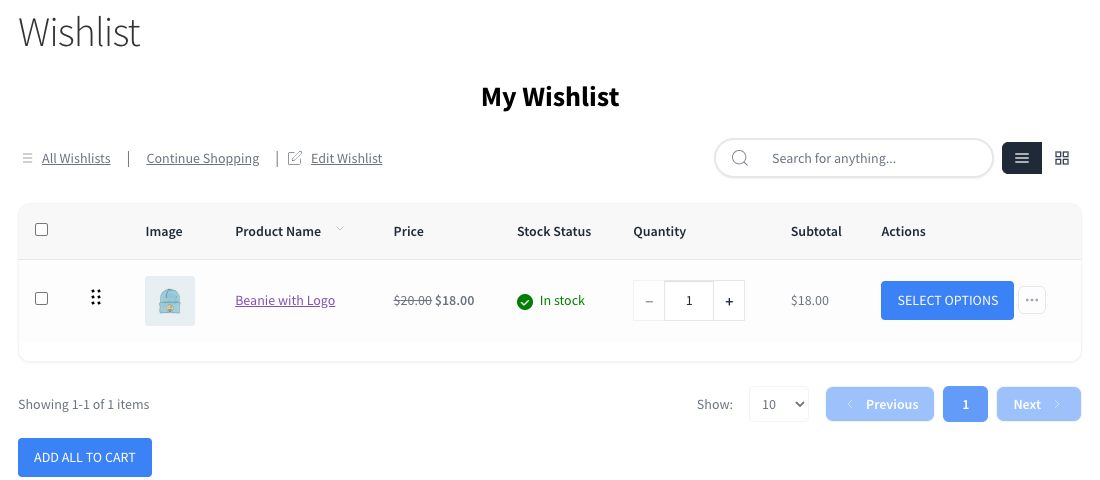
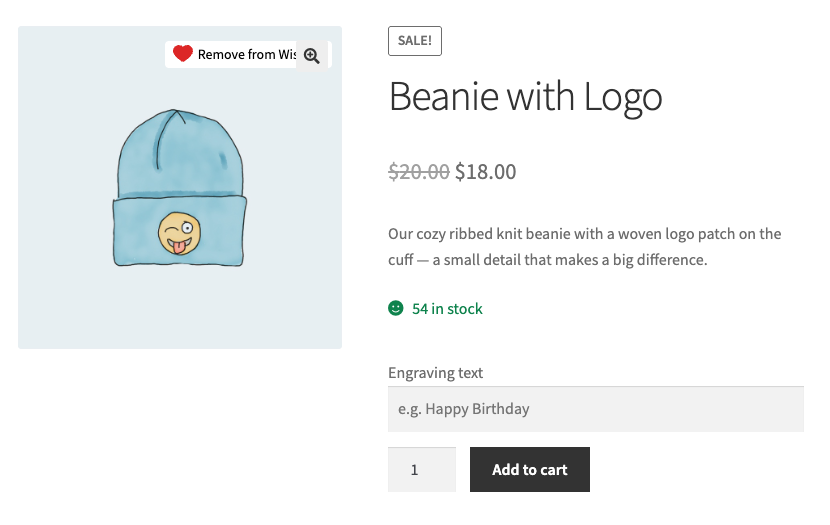
If you sell products with custom option fields through Advanced Product Fields (Product Addons) for WooCommerce, shoppers must still choose those options when they move a wishlist item to the cart. SaveTo Wishlist handles this for you. Below, you can see what shoppers see on the wishlist and on the product page.
Before you start
- Advanced Product Fields (free or Pro) installed and active.
- One or more products set up with Advanced Product Fields option fields.
- SaveTo Wishlist active. The integration runs automatically. There are no settings to configure.
- SaveTo Wishlist 1.1.6 or later if you use Advanced Product Fields Pro.
How it works
Some products need choices made before they can be bought, such as a size, an engraving, or an uploaded file. When a product has Advanced Product Fields option fields, SaveTo Wishlist shows a Select options button on its wishlist row instead of Add to Cart.
The Select options button sends the shopper to the product page. There they fill in the option fields and add the product to the cart with their choices, so nothing important is skipped.
Troubleshooting
The wishlist shows Add to Cart for a product with option fields.
Make sure Advanced Product Fields is active. Then open the field group and check that its conditions include this product. If you use Advanced Product Fields Pro, update SaveTo Wishlist to 1.1.6 or later.
Frequently asked questions
Why does the wishlist send shoppers to the product page?
So shoppers can choose the product’s options. Adding it directly would skip those choices.
Does the wishlist save the options a shopper picks?
No. The wishlist saves the product. Shoppers pick the options on the product page when they add it to the cart.
Do products with option fields go into the cart with Add All to Cart?
No. The Add All to Cart and Add Selected to Cart buttons skip them. Use the Select options button on each one.
Does this change how my other products add to the cart?
No. This integration only affects products that carry Advanced Product Fields option fields. Everything else adds to the cart as usual.
Need help?
If you have a question or run into any issues, we’re here to help.
- Premium users: Open a support ticket
- Free users: Visit our community forum
 SaveTo Wishlist