

 Reviewed by
 If you sell home goods, kitchenware, baby products, or anything people buy as gifts, you’ve probably had customers ask: “Do you offer a gift registry?”
It’s a reasonable request. Couples planning weddings, parents expecting a baby, and hosts organizing housewarmings all want a way to share a curated list of products with friends and family. For a long time, the honest answer for most WooCommerce stores was “sort of.” You could share a wishlist publicly and get close, but you couldn’t track what guests had already bought.
That’s changed. The SaveTo Wishlist Gift Registry Addon turns any wishlist into a real WooCommerce gift registry wishlist. It adds a public registry page, a search page for guests, and automatic purchase tracking, so guests can see what’s already been bought. This guide covers what the addon does, how to set it up, and how to promote registries for weddings, baby showers, birthdays, and beyond.
Table of Contents
- What Makes A Gift Registry Different From A Regular Wishlist?
- Key Features Of The Gift Registry Addon
- Registry Owner Capabilities
- The Gift Giver Experience
- Your Role As The Store Owner
- How To Set Up The Gift Registry Addon
- Event Types That Work With WooCommerce Gift Registries
- The Wishlist Features Behind Every Registry
- Building Your Gift Registry Strategy
- What To Know Before You Launch
- Gift Registry Niches That Work Best With WooCommerce
- FAQs: WooCommerce Gift Registry Wishlist
- Turn Your WooCommerce Store Into A Gift Registry Destination
What Makes A Gift Registry Different From A Regular Wishlist?
A regular WooCommerce wishlist is private by default. A customer saves items for their own reference, and nobody else sees the list. A gift registry flips that. The whole point is that other people can view the list and buy from it.
Not sure which one your customers need? Our guide to wishlist vs gift registry compares the two.
That means four things have to work:
- Public sharing: The registry owner generates a link that gift givers can open.
- Guest access: Gift givers can view a registry without an account and can buy without creating one when WooCommerce guest checkout is enabled.
- Named lists: Customers need separate lists for different events. A wedding registry and a birthday list shouldn’t be lumped together.
- Purchase tracking: Once someone buys a gift, the list has to say so. Without this, guests can’t see what others have purchased, increasing the risk of duplicate gifts.
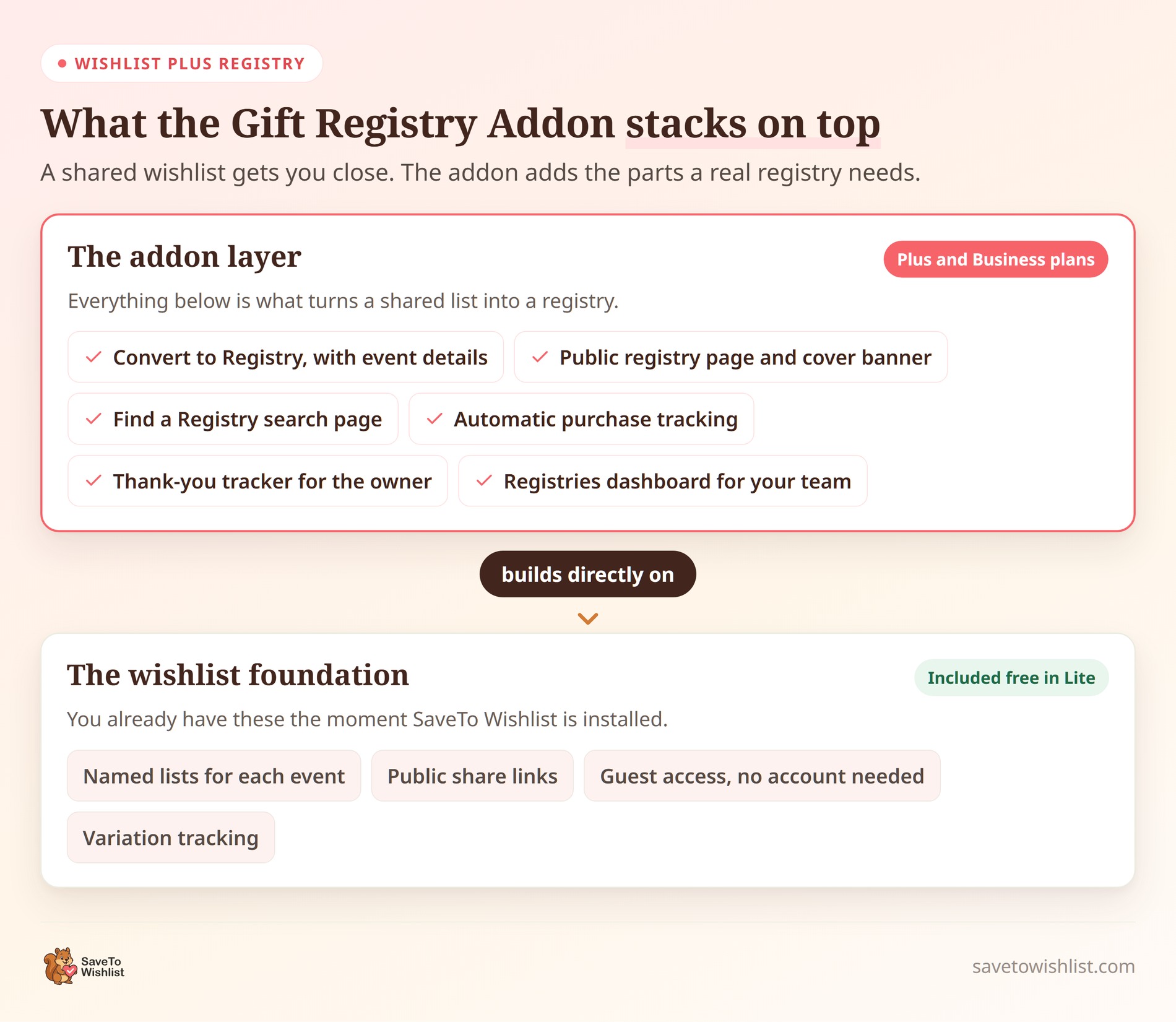
The first three come free with SaveTo Wishlist. The fourth is what makes a registry feel trustworthy, and the Gift Registry Addon handles it automatically.
🔍️ What We’ve Seen: A pattern we see often is stores treating registries as an afterthought, then wondering why nobody uses them. The feature itself isn’t the hard part anymore. The stores that get sign-ups do three plain things. They explain the registry clearly, put a link where people can find it, and promote it before each gifting season rather than after.
Key Features Of The Gift Registry Addon
The Gift Registry Addon is a separate plugin for WooCommerce that sits on top of SaveTo Wishlist Lite. It doesn’t replace anything. It reuses the products and wishlists you already have, so there’s no special registry product type to set up.
Here’s the whole journey, from a saved wishlist to a thank-you note:
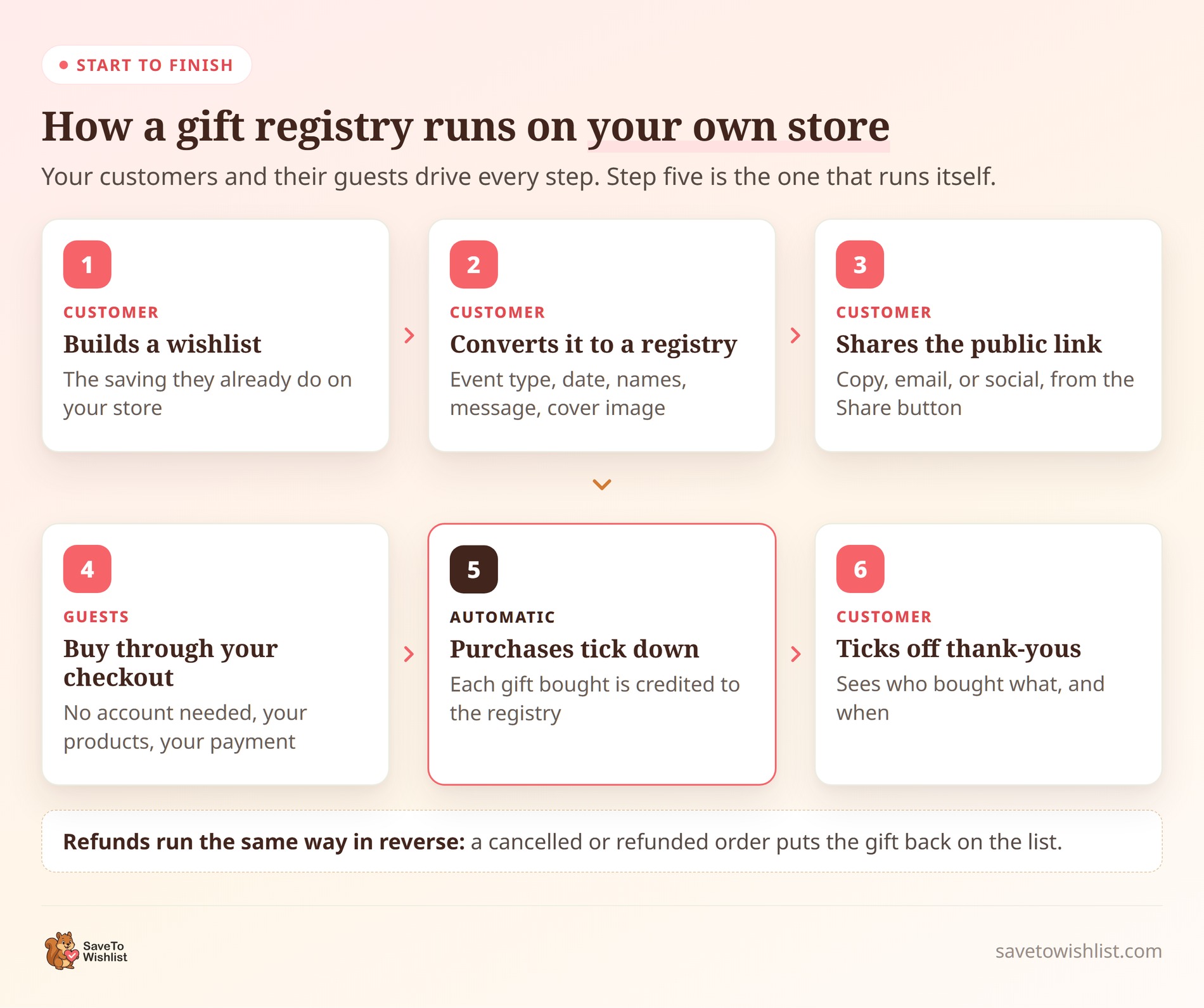
The part worth pausing on is step five. Once a guest pays for their order in WooCommerce (usually marked as Processing or Completed), the add-on automatically updates the registry to include the purchase. The purchased count increases, and fully claimed items show a count such as “5 out of 5 purchased” and no longer accept another normal claim. You don’t touch it, and neither does the customer.
It records orders when they enter a WooCommerce paid status, normally Processing or Completed. This can include Cash on Delivery when the gateway moves the order into Processing. Bank-transfer and cheque orders commonly remain On hold and aren’t counted until they move into a paid status.
You’ll need the free SaveTo Wishlist Lite plugin installed and active, WooCommerce 4.0 or newer, WordPress 5.8 or newer, and PHP 7.4 or newer. The Plus and Business plans include the addon itself. For a fuller walkthrough of the release, see our post on the WooCommerce Gift Registry Addon.
Registry Owner Capabilities
Your customers do the work of building and running their own registries. Here’s what they get.
Turning a wishlist into a registry
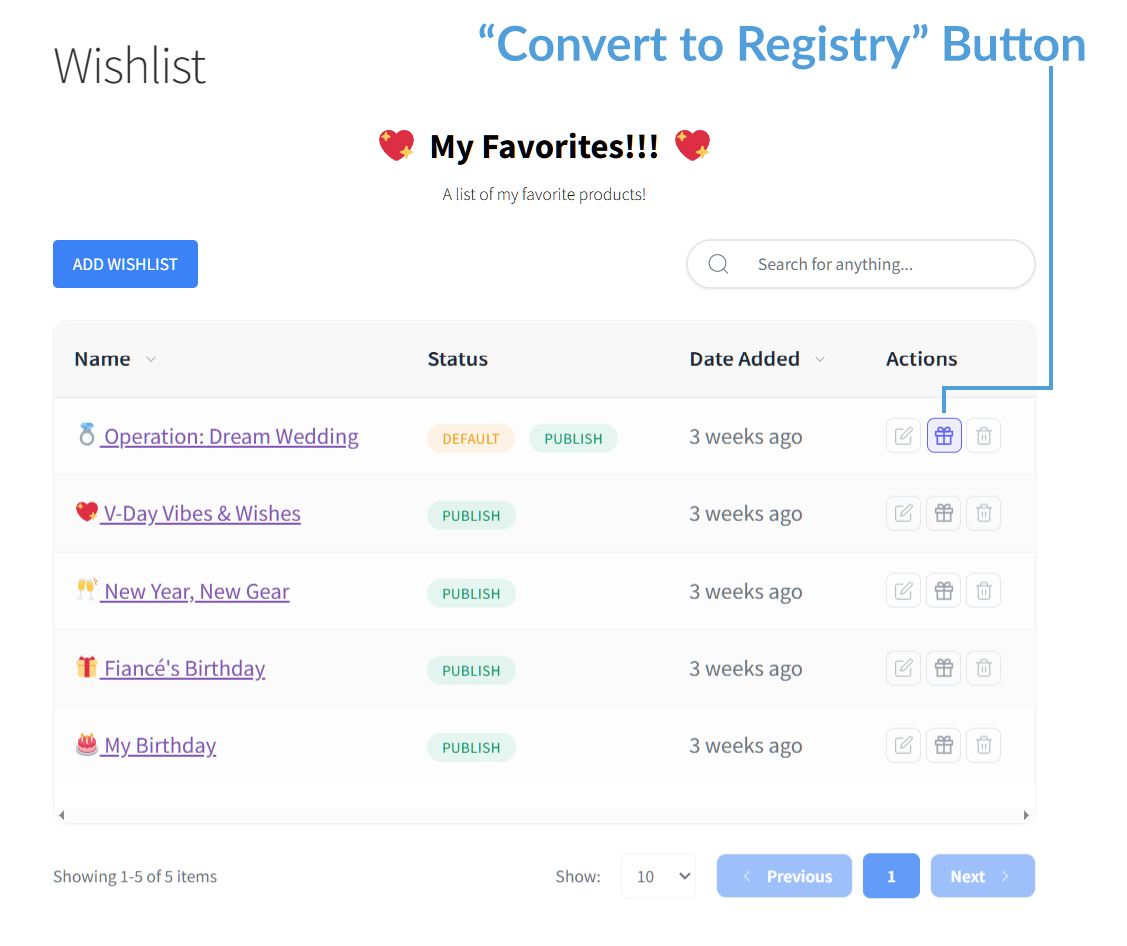
From the wishlist collection page, the customer clicks the gift-box Convert to Registry action beside an eligible wishlist they own. Then they fill in a short form: event type, event date, the names the registry is for, an optional message, and an optional cover image. Only the owner of a wishlist can convert it, so nobody can turn someone else’s list into a registry.
The cover image field tells them what to upload, right down to the recommended 1600 by 900 pixels. That saves you a support email about a badly cropped banner.
A public registry page they can share
Each registry gets its own page at a tidy address like yourstore.com/registry/ABC12345/. The page shows a responsive cover image (or a color gradient when no image is uploaded) followed by the event details, registrant names, an optional welcome message, and the gift grid.
A Share button sits at the top of the page, but only the owner sees it. It opens a box with a copy link button, an email option that pre-fills the subject and message, and buttons for Facebook, X, and WhatsApp. Guests never see it.
Editing the registry after it’s live
People change their minds, so a registry isn’t frozen once it’s created. Owners can add gifts and change requested quantities, but they can’t reduce an item’s requested quantity below the quantity already purchased. They can also drag items into a new order, so the ones that matter most sit at the top.
Gifts can also be removed from the list, with one sensible exception. If someone has already bought an item, the addon greys out the delete button and displays a tooltip explaining why. That’s better than letting them try and hit an error.
The thank-you tracker
Registry owners get a Gift Registries tab in their account on your store. The tab only shows up once they actually own a registry, so shoppers who’ve never made one don’t see an empty menu item.
Inside, they get one row per purchase. Each row shows the item name and picture, how many were bought, who bought it, the date, and the order number. Each row has a thank-you sent tick box and a notes field for something like “posted card on the 3rd.” They can filter by thanked or not yet thanked, and sort by date or item name.
The thank-you tracker helps registry owners organize thank-you notes after an event. It can also make your store’s registry experience more convenient.
When the relevant notifications are enabled, the store emails owners after a registry purchase and after a contributing order is refunded or cancelled.
The Gift Giver Experience
Gift givers may include first-time visitors as well as existing customers, so their experience needs to be simple.
A Find a Registry search page
Plenty of guests hear about a registry without ever getting the link. The addon publishes a Find a Registry page on your store when you activate it, so those guests can look it up themselves.
They search by the registrant’s name and can narrow results with an event type dropdown. Results show the names, event type, event date, and a link, with the soonest events first. Only published registries appear, and the search results never show private information. No owner email, no buyer names, no purchase history.
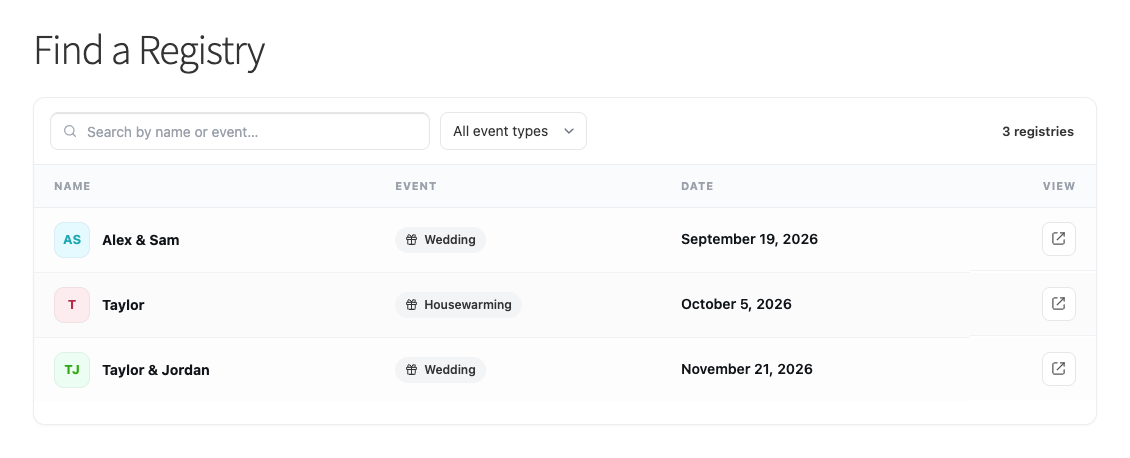
One thing to tell your team: the search box matches names, not events. Typing “wedding” into it won’t work, because event filtering is what the dropdown is for.
Buying a gift
For every item, guests see a running count such as ‘2 out of 5 purchased,’ showing the purchased quantity out of the quantity requested. Once an item is fully claimed, it shows the full purchased count, such as “5 out of 5 purchased,” and no longer accepts another normal claim. Simultaneous checkouts can still exceed the requested quantity.
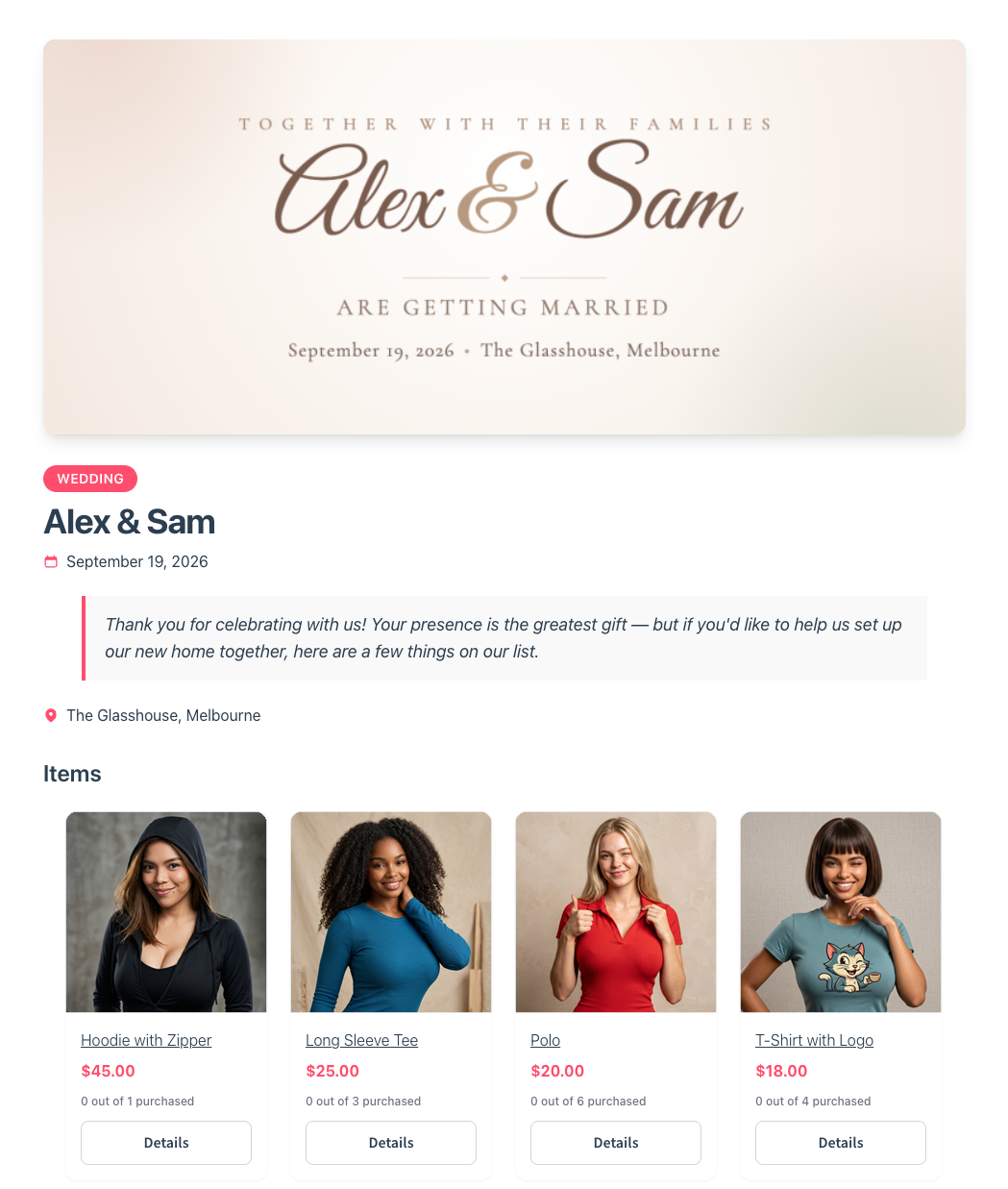
The guest opens the gift’s Details window, enters their name and email, chooses a quantity, and adds the gift to the normal WooCommerce cart. They can then check out without an account if WooCommerce guest checkout is enabled. After adding a gift, guests land straight in the cart, so it’s obvious the item went in. That’s on by default and you can switch it off.
Refunds and cancellations run in reverse. The gift returns to available, so the owner and the next guest see the true picture. A partial refund only reduces the count by the right amount.
Your Role As The Store Owner
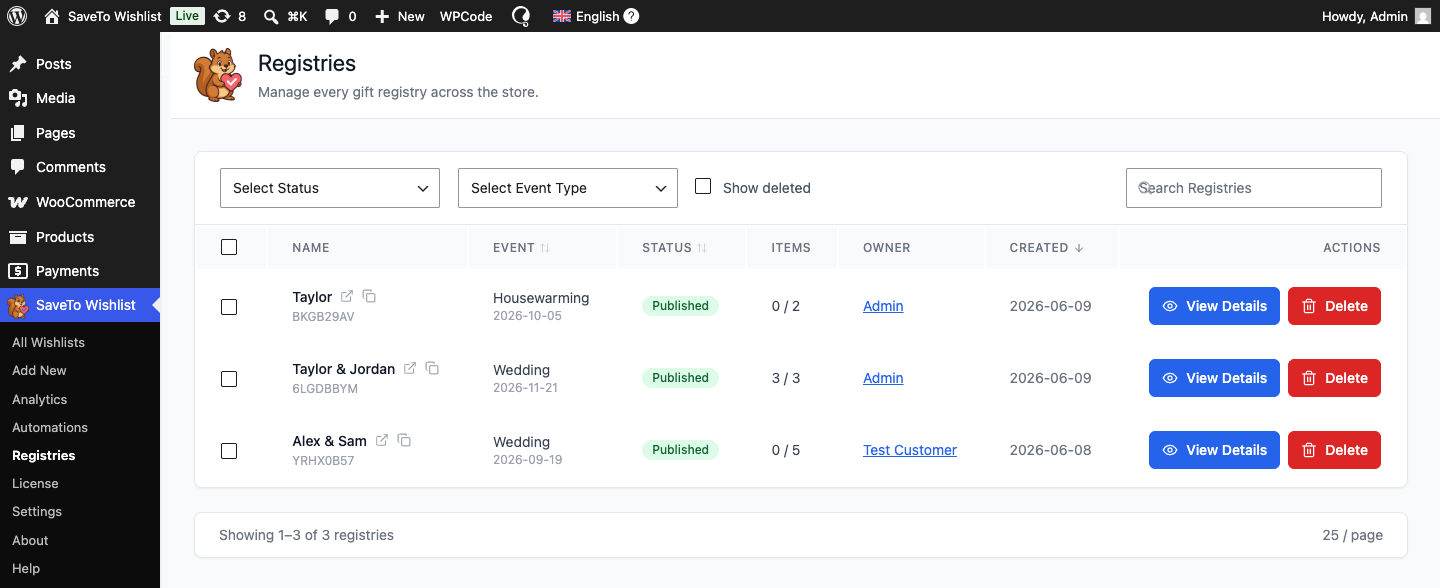
Customers run their own registries, so your job is mostly oversight. A Registries screen inside your SaveTo Wishlist menu lists every registry on your store. Columns cover the registrant names, event type, event date, status, item count, purchase count, owner, and created date. You can search, filter by status and event type, and act in bulk.
Per registry, you can:
- View the public page in a new tab
- Edit it on the customer’s behalf, and system logs the override so there’s a record of who did it
- Archive it, which politely tells visitors the registry is no longer accepting purchases. That’s exactly what you want once an event has passed.
- Delete it, which hides it everywhere and retains the registry and its purchase records for a 90-day recovery window
You or a store manager can also convert a customer’s wishlist into a gift registry wishlist from the back end, which helps when someone phones or emails instead of doing it themselves. The system still credits the registry to the customer as the owner, not to you.
Two smaller details make a real difference over time. You can have the store email you whenever a customer creates a registry, so you can watch adoption without going looking for it. Each registry item also keeps its own copy of the product title, SKU, and image. If you later delete a product, the registry can still display its saved title, SKU, and image, but the deleted product can no longer be purchased.
How To Set Up The Gift Registry Addon
Activation does most of the work. It creates the database tables and publishes two pages for you, Find a Registry and Registry, then assigns them automatically. Everything else lives on one settings screen.
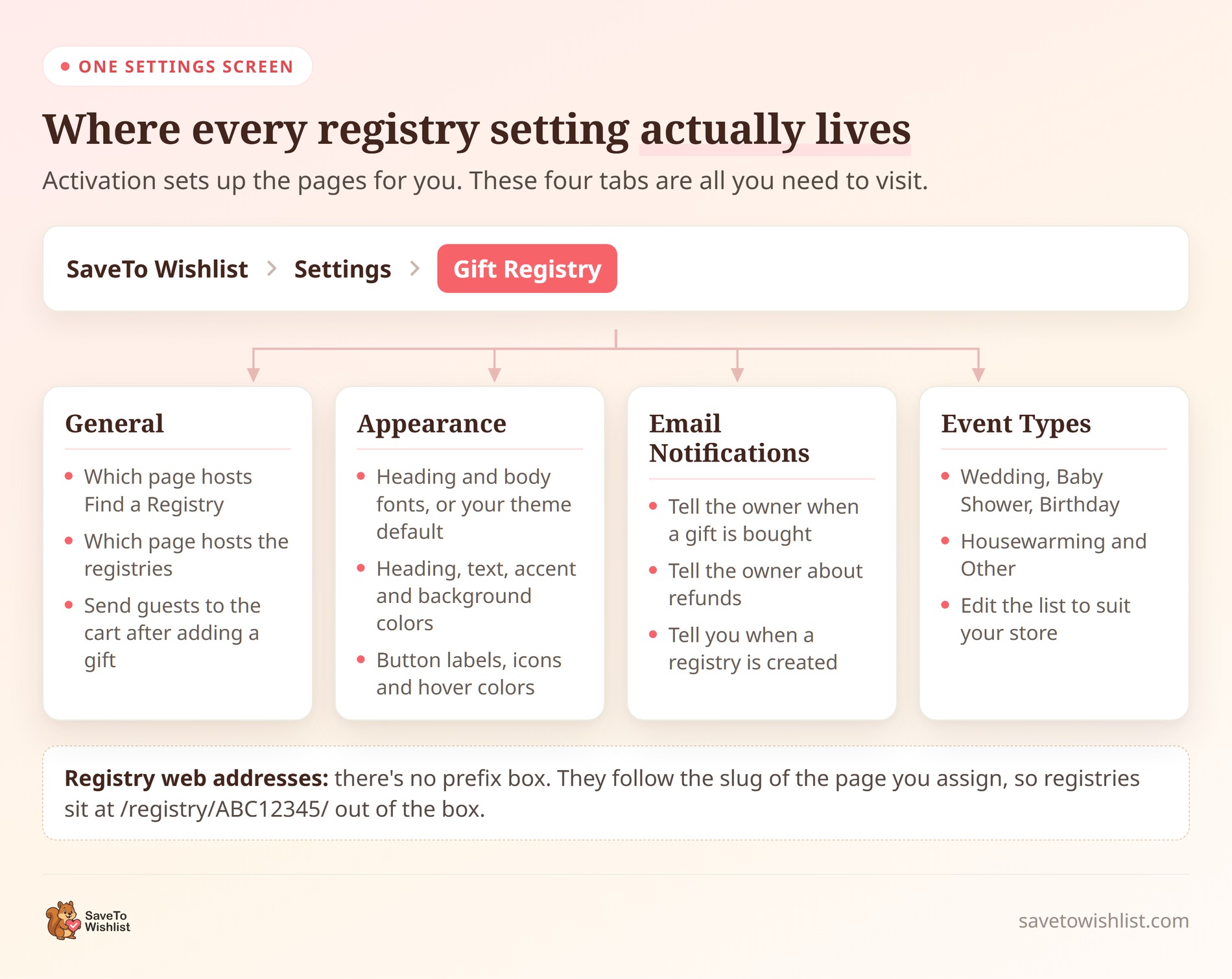
Work through it in this order:
- Check the two page assignments under General look right.
- Trim or extend the list under Event Types. It ships with Wedding, Baby Shower, Birthday, Housewarming, and Other. A homeware store might add “Engagement,” while a baby brand might cut the list right down.
- Set your fonts, colors, and button wording under Appearance so registry pages look like the rest of your store.
- Switch on the notifications you want under Email Notifications, then use the Send test email button to confirm they arrive.
- Decide under General whether guests go straight to the cart after adding a gift.
- Run one end-to-end test. Build a wishlist, convert it, open the public page in a private window, buy an item as a guest, then check the purchase appears in the owner’s thank-you tracker.
- Link your Find a Registry page from your main menu or footer. Guests can’t search a page they can’t find.
One note on web addresses. There’s no URL prefix box to fill in. The address comes from the page you assign as the registry page, which is why registries live at /registry/ABC12345/ out of the box. Rename that page’s slug to gift-registry and every registry address follows.
Event Types That Work With WooCommerce Gift Registries
The addon ships with five event types, and they map closely to the occasions that actually drive traffic for WooCommerce gift registry wishlists. Here’s what each one needs from your store.
Wedding registries
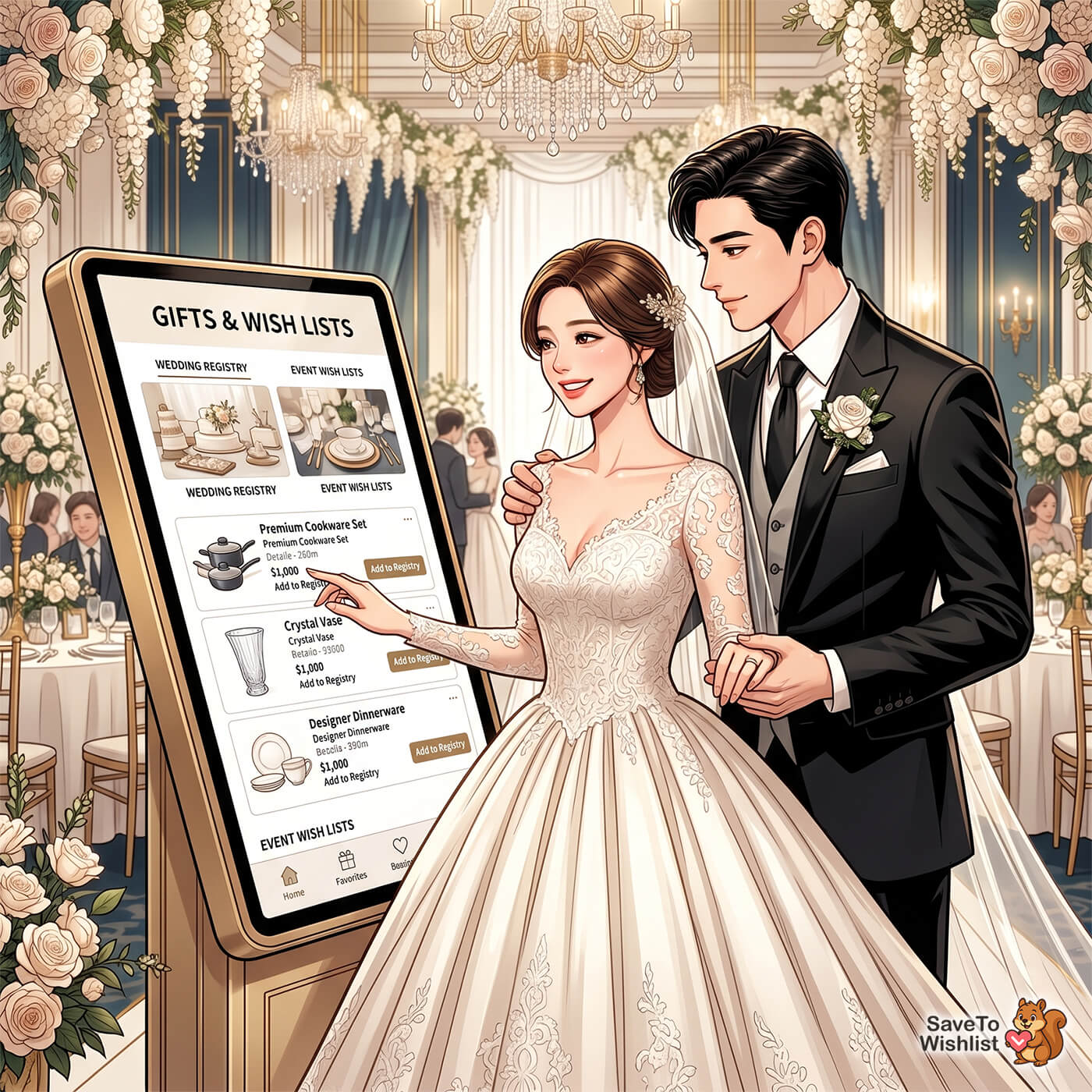
This is the most common request and the one with the highest average order value. Couples create a shared list of items they want, then send the link out through their wedding website, invitations, or social media.
Before conversion, SaveTo Wishlist Pro’s collaborative editing lets both partners add products to the source wishlist. After it becomes a registry, the registry owner manages its contents through the registry page.
According to The Knot, the average wedding registry in the United States contains items totaling between $4,000 and $5,000. For stores in home goods, kitchenware, or lifestyle niches, that’s significant revenue per registry.
Baby shower registries
Parents-to-be create a registry of things they need for the new arrival. Baby registries tend to be more practical than wedding ones, with specific sizes, colors, and quantities mattering more.
What a baby registry needs: variation tracking, so customers save “Size 3-6 months” rather than just “Onesie.” It also needs easy sharing with family, and room to keep updating the list as needs change. Requested quantities help guests see how many units are still needed, although simultaneous checkouts can occasionally exceed the requested amount.
Birthday and holiday wish lists
These are less formal than wedding or baby registries, but they’re just as valuable for stores selling gifts, toys, lifestyle products, or accessories. A customer creates a birthday registry, shares it with friends and family, and recipients buy directly from your store.
This works especially well for children’s stores, hobby shops, and artisan stores where customers often buy for other people.
Housewarming and special occasion registries
Home goods, decor, and kitchen stores are natural fits here. Customers moving into a new place can build a registry of what they need, and guests buy from it instead of guessing.
These registries often include higher-value items like furniture, appliances, and specialty cookware. A specific list helps reduce duplicate gifts and makes it easier for guests to choose what the recipient wants.
If none of the five defaults fit your store, edit the list. A few minutes in the Event Types tab makes the whole feature read like it was built for your niche.
The Wishlist Features Behind Every Registry
The addon handles the registry layer, but it’s standing on the wishlist features underneath. These are worth understanding, because they’re what your customers touch every day.
Multiple wishlists for separate events
SaveTo Wishlist lets customers create unlimited named wishlists. One person can keep a “Wedding Registry” list, a “Housewarming” list, and a personal “Favorites” list under one account. Each list is independent, with its own items and sharing settings, and each eligible wishlist can be converted into a registry once.
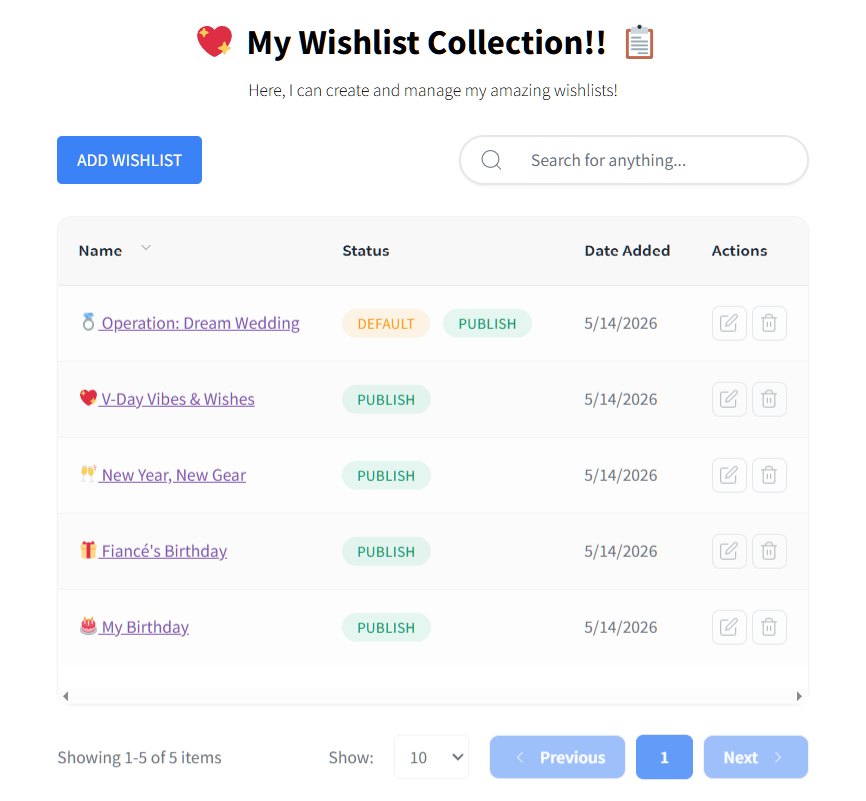
This is included in the free version. Learn more about the multiple wishlists feature.
Sharing permissions and public links
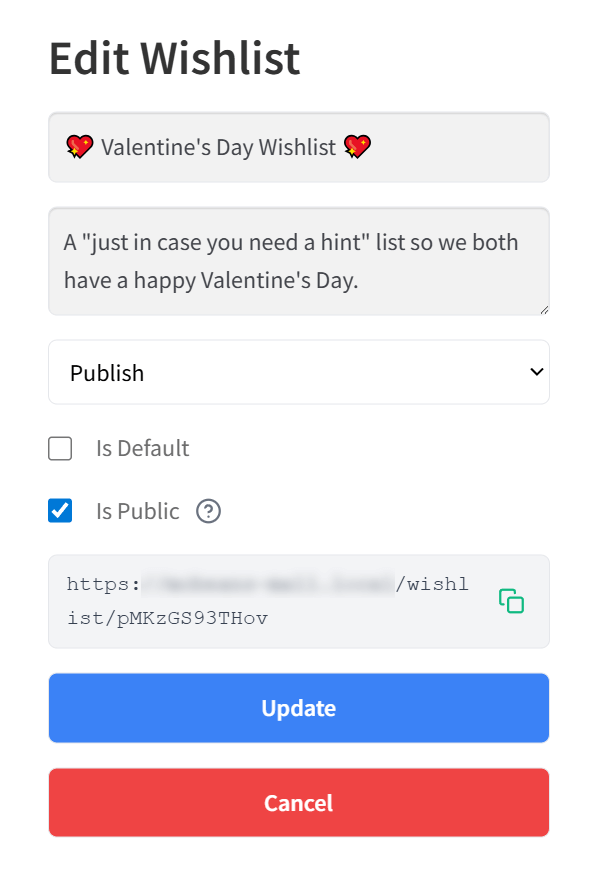
A logged-in customer can make an account-based wishlist public and share its unique link. The owner generates the link and shares it however they want. That might be a wedding website, an email, a social post, or a printed invitation.
Once a list becomes a registry, sharing gets its own dedicated button and a proper public page. Plain wishlist sharing is still useful for the lists that don’t need the full registry treatment. Read more about sharing and permissions.
Guest access for gift givers
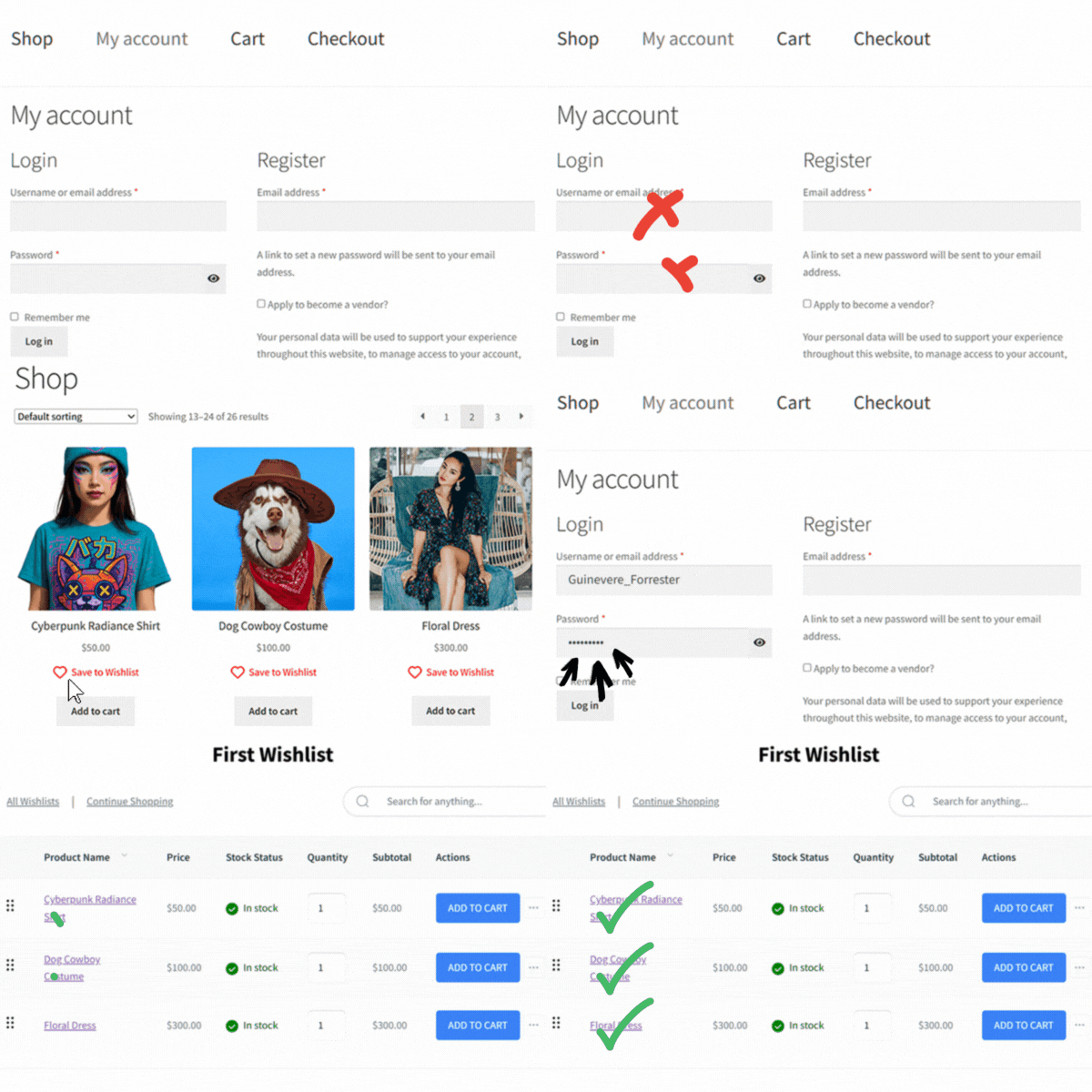
This small feature makes a big difference. Gift givers don’t need an account to browse a public registry and can buy without one if you enable WooCommerce guest checkout. They can view the registry and add gifts to the cart without logging in. They can also check out as guests when WooCommerce guest checkout is enabled.
Reducing that friction matters. If someone clicks a wedding registry link and hits a “Create an Account” wall, plenty of them just leave. Guest access removes that barrier, and it’s exactly the audience you most want to keep.
Collaborative lists
With SaveTo Wishlist Pro, several invited contributors can build the source wishlist together before its owner converts it into a registry. The live registry itself is managed by its owner.
Building Your Gift Registry Strategy
Having the feature is one thing. Getting customers to use it is another. Here’s how to turn the addon into actual registry sign-ups.
Weighing an on-site registry against a standalone registry site? Here’s how a gift registry vs a registry website compares.
Setting up a dedicated registry page
The addon gives you a Find a Registry page, but that page answers only one question: where is the registry I was told about? You still want a short page of your own that explains the whole thing. Include:
- A clear explanation of what your registry offers
- Steps for creating a registry, written for the registrant
- Steps for buying from one, written for the gift giver
- Links to the customer’s wishlist area, where they can create and convert a wishlist
- Links to the Find a Registry search page for gift givers
This becomes the hub for your registry marketing. When someone asks your support team about registries, you send them here.
Promoting your gift registry to customers
Customers don’t expect a gift registry wishlist from every store, so you have to tell them it exists. Put the Find a Registry link in your main navigation, not buried in the footer, and time your promotion around seasonal peaks:
- Wedding season (March through June): Push registry creation in email campaigns and on-site banners
- Holiday season (November through December): Birthday and holiday lists, plus gift guides
- Baby registries: Year-round, with peaks in spring and fall
- Housewarming: Align with real estate peak seasons in spring and summer
According to Statista, the wedding industry in the United States is worth over $70 billion annually, with gift registries representing a significant portion of that spending. Even a small slice of registry traffic can move your revenue.

Handling purchased items
This used to be the awkward part of running a registry on a wishlist, and it’s the biggest thing the addon fixes. You don’t have to manage it at all.
As soon as a guest’s order gets a paid status in WooCommerce (normally Processing or Completed), the add-on automatically records the purchase on the registry. The quantity still needed drops. Once guests fully buy an item, the addon marks it as such and stops anyone from adding it to a cart again. Refunds and cancellations put it back. When you enable the relevant owner notifications, owners receive emails about recorded purchases and refunded or cancelled contributing orders.
There’s still one case worth telling customers about. If an owner receives a gift outside your store, the addon can’t detect it automatically. If the registry item has no recorded purchases, the owner can remove it; if it already has recorded purchases, the owner can reduce its requested quantity no lower than the quantity purchased.
🔍️ What We’ve Seen: A mistake we’ve seen repeatedly is stores launching a registry without clear instructions for gift givers. Guests are the audience least familiar with your store, and they arrive with a job to do. Put two short explanations somewhere obvious: how to find a registry, and how to buy from one. That does more for registry sales than almost any other change.
What To Know Before You Launch
These aren’t faults so much as design decisions worth understanding before you promote registries widely.
- Adding a gift to a cart doesn’t reserve it. Items count as purchased when the order first enters a WooCommerce paid status, normally Processing or Completed. If two guests check out the last item at the same moment, both purchases complete. That’s deliberate, because the alternative is failing someone’s payment at the till, but a very popular item can occasionally be over-bought. When purchase notifications are enabled, the owner receives an email for each recorded purchase. A refund or cancellation reverses the applicable purchased quantity, and the owner receives another email when the refund notification is enabled.
- Counts update on page load. A guest who leaves the registry page open won’t see changes until they refresh.
- Registries are public, not password-protected. Anyone with the link can view and buy. The registry never shows buyer identities, purchase records, or the owner’s email, but the page itself is public by design.
- Test on staging first. Any new plugin deserves one run-through on a test site before it meets a busy store.
Gift Registry Niches That Work Best With WooCommerce
Not every WooCommerce store is a natural fit for gift registries. Several niches are.
Home goods and kitchen stores
The most natural fit for wedding and housewarming registries. Customers already browse these stores for gifts, and a registry formalizes that.
Baby and children’s stores
Baby shower registries with specific sizing needs. Variation tracking means parents can save “Size 6–9 months, Yellow” instead of just “Baby Onesie,” while requested quantities help guests see how many are needed. Simultaneous checkouts can still exceed the requested quantity.
Jewelry and accessories
Registries for birthdays and anniversaries work well here. Customers save the exact piece they want, and friends and family buy with confidence that they’ve got the right one.
Experience and artisan stores
Unique gifts, handmade products, and local artisan goods. These stores have a built-in advantage over the big registry platforms: your products aren’t on Amazon. The only way to buy from the registry is through your store.
That’s the real advantage of running registries on WooCommerce. Your catalog, your brand, your checkout, and your customer relationships all stay with you. Explore the full SaveTo Wishlist features to see how they map to your niche.
Frequently Asked Questions: WooCommerce Gift Registry Wishlist
Can gift givers browse a registry without creating an account?
Yes. Anyone with a registry link can view it without creating an account. They can also check out as guests through the normal WooCommerce checkout if guest checkout is enabled; otherwise, the store’s normal account requirement applies.
Does the addon track which items have been purchased from a registry?
Yes, automatically. When a guest’s order first enters a WooCommerce paid status, normally Processing or Completed, the addon credits the purchase to the registry and increases its purchased count. Fully claimed items show the full purchased count, such as “5 out of 5 purchased,” and no longer accept another normal claim. Orders in Processing count because Processing is normally a paid status. This can include Cash on Delivery, but bank-transfer orders commonly remain On hold and are not counted until they move into a paid status. Refunds and cancellations put the gift back on the list.
Which plan includes the Gift Registry Addon?
The Gift Registry Addon is included with the Plus and Business plans. Plus is $99.50 for the first year and renews at $199 a year for a single site. Business is $199.50 for the first year and renews at $399 a year for unlimited sites. The Growth plan doesn’t include the addon. You’ll also need the free SaveTo Wishlist Lite plugin, since the addon builds on it.
Can I run a registry on the free plugin alone?
You can get part of the way using just the free wishlist plugin, SaveTo Wishlist Lite. For logged-in customers, the free version provides named lists, public sharing links, and variation tracking. Visitors can view public wishlists without an account, while account-free purchasing depends on WooCommerce guest checkout. What it can’t do is track purchases, so guests can’t see what others have bought and may purchase the same gift. It also has no registry pages, no Find a Registry search, and no thank-you tracker. For a registry customers will trust with a wedding, you want the addon.
Can multiple people help build a list before it becomes a registry?
Yes. With SaveTo Wishlist Pro, invited contributors can collaboratively build the source wishlist before its owner converts it into a registry. After conversion, the registry owner manages the live registry’s contents. A couple can build a wedding list together, or a family can coordinate a shared list, before the owner converts it into a registry and shares it out.
Where do registry pages live on my site?
Activating the addon publishes two pages for you, Registry and Find a Registry, and assigns them automatically. Individual registries then sit at addresses like yourstore.com/registry/ABC12345/. There’s no prefix setting to configure, because the address follows the slug of the page you assign, so renaming that page changes every registry address with it.
What’s the difference between a gift registry and a regular wishlist?
A regular WooCommerce wishlist is private and used for personal shopping plans. A registry is a public page tied to an event, built so other people can view it and buy from it, with purchase tracking that shows what’s still needed. SaveTo Wishlist handles both, and a customer can turn an eligible wishlist they own into a registry when the occasion calls for it.
Turn Your WooCommerce Store Into A Gift Registry Destination
Gift registries aren’t reserved for big-box retailers or dedicated registry platforms anymore. Any WooCommerce store with the right product mix can run a proper registry, on its own domain, with its own checkout.
Here’s what to focus on:
- Understand what a registry needs that a plain wishlist doesn’t.
- See what the addon adds, especially the automatic purchase tracking.
- Know what registry owners can do, from converting a wishlist to ticking off thank-you notes.
- Check what gift givers see, since some of them may be visiting your store for the first time.
- Learn what you manage from the Registries screen in your admin.
- Set it up once through the four settings tabs, then test it end to end.
- Match the event types to the occasions your products already suit.
- Lean on the wishlist features underneath, like named lists, sharing links, and guest access.
- Build a strategy with an explainer page and seasonal promotion.
- Read the trade-offs before you launch, particularly how purchases are counted.
- Focus on niches where your store has a natural advantage.
The free plugin covers the foundations, and the Gift Registry Addon on the Plus and Business plans turns those foundations into registries your customers can actually rely on. Each registry purchase brings a gift giver to your store with a specific product in mind, and some of those gift givers may be first-time shoppers.
Ready to add a WooCommerce gift registry wishlist to your store? See the Gift Registry Addon or view pricing to find the plan that fits.



