

 Reviewed by
 The holiday season is the busiest, most profitable stretch of the year. It’s also the most crowded. Shoppers spent a record $257.8 billion online during the 2025 holiday season, up 6.8% year over year. The best holiday marketing ideas help you capture your share without blowing your budget on cold traffic.
Here’s the pattern most stores miss. Holiday shoppers research and browse for weeks before they buy, especially for gifts. If you start marketing only when sales begin, you miss the deciding phase. A wishlist captures those decisions early so you can act on them later.
I’ve watched a lot of seasonal campaigns run through SaveTo Wishlist. The pattern I keep seeing is that early preparation buys you options later. This guide collects the WooCommerce holiday marketing ideas that work across the whole season.
Jump to:
- What Are The Best Holiday Marketing Ideas For WooCommerce?
- 8 Proven Holiday Marketing Ideas That Drive Sales
- 1. Start early with a holiday wishlist
- 2. Make gift-giving easy with shareable wishlists
- 3. Automate your holiday alerts
- 4. Plan your whole holiday calendar
- 5. Get found on Google Shopping
- 6. Schedule your holiday discounts
- 7. Recover holiday cart abandonment
- 8. Turn your bestsellers into a saveable gift guide
- How To Segment Your Holiday Email List With Wishlist Data
- Time Your Holiday Follow-Ups To How Long Items Sit
- How To Measure Your Holiday Marketing Results
- Your Holiday Marketing Checklist
- Make This Holiday Season Your Best Yet
- FAQs: Holiday Marketing Ideas
What Are The Best Holiday Marketing Ideas For WooCommerce?
The best holiday marketing ideas for WooCommerce capture demand early and re-engage it at the right moment. They don’t rely on a single big sale day. The season runs from autumn through the new year. Each event is a fresh chance to bring shoppers back.
A wishlist is the thread that ties it together. When a shopper saves gift ideas in November, you can remind them later. The same saved list works for Black Friday, Christmas, and the post-holiday sales. So you set it up once and benefit all season.
Everything below builds on that idea. Capture intent, make it easy to share and act on, then follow up automatically.

8 Proven Holiday Marketing Ideas That Drive Sales
The busy season rewards a strategy that moves customers from casual browsing to final checkout. Pair wishlists with automations and a bit of planning. The result runs in the background while you focus on fulfillment.
Here are eight holiday marketing ideas that capture early demand and keep your brand top of mind:
1. Start early with a holiday wishlist
Holiday shopping starts long before the big sales begin. When someone saves a gift idea in October, that is a future sale waiting to happen. So to capture those early shoppers, make it easy for them to save their favorite items.
Add a clear “Add to your holiday wishlist” button to your product pages using the free WooCommerce wishlist plugin. Make sure to let guests save items without creating an account so you don’t scare away first-time visitors.
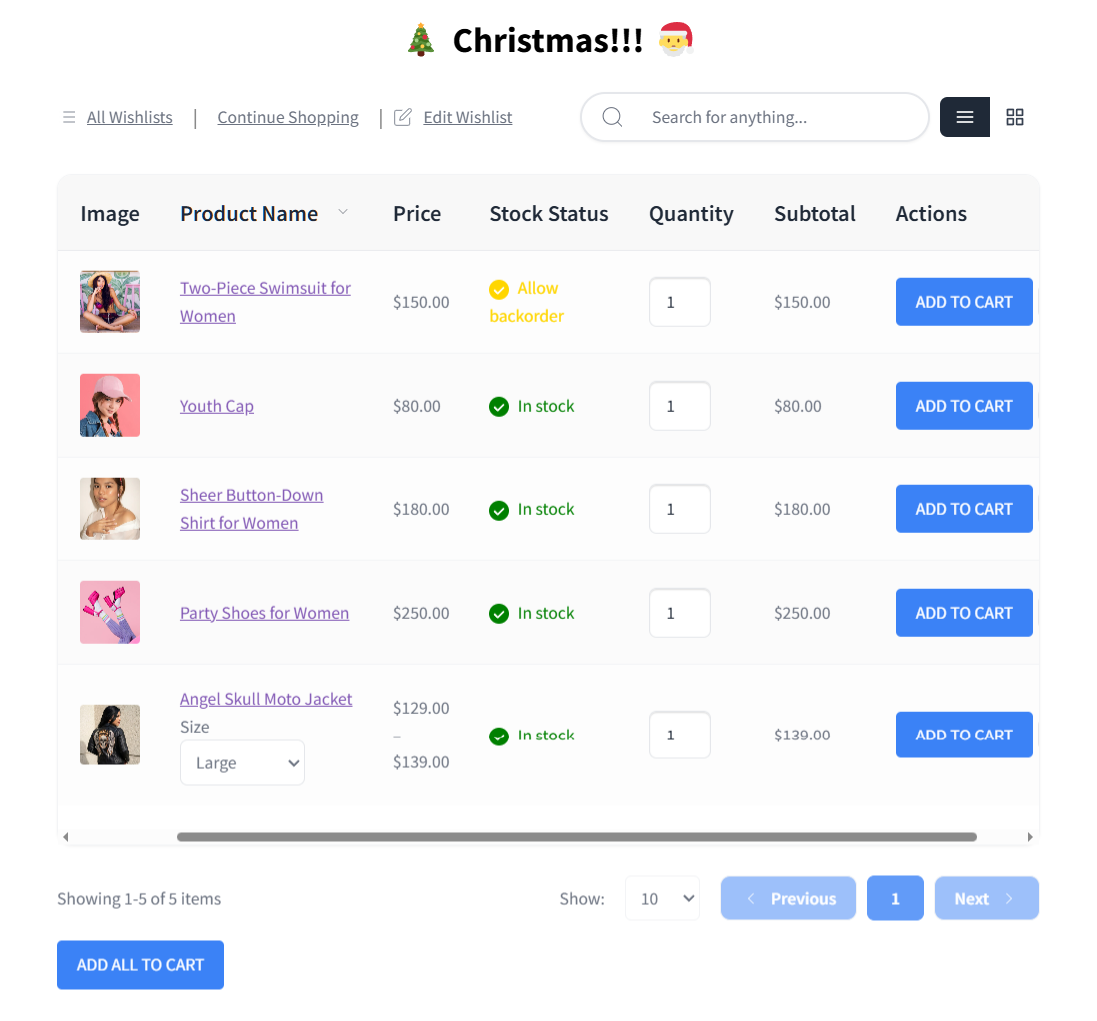
How it works:
- Enable the tools: Turn on the wishlist button and the guest-saving feature.
- Spread the word: Encourage shoppers to start building their lists early using website banners and your early-season email marketing.
2. Make gift-giving easy with shareable wishlists
The holidays are all about giving gifts to others. When a shopper shares their wishlist with family and friends, your products get put in front of brand-new buyers. Better still, many of these people might never have found your store on their own.
Shareable wishlists put your products in front of people who were not shopping with you. Someone builds a list, then shares it or sends it to a partner or parent. That gift-giver arrives on your site already knowing what to buy. Your customer made the introduction for you.
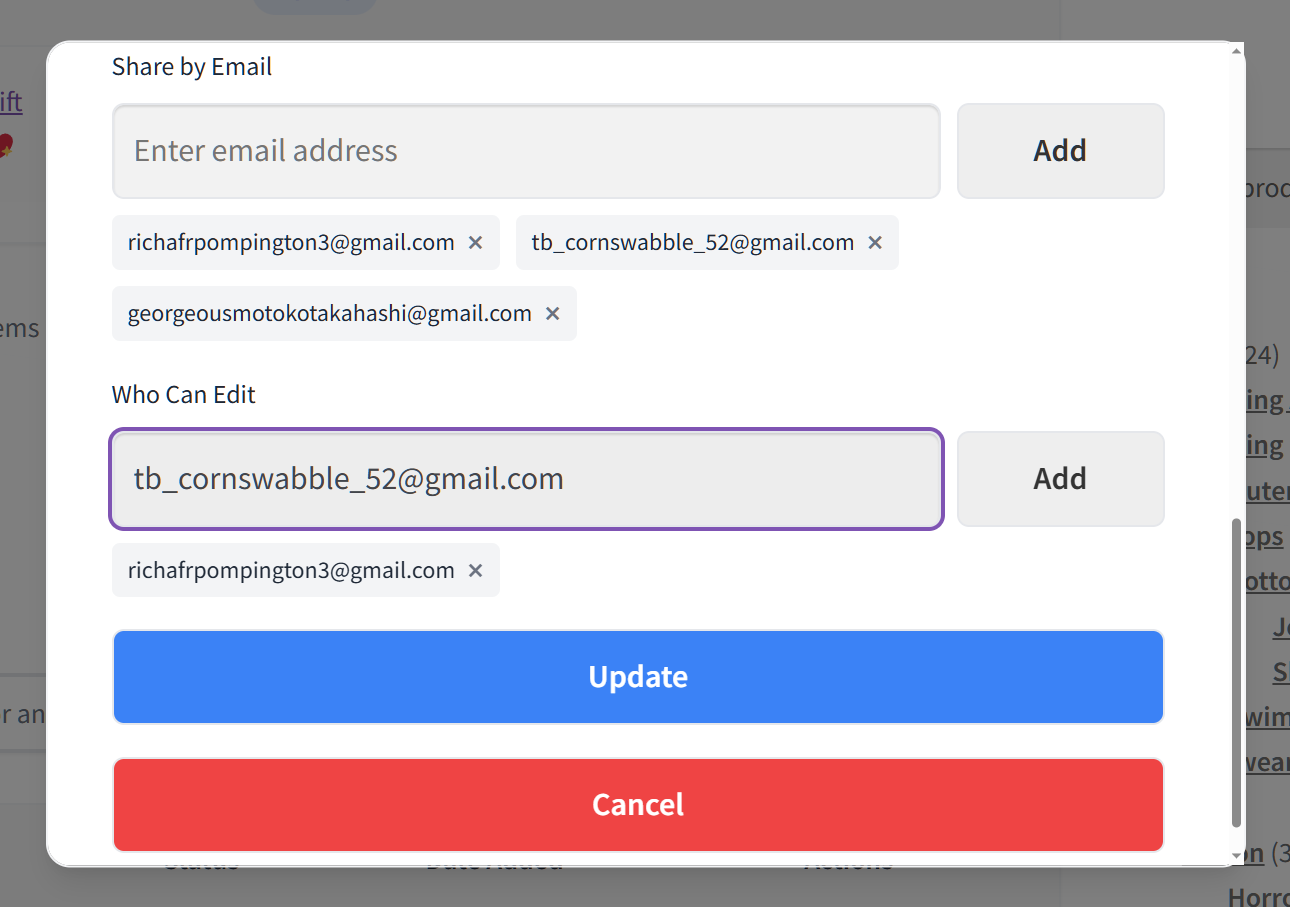
🔍️ What we’ve seen: Stores treat wishlists as a private save-for-later tool and forget the social side. During the holidays, the sharing is the marketing. One shared list can reach several gift-givers. Each of them lands on a product page you never paid to put in front of them.
How it works:
- Include a clear prompt: Remind shoppers to send their finished lists to whoever is buying their gifts.
- Turn on public sharing: Share buttons only appear once a wishlist is public. Leave Disable Public Wishlists unchecked under SaveTo Wishlist > Settings > Wishlist Page.
- Point shoppers at the buttons: A public wishlist carries one-click sharing for Facebook, X, Pinterest, email and WhatsApp. There is a copy-link button too, and the whole set is free.
3. Automate your holiday alerts
The holiday season moves fast. Prices change, and popular gifts sell out quickly. Still, automated email alerts keep your shoppers updated without forcing you to work around the clock.
With SaveTo Wishlist Pro, you can automatically email shoppers the exact moment a saved item goes on sale. If a sold-out gift comes back, a restock alert brings the shopper right back to your store. Cyber Monday 2025 also ran 57.5% mobile. A timely alert reaches buyers on the device they already shop on.
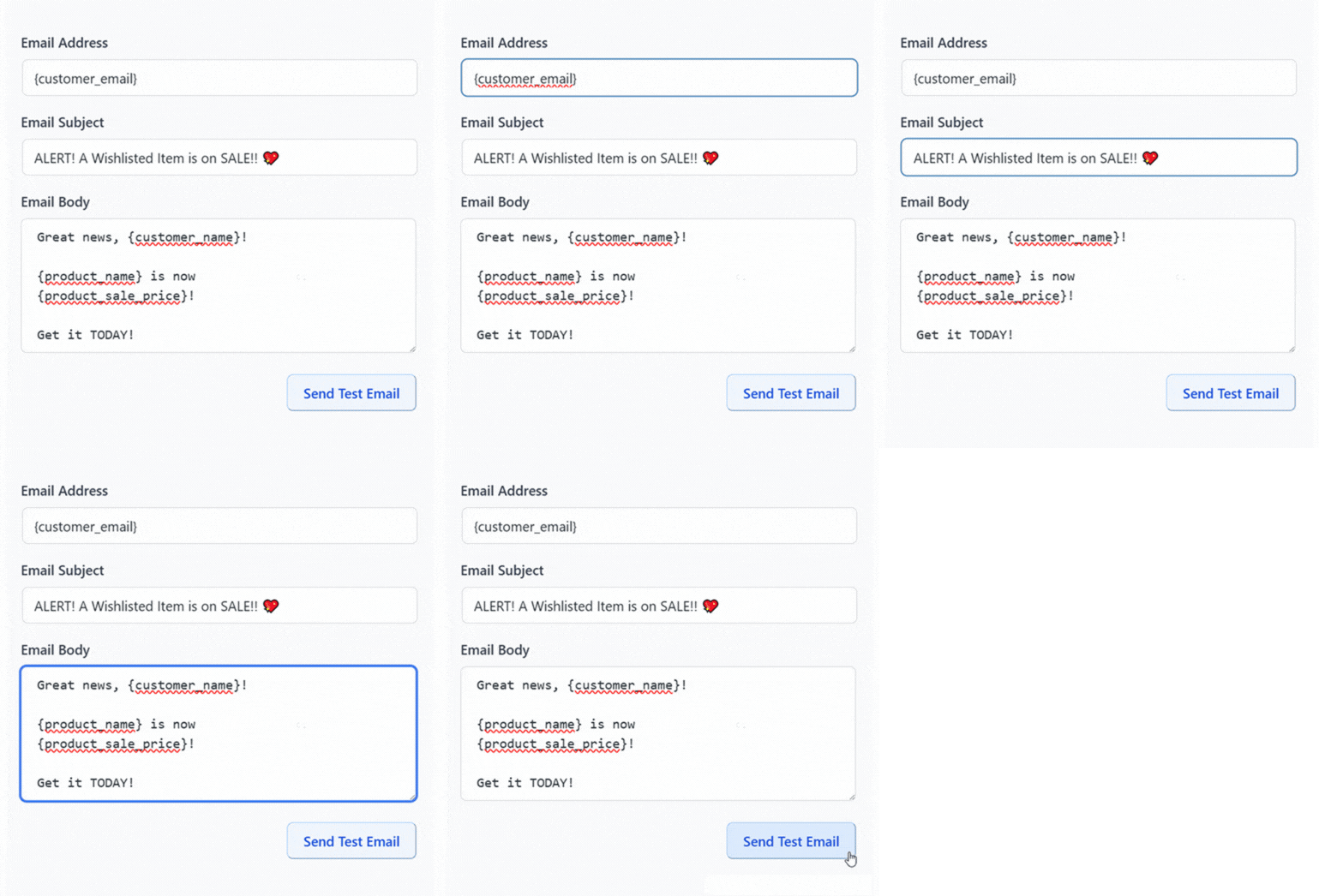
How it works:
- Turn on alerts early: Enable price-drop and back-in-stock emails in your plugin settings well before the holiday rush begins.
- Let the system work: Launch a sale or restock an item, and the plugin notifies everyone who saved it.
4. Plan your whole holiday calendar
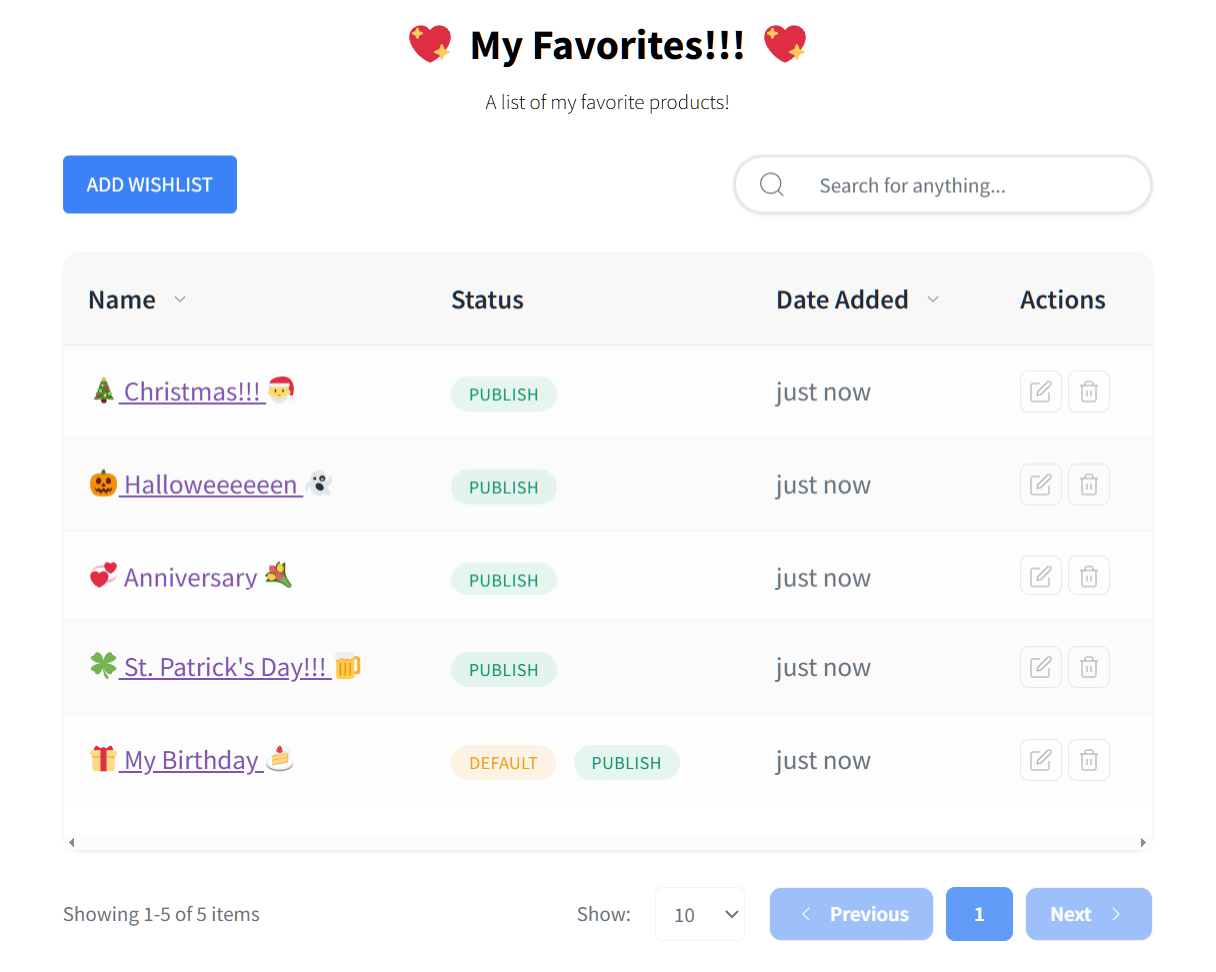
The holidays aren’t just one day. They’re a sequence: Halloween, Black Friday, Cyber Monday, Christmas, and the new-year sales. Planning your entire calendar in advance lets you reuse the exact same wishlist audience across every single event.
Map your promotions out early so each event has a clear offer and a reminder.
We’ve covered some of these events in depth, including new year marketing ideas and Valentine’s sale ideas. Our dedicated guides for Black Friday and the other dates round out the series. The goal is continuity. A shopper who saves an item in November should hear from you at each key moment.
How it works:
- Assign and schedule: Create an offer for each holiday. Schedule a wishlist reminder to land just before each date.
- Map out the dates: Build a simple calendar tracking every holiday event from autumn through the new year.
5. Get found on Google Shopping
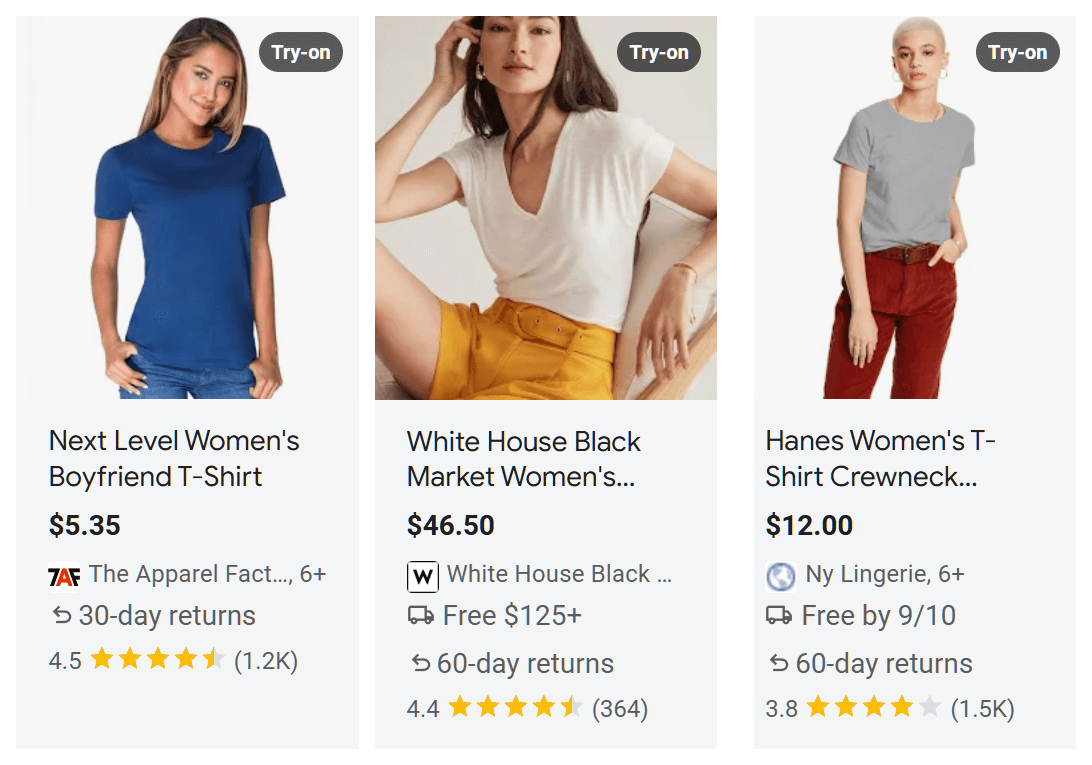
Plenty of holiday gift research starts on Google. If your products and prices aren’t in the results, shoppers comparing gifts never see them.
Keeping an accurate Google Shopping product feed puts your seasonal items right in front of ready buyers. It sends them to your product pages where they can either buy immediately or save the item for later. Those saved items then feed directly into your wishlist follow-up emails. Because of this, even cold traffic from Google becomes a valuable part of your holiday marketing campaigns.
How it works:
- Sync your feed: Connect your product feed to Google before the busy season begins.
- Stay updated: Keep your prices and stock availability completely up to date so Google displays accurate information.
- Capture the traffic: Give visitors arriving from Google a clearly visible wishlist button, so they can save what they find.
6. Schedule your holiday discounts
With so many sales across the season, scheduling deals in advance saves you launching them by hand at odd hours. It also keeps your offers consistent and on time.
You can schedule your WooCommerce discounts using Advanced Coupons, so each event’s deal starts and ends automatically. Pair these scheduled discounts with your wishlist alerts and each sale launches on its own. The price-drop alert then goes to the shoppers who already saved the item.
How it works:
- Schedule your coupons: Set up each event’s deals ahead of time with fixed start and end dates.
- Check your alerts: Confirm price-drop alerts are turned on, so they fire when your scheduled discounts go live.
7. Recover holiday cart abandonment
Holiday shoppers love to compare prices and hesitate, which leads to more abandoned carts. In fact, just over 70% of online carts are abandoned before a purchase is made. Holiday comparison shopping gives hesitant buyers even more reasons to stall.
Wishlists give hesitant gift shoppers a better option than just leaving: they can save the item and come back later. From there, your automated reminders and price-drop alerts do the hard work of winning them back. Our guide to cart abandonment recovery for WooCommerce covers how to handle the follow-up.
How it works:
- Offer a fallback: Put a clear save-to-wishlist option near the cart and checkout pages.
- Re-engage automatically: Let your automated reminders bring those saved shoppers back to finish checking out. This works much better than just treating a holiday abandoned cart as a lost sale.
8. Turn your bestsellers into a saveable gift guide
A gift guide does the choosing for shoppers who have no idea what to buy. Instead of a category page with 200 products, you hand them a short list built around one recipient.
Group the guide the way gift shoppers actually think. Recipient works well, so does budget: under $25, under $50, under $100. In practice, those price bands match the way people set a gift budget in the first place.
Build the page with WooCommerce product blocks and the saving comes built in. SaveTo Wishlist injects the Save to Wishlist button into WooCommerce product blocks, with no separate setting to switch on. So every item on your guide is saveable the moment the page goes live.
How it works:
- Keep it short: Pick 8 to 12 products per band. A guide that lists your whole catalog reads like the shop page with a festive title.
- Link it everywhere: Put the guide in your main menu and your early-season emails. It should be the page holiday traffic lands on.
- Feed it back: Saves from your guide become the audience for the price-drop and restock alerts you send later.
How To Segment Your Holiday Email List With Wishlist Data
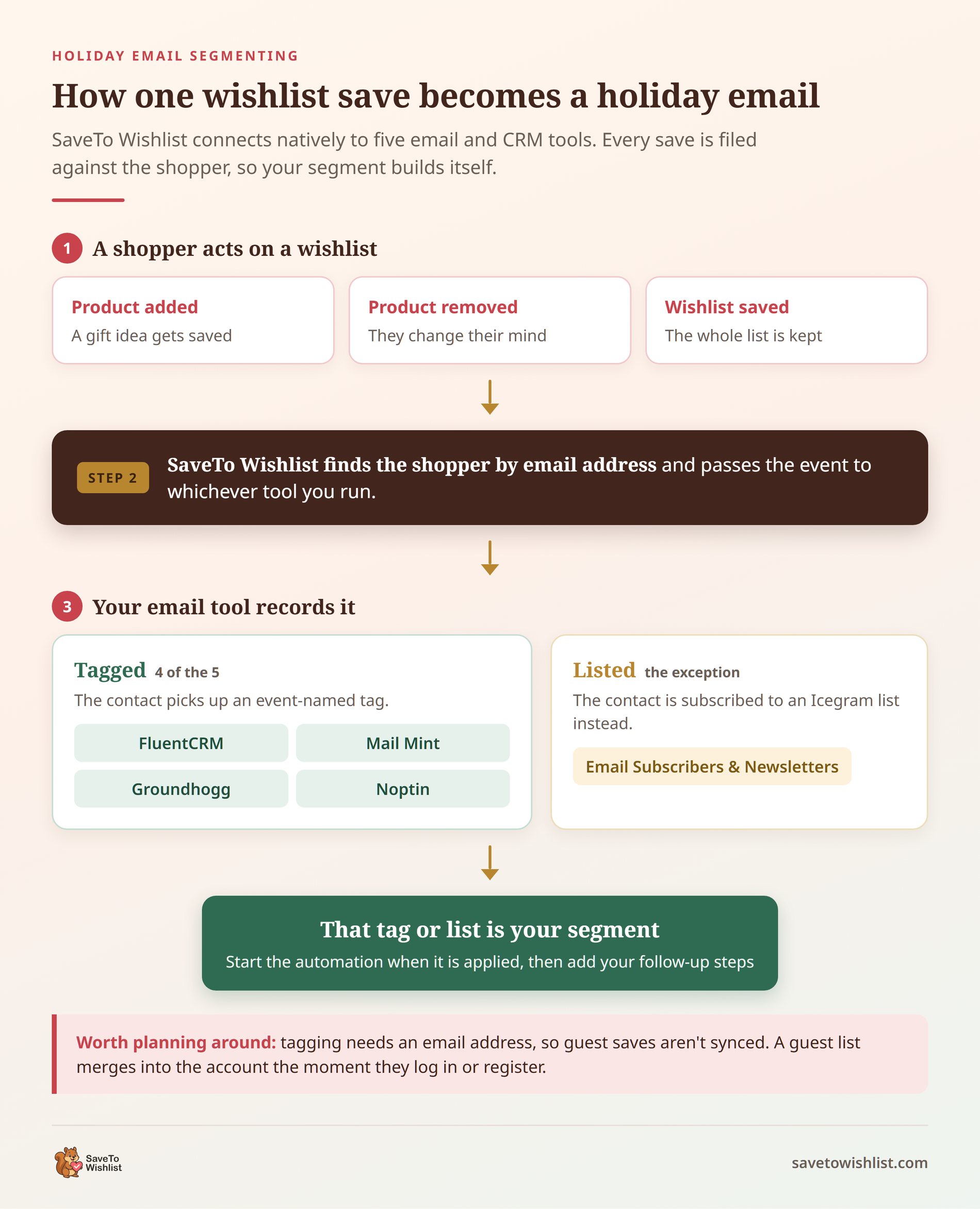
A wishlist save tells you what one shopper wants. Segmenting turns that into a list you can actually email, instead of one more line in a spreadsheet.
SaveTo Wishlist connects natively to five email and CRM tools: FluentCRM, Mail Mint, Groundhogg, Noptin, and Email Subscribers & Newsletters. Four of them tag the customer’s contact when a wishlist event happens. Email Subscribers & Newsletters subscribes them to an Icegram list instead. Either way, that tag or list becomes your segment.
Map your wishlist events to tags
Noptin and Mail Mint need no setup at all. Once both plugins are active, the tags appear on their own. They are named Wishlist - Product Added, Wishlist - Product Removed, and Wishlist - Saved.
FluentCRM lets you map your own tags instead. Go to SaveTo Wishlist > Settings > Integrations and turn on Enable FluentCRM integration. Then pick a tag under Added to wishlist tag, and another under Wishlist saved tag.
Who does not get tagged
One thing to plan around: tagging needs an email address, so guest saves are not synced. Guest lists merge into the account when the shopper logs in or registers. That sign-in prompt is what turns an October guest save into a December email. Groundhogg adds one more rule, and only tags people who already have a contact record.
🔍️ What we’ve seen: Store owners often build a webhook to push wishlist activity into their email tool. A native integration may already ship for the tool they run. It is an easy thing to miss, so check the Integrations tab first.
How it works:
- Tag before you promote: Turn the integration on early. Then October and November saves are tagged before your first campaign goes out.
- Build the segments you will use: A “saved something, bought nothing” segment earns its keep all season.
- Trigger from the tag: Start your automation when the tag is applied. Add the follow-up steps in your email tool. Our guide to wishlist email marketing walks through the workflows worth building.
Time Your Holiday Follow-Ups To How Long Items Sit
A gift saved in early October and a gift saved on December 20 need different emails. One shopper is still deciding. The other is running out of time.
SaveTo Wishlist Pro gives you a way to tell them apart. Its Time-Based Trends module includes a Wishlist Age Analysis view. That view groups saved items by how long they have been sitting. Alongside it, an Optimization Recommendations panel pairs each age band with the follow-up that suits it.
The four bands, and what the plugin suggests for each:
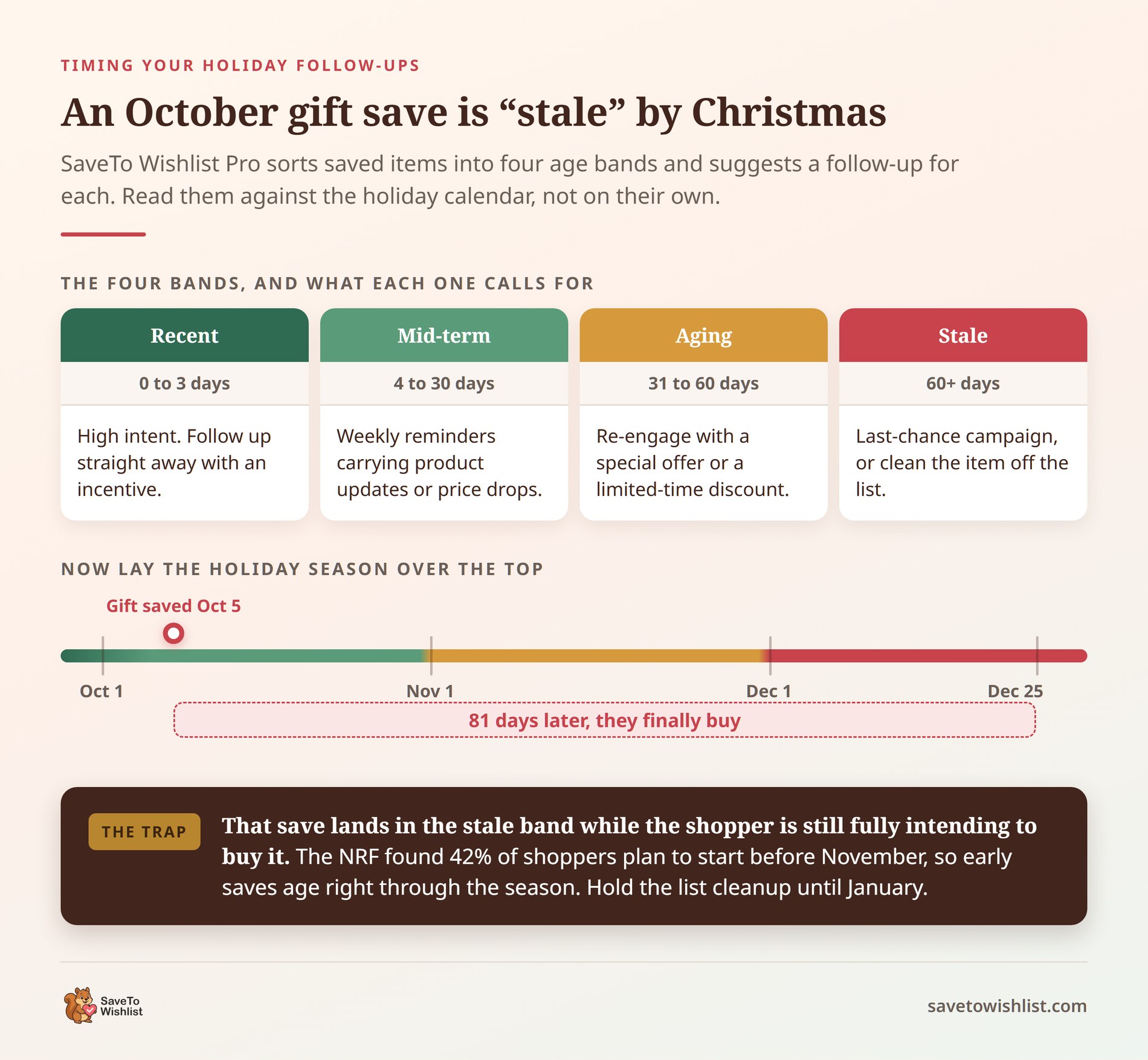
- Recent Items (0 to 3 days): High intent. Send an immediate follow-up with an incentive while the product is still on their mind.
- Mid-term (4 to 30 days): Send weekly reminders carrying product updates or price drops.
- Aging Items (31 to 60 days): Re-engage with a special offer or a limited-time discount.
- Stale Items (60+ days): Run a last-chance campaign, or clean the item off the list.
Why the bands mislead at Christmas
Here is the part that catches stores out at Christmas. The NRF’s 2025 holiday survey found 42% of shoppers planned to start browsing and buying before November. Adobe measures the season itself as November 1 to December 31.
Do the arithmetic and an early-October save is past 60 days by mid-December. It lands in the stale band while the shopper is still fully intending to buy it. So read the age bands against your holiday calendar, not on their own. Hold off on the cleanup until January.
How it works:
- Match the message to the band: Fresh saves get urgency and an incentive. Older saves get a reason to come back, like a price drop or a restock.
- Suspend the cleanup: Leave stale-list pruning until after the new year. Genuine gift planning should not be swept away in December.
How To Measure Your Holiday Marketing Results
Revenue alone will not tell you which of these holiday marketing ideas produced it. You need to see what shoppers saved, and how much of that turned into orders.
SaveTo Wishlist Pro puts that under SaveTo Wishlist > Analytics, split across five modules. Those are Product Insights, Category & Brand Insights, Engagement & Conversion Insights, Time-Based Trends, and Customer Behavior. Three carry most of the weight over a holiday season.
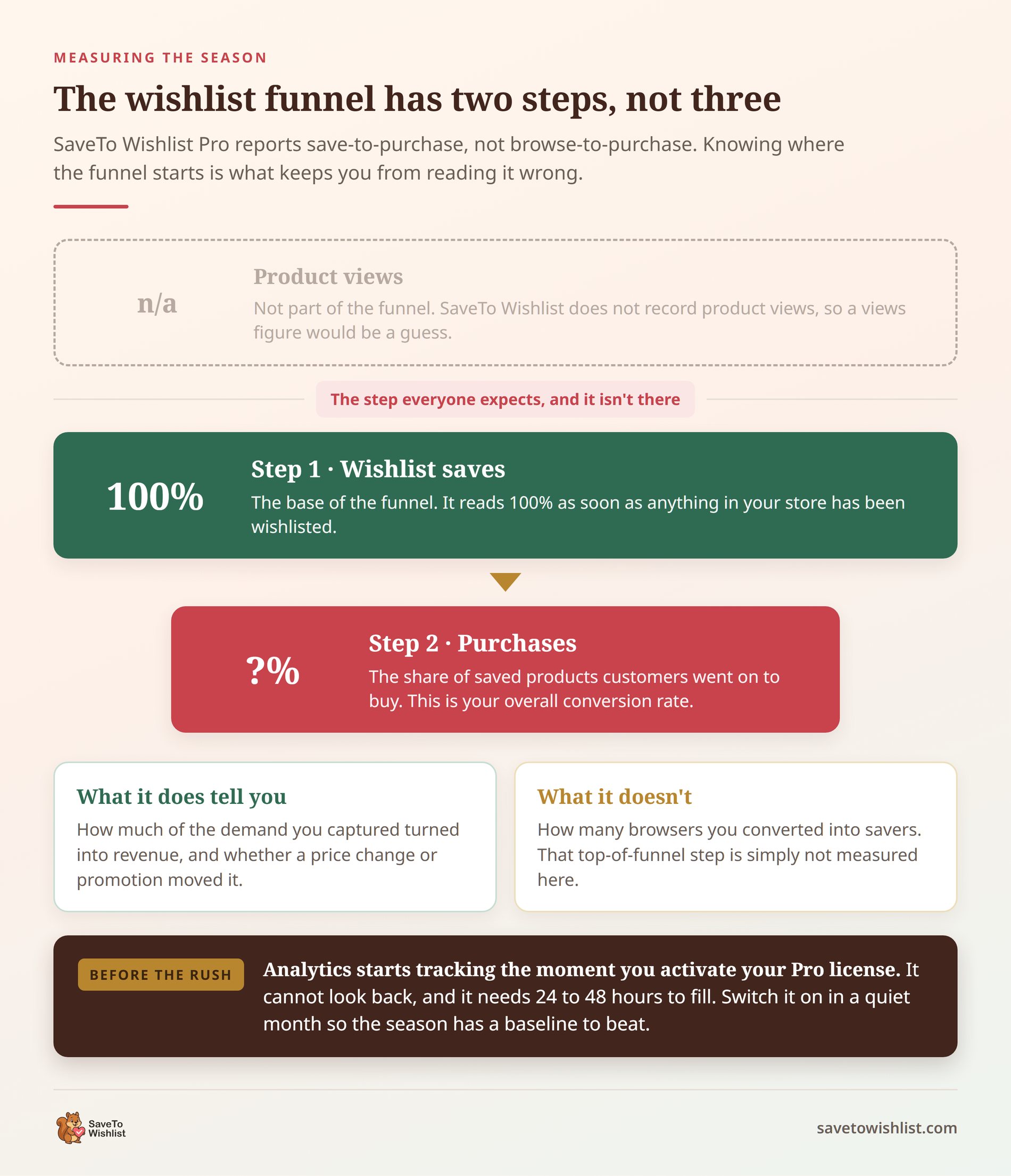
- Wishlist Conversion Funnel: Two cards. Wishlist Saves is the base, and Purchases shows the share of saved products that customers went on to buy. There is no product-views step, because the plugin does not track product views. So it measures save-to-purchase, not browse-to-purchase.
- High Wishlist / Low Sales Products: The items shoppers wanted and did not buy. That list is your January pricing review and your restock shortlist, handed to you.
- Customer Segments: Groups your shoppers into VIP Customers, Active Buyers, Window Shoppers, and Inactive Users. Window Shoppers means high saves and low purchases. That group is your re-engagement list.
Switch analytics on before the rush
One timing detail is worth knowing before the rush. Analytics starts tracking the moment you activate your Pro license. It cannot look back at anything before that. It also needs 24 to 48 hours to fill with fresh data.
So install it in September, not in the middle of Black Friday week. A season measured from day one gives you a baseline to compare next year against.
How it works:
- Set your baseline early: Switch analytics on in a quiet month, so you have something to measure the season against.
- Check one number weekly: The Purchases share tells you whether saved demand is converting or just piling up.
- Act on the gap: Pair a low Purchases share with the High Wishlist / Low Sales table. That shows what is holding buyers back. Our guide to wishlist conversion rate covers the fixes.
Your Holiday Marketing Checklist
- Add a wishlist button and enable guest saving before the season.
- Promote building a holiday wishlist in early-season campaigns.
- Make sharing via email and social media easy to turn gift lists into new traffic.
- Set up price-drop and back-in-stock alerts.
- Map your full holiday calendar with an offer per event.
- Keep your Google Shopping feed accurate and schedule your deals.
- Plan a wishlist recovery flow for abandoned holiday carts.
- Publish a short gift guide built with WooCommerce product blocks.
- Switch on your email tool integration so saves are tagged from October.
- Switch on SaveTo Wishlist Pro analytics before your first sale event.

Make This Holiday Season Your Best Yet
The stores that win the holidays treat the season as one connected campaign, not a string of last-minute sales. Capture gift demand early, make it easy to share, and let automated alerts carry shoppers between events. In short, your wishlist is the thread that holds the whole season together.
Here’s the short version of these holiday marketing ideas:
- Start early with a holiday wishlist
- Make gift-giving easy with shareable wishlists
- Automate your holiday alerts
- Plan your whole holiday calendar
- Get found on Google Shopping
- Schedule your holiday discounts
- Recover holiday cart abandonment
- Turn your bestsellers into a saveable gift guide
Then segment those saves, time your follow-ups, and measure what the season produced.
Ready to set up for the season? Start capturing holiday demand today. Download SaveTo Wishlist for free today. And when you’re ready to turn your wishlists into a growth engine, upgrade to SaveTo Wishlist Pro!
FAQs: Holiday Marketing Ideas
When should I start holiday marketing for my WooCommerce store?
Earlier than you think. Many shoppers begin researching gifts in October. So a wishlist that’s live and promoted by early autumn captures demand before the sales begin.
What are the best holiday marketing ideas for a small store?
Focus on what’s free and high-leverage. Capture wishlists early, make sharing easy to earn referral traffic, and re-engage saved shoppers with reminders. These cost little and work across every holiday event.
How do wishlists help during the holidays?
Wishlists capture what shoppers and their gift-givers want. They then power reminders, price-drop alerts, and restock notifications across the season. Because the same list works for every event, you set it up once and benefit through the new year.
Which holidays should WooCommerce stores plan for?
Plan for the full sequence: Halloween, Black Friday, Cyber Monday, Christmas, and post-holiday and new-year sales. Each is a fresh reason to re-engage the same saved shoppers with a relevant offer.
Do I need paid tools for holiday marketing?
You can capture and share wishlists with the free plugin. Automated price-drop and back-in-stock alerts come with SaveTo Wishlist Pro. That makes season-long follow-up hands-off.



