
 Reviewed by
Plenty of WooCommerce store owners have heard “AI” pitched as a chat widget in the corner of a product page. So when a client asks what AI can do with store data, the honest answer has usually been “not much.”
That’s changing. WordPress 6.9 added the Abilities API to core. It’s a standard that lets a plugin publish named actions other software can discover and call. SaveTo Wishlist Pro registers 15 of them, starting with the release that introduced Abilities API support.
This guide covers WooCommerce AI agent wishlist data access from the store owner’s side, not the developer’s. You’ll see what an ability is, which wishlist data an agent can read, and what it can change. I’ll also cover the permission model, how to connect a client, and where it all stops short.
Jump to:
- What The WordPress Abilities API Actually Is
- What An Ability Looks Like In Practice
- The Permission Model And What An Agent Is Allowed To Do
- What SaveTo Wishlist Pro Exposes To AI Agents
- All 15 Abilities And What Each One Can Change
- How To Connect An AI Client To Your Store
- How To Turn Agent Access On Or Off
- What This Does Not Do Yet
- Frequently Asked Questions
- Make Your WooCommerce Wishlist Data Agent Ready
What The WordPress Abilities API Actually Is

The WordPress Abilities API is a standard way for a plugin to publish the named things it can do. Software outside WordPress can then find those actions and run them without a custom integration.
Think of it like a restaurant menu. Without one, every diner would have to walk into the kitchen and explain what they wanted. A menu lists the dishes and what comes with each, and leaves the kitchen in charge of who gets served. Abilities do that job for your site.
Where MCP fits in
Each ability has a name, a defined input, a defined output, and a permission check. That structure matters because of a second standard, the Model Context Protocol, usually shortened to MCP. MCP is a shared format AI clients use to find available tools and call them.
However, WordPress doesn’t speak MCP on its own. A bridge plugin such as the official MCP Adapter turns abilities into tools an MCP client can list. Our sister plugin StoreAgent also runs an MCP server, with settings for browsing the abilities your plugins register.
The sequence looks like this:
- The plugin registers its abilities. This happens on your site, in code, when the plugin loads.
- A client connects through the bridge and asks what’s available. It gets back a structured list of named actions, not a wall of documentation.
- You ask a question in normal language. Something like “which products are people saving most this month?”
- The client picks a matching ability and calls it. The answer comes back from your live store data.
There’s no export, no spreadsheet, and no custom connector for each AI tool. Your store publishes the menu once, and any client that speaks MCP can order from it once you connect it.
What An Ability Looks Like In Practice
An ability is one named action with a fixed input, a fixed output, and a permission check that runs first. It’s deliberately small, so one ability does one job the same way every time.
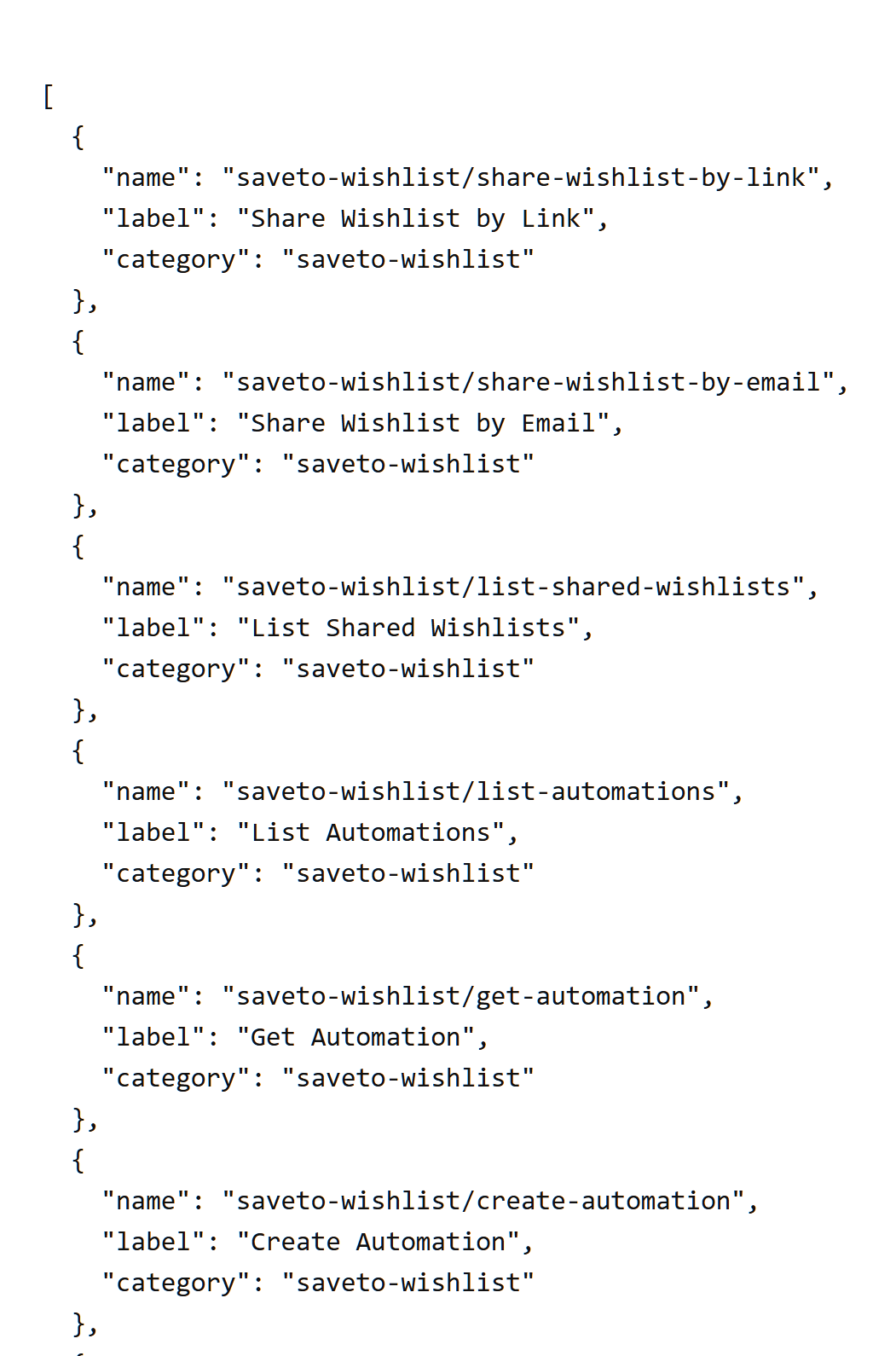
SaveTo Wishlist Pro registers its abilities under the saveto-wishlist/ prefix, inside one ability category called saveto-wishlist. As a result, every ability name tells you which plugin it came from.
Other Rymera plugins use the same API. Advanced Coupons, for example, lets you manage WooCommerce coupons with AI.
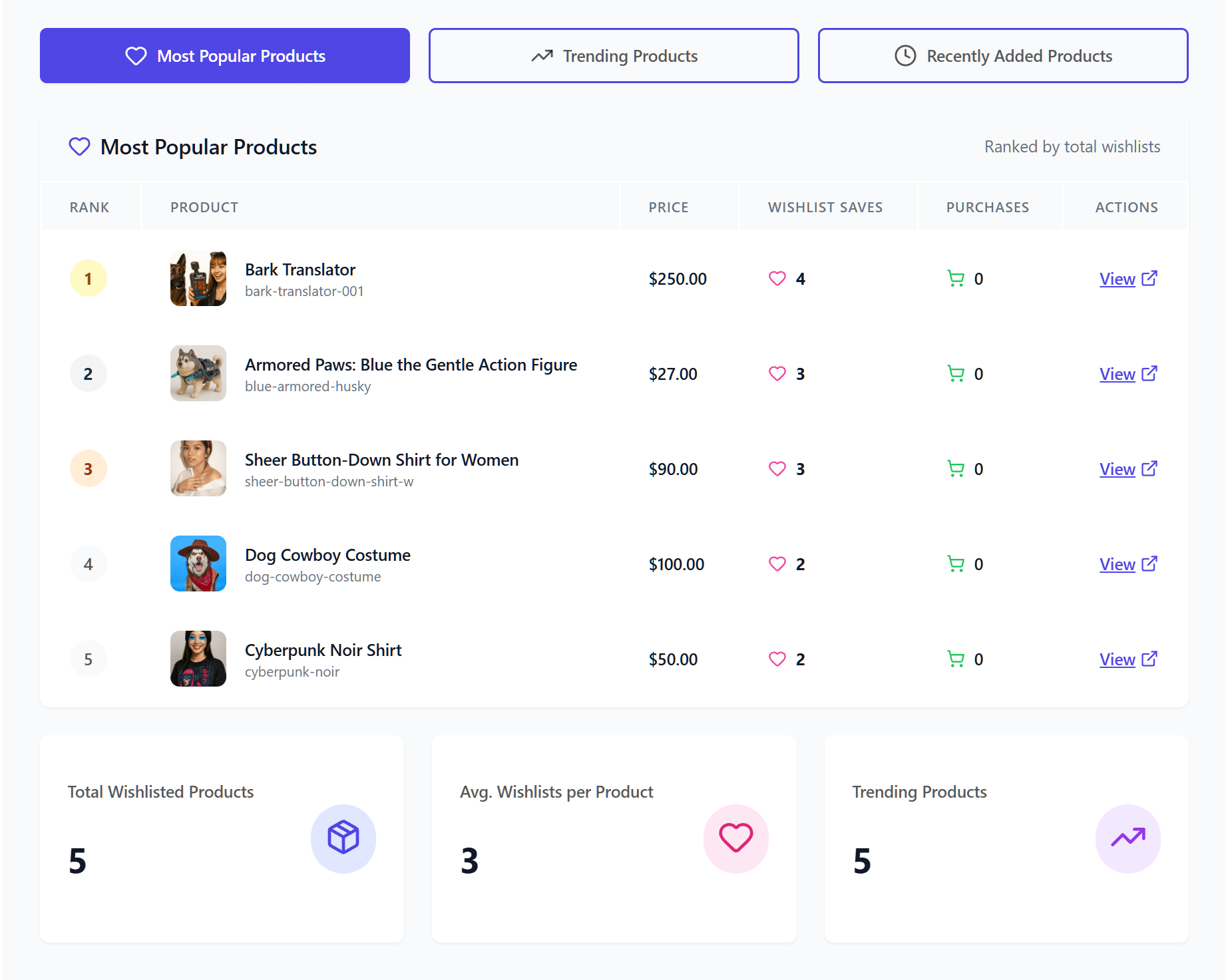
Take get-product-insights. It’s read-only, so calling it changes nothing. For instance, ask an assistant which products customers save most, and it returns your most popular, trending, and recently added products. A follow-up about categories goes to get-category-insights, which groups wishlist activity by category and brand.
Now take share-wishlist-by-link. It writes, so it’s flagged destructive. It’s also flagged idempotent, so it’s safe to retry. In other words, calling it twice with the same input ends in the same state.
If you’re writing code against the store yourself, the REST API is still the right tool. The wishlist REST API developer guide covers those endpoints. That said, the two are easy to blur. REST endpoints suit software you’re building and control, while abilities suit software you didn’t build, like an AI client.
The Permission Model And What An Agent Is Allowed To Do
Every ability runs a permission callback before it does anything, and that check is the core of the safety story. In short, an AI client asking politely doesn’t widen what a user is allowed to do.
SaveTo Wishlist Pro uses two callbacks, but they set the same bar:
- Destructive abilities: anything that writes or changes data runs behind a
can_manage_woocommercecallback. That’s store-manager territory, not general-visitor territory. - Read-only abilities: these use a separate
can_view_datacallback, but it checks the samemanage_woocommercecapability. Reading needs the same account as writing.
Each ability also carries MCP annotations built from its destructive and idempotent flags. Those annotations tell a client, before it calls anything, whether a tool changes data and whether a retry is safe.
One more design decision matters more than any of the above. Every destructive ability hands off to the same service layer the admin screens use, with no separate AI-only code path. So when an agent emails a wishlist, the same WordPress and WooCommerce actions fire as when you do it. The same emails go out, and the same hooks run.
That can read like a dry architectural footnote. In practice, it means an agent has no shortcut around your logging, your integrations, or your customer notifications. That’s what makes the feature something you can audit.
❗️🔍️ What to check: some tools add a separate code path for automated access. Events that fire on a human click may then never fire on an automated one. When that happens, a CRM can stop receiving records without anyone noticing. Whatever you connect, ask whether its automated path runs the same code as its admin screens.
What SaveTo Wishlist Pro Exposes To AI Agents
SaveTo Wishlist Pro registers one ability category and 15 abilities under the saveto-wishlist/ prefix. They arrived in Pro version 1.0.2, released on 30 June 2026.
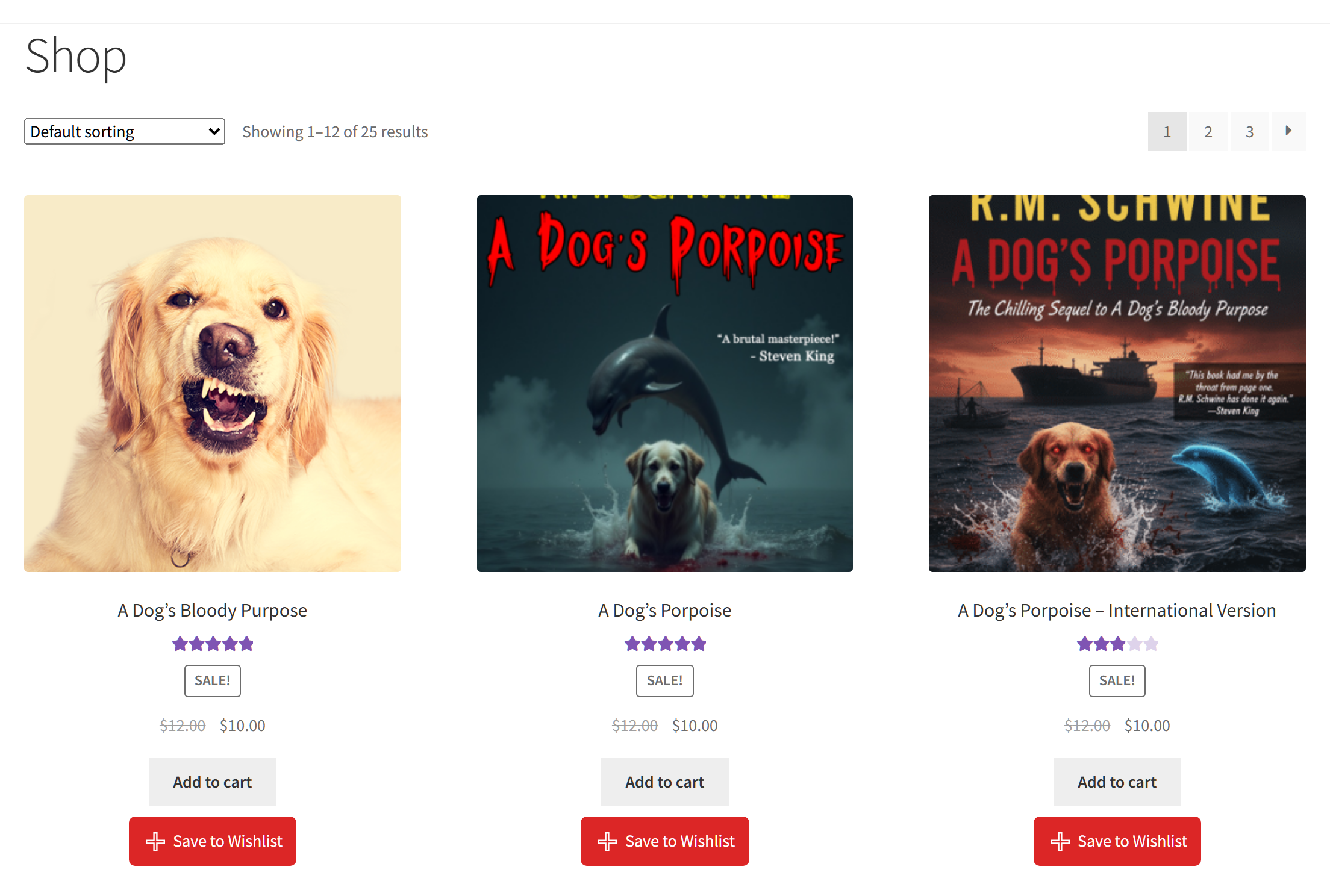
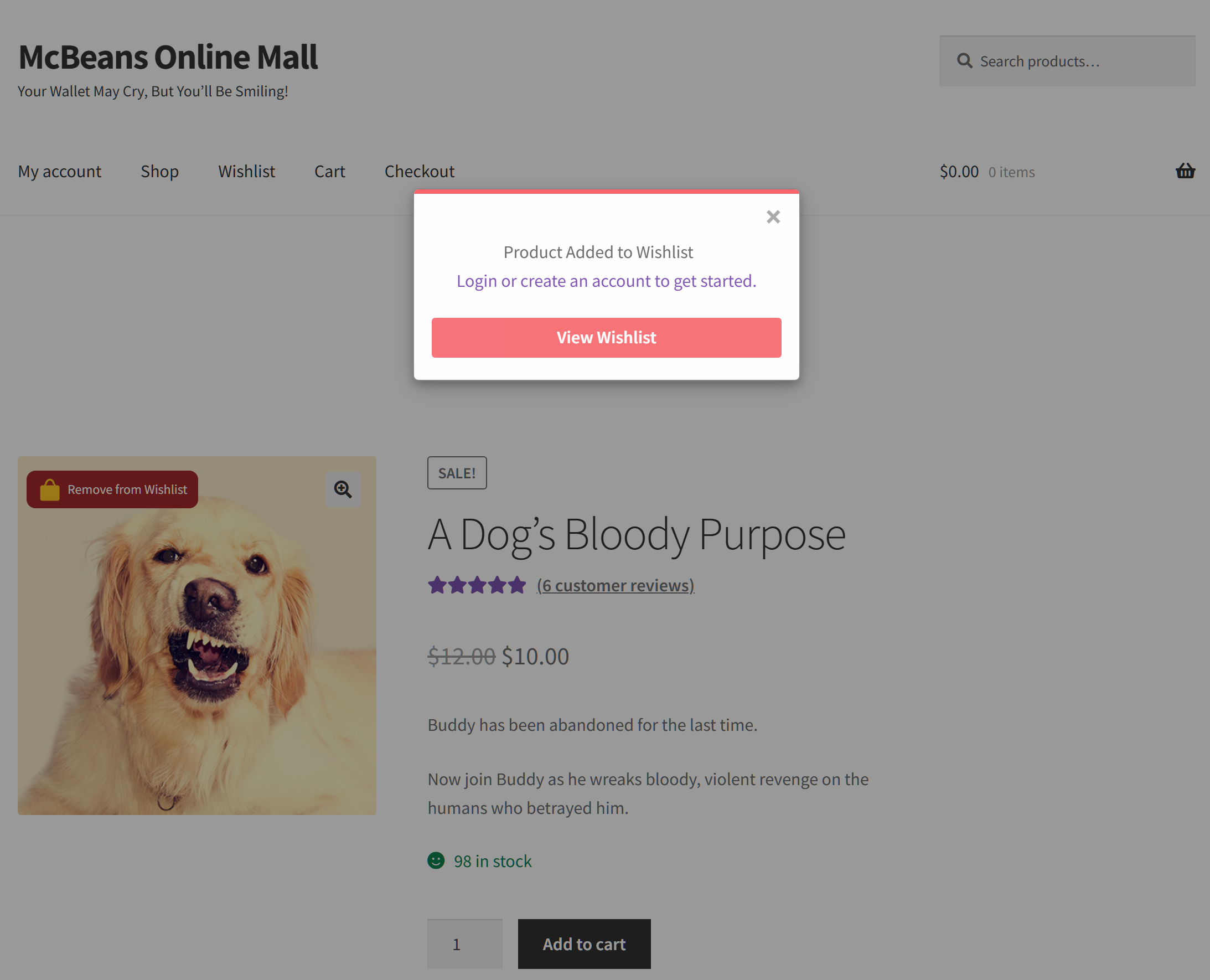
Those abilities report on data your customers create every day. For example, a shopper clicks the wishlist button, and that click becomes a record an insight ability can count later. In the free SaveTo Wishlist Lite plugin, the button shows on shop pages out of the box. Once a product is saved, its label switches to “Remove from Wishlist.”
Four abilities to start with
Here are four you’re likely to use first:
| Ability group | Example ability | Changes data? |
|---|---|---|
| Sharing | share-wishlist-by-link | Yes, safe to retry |
| Product insight | get-product-insights | No |
| Category insight | get-category-insights | No |
| Trends | get-time-based-trends | No |
The full list of 15 follows this section. Each of these four answers a different kind of question:
- Sharing:
share-wishlist-by-linkcreates or refreshes a shareable link for a wishlist. Because it’s idempotent, an agent can retry it safely after a dropped connection. - Product insight:
get-product-insightsanswers the merchandising question. Which items are people saving, and which are trending? - Category insight:
get-category-insightsgroups wishlist activity by category and brand, so you see demand across a range, not one SKU. - Trends:
get-time-based-trendscovers additions over time and day-of-week patterns. That’s the difference between knowing a product is popular and knowing when people decide they want it.
In addition, Pro shows this reporting in its wishlist analytics screens. The abilities are an extra route to the same data, not the only one.
Which plan you need
Here’s which product does what. SaveTo Wishlist Lite is the free plugin, and it stays free. SaveTo Wishlist Pro is the paid plugin that registers the abilities, and it’s included on all three pricing plans.
Growth is $49.50 for the first year and renews at $99. Plus is $99.50 for the first year and renews at $199. Business is $199.50 for the first year and renews at $399. The Gift Registry Addon comes with Plus and Business only, not Growth.
All 15 Abilities And What Each One Can Change
Nine of the 15 abilities only read. The other six change something, and two of them can send email. Here’s the full set:
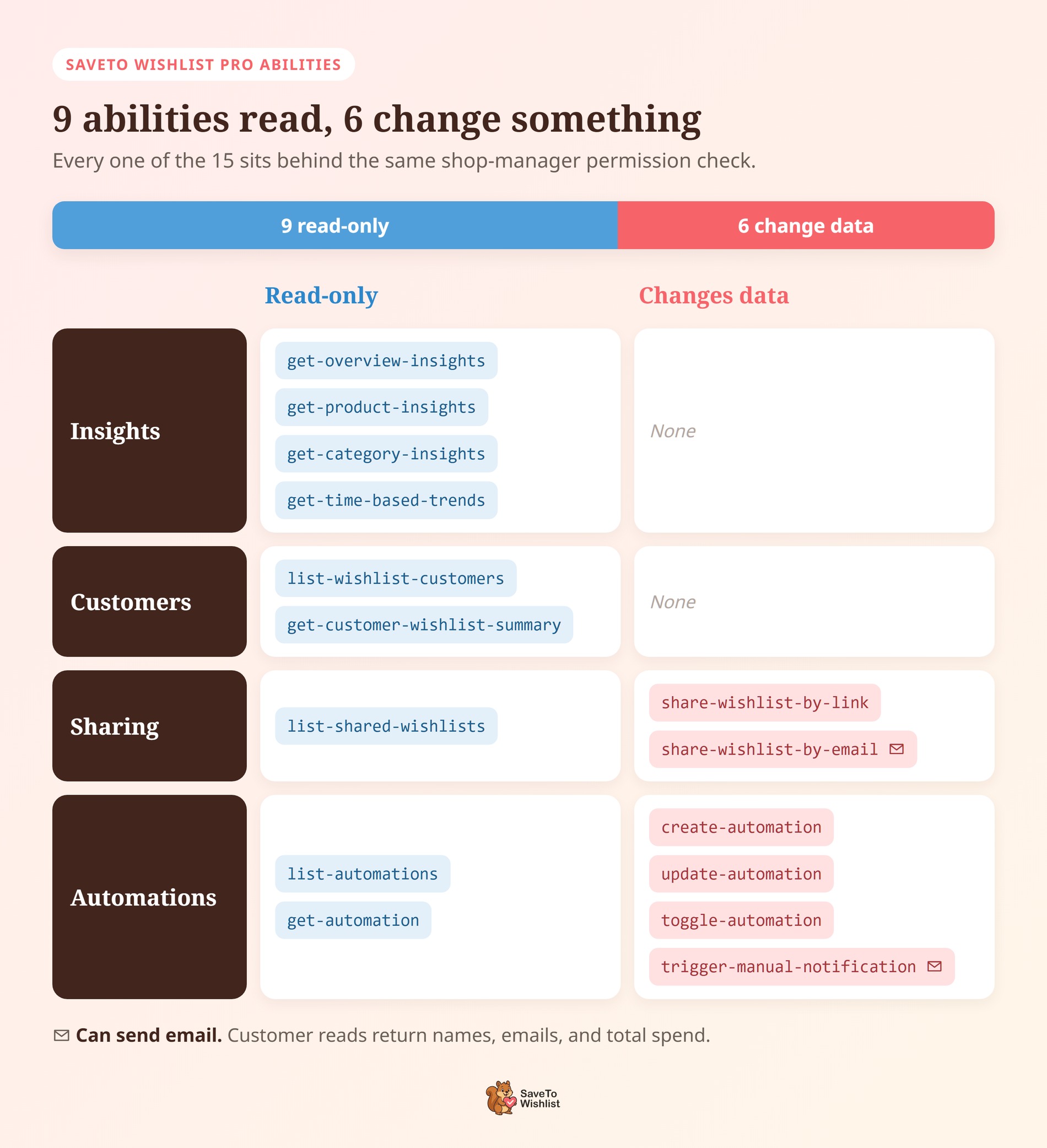
| Ability | What it does | Changes data? |
|---|---|---|
share-wishlist-by-link | Creates or refreshes a shareable link for one wishlist. No emails go out. | Yes, safe to retry |
share-wishlist-by-email | Emails a wishlist to a list of addresses, with an optional message. | Yes |
list-shared-wishlists | Lists shared wishlists and their recipients. | No |
list-automations | Lists your automations, filtered by status, trigger, or action if you ask. | No |
get-automation | Returns one automation’s full configuration. | No |
create-automation | Creates a new automation from a trigger and an action. | Yes |
update-automation | Edits an existing automation. | Yes, safe to retry |
toggle-automation | Turns an automation on or off. With no status given, it flips the current one. | Yes, safe to retry |
list-wishlist-customers | Lists customers with active wishlists, most active first. | No |
get-customer-wishlist-summary | Summarizes one customer’s wishlists, items, value, and last activity. | No |
trigger-manual-notification | Runs an automation’s action for one customer, right now. | Yes |
get-overview-insights | Headline numbers, including conversion rate and the trend against the previous period. | No |
get-product-insights | Most popular, trending, and recently added products. | No |
get-category-insights | Wishlist activity grouped by category and brand. | No |
get-time-based-trends | Additions over time and day-of-week patterns. | No |
Details that change what you should ask
A few details in that table shape what you should ask an agent:
- Reads can still return personal data.
list-wishlist-customersandget-customer-wishlist-summaryreturn customer names, emails, and total spend. Automation configs can include webhook auth headers. Treat the connected account like any staff login. - Product trends look back 7 days unless you ask for 30.
get-product-insightsaccepts only those two periods.get-time-based-trendsdefaults to 30 days and also accepts 7, 90, or 365. Ask for anything else and it quietly uses the default. - Some answers are capped. Product insights return the top 10 popular and 10 trending products, plus 8 recent additions. Customer lists default to 15 and share lists to 100. Neither goes past 200.
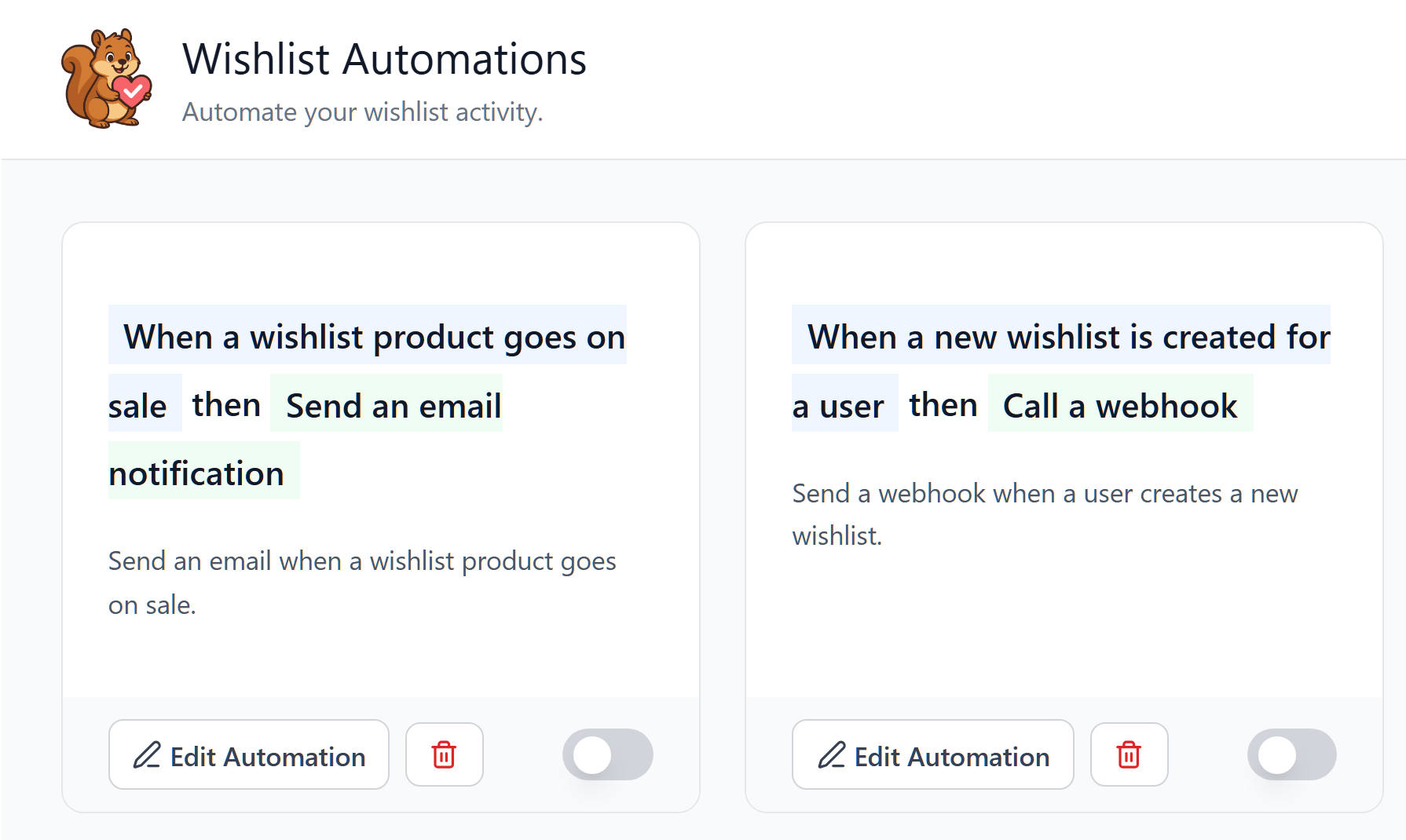
trigger-manual-notificationsends for real. It runs an existing automation’s action for one customer: an email, a webhook call, or a user meta update. Product-based automations refuse to run without a product ID, so unfilled placeholders never go out.
How To Connect An AI Client To Your Store
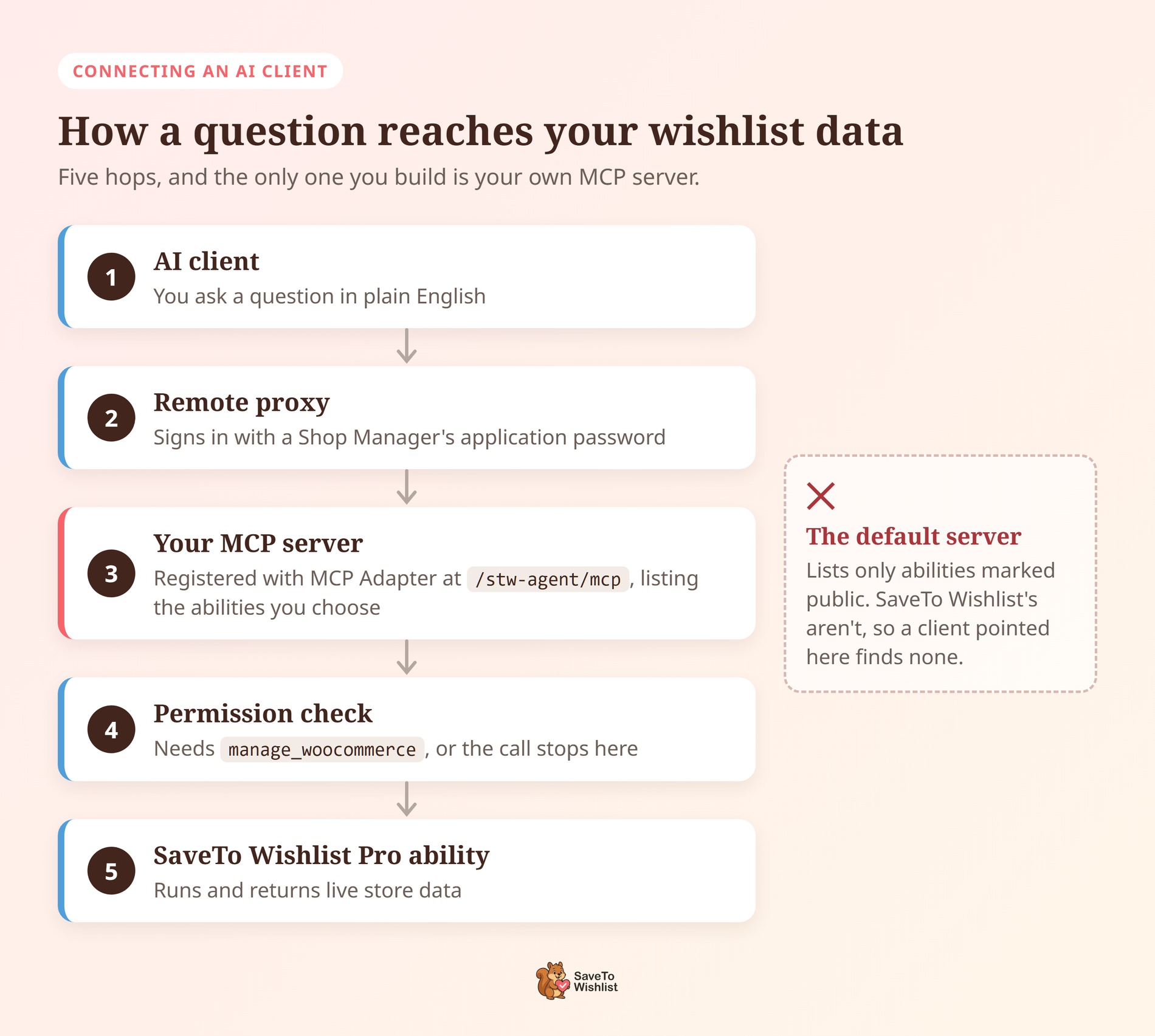
Registering abilities doesn’t connect anything on its own. The connection runs through the MCP Adapter plugin, with one extra step that’s easy to miss.
The adapter’s default server only lists abilities marked public, and SaveTo Wishlist Pro doesn’t mark its abilities that way. As a result, a client pointed at the default server won’t find them. Instead, you register a small server of your own, which also lets you choose which abilities it offers.
Set it up step by step
Here’s the setup, start to finish:
- Install MCP Adapter. It’s the official, free WordPress plugin for MCP, installed from its GitHub releases page. It needs WordPress 6.9 or later.
- Pick the account the agent will use. Every ability checks for the
manage_woocommercecapability, which WooCommerce gives Administrators and Shop Managers. A dedicated Shop Manager user keeps the agent’s activity separate from your own login. - Create an application password for that user. Go to Users, edit the user, and scroll to Application Passwords. Type a label into New Application Password Name, then click Add Application Password. Copy it right away, because WordPress won’t show it again.
- Register a server listing the abilities you want. Add the snippet below to a site-specific plugin or a code snippets plugin.
- Point your client at the server. Most desktop clients connect through the
@automattic/mcp-wordpress-remoteproxy, which takes your server URL, username, and application password.
add_action( 'mcp_adapter_init', function ( $adapter ) {
    $adapter->create_server(
        'stw-agent',                  // Server ID
        'stw-agent',                  // REST namespace
        'mcp',                        // REST route
        'SaveTo Wishlist Agent',
        'Read-only SaveTo Wishlist abilities',
        '1.0.0',
        array( \WP\MCP\Transport\HttpTransport::class ),
        \WP\MCP\Infrastructure\ErrorHandling\ErrorLogMcpErrorHandler::class,
        null,
        array(
            'saveto-wishlist/get-overview-insights',
            'saveto-wishlist/get-product-insights',
            'saveto-wishlist/get-category-insights',
            'saveto-wishlist/get-time-based-trends',
            'saveto-wishlist/list-wishlist-customers',
            'saveto-wishlist/get-customer-wishlist-summary',
            'saveto-wishlist/list-shared-wishlists',
            'saveto-wishlist/list-automations',
            'saveto-wishlist/get-automation',
        )
    );
} );
That snippet exposes only the nine read-only abilities. To let the agent act, add write abilities from the table above one at a time. With the IDs used here, the endpoint is https://yourstore.com/wp-json/stw-agent/mcp.
How to cut off access
Keep in mind that an application password carries its user’s full permissions across the REST API, not only these abilities. Clicking Revoke next to it on the same screen cuts the agent off immediately.
If you run StoreAgent, it has its own guide to connecting Claude and ChatGPT to your store.
How to tell it worked
Ask the client to list its tools. Each ability appears with its slash swapped for a hyphen, such as saveto-wishlist-get-overview-insights. Then try a read-only question, like how your wishlist conversion rate is trending.
Two results point to specific fixes:
- No SaveTo Wishlist tools in the list. The client is probably still pointed at the default server, so check that its URL ends in
/stw-agent/mcp. Also confirm nobody has switched registration off. - A permission error on every call. The connected user lacks
manage_woocommerce. Switch the client to a Shop Manager or Administrator account.
How To Turn Agent Access On Or Off
Ability registration is on by default, and it comes with three off switches. Two of them are yours to flip.
1. The function is missing. If wp_register_ability() isn’t available on the site, SaveTo Wishlist Pro skips registration entirely. Nothing errors, nothing half-registers, and the plugin carries on with its normal job.
2. A constant. Setting STWPRO_DISABLE_ABILITIES to a truthy value also skips registration. Define it somewhere that loads before plugins do, which in practice means wp-config.php or a must-use plugin:
define( 'STWPRO_DISABLE_ABILITIES', true );3. A filter. Returning true from the stwpro_disable_abilities filter has the same effect. It suits sites that keep this kind of decision inside a site-specific plugin:
add_filter( 'stwpro_disable_abilities', '__return_true' );Any of the three means no ability is registered, so no client can discover or call one. There’s no partial state to reason about, which suits a switch you may need to flip in a hurry.
What This Does Not Do Yet
AI coverage often skips the limits, so here are the real ones.
- No autonomous purchasing. None of the 15 abilities lets an agent place an order, spend money, or check out on a shopper’s behalf.
- No bypassing the permission model. An account that can’t manage WooCommerce can’t call these abilities by asking an assistant to do it instead.
- A fixed menu, not open access. From SaveTo Wishlist, the 15 named abilities are the whole list. An agent can’t invent a sixteenth, query arbitrary tables, or reach features nobody registered.
- A client still has to connect. Registering an ability publishes nothing to the open internet. A client has to connect through an MCP server, with credentials that pass the permission checks.
- It only reads what the store holds. A guest’s saves live in their browser until they log in or register. At that point, the items move into their account and become data an ability can report on.
Overall, most of these are deliberate, not oversights waiting on a patch. They’re the permission model doing its job, which beats a feature that quietly grants more than you expected.
Frequently Asked Questions
Do I need an MCP client to use this?
Yes, for the agent side. Abilities are registered on your site either way, but something has to connect and call them. That means an MCP client plus the MCP Adapter plugin, with a server that lists SaveTo Wishlist’s abilities. Without that connection, the abilities sit registered and unused.
Is my wishlist data exposed to the public?
No, registering an ability publishes nothing to the open web. Every call runs a permission check first, and every SaveTo Wishlist ability requires the manage_woocommerce capability. A visitor browsing your store can’t reach any of it. Neither can a client without credentials that pass that check.
Can I disable the abilities completely?
Yes, in two ways you control. Set the STWPRO_DISABLE_ABILITIES constant to a truthy value, or return true from the stwpro_disable_abilities filter. Either one skips registration entirely, so nothing is discoverable. Registration is also skipped automatically if wp_register_ability() is unavailable on the site.
Which SaveTo Wishlist plan includes the abilities?
Every SaveTo Wishlist Pro plan includes them: Growth, Plus, and Business. Prices are in the section above. The free SaveTo Wishlist Lite plugin doesn’t register abilities.
Do abilities replace the wishlist REST API?
No, they serve different jobs. REST endpoints are what you build against when you write the integration yourself and control both ends. Abilities exist so software you didn’t write can discover what your store offers without a custom connector. Use REST for your own code, and abilities for connected AI clients.

Make Your WooCommerce Wishlist Data Agent Ready
The interesting part isn’t that an assistant can answer a question about your store. It’s that nobody had to build a connector for that specific assistant first. Instead, a shared standard did the introductions, and your wishlist data was ready because it was already structured, permissioned, and named.
Here’s what to do with that:
- Get familiar with the WordPress Abilities API before you connect anything to your store.
- Check the permission model on any plugin you connect, especially whether automated calls run the same code as admin screens.
- Decide which insights you want an agent to answer, then match them to the abilities that return them.
- Connect a client through your own server, starting with the nine read-only abilities.
- Note the off switches now, so the decision is already made if you ever need it quickly.
- Set expectations with your team about what an agent can’t do here.
Wishlist saves are one of the earliest signals of intent your store gets. That’s why they’re worth using for browse abandonment recovery and worth sharing with a group. Making that data readable by AI agents is a practical first step toward agentic commerce.